
How to save Last.fm songs

last.fm logoOne of the success stories of the internet has been Last.fm now with over 15 million users across the world. Although Last.fm songs are streamed, there is a way you can save them as Mp3’s on your hard drive.

TheLastRipper is a freeware audio recorder that does exactly that. After installing the program, you simply enter your Last.fm login name and password and choose one of the radio stations available. TheLastRipper can save Last.fm streams to Mp3’s, while downloading album covers, appending ID3v1 tags and organizing your music by Artist/Album/Track. It can even help you generate playlists from the data available in your Last.fm account in M3U, SMIL and PIS formats.

TheLastRipper developers also have a useful blog with info about the latest releases of the program across different platforms. One warning however – the legality of using TheLastRipper depends on which part of the world you are living in. The Danish developers claim that in their country, it is legal to record radio and/or TV ‘depending on the interpretation of the law’.
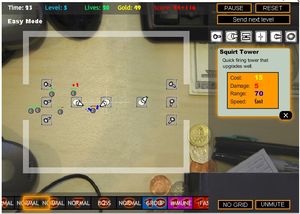
Desktop Tower Defense: simply addictive strategy

Desktop Tower DefenseIf you’re to create a successful online game you must meet two core requirements: keep it easy and addictive. This is apparently what Paul Preece has achieved with his game Desktop Tower Defense, to the point that he has recently quit his job and started his own game company.

Desktop Tower Defense is a simple strategy game where, according to the author’s description, “you have to protect your desktop from invaders by spending money on attacking pieces and building a maze for them to follow”.

The first few levels are very easy, which is great to learn the basics of the game without getting crushed by enemies. However as you keep on progressing you’ll have to use more carefully planned strategies in order to win the battle against those invading creeps.

Click here to play the game, but don’t blame us if you end up addicted to it!

30 Firefox extensions for developers

mozilla-extensions.jpgIf you’re a web developer or programmer, take a look at this excellent list of 30 Firefox extensions. It features what the author considers as the best developer tools you can add to your Firefox browser. We don’t suggest bloating up your Firefox with all of these but instead selecting the ones you find more convenient. You might have trouble choosing though, so we decided to handpick the best ones for you:

Firebug is great to debug, edit and monitor CSS, HTML or Javascript. Web Developer adds a menu and toolbar from which you can validate, outline, manipulate forms and many more common developing tasks. If you want to quickly verify your IP address, install the ShowIP extension. We also really like ColorZilla, which gets a color reading of any pixel on your screen. Finally we suggest Html Validator with its simple view of all errors and warnings on a web page.

Google’s presentation tool takes shape

Google AppsGoogle’s recently announced plans for a presentation tool for Google Apps have taken a major step-forward after confirming their acquisition of Zenter – a company which makes software for slideshow presentations. The announcement follows Google’s other major acquisition – that of Tonic Systems which also specialise on presentation software. The search giant say the presentation app should be released this summer

Google Engineering director Sam Schillace said the move had been prompted since presentation and sharing tools are becoming an increasing necessity for users.

These days, when you create a document – whether it’s a text document, a spreadsheet, or a presentation – you usually want to share it, collect feedback, or communicate about it in some way.

But what will Google’s presentation tool offer that others don’t? One thing it can really excel in is in offering community and sharing features. According to the Internet Marketing Monitor, this is why Google have acquired Zenter to focus on the frontend of the product whilst Tonic works on the backend. Zenter is particularly adept at letting users share their projects and incorporate content directly from the web, including Google Images.

To my mind, the most important thing is that Google make sure that this presentation tool integrates seamlessly with the rest of Google Apps for it to really take-off.

Fun arcade with a Mexican look

Download Dungeon RidersDungeon Riders lets you explore mysterious catacombs in search of hidden valuable Maya treasures. Be ready to avoid all kinds of traps and fight many different enemies while running along a dangerous labyrinth and collecting diamonds on your way. Only authentic adventurers will survive the challenge and obtain the final treasure! Are you one of them?

The games they didn’t want you to play

Pikachu bannedAfter hearing that Manhunt 2 is to be banned in the UK and Ireland, I decided to revisit some of the infamous classics which the powers that be decided wouldn’t be suitable for us to play. Take, for instance, Mortal Kombat, a game that was banned by many countries and censored in others due to its glorification of violence and the sheer amount of blood that flew off those guys. After playing this faithful freeware recreation of the game, it occurred to me just how tame the action is compared to many of today’s beat-em-ups.

Rockstar’s Grand Theft Auto is another gaming series that has courted controversy (some would argue, to its own advantage) for years. GTA III and San Andreas were banned in Australia and the fist two versions nearly didn’t make the shelves in many countries over fears they would insight youths everywhere to go out and steal cars. However, after going back to the mightily addictive GTA Volume I and Volume II, I instantly remembered that I didn’t even want to walk away from the TV of an evening let alone go outside and hotwire the next-door neighbour’s BMW.

Then there are the titles that are banned because they don’t fit in with a particular country’s political or social agenda. For example, Splinter Cell: Chaos Theory was outlawed in South Korea as it referenced a fictional war between the country and North Korea, while the German government banned Commandos as it contained images of swastikas, which are considered “symbols of unconstitutional organisations” over there. However, nothing compares with the hard-line taken by Saudi Arabia, where you would never be allowed to play Pikaball Volleyball, as it features a character from Pokemon – a gaming series banned for allegedly promoting Zionism and encouraging gambling.

Manage passwords the Mac way

password-repository.jpgPassword Repository is an alternative to your Mac’s Keychain utility. The program uses modern encryption methods like Blowfish or SSL and keeps all your passwords stored in a simple interface. Passwords can be kept neatly in different colored categories and the application has a find-as-you-type function to get to your saved data more quickly.

Computer security against Harry Potter hackers

Security against hackersOnly a month before Harry Potter’s seventh and last book is published, a hacker nicknamed as Gabriel has posted some alleged key plot elements on an Internet forum, thus ruining all the mystery and excitement created around the end of the popular saga. Gabriel claims he took this information from a copy of the book that he obtained by breaking into the computer system at Bloomsbury, Harry Potter’s publishers.

While HP fans are now discussing whether this is a serious threat or just another hoax, we’d like to emphasize on the importance of computer security. Even if you’re not J.K. Rowling and you don’t have Harry Potter’s last book stored on your PC, your personal documents are important enough to be conveniently protected. Just follow these easy tips and you’ll feel much safer.

  • Block access to your PC – This is probably the first step. You can do it by either using Windows native user accounts or any computer access control app.
  • Use a firewall – There is a wide variety to choose from and many of them are free. A good firewall will warn you of any unauthorized access to your computer.
  • Protect files and folders – You can keep them away them from prying eyes in several ways: by hiding them, locking them, setting a password, etc.
  • Encrypt documents – This another option to protect your data. There are many encrypting apps you can use to make them unreadable to strangers.
  • Make backup copies – Most backup tools can be scheduled to work on their own, so you don’t have to worry about all those copying, saving and synchronizing tasks.

An online OS for Google apps

google-logo.jpgFree Online OS is a web operating system that gives you access to all the Google sites like Gmail, Google Spreadsheets or Google Finance. The application, still in Beta, opens up in a new pop up window, which is a bit annoying if you have tabs open in your browser. The Google sites are conveniently organized according to theme (Office, Personal, Online Tools, Network, Search) in a left sided menu bar. When you click on one of the elements it will open up in a new tab in the pop up window.

The idea makes sense when you know that Google has created all sorts of online tools that replace your desktop applications. However Free Online OS, still feels a bit just like a pop up page with links to the Google services. In this sense, it kinds of remind us of Simply Google, already a web page linking to all the Google services, blogs and downloads.

You can still find proper web OSs, with their own desktops, text editors, MP3 players and many other applications you would normally install on your computer. FranticIndustries has two great posts, here and here, with a run down of 20 web OSs, including some that might make you seriously consider using them in place of your current operating system.

Tune in to more Internet TV channels

PPLiveMashable has put up an interesting list of the top 33 ways to watch TV online, highlighting the boom in Internet television. However, the post omits some of the great standalone alternatives to these Web-based viewers, many of which offer a richer array of features and improved picture quality.

PPLive is one of the most popular Internet TV apps around, and although it takes a little fiddling with to set up, the program boasts a huge range of channels and delivers quick, reliable connections, making it a capable alternative to the likes of Joost and Zattoo. Metacafe is another glaring omission from Mashable’s list. We’re big fans of the program due to the way it gives you speedy access to interesting and amusing viral video content from the Web.

If you’re a sports fan then TVAnts makes a great addition to your PC entertainment centre. Having used the program to watch football at the weekend, I was impressed by the sheer range of sports channels available and although many are broadcast with Japanese commentary, it’s a great way of picking up matches you’d otherwise have to pay for.