 For those who think that Windows Explorer falls too short, Directory Opus may be the perfect alternative. This file manager enables you to browse files and folders in a convenient double-pane interface. A variety of extra tools (ZIP archiver, FTP client, photo viewer, audio player and many more) makes it an excellent application that will definitely boost your productivity.
Month: July 2007
More power to your notebook
 If you’ve just acquired a new notebook, then there are a few free utilities that can help you get the most out of your battery life. Since new notebook batteries are often quite an expensive investment, these are well worth downloading to save both money and confusion over exactly how much power you have remaining.
Most notebooks come bundled with their own custom software for battery status info but in my experience, these are often limited. One thing I always have problems with is the battery indicator. The status information is invariably either inaccurate or lacking in detail. Notebook BatteryInfo displays a separate battery symbol on your toolbar which accurately shows exactly how much time you have remaining, the capacity of your battery and even it’s power consumption. So no more nasty surprises when your battery expires before you expected it.
If your notebook’s battery life is not long enough, then you can extend it with Battery Doubler. The program works by more intelligently monitoring the power use of your notebook. It uses standard techniques such as dimming the screen light, hibernating etc. but also finds out what is not being used and turns it off such as the USB ports. The developers claim this can double the life of your battery although I’ve found that it offers around a 20% longer life than under my normal manager.
What to expect of this year’s E3 Expo
 We’re now just a few hours away from E3, the glitziest games expo of the year. Well, that was until this year. The Entertainment Software Association, which organizes the event, has decided to sober up E3 by making it strictly business. No more Vin Diesel to promote new releases, champagne flowing all over the place, fireworks or scantily clad “booth babes”. According to GameSpot this year’s E3 will “feature subdued, standardized booths”, cut the light shows and “product previews will be held in private suites rented by publishers”. Some disappointed games publishers, like Tecmo, have already decided to skip the event altogether. So have the ESA forever sapped the soul of E3 or will their cleaner cut, business oriented event yield more deals for games publishers?
We’ll only know this once E3 shuts its doors on July 13. For now, the event is still expected to unveil a great deal of exciting titles, especially for new consoles like Nintendo’s Wii, Microsoft’s XBox 360 and Sony’s PS3. What about PC games? E3 still has a lot to offer for Windows gamers and we’re really looking forward to games like Activision’s Enemy Territory and Call of Duty 4, Namco’s Hellgate London, or Midway’s Stranglehold. E3 should also gives us the chance to take a closer look at Blizzard’s Starcraft 2.
Make animated slideshows with your photos
 PhotoPresenter is a simple little app that will allow you to create animated slideshows of your photos. All you have to do is select the images you want to use for your slideshow and arrange them in the order you like. PhotoPresenter can display content from any source, be it a CD, iPhoto or a USB drive.
Search online videos and download them as AVI
 Many websites offer online videos that you can watch in streaming, but what happens if you want to download them? The answer is TubeMaster, an easy application that enables you to download videos from the most popular sites right to your PC, iPod or PSP. You can save them in their native Flash format (FLV) or convert them to AVI right away. The program includes an embedded web browser to search for your favorite videos.
How to increase productivity in a (key)stroke
 They say we only use about 15% of our brain’s capacity but maybe that’s true with our keyboards and mouse too. One of the most effective ways to speed up your working life is to assign more functions to both of these devices. The easiest program I’ve found for doing this is AutoHotKey which adds a whole host of possibilities to them.
Creating hotkeys with this program is easy because you can record any mouse or keyboard macro you like by using a macro recorder. This works a bit like a motion recorder – you tell it what function you want it to do and then perform the actions with the keys you want to do it with. It even works with joysticks! Since I write a lot every day, one of the most useful functions I’ve found is the ability to expand abbreviations as I type. So for example, typing “sd” automatically produces “software download”.
I’ve even used it to re-configure my mouse as I’ve had problems with the custom software. My left and right clicks now perform various functions depending how many times I click them and in what order. However, although you can definitely save working time in this way it can become annoying when you accidentally activate something with your keyboard or mouse whilst working.
Sync your phone or PDA with Google Calendar
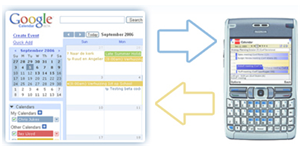 For those who haven’t yet tried it, Google Calendar is a truly fantastic piece of software. While it’s perfectly possible to access your Google Calendar on the move using the mobile version of the site (just go to http://mobile.google.com/calendar using your mobile device’s web browser), this doesn’t integrate Google Calendar into any built-in calendar system you might have, so you need to go online every time you want to check your appointments.
This is where GooSync comes in handy. This cool web-based application allows you to set up a sync operation which downloads entries from your Google Calendar and automatically inserts them into your phone’s or PDA’s default calendar. It’s easy to set up, and it works really well. It’s also compatible with a huge number of devices, including Palm PDAs. For a completely free alternative, try GCalSync. I’ve had more trouble with this solution but if you can get it working, it’s pretty impressive.
How to test the strength of your firewall
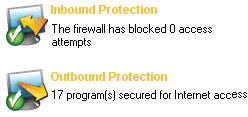 If you think having a firewall is a totally secure way to protect your PC then you’d be wrong. Firewalls are under constant attack from bots, trojans and other threats that try to implant software on your computer or take control of your PC. The ability of the firewall to repel these attacks depends on various factors but there is a simple way to test it.
Atellier Web Firewall Tester basically pounds your firewall with data to see just how strong it really is. It uses six different tests which probe the key areas which attacks usually exploit. These tests include the most common attacks which include hijacking your browser, accessing Windows Explorer, trying to retrieve admin passwords and exploiting proxies. Although it can’t guarantee the security of your firewall, it throws-up some very interesting results when making comparisons.
The developers have posted an interesting table of comparisons between the major firewalls out there. It’s interesting to note that Windows Firewall – which many users rely on – scored by far the lowest marks. Fortunately, free solutions such as ZoneAlarm and Jetico Personal Firewall proved the most effective.
Top 10 widgets for your Mac
 When you first discover the Mac Dashboard and widgets you’re usually pretty impressed at the smooth design and streamlined integration. Once you get over the excitement of the typical RSS, clock or crossword puzzle widgets though you’re often left with the bitter sensation that widgets look nice, but don’t really serve any purpose. And if, in your dazzled, overexcited state, you’ve piled up way too much of them, your Mac will also start to complain.
Widgets should really only be used if you need them. We’ve decided to write up a list of 10 original, fun to use or simply very practical widgets. You don’t need to install them all, but you can hand-pick some you like from this list:
- iStat pro – Get detailed performance statistics on all key areas of your Mac.
- The BART Widget – If you live in the Bay Area, this is the ultimate commuter tool.
- Dine-O-Matic – Randomly find a good restaurant for tonight.
- Starry Night – Shows you the constellations in your geographical region.
- Tomatometer – Read up on Rotten Tomatoes movie reviews.
- Scoreboard – This minimalistic widget shows you all latest baseball scores.
- Air Traffic – Advanced widget to find WiFi hotspots near you.
- Sudoku Widget – If you haven’t gotten hooked to Sudoku yet, this is the chance.
- Facebook Watch – This widget brings one of the most hyped websites of the year onto your Dashboard.
- Word of the Day – Discover a random word from Dictionary.com everyday.
Homer’s hamper of software
 As the days tick down to the release of the long-overdue Simpsons Movie, creator Matt Groening reckons it will be the funniest outing yet for the world’s favourite family. In tribute to the bumbling figurehead of the family we’ve put together a collection of freeware and shareware applications to help Homer relax now his hectic filming schedule has come to an end.
Coffee Break Icons – We know how often you like to take time out for not-so well-earned breaks at work, and now you can even revel in your passion for donuts on the job by installing this series of coffeetime icons. Mmmmm…icons.
Furnish – Your DIY disasters have become the stuff of legend. Why not plan things out a bit more before you fix that table or hang the drapes? This interior design program will let you create a piece of furniture on screen before you actually put it together.
Hair Pro – That haircut of Marge’s has come in and out of fashion more times than you’ve had hot dinners (which is really saying something). Download this program for her and give her a fresh new look.
Periodic Table – We’ve lost count of the number of times you’ve blown up Springfield by pressing the wrong button at Mr Burns’ power station. Swat up on your chemical elements with this app and you might not get fired so much.
Simpsons Wallpaper – For all your faults we reckon you’re still a decent family man. Enjoy the company of your nearest and dearest at all times by loading this picture of Bart whacking you on the butt onto your desktop.