A handy way to switch between tabs

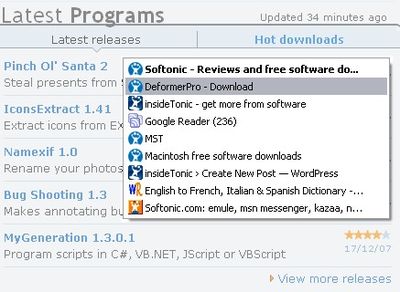
One of my favorite Firefox extensions is Tab Mix Plus. I love this great tool for managing tabs so much that I can’t use Firefox without it anymore. The funny thing is that, after having this extension in my computer for a couple of years, I still find new features in it, like the one I discovered today surprisingly hidden in its settings menu: the ability to display a pop-up window that enables you to switch between tabs in a really comfortable way.

This feature takes advantage of the browser’s embedded functionality to change between tabs by pressing Ctrl+Tab. What Tab Mix Plus does is displaying a small menu on top of the browser with the list of all your currently opened tabs, which enables you to choose the appropriate one in a much easier way. Just keep on pressing the Tab key and release the keys when you reach the browser tab you want – just like the Alt+Tab works for apps.
A great feature in Tab Mix Plus

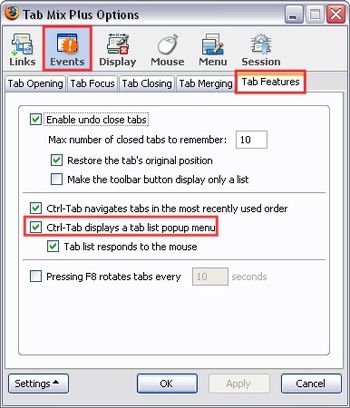
To turn this setting on, open the Tab Mix Plus options window and click on Events. Then go to Tab Features and tick the “Ctrl-Tab displays a tab list popup menu” option. Hit Apply and OK, and it’ll be ready to use.
A great feature in Tab Mix Plus

Being particularly useful for those of us who work with a dozen simultaneous tabs, I’m already wondering how I could live without this trick for all these years!
Email encryption: how it works and how to use it

Email encryptionWhy is it that most computer users know so little about mail encryption? After all, we hear time and time again how emails can be intercepted and read by anybody. Yet no online or desktop mail client seems to offer a proper service to easily send safe and securely encrypted mails. The process is painful, discouraging and incredibly unintuitive. But I truly think it should be looked at more closely. If you have no clue what mail encryption is about or just want a little update on how it works than this post is for you.

Why you should encrypt your mail

The majority of the emails you send might not be particularly private, but you know there’s some times when you want to make sure only you and your receiver see the information. Think of credit card details, passport numbers, addresses or explanations as to where you’re hiding the house keys before going on holiday. Even though emails can take seconds to be sent and received, they actually go through all sorts of networks and servers before reaching their destination. And at those passage ways they leave a trace, just like Hansel & Gretel. Which means there’s plenty of places from where anybody can access and read what you’ve written. Encrypting (or authenticating) your mail can make sure only you and your receiver can see the contents of the message. It’s also a great way of reducing the flow of spam using your own email address.

Continue reading “Email encryption: how it works and how to use it”

Watch your TV anywhere with SlingPlayer

Sling Media logoImagine if you could watch your TV, or the saved contents of your SkyPlus, Tivo or HD hard drive anywhere in the world and even on your phone. That’s exactly what SlingPlayer offers, meaning you’ll never be far away from your favourite programs. For anyone who lives abroad, or is going to be away from home this Christmas, this player is an absolute dream. Elegant, simple to use and offering superb image and sound quality, it’s a giant leap forward in broadcasting.

However, you will need to make sure that you have a Slingbox. A Slingbox is basically a slim device that sells for around $130 in the US (and approximately 200 pounds in the UK) that attaches to your digital TV’s hard drive. It assigns an IP address to it thus allowing anyone with an internet connection to access it at any time (as long as it is switched on of course). The user simply has to download SlingPlayer which takes you through a very simple setup process. First, you are shown a series of simultaneous video images running in parallel and you have to choose which one appears to be the best quality on your screen. This optimises the image quality for your connection. Then you simply need to enter the ID of your Slingbox plus a password. Simply click “Watch” and within seconds, depending on your connection, you’ll be watching your TV as if you were in your lounge!

The program features a big chunky remote control too which allows you to control your TV hard drive as if you were at home. This includes access to your saved and recorded programs and even pay per view programming. The only downside is that only one user at a time may be connected to the Slingbox at one time and I suspect this may be due to broadcasting restrictions. Even if you don’t buy one yourself, it’s worth making a friend in another country who has one, and then you can share your TV with them and vice versa. Even in full screen mode though, image and sound quality are excellent with virtually no blips in reproduction or streaming.

Note that, the download featured here is for the US player but if your Slingbox is in the UK, or another country, you’ll have to download the appropriate player for that Slingbox from the developer download page.

Use your puzzle-solving skills to help Santa

Festive fun on your phoneOh no, it looks like Santa has screwed up Christmas by getting the presents in a muddle. The only way you can save him is to match up a series of different Yuletide symbols on your mobile device. Yes, you guessed it, popular puzzle game Snowed In is back again for another year of festive mayhem. Complete the online regsitration and you can play the game for free until January 15th 2008.

De-worming Windows Live Messenger

Worm logoGetting infected with worms isn’t pleasant for man, beast or PC. It’s particularly annoying when your Messenger becomes infected with one. Today, I was chatting to a friend on Windows Live Messenger and she suddenly started saying some very suspicious things like “Remember when your hair looked liked this?” and “I’m going to post this picture of us on my weblog” followed by an attachment. Actually, if she’d used the word “blog” I might have clicked on it as I knew “weblog” was a bit too formal. Anyway, fortunately, it seems my Avast! anti-virus or Windows Firewall blocked it and the transfer failed. One Google search later and I discovered that the worm she had is known as “MsnSend.A“.

Her anti-virus checker obviously hadn’t caught it and amazingly, the only website offering cleanup advice on it was that of Panda Antivirus. She didn’t have it already installed however and it’s a bit of a long winded job to install a new piece of anti-virus software just to remove one virus. So is there another way? Well, searching around I found a few sites dedicated to Messenger worms. Happy-Messaging is once such site that lists a handful of common worms and viruses that can infect MSN Messenger (now known as Windows Live Messenger).

Meanwhile, Microsoft have their own site dedicated to tips on how to avoid Messenger worms. However, it seems a bit poor that the software giant hasn’t at least devised a simple Worm Removal tool for this kind of thing. After all, it is one of their most popular downloads (downloaded almost 500,000 times from Softonic alone) and used by millions across the world. Come on, surely it can’t be that hard, Bill?

How to: Power up Guitar Pro with tabs

Become a guitar maestro using your PCIf you’re a keen guitarist looking to hone or skills, or a complete beginner discovering the instrument for the first time, you could do a lot worse than installing Guitar Pro. The popular musical software allows you to create whole scores for guitar, bass or other stringed instruments in a few minutes. At the core of the program are tabs, guitar lingo for diagrams that shows you how to play a song note for note. This is great because if you’re musical skills are basic, you can still pick up how to play with relative ease.

There are lots of tabs included in the program and, of course, you can create your own. But if you’re really looking to fast-track your route to becoming the next Hendrix then you should try downloading and installing some extra tabs. GProTab provides a huge repository of tabs designed to enhance your playing skills. You can also share your own tabs with others and use the forums to discuss your musical quandries with talented experts.

MySongBook is another great site, which boasts lots of songs and lesson tabs for use with Guitar Pro. These tabs are well-ordered by category, so whether you’re into grunge, blues, pop or electronic, you should find something useful. If, like my old mate Bono, you still haven’t found what you’re looking for then head to TabScout, a guitar tablature search engine that will trawl the whole Internet for Guitar Pro-compatible tabs.

How to dual boot in Linux on Windows XP: Part 1

Linux logoI’ve finally had it with Windows. I’ve had it with the crashes, the bugs, the constant updates, the expensive software, and most of all, I’ve had it with the slowness. I’m giving myself the best Christmas present any savvy PC user could give themselves this Christmas and it doesn’t cost of penny. I am of course talking about Linux. This is part one of a mini-guide about how to install Linux on your PC or laptop so that you can choose whether to boot in Windows XP or Linux.


In October, Tom wrote about the latest version of Linux – “Ubuntu – Gutsy Gibbon” (even the name has more zest than Windows XP) and it’s this release that’s convinced me to change. As far as I’m aware, earlier releases of Linux were notoriously difficult to install in terms of compatibility with USB devices (webcams, external hard drives etc.) and even basic internal components. Ubuntu has taken all the hassle out of that though by automatically recognising external and internal components of most common PC’s and laptops. I’m now finding that even those that don’t consider themselves particuarly computer literate are starting to install it and it’s about time I jumped on board.

Continue reading “How to dual boot in Linux on Windows XP: Part 1”

Apply a fun warping effect to your photos

Download DeformerProWhile professional warping effects require some ability and a good knowledge of photo editing, you can start taking your first steps in photo warping with DeformerPro. This easy tool enables you to apply hilarious warping effects to your photos in no time, just by using your mouse. Make mouths, noses and eyes as big as you want them to be and have a good laugh!

Protect your phone’s data

Perform quick backups on your PPCMore and more people are carrying valuable data on their mobiles these days, and it’s very important to ensure that this doesn’t disappear somehow. One easy solution for making backup copies of your Pocket PC’s data is Spb Backup. The application creates self-extracting compressed executables, thus making backup and restore processes very simple and intuitive.