 It seems that online photo editing tools are no longer child’s play. Companies take web apps so seriously that they even consider developing online versions of their most popular products. This is the case with Adobe and its long-awaited online photo editor, which was just unveiled as a public beta where anyone can sign up. And being the official Photoshop fan on this blog, I couldn’t miss it!
First of all, be warned: Photoshop Express is by no means the online version of the original desktop Photoshop app. It’s not intended for professional photographers or designers, basically because it doesn’t include many of the tools featured in the original editor. In my opinion, Photoshop Express is simply another online photo editor you can use to easily fix your images, add a quick retouch and pimp them up with some basic effects, all of these with the same degree of usability you would expect from an Adobe product.
That said, I must say Photoshop Express looks great. The web interface is all designed in Flash and while this may cause problems (especially in forms, which didn’t recognize the @ character) it gives the app a shiny, sleek look. Once you’re logged in, you’re directed to a kind of homepage with three main options: My Photos, My Gallery and Browse.
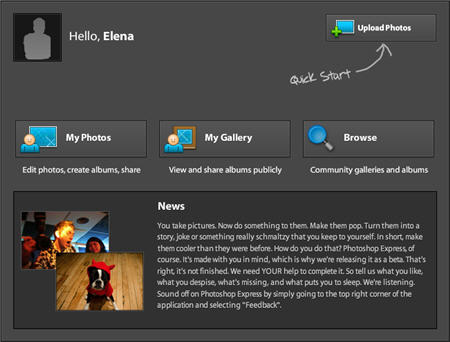
My Photos lets you upload images from your hard drive to Photoshop Express. Yes: besides being an online photo editor, the program also gives you 2 GB of free storage for your pictures (ain’t that nice?). Photoshop Express also imports photos from Photobucket or Picasa, but not from Flickr – in case you wonder why, it’s just because Flickr is engaged to someone else. You can upload single photos or several of them simultaneously, and the whole uploading process is surprisingly fast. Continue reading “First look at Adobe Photoshop Express”
 Ripping a DVD is becoming an increasingly tricky affair with encryption methods always improving. Of course, unless it’s for your own use or you own the copyright, you shouldn’t be ripping DVDs at all but sometimes, there’s no other way to obtain that particular sound-bite or clip you want from a film. The problem nowadays is that most rippers simply can’t handle the encryption of commercial DVDs but here are 5 that continue in popularity, precisely because they’re continually updated to deal with this problem.
 You’ve probably heard of the campaign to
  Edwin Starr once famously asked: “War, what is it good for?” Like many people, I’m tempted to reply “absolutely nothing” but then I think about all the great war games that have come out on the PC and I realise that without war the gaming world would be a totally different place. Classics like Call of Duty, Delta Force and World of Warcraft would never have existed. Either that, or the characters would all be running around shaking hands or kissing each other. Whether you’re for or against military conflict there are plenty of great games that let you take part in some of history’s most significant wars without you having to pick up a real-life weapon. Here are some of the biggest games from the biggest wars:
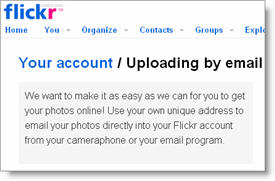 Having a phone with a 2MP camera like the iPhone’s definitely contributes to increase the number of pictures you take on a daily basis. Also, as you carry your mobile phone almost anywhere, you end up taking many interesting shots that describe the places you visit, the people you meet, in short, your everyday life.
 Downloading copyrighted content via peer to peer (P2P), like Bittorrent, is obviously illegal, but if you’re sharing legal and open source content there’s no reason why you should be blocked. Unfortunately though many internet service providers (ISPs), particularly in North America, have for a while now decided to “throttle”, or disrupt Bittorrent traffic. Rightly so, Bittorrent client developers and the whole peer to peer community has risen up against this method, which it considers to be illegal.
 There was once a time when phishing was all about sitting on the banks of a river with a bag of maggots waiting for something to bite. Then the internet came along and suddenly phishing became one of the biggest threats to our online security. If you don’t already know, phishing basically involves websites and popups masquerading as something else, usually to fool you into entering private or confidential data.
 If there’s one thing it’s hard to keep private nowadays, it’s online chatting. With so many loopholes, chat clients and key loggers out there, it’s very easy for anyone wanting to track your conversations to do so with a little know-how. Of course, most of us don’t have anything to hide but when it comes to work or confidential matters, and if you suspect something fishy is going on during your conversations, then there’s no reason to take risks.
 Bloatware, craplets, crapware…call it what you want, but the software that usually comes preinstalled on new computers isn’t always welcome by users. In fact, more than often, you find that you don’t really need what comes prepackaged or that it simply isn’t the application you would have chosen for the same task. Having crapware preinstalled on your new computer is annoying, not only because it takes up space which could be better used for something else, but it can also be a hassle to uninstall.
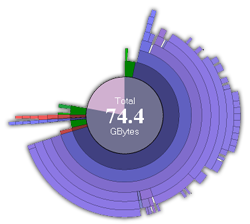 No matter how many external hard drives I buy, no matter how big they are, I always end up getting that stupid Windows warning message: “Low Disk Space. You are running out of disk space on Local disk. To free space on this drive by deleting old or unnecessary files, click here…” How is that possible? I had tons of available gigs just some weeks ago… Well, I guess it’s the logical consequence of having a few fully working P2P apps installed on my PC, together with an incomprehensible dislike towards the Delete key. So, what can I do now?