How to download videos from Flickr

Though many Flickr users seem to be against the presence of videos on the popular photo sharing site the truth is that you can already find a bunch of short movies of all kinds. Now the question is whether there is a way to download them to your hard drive, and the answer is yes, though you need to install Orbit Downloader first.

For those of you who don’t know this program, Orbit Downloader is an excellent download manager that handles all your downloads in an easy, convenient interface and is compatible with all main browsers. So once you have Orbit Downloader on your PC, browse to the Flickr video you want to download and you’ll see a tiny gray arrow on its right top corner.

Download videos from Flickr

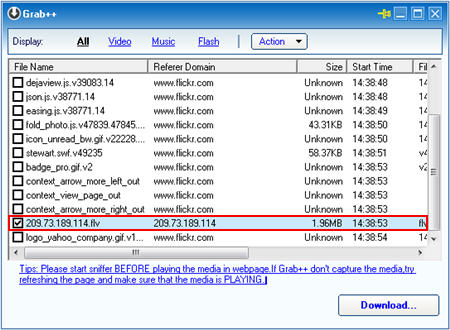
Click it and you’ll launch Grab++, Orbit’s grabbing utility. You may be asked to refresh the page – for Grab++ to get all the downloadable elements available on the webpage – so simply press F5 on your browser and go back to Grab++.
Download videos from Flickr

Now look for the video on the list. It’s easy to spot: it’s an FLV file and it’s probably the largest in size. Select it, click on “Download” and it’s all yours. Just make sure that the video is actually playing on Flickr (otherwise you’ll get an error message in Orbit) and that you have an FLV player to watch the video once it’s on your system.


Opera 9.5 beta2 – the fastest web browser on the Net?

opera-browser.jpg

As soon as you install this browser you will have a new pleasant experience about web surfing. Every page loads faster and this is something measurable even without having to use a stopwatch, such is the difference respect other web browsers.
In terms of computer resources then, Opera stands out. Compared with Firefox for example, the former uses 30% less RAM, with the same number of web sites and tabs open.

Another immediately visible improvement is the scrolling page function which is much smother when compared with other web browsers. Also the full screen mode (press F11 for this), takes up nearly all of your screen leaving nothing but the web site you want to look at. I also liked the way the browser lights up tabs and query buttons, when you pass the mouse over them.

Among the most important features outlined by Opera you can find:

  • Quick Find – type one word of a web site you visited, and Opera finds the page for you
  • Opera Link – Syncs your bookmarks and Speed Dial between your computers and mobile phone.
  • Speed Dial – set of visual bookmarks you see when you open a new tab. Very effective and useful to keep an eye on multiple web pages, at the same time!
  • Stay safe – Fraud Protection is enabled by default, detecting and warning you about fraudulent Web sites automatically.
  • Email enlightened – Opera’s built-in e-mail client features improved responsiveness.
  • Web developer tools – Supports cutting edge Web standards and the upcoming Web developer tools.

Have you tried the new Opera? If you haven’t, now’s the time!

Turn your mobile into a powerful calculator

How times have changed!Counting devices have come a long way since the days of the abacus and most of us now have a calculator to hand on our mobile phones. Many of these default calculation programs are pretty crude though and are far too basic for the likes of scientists, maths students or financial workers, who often need powerful equation-solving tools in their daily lives. Luckily there are plenty of third-party calculators you can install that will make your phone as smart as Stephen Hawking. Here are some of the best:

  • MxCalc SE – Programmable calculator that specializes in financial mathematics
  • Abakus – Perform complex engineering and business calculations on your Sony Ericsson
  • Best Calc – Displays 24 digits and performs a wide range of scientific functions
  • Calcium – One of the most gorgeous and enjoyable-to-use calculators you’ll see
  • SpaceTime – Advanced Pocket PC calculator with support for 4D graphs

Microsoft Messenger 7 for Mac released

Messenger for Mac 7The highly awaited new version of Messenger for Mac is finally out. Microsoft’s Mac Team blog, Mac Mojo, has all the details on the new features, which include nicknames, detailed presence information, Bonjour support and the long awaited audio and video support, which we had given you an update on back in November. So what is version 7 of Messenger for Mac like? Here is a roundup of its features.

You will still have to sign in using your hotmail or Windows Live account. Once installed, you’ll see Microsoft Messenger 7 offers a slightly updated interface, yet overall very similar to that of version6. Messenger now offers Bonjour support, so you can detect and connect with users on the same local network as you. Features like sending files, displaying a picture or emoticons are unchanged. You can change your display name and add a personal message just by clicking on them. One new feature is that you can give nicknames to your friends. Just click on their display name and start typing. We also liked the search feature, which is really handy to quickly find a contact or email address.

It’s obvious that this upgrade is aimed at corporate users as they get the most significant updates though. The highly touted audio and video feature, with which you can have videoconferences with your contacts, is only available to them. The same goes with detailed presence information, as you’ll need a version of Office Communications Server 2007 to use it.

Corporate users will love the new features in Messenger for Mac 7, like Bonjour Support, detailed presence information and especially audio and video. Personal users will find barely anything different from version 6.

Apple won’t sell off Pro apps

Final Cut Studio 2With Apple’s senior manager of PR Anuj Nayar announcing that Apple would not take part in this year’s National Association of Broadcaster’s (NAB) Show, the world’s largest broadcast media show, many started to wonder if that meant Apple would draw back from its pro apps. The decision was explained, “Apple is participating in fewer trade shows this year,” said Anuj Nayar, senior manager of PR at Apple. “Often there are better ways to reach our customers. The increasing popularity of our retail stores and Apple.com Web site allows us to directly reach more than 100 million customers around the world in innovative new ways.”

As TUAW also do well to point out, Apple took more than a year to release their new version of Final Cut Server, which came out only this April. Apple’s Pro range includes a dozen applications, of which the Aperture image editor, the Final Cut video editing tool and Logic Studio for music creation are still highly popular. To calm all rumors, Apple have pointed out how successful their line of professional video software is, with Final Cut Pro now past more than one million paid licenses.

I don’t believe Apple would sell off their Pro apps, especially when you know that an application like Final Cut is becoming the preferred choice of movie makers in Hollywood. What I do believe though, is that Apple probably looks to focus more on the mass market and I actually expect them to make their Pro applications attractive to everyone, not just professionals. This seems to be the reason why they are refocusing on the Apple website, which is the best way for them to reach mass market.

Does Open Source make sense for security programs?

Open Source SecurityOpen Source software is great when it comes to productivity applications. That’s because many different programmers can see the source code of an application and write plug-ins or suggest improvements to make the application more efficient and improve the users’ final experience. When talking about security though, do you really want hackers to see how your firewall or antivirus software works? Isn’t it a complete contradiction?
Clearly it’s not for some developers, as they believe in the efficiency that open source necessarily has. The advantage of having different programmers who can spot errors or weakness in the code is the great advantage of Open Source, even when it comes to security. As soon as a mistake or bug is spotted, it can be reported and fixed by the main developers who are taking care of the official distribution. It’s the principle of peer review; Open Source software undergoes a process of continuous improvement and frequent updates which leads to a more reliable product. The point Open Source supporters make is that knowing how something works doesn’t necessarily allow you to know how to crack it. Even if we know how a safe works, we will never be able to open it if it’s well designed.

If you want to give Open Source software security programs a try here’s a list of the most famous:

There are also other free solutions for your PC protection. Here’s the best free software selected for you:
Continue reading “Does Open Source make sense for security programs?”

How to add a sepia old-photo effect in Photoshop

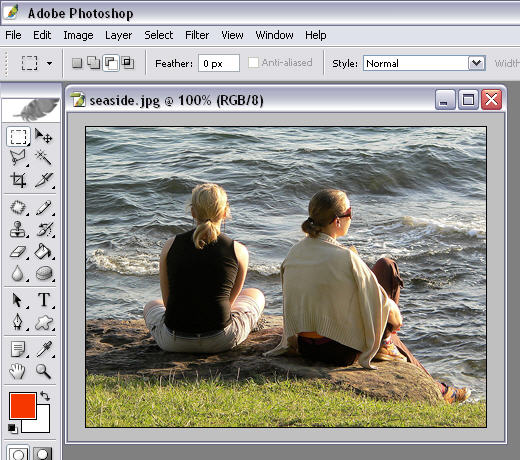
Old photos have an appealing kind of charm that the perfection of digital photography sometimes can’t achieve. But I know a trick to give your digital pics an aging touch that makes them look even more attractive. Simply follow these easy steps in Photoshop and turn your digital images into old photos with a sepia tone.

1. First of all, open the photo you want to make look older.

add a sepia old photo effect in Photoshop

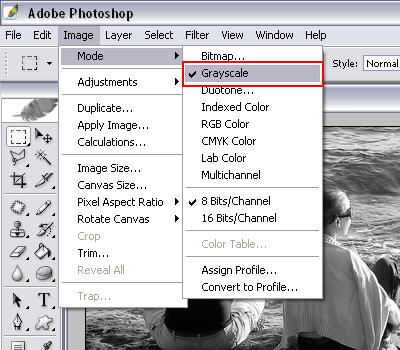
2. Then convert it to grayscale by selecting the Image > Mode > Grayscale menu and clicking “Yes” on the dialog box that Photoshop will display.

add a sepia old photo effect in Photoshop

Continue reading “How to add a sepia old-photo effect in Photoshop”

Top 5 PC maintenance schedulers

Maintenance logoPC maintenance is something that most people carry out in the first few months of receiving their new machine and then proceed to completely forget or ignore for the remainder of the computer’s lifetime. That lifetime is often considerably shorter than it would have been if they’d only managed to carry out regular basic maintenance. When the computer starts to slow down, most people think that buying more memory, tweaking the operating system or simply buying a new one is the answer to their problems. In fact, I’d guess that poor maintenance is the reason that many a PC has been needlessly consigned to an early grave. Remembering to defrag, clean and scan your PC for spyware never usually works – it’s far better to schedule the tasks to automatically work. Windows System Scheduler is the basic tool that comes bundled with Windows to help you do this but it’s neither particularly easy to configure or customise. These top 5 maintenance schedulers should make life much easier and ensure that your PC lives a longer life:

Ghost Control – Record macros to automatically execute maintenance programs at any time

nCleaner – Schedule regular and thorough cleaning of your hard drive

JkDefrag – Prevent hard drive slow downs by scheduling defrags with this tool

Advanced Registry Doctor – Keep your registry in tip top condition by scheduling scans

GetRight – Don’t let downloads slow down your PC – schedule them for completion later

Widgets to prepare for the recession

stock market tickerThe world is going through a tough economic period: rising inflation, high unemployment, crises in the housing and banking sectors, oil prices running high….things are looking pretty bleak this year and aren’t expected to get any better for some time. While the US economy isn’t officially in a recession, at least not yet, it is expected to stagnate this year. What is it you can do to prepare for an eventual recession? The best I can do is suggest a few widgets to help you monitor your stock and news on your Mac. At least you won’t be surprised if a real crisis hits.

  • iStocks Widget – View stock on all world markets. Includes a graph view expendable from a day to 2 years.
  • Google Adsense Widget – Money not coming in from your other sources of income? Check how much you’re still making online daily on your Google Adsense account.
  • Currency Converter – Worried about fluctuating currency rates? Use this widget to compare the best rates and avoid losing out when converting money.
  • Gas – Oil prices have gone up drastically in recent years. With this widget you can find the cheapest gas station near you.
  • iActu USA – Keep an eye on the news at all times so you can be informed in case a disaster strikes.
  • WagerWidget – Your last chance of saving yourself my just go by betting the last of your savings over your favorite sports team.
  • AirCompare – Can’t stand the pessimism? Find yourself a cheap flight and runaway to an exotic location until the economy gets better.

And if you have a portable device check out our post on pocket apps to monitor your stock.

Make Outlook more intelligent with Xobni

Xobni logoEver felt that Outlook is not exactly the most helpful e-mail client when it comes to finding old attachments or sending group e-mails? If so, then get your hands on the excellent Xobni which has just been released as a public beta version. This is no average plugin either – it’s the result of 7 months closed beta testing and adds major new functionalities to Outlook.

Once installed, you’ll see the Xobni sidebar on the right of your Outlook interface. It creates a separate profile for every contact (with a little photo too if you want) in your contacts list where you can see data about your relationship statistics (how many e-mails you’ve exchanged including a ranking based on how frequently you contact them), related contacts, threaded conversations and attachments they’ve exchanged with you.

One particularly useful feature is a small graph at the top of the profile which shows you averages of the time of the day you most frequently exchange e-mails which gives you an idea of that person’s working time schedule (useful if you don’t work in the same office). In addition, it adds contact details automatically to your e-mails without even requiring any info from your Outlook contacts list. It does this by detecting phone numbers and e-mail addresses that people have sent you and then automatically creating a profile based on this data. On top of this, finding threaded e-mails and attachments is considerably easier than trawling for them through Outlook. In fact, searching in Xobni is a pleasure because it has its own search bar which instantly brings up contacts with contact details and your most recent conversations with them.

If you’re continually finding yourself frustrated with Outlook, then you might find that Xobni brings long overdue Gmail style functionality to the world’s most widely used desktop e-mail client.

You can download Xobni here and see it in action here:

[youtube]amRkMds177A[/youtube]