Google’s GDrive – innovative or invasive?

GDriveWhen does a Google app cross the line between being a brilliant innovation and purely an invasion of privacy? Many people, including myself, probably trust Google’s servers more than their own hard drive backups but does that mean that we should continue to flock like sheep to apps like Google Docs and Gmail which store huge amounts of private data? Google latest work in progress, the GDrive, has added a new dimension to the debate as it promises to revolutionise the way we view PCs. The GDrive will be a Web 2.0 app/online storage solution that means your machine will be viewed as simply an interface through which to access all your applications and data online. In other words, the machine will no longer be the star of the show.
Technology site TGDaily reports that the GDrive will be released at some time later this year predicting that:

Gdrive will likely cause a major paradigm shift in how we use computers and bring Google one step closer to dethroning Windows on your desktop.

GDrive is of course simply a progression of “cloud computing” that transfers processing power from the PCs to web servers. The Guardian defines the future of a PC linked to GDrive as:

A simpler, cheaper device acting as a portal to the web, perhaps via an adaptation of Google’s operating system for mobile phones, Android. Users would think of their computer as software rather than hardware.

Anything more specific than that at the moment is hard to say although TGDaily reveal a little more detail on what it should look like:

Gdrive is basically a cloud-based storage that should have two faces: A desktop client that keeps local and online files and folders in two-directional sync via a web interface for accessing your desktop files anywhere and anytime, using any network-enabled computer. In addition, it will come tightly integrated with other Google services to enable editing of supported document types, like spreadsheets and presentations via Google Docs, email via Gmail, images via Picasa Web Albums, etc.

The possibilities this offers are undeniably exciting if nothing new. It means that rather than having hard copies of documents that are out of sync with your online documents, once they are updated online, they will be automatically updated on your hard drive without you needing to lift a finger. This surely raises the issue though whether it will be even worth editing anything on your hard drive anymore other than to have a hard-copy backup. The bigger and more obvious question however surrounds personal privacy which has already got civil liberties groups such as The Free Software Foundation up in arms. Executive Director told The Guardian:

It’s a little bit like saying, ‘we’re in a dictatorship, the trains are running on time’. Does it matter to you that someone can see everything on your computer? Does it matter that Google can be subpoenaed at any time to hand over all your data to the American government?

As I wrote a while back too, other critics such as GNU founder Richard Stallman describe the entire cloud-computing movement as “worse than stupidity”.

Dave Armstrong of Google Enterprise however rejects such notions claiming that Google are simply bending to the demands of consumers:

There’s a clear direction … away from people thinking, ‘This is my PC, this is my hard drive,’ to ‘This is how I interact with information, this is how I interact with the web.

Armstrong is of course right – ask most people what they use their PC for and it will be web based activities such as e-mailing, social networking, reading, multimedia and online gaming rather than using any particular application they have installed. The fact is, we’ve already gone a hell of a long way down the road of online storage and web interaction to turn back now. There is nothing wrong with concepts such as the GDrive as long as their role is clearly defined i.e. that they can only access those parts of your hard drive that you allow them to.

The most important factor however is your own discretion. It goes without saying that anything that is particularly sensitive or private should not be stored on something such as GDrive for your own peace of mind. However, with PCs relatively easy to hijack, the truth is GDrive or no GDRive, there are few safe places for you to store data on a machine with a connection to the net.

There’s only one thing for it then – buy a Mac 😉

Time waster: Make traffic flow

I drive to work everyday, which means I often get to see local policemen trying to make the morning rush hour a little less heavier on all of us. Managing traffic in a big city is surely a hard work! If you feel curious and want to try it for yourself, have a look at this fun online game.

Time waster: Crash

Your aim in Crash is to manage traffic successfully in a multiple road intersection, by simply adjusting the speed of cars and trucks going by. Use your mouse and click on any vehicle to speed it up, or click it again to slow it down. The more vehicles reach their destination, the higher score you obtain. You can also make some extra points at the end of each stage by crashing on bad cars, which are marked with a dreary skull.

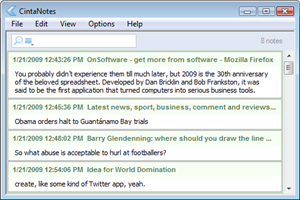
CintaNotes: Help for cluttered desktops

Spending much of my day at a computer, my daily routine leaves my desktop in a mess: A ton of browser tabs open, various documents and more. It’s like a chaotic to do list – it’s easier to leave a tab open than find it again later, I say to myself. It’s probably not great for my terminal’s performance.

I’ve been using a great little application called CintaNotes recently (here’s what I said in my review), and have found it to be a solution to my desktop clutter. There are other note taking apps out there, but I have always found they are just “yet another thing” to do, instead of making my life easier. My desktop maybe chaotic, but it works. CintaNotes however, feels natural and sits in the system tray ready to spring into action whenever you need it: highlight text, hot key, you’re done. Easy.

What’s cool about it is your note is recorded with meta info – so it keeps a record of the web address where you took the text from, for example.  That means I can stick anything interesting in CintaNotes, find it again without problems (did I mention the search is great?), and work with a more manageable number of browser tabs and windows! Once my morning delving is done, I just put it all in CintaNotes. Now my desktop has a zen-like calm about it.

Puzzle Quest Sequel to drain your free-time

Back in 2007 I got dangerously hooked on Puzzle Quest, then on my DS. Despite being a mix of two things I wasn’t that keen on – puzzles and fantasy RPGs – I found I couldn’t put it down. The story was pretty basic, but gaining abilities and the feeling of relief at beating the generic fantasy opponents was palpable, while defeat was crushing.
Worryingly, the sequel Galactrix is on its way. Worse still, Infinite Interactive have put a flash demo up for you to try. The new game features the same mix of puzzle and role playing, but has a slightly different puzzle dynamic and a new futuristic setting.

The demo is only one level, and shouldn’t take too much effort to beat, but it gives you a good idea of the game. Swap blocks around to create lines of three or more to destroy them. Different colors give you different abilities – a row of mines will damage your opponent, or red blocks charge your laser – to help you attack and defend during the puzzle powered battles.

I think this sequel looks even better than the original – the new gravity affected mechanics haven’t diminished its addictive qualities at all. There’s no release date yet for the game, which is coming out on all major format, but it’s expected in the next couple of months. You can kiss your free-time goodbye now…

How to: view Links and Forms in Firefox 3’s Page Info

Link and Form Info

One of the things that first made Firefox such a popular web browser was that it was so developer-friendly. Including features that web developers loved meant that they were more likely to use Firefox and, in turn, more likely to develop for maximum compatibility with Mozilla’s browser.

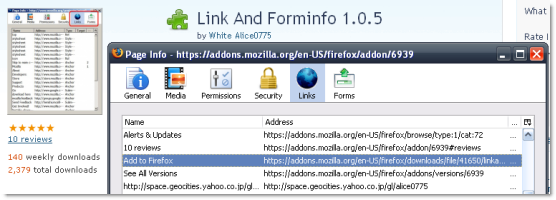
One such feature is the Page Info window which, until the launch of Firefox 3, included two extra options: the Links and Forms tabs, which provided a wealth of data but saved on the hassle of trawling through the page’s source. For some reason, Mozilla removed these options in version 3… and though this has been annoying me for months, I’ve only actually bothered to look for a solution today. As you might expect, the fix is quick, easy, and comes in the form of an extension.

Simply install the ‘Link and Forminfo’ add-on from Mozilla’s site, restart Firefox and check the Page Info on any page you like. Those handy Links and Forms tabs will be back! Hooray!

3 free tools to search and replace text on your Mac

Search Text imageImagine you’ve just finished editing a series of documents but at the last minute you either realize you’ve made a mistake or are asked to change something in all of them. The prospect of painstakingly going through them one by one would be too hard to bare not to mention ridiculously time consuming. Or imagine for example that you’ve just downloaded a huge number of photos from your digital camera all with generic names. To go through each one and rename them would take ages so but by trying one of these search and replace apps, you could just save yourself a lot of time and trouble:
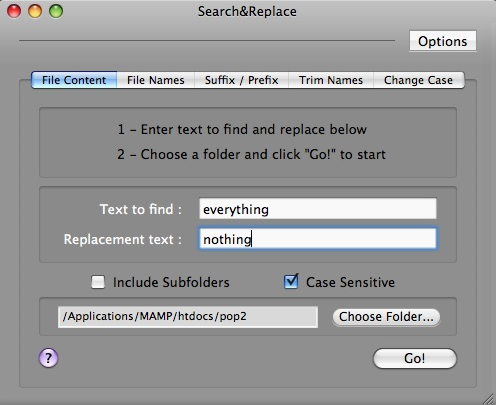

1. Search&Replace

A simple but extremely powerful and effective tool that can go through any number of documents at once and both find and replace text within them and change the filenames themselves. Simply give Search&Replace a target folder to aim for, make sure all your documents that need changing are in there, enter the term you want to change and let it run. It doesn’t display the results though so you may want to double check them.

Search&Replace

2. TexFinderX

This app is designed more with programmers in mind who want to change text strings to HTML strings etc although it could easily be used by someone wanting to scan word processed documents. Simply drag and drop folders containing the documents you want to search inside the TexFinderX interface. Once TexFinderX has found the terms that you want to replace, it shows you exactly all the changes that have been made so you’re left in no doubt whether it’s definitely done its job or not. Continue reading “3 free tools to search and replace text on your Mac”

Use software to add missing functions to your iPhone

Software apps to add missing functions to your iPhoneLast year I happily bought a first-generation iPhone, totally convinced that I was acquiring a state-of-the-art piece of technology. However, it didn’t take me much time to discover that my new phone had some ridiculous limitations and was clearly behind other terminals I had bought before.

Let’s face it: the iPhone is beautifully designed and has an amazing user interface that has turned the mobile industry upside down – think about all those mobile companies suddenly launching phones with multi-touch screens. But when it comes to functionality, Apple has left a bunch of basic features outside their cutting-edge device. I’m not talking about secondary characteristics here, like being able to customize user themes (which, by the way, you can’t do on the iPhone either) but about basic functions like being able to send a multimedia message or recording video with your camera.

Unfortunately the only solution to many of these problems nowadays is to jailbreak your iPhone and install the necessary third-party apps to make up for these limitations. While jailbreaking your iPhone is up to you, I’d like to review a few interesting apps you can find in alternative software repositories like Cydia and Installer, which can bring those basic functions back to your iPhone. Meanwhile I guess the only solution is to keep on waiting for official software tools from the AppStore.

Software apps to add missing functions to your iPhoneSwirlyMMS – A truly native iPhone app that enables you to send and receive multimedia messages. This app has become the de-facto standard for MMS messages on the iPhone. It’s published as shareware ($8) with a 14-day trial period. You can get it through Cydia.

Software apps to add missing functions to your iPhoneClippy – I still can’t believe the iPhone doesn’t support copy and paste. Luckily you can now have this basic function back with Clippy, a simple copying and pasting app available also in Cydia. Clippy is free and lets you copy and paste any selected text between different applications.

Software apps to add missing functions to your iPhoneiPhone Video Recorder – This app enables you to record high-quality videos with the iPhone’s built-in camera. Videos are saved in MOV or MP4 formats, and can be sent by email, downloaded to a computer or published to YouTube straight away. You can get this tool both through Installer or Cydia.

Software apps to add missing functions to your iPhoneiFlickr – With this app you’ll be able to upload photos to Flickr right from the iPhone without having your images scaled down. iFlickr also lets you rotate images, add tags, set privacy options and even geotag your pictures. iFlickr is available through Installer.

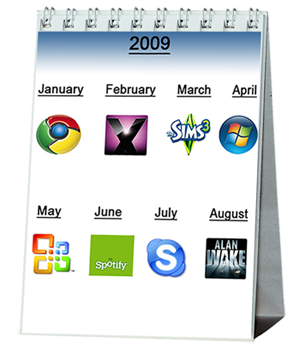
Top software for 2009

What’s in store for the software world this year?At this time of the year we’re always keen to start looking ahead at what’s in store for the software world over the next 12 months. Last year Nick made a series of bold software predictions for 2008. I have to admit most of his forecasts proved more than a little wide of the mark. The death of Skype? A miracle new free operating system? A worthy YouTube killer? Better get back to those Nostrodamus books, mate. Owing to my colleague’s failings last time round I’d thought I’d take control of the crystal ball this year, with a few predictions that I can almost guarantee happening. Here’s my top 8 programs to look out for, plus a bold prediction of my own:
1. Windows 7 – We’ve already seen the public beta of Microsoft’s latest OS and the general consensus is that Windows 7 is a darn sight better than Vista (let’s face it, that wasn’t difficult). Although it hasn’t changed much visually, the new incarnation has a lot more under the hood, making it faster and more powerful than its predecessor. Expect the full release mid-summer.

2. OS X Snow Leopard – It’s looking like 2009 could be quite an underwhelming year for Apple fans. Even the launch of version 10.6 of OS X looks set to be overshadowed by Windows 7. As with the MS operating system the changes in Snow Leopard will be largely performance-related, rather than any radical interface overhauls. According to PC World, the new OS will pounce in June.

3. Spotify – This one’s currently in invite-only beta stage, but having tried it myself, I reckon Spotify could be the best thing to happen to music since the Spice Girls split up. It’s an online radio app à la Last.fm, only without the annoying playback restrictions and overblown social networking features. There’s no word on when it will be out of beta, but my guess is a couple of months.

4. Skype 4 – While Nick was predicting doom and gloom for Skype in 2008, the product actually became an even stronger leader in its field last year. This year should see the full, finished release of Skype 4.0, which greatly improves video calling and adds cool features like SMS messaging and chat bookmarking. We should see the ‘full’ release of Skype 4.0 early this year.

5. Microsoft Office 14/Office Web – Skipping version 13 to avoid a hex on the program, MS will bring out its thirteenth Office suite to coincide with the launch of Windows 7. Details of what will be in it are sketchy at present but expect the same ribbon-style interface from Office 2007, along with the addition of more ‘role-based’ features and compliance with Office Open XML. What’s more, we’ll almost certainly see online versions of Word, Excel, PowerPoint and OneNote. The beta of Office 14 could come as early as May, with the full release arriving in the autumn.

6. Chrome for Mac – For about two days in 2008 Google’s Chrome browser seemed the most popular piece of software ever invented. Then everyone just went back to using Firefox. This year should see a more standards-compliant version of the program come out of beta stage, with the all-important support for extensions that could win over those Fox fanatics. Chrome will also hit Mac and Linux systems within the first half of 2009.

7. The Sims 3 – Personally I found living one life bad enough, so I’ve never liked the idea of having to come home and having to wash, work, eat and talk to people on my computer as well. Some people love the Sims though, and I’m sure they’ll lap up the third version in their billions. The Sims 3 promises to be more customizable than ever, with seamless ‘living’ neighborhoods and realistic personalities. It looks like EA still hasn’t taught those annoying faux humans to speak a proper language though, so I’ll be steering well clear on its February release.

8. Alan Wake – Unfortunately it looks like you’ll have to wait until the very last day of 2009 in order to play one of the most exciting-looking video games of all time. Alan Wake is a horror writer who goes to the country to get away from it all and ends up in a terrifying nightmare of his own. Judging by some of the trailers, this is a game that’ll be well worth the wait.

And finally, a slightly bolder prediction: by the end of 2009 we will be talking to our computers and telling them what to do. Google is already investing in voice recognition technology and last year delivered an impressive vocal search tool in its iPhone Mobile App. I reckon by the close of the year I will be able to provide instructions to by browser (probably Chrome), telling it what to search for and commanding it to open Web pages. Remember where you heard it first.

How to: add a warping effect in Photoshop

Sometimes the most eye-catching photo effects are also the easiest to apply. Creating a warping effect on your pictures in Photoshop is relatively easy and, at the same time, it gives your photos a completely new appearance. Want to learn how? Follow these easy steps and see for yourself:

1. Open the photo you want to work with and unblock the background layer by double clicking on it. Then create another layer under this one.

Add a warping effect to your photos in Photoshop

2. With the new layer selected, go to Image > Canvas size and enlarge the size of the canvas with the following settings: Continue reading “How to: add a warping effect in Photoshop”

30 Years of spreadsheets

You probably didn’t experience them till much later, but 2009 is the 30th anniversary of the beloved spreadsheet. Developed by Dan Bricklin and Bob Frankston, it was said to be the first application that turned computers into serious business tools.

Amazingly, these pioneers didn’t patent their program, and the idea was copied by Lotus 1-2-3 and of course the behemoth that is Microsoft Excel. Business people immediately saw how such an application could speed up bureaucracy and make financial modeling much faster. John C. Dvorak angrily writes that, ‘society as a whole has deteriorated ever since its invention,’ which is quite a statement! That may be an exaggeration, but it’s true that things like the Enron financial scandal may not have happened without spreadsheets.

My immediate reaction to spreadsheets was intimidation. For such a common tool, the programs are still really complex, and you need a degree of expertise before you begin to feel comfortable using them. Despite this they are inescapable, whether you like it or not.

If you start to imagine doing what spreadsheets do manually, you can see how much easier office life has become. The hours of tedious calculation that humans have been liberated from is probably reason enough to celebrate.