Today’s downloads for Windows, Mac and Mobile

Download Free Screen CapturerWindows: if you need to take screenshots on a daily basis and don’t want to use a massive photo editor for that simple task, use Free Screen Capturer instead. This simple tool takes snapshots of your desktop in several ways and saves them in all popular image formats. What’s more, it even lets you record short clips of video for screencasts or video tutorials.

2t_xstreamripper_tb.jpgMac: Ever wanted to save radio broadcasts directly onto your hard disk? Xstreamripper for OS X can do the job for your in a few clicks. Xstreamripper integrates with your internet connection so that whenever it detects a radio stream, it immediately springs into action. Just click on “Start” and Xstreamripper will then save the songs in MP3 format.

Record voice messages on your BlackberryBlackberry: There are times when we all have to have conversations we don’t really want to, but thanks to VR+ you don’t actually have to be there when they take place. The Blackberry application allows you to record voice messages in MP3 format on your device then send them as an SMS message or via a URL.

First reactions to iLife 09

iLife 09 BoxAlthough this year’s Macworld was bereft of any major news (and of course a keynote speech by Mac founder Steve Jobs), it did reveal iLife 09 which will be on general release at the end of January. Although no new applications have been added, Apple claims it features: “Major upgrades to iPhoto, iMovie and GarageBand, and includes iDVD and an updated version of iWeb.” At around $80 for the upgrade, however, is it really worth it? At this stage, there are very few who’ve been able, or allowed, to put it through its paces at Macworld although the team at Pocket-lint, is one of the lucky few who’ve managed to.

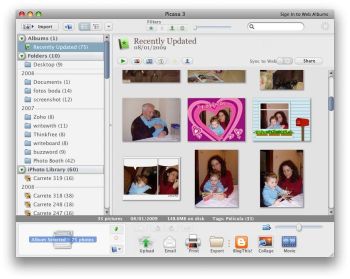
With the release of Google’s Picasa, it’s no surprise that iPhoto is the major recipient of surgery (and long overdue might I add too). The main additions are Faces, Places and integration with Facebook, Flickr, and MobileMe. Faces sounds like the most exciting feature allowing you to automatically organise your photos by person simply by iPhoto recognising their facial features.

iLife 09 Faces

Continue reading “First reactions to iLife 09”

Top software at CES 2009

What we liked from CES 2009It may only be half way through, but the Consumer Electronics Show 2009 in Las Vegas has already sprung surprises in the software sphere. After a disappointing showing from Apple at MacWorld earlier in the week, CES has injected some much-needed optimism into the tech community. Those worried that these troubling economic times would spark a slowdown in software innovation this year should rest easy thanks to some genuinely eye-opening developments at CES 2009. Here is a collection of some of our favourites so far:

Windows 7 -There couldn’t have been a better time for Microsoft to enlighten the World with details of its new operating system, given Apple’s rather flat performance earlier this week. Releasing the product as a free Beta download was a real stroke of showmanship from Microsoft and from what we’ve seen the developer has plenty to show off about. It may look a lot like Vista but unlike the previous OS, Windows 7 is a different beast altogether. Primed for performance and packed with great new tools such as gadgets, a dock, and significant enhancements to bundled apps like WordPad and Paint, this could be the product to resurrect Microsoft’s failing image.

Palm Pre with WebOS – Once a giant in the world of PDAs and smartphones, Palm was just of couple more failed releases away from being a complete laughing stock. Just like Microsoft though, the company has instantly regained its credibility with the announcement of the Palm Pre. The sleek full touchscreen phone comes with a pop-out keyboard and runs boasts a completely new operating system, WebOS. The new UI looks great, with features such as swipe gestures, an intuitive app switcher, iCal-style calendar app, and a system that avoids task interruption when a call or SMS comes in. Wish you’d released a new iPhone now Apple?

Yahoo! TV Widgets – CES 2009 has highlighted the spread of the Internet beyond computers and onto more and more traditionally offline devices. Nowhere is this better illustrated than Yahoo!’s TV Widgets. These mini software apps allow you to tap into Web content while you’re watching your digital TV. This means you’ll be able to check your Facebook friends’ status while watching Lost, bid on eBay during commercial breaks, or check the weather forecast during Oprah. Although it will only launch with a few widgets on a few TVs to start wit, TV Widgets could represent a major step forward for the connected home.

Limewire 5.0 – As John mentioned earlier this week, the new version of Limewire could revolutionise the way people share files over the Internet. By introducing a more social element to the P2P client, users will surely now have more confidence when sharing their wares over the network. Being able to connect up to your GMail friends and give them access to your files is a real stroke of genius which, again, represents a pioneering step forward from a developer with a flagging reputation.

Skype Lite for Android – Another great step forward for mobile communication, Skype announced it will be releasing a Lite version of its VoIP software for Google’s Android platform. In these bleak economic times, the ability to make cheap calls from a mobile phone is something all of us will welcome. As well as launching for Android, Skype Lite will also support Java and Windows devices. Most mobile carriers have until now, been scared of allowing Skype on their phones for fear of losing revenue so this latest announcement is most welcome.

How to: install a new operating system on VirtualBox

Being a software reviewer means I’m always willing to test new apps, check out innovative web services or even have a look at the latest version of an operating system. If you’re anything like me – and don’t want to ruin your computer in six months with all those software experiments – you should use a virtual machine.

Virtual machines can run on your system as separate computers, with their own hard drive, operating system and file structure. Therefore you can test anything you like without compromising your actual system. It’s the perfect sandbox for beta versions, new operating systems or software apps you want to try out before installing them definitively on your PC.

A few months ago I wrote a post about the two most popular virtual machine solutions (VMware vs VirtualBox) but today I’m going to focus on the latter, and explain how to install and run a new operating system in VirtualBox with an ISO file. This may be the best way to take your first steps in Linux, for example.

The first step is obviously downloading the ISO file with the operating system you want to try out. There are many sources from which you can obtain them. You only need to be a bit patient because these image files are usually massive and can take a long time to complete downloading.

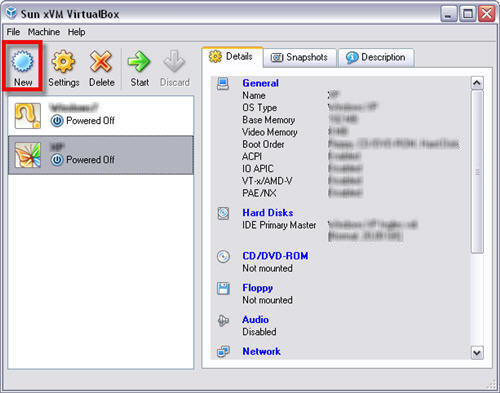
1. Once you’ve got the ISO image file of the OS you want to test, launch VirtualBox and click on New.

New operating system on VirtualBox with ISO file

Continue reading “How to: install a new operating system on VirtualBox”

Does Picasa spell the end for iPhoto?

Could Picasa knock iPhoto into touch?Now that Picasa has finally arrived on Mac the end is surely nigh for iPhoto.

And good riddance as far as I’m concerned. I’ve never liked iPhoto, mainly because it takes so long to import photos and videos. Picasa on the other hand does it in less than half the time. In addition, what I really love about Picasa is that it makes publishing to the web a pleasure – unlike iPhoto which required the Picasa uploader plugin to upload photos from it to iPhoto.

The way iPhoto takes photo imports as an “event” and just lumps them into one big collection also irks me. As John P. points out:

I hate any sort of application that unnecessarily forces it’s users into a proprietary closed platform. And right off the bat, iPhoto does this (just like freakin iTunes!). You see, when you import photos into an iPhoto library it basically takes all of your individual pictures and lumps them into a giant ball, from which the average users can no longer extract them without great pain!

Fortunately, Picasa has included a useful “Import from iPhoto” option that allows you to liberate your photos from the greasy clutches of iPhoto.

There a few reasons why I’ll keep iPhoto on my Mac though. One is purely practical because it’s integrated with both iMovie and iDVD when it comes to adding photos to DVD edits or DVD menus. The other main reason is that I like the slideshows that iPhoto creates with a selection of different soundtracks and camera panning effects, although the music soon becomes irritating once you’ve seen a hundred slideshows. I’ll also concede that there are a few features in the new iPhoto, released as part of iLife 09 that will enhance iPhoto’s appeal such as facial recognition, GPS location for photos and integration with Facebook.

However, Picasa’s simplicity, speed and web publishing integration mean that it will take a lot more than that for iPhoto to win me back. Now if only Google made computers too…

How to: color a black and white image in Photoshop

Black and white images have their own special beauty, but some people still prefer colored ones. If you’re among them you’ll probably be interested in this simple Photoshop trick which lets you color any black and white photo. The process is long and tedious, but pretty straightforward. Plus you can fully customize each color you use, and therefore add an original final touch: a vintage photo, a fantasy image with surrealistic colors… anything goes!

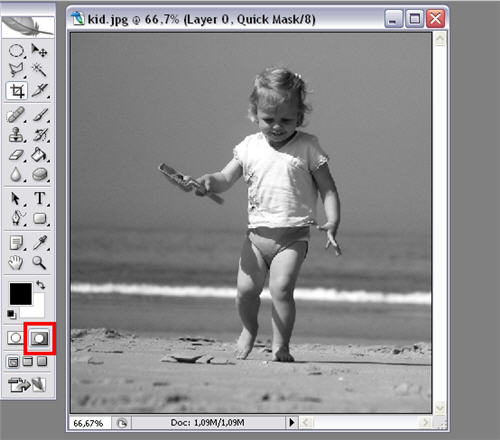
1. Open the image you want to color and change to Quick Mask mode by clicking on the marked icon.

Color a black and white image in Photoshop

Continue reading “How to: color a black and white image in Photoshop”

Limewire makes sharing sociable

Sharing music is something I’ve always done, but I have to admit that the internet has made the experience a bit cold. It’s easy, sure, but not as personal as in the past when it was all about giving each other cassettes. P2P file sharing is impersonal at best, and obviously has legal “issues” when it comes to copyrighted stuff.

For the past few weeks I’ve been playing with the alpha version of Limewire 5, and I’m really impressed. Firstly, it’s been completely redesigned, and now looks ultra modern, sleek and attractive. While you still have the “Upgrade to Pro” pop-up every time you start, it looks and feels much friendlier.

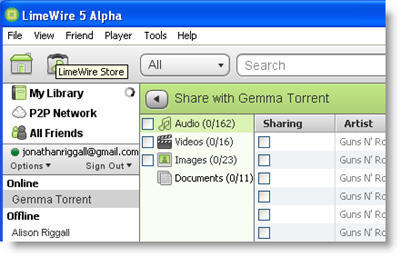
All the features we’re used to are present and correct – there’s nothing that current users will find difficult to do in version 5 – and there’s something new too. If you have friends with Limewire and Gmail, Jabber or LiveJournal accounts, you can share file directly with them without sharing them publicly. Connecting Limewire to Gmail friend lists is genius – you don’t have to even think about IP addresses or any complicated connecting, just pick the files you want to share and that’s it.

Unlike older file sharing communities, you can’t search and add friends from the Limewire network, just use ones from you own friend lists. This is quite a change, and means two things – firstly, that you can have a really neat sharing community of your actual friends, and secondly that you can be sure no one is spying on what you’re sharing. I have read that Limewire is considering adding Facebook contacts to the app in a future release. Considering how many people are connected with each other through Facebook, utilizing that for easy file-sharing has wonderful potential. Not only can I get that warm community feeling when sharing music again, but sharing anything, from pictures to documents, is finally as easy as you want it to be.

How to stop VLC Player crashing on Mac

VLC Player logoOne application that’s been a huge disappointment since I switched to Mac has been VLC Player. I’ve always relied on the Windows version to play absolutely anything – both audio and video – and it served me well. The problem I’ve found on Mac, however, is that often crashes whenever I’m trying to add a large amount of songs or films to the playlist.

I searched and found out that I wasn’t alone either. It seems that VLC Player has a tendency to be unstable on Mac for sometimes rather mysterious reasons. One problem concerns failure to play video due to errors in the preferences file as outlined by The Racing Geek. The solution:

1) Quit the application if it is running
2) Delete the VLC folder in /Users/USERNAME/Library/Preferences
3) Delete org.videolan.vlc.plist in /Users/USERNAME/Library/Preferences
4) Delete org.videolan.vlc.plist in /DRIVENAME/Library/Preferences

However, the main problem I’ve been experiencing is adding music. Since I wanted something simpler than iTunes, I decided to try using VLC as my default media player (big mistake) but adding huge amounts of music to it, simply causes it to hang and stop responding. Oh, how I miss simple apps like Winamp sometimes.

The solution I’ve found is simply to add music in smaller chunks. Album by album seems to work better although this is obviously painfully slow and inconvenient. Users on the Videolan forum are at a loss to explain why this happens – it seems that for all its simplicity, VLC cannot handle a basic operation like adding a large directory of music to it. The most likely explanation is that it can’t handle either metadata or album art, although if this is the case there should be a simple way to deactivate reading these.

So come on Videolan, when are you going to fix this simple bug that will enable Mac users to enjoy VLC Player as a lightweight alternative to iTunes?

Beware: Phishing threat on Twitter!

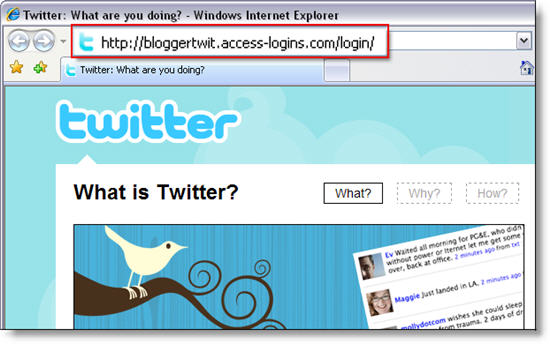
Yesterday I logged on to my Twitter account and saw a couple of direct messages from one of my contacts. I found them quite odd from the moment I opened them, as they were not the kind of messages this person would send to me. Anyway I opened the link he included in those messages and immediately noticed the trick. These are not real DMs: they’re a phishing scam to obtain your Twitter password.

Twitter phishing scam

Luckily for us, the swindle is fairly easy to spot. First, double check every link before clicking on it, even if they come from people you trust. Also, make sure you’re on the actual Twitter domain before entering your login data: the scam page may look exactly like the real thing, but the URL is not twitter.com. The good thing is that if you’re a Firefox user, your browser will probably detect the fraud for you.

Twitter phishing scam

If this advice is already too late and you’ve been tricked, use the Reset password service to create a new password and regain access to your Twitter account. Meanwhile, you can find more information about the whole issue on Twitter’s official blog.

Tips for dealing with Skype spam

Skype logoI’ve been used to receiving spam on IM clients such as MSN Live Messenger and Adium for a long time now. What usually happens is a contact I haven’t spoken to for years will suddenly pop up telling me to click on this “great link” or implore me to “check out this great site – you won’t believe it!”. However, increasingly I’ve been experiencing this problem with Skype too and according to the Skype forums, I’m not alone.

The last time it happened to me, a chat box simply popped-up from a supposedly female contact called “-sex”. The spam message was quite simply a smiley emoticon with a party hat on.

Skype spam window

While this type of spam is fairly harmless, other types are more sinister, such as the one received by a user on the Skype forums who reports:

At 08.00 today I had a skype call from ” his lordship”. (lordship.pua) skype user, He claimed to work for my bank and they were doing some work on my account !! Could i please confirm my sort code and account number.

Other users report spam messages that claim their PC has a virus, content that includes crude pictures and sexually explicit messages aimed at female users. The problem is due to the fact that Skype simply aren’t filtering spam as they should be, which I find inexcusable. I have no spam problems when using an IM client such as Google Talk, so there’s no excuse for a company as big as Skype to not be just as vigilant too. Until they finally take action, there is unfortunately very little you can do about this problem other than restrict messages to only those that are in your contact list.

On Windows, do the following:

  1. Open Skype, click “Tools” and then “Options”
  2. Click “Show Advanced Options”
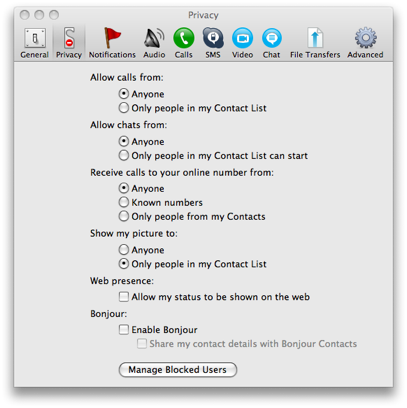
  3. Select the following to ensure maximum privacy: Allow Calls from only people in my contact list, Automatically receive video from no-one, Show that I have video to no-one, Allow chats from only people in my contact list and uncheck “allow my status to be shown on the web”
  4. Click “Notifications” and uncheck “pop up a window when someone requests my contact details”, “Display notifications in the Windows tray when someone comes online” and “Display notifications in the Windows tray when someone requests my contact details”

On Mac:

  1. Select “Skype” and then “Preferences”
  2. Select the “Privacy” tab
  3. Follow the same steps as for Windows above

Skype privacy options Mac

Doing this obviously limits your availability on Skype and will cause problems if someone is trying to call you for the first time and you haven’t added them to your contacts. However, until Skype starts blocking spam itself, this is the most effective way to protect yourself from uninvited guests. For a more in depth look at Skype spam, check out this interesting article at VoIP News which dates the problem back to early 2008. If after reading that you’ve really had enough, then take a look at the post I wrote a while back about 5 alternatives to Skype.