Update Google’s favicon on Firefox search plug-in

Last week Google surprised us with a new favicon for all their web addresses. This new design comes only six months after the last one – which apparently wasn’t very well received – and its design has been inspired by the submissions of hundreds of users after Google encouraged them to submit their own ideas.

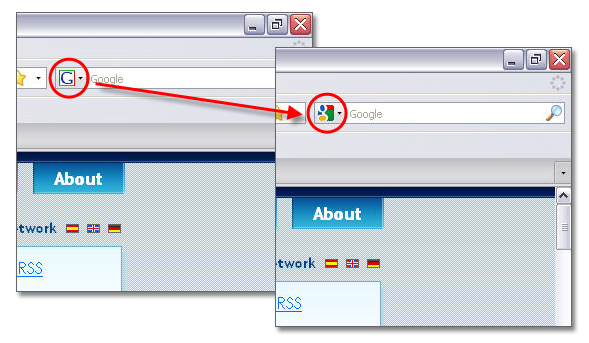
This colorful new favicon now shows up on the address bar when you visit Google or any of its apps, and also on your bookmarks. But what about the Google search tool in Firefox? This built-in searcher still keeps the old-fashioned G logo Google used as favicon a few years ago. Luckily I just found a simple trick on the Mozillalinks site that replaces this old icon with the new, stylish one.

Update Google’s favicon on Firefox search plug-in

All you have to do is download the updated version of the Google search plugin for Firefox with the new favicon, and copy it to your searchplugins folder. This folder is inside your browser’s install folder, usually in C:\Program files\Mozilla Firefox. Replace the existing google.xml file with the new one, restart Firefox and you’re done.

5 neat tips and tricks for YouTube

YouTube has certainly caused a revolution in the way we enjoy content on the Web. A few years ago we used to waste a couple of hours every day surfing channels on TV. Now we spend that time on the computer instead, watching all sorts of online videos. So, if you want to make the most of your personal YouTube experience, have a look at this list of tricks and tips for the popular website, with which you’ll be able to set starting points, extract audio tracks or even play videos at different speed rates.

Tips and tricks for YouTubeSpecify a starting point for videos

Say you send a YouTube video to a friend and ask him to fast forward to the funny scene at 03:52. He’ll probably have to wait for a while until he can watch those frames.

Luckily you can now use this simple trick: add #t=XmYs at the end of the video URL – where X stands for minutes and Y for seconds – and the video will start right at that point. So for example, #t=3m52s is the parameter you’ll need to add to that video you wan to share with your friend. Nice, huh?

Tips and tricks for YouTubeExtract the audio track to MP3

Youtube features many videos in which the important thing is sound, not images. Downloading the whole FLV video just to get the sound is not the best solution, so why not simply download the audio track and save it as an MP3 file?

This is what you can do with VidToMP3, an online ripping tool that’s very easy to use: all you have to do is copy and paste the URL of the video you want to extract the sound from and download the resulting MP3 file. If you prefer a desktop solution, then use FLV Extract to split the selected video in image, sound and source code.

Tips and tricks for YouTubePlay videos at a faster or slower rate

Unlike traditional desktop video players, YouTube doesn’t feature speed controls with which to speed up the boring parts of a given video or play an important dialog at a slower speed. In these cases, you can use MySpeed, a simple tool that runs in the background and displays a speed slider every time you load a YouTube video on the browser.

Tips and tricks for YouTubePlay videos at full screen

For those occasions when you want to focus on the video and forget about comments, stats and other distracting elements on the website, watching videos in full screen is the best solution. You can use the appropriate button on the embedded player or use the v/ parameter instead of watch?v= to link directly to the full screen version. So http://www.youtube.com/watch?v=A_EgbJFSAQM would then be http://www.youtube.com/v/A_EgbJFSAQM

Always bear in mind that a full screen video may lose image quality compared to the smaller version. But if you combine this function with the HD one, the results can be impressive!

Tips and tricks for YouTubeDownload videos to your hard drive

YouTube doesn’t feature any tool to download videos to your computer, but there are dozens of software tools and online services that enable you to download your favorite videos, play them as FLV files and even convert them to other formats.

You can choose between desktop apps like vDownloader or aTube – including also easy tools like YouChoob or Firefox add-ons like Video DownloadHelper – or online tools such as VideoDL, Vixy or KeepVid. If you’re looking for a desktop player, you can try FLV Player or FLVPlayer4Free.

8 iPhone apps that could save your life

Your shortcut to the emergency servicesEveryone raves about how great the iPhone is, but did you know the Apple device could actually save your life? I don’t mean you should use it as a buoyancy aid or some kind of makeshift splint, but rather install one of the many life-saving apps available for the iPhone. Install these on your device and you’ll be prepared for many emergency situations where someone’s life, or indeed your own, is in danger (you’ll need iTunes running to install them via your computer). Don’t forget too that the iPhone also doubles up as a telephone, which you can use to call the emergency services.

Diabetes Log – Helps diabetics track their glucose, food and medicine readings

PhoneAid – Get animated, step-by-step instructions on how to perform basic first aid

iMergency – Set up a single-tap ‘quick dial’ to your local emergency services

NoPeanut – Helps peanut allergy sufferers warn others about their condition

Meds – Simple way to manage all of your medications in one place

Close Call – Shows your emergency contact details in the event of something happening to you

BP Buddy – Keep a close check on your blood pressure

Contractions – Contraction timer for women in labour

How to: Apply a puzzle effect to your photos

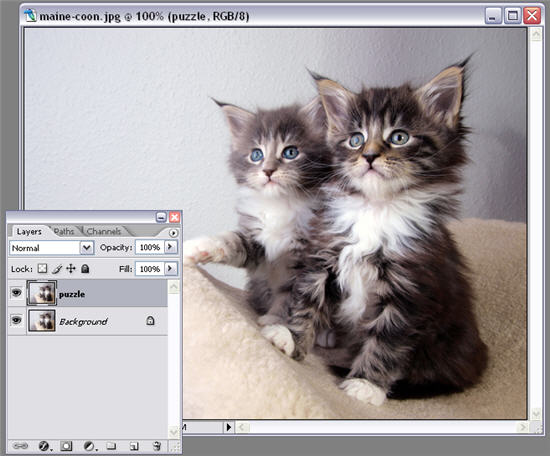
Some Photoshop effects are easier than others to apply simply because Photoshop already includes the exact template you need for it. In this tutorial we’ll use a default texture included in Adobe’s tool to create a jigsaw puzzle effect with your favorite picture.

1. Open the photo you want to work with and duplicate the background layer. Name this new layer “Puzzle”.

Apply a puzzle effect to your photos

Continue reading “How to: Apply a puzzle effect to your photos”

Enter the world of indie gaming

Explore the digital world of MultiwiniaThe rise of game download portals such as XBLA, Virtual Console and PlayStation has presented a flurry of retro games and weirdly innovative titles. PC users needn’t feel left though because there’s a thriving indie scene producing tons of games, many which are free. While these are not the 3D, high production value epics we pay for, they do provide some unique experiences. They represent great time wasters with some fiendishly hard and addictive gaming – perfect for these difficult economic times. Here are a few of my recent stand-out indie experiences:

For relaxed ambient games, give chilled out real time strategy game Dyson a spin, or the demo of the hypnotic Osmos. Both of these manage to be addictive and relatively peaceful experiences. These are great if you have a spare ten minutes, but don’t mind losing an hour or two.

Equally stylish, but more traditional, is the wonderful Multiwinia. Download the demo here to check out one of the coolest looking action/strategy games from last year.

skull2.jpgIf you need more action, there’s fast paced 8-bit zombie gore-fest 10800 Zombies, or the slightly more cerebral The Manipulator, both of which are totally free and great examples of not-quite-retro indie productions.

I also recently looked at the cute platformer The Kiwi’s Tale, which is a great throwback to early-90s gaming. For a desktop high score challenge, check out Skull Pogo. I loved the simple controls and macabre comic-style graphics, and spent far too much time trying to beat my last score. It has an online scoreboard too, so keep clear if you’re super competitive!

Today’s downloads for Windows, Mac and Mobile

Download Youtube Downloader HDWindows: There are many tools that let you download videos from YouTube and convert them to other formats. However, Youtube Downloader HD stands out among them all because it allows you to download videos in high definition, so that you can enjoy the highest image quality on your favorite clips. You can also convert them to AVI or iPod-compatible MP4.

0t_pb.pngMac: Have you ever wished you had Microsoft Paint on Mac? Paintbrush is a Cocoa-based paint program for Mac OS X, similar to Microsoft Paint and the now-defunct MacPaint. The project’s ultimate goal is to recreate the basic functionality of Microsoft Paint, which has been noticeably absent from Mac OS X for years.

Watch DVDs on your Pocket PCPocket PC: Did you know you can watch DVDs on your PDA? Pocket DVD Wizard allows you to reduce the size of four DVD movies to 512Mb so you can watch them from your handset wherever you go. The program is available for Palm and Pocket PC, and the video conversion process is a very quick and simple one.

Extract the audio from a video file

Some time ago a good friend of mine sent me an awesome video in WMV format, featuring one of my favorite bands in concert. I enjoy watching the gig from time to time, but as I mainly listen to music while working on the PC, my music player is minimized most of the time. Therefore, having a video in permanent playback was simply a waste of system resources, not to mention a bit of a distraction.

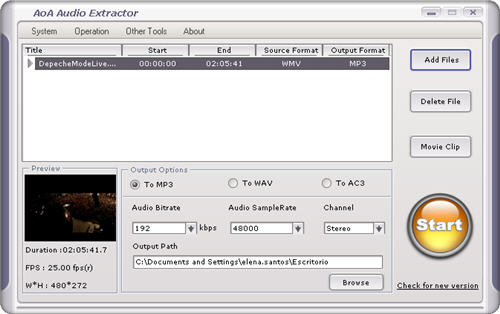
I started looking for a way to extract the audio of this concert so that I could still enjoy it, but without the video part. After some deceptive apps that seemed perfect at first sight but were then full of limitations, I came across Aoa Audio Extractor: a free, simple tool that, according to the developer’s description, enabled you to “extract audio/sound or background music from video files”.

Use Aoa Audio Extractor to rip the soundtrack of a video

After installing the program in a few seconds, I loaded the WMV video on its interface, selected the appropriate configuration settings and started the conversion process. I minimized the program, thinking that the audio track in a two-hour video would take forever to be extracted, but the program only needed a few minutes to seamlessly rip the video’s soundtrack and save it to an MP3 file. Now I can enjoy this great concert while writing this, and without having to play the video anymore.

I used Aoa Audio Extractor to convert the audio track in a WMV file to MP3, but there are other possible combinations. The program works also with videos in AVI, MPEG, MPG, FLV, MOV, MP4 and 3GP formats, and can save their soundtracks to WAV and AC3, besides MP3.

Watch TV on your mobile phone

Phone-based TV is a reality with MobiTVIn my book, watching TV on a mobile phone is one of the most futuristic things you can do today. Although the technology is really still in its infancy, it is possible to enjoy decent quality television on your phone without having to invest lots of money in new equipment or services. In fact, many of the mobile TV broadcasting apps and services out there are free of charge, and are available on a wide range of devices.

Joost for iPhone – Joost was one of the first free Web TV services to hit the Internet and now you can enjoy the delights of the portal from your iPhone. The free iPhone client is very easy to operate and programs can be watched in either horizontal or vertical aspect. There are almost 50,000 videos currently available to watch through Joost and the picture quality is generally excellent.

Good for: music videos, celebrity gossip shows, sports magazine-style programs

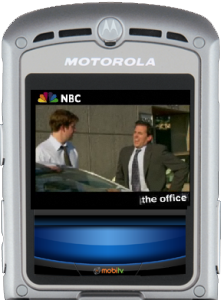
MobiTV – Although MobiTV isn’t free it’s certainly not worth discounting as an option due to the quality of the content on offer. Available for Windows Mobile, Palm and BlackBerry devices, the service starts from $9.95 per month but for that you get access to shows from the most popular US networks, including Fox, NBC and CBS.

Good for: US series, comedy, documentaries

Pocket Live TV – If you’re using a Windows Mobile device (Pocket PC or Smartphone) then you may want to check out Pocket Live TV. As its name suggests, this one lets you watch live television from your PDA or phone. It boasts access to an impressive array of more than 100 channels from 10 different countries around Europe and North America. This includes the likes of CNN, BBC, Deutsche Welle, Sky News and NBC. It’s not free, but only costs $14.95 for high quality access to all this.

Good for: major European and US channels, live sport, music channels

vTap – If you’ve grown tired of conventional television and watch most of your shows in the form of online video clips then get a load of vTap. This app, available for Windows Mobile, iPhone, BlackBerry and Java devices, lets you easily tap into all the videos on the web from your phone. That means you can use it to browse videos from the likes of YouTube, DailyMotion, Metacafe, MySpace, etc.

Good for: squirrels on skateboards, babies pulling funny faces, Star Wars Kid – anything you’d find on YouTube, basically.

FreeBe TV – Although it doesn’t offer access to any of the big channels, FreeBe TV, like Joost, does provide genuinely ‘free’ mobile television (apart from your data charges, of course). The service offers up its own selection of news, sports, and movie clip channels, and is available for users in the UK, USA and Brazil. It’s compatible with a number of different handsets (including the iPhone) so check on the FreeBe TV site to see if yours is compatible.

Good for: news, extreme sports, short films
Time waster: Being a farmer is hard to do

Many kids dream of becoming farmers because it seems like a great job: living in the countryside, taking care of animals, having direct contact with Mother Nature – but if you’ve ever tried it you’ll realize this is the stuff of pure fantasy. Being a farmer is actually a hard job, and you can have a clear idea of it when playing Youda Farmer, an addictive online game that challenges you to become a virtual farmer.

Play Youda Farmer

Your mission in Youda Farmer consists on picking up different products (meat, eggs, flour, etc.) and delivering them to your customers in the village. It sounds easy, but wait until you have fifteen pending orders and a dozen anxious customers waiting for you and you’ll understand the meaning of the word “stress”.

Youda Farmer features really nice graphics and sound effects. I especially love the sound of the truck’s horn! The game tends to get addictive, but I’m sure it would be much more fun if you could actually drive the truck.

Control your Mac with a mobile phone

Bluetooth LogoOne of things that’s severely under-utilized on my Macbook is the Bluetooth module. This is scandalous really because Bluetooth is a fantastic option to have at your disposal, removing the need for cables when connecting external devices, especially mobile phones.
One of the cool little features of Bluetooth on Macs is that it allows you to control your machine via your mobile phone. Why on earth you would want to do this is another question but I guess it could be useful for presentations, if you’ve lost your remote control, or if you just want to play a trick on an unsuspecting user as they see their mouse cursor fly across the screen apparently of its own accord.

The following instructions are for a Sony Ericsson K750i but the same principles should apply to all Bluetooth enabled mobile phones:

1. Activate Bluetooth on both the Mac and phone

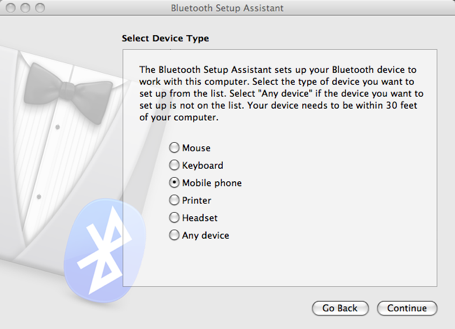
2. Select “Setup Bluetooth device…” from the Bluetooth menu

Bluetooth screenshot 1

3. Depending on the capabilities of your phone, you’ll be asked by the phone what you want to set it up for. I was offered the opportunity to set it up both as a data device and remote control

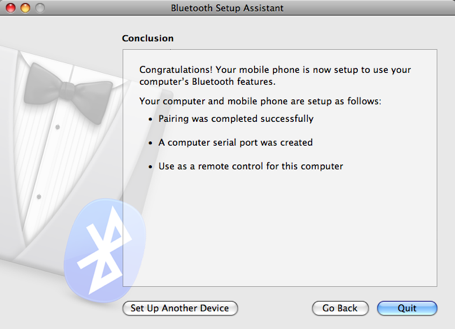
4. Make sure you accept the petition to use as a remote control on your mobile. Select “Accept” on your phone when you’re ready to start and off you go!

Bluetooth screenshot 2

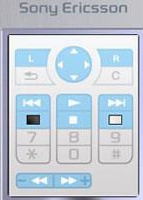
What you’ll then see on your phone is is a map of functions on your screen:

Sony Ericsson screen

There is no keyboard so you can’t type but you can browse the Internet on your Mac using the mobile phone to move the cursor (which moves rather sluggishly) and click on links. You can even shut down your Mac using your phone.

What’s really impressive is the range – I was using the phone from 5 meters away and it was still working which would make it ideal for presentations. If you were to connect a device with a proper keyboard too (such as a Blackberry) you’d even be able to type, although I wouldn’t want to try this for long!