Three easy steps to recover hard drive space

As a software reviewer, I install dozens of new applications every week, which means I tend to run out of hard drive space very easily. But last Monday the situation suddenly got worse, when I realized I only had one gigabyte left on my main hard drive. Time for some action!

Recovering hard disk space is not difficult at all. It only requires a bit of common sense and the right software tools. And the first place you should focus on is installed software.

In my case, I could get easily get rid of 3 GB of software I didn’t plan to use ever again. For those of you who don’t spend your days testing apps, it may take a bit longer, but I’m sure you’ll find a couple of programs you don’t need on your system anymore.
Recover hard drive space

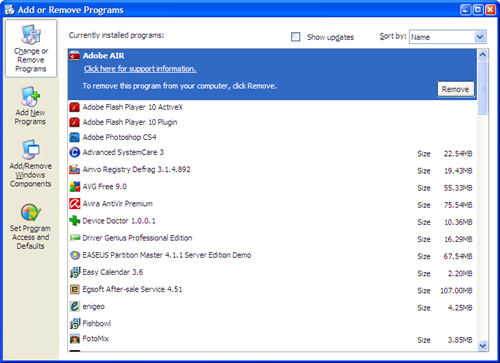
You can uninstall unnecessary programs with the Add/Remove Programs tool in Windows Control Panel, or use a third-party software uninstaller – which are usually more informative and have more features than the default tool in Windows.

Now that you’ve removed redundant software, it’s time to look somewhere else: the file structure in Windows. After a few months of usage, you’ve surely lost track of all the stuff stored on your hard drive. A quick analysis with hard drive scanning tools like Scanner, OverDisk, JDiskReport or SpaceSniffer will reveal the largest folders and files on your system. This will enable you to quickly identify the most space-consuming items and take the appropriate measures. Continue reading “Three easy steps to recover hard drive space”


Tunngle – now available in English!

tunngle1.pngLots of you will probably have already heard of Tunngle, the new VPN client that is slated to give Hamachi a run for its money, especially where gaming is concerned. Personally, I came across Tunngle a few weeks ago while doing research for some posts on Hamachi, but much to my dismay, I found that it was only available in German!

Obviously that wasn’t much use to those of us who don’t speak the language, but the developers promised us that things would change. We waited patiently and, sure enough, the international version came out last Friday, 11th December. How’s that for an early Christmas present?!

People are getting excited about Tunngle because it is rumored to be far more efficient for hosted games than its most popular rival, Hamachi. Whereas nobody is doubting the utility of Hamachi for lots of things, some users have found it to be sluggish when playing games, dropping connections and having problems getting them started. If you’re one of those users, you’ll be really glad for the alternative. Well, you can download Tunngle now at Softonic, and take a peek at my first impressions. You’ll probably want to give it your own test run though, and if you do, be sure to let us know how you get on!

OnSoftware advent calendar 2009 – Day 16

Window number 16 of the advent calendar hides a major game release of 2009. Elena likes this game so much she included it in her top ten apps of the decade.

Day Sixteen

xxx is the long-awaited new version of the popular EA franchise. Like in previous titles, the game has no fixed end: your aim consists of creating a human-like creature and managing their existence, looking after all aspects of their lives, from controlling their bladder to achieving the highest position in their professional career. It is truly an excellent successor, including many great features that make the game even more enjoyable.

How to: rip audio CD to MP3

This week I finally got a CD I ordered online a while ago, but funnily enough, when I arrived home I realized I don’t really have anything to play CD anymore – except for my computer. I stopped using audio CD a long time ago, switched to MP3 and never looked back. And now whenever I buy a CD, I immediately rip it to MP3. It’s a simple process that hardly takes ten minutes and makes my favorite music much easier to carry around and enjoy!

So, if someday you find yourself in the same situation, here’s how to rip audio CD to MP3. I’m using an open source ripping tool called CDex, which works great. All you need to do is insert the CD and wait for CDex to read it and display its contents on the interface.

How to: rip audio CD to MP3

If CDex doesn’t recognize the tracks, you can try to search an online music database for that info. CDex includes a couple of them, plus other ways to find the necessary details for your songs. If nothing of this works, you can always type everything. Continue reading “How to: rip audio CD to MP3”

OnSoftware advent calendar 2009 – Day 15

Today’s advent calendar features an Android app I tested earlier this year and couldn’t get enough of. If you’re a fan of the Google mobile OS, this is my Christmas gift to you…

Day Fifteen

If you can’t be bothered going through the hassle of being on a reality show, just install xxx on your phone and beam yourself live across the Internet for the World to watch. The xxx project is an ambitious and exciting one and once the technology really gets off the ground, the scope of its uses for entertainment, communication, and education will be huge – James

Linux is great – if your hardware is supported

ubuntu.pngLinux has come a long way since the days when you needed to be an astrophysicist just to install it. Nowadays its so easy to install, I reckon even my mum could do it especially since Ubuntu even installs from a self-extracting EXE file. Just download it, double click and Ubuntu installs automatically – partition and all. With this in mind, I recently decided to try breathing new life into an old ailing Acer Aspire 1410 laptop by installing Ubuntu using the above method. Everything went absolutely fine – until it came to hardware support.

The installation process is amazingly quick and easy. I’d estimate from start to finish it took less than 15 minutes. To be precise, it was exactly one half of the Pop Idol final which I was kind of watching at the time – and I have to say the installation process was far more entertaining and much less painful.

The first thing that struck me was how slick and lightning quick Ubuntu is. And just because it’s free, it’s no ugly duckling either. Using Ubuntu is now as intuitive as using Windows. Sure, things are in slightly different places, menus are slightly different but it’s easy enough for anyone to work out. The problem however, comes when it doesn’t work with your hardware.

Unfortunately, my 5 year-old Acer Aspire isn’t one of the models that Ubuntu supports. This doesn’t mean I can’t use the Ubuntu, it just means that I have to install drivers for each component separately – and that’s where the fun stops. Continue reading “Linux is great – if your hardware is supported”

Skype finally comes to Nokia phones

Skype for S60 is finally outIt’s taken a while, but finally Nokia users can talk for free on their mobile using Skype. iPhone and Windows Mobile users have been able to use Skype for some time, but the new Beta release for Symbian opens up the service to to all those people with Series 60 Third Edition phones.



Skype for Series 60 lets you make free Skype-to-Skype calls over 3G or WiFi. It also lets you call phones with Skype credit, as well as allowing you to receive calls on your online number, send instant messages, share files, take part in group conversations, and more. Thankfully, this version of the app is just as user friendly as its iPhone and WM counterparts thanks to a simple, stripped-down interface that uses bold icons and tabs to make things as clear as possible.

Although it lacks some of the more advanced features of the desktop version of Skype (video calling, Extras, etc.) there’s still enough to tinker around with. For instance, all the Skype emoticons are included, you can change your Mood settings, and there’s a History feature that tracks all of the conversations you’ve been having. There’s even some integration with your phonebook, allowing you to import contacts into Skype on start-up.

If you’ve got a flat rate data plan then Skype is a real must-have piece of kit for your phone. The app has already changed the way we communicate while we’re at home and now Skype is pushing into the mobile market things are going to get even more interesting.

The UN Climate Conference in Copenhagen

It may not have a snappy title, but the Climate Conference is a big deal, and has put environmental issues back in the headlines. Who knows if your leaders will be able to make any kind of meaningful deal?

You can follow the official timetable and events at http://en.cop15.dk/frontpag, which has a good range of articles and reports as well as regular updates on the goings on in Copenhagen. For breaking news, just search for #Copenhagen in Twitter. Of course news on Twitter is mixed in with lots of peoples personal opinions and often stupid comments, but you can still see stories break there amongst all the noise.

If you want to relax, why not try this Global Warming game? It’s really easy to pick up and there does seem to be a point about sustainability in the game – you have to add green technology to factories, put out forest fires and use bikes from the factories to replace cars. But as the game goes on it gets harder and harder to manage all the problems, and it’s likely eventually the ice caps will melt and drown the planet! I felt the idea was that we can’t just continue by making different products, but have to change our lifestyles more fundamentally. Whether that’s right or not, Global Warming is quite a fun casual game.

[Via: PlayThisThing]

OnSoftware advent calendar 2009 – Day 14

Today’s advent calendar window hides behind it one of Jon’s favorite games of 2009. It’s not the most well-known of the titles we’ve been playing this year but it’s great fun nonetheless.

Day Fourteen

xxx is a puzzle game that will remind some of the highly-rated Portal. Instead of that games portal creating gun, you have a gravity gun that can attract or repel objects. It is an interesting puzzle game, and is absolutely fantastic quality for a free game – Jon

OnSoftware advent calendar 2009 – Day 13

The number thirteen might be unlucky for some, but not for this application, which makes it into our list of 2009’s top software. It’s unlikely you’ll guess this one because the program is relatively unheard of – but have a stab at it anyway!

Day Thirteen

All writers suffer from writers block from time to time, and xxx is a tool designed specifically to overcome it. xxx consists of a very basic word processing program with absolutely no frills. You set a word target and a time limit and start writing. If you don’t meet the target within the time limit, xxx erases all your work. If that isn’t motivation, I don’t know what is! – Niamh