Google Instant goes Mobile

If you’ve been blown away by Google Instant, you’ll be stoked to find that it’s now also available on mobile devices, for top class searching on the go.

[youtube]http://www.youtube.com/watch?v=R-_HxR5QFn8&feature=player_embedded[/youtube]

If you’re not familiar with the concept of Instant , it’s a really cool way of visualizing search results in real time as you type. Google point out that in the space and speed-limited environment of a mobile device, the instantaneous-ness of it all will be even more useful, and I’m inclined to agree. There’s even an easily accessible link to turn Instant on and off, in case you’re temporarily struggling with a less than perfect wi-fi or 3G connection. If you’re running Android 2.2 or an iPhone/iPod running iOS 4, check it out now!

Skyfire’s new iPhone browser is ‘sold out’

SkyfireBack on Tuesday I was predicting that the new Skyfire iPhone browser, released today, would be a big hit on the App Store. But I didn’t anticipate that demand would be so great that the developer would have to pull the product from iTunes!

As Skyfire reports on its blog, the new Flash-ready browser became the top grossing app, and the third highest paid app overall – in just five hours of it being online. Now it’s unclear if and when the new browser will go back online. Of course, this is all great publicity for Skyfire – but infuriating for those still waiting to experience Flash video in their iPhone browser.

Twitter and Facebook for Android Updated

Facebook CEO Mark Zuckerberg has been sounding off about Google slowing Facebook’s Android development – apparently the search giant bought the developer who was originally making the app! Today a new version has been released, 1.4, and it brings the Android app into line with its more-developed iPhone cousin. Groups and Places are now included, and the notifications have been improved. Get it here.

Android’s official Twitter app has also been updated to include many interface features first introduced in their iPhone app. You can now pull to refresh your twitter feed, and swipe tweets to reveal Twitter tools like quote tweet, reply and so on. Get it here.

Sophos launch free-anti virus for Mac

sophoslogo.pngI’m a huge skeptic when it comes to anti-virus solutions on the Mac but Sophos have launched a free version of it’s anti-virus software and I have to concede, it’s pretty good. Sophos Anti-Virus for Mac Home Edition is a free and slighter slimmed-down version of Sophos Anti Virus for Mac.

The latter was somewhat disappointing but this version is something of an improvement being less bloated and of course, with the added bonus that it’s absolutely free.

Sophos Anti-Virus for Mac Home Edition is designed to protect your Mac from the latest viruses, trojans, worms and malicious spyware. It features an on-access scanner that provides constant real-time protection while consuming the minimum of system resources. In fact, it hardly consumes any CPU while it scans in the background which is a big improvement on Sophos Anti Virus for Mac. In addition, you don’t need to restart your Mac after installation as is common with many anti-virus programs.

As soon as it is installed, Sophos Anti-Virus for Mac Home Edition starts working immediately symbolized by the black Sophos shield in your menu bar. If you think you have viruses, you can scan your Mac manually. Just click the black shield and select Scan Local Drives:

screen-capture-411.jpg

If a threat is found, click the black shield and select Open Quarantine Manager.

There are obviously some downsides to this free version. Sophos Anti-Virus for Mac Home Edition doesn’t provide network scanning for example and many of the advanced scanning options available in Sophos Anti-Virus for Mac are missing.

Overall however, Sophos Anti-Virus for Mac Home Edition is one of the better anti-virus solutions for Mac. Is this a free discreet anti-virus that Mac users could actually grow to like?

Drop.io closing down after deal with Facebook

The online file sharing service Drop.io is shutting down servers in the next few weeks, as a direct result of the deal signed with Facebook. The ubiquitous social network has acquired Drop.io’s technology and has also hired the man behind it, Sam Lessin, as announced on the company’s blog a couple of days ago.

Drop.io closing down

The first immediate consequence is that starting this week, you can’t create new drops (shared links), though you can still download content from existing drops, which will be available until December 15th. after this date, all the content in Drop.io’s servers will be deleted, so remember to download your information before it’s too late – you’ll get a reminder by email just in case.

Paid accounts also have the same deadline. Billing for these accounts will stop on November 15th, giving everyone a full month of service – and plenty of time to download your information before it’s all wiped out.

Oh, and if you have any concerns about Facebook taking over your Drop.io data, rest assured. No user information will be transferred to Facebook and everything will be deleted from Drop.io’s servers.

Softonic is five years old today

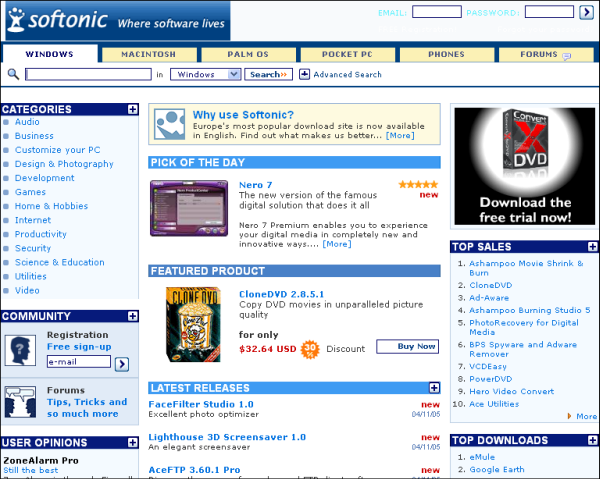
Softonic BirthdayIt’s time to celebrate, because today is Softonic‘s fifth birthday. The English version of Europe’s most popular software download site was launched exactly five years ago to this day.

Since the launch of Softonic, OnSoftware‘s parent site, the world of software has changed pretty significantly – and the site has evolved accordingly, of course. Back then, there was no such thing as an app store, Windows Vista was still a twinkle in Bill Gate’s eyes, Macromedia owned Flash, and Twitter would have sounded ridiculous.

Looking back at that first site, not only were we staggered by the shift in our design since then, we also noted interesting changes in the activity of our users. Back then, Winamp was far more popular than iTunes, our top downloaded files largely consisted of P2P and file sharing apps, and the Mac section attracted less of a share of downloads.

Softonic Old

Continue reading “Softonic is five years old today”

Free Browser Game: Rolling Fall

Rolling Fall is a zombie-themed free puzzle game you can play in your browser. Heard of iPhone phenomenon Cut The Rope? Rolling Fall uses much the same mechanic, but instead of feeding a cute critter, you have to squish zombies!

Each level starts off in stillness, and you have to literally get the ball rolling by cutting chains that suspend heavy balls. Using timing and momentum, you’ll hopefully end up with a screen full of squashed zombies, and move on to the next puzzle.

Rolling Fall doesn’t win any marks for originality, but it’s fun anyway. If the music gets annoying or the sound effects gross you out, you can thankfully turn them off! Play Rolling Fall here. Requires Flash.

[via Jay is Games]

How to: Uninstall Windows Live Messenger 2011

Judging by the user comments I’ve read in the program’s review and blog post, I’d say Windows Live Messenger 2011 hasn’t been very successful among users. Whether the problem is the integration with Facebook or the new “social” interface, I can’t tell. What I know for sure is that many people want to get rid of it and go back to a previous, lighter and more friendly version of Live Messenger. So here’s a short tutorial I wrote on how to downgrade to Windows Live Messenger 2009 in just a few easy steps.

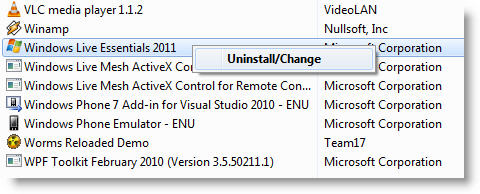
1. First of all, you need to remove Windows Live Messenger from your computer. Go to Control Panel > Programs and Features, scroll down to Windows Live Essentials 2011, right click on it and start the uninstalling wizard.

Uninstall Windows Live Messenger 2011

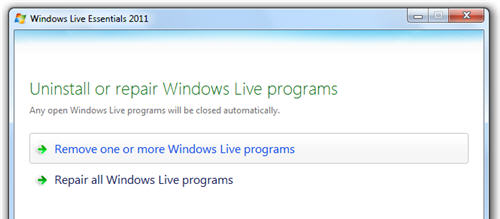
2. In the first screen of the wizard, select the “Remove one or more Windows Live programs”.

Uninstall Windows Live Messenger 2011

Continue reading “How to: Uninstall Windows Live Messenger 2011”

How to get around the iPhone Alarm bug

While half the world was celebrating Halloween, the other half was adjusting their clocks to the new daylight saving time for winter, starting effectively Sunday October 31st at 3:00 AM. But the iPhone didn’t seem to notice, and though the device switches hours automatically, a bug in iOS4 prevented many of them from working it out successfully. Time was adjusted, but the built-in alarm failed. This resulted in thousands of iPhone users being woken up an hour late!

The daylight savings time is coming to the US on Sunday 7 November, so if you want to avoid having trouble with your alarms, you have two options: either you buy a standard alarm clock for your bedside table, or you use any of the dozen alarm apps you can find in the App Store. Here are some of them:

iPhone alarm appsNightstand Central – This complete alarm clock includes a sleep timer, weather info and customizable backgrounds. You can listen to your favorite music or audiobooks while going to sleep, set up various alarms with different configuration options and make use of the app’s convenient flashlight if you need to get up in the middle of the night.

iPhone alarm appsAlarm Clock Free – A nicely designed alarm clock for the iPhone that includes a gorgeous LCD-style display, support for multiple alarms, 11 built-in alarm sounds and customizable snooze function, among other features. The Pro version lets you use your favorite songs or playlists as alarm sound, includes more themes and also has a built-in flashlight.

iPhone alarm appsClock Pro – More than just an alarm app, Clock Pro combines many clock and timer functions in one program. You can use it as an alarm clock with regular sounds or with your favorite music, and also as a timer for different purposes: a world clock to display the time around the globe, a chess clock, a stop watch, a sleep timer, a metronome, even an egg timer!

iPhone alarm appsGoodnite – A fully customizable alarm clock that uses different LED displays, screen orientations and personal backgrounds images. You can have it play your favorite songs at night when going to sleep, and play an alarm sound – or iPod playlist – in the morning at an increasing volume to wake up without any rush.

iPhone alarm appsTimeTuner Radio  – A powerful app that wakes you up not only with its own alarm sounds or your favorite iPod songs and playlists, but also with any of the 30,000 online radio stations the program can tune in to. Other interesting features are support for unlimited, customizable alarms, dual time zone (perfect for travelers), and night mode (to adjust brightness).

Skyfire 2.0 set to bring Flash to iPhone

iPhone owners are in for a treat this week, when Flash video content will be finally be accessible on the device, through the new Skyfire browser. Apple has already approved the Skyfire Mobile Browser 2.0, which is due for release on Thursday. The app will allow users to watch Flash video content, which will get downloaded to the Skyfire servers, converted to HTML 5 then shown in the browser.

Annoyingly, there will be no support for Hulu in the new Skyfire, as the popular video streaming site has already blocked the developer from using its content. However, Skyfire 2.0 should allow access to Flash video embedded into web pages, as well as playing clips from sites such as Dailymotion, Google Video and Metacafe. Significantly, Skyfire has assured the protection of users’ personal data by automatically shutting off downloading to the company’s servers when someone is viewing a secure site (an online bank account, for example).

Being the first browser to fully integrate Flash video should be a massive boon for Skyfire, and will surely see it race to the top of the App Store upon its release. Check back on Thursday to find out our verdict on Skyfire 2.0.

 [youtube]http://www.youtube.com/watch?v=KGai5Nf9BwU[/youtube]