Adobe Audition beta released for Mac

audition logo.pngAdobe have finally released a beta version of Adobe Audition for Mac in Adobe Labs. Adobe Audition started life as a simple audio editor on Windows called Cool Edit Pro until Adobe saw that the big money was in music creation software. It’s taken almost 7 years for it to reach Mac though.

Adobe Audition is a multi-track recording studio that offers all the refinement you expect in Adobe products, but may leave beginners floundering in technical jargon.

The new Mac version features almost everything available in the Windows version including audio editing, multitrack mixing plus greater workflow flexibility and new features such as native 5.1 surround support and special sound effects. One of the other big bonuses for users of Adobe Premiere Pro is that Adobe Audition now integrates better with it meaning you can make soundtracks and audio that can be imported more easily into your video creations.

adobeaud.png

However, some features, such as MIDI support, are not included because Adobe say other tools in the market offer those capabilities and “they are not part of the core audio post-production workflows that are at the heart of Audition’s strengths”. Others, like CD Burning, are also not included for similar reasons.

The beta version is available as a 30 day free trial here. There’s a forum for new users to discuss and report issues related to the beta release here.

Call of Duty: Black Ops released today

Call of Duty: Black Ops is out on PC and consoles today, you can check out the official  launch trailer for the game below.

Last year’s Modern Warfare 2 was the biggest launch ever, but can this release beat it? Many people think the last game’s story was too convoluted, although it certainly delivered on cinematic thrills.

Black Ops takes us back into the Cold War, for some over-the-top historical action. Word has it the gore animation is now ‘too good’, so expect some pretty gruesome scenes amongst all the Jerry Bruckheimer-esque action. We’ll be taking a look at it later today.

[youtube]http://www.youtube.com/watch?v=OPTOVQFRggI[/youtube]

Organize and plan your shopping for the holidays

This time of year always seems a bit early for me to be thinking about holiday shopping, but in just a few short weeks the infamous Black Friday will be upon us in the US. While some people look forward to the experience and jump into it with gusto, shopping for holiday gifts can be a stressful and overwhelming experience for many of us.

Thankfully, for those of us who prefer to pre-plan everything from our holiday shopping budgets to what gifts we actually expect to purchase, there’s an app for that. Quite a few, actually:

Santa’s Little Helper: As the name suggests, this app for the iPhone and iPod organizes your Christmas gifts several different ways. You can arrange your purchases by group, store, type of gift, and also by individual person. One of its more useful features is the individual gifts page that allows you to include the item’s name, the person to whom it’s intended to be given, and the gift’s status, such as where you bought it and whether it’s been wrapped.

Toys R Us – The Great Big Christmas Book: This fun and colorful app makes me wish the iPad had been around when I was a kid. The Great Big Christmas Book is a creative way to involve your children in holiday gift-giving. Toys are distinguished by categories, allowing your child to create a list toys they’d like to receive. The prices are only seen in the parents’ section, and the wish list can be sent to friends and family alike with ease.

EverNote: Although not technically a holiday-specific program, EverNote is hard to beat when it comes to capturing, storing, and syncing just about any information onto multiple devices. It’s a great organizational tool, particularly for holiday shopping, and works on PCs, Macs, and even your iPod and phone. Tags are also a highlight of the program, making it even easier to categorize different holiday purchases.

GiftBox: For those who aren’t quite as enthusiastic about apps, GiftBox is a great alternative. A free, web-based program, GiftBox allows you to create an account and not only keep track of your gift ideas for friends and family but also notes the gifts you’ve received from other people. In other words, you’ll never have to worry about misplacing your thank you list again. You can also even go one step further and use GiftBox to send thank you eCards.

Read ebook ePub and PDF files on your iPhone

It may seem like heresy to bookworms, but reading a book on your iPhone is actually quite a pleasant experience. If you’re not convinced, it’s easy to give it a go, and there are plenty of free books out there to try.

Of all the ebook readers available on the App Store, my favorite is Stanza. You can read my review here. I like Stanza as it’s free, full of features to make reading as comfortable as possible, and there are plenty of in-app ways to download books.

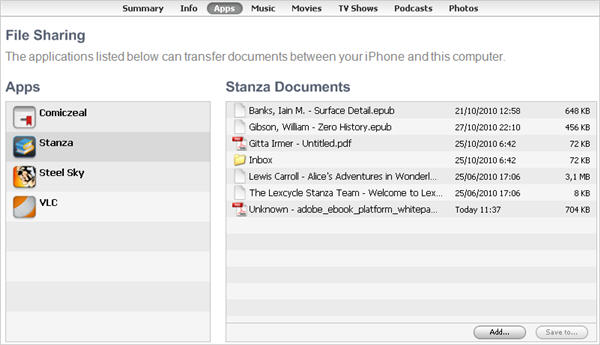
However, as well getting books directly from the app, you can also import any PDF or ePub files you have on your computer, making Stanza a really useful document reader too. Plug in your iPhone, and open iTunes.

Click the Apps tab at the top, and scroll down. Here there’s a File Sharing section, click Stanza, and drag any PDF or ePub files you want. After a short sync, you’ll be able to view the files from Stanza. Stanza automatically bookmarks your page, so you’ll never lose your place, it can look up words you don’t know and add annotations too. It may not smell like a book, but the advantages are clear!

Become a beta tester for Battlestar Galactica Online

Closed beta testing has today opened for the hotly anticipated Battlestar Galactica Online game. If you’re a fan of Battlestar Galactica and you also love massively multiplayer online gaming then it’s worth signing up to be a beta tester. Registration is open to a limited number of testers in Europe and the US, and you need to complete a profiling survey to see if you’ll be accepted.

Battlestar Galactica Online allows you to choose to play human or cylon, as you aim to take command of the Universe. The game combines elements of Space combat, exploration, mining and mission play. Assets from the popular sci-fi show have been used in the game, so fans should really feel like they are immersed in the Battlestar Galatica universe.

[youtube]http://www.youtube.com/watch?v=UxMYDUgcBFE[/youtube]

Increase your email productivity with Gmail Labs

I only use Gmail for my personal email, and I certainly don’t get any important assignments there. But I do know people whose jobs are mainly email-based and use Gmail for all sorts of work-related topics, tasks and projects. If Gmail is also your tool of choice to manage work stuff, you’ll probably like this list of Gmail features focused on productivity – a bunch of extra Gmail tools that can be enabled in Labs and which can help you become more productive when working with email.

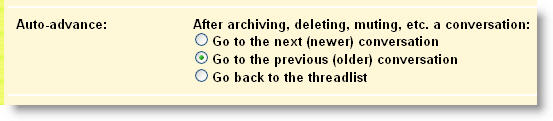
  • Auto-Advance – Moves on to the next conversation (or goes back to the previous one) instead of displaying the inbox after you mute, archive or delete a conversation. It can save you a few clicks every day.

Increase your Gmail productivity with Gmail Labs

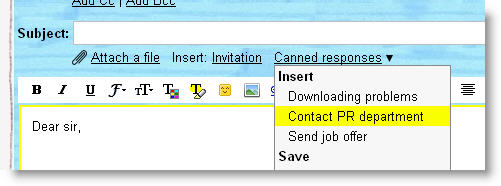
  • Canned Responses – Creates automated responses from emails you need to write frequently. In that way you’ll only need to type them once, and then select them from a drop-down menu next time you need to send a similar message.

Increase your Gmail productivity with Gmail Labs

Continue reading “Increase your email productivity with Gmail Labs”

Windows Phone 7 arrives in US

Windows Phone 7 phones are today available in the US, as Microsoft begins its campaign to break up Android and iOS’s party. The HTC Surround and Samsung Focus are both available to buy through AT&T, while T-Mobile offers the HTC HD7 device.

Already, there’s a lot of Windows Phone 7 software around, including official offerings from Twitter and Facebook. The Marketplace is home to other popular favorites, including Shazam, Netflix, Tetris, and IMDb.

If you want a feel for what the new Windows Phone 7 operating system is like, then go check out our guide to using the Windows Phone 7 emulator, and watch our video demo.

Windows Phone 7 arrives in US

Mac OS X 10.6.5 update delayed

Snow Leopard users will have to wait a little longer for the anticipated 10.6.5 update. 9To5 Mac reported a week ago that a public release was imminent but it seems Apple have put the update on hold.

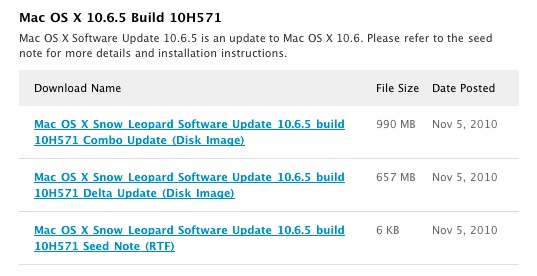
A few days ago however, 9T05 Mac reported that the developer seeds (which usually precede OS X updates) were only issued a few days ago so the wait shouldn’t be too much longer:

screen-capture-16.jpg

According to the developer seeds that have been released, OS X 10.6.5 will address the following issues:

  • Improve reliability with Microsoft Exchange servers
  • Address performance of some image-processing operations in iPhoto and Aperture
  • Address stability and performance of graphics applications and games
  • Resolve a delay between print jobs
  • Address a printing issue for some HP printers connected to an AirPort Extreme
  • Resolve an issue when dragging contacts from Address Book to iCal
  • Address an issue where dragging an item from a stack causes the Dock to not automatically hide
  • Resolve an issue with Wikipedia information not displaying correctly in Dictionary
  • Improve performance of MainStage on certain Mac systems
  • Resolve spacing issues with OpenType fonts
  • Improve reliability with some Bluetooth braille displays
  • Resolve a VoiceOver issue when browsing some web sites with Safari 5”

The 10.6.5 update will be rolled out automatically to Snow Leopard users via Apple Software Update.

Firefox 4 Mobile comes to Android

Today’s a great day for releases. If the excitement of Google Instant for mobile wasn’t enough, Android and Nokia users are now able to browse the web with Firefox 4 (Fennec). You’ll be pleased to hear that loads of your favorites are packed into this mobile device – Sync, Add-ons and the Awesome Bar all feature.

[youtube]http://www.youtube.com/watch?v=sjnhSkuqods[/youtube]

There’s only one problem – even though this beta is available for Android and Nokia N900 (and there’s a long list of supported devices) my HTC Legend, for example, simply wasn’t able to cope. Apparently this is due to the fact that the Legend and other phones use ARMv6 processors, rather than the more standard ARMv7, but after taking a deep breath and disabling the security settings that prevent you from installing any non-Market sourced apps, I was pretty disappointed!

If your device doesn’t seem to be supported, pay attention to this information. The Mozilla blog says that your phone might be able to run one of the experimental ARMv6 nightly builds. I’m normally a careful girl, but after throwing caution to the wind and unchecking that security box, I may as well go the whole hog and get experimental – I’ll report back if I get it working!

First look at Skype 5 beta for Mac

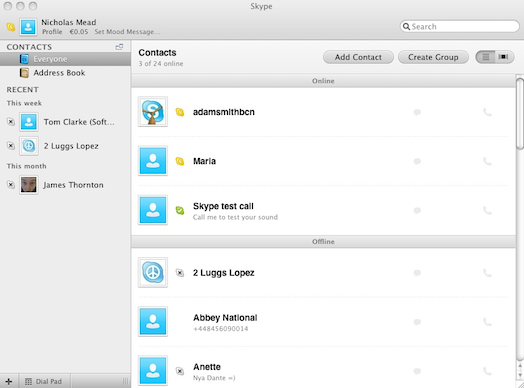
Skype have released a beta version of Skype 5 for Mac and I’ve taken a look at what it offers. In a nutshell, Skype for Mac has gone through some significant changes that make it bigger, slicker and with more video conferencing support. Some people will like the new look but until they get used to it, others might find it a bit of a pain.

The first thing you notice when you log in for the first time is that the traditional Skype interface has been replaced with a bigger, streamlined one. By default, your contacts list is on the left, the other basic functions are in the main part of the program window making it more streamlined and slicker than previous releases:

skype1.png

Continue reading “First look at Skype 5 beta for Mac”