Borrow and lend Kindle books online with Lendle

If you own a Kindle, you’re probably already aware that Amazon allows you to lend out select ebooks you’ve purchased to other Kindle users. This is a one-time service where you can let another Kindle user borrow an ebook you’ve purchased for up to 14 days before the book is returned to your own device. Author and publisher prohibitions against lending on certain books notwithstanding, it’s a pretty useful feature.

But what if you don’t know anyone else who owns a Kindle? Now you don’t have to, thanks to Lendle. A web-based service that allows users in the US to lend and borrow books entirely online, Lendle is easy to use and a great way to take advantage of Amazon’s ebook lending service, even with people you don’t know. While you don’t technically have to own a Kindle to participate, you do need to own lendable ebooks in Kindle’s format and have a Kindle-compatible device in order to read them.

The obvious downside is that quite a few ebooks aren’t able to be lent out. Publishers or authors have the right to restrict lending abilities on their works, and many choose this option. Also, since Amazon limits a user’s ability to lend more than one time per book, once you’ve accepted a lend request, that’s the last time you can lend it out to someone else. For all its outward popularity, ebook technology is still in its infancy and developers of ebook devices like the Kindle are still trying to work out the kinks in their policy on lending ebooks. It may not be the best or most user-preferred solution, but by connecting book lovers across the web Lendle still offers an incredibly useful sharing service that’s definitely worth a look.

For ebook device owners who want a simple and comprehensive way to manage ebook purchases via desktop, check out our blog post about Calibre.
What will Windows 8 look like?

Windows 8 large

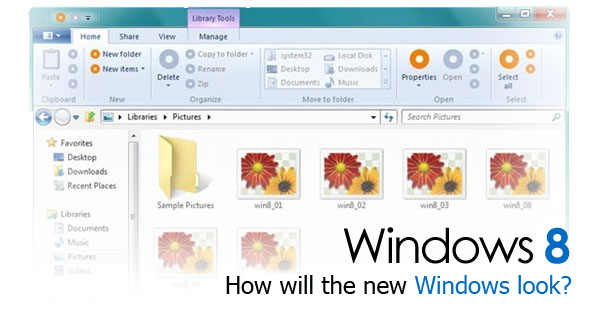
Windows 7 has been with us for one and half years now and thoughts are naturally turning to its successor, Windows 8. Nobody knows an awful lot about Microsoft’s next desktop operating system, but the odd tidbit or two has filtered through in the shape of leaked screenshots and even a (seemingly) official Windows 8 wallpaper from the Milestone 3 development version of the OS.

We’ve gathered together the information that exists about Windows 8 and compiled this short dossier of its possible features.

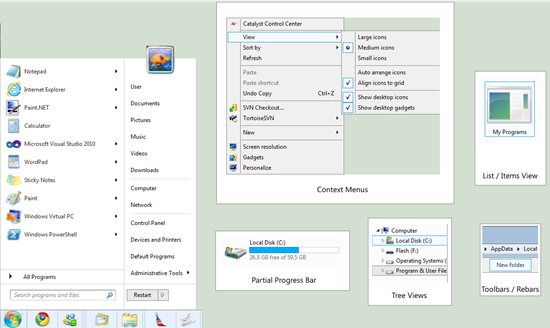
Aero Lite theme using the ‘Ribbon’

Windows 8 will surely use the Aero theme, but it’s likely to get some important tweaks. Although the general appearance of the windows won’t change, the new default theme, Aero Lite will put less strain on the system. Windows 8, in fact, is designed to run even on low-end devices.

Aero LiteSome enthusiasts have already begun creating Windows 8-inspired themes, such as Aero Lite for 7

The Windows 8 interface should have a lot in common with the Metro UI found in Windows Phone 7. This approach to marrying desktop and mobile platforms is the latest craze among manufacturers, and is something we’ll also see in Mac OS X 10.7 Lion. The most likely outcome? That Aero Lite will be used in embedded systems, and regular Aero on standard machines. Continue reading “What will Windows 8 look like?”

Google Maps for Android updated

Google Maps for Android has been updated to 5.3.0, bringing with it juicy new features that Android users are sure to love.

First up, Google Maps now allows Hotspot users to add their own rating categories to reviews – eating in a Mexican place where the food and service are great, but the Margaritas suck? Well now’s your chance to let people know about what really matters.

The other changes relate to Google Latitude, Google Map’s geolocation service. If you have enabled Latitude in Maps, and then enabled Location History for Latitude, you’ll be able to view your Latitude history on your Dashboard, directly from your mobile device. This is pretty cool, as you’ll be able to view (but not necessarily share):

“…your past locations and visualize them on Google Maps and Earth. See a dashboard showing interesting information, such as trips, frequently visited locations, distance traveled and more.”

In addition to this, you’ll now be able to check in “at home”, and not just when you are out and about. Perfect for letting mom know that you’ve gotten home safely, or letting friends know that you’re in if they decide to pop over for a visit.

Check out Google Maps for Android here.

Mozilla names and shames slowest add-ons

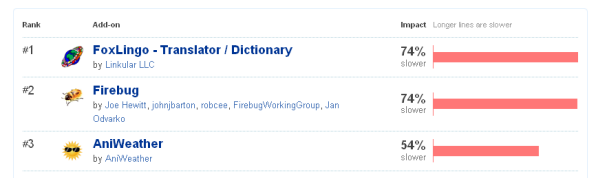
As part of its attempt to haul Firefox out of its speed slump, Mozilla has named and shamed the add-ons that slow Firefox down the most.

The folks over at Firefox HQ recommend checking the list if you’re suffering from slow start-up times, and to remove them if you are. It also recommends uninstalling any add-ons that you no longer use, as they could also be responsible for blocking things up.

So who are the biggest culprits?

  • FoxLingo, a translation add-on that James rates pretty highly. As add-ons go, it’s a good one, but with all the power of Google Translate just a click away, we’re not sure that anyone really needs a translation add-on anymore.
  • Firebug, a developer’s tool that the average user is unlikely to miss. If you’re a professional looking for a replacement,your best options are to ask around on development forums. In the meantime, try Fiddler.
  • AniWeather, a cute animated weather forecast add-on. In fact, it’s probably the animation that slows it down so much. Instead of clogging Firefox up, then, why not take a look at a nice desktop version? If appearance is high on your list, definitely check out Meteo Fusion or YoWindow – you won’t be disappointed.
  • FlashGot, a mythical download helper. It’s pretty popular, so its inclusion on the list is likely to upset quite a few people! If it just has to go however, you’re in luck. Just the other day we wrote an article about the best download helpers, and luckily for you, lots of them integrate completely with Firefox. Check them out here!
  • FoxClocks, a little extension that adds a selection of world clocks to Firefox. This is one of the easiest replacements to make – even Windows will let you add multiple world times to the task bar in Windows Vista and 7 (right-click on the clock > Adjust Date/Time > Additional Clocks and add the ones you want). Even if you want a separate app, you’re spoiled for choice – what about Clock! or ClocX?

There are 50 add-ons on Mozilla’s list, but you’re sure to be able to find a replacement if you decide to uninstall. If you’re having any problems, let us know and we’ll try our best to come up with a solution. Alternatively, you could always make the ultimate replacement – how about swapping Firefox for Chrome , IE 9 or Opera?!

Battlefield Play4Free out now

EA continue their march into browser-based online gaming with their latest effort, Battlefield Play4Free.

It’s Windows only and like Battlefield Heroes uses a browser add-on to launch the game. Battlefield Play4Free is a pretty traditional FPS. It’s got a modern setting and all the basics that make the Battlefield series what it is. We played the closed Beta recently, and as I said in my review, found it to be pretty fun and certainly impressive for a free game!

There are paid, premium aspects to Battlefield Play4Free, but you can have a perfectly good time without paying a thing. While it looks a bit last-generation graphically, it’s good enough and is great fun to play, especially if you persevere and learn to use the vehicles well.  If you thought Battlefield Heroes’ cartoon style wasn’t serious enough, Play4free could be the free game you’re looking for.

How to open Pages files in Windows

Pages is Apple’s answer to Microsoft Word but it’s only available on Macs. What do you do then when a Mac user sends you a Pages document and you want to open it in Windows? Don’t worry, there are three very simple solutions:

1. Use WinZip or WinRAR

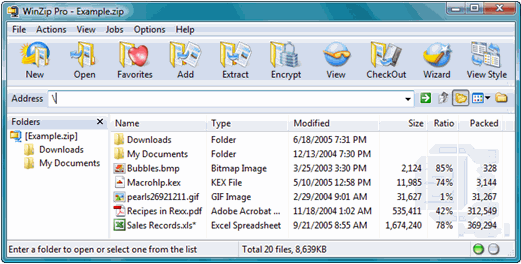
If you can’t contact the sender, you can use WinZip or WinRAR to read the file. Change the name of the .Pages file to .Zip. Unzip the package with WinZip or WinRAR and you’ll see a file named “Preview.pdf”. You’ll be able to read the contents of the document in this PDF file. However, you won’t be able to edit it unless you use a PDF unlocker and editing program such as PDF-XChange-Viewer.

2. Use Google Docs

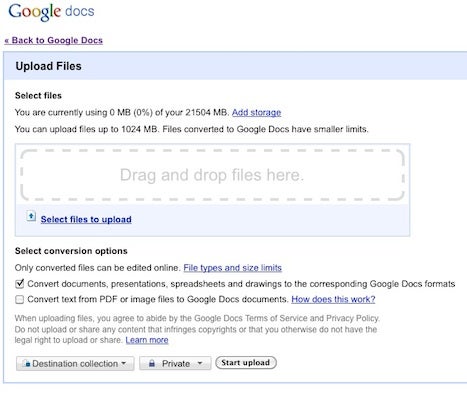
Google Docs is incredibly flexible nowadays when it comes to opening file formats including .Pages files. Just click the “Upload” option in the top left corner of Google Docs and you can open the file immediately.

3. Ask the sender to export the file to a different format.

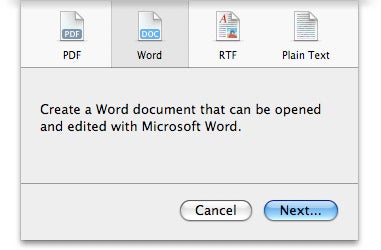
In Pages, go to “File”, “Export” and then select the format you’d like to export to. Currently Pages supports exporting to PDF, Word, RTF and Plain Text. Most recently Apple have also added the ePub format for eBooks. You’ll then be able to open any of these formats in Windows:

Top List: Download Managers

Whenever I get a new computer, or a virtual machine here at Softonic HQ, one of the first programs I install is a download manager. If you download frequently, it makes the job so much more efficient, easily allowing you to sort, categorize and automate your downloads. What’s more, lots also make downloading much, much quicker. What are you waiting for?! Check out the top options here.
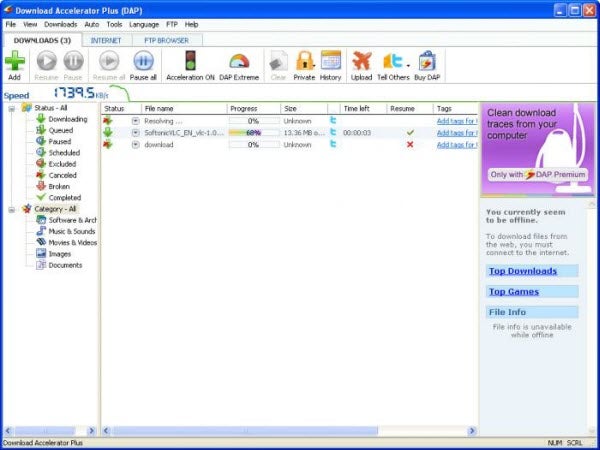
Download Accelerator Plus

My favorite app is Download Accelerator Plus (DAP). Even the free version of this manager has more options than you can imagine, integrates perfectly with most browsers and really speeds things up. I couldn’t live without it, and if you are looking for a great all-rounder, don’t hesitate to download it. Also available for Mac.

Continue reading “Top List: Download Managers”

Delete yourself from the Internet

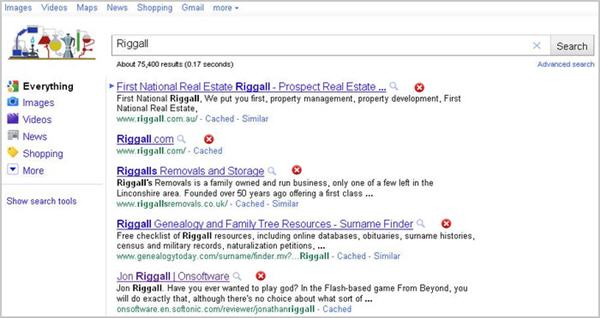
Have you ever searched for yourself on the internet? It’s a fun and potentially ego-boosting pastime for most, but be warned – some of you are bound to find things you wish weren’t there: angry drunken blog rants, unfortunate photos, leaked videos, useful information and more. If you are one of them, UnGoogleMe is a new browser add-on that’s perfect for you.

Easy to install, and compatible with IE 6, Firefox 3 and Chrome beta builds, UnGoogleMe will change the way you interact with the internet. Now, when you see search results, there will be a small red ‘x’ next to each one. Click this, and your result will disappear forever (unless the search engine’s algorithm is changed, then it may need re-deleting). Incredible but true: UnGoogleMe lets you delete yourself from Google and other search engines!

Sharp readers may look at UnGoogleMe and think, ‘what’s to stop me deleting other people too?’ It’s a good question, and the answer appears to be – nothing. Like most technology in the 21st century, celebrities have been the first to make use of this powerful tool, deleting their rivals and competitors in a cycle of hatred where only one celebrity will be left standing. And guess what? There’s nothing to stop you deleting that one too!

Until search engine providers find a way around it, it seems that like some nightmarish nanotechnology grey goo scenario, UnGoogleMe is going to eat away the internet before our very eyes.

On the other hand, people may surprise us by using it fairly and responsibly, helping the future of UnGoogleMe seem much brighter.

Download UnGoogleMe here, and take control of your, and everyone else’s, public information.