Facebook for iPhone updated

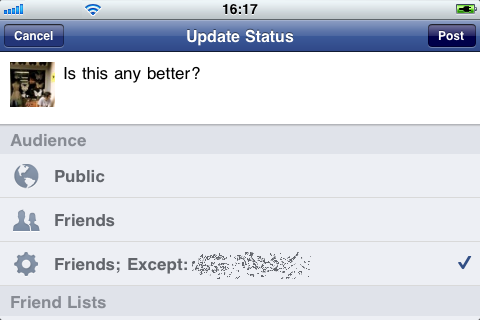
You may not be a fan of Google+, but Facebook certainly is! Now Facebook’s iOS app also has the improved status sharing options that the web version borrowed from Google’s new social service. This means you can choose who to share your status updates with.

You can also tag people and places from the iOS app. Alongside are a range of bug fixes and small improvements – most noticeable are faster notifications, better chat and stability. As long as the desktop browser version of Facebook works better, the iOS app will always feel like a work in progress to me, but even so, it now seems to be catching up.

Best iOS apps for the Rugby World Cup 2011

The Rugby World Cup kicks off this Friday and if you want to keep up with all the action then the iTunes App Store is the place to go.

There are dozens of rugby-related apps out there that will help maximize your enjoyment of the tournament – it takes place in New Zealand over the next six weeks and culminates in the final on the 23 October in Auckland. Here are some of our favorites.

Rugby World Cup 2011

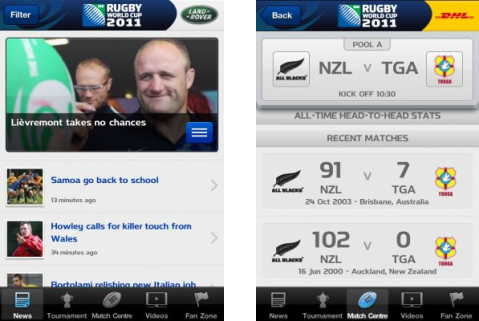
This official tournament app is the best way to follow the World Cup for free on your iPhone. Besides comprehensive live coverage of every game, the application offers the latest news, a mountain of stats, video highlights and interviews, and even an option to buy tickets for matches. A must-have World Cup companion. Price – Free

Rugby World Cup 2011IRB Laws of Rugby

Rugby can be a bit complicated to follow at times. If you’re not well versed in the intricacies of the rulebook, then this app is worth downloading. It has lots of very clearly presented information about the game, including more than 200 videos outlining different set plays, tactics and rules.
Continue reading “Best iOS apps for the Rugby World Cup 2011”

BlackBerry App World 3.0 now available for download

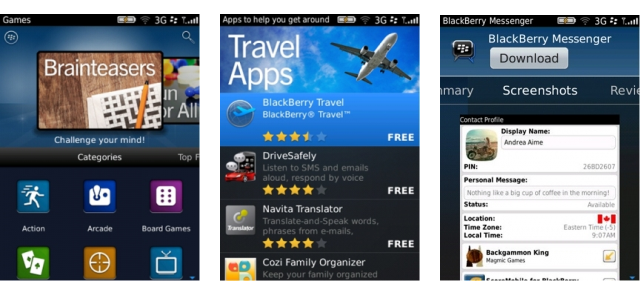
BlackBerry has revamped its app store in an effort to make it easier for users to find and install apps. BlackBerry App World 3.0, available to download from today, includes a redesigned user interface and other new features. Changes to the official BlackBerry store include:

  • Redesigned home screen
  • Introduction of new categories and sections to help find apps more quickly
  • Swipe between app summaries, screenshots and reviews from within one screen
  • Recommend apps to your friends via Twitter, Facebook, email, BlackBerry Messenger or SMS
  • My Account feature added to home screen for managing payment options more easily
  • More search options, including the ability to filter by app name, price, rating, newest, best match or popular
  • New My World features give a streamlined view of installed apps along with the ability to manage subscription content and services

New Blackberry App world

Google+ iOS app updated with reshare feature

The latest update to Google+ for iOS devices might be small, but it will be appreciated by users. Now you can reshare content on Google+ directly from the app itself. This feature is already available on the latest version of Google+ for Android, and it’s a welcome addition to the iOS app update.

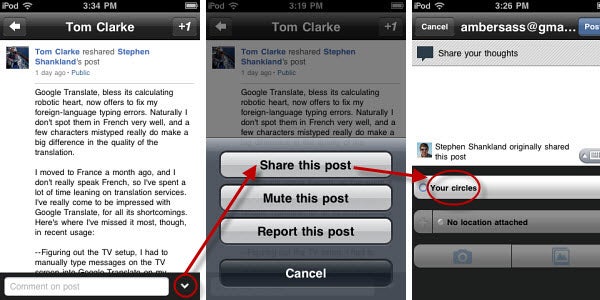
Resharing on your iPhone, iPad or iPod Touch is really simple. Just browse through your Google+ stream and find a post you’d like share. Click on the entry and you’ll be taken to a screen that gives you the full content of the post you’ve chosen. From there, users can click the small down arrow on the bottom right of the screen. This will bring up the option to either share, mute or report the post.

You can also choose which circles to share the content with. This allows you to target the people you think would want to see the content most, or simply publish it publicly for everyone to enjoy. So while this is a small update to the Google+ iOS app, it’s an incredibly useful one for a service that’s meant to be just as much of a social experience as Facebook.

What other features would you like to see added to the Google+ mobile app in future updates?

Optimize images and save space with ImageOptim

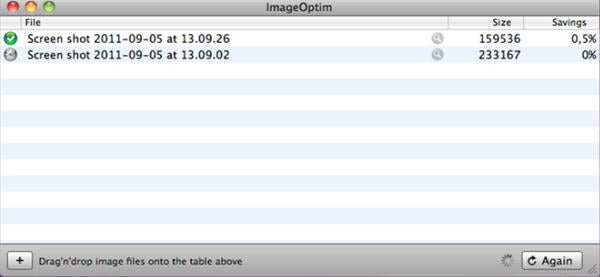
If you use your Mac to store all your images, you might find they start to take up some serious space. With ImageOptim you can cut JPEG, PNG and GIF images by around 20-30%, without losing noticeable quality.

ImageOptim is a graphical user interface (GUI) for a range of open source optimizing engines, and is extremely easy to use.  Simply drag and drop your images into the app, and they will be automatically analyzed and optimized. Be aware that ImageOptim actually changes the files you give it, so you may want to keep your original images in case you don’t like the results. We tested a range of images, and the results are good.

You can often save 20-30% of the size without losing any image quality. With a large collection of images this can be significant. ImageOptim is ideal for image you want to upload to web pages, as it improves load times.

Download ImageOptim for Mac here, it’s free and incredibly easy to use!

Advanced Kaspersky Antirvirus 2012 tips

Kaspersky Antivirus 2012 is one of the most powerful virus prevention suites on the market. As with many antivirus solutions, though, there is a temptation to set it up as quickly as possible, never exploring the more advanced options available.

It’s worth delving into the settings menu in Kaspersky Antivirus 2012: it has lots of different options for managing the way the application runs and what it does to your system.

I’ll explain some of the useful features in Kaspersky’s Advanced Settings. This menu can be accessed by clicking the  Settings tab at the top-right of the user interface, then clicking the Advanced Settings tab, which is the fourth and final in the row of icons (it looks like a box).

Detect Threats and Exclusion Rules

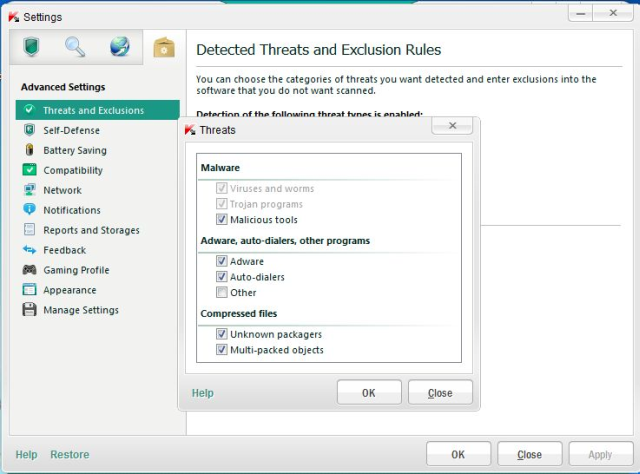
The first option in the settings menu allows you to define the type of threat you want Kaspersky to look for. Besides viruses and Trojans, the software can scan for adware, auto-dialers, and strangely created compressed files.

Detect Treats

It’s also possible to exclude certain applications from these scans by clicking the Settings button in the Exclusions section.
Continue reading “Advanced Kaspersky Antirvirus 2012 tips”

Labor Day Sale on iTunes

With Labor Day weekend upon us in the United States, there are a lot of deals in iTunes for different apps and games.
Many of these deals are only for the weekend or the early days of September, so if there is something you have been waiting to get discounted now is the time search for it.

Many publishers are discounting their catalogs, so look around and you might find something special.

Here are some of the bigger games on sale for Labor Day. Publishers Electronic Arts, Big Fish Games, and Gameloft appear to be leading the pack on discounted titles for the weekend.

Continue reading “Labor Day Sale on iTunes”

Parallels 7 released

Parallels has released the latest version of its virtual environment software. Current users can upgrade now and new users can purchase the full version on September 6th. You can download a trial however already and try it out for yourself. Note that you have to request a trial license key using the “Get Trial” button on the lower left side of the start-up dialog when you install the trial.

Parallels will also be releasing apps for iPhone and Android that allow you to control the virtual environment from your mobile device.

Parallels claims that version 7 streamlines switching between OS X and Windows so that it feels like a much more natural experience, blurring the line between the two operating systems. Paralells CEO Birger Steen said of version 7:

As Macs have become more popular than ever, a growing number of Mac users, including enterprises, find they need to run critical Windows programs on their Macs,” he said. “Parallels Desktop 7 lets you run popular apps like Windows Internet Explorer, Access, OneNote, Quicken and more, even the most demanding graphical programs, without rebooting and without compromise on speed and usability.

Parallels also claims that it’s 6o percent faster than version 6 with Windows sleep and resume now taking seconds. Other improvements include faster copying of files and a security protection feature to stop potential Window’s viruses from damaging files you want to use in OS X.

Users who have already purchased Parallels 6 after August 1st will be able to upgrade to version 7 for free. All other users will be charged $59.95 to upgrade. New users can buy a Standard version ($89.95) or Student Version ($59.95). There will also be a special “Switch to Mac” edition for $119.95 which will include a USB cable to transfer files and a 2 hour beginners guide for switching to Mac.

Download Parallels Desktop 7.

How to play Deus Ex on Mac with OnLive

If you’re one of the many Mac users disappointed that the much hyped Deus Ex: Human Revolution hasn’t been released for Mac, then don’t fear. You can still play it online using OnLive.

And even better, if you buy the boxed PC version or know a friend who has, the game includes a free coupon to play Deus Ex online using OnLive so it won’t cost you a thing. This offer only applies to boxed versions – it does not apply to digital downloads or console versions of Deus Ex.

Deus Ex is available in Standard Edition (around $59.99) and Augmented Edition ($69.99) which includes a digital art book, a making-of film, special, motion graphic novel, soundtrack, a free download of the Deus Ex Game of the Year Edition and more.

The only other way to play Deus Ex on Mac is to buy the PC version and run it in Parallels on your Mac  instead but you’ll probably find it works much better using OnLive if you have a decent broadband connection.

By the way, if you haven’t seen the impressive The Eyeborg Documentary which details the real-life backdrop to the game, check it out.

The New Chrome +1 Button and Your Privacy

Google has finally launched its +1 Chrome extension, that allows you to +1 any page you visit on the web and see how many +1s the page has. It still doesn’t let you share a page straight to your Google+ stream – a feature lots of users seem to be desperate for, but it’s certainly a step in the right direction.
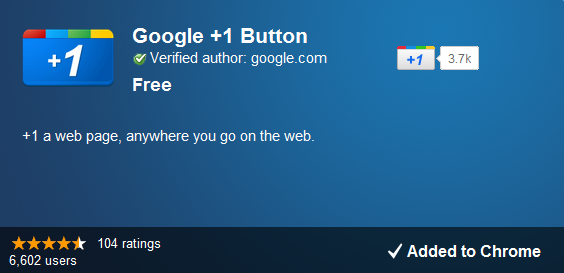
So far, so good… but what’s that I spy on the extension’s Chrome Web Store page? Oh, it’s a message from Google warning that

“In addition to the practices described in the Google +1 Button Privacy Policy, by installing this extension, all of the pages and URLs you visit  will be sent to Google in order to retrieve +1 information.”

Yes, that’s right: every page you visit in Chrome gets sent to Google, whether you +1 it or not.

To be fair to Google, the company has obviously learned from previous privacy fumbles. Not only is the above warning displayed fairly clearly on the extension page in the Web Store, Google has also produced a clear guide to what this actually means, entitled ‘How the +1 button respects your privacy‘.

Google insists that while yes, data is collected “to maintain and debug internal systems”, said data “isn’t organized by individual profiles, usernames, or URLs” and that any info collected is deleted after “about two weeks”. As with other extensions, the +1 button does not run while you’re in Incognito mode.

I don’t get too worried about privacy topics like this. I’m happy to use my real identity online and I trust Google when it says it’s not really interested in what I’m personally doing. If you don’t feel so sure, I recommend that you avoid the +1 extension, and stick to Incognito browsing.

If you’re still interested, you can get the Google +1 button Chrome extension here. You can download Chrome here for Mac and here for Windows.