GTA V trailer – what we’ve learned

Now the trailer’s been released after a week of frenzied and often pretty funny speculation, what can we say for sure about GTA V?

Where?

Vinewood appears, meaning we’re returning to San Andreas. Like GTA San Andreas, this looks to be another huge game, with multiple locations. It looks like there’ll be the same mix of city and countryside, but we don’t know if there will be more than one city. However, the jet plane at the end suggests there may somewhere else to fly to, and it’s great to see planes back after their absence in Grand Theft Auto IV! It also looks to have a pretty contemporary setting from the cars we see, although it could be set any time in the last decade.

Who?

Our narrator sounds a little older than what we’re used to, but his story sounds like one we’ve heard before: a bad guy trying to go straight, but of course, it doesn’t go that way. There’s no indication this middle-aged family man will be the only character. The trailer is cleverly ambiguous about that…

Changes?

With the depictions of homelessness mixed with the opulence of Vinewood, it’s clear Rockstar isn’t shying away from the grittiness that GTA IV introduced. But at the same time, there appear to be fighter jets and airplanes, so we may see more of the excess that made so many people fall in love with the original San Andreas.

Did the trailer live up to your expectations, or are you disappointed the rumor of a Detroit setting didn’t come to pass? We’ll be sure to keep you updated with whatever we hear about the game in coming months!
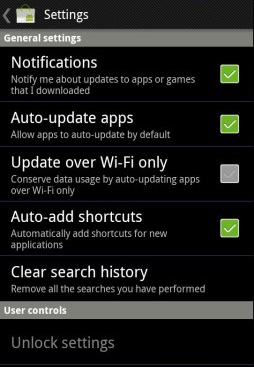
How to: Disable app auto-updates in new Android Market

The Android Market was updated today. Among the new features is a setting that automatically updates any applications you have installed on your device when a new version is released.

It sounds like a handy function, and in principal it is. However, it also has the potential to be annoying and disruptive. There are times when you may not automatically want an app to update. Perhaps you’d prefer to read the release notes first to check if the new version takes away a function that you need, or you want to check out user comments to find out if anyone is having stability issues with the new release.

Don’t panic, because there is a way to disable automatic updates from the Android Market. Simply hit the Menu button in Market and make sure that ‘Auto-update apps’ is unchecked. There’s also a new WiFi-only upgrade setting that will save you using up your bandwidth allocation when updating apps.

Market

Incidentally, there are several other changes that come with the new version of the Android Market. These include voice-based search, PIN authentication support to prevent accidental purchase of apps, a star rating chart, and more.

The new version of the Android Market will be made available as an over-the-air download from today. If you still haven’t received it and can’t wait to check it out, though, then you can download it here and install it right now!

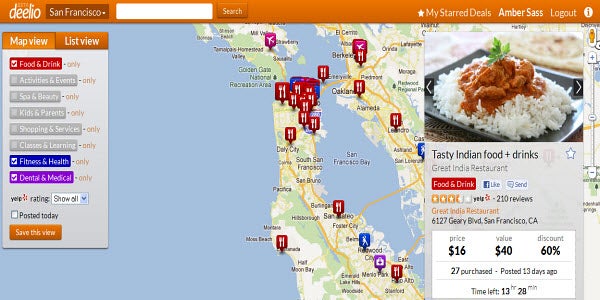
Deel.io launches with Google Maps integration

There are a lot of great sites out there that help internet users find deals on services provided by local businesses. Groupon and LivingSocial are just two examples of sites that advertise daily deals and vacation getaways at discounted rates under certain conditions.

How do you keep track of what deals are being offered when around where you live? Newly launched Deel.io hopes to give you a helping hand on the matter.


Continue reading “Deel.io launches with Google Maps integration”