Star Trek Online goes free-to-play

Boldy going where many MMORPGs have gone before, Star Trek Online goes free-to-play this morning.

On its original release, Cryptic Studios’ take on Star Trek had a generally lukewarm reaction. Despite the huge possibilities that the Star Trek universe offers, it felt bland and lacked character. Thankfully since then there have been lots of updates and episodic content to play through.  The Space combat was exactly what fans wanted, but down on planets, Star Trek Online felt like a bit of a grind. I was surprised by this, as Cryptic’s super-hero MMORPGs are some of the best in the genre, and great fun to play.

We’ll be taking another in-depth look at Star Trek Online later today when the Free to Play version is released – lets hope more fun has been injected into the game, as the camp humor of the series should be able to differentiate it from po-faced Star Wars The Old Republic!

You can sign up for a free Star Trek Online account here. Cryptic Studios’ other MMORPGs, City of Heroes Freedom and Champions Online Free for All are still available to play for free, and are highly recommended!

Listen to free music on your mobile with Grooveshark

Smartphone users can now listen to free music through Grooveshark on their device thanks to the launch of a new mobile web app from the music streaming service.

Grooveshark’s native apps were removed from both the Apple App Store and Android Market last year due to record label complaints. However, Grooveshark has now launched an HTML5-based music streaming service – effectively bypassing the app store owners since approval is not needed.

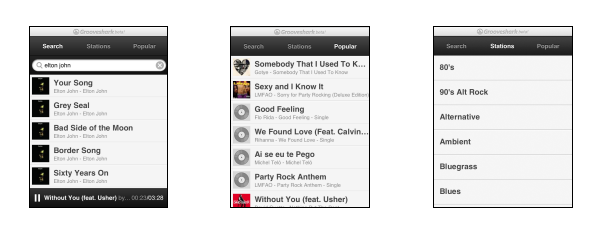
The Grooveshark web app can be accessed through many mobile web browsers, supporting iOS, Android, BlackBerry and HP devices. To use the service, simply visit html5.grooveshark.com from your mobile and start listening.

You can use the Grooveshark web app to search for and listen to a particular song or artist, or hear playlists generated by genre through the Stations section. The Popular tab lists the most searched-for tracks of the moment. The Grooveshark web app has a compact and easy-to-operate user interface, although it lacks the range of features and functionality that the short-lived native Grooveshark app had.

Call of Duty ELITE for iOS released

Call of Duty: Modern Warfare 3 is one of the most popular online multiplayer games around. When the game launched, Activision started an online service that aggregates multiplayer data from matches played. Called Call of Duty ELITE, it is now available on iOS with an Android version set to be released in the near future.

As you can see in the screenshot, the iOS version of Call of Duty ELITE features the same information you can get on your browser or console, but rearranged to fit the touchscreen better. Read our Call of Duty ELITE review and download the app here.

How to log out of Facebook remotely

Think back to the last time you used Facebook at someone else’s house or an internet café. Now ask yourself, did you remember to sign out? Are you sure? Here’s how to log out of Facebook remotely.

If you forgot to log out of Facebook while on a different computer to the one you normally use, the consequences can be catastrophic. If your account is logged in at your friends’ house then ‘you’ suddenly might start posting some strange updates about yourself indicting you for various embarrassing things you haven’t actually done. Worse still, if it was on a public computer, all of your personal details, photos and messages are accessible to complete strangers. Still sure you signed out?

Luckily for you, there’s an easy way to check wherever you are signed into Facebook – and close active sessions remotely. Even if you’re 99% certain you’ve signed out it’s worth checking by following the process below – you might regret it if not!

1. Account settings

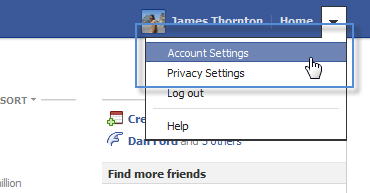
Click on the little down-facing arrow in the top-right of your Facebook page and choose Account Settings.

2. Security

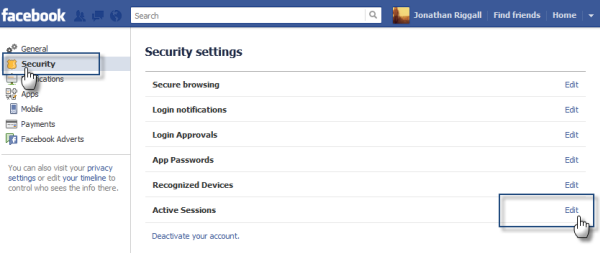
Now click on the Security option in the left-hand menu.

3. Active sessions

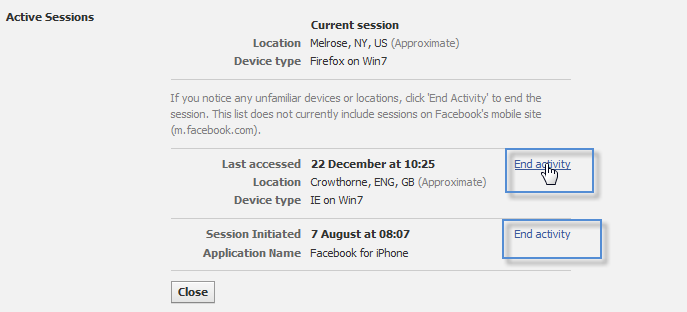
Click the Edit button that appears next to Active Sessions, which you’ll find at the bottom of the Security settings window. Here you can see the current session you’re logged in on (which should be the computer you’re using).
Crucially, you can also see information about all other sessions where you’e currently still logged in. Click the End Activity button to close down a session and prevent access to your account from that machine.

Via OnSoftware Spain

Kinect for Windows out next month

Microsoft’s hugely successful motion sensor technology Kinect is being released for Windows on February 1st. This will allow Windows 7 (and later Windows 8) users to interact with PCs without a keyboard or mouse.

As well as motion control, Kinect for Windows also includes voice control, which could make Windows 8 a really interesting and flexible operating system. Microsoft’s Kinect for Windows SDK for developers has been available for a couple of months now, so developers can already get stuck into experimenting with Kinect integration into apps.

I am excited about the possibilities for Kinect for Windows – in recent years Apple’s excellent trackpads have been my favorite navigation tools, but I can imagine Windows 8 with motion control being fantastic. Using gesture controls on an office desktop would be really comfortable as a replacement for a mouse if it’s precise enough – for me motion control on a desktop makes much more sense than touchscreens, which are better used on portable devices.

With Kinect for Windows, 2012 has got off to a great start for PC users, and the potential for new software is huge.

Tumblr adds new private messaging feature

Tumblr‘s on the move again when it comes to adding new features. This time it’s a new way to privately message other users.

Called Fan Mail, this new features allows Tumblr users to send stylized messages to blog users they’re following. Currently there are two skin options for the message body and three font choices, one of which looks like actual handwriting. Just type in the username of the blog you want your message sent to, pick your style options and write your message.

According to Tumblr founder and CEO, David Karp, you’ll be able to send unlimited private messages via Fan Mail, which can be accessed through your Tumblr inbox, the avatar drop-down menus of the users you follow and on the top corner of the main page on each blog you follow. Unlike the current messaging system, you can’t post Fan Mail messages publicly on your blog without the use of a screen capture program.

Tumblr has a history of adding new features and making big changes to the dashboard interface, so this new feature isn’t necessarily a surprise. What might surprise some users though is that Tumblr developers have chosen to focus on this particular feature. Tumblr already has a private messaging system that, until recently, allowed unlimited messages (asks) to be sent. In the past few months, however, this feature has been limited, both by restricting the number of daily messages you can send and limiting the characters each message can contain. While Fan Mail does look neat, some users might find it a little redundant or wonder if it’s meant to replace the current ask feature altogether.

What are your thoughts on Fan Mail? Does it have potential or is it just plain unnecessary?

How to control data usage in Android 4.0

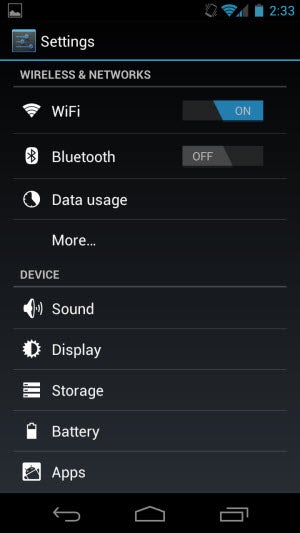
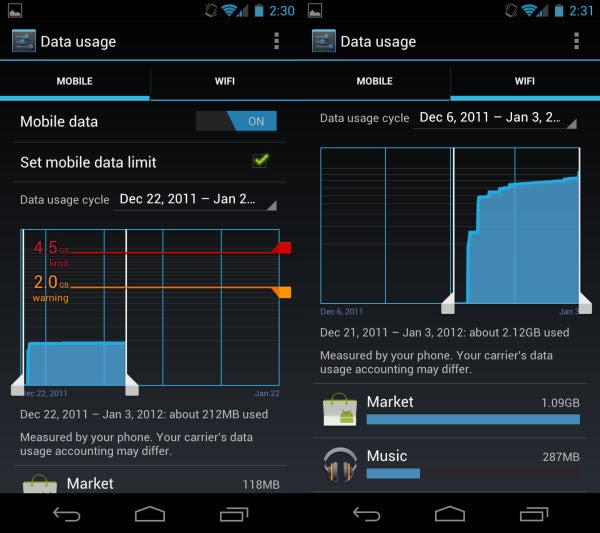
Devices supporting Android 4.0 (Ice Cream Sandwich) gain a useful standard feature: data usage controls. Built into Settings, data usage aggregates how the Android device and Ice Cream Sandwich use data over both a carrier’s data network and Wi-Fi.

Carriers now set data caps so knowing which applications are consuming precious bytes is important. Here is how to locate and monitor the use of data on Android 4.0 devices.

1: Access the Settings panel and enter “Data usage.”

2: Set Data limits. In Data usage, you will see a graph that highlights a range of days and the amount of data. By selecting “Set mobile data limit,” you can cap your data (turn off data when it reaches the limit) and set a warning for a specific amount of data used. Since Wi-Fi is free of caps, limits cannot be set, but you can see the applications that are using the most data.

Continue reading “How to control data usage in Android 4.0”

The Chrometroversy and why it’s important

The recent news that Google was inadvertently promoting it’s own browser Google Chrome to the top of Google rankings highlights concerning issues for software users, developers and the integrity of the blogosphere.

If you don’t know the story, Google were employing PR firm Unruly Media to promote Google’s own browser Chrome. Nothing wrong with that but unbeknown to Google, Unruly Media were paying bloggers to promote Google Chrome on blogs. To be fair to them, the posts did state “This post is sponsored by Google” in the search results but they helped rapidly improve Chrome’s search engine rankings which is strictly against Google’s code of ethics on paid links.

When search engine specialist sites SEO Book and Search Engine Land spotted what was going on, Google – to their credit – immediately took action and are now “punishing” the rankings of their own browser for the next 60 days.

The incident highlights three main points of concern.

1. Potential conflict of interest

This incident was largely out of Google’s control and to some extent, it has simply become a victim of it’s own success. Over the past ten years, it has gone from a simple search engine company to one that develops its own software. The battle for browser supremacy is so intense – and so incredibly lucrative to the winner – that it’s perfectly understandable that Google employed a PR firm to try and help boost Chrome rankings in its own search engine. The problem is exactly that however – that the battle is taking place in its own search engine and Google is caught between a rock and a hard place in how to conduct the battle. The company have to tread a very difficult line between promoting their own product Chrome, but not unfairly “favoring” it in Google rankings through various means.

2.Pitfalls of outsourcing marketing

The problem is that once Google has relinquished some marketing control over its products, it’s not as easy for it to check if is living up to its own code of ethics. Presumably, any company that enters into a marketing agreement with Google has to agree to abide by the company’s ethics code. However, it’s obviously not as easy for Google to keep tabs on absolutely every marketing campaign being used by PR firms it works with. The result may be an unfair playing field for developers trying to develop competing products and a bum deal for users who aren’t necessarily getting the best product for their needs when they perform a Google search.

3. Reliability of the blogosphere

When blogs first appeared, they were an outlet for people to express their feelings and thoughts on whatever issue took their fancy without any commercial influences and as such, have built up a highly trustworthy reputation. Today, blogs that look highly personalized may be heavily tainted by advertisers or corporate funding making it hard for users to know whether the information they are reading is trustworthy. The result is “personalized” blog posts that don’t reflect the user’s opinion – exactly what happened in this case as is amply highlighted here. This kind of problem has been brewing for some time and Frederic Filloux wrote one of the most thoughtful articles about it in “The Blogosphere’s Soft Corruption” following the TechCruch-Arrington saga.

Of course, you can always rely on us here at OnSoftware to bring you our honest opinions and thoughts on software, and check out our reviews of Google Chrome for Windows and Mac.

[Image courtesy of Search Engine Land]
How to watch AVI movies on an iPhone

Ever tried to watch AVI movies on your iPhone? Then you’ve probably already worked out that the Apple device sadly doesn’t support playback of AVI video.

Thankfully, there is a way around this issue and there are at least two ways to play AVI files on an iPhone, iPod touch or iPad. Here I’ll explain how it’s done, first by converting your video file and prepping it for your iOS device, or alternatively by using an app called Air Video to stream video files from your computer to your iPhone.

Do this…

Use a conversion tool to convert AVI movies to iPhone format. I recommend Format Factory because it’s free and it has built-in output settings for converting to particular mobile devices, including the iPhone.
Continue reading “How to watch AVI movies on an iPhone”

Firefox 11 Aurora released

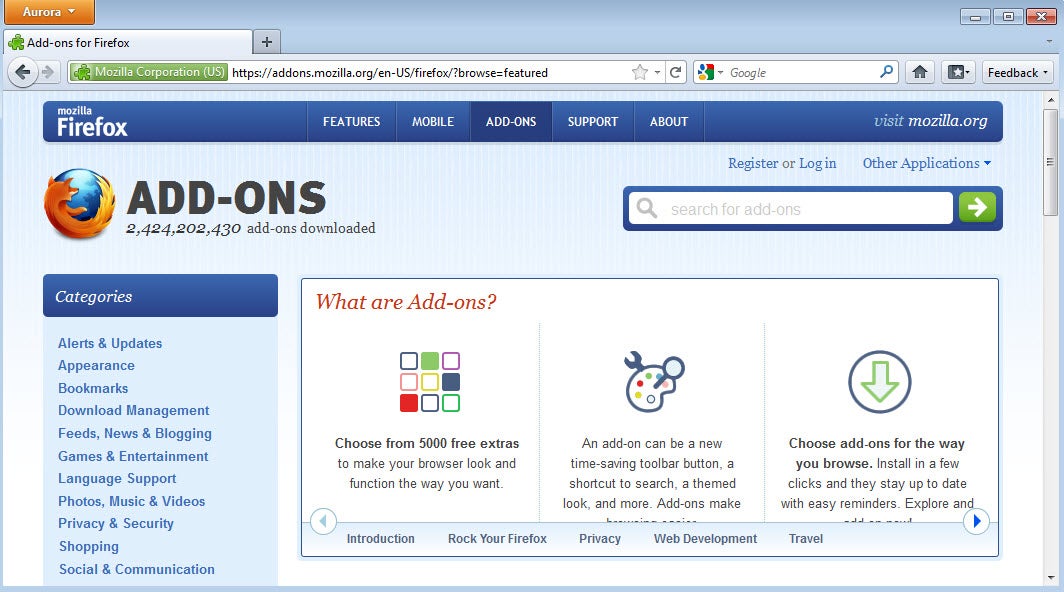
Mozilla has released the latest Alpha version of Firefox – Firefox 11 Aurora. Most of the major changes in Firefox 11 Aurora are in the Android version, which now finally supports Adobe Flash and has a native Android interface. Syncing has been temporarily removed, however.

For Windows and Mac users the User Account Control panel has been withdrawn after installation and you can now import bookmarks from Chrome.

Other changes are mainly under the hood, including more support for HTML5 and Google’s SPDY protocol for faster site loading can now be tested. In addition, there’s support for 3D web page visualization and HTML5 video controls have been redesigned. There are no major changes to the appearance.

Note that Firefox 11 Aurora is an developmental release and therefore can be unstable and may not work with many add-ons. If you want the stable version (version 9), you can download it here for Windows and Mac.

Download Firefox 11 Aurora for Windows or Mac.