Pulse turns its mobile newsreader into a beautiful web app

pulse iconPulse Newsreader has been on iOS and Android for a long time and today they’ve released a web app version of their newsreader. This is great news for Pulse fans who want an all encompassing ecosystem for reading customized news feeds. What Pulse does is aggregate all of the types of news you’re interested in like fashion, politics, technology, and many more. Choose at least 3 categories when you join Pulse and the app will give you suggested stories for each category.

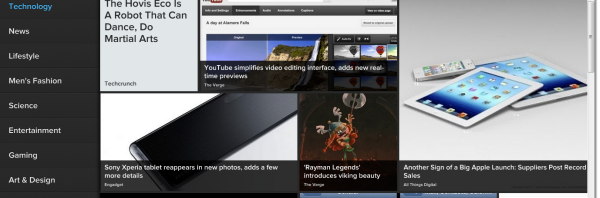
News stories are presented in a mosaic or rows of thumbnails, if you wish. You can toggle between the modes on top of the website. News categories show up on the left hand side. Tap on one and you’ll be given a mosaic of news stories and images. You can filter further by publication on the left if you wish. Pulse.me’s interface is smooth and intuitive.

Continue reading “Pulse turns its mobile newsreader into a beautiful web app”

How to set up Google 2-step verification

It hasn’t been a very good year for companies and “secure” data. A slew of high-profile companies like Sony, Dropbox, and LinkedIn were hacked, their security bypassed, and user data copied.

The recent case of Mat Horan is a good example of how a connected person can display their online presence without realizing how far it reaches.

Accounts with Facebook Connect, connected email accounts, and the passwords that you use (or don’t use intelligently) can unfortunately get hacked, so you need to take steps to protect yourself.

Google’s 2-step authentication is a great way to secure your Google account and any other accounts associated with it. It requires you to enter a verification key when accessing your account on different devices and is used with the Google Authenticator app.

Here’s how to set up 2-step authentication.

Continue reading “How to set up Google 2-step verification”

Steam to start offering non-gaming apps

Developer Valve has announced that popular gaming platform Steam will start offering non-gaming apps for PC and Mac users. Until now, Steam has always been a 100% gaming platform offering games such as Portal, Half Life and Skyrim.
Valve issued a statement saying that from September, it will start offering PC and Mac apps “ranging from creativity to productivity”.

Continue reading “Steam to start offering non-gaming apps”

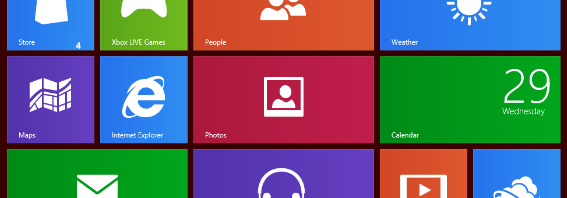
Windows 8 Guide: touch commands

By now, Microsoft’s release of the Windows 8 Release Preview earlier this year is old news. Microsoft has been keeping interest high in the upcoming Windows 8 official release through its launch of its Surface tablet, as well as a myriad of apps developed for use on Windows 8’s Metro interface.

Whether you plan on getting the Surface, making use of Windows 8 on a touch screen PC monitor, or installing it on a tablet you already own, you’ll want to get a head-start on learning some of the most important touch commands that’ll make your Windows 8 navigation experience as simple as possible.

Here are some important touch commands to commit to memory before Windows 8’s expected release this coming October. Continue reading “Windows 8 Guide: touch commands”

Windows Essentials 2012 available today

Windows 8 iconMicrosoft released Windows Essentials 2012 suite today, which provides updates across the board to the previous Windows Live Essentials 2011 applications. An interesting thing to note is that Microsoft is dropping the ‘Live’ branding from this release of Windows Essentials. Lately Microsoft has been very aggressive at trying to re-brand itself. First they re-branded Hotmail.com to Outlook.com and now they’re dropping ‘Live’ from Windows Essentials. Strangely, the individual apps included in Windows Essentials 2012 still retain the ‘Live’ nomenclature.

This update is huge, clocking in at 131 MB. Not surprisingly, this package includes a ton of apps including Messenger, Mail, Photo Gallery, Movie Maker, SkyDrive, and Writer. Windows Movie Maker and Photo Gallery received the most substantial updates with Windows 8 optimization. Let’s delve a bit deeper and see what’s changed. Continue reading “Windows Essentials 2012 available today”

YouTube and Google Maps removed from iOS 6 by Apple

Apple revealed in the latest developers version of iOS 6 that the YouTube app will not be included when iOS 6 launches this fall. Google Maps had already been removed when Apple announced iOS 6 and their proprietary Maps app.

While the official noted reason for this omission is that the license for YouTube had ended, the constant tension between iOS and Android might also be a factor. The current Apple versus Samsung trial is not only Apple claiming infringement, but also an indirect attack on Android.

YouTube and Google Maps will be in iOS 6, but as a direct result of Google’s subsequent development of these apps that will likely mirror their current offerings that exist natively in Android.

Continue reading “YouTube and Google Maps removed from iOS 6 by Apple”

Get CandyBar for Mac free

CandyBar has become one of the first casualties of Mountain Lion but the good news is the developer is now giving the dock customization software away for free. Although you can customize icons individually, the application will not allow you to change the look of the entire Dock in Mountain Lion because Apple has changed the way it renders, hence the decision to make it free from now on.

Continue reading “Get CandyBar for Mac free”

Microsoft Office Store opens in beta

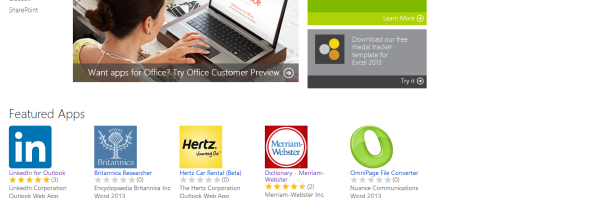
officeicon blogMicrosoft quietly unveiled its app store for Microsoft Office 2013. The company announced that it would support applications within Office to expand functionality. Although it was vague during the Microsoft Office 2013 keynote, we now have a better picture of what Microsoft wants to give customers with these add on apps.

Since this is only the first day that the Microsoft Office Store has opened, app selection is still pretty sparse but there are a few applications that show the power given to developers to integrate their applications within Office products, even on the web. Outlook.com supports applications too, with apps for LinkedIn and Groupon, which will make staying in touch and finding deals much easier. Continue reading “Microsoft Office Store opens in beta”

Like Slender? Then try Slenderman

If you like the hugely popular Slender game and the Slenderman myth that it’s based on, then you might like Slenderman, a free game that actually predates Slender.

Slenderman is slightly different to Slender, however, because rather than being in a forest, you are in a large building. In addition, the concept is slightly different.

Continue reading “Like Slender? Then try Slenderman”

Google Wallet and the long road ahead

This week Google announced that Android‘s Google Wallet now supports all major credit or debit cards. This move expands the usability of Near Field Communication (NFC) payments beyond the MasterCard PayPass or prepaid cards that used to be the only way to pay. Using a cloud-based version of the app, you can apply almost any card you own to pay at NFC payment points. The use of NFC payments has been slow to pick up in the United States, but more and more businesses are adopting NFC as a payment system.

Even with Google Wallet supporting all major credit and debit cards, there is still one large barrier that makes the app next to useless – wireless carriers. Sprint is currently the only formally supported carrier that allows Google Wallet natively.

There are workarounds, requiring rooting or installing a custom ROM. It’s frustrating that a payment system exists for Android users, but is unavailable because of access denial by carriers.

How long do Android users have to wait until they can actually use Google Wallet natively? Could it be forever?

Continue reading “Google Wallet and the long road ahead”