
Pandora Radio for Android gets a major update

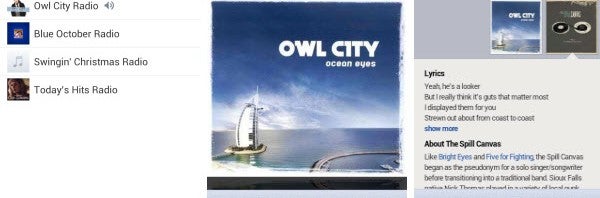
The battle of the free music streaming apps on Android continues. Popular music streaming app Pandora Radio for Android recently received a major update.

It’s possible this update is entirely independent of any competitor influence. It’s not difficult however to note the proximity in time between this update and Spotify’s announcement of a similar streaming service, first on iPhone in June and then for Android in August.

Whether or not this update was planned as a response to Spotify’s new mobile streaming service, there’s a lot to love about its new features. Continue reading “Pandora Radio for Android gets a major update”


Google Play updates with personalized recommendations

google play iconThere have been many criticisms about the Google Play store in the past but Google is working hard to improve its app selection and usability. App selection has definitely improved on Android, but browsing for apps definitely leaves something to be desired. While there are sections for Editors’ Choice and top lists, it can still be hard to find apps (especially if an app has a generic name).

Google is trying to make your app browsing experience better by adding a ‘Recommended For You‘ section. This section will show up when you navigate to the ‘Apps’ section of Google Play. Google has yet to roll out recommendations for books, music, or movies/TV shows. It’s safe to assume that Google is working on it.

How well do these personalized recommendations work? Continue reading “Google Play updates with personalized recommendations”

Windows 8 Guide: The new Modern UI control panel

settings iconIn this installment of our Windows 8 Guide series, I’ll be showing how to use the Windows 8 Modern UI control panel and “Settings” app. Windows 8 has been so dramatically redesigned that even the control panel has seen significant changes. Microsoft had the foresight to include the traditional Windows control panel as well as a more modern, simplified control panel for its touch-centric Modern UI.

Although it is nice of Microsoft to include both types of control panels to modify settings, it can be a jarring experience as not all options are shared between the two. The Settings app for the Modern UI will feature settings for personalization, notifications, and more Modern UI enhancements while the traditional Control Panel in the desktop mode of Windows 8 features more technical features like enabling BitLocker and File History. Continue reading “Windows 8 Guide: The new Modern UI control panel”

How to hide iPhone photos and videos using NQ Mobile Vault

Have you got photos and videos stored in your phone’s album that you’d rather people not see? Then you should go download NQ Mobile Vault, a mobile app that lets you move ‘sensitive’ images and videos to a safe, password-protected vault, for your eyes only.

Vault has been available for Android for a while, but the app has now been released on the App Store for iOS devices. It doesn’t have all the functionality of the Android device (you can’t secure contacts or messages, for example), but it does support movement of photos and videos from your photo album to the secure vault.

Continue reading “How to hide iPhone photos and videos using NQ Mobile Vault”