Major LibreOffice update features better collaboration tools and optimized code

libre officeToday LibreOffice, the popular open source office suite, received a major update that will make its users and developers happy. This update focuses on cleaning up and optimizing code as well as improving collaboration and performance.

In terms of cleaning up the code, there were close to 1,500 code changes. Excess and obsolete code was removed while more code was added to make LibreOffice run quicker and to add new features. This will be great for developers of LibreOffice as it will make the code easier to understand. Thousands of lines of comments were also translated from German to English. Hopefully LibreOffice will be less intimidating for new developers.

Here are some of the major updates you can find in LibreOffice 4.0: Continue reading “Major LibreOffice update features better collaboration tools and optimized code”

Is Microsoft Office coming to Linux in 2014?

The Linux focused site Phoronix is reporting that Microsoft is looking at developing Office for Linux in 2014. This is based on a conversation the writer had at the Free Open Source European Meeting in Brussels, where he was told, ‘Microsoft is having a “meaningful look” at a full Linux port of Office thanks to Linux showing signs of commercial viability.’

Linux has certainly been getting more serious support recently, with the game platform Steam now available on the Ubuntu distribution of the open source operating system. Linux is also increasing in popularity among government organizations, attracted by its cost cutting possibilities.

How likely is Office for Linux?

Continue reading “Is Microsoft Office coming to Linux in 2014?”

Mobile game of the week: Zombie Smasher

Not another zombie game, I hear you scream! Well yes, Zombie Smasher is another zombie game for Android but it’s so much fun that it warrants a look.

The great thing about Zombie Smasher is its simplicity. To destroy the moronic hoards of undead you don’t need to cultivate an elaborate garden like you do in Plants vs Zombies, hunt them with guns like in Dead Trigger, or run for your life as you do in Zombie Dash. In Zombie Smasher, all you need to do is squish soulless corpses with your finger.

Continue reading “Mobile game of the week: Zombie Smasher”

Heavy Rain creator says video games need to grow up

Childish games?David Cage, the director of the Playstation 3 exclusive Heavy Rain says that the games industry needs to grow up and stop making titles just for teenagers and young adults.

Addressing the DICE Summit in Las Vegas about the state of the games industry Cage slammed Call of Duty and Grand Theft Auto, saying that developers should be making games that are more mature.

Cage listed nine ways games need to change, so they can become something adults as well as children will want to play:

How to backup Android app files with Helium (formerly known as Carbon)

There are many Android backup apps available in the Google Play Store. The problem with these apps is that they either take a snapshot of the device, saving all the apps and settings, or only save individual APKs and not the user files. A great backup alternative is Helium. This Android app will backup individual app files like game saves and user information from installed apps.

You can backup locally (on the device), copy to a PC, or upload to a cloud storage service like Google Play. Cloud storage requires Helium Premium, but it’s a worthwhile investment because you can automate backup schedules and Android to Android sync.

Backing up your Android device is important because you don’t want to lose any important files, and with Helium, you can be sure you’ve saved the most important ones.

Here is how to use Helium.

Backup
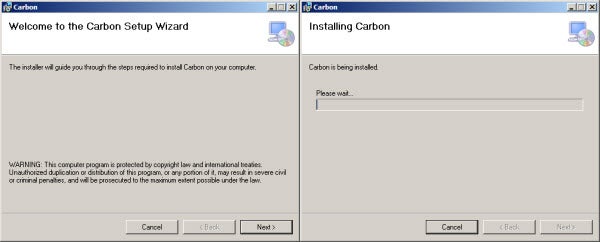
Download Helium on your Android device and download the Heliumn Desktop Installer to your PC, Mac, or Linux machine. If you’re using Windows, it’s a good idea to download Android drivers for your phone, just in case, especially if you’ve never connected your device to a computer.
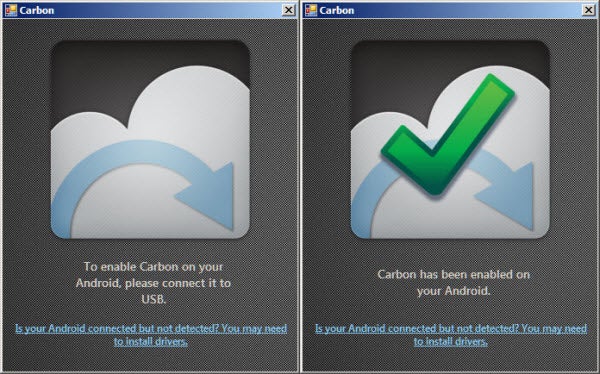
Install Helium Desktop Installer and follow its instructions. Once it’s installed, Helium on Android will ask you to connect the Android device to the computer to enable Helium on Android.

The free version of Helium doesn’t allow Google Drive backups, but it’s worth paying for the premium version to get this support.
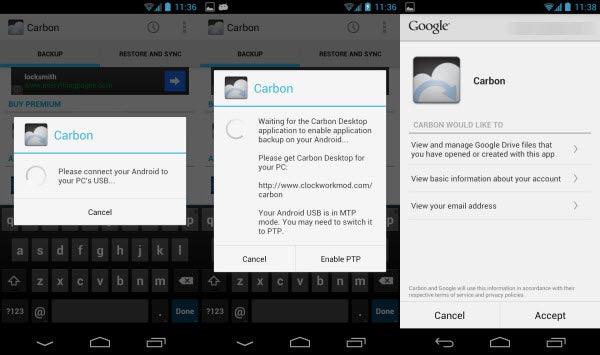
Unless you have a lot of apps you don’t use anymore, your first backup should be a full backup. Once you’ve finished selecting the apps, add a name, and tap “Backup.”

Helium will ask where you want to save the backup. Even though there are options for Google Drive and other cloud storage accounts, they are not activated. Choose “USB Storage”, which will save it to your device locally. After you select the location, wait for Helium to complete. The default option for Helium is to only save the internal app files and not the apk, s0 take note that you won’t have the actual APK for any apps.
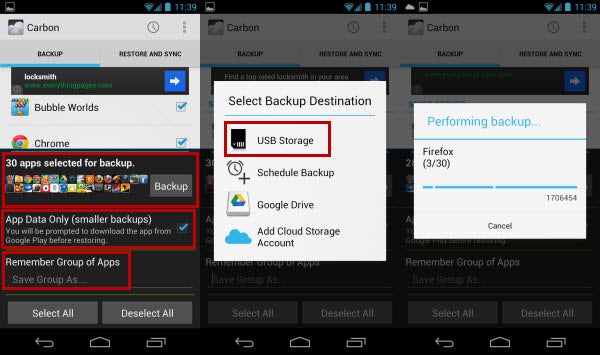
It’ll notify you when the backup is complete. If you want to save the Android Helium folder on your desktop, connect the Android device to the computer, and copy the file.

Restore

Restoring files is as easy as backing up. Select “Restore and Sync” and choose where the file is saved. If you don’t have the paid version of Helium, it’ll most likely be in “USB Storage”. If you are restoring after wiping your device, you’re going to have to install all the APKs for your apps again. Helium doesn’t save the APK by default.
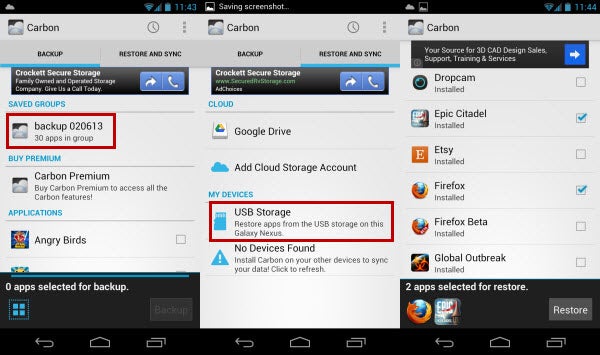
Select the app files and “Restore.” If you have a lot of apps, it may take a little time for Helium to completely restore all the files. After you finish, your other apps should have all the user data.

Helium is a great app for backups because it saves the most important files that other backup apps seem to ignore. I recommend the full version because of the cloud storage support, but you can get around that by copying the Helium folder off your Android device to a computer, and then uploading that to the cloud.

Add me on Google+

Before you do a backup, clean up your Android device by detecting malicious apps that eat your battery-life up.

Twitter updates mobile apps for easier search and discovery

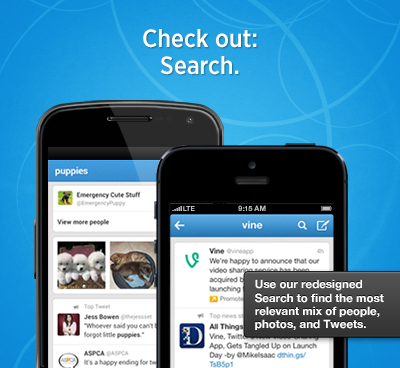
twitter iconSearch and discovery with Twitter’s mobile apps (and mobile.twitter.com) is about to get simpler. Previously, the Discover tab organized information into different blocks like trending topics and suggested followers. With this new update, tweets, activity, trends, and suggestions will all show up in a single stream so users won’t have to scroll through huge sections to get what they want. Users will also be able to divide Activity and Trends at the top of the Discover tab.

Search will also be updated and will pull up the most relevant mix of tweets, users, and photos in one stream, similar to the revamped Discover feed. iPhone users will have a dedicated search button that can be accessed anywhere within the app, making searching much more accessible. Android and iPad users have been enjoying this feature for a while now.

The Connect tab will also change by defaulting to a view that displays interactions, new followers, retweets and mentions. You can still narrow down the results by selecting “Mentions only.”

updated twitter search and discover

Last but not least, Twitter has finally fixed one annoying aspect of its mobile apps. Previously you could only click on a link by expanding a tweet first. Now users can tap directly on a link without expanding a tweet, taking one step out of the equation.

The updated apps haven’t hit their respective app stores yet but it should be pushed out by the end of the day. Twitter is available on both Android and iOS.

Source: Twitter

BBC Sport app for iOS goes worldwide

The international arm of the BBC (British Broadcasting Corporation) has released its BBC Sport app for international users on iOS, with an Android version on the way. It allows you to access news and results for all major sports, with a customizable menu so you can always have your favorites to hand.

The BBC Sport app has the same clean design you see on their website, optimized for smaller screens. Currently it’s only text and images – the UK version has on demand audio/video. Due to international licensing laws, it’s unlikely that exactly the same experience will be rolled out to the worldwide app, but we could see it in a limited form soon.

Continue reading “BBC Sport app for iOS goes worldwide”

The Witcher 3: Wild Hunt aims to surpass Skyrim

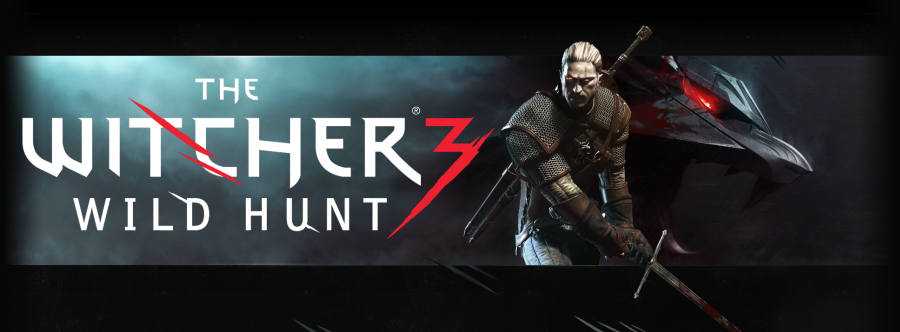
CD Projekt RED has announced the third and final installment of their fantasy role playing series, The Witcher 3: Wild Hunt. The Witcher 2 was highly acclaimed, and the Polish developers have ambitious plans for Wild Hunt.

The world of The Witcher 3: Wild Hunt is 30 times bigger than the last game, is properly open world with distinct regions. They are also promising an end to ‘Quick Time Events’, with a much better combat system. The lauded non-linear storytelling of the series will remain, but set in a living world they promise will be ‘larger than any other in modern RPG history.’ This puts 2011’s the expansive Skyrim firmly in CD Projekct RED’s sights.

The Witcher 3: Wild Hunt is slated for a 2014 release on PC and next-generation consoles.

Check out the teaser trailer below:

Twitter hacked, working on two-factor authentication

twitter iconOn Friday, Twitter announced via a blog post that its service was hacked, affecting approximately 250,000 users. Those affected should have received an email from Twitter notifying them of the hack. It’s a good time for everyone using Twitter to change passwords, just in case. Twitter claims that they “discovered one live attack and were able to shut it down in process moments later” but that was enough time for the hackers to have compromised hundreds of thousands of accounts.

Twitter recommends that users reset their passwords and revoke session tokens for the accounts, meaning you should log out and back in with your new password after you’ve changed it. This is also a good time for users to look into password locker services like LastPass, KeePass, and 1Password. It’s a good idea never to use the same password twice so one breached account won’t lead to many breached accounts.

twitter log in pg

Twitter is also working on a two-factor authentication system to beef up its security, much like what Google, Facebook, and Dropbox already have. How this system works is that an app installed on your phone will generate a random password every minute or so, making it extremely difficult for hackers to brute-force their way into your account. While it’s nice that Twitter is working on two-factor authentication, it’s a shame it hasn’t been rolled out earlier when most of its competitors already have this feature.

Twitter is still working with federal law enforcement to investigate who was behind these attacks.

Source: Twitter | The Guardian

How to use Vine

Twitter’s Vine became popular very quickly with Twitter’s social media influence. The concept behind Vine is to take six-second videos where you can post basically anything you want. While this can also include possibility not-safe-for-work videos, the majority of the Vine community has released interesting and creative videos. Since Vine is still relatively young, the majority of the posts are still direct videos of people showing something, but keep an eye on the community for more interesting videos.

Using the app is easy if you have ever posted to Twitter and only requires a few extra steps to record, edit, and upload to Twitter and the Vine community. While you can’t find friends through Facebook, your Twitter friends are ripe for spamming tons of videos of your food or cats.

So how do you use Vine?

Read on to find out.

Continue reading “How to use Vine”