Microsoft’s browser benchmark cheats, gives IE 11 speed crown

During last week’s Build 2013 conference in San Francisco, Microsoft showed off Windows 8.1 and its latest version of Internet Explorer. IE 11 looks to be the most feature rich and quickest version of Microsoft’s browser but can it dethrone Chrome as the fastest browser? Microsoft seems to think so and has created its own browser benchmark dubbed Lawn Mark 2013.

The test is performed in browser, loading symbols for different browsers as patches of grass. Unsurprisingly, Internet Explorer 11 took top marks but is this test accurate? The folks over at the Chromium project were skeptical and decided to dissect the test to see what was really going on.

IE11 lawn mark results

What they found was that Lawn Mark 2013 was improperly setting the smallest timeout value (setTimeout)improperly for the competition. While IE11 was allowed a “0” value for setTimeout, the competition was set to the standard 4 milliseconds.

After adjusting the test to give all browser the same smallest timeout value, Internet Explorer 11 actually came out about 30% slower than Chrome. Even Firefox managed to be quicker than IE 11. In reality, IE 11 is in 3rd place with Opera and Safari following. You can try out the modified test yourself here.

So what did we learn from these benchmarks? Either there’s a “bug” in Lawn Mark 2013 or Microsoft deliberately created a benchmark where IE would alway win. Also, don’t mess with the Chrome fanboys.

[Source: Chromium]

How to: send Facebook stickers from your PC or Mac

Following in the steps of Path, Line and Viber, Facebook is the latest to adopt stickers, the little virtual stickies that are gradually replacing the emoticons and smileys of old. Right now, Facebook’s stickers are limited to people using Facebook’s mobile applications, Facebook and Facebook Messenger. Fortunately, the facemoji extension allows you to overcome this restriction. We’re going to show you how to use Facebook stickers on PCs and Macs!

Warning: the facemoji extension can only be installed on Google Chrome (PC | Mac) or Firefox (PC | Mac).

  1. First install facemoji on you normal browser: To learn more about installing extensions and add ons, take a look at these guides: Firefox| Chrome.
  2. Log in to your Facebook account.
  3. Send a private message to a contact of your choice, or send an instant message.
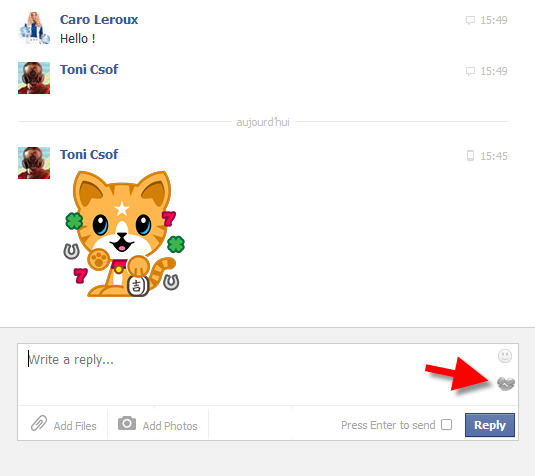
  4. You’ll see a new icon appear to the bottom right of the text box – click on it to activate facemoji.
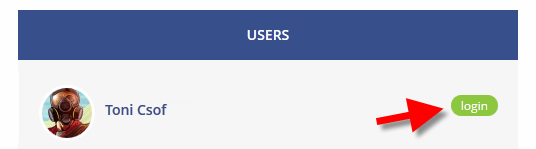
  5. A new window will appear – click login.
  6. Go back to the message or chat you started in step 3.
  7. Refresh your browser page by hitting F5. Alternatively, hit Ctrl + R on PC or ⌘ + R on Mac.
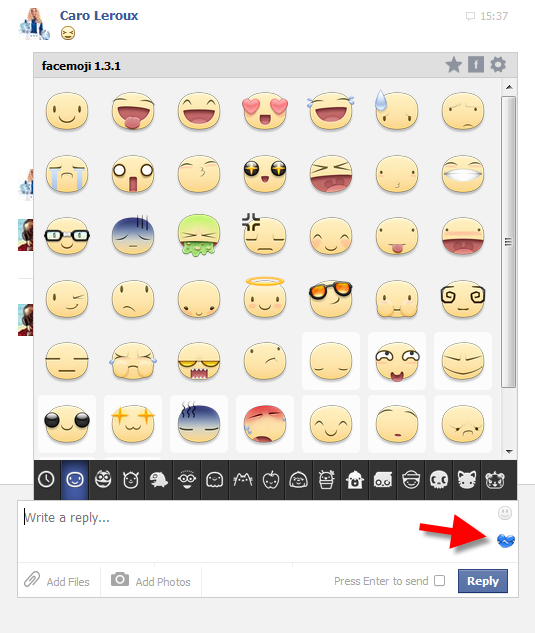
  8. Click the facemoji icon again and you’ll open the Facebook stickers menu.
  9. Click on the sticker your want, and it will be inserted into your conversation.


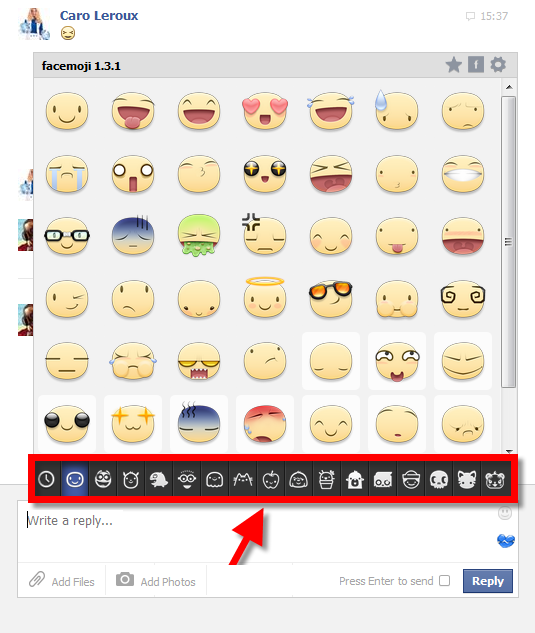
Remember that you can change the set of stickers by clicking the icon bar that runs beneath the stickers menu.


Via Softonic FR

Any more questions about Facebook stickers? Ask below, and we’ll answer!

Wikipedia launches new simple VisualEditor for contributors

Wikipedia has launched a WYSIWYG (what you see is what you get) editor that makes contributing to the site easier for everyone. The old article editor, wiki markup, is difficult for newcomers. The simpler VisualEditor will mean contributors can focus on their articles, without being wiki markup experts.

The new VisualEditor has been available as an alpha test for a few months on Wikipedia in English, and now all registered users can use it. The classic editor is still available, and according to the site, there are still some functions in wiki markup that are not available in the VisualEditor. Experienced Wikipedia editors will therefore still be able to work as normal, but the foundation is trying to convince as many people as possible to use VisualEditor by default, so any bugs or problems can be ironed out as soon as possible. There are no plans to to remove the wiki markup editing ability.

Not all browsers support VisualEditor yet – current versions of Chrome, Safari, and Firefox are supported, but Internet Explorer is not. Wikipedia is asking for as much feedback from users as possible, to make VisualEditor as good as possible.

[Source: Wikimedia Foundation]

Skype celebrates 100 million Android installs with 4.0 release

Skype has hit a new milestone today on Android and its celebrating with a redesigned app. Version 4.0 of Skype for Android features a new design that looks more like Windows Phone, as well as redesigned conversations.

The impetus behind the redesigned converstations comes from wanting to make “interactions easier and [putting] conversations first.” Check out the short trailer below to see the new Android app in action.

Beyond visual changes, Skype for Android also has a ton of performance and bug fixes. Skype has been concentrating on making a more stable and speedy app. The company also promises more updates “in the coming months.”

[Source: Skype | Download: Softonic]

New PES 2014 trailer shows off “next-gen equivalent” graphics

Althought PES 2014 has only been confirmed for release on current generation consoles, Konami claims that the FIFA rival will have graphics that are on par with what’s being offered on the Xbox One and PlayStation 4.

In a new trailer released by Konami, in-game graphics and new game features like the “barycenter” ball handling system, which controls the player’s weight separately from the ball’s movement for a more realistic feel.

The trailer also shows off the Bayer Munich team doing some technical moves and precise ball control. The ball always acts as the center for the player, which makes feints and dodges much more realistic. The new barycenter physics engine also influences the defensive play in the game where balls can be cut in ways that weren’t in the previous versions of PES.

The Fox Engine provides impressive graphics as displayed by the close-ups of players from the team. Facial expresions are more detailed and realistic to the point where you can even see the veins in their necks.

PES 2014 looks like an impressive game, especially if can live up to the claims of “next-gen” quality graphics. We’ll reserve judgement until the game comes out on September 20th of this year for current generation consoles. Konami has not announced a release date for next-gen consoles yet.

Two PC viruses discovered that work together

Microsoft’s Malware Protection Centre has described two families of PC virus that actually work together to download new versions of the viruses, making them harder to eradicate. Called Vobfus and Beebone, one works to download new versions of the other.

Vobfus is usually the first infection, arriving through fake links, infected USB drives or across networked PCs. This then downloads Beebone, which enlists your PC in a botnet – with all the other Beebone infected computers. Beebone can then download fresh versions of the Vobfus virus.

The advantage of this collaboration for the viruses is that they may be able to stay ahead of malware detection. You could discover a known version of one virus on your PC, but it might have already downloaded a newer version of the other which has not yet been detected.

Microsoft recommend making sure your browser is always up to date, which helps prevent you from visiting potentially dangerous sites. Disabling ‘autorun’ on Windows XP is also a good way to avoid viruses installing themselves from infected drives. You should always make sure your antivirus suite is up to date.

[Source: Malware Protection Centre]

Hands on with Windows 8.1 Preview

Microsoft announced interesting updates with Windows 8.1. From the “return” of the Start Button and updates to apps, Windows 8.1 is not a significant update to the operating system but more of a polishing of  Microsoft’s services. There are some new apps like Bing Food & Drink and Bing Health & Fitness, but they don’t add much extra content.

The Preview build released doesn’t contain the more useful updates like 3D Maps or Outlook gestures and is more of a look into operating system’s updates.
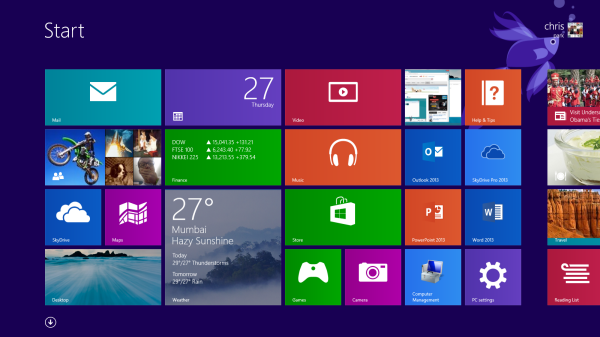
Essentially the same on the Surface

The Modern UI remains the same in Windows 8.1. There are more customization options like Live Tile management. You can resize titles, though the size options aren’t available to all apps pinned to the Start screen. Pinning apps is also easier because you can select multiple apps rather than individually like in Windows 8.

First party apps continue to have notifications update in the Live Tiles, depending on the app. It’s definitely not as visual as Microsoft demoed during Build, however. This will all depend on the apps and services you have connected to your Microsoft account.

Windows 8.1 Preview includes the redesigned app drawer, which offers  much better organization than before. Native apps are sorted in one main section and compatible Windows 8 apps are sorted by name like the Programs list in Windows 7.

This view also shows a lot information for managing your computer like direct links for System Information, Task Scheduler, and Windows Firewall with Advanced Security. These apps still load in the Desktop, however.

Redesigned and new apps
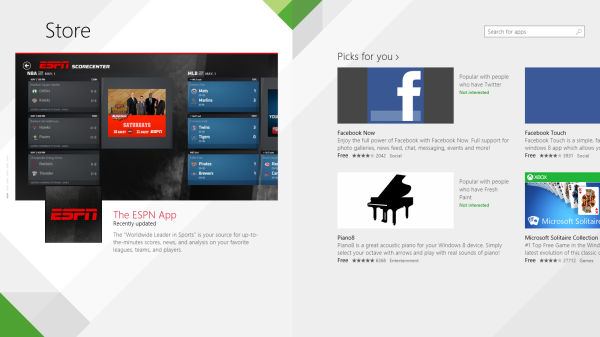
The Windows Store received a redesign to make the interface easier to navigate. Instead of separating apps into different categories, it highlights apps, shows “Picks for You” that you can reply to if they aren’t interesting, popular apps, new releases, and top lists for paid and free apps.

It also improves the options in Settings by having a direct app update link, which is much improved over the hidden and slow to refresh Windows Store app .
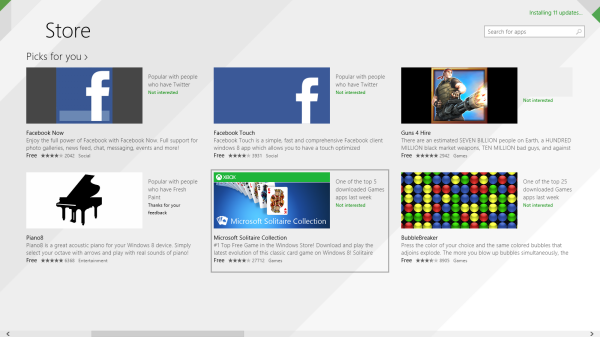
One small problem is app discovery because it relies on your existing library of apps and what’s trending in the store.

Xbox Music and Bing in everything
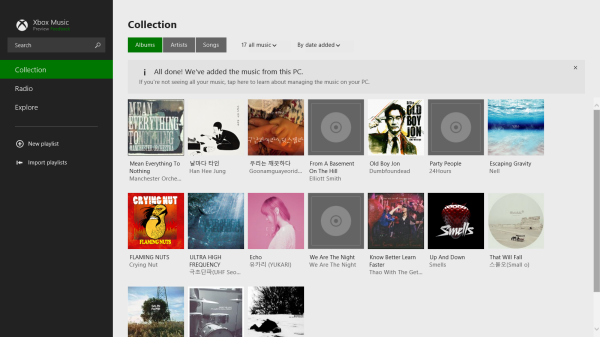
Xbox Music also got an updated user interface. It focuses a lot on your personal collection with options for exploring new music. You can upload your own music collection with the Xbox Music Pass, similar to Google Play Music.

It’s not as visually striking as iTunes or Google Play Music and also doesn’t feature many options. In the Build Keynote, Microsoft showed how to create playlists from websites directly within the app, which was interesting. But with a lot of users using Spotify and other streaming services, Xbox Music doesn’t offer a compelling reason to switch unless you want to use the app on Xbox 360.

Controls for Xbox Music are still lacking with playback controls not optimized and the Live Tile is very basic.
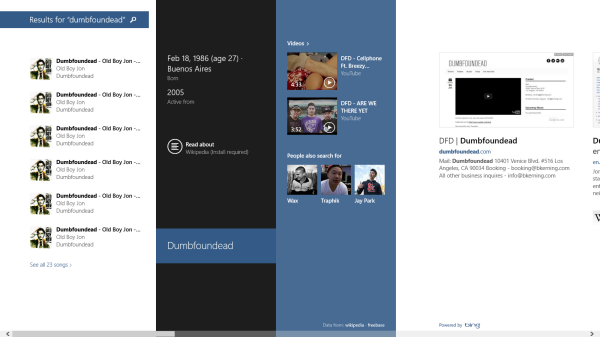
While looking at Xbox Music, I tried searching through Windows 8.1 with Bing. Microsoft said that it would pull information from multiple sources when searching and my search for the artist, “Dumbfoundead”, actually had some good results. It wasn’t as good as the demos that Microsoft showed, but it did pull information from Wikipedia (with an option to install the app) and music I had on the laptop.

General searching in Windows 8.1 is much easier and since search also pulls results from the web, it makes finding relevant information simple. It makes sense that there’s still work to be done to accurately import all relevant information through Bing, but it works well in the Windows 8.1 Preview.

Food, Drink, and Fitness

Microsoft also showed off the new Bing Food & Drink and Health & Fitness apps for Windows 8.1. Food & Drink is an interesting app, which features the ability to add recipes to Collections or manually create a recipe. There also a shopping list built in and the ability to create meal plans.
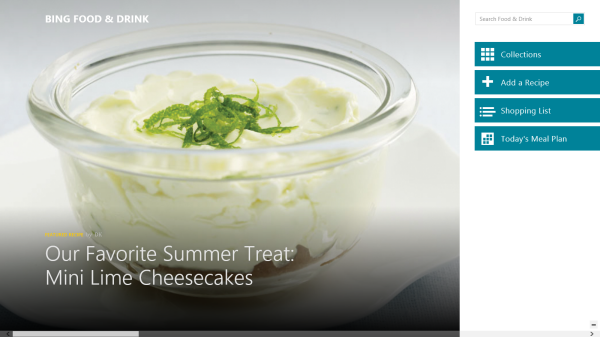
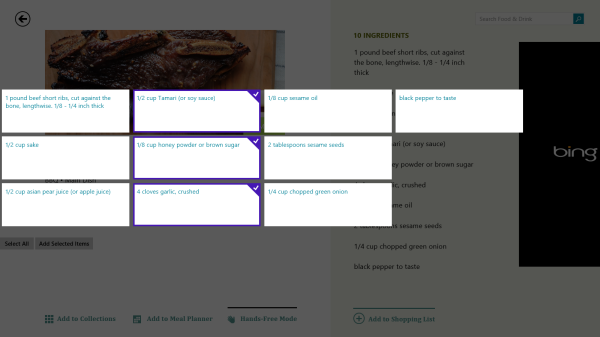
Food & Drink looks like it could be useful, but there’s a lot of manual input required for creating collections and adding recipes. One nice feature is the ability to look at recipes and add them to meal plans or add ingredients to a shopping list. There’s a lot of potential for use in Food & Drink, but I think there’s too much manual data input required before it’s becomes truly useful.
Bing Health & Fitness includes three separate apps in one. The Diet Tracker, Health Tracker, and Exercise Tracker are all tools to monitor your health.

All three trackers are connected to Microsoft’s HealthVault service, which contains apps from over 140 providers that will import your information. However, a lot of these apps aren’t standard health apps and are released by specific health providers. This is actually a big benefit because it will bridge mobile and Windows 8.1 together so your data is collected and synced easily.

The Health Tracker collects all your medical information and syncs it with HealthVault. It looks like your medical history all collected in one place. Diet Tracker functions as your food intake calculator. With over 200,000 foods with nutrition profiles, it shows the amount of calories that your diet contains and helps create goals.

Exercise Tracker is a database that keeps information on your exercise. Combined with Diet Tracker, it can calculate information on how much exercise is necessary in relation to the food you eat.

While Food & Drink is more of a simple food app, there is great potential with the Health & Fitness app.

If the all three apps inside Health & Fitness are used, then you can get an excellent database of health information that can provide accurate data for doctors.

The “return” of the Start Button

Windows 8.1 reintroduces the Start Button to the Desktop of Windows. On the Modern UI, it shows up briefly and fades away, which is a bit confusing. One of the major changes is the ability to boot directly to the desktop in Windows 8.1, allowing users to bypass the Start screen.
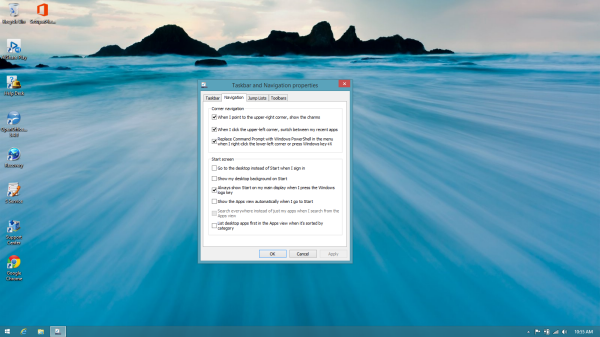
The Desktop is a necessity for apps that are not native to the Modern UI, an issue that Microsoft has been attempting to correct by building better Modern UI apps.

While many people celebrated the return of the Start Button, there’s more applause for the ability to bypass the Modern UI entirely.

Incremental update
Windows 8.1 address some user concerns while also adding new features to entice users to upgrade. The updates to the UI are mainly cosmetic, including the Start Button and redesigned apps like Xbox Music don’t change the core functionality of the operating system.

Bing integration into the core of the operating system is great for users because it allows for quick searches within 8.1, but users who use Google primarily may not find the results as useful. Microsoft is attempting to give a reason to move into its ecosystem, but it isn’t there in Windows 8.1.

Windows 8 is still a tough sell, especially to those who are content with the features and interface of Windows 7.

Xbox Music web version launched

Xbox Music, Microsoft’s streaming music service has a new web service, so you can now listen from your browser. All you need is Adobe Flash player installed for the web app to run (so it currently doesn’t work on iOS devices).

Previously only available on Windows 8, RT, Windows Phone 8 and Xbox 360, the new web app means you can access Xbox music from any PC or Mac, and unlike some streaming services, you can be logged into the service on multiple devices at the same time. Android and iOS users will be able to use the service later this year according to Microsoft.

Xbox Music has a very simple interface, and mirrors the design of Xbox and Windows 8’s Modern UI design. It lacks the recommendations and social features of rivals like Spotify or Deezer, but does offer ‘millions’ of songs to listen to. We don’t know exactly how many, so can’t yet compare Xbox Music with the libraries of competitors.

You can try the service free for 30 days.

PRISM: Leaked NSA slides explains real-time monitoring

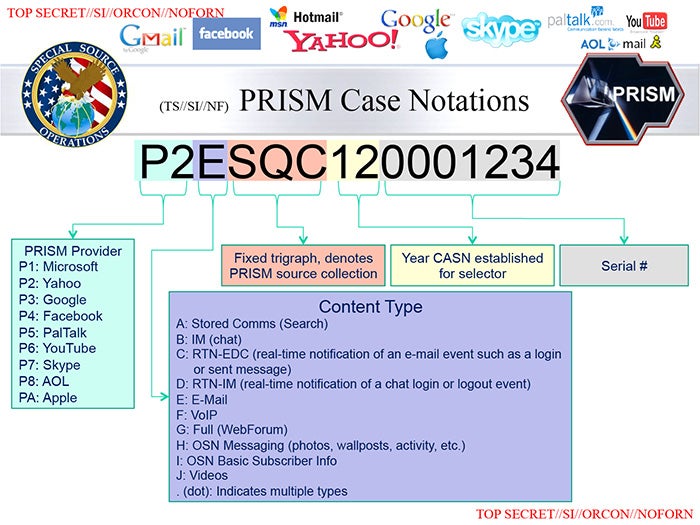
New details have been revealed about the NSA PRISM program, which allows the United States government to snoop on internet traffic from major tech companies like Google, Facebook, Yahoo! and Apple. The Washington Post has posted the top secret slides from the NSA, which shows exactly how PRISM’s real-time data tracking works.

One slide seemingly confirms Edward Snowden’s claims that the NSA has access to real-time data from email and instant messaging, which flags a targeted person as soon as he or she is online.

PRISM real time data collection

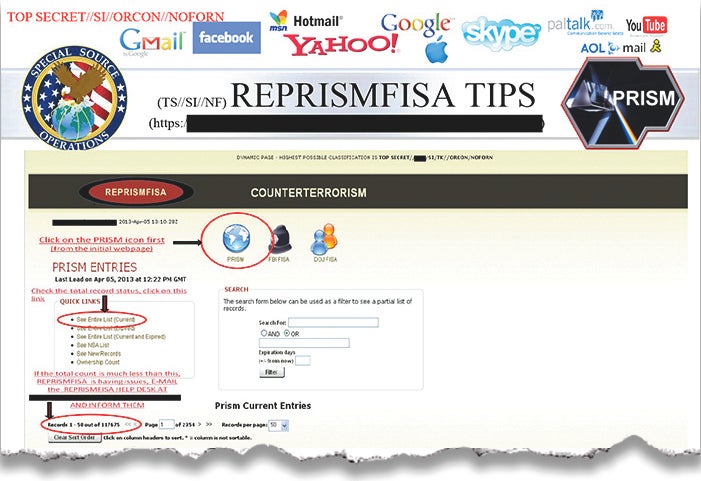
There’s also a slide showing the amount of collateral data collecting that the NSA has while pursing a target. Dated April 5th, 2013, the side shows that 117,675 simultaneous records we being recorded, though it doesn’t specifically state how many of these were from US users or how many relevant records there were.

prism interface

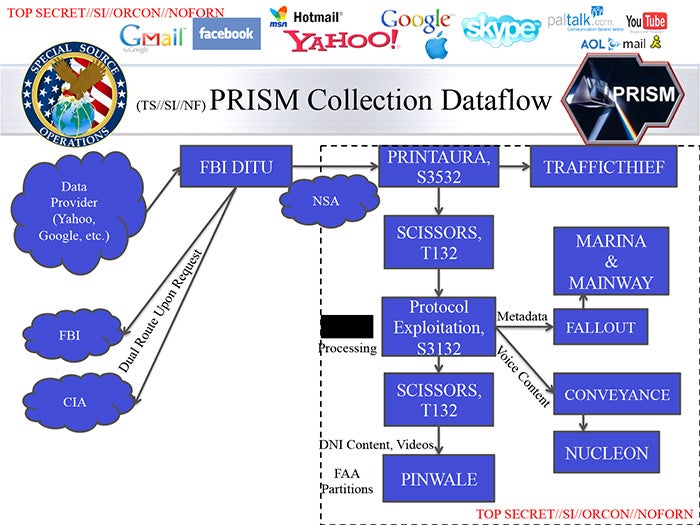
One particularly interesting slide shows exactly how the data collection process works. The NSA data analysis is broken up into different tools with secret names such as NUCLEON (voice analysis), PINWALE (video analysis), and MARINA (internet records). While the FBI cross-references its own database with stored records to check that they do not match US citizens, live surveillance doesn’t apply. This means that real-time data collected could potentially lead to the collateral collection of data from innocent US citizens.

PRISM data flow slide

While the leaked sides do show more information about PRISM, there’s still a substantial amount of uncertainty about the program. One looming question that remains is if the NSA has direct and unencumbered access to data from companies like Google, Apple, and Facebook. There’s also no mention of the tactics that actual terrorists can use to mask their identities with things like VPN and data encryption.

[Source: The Washington Post]

Minecraft 1.6.1 Horse Update released today

The next update to Minecraft, version 1.6.1, will be released today. Called the ‘Horse Update‘, it indeed brings horses to Minecraft. You’ll be able to tame, ride and breed horses, as well as give them armor. The update comes with a raft of non-horse related additions and updates too.

There are five types of horse – normal horses, donkeys, mules, skeleton and undead horses. There are 35 breed variations of horse, and once tamed they can be given saddles, armor and equipment.

Other additions include lead blocks, carpets, name tags, hardened and stained clay. The Minecraft launcher has also been updated, with self updates and a new password storing system amongst the improvements.
The Horse Update looks like being one of the most popular Minecraft versions, and lots of players are excited about using horses in the game. What will you call yours?

Read more about the Minecraft Horse update.

[Source: Minecraft wiki]