Skype 10th Anniversary: a history

Skype is a great communication app for making video calls. It is available for nearly any device with internet access, reaching more than 300 million users per month.

In the last few years Skype has made headlines for two reasons: its acquisition by Microsoft for 8.5 billion dollars and Skype’s replacement of Messenger. Today marks the service’s tenth birthday!

Skype’s beginning

Skype’s origins date back 10 years to Estonia, developed by the creators of Kazaa, the well-known P2P downloader. The same Peer to Peer technology is utilized for voice calls, and even the origin of the name of the program: Skype is short for “Sky Peer to Peer”.

Founders

The founders of Skype: Janus Friis (Danish) and Niklas Zennström (Swedish)

The first beta of Skype was an application able to make voice calls from PC to PC and little else. The original logo was purple.
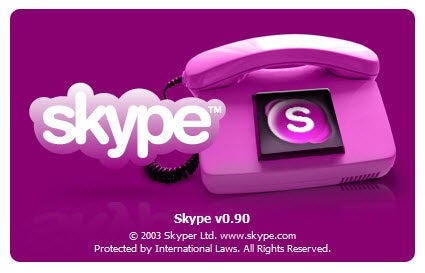
Skype 0.9 Beta introduced the concept of paying to use Skype to make calls to landlines, while trying to find the right color to fit the program. Successive versions varied their main color to finally settle on the blue by which Skype is known today.
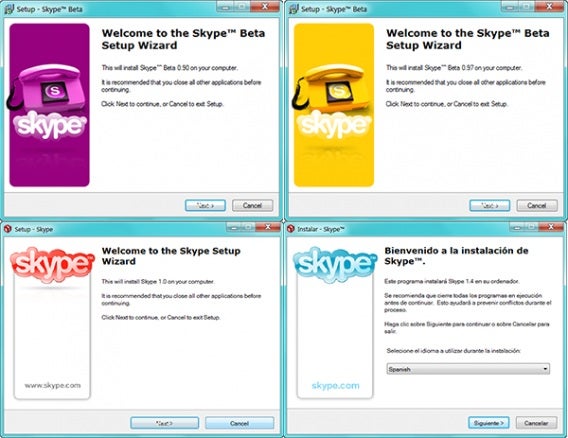
Skype Installation Window Beta 0.90, 0.97, 1.0 and 1.4, with different colors

Then came video

Version 2.0 was released for the first time in beta version in late 2005. It aimed to revolutionize internet calls again, first introducing video calling and a new design incorporating a more simplified interface.

This version was already very similar to Skype as we know it today.
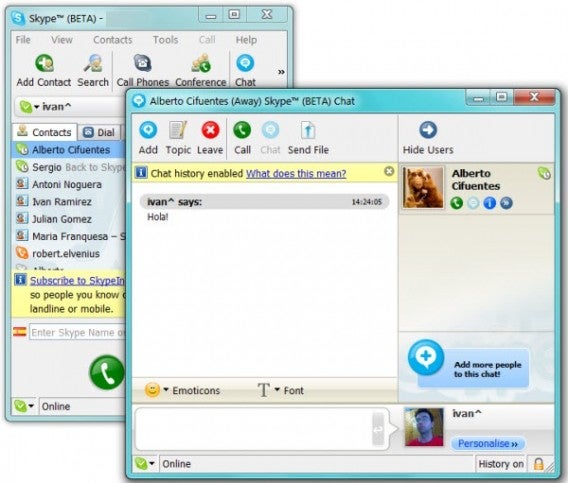
It enabled voice and video calls, instant messages with animated emoticons, sharing files, group conversations, SMS, chat logs, and custom avatars.

Purchase by eBay

In September 2005, eBay bought Skype for $2.5 billion. The founders of Skype then concentrated on a streaming video service called Joost, which unfortunately wasn’t very successful.

During the following years, Skype continued to be updated, but the company didn’t flourish financially. eBay absorbed billions in losses for the company, and subsequently stated that they had overrated Skype.

Skype becomes more social

Skype version 3.1 and successive apps became more social. It was no longer a matter of calling your family, but also of connecting with new people through the network.

Skypecasts were first introduced in May 2006. It was a service which could create voice conversations with up to one hundred participants. It worked like a chat room with a host who could control who could talk.
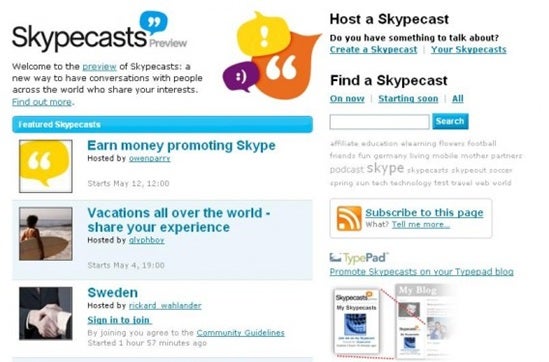
The service would stay active until September 2008, when Skype decided to close it permanently for not maintaining the expected minimum quality standard.

Other social functions were Skype Find and a directory of users. Skype Find, later simply called business directory, was maintained by the community of Skype users. You could find a local restaurant phone number and call from Skype. This was active until Skype 5.2.
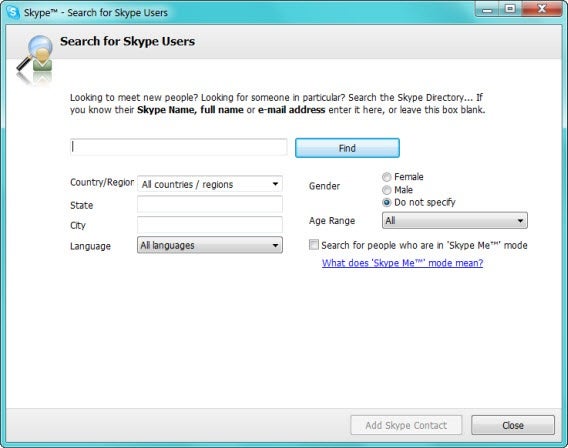
Back in those days the user directories allowed you to search for much more than you could today: you could search for users by age, region, sex and language.
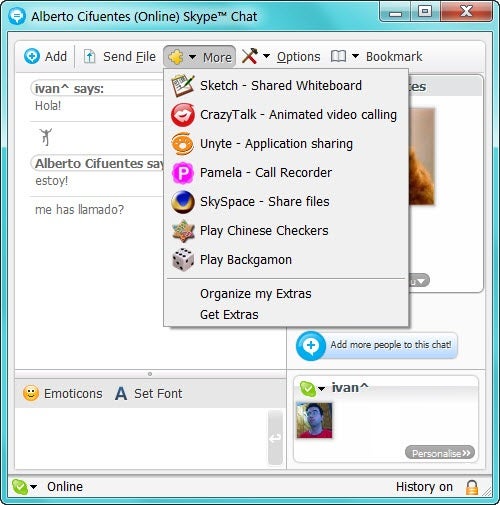
Version 3.0 of Skype had pretty much everything we know about Skype, including extras: small plug-ins that added features and games.

Focus on video calls

In early 2008, the tension between eBay and Skype’s respective management teams resulted constant managerial changes and culminated with the departure of the company’s two founders.

Josh Silverman took over in February and put the main focus of the company on video calls. The result: many of the features of previous versions were discontinued (Skypecast, Skype Find) while version 4.0 of Skype allowed video calls in 720p HD.
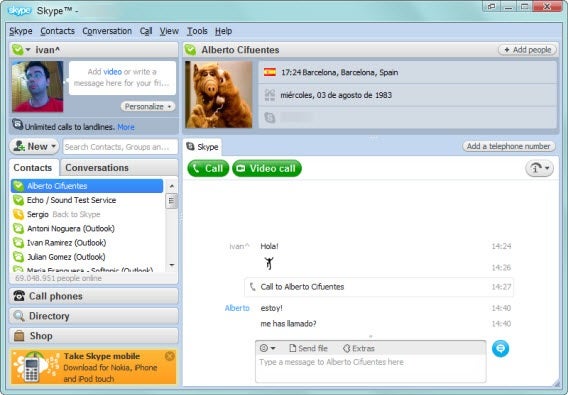
Main window of Skype 4.0, very similar to the current versions of the program

In 2009, Skype 4.1 also included the possibility of screen sharing and joined up with Boingo to offer wireless internet access through their access points (with a surcharge). It would later to be renamed to Skype and Skype Wi-Fi Access.
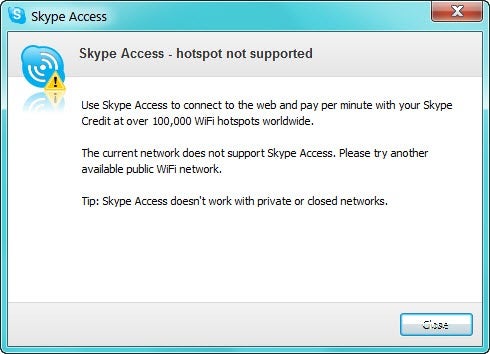
Skype Access in Skype 4.1 for Windows

Expansion to all devices

In 2010 the versions of Skype for Windows, Mac and Linux were already very mature: it was time to jump to other platforms.

First it was Android, and then iPhone and iPad. Early versions allowed only voice calls (in some cases, only Wi-Fi and not 3G). It was not until December 2010 that video calls came to iPhone and June 2011 to Android.
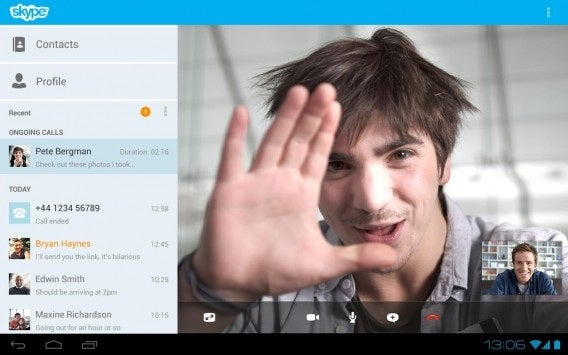
Video call on Android tablet

This expansion did not end there: Skype is one of the applications that has spread to many platforms: it’s available on PC, Mac, Linux, smart TVs, Skype phones and consoles.

Microsoft buys Skype

In May 2011, Microsoft bought Skype for $8.5 billion. By then, the stable version of Skype for Windows was 5.3, with Facebook integration and group video calls.
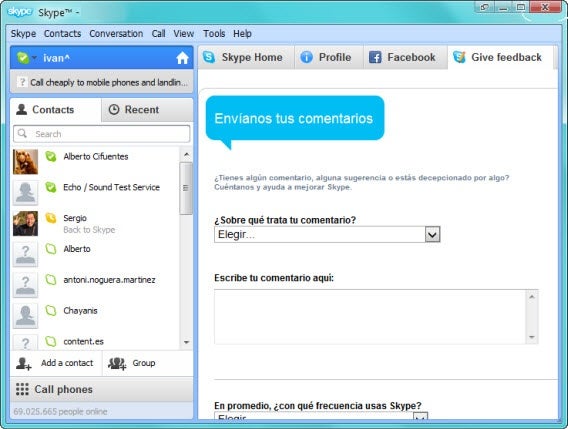
How it looked when Microsoft bought Skype (Skype 5.3)

The group calls and other functions were included within a monthly subscription package called Skype Premium. With a payment of about $4.99 per month, you could access to shared screen video calls and group calls, unlimited calls to a country, and an ad-free interface.

Skype replaces Messenger

The news came in November 2012: Messenger would disappear and the main Microsoft messaging system would be Skype.

Since then, Skype has evolved, slowly, to cover the gap and replace the once-famous Messenger. The first change was obvious: allow login through a Microsoft account. The second: the inclusion of Bing Bar in the installer.
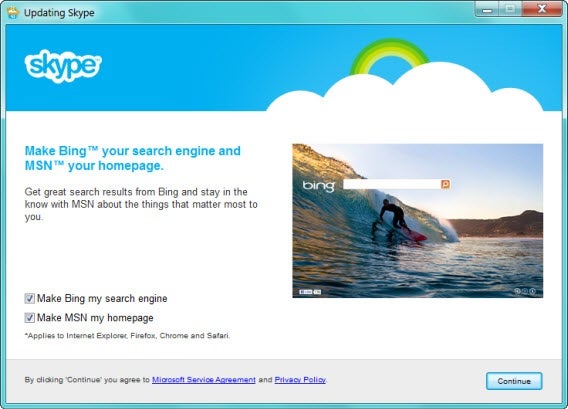
Bing Bar Skype installer

Skype has slowly adapted some Microsoft’s overall style. The first thing: a flat interface and the disappearance of icon highlights bring it in line with the rest of Windows 8.

The most current version of Skype today is 6.6 and although you can’t completely replace Messenger, with some patience it proves to be an efficient messenger with multipurpose network support (Skype, Facebook and Messenger).

Happy Birthday, Skype!
Happy 10th birthday Skype!

Today marks ten years since the launch of Skype, the free internet calling app that has grown to over 300 million users. A startup from Estonia, from the developers of the peer to peer file sharing app Kazaa, Skype went on to be bought by Microsoft for $8.5 million, and replace Windows Live Messenger as Microsoft’s communication app.

Skype is incredibly popular but there are plenty of apps snapping at its heals in 2013. Viber is the obvious direct competitor, but others such as LINE are getting extremely popular too. The merger of Messenger and Skype exposed some of Skype’s weaknesses, such as no email notifications and a weaker emoticon offering than other apps.

However, if you want to make voice or video calls, Skype is excellent whether you’re on your desktop or mobile devices.

Download Skype for Windows, Mac, iOS, Android, and Windows Phone.

Happy 10th Birthday Skype!

Spam links make $200 million a year on Facebook

Researchers have discovered that putting third-party links to scam sites on Facebook fan pages are making $200 million a year for spammers. The Guardian reports that an Italian team has investigated links shared on Facebook, like the well known ‘Click here for a free iPhone’ scam, which lead to sites outside Facebook.

Many spammers use URL shortening services like Bitly so users can’t see where links are pointing to. These third party sites sometimes have genuine scams that try to trick users into paying for a fake product – like WhatsApp for Windows that we reported on earlier this year. Other links point to pages that make money from Google Ads. Even linking to YouTube videos can generate cash, thanks to YouTube’s revenue sharing model.

Scammers set up fake fan pages, and then share content to attract fans. On a page with 30,000 fans, scammers earn around $13 per link shared. Companies pay fan page admins to link to their dubious sites and offers, which suggests that the third party sites make even more than scammers on Facebook.

There is big money in Facebook scams, which explains why there are so many of them. As we have said before, you have to be careful before clicking on shared links. Facebook says it is taking steps to crack down on spam and scams, but scammers will always be looking for new ways to trick users.

[Source: The Guardian]

Yahoo! redesigns omg!, Sports, Weather and other sites to match mobile apps

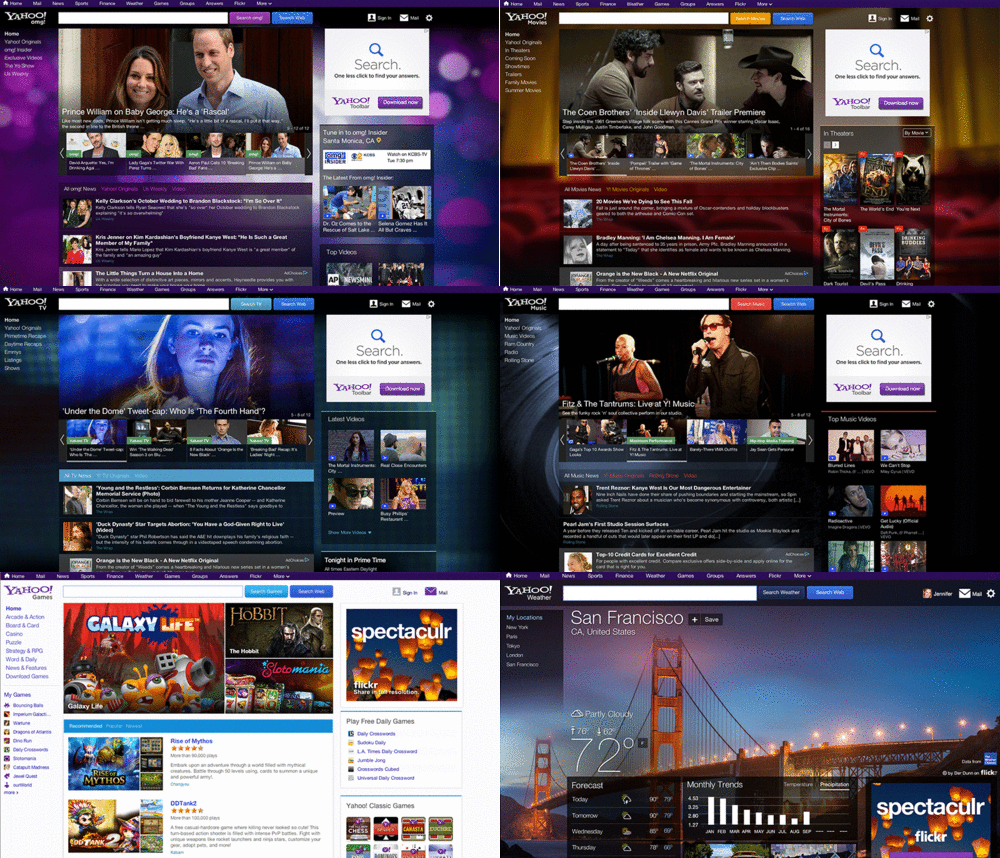
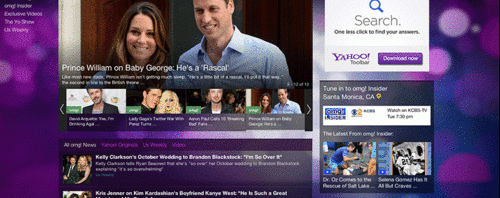
Yahoo! is continuing to update its various properties and products to fit in line with the new company look and feel (beyond just a logo change). The company has updated its Games, Sports, Weather and other sites to match the same look and feel of its recently redesigned mobile apps.


  • Yahoo! starts handing out abandoned IDs, will cost $1.99 to request name
  • Yahoo!’s new Weather app now on Android
  • What does the acquisition of Rockmelt mean for Yahoo!?

  • The experience across the board on all of the redesigned sites is much more visual. Huge photos sourced from Yahoo!’s photo hosting site, Flickr, dominate the backgrounds. The Yahoo! Weather site looks and feels much like the Android and iOS apps with translucent menus, animated wind turbines, and moonphase. Sports features a similar redesign with translucent menus and a picture of a baseball field in the background.

    yahoo redesign gif

    Things haven’t moved around too much and all the features that Yahoo! fans love are still there. It’s not a complete redesign by any means but it does go a long way to make Yahoo! feel modern and fresh.

    Source: Yahoo!

    Google+ Hangouts goes HD, will run without plug-ins soon

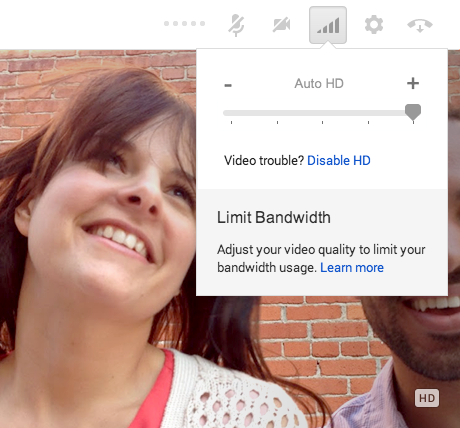
    Google is slowly rolling out HD Hangouts for its Google+ social network. Lucky users who have received the update can look forward to 720p resolution video. This update marks a move toward something bigger than just great video fidelity. Google is planning to abandon the H.264 codec in favor of its own VP8 codec. The codec was acquired by the company in 2010 and has since been open sourced.


  • Google Hangouts for Android updated, adds more emoji
  • You can now make calls with Google Hangouts
  • Google Hangouts Easter Eggs lets you change background colors, release ponies

  • After implementing the use of the VP8 codec, Google is planning to move Hangouts to WebRTC, the browser-based chat standard that Chrome and Firefox support. WebRTC will allow browsers to natively run Hangouts without requiring users to install a separate plug-in. Although this all sounds great, WebRTC will have less functionality than a plug-in based Hangouts experience. For one, WebRTC will only allow for basic video chat. Advanced features like Hangouts’ silly hats will not work with WebRTC.

    The upgrade to HD Hangouts is rolling out over the next few weeks so be patient if you haven’t received the update yet.

    Sources: GigaOM | Chee Chew (Google+)

    Twitter for Android, iOS updated with easier to follow conversations

    It can be a bit difficult to track a conversation on Twitter, especially if you see a tweet that’s out of context. Twitter is fixing this problem by updating its Android and iOS apps to make it easier to read conversations.


  • Syrian Electronic Army hacks Twitter, New York Times
  • Twitter adds related headlines to tweets for context
  • Twitter experiments with ‘TV Trending’ box at the top of your Timeline

  • Conversations on Twitter will now be displayed in chronological order as well as grouping up to three Tweets in a sequence in your home timeline. If you want to expand the conversation, tap on it and you’ll see every reply people have made in that conversation, even from the people you aren’t following. This provides valuable context when looking back at the source of the conversation.

    In addition to updating its Android and iOS apps, Twitter is updating its website to make it easier to share conversations using email. The mobile apps will allow you to share conversations and direct messages as well. Twitter has also updated its app for entry-level Android handsets, reducing the size of the app, making it faster and easier to install.

    Download Twitter for Android and iOS

    Source: Twitter

    Square Enix halts Final Fantasy XIV sales due to lack of capacity

    Final Fantasy XIV: A Real Reborn, the massively multiplayer online role playing game, is off to a rough start. The game went on sale yesterday and has received such overwhelming interest that servers have been flooded with players trying to log onto the game. Square Enix has stopped selling the game temporarily while it attempts to add more capacity to its servers.

    In addition, those who have purchased the game will no longer be able to create characters in the following worlds. A news post on the European Final Fantasy XIV site lists off all the worlds where character creation has been temporarily suspended.

    Over the weekend, those who pre-ordered the game gained early access but faced server issues right away. Many players reported getting error 1017 which reads, “The World is currently full. Please wait until an opening is available and try again.” Square Enix has taken to Facebook to apologize to fans for the poor experience. Here’s what the company said:

    “Due to the overwhelmingly positive response to FINAL FANTASY XIV: A Realm Reborn, we are currently experiencing extremely long wait times for users to be able to log in and play. As a temporary measure, we will halt sales of FINAL FANTASY XIV: A REALM REBORN’s digital download products so we can accommodate all of those wishing to play. We are working to expand our server capacity in the coming days.”

    The company did not give an expected time for increasing its server capacity so players will have to wait indefinitely. Although you can’t buy or really play the game at the moment, you can check out our hands-on with the game here.

    Source: Square Enix (Facebook)

    Foursquare now available on Windows 8

    Windows 8 is still seriously lacking apps but Microsoft can cross off one app off its “to-do” list today. Foursquare is finally available on Windows 8, letting users check in, find places to go, and read tips.


  • Read our Foursquare for Android review
  • Read our Foursquare for iPhone review
  • Read our Foursquare for Blackberry review

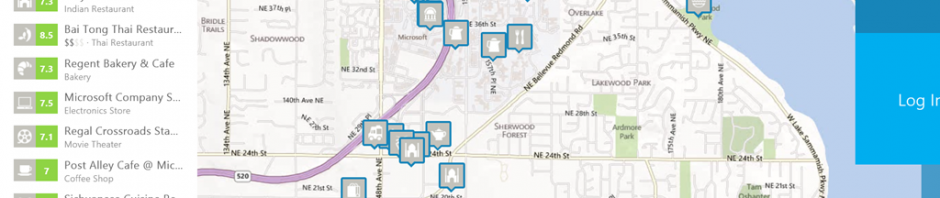
  • Foursquare is usually most useful as a mobile app for phones so you can look up place on the go but having the app on a tablet or desktop has its benefits. The app takes advantage of larger screens by showing more information at once with touch friendly controls. While you probably won’t be checking in with the app, it is useful as a research tool for looking up places you want to go and seeing where your friends have been.

    foursquare for windows 8 map

    The app is still propagating across the Windows Store servers so users might be getting a “not found” error. Microsoft recommends checking back later, but the app will be fully rolled out by the end of today.

    Download Foursquare for Windows 8

    Source: Microsoft

    Facebook publishes Global Government Requests Report

    Concern about government surveillance is very high in the wake of the PRISM scandal. Facebook has published a report explaining how many requests it gets for user information from governments around the world.

    The report shows us how many requests for data were made, and for how many user accounts per country. It also shows the percentage of the requests ‘in which (it was) required by law to disclose at least some data.’

    The greatest number of requests came not from Russia, but the United States, with over 10,000 requests for data about over 20,000 users (Russia made only one request). Facebook released data on 79% of those requests.

    Colin Stretch, Facebook General Counsel, makes it clear that they make sure that any request meets the required legal standards before releasing any data to governments.

    The report covers the first six months of 2013, and Facebook promise this will be the first of many, so we can expect to see more transparency like this from the social network.

    Read the full report here.

    Note-taking apps for Android

    While it’s possible to be productive on Android, using a smartphone or tablet doesn’t have the same speed as a physical keyboard. But Android does have a good selection of note-taking apps that sync across your devices and into the cloud.

    There are a lot of popular apps that offer different extra functions, but when you need to create a quick note it’s easier to use something a bit more simple.

    When it comes to usability, speed is key for note-taking apps. Whether you take notes during class or just need to make a list, here are some suggestions of apps to use.

    Google Keep

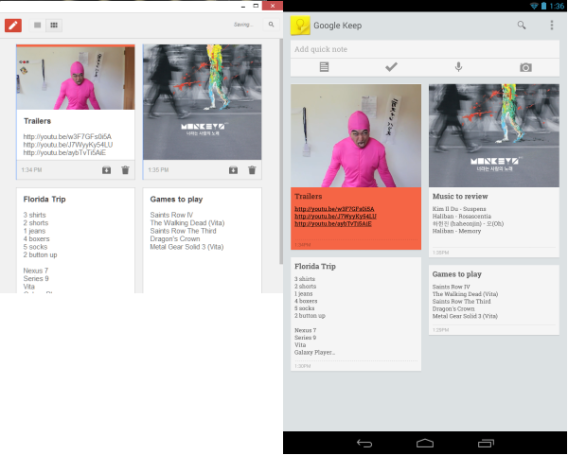
    Launched back in March 2013, Google Keep was released for Android 4.0+. It is designed for very simple note-taking and lists. Like most Google apps, it syncs to your Google account and updates on all devices the app is installed on. It supports use offline use and will sync once the device is connected online again. Google Keep also integrates with Google Now’s reminders to give you notifications based off time or location.

    The launch of the Chrome extension makes it even more versatile because you can work from your PC to make lists and sync it to your Android devices. Restricting usage of the app to just simple notes is smart because the limited feature set allows you to focus on exactly what you need. Keep is designed for your personal notes.

    Evernote

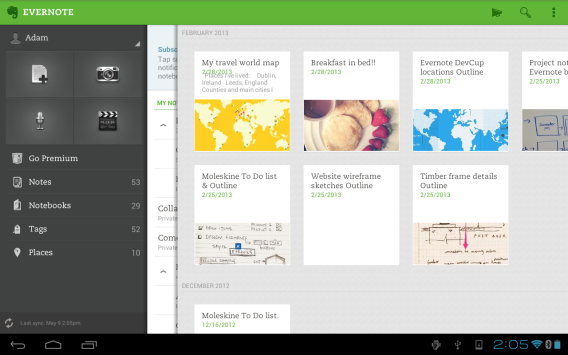
    Right now, Evernote is the best note-taking app on Android. The feature set of the app is excellent because it goes beyond note-taking like the ability to take photos and record audio. Evernote can also be used to archive sites from the web so you can read them later. Like Google Keep, it sync to all devices that the app is installed on. A plus is that Evernote is also available on iOS if you switch between devices.

    The premium version of Evernote does add a few more features like allowing other users to edit notebooks, but if you use it to keep personal lists then the free version is more than enough.

    Springpad

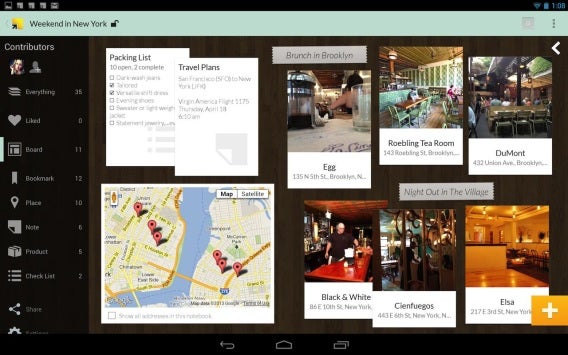
    A little different from Google Keep and Evernote, Springpad focuses on creating “notebooks.” These notebooks contain similar tasks that are combined so you have a sorted order to all your notes. It also syncs across devices so your notes are readily available.

    Like Evernote, you can also bookmark websites to view later. In addition, you can collaborate with others through “notes, videos, links, and tasks.” In this way, Springpad is similar to the collaboration available through Google Docs.

    Built-in notepad

    Stock Android devices don’t have a built-in note-taking app as Google is pushing Google Keep on Android devices. But if you own another Android device from a third party manufacturer, it will probably have a note-taking app installed on it. On my Galaxy SIII, the app is called S Memo. Taking quick notes with the app is easy and is great for lists, but doesn’t natively sync anywhere.

    I can share it through other apps, but S Memo is really meant just for very quick lists. Other manufacturers will likely have notepad apps included on the device, but they’re not as versatile as Google Keep, Evernote, and Springpad.

    Established options

    While Google Keep is the newest of the three apps, it still works for personal lists and notes. Evernote is the most popular with Springpad offering a similar, but slightly different usability. The built-in note-taking apps on third party devices are decent, but don’t provide the syncing options or versatility of actual apps.

    If you need to take personal notes any of the apps will work well. But for more feature-complete apps, Evernote and Springpad offer a lot usability.