iPad and Android tablet games… for your cat!

iOS and Android devices are relatively easy to use. So easy, in fact, that games are now being created specifically for… your cat?  Yes, really. With cat videos taking over the internet, its apparent people REALLY love cats. This online love affair and easy of use of tablets translates to, naturally, games and apps designed specifically for your cat.

So, here is our list of the most interesting games and apps that you and your cat can play.

Photos

One of the most enjoyable activities for cat owners (and the bane of cat haters existence) is taking and posting pictures of their beloved feline friends. Well, what if you could eliminate your own efforts and let your cat do all the work? Now you can with the Cat Selfie app for iPhone and Snapcat for Android.

How does the app work? When you launch the app, the screen displays an object that will catch your cat’s attention. If the cat follows the object with his paw, when it hits the screen, the camera will take a selfie. This app requires that your phone or tablet have a camera on the front of the device.

Download Cat Selfie for iPhone
Download SnapCat for Android

Games

The concept of Cat Selfie and Snapcat, which uses a red dot to grab your cat’s attention on screen, is being used for games too!

In Crazy Cat for Android, your cat can chase a cute mouse on screen running across a background of delicious Swiss cheese.

Crazy Cat

Your cat gets points as it touches the mouse on the screen; the faster the critter is moving when your cat hits it, the higher his or her score will be. You can upgrade to unlock more characters, like a butterfly or a gecko.

The game has some other interesting features too. If you have more than one Android device, for example, you can use one as a controller to dictate the movements of the animal on the screen- it’s like a technologically hybrid cat and mouse game for our and your cat!

Game for Cats for iPad is a similar concept and lets your cat chase either a laser or  a mouse. The goal is for the cat to “catch” the laser or mouse by batting at the iPad screen, which increases your cat’s score. You can control the laser pointer and mouse with your iPhone via a paid upgrade.

Art

If you suspect that yoCat Canvasur cat has an artistic soul waiting to be released, install the Paint for Cats app on your iPad. As your cat chases a mouse moving across the screen, the paw prints on screen leave splashes of color revealing your cat’s creativity.

There are several color palettes to choose from – from psychedelic to toned.

For Android, we like similar app Cat Canvas.

Fishing

What cats don’t like fish? The Pocket Pond 2 app for iPad and iPhone wasn’t developed with cats in mind, but it will keep them captivated. Your cat can peer down at a pond with beautiful koi fish swimming around. Its got a beautiful design with crystal clear graphics and music that’s easy on the ears, and you (or your cat) can cross fish with each other and develop colorful new species. You can Download Pocket Pond 2 for Android too!

And for something completely different…

Is your cat uninterested in laser pointers, mouse and fish? Then try ants! With Ant Smasher, smash all the ants you can as they parade across the screen.  Ant Smasher is available for Android and iOS!

Are there any other games your cat loves to play on your tablet?

Original article written by Radek Grabarek, published on Softonic PL.

Back up your Android data using G Cloud

How do you backup your text messages, contacts, apps, settings, photos, and everything else on your Android device? We’ll explain how you can backup and restore all of your data easily using G Cloud.

Configuring backup and reset options on Android

Android allows you to automatically back up some settings and data associated with a Google Account such as Wi-Fi passwords, browser bookmarks, applications installed from Google Play, terms added to your personal dictionary, as well as most device settings and applications using the backup service.

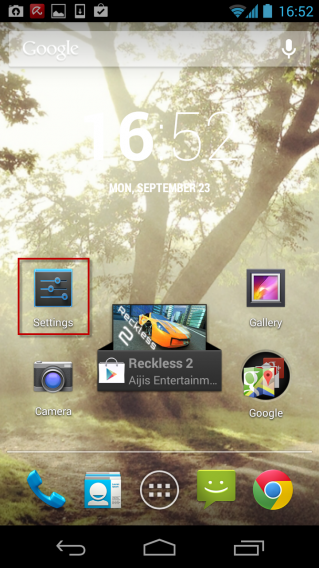
1. To ensure that the backup options for your device is properly configured, go to Settings on your phone or tablet.

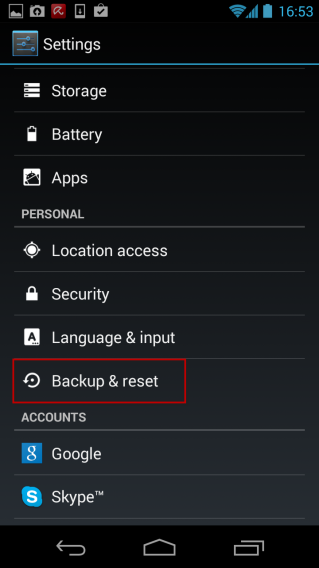
2. In the Personal section, press Backup & reset.

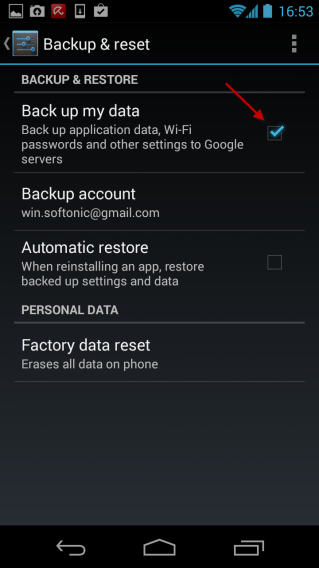
3. Check the box next to Back up my data.

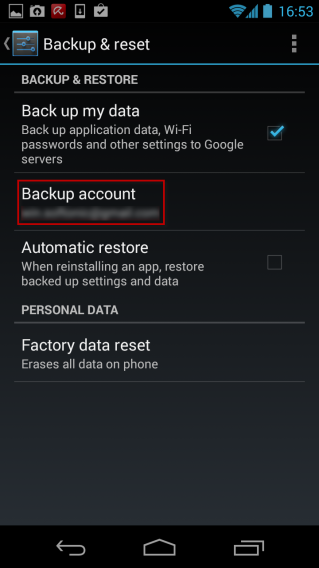
4. Configure the Google account that will be used for backup by clicking Backup account.

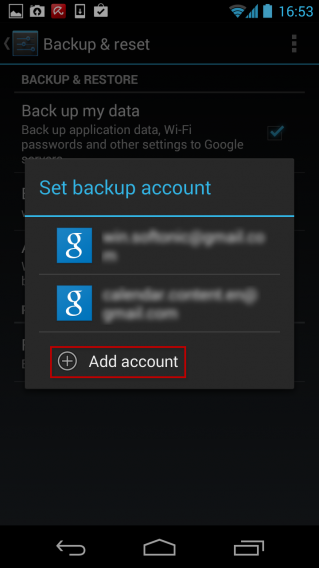
5. Select the Google account of your choice by clicking on it or add a new one by clicking on Add account.

6. Voila! You can now restore the data associated with your Google Account when you first connect to a new Android device.

Backup SMS, contacts, photos and more

There are many backup solutions on Android, but the G Cloud application caught our eye because of its flexibility and ease of use. G Cloud Backup lets you securely save your data online for free: contacts, call log, SMS, photos, videos, music, documents, settings, browsing history and many more. You have 1 GB of free storage to backup the entire contents of your Android smartphone or tablet!

7. Download the G Cloud app. Once the application is downloaded and installed on your Android device, launch it to start the configuration process.

8. Click New User to create a new account on G Cloud Backup. Enter a valid e-mail address, choose a password and then click Sign up. Next, confirm that you have correctly spelled your email address and click Proceed.


9. Select the categories to be backed up by checking the appropriate boxes. Then click the Done button. G Cloud Backup ensures that your data is copied to your secure account. Wait until the backup has finished.

10. By default, G Cloud Backup will schedule daily backups of your data. If you want to disable them, go to the application options by clicking the button at the top right. Click Back up Schedule, then uncheck the box next to Enable Auto Backup.

11. To restore your data to a new device or after formatting, install G Cloud Backup on the new Android device and launch the application. Click the Existing user/Restore button, enter your username (email address and password) and then click the RESTORE tab.

12. Check the boxes next to the data you want to copy to your device and click the Restore button to begin the restore. Wait until the restore has finished and then click OK. And that’s is, all of your data has been restored!

If you have a question about Android, check out our landing page for everything you need to know about Android!

Related items

How to back up Android data using Helium

How to sync your Android apps with a PC

How to use BitTorrent Sync for your Android

Original article written by Samuel Marc for Softonic FR.

Candy Crush Saga: What’s the secret behind the addiction?

Head down, brow furrowed and a screenful of candy: Candy Crush Saga addicts are all the same – totally hooked on the game that’s even beaten FarmVille to rise to the top spot.

There are people who have spent hundreds of dollars on the game without batting an eyelid.  In Hong Kong, where 15% of the population play the game, the authorities are beginning to worry.

So, what is this obsession with popping pieces of candy?

Candy Crush: the puzzle that gets you hooked

Millions of people play it every day. It has fan clubs and its own Wiki. Candy Crush Saga has brought in huge profit for its creators at King.com: the game alone rakes in $633,000 per day, and $230 million per year.

Its creators insist that there is nothing evil about the game; it’s simply an excellent way to relax and disconnect from the stresses of everyday life.  Women especially enjoy playing it, both on Facebook and on their cellphone.

A varied and never-ending game

What a cool game. Lol. I love candy.  It looks easy… Let’s see what happens if I make a line of four… Hey! This is REALLY good fun!

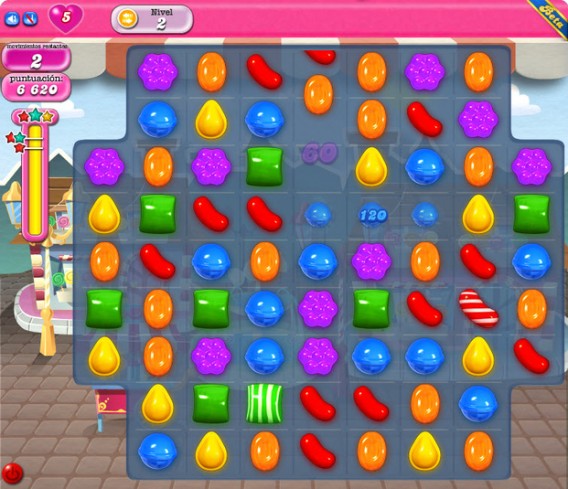
Candy Crush Saga is very similar to another puzzle game, Bejeweled, where you have to line up at least three of the same type of jewel to make them disappear and continue on through the game. The basic ingredients aren’t original, but the particular way Candy Crush combines them certainly is.

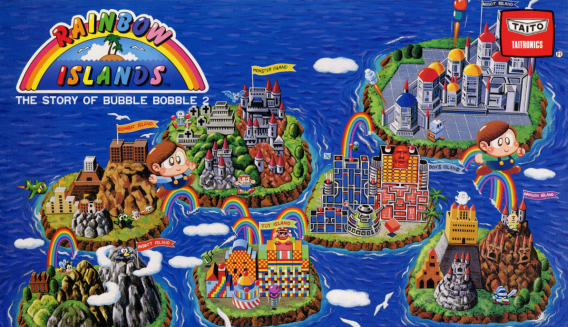
Candy Crush is every bit as colorful and adorable as the classic by Taito (source)

Some levels are completed by reaching a certain score, while others are completed only when you have eliminated a certain type of candy.  Some also have a time limit, but these are few and far between; the game favors tactics over speed.

I’m making my way round the map.  And I’m already doing better than my buddy, Joe.  How many levels do I have left? 350? Right, here goes.  And they said this was difficult! Lol!

Presently, there are more than 450 levels in Candy Crush Saga, spread over the map of a fictional country whose place names refer to the world of candy.  And each level has its own surprise obstacles, along with special types of candy.

Who doesn’t like candy? Even Wreck-it Ralph travels through a world of sugary goodness

The frustration you can’t get enough of

In Candy Crush Saga you have lives. Five lives to be exact.  If you fail to complete a level, you lose one of them.  When you reach the first few difficult levels, you start to run out of lives pretty quickly, and that’s when Candy Crush starts to get stressful.

Darn it, level 29 is really hard.  It’s impossible.  What? Am I hungry? No, thanks.  I just want to complete this darn level.  I’m not going till I get it done!

If you run out of lives, you have to wait thirty minutes to get one back. Meanwhile, you watch your friends play. Maybe you want to be better than them, catch up to them or even beat them. Or maybe you just don’t want to feel like a loser.

Spam, pay, play. Again and again

There are only two ways to avoid waiting thirty minutes to get more lives: ask one of your Facebook friends to help you, or pay via microtransactions. The amount of money some people spend is considerable.

I need more lives.  More lives.  My buddy Joe is way ahead of me.  He must be 50 levels in front.  I bet he’s paid.  I’ll ask my friends for help.

The dilemma is agonizing: either you send requests to your Facebook friends, or you pay up.  If not, you just have to wait.  Many people choose to sit it out, but others can’t stand the suspense and are eager to continue.

Six people have deleted me on Facebook for sending them help requests.  They don’t get it.  If they played they’d understand.  Maybe I’ll pay… Yeah, that’s what I’ll do… I have to finish this level…

This is how a worrier, who just wanted to relax and play a game for a while, ends up finding something else to obsess over and worry about.  And it can be quite an expensive obsession.

The eight secrets of Candy Crush Saga

  1. It’s easy to learn: there’s only a handful of rules
  2. It’s everywhere: cellphones, Facebook, tablets
  3. It rewards you at random, like a slot machine
  4. It gives you goals, which encourage you to struggle on through each level
  5. It gives you a sense of progress: you don’t have to “start again” when you lose
  6. It appeals to your competitive nature and your desire to avoid negative outcomes
  7. You suffer withdrawal symptoms whenever you put it down
  8. The difficulty increases in sudden leaps, and pushes you to do whatever it takes

What game will knock Candy Crush Saga off the top spot?

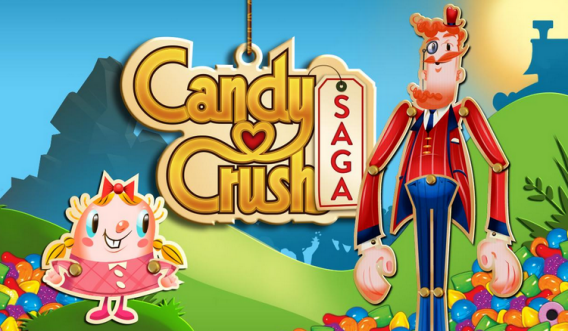
Tiffy and Mr. Toffee look on smugly while I play level 294.  I don’t know how to complete it. I scratch my two-day old stubble and decide to pay.  But someday I’ll get sick of this game. And then I’ll have to wait for another game to come along.

Tiffy and Mr. Toffee, the “adorable” Candy Crush Saga characters

It isn’t easy to find a substitute. Candy Crush is like a shot of digital sweetness. Everything in it is positive. And positivity is addictive. Candy Crush Saga is like a modern placebo. It gives you a buzz you can’t get enough of.

Game developers have noticed this recipe for success and have started to apply it to their own creations.  But what’s the alternative? You can try downloading games which are just as difficult, but aren’t as addictive, such as Dots.

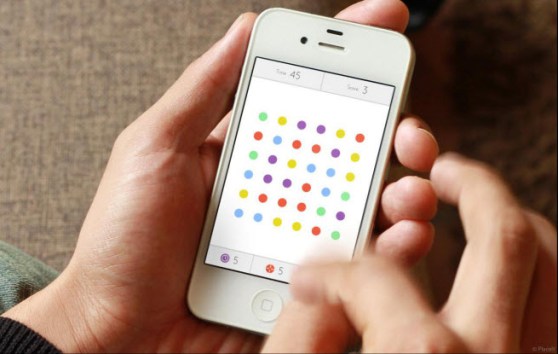
Could the incredibly popular Dots help you give up Candy Crush? (source)

But don’t be fooled: whichever game usurps Candy Crush Saga won’t necessarily be the best one. Instead, it’ll be the that makes you feel the most insecure and useless after a few goes, a bit like a poker player who lets you win a hand, but one hand only…

What level are you on?

Original article featured on Softonic ES.

Microsoft rumored to be creating one app store for Windows and Windows Phone

Microsoft plans for unifying Windows may be one step closer. ZDNet reports that the company is looking to unify the app store between Windows and Windows Phone. While no prototypes have been shown, Microsoft has voiced its intent to unify the stores during its annual company meeting in Seattle, Washington.

Mary Jo Foley of ZDNet believes the unified store could debut as an update to Windows 8.1 sometime in 2014. She also speculates that Windows Azure will be playing a critical role, leveraging the company’s cloud computing applications. Microsoft would play an active role in compiling apps from developers to help with “portability and performance.”

Microsoft has previously announced its intent to have all Windows products running with the same framework. Windows 8 and the introduction of the WinRT kernel were the first step of that realization. By having a unified kernel and unified API, it could make programming applications for Microsoft’s various operating system much easier. A developer could develop an app for Windows 8 and have it work flawlessly on Windows Phone.

While a unified store has not been shown, it’s promising to hear that Microsoft is moving forward with its unification plans. If they can pull it off, Windows Phone and Windows 8 may gain many more happy developers.

[Source: ZDNet]

Twitter improves photos in embedded Tweets

Twitter has made a minor change to the way it displays photos in embedded Tweets. Attached photos are much more visual and eye-catching, taking up a ton of space. The interface of the embedded Tweet hasn’t changed as you still get the option to Follow, reply, retweet, and favorite right from the embed.

Twitter says, “we’ve put the photo front and center, with a bigger and bold visual focus on the media. Both landscape and portrait photos now have more room to show their pixels when the Tweets are embedded online.”

The bigger photos are clickable, allowing you to be taken to the Tweet’s page where you can view more detailed information, including the entire conversation history. Check out astronaut Chris Hadfield’s Tweet below.

For more information, check out the source link below.

[Source: Twitter]

Google Play basics series

Whether you’re new to smartphones or just making the switch to Android, our Google Play Basics series is meant to answer some of your most basic questions about accessing and using the Google Play store, questions you might be too afraid to ask! Check out our five part series below for getting started with Google Play!

Google Play Basics Part 1: Is Google Play free?

Google Play Basics Part 2: How to register with Google Play

Google Play Basics Part 3: Recover your forgotten password

Google Play Basics Part 4: How to fix server error RPC:S-5:AEC-0

Google Play Basics part 5: Send apps to your Android device from a PC

Google Play Basics part 6: Get a refund for an app purchased in Google Play

Google Play Basics part 7: remove or rename a device on Google Play

If you’ve got more questions about getting the most from your Android device, check out our Android Basics series here.

The best platform and action games for your mobile!

The action genre is one of the oldest in video games and one that encompasses a mountain of sub-genres. You know the great titles for consoles and PC, of course, but are there any good free alternatives for your mobile? Of course there are!

In this article, we’ve got 5 great action games for your iPhone, iPad and Android phones and tablets, a selection of free must-haves, whatever your tastes.

Temple Run 2

Temple Run is more than a game, it’s a phenomenon for iOS and Android. Although there have been loads of versions and substitutes, nothing compares to the original game…well, actually, its sequeldoes! It’s the same gameplay but with improved graphics and more challenges.

Huh? You don’t know how Temple Run 2 works? It’s easy: your character has to flee rabid monkeys and overcome obstacles at the same time as collecting coins to buy bonuses. Sounds too simple? Try playing it for five minutes and then tell us it’s easy!

Download Temple Run 2 for Android

Download Temple Run 2 for iPhone

Jetpack Joyride

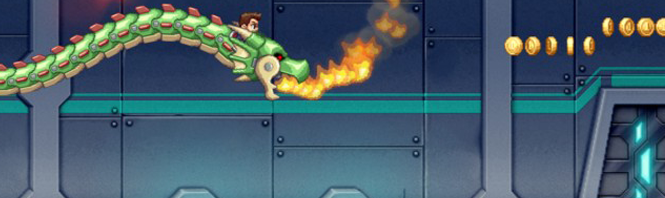
In the app store there are so many games with side-scrolling endless running characters, but we had to pick one and it’s Jetpack Joyride. Why? It’s got fun graphics – like all games featuring Barry Steakfries – there’s excellent touch response, the hero keeps it interesting, and there’s a good level of difficulty which corresponds well to the user. So strap on your jetpack and enjoy!

Download Jetpack Joyride for Android

Download Jetpack Joyride for iPhone

Download Jetpack Joyride for Windows Phone

Download Jetpack Joyride for Blackberry

My Favorite Villain: Minion Rush

Not all “movie games” fall short of the movies they’re based on. Despicable Me: Minion Rush is a perfect example – it’s an excellent adaptation of the animated Gru series.

In Minion Rush, you control the cute Minions in countless crazy Temple Run-style adventures, but with the peculiar style of the film and additional minigames. A word of warning though, don’t let your kids have your phone, because once they try this game starring their heroes, you’ll probably not get it back!

Download My Favorite Villain: Minion Rush for Android

Download My Favorite Villain: Minion Rush for iPhone

Dead Trigger

From a game suitable for all, we’re moving on to one that’s definitely “adults only”. Zombies, or the undead, (so fashionable in recent years) haven’t escaped the lure of next generation tablets and mobiles, and they’re displayed in all their glory in Dead Trigger.

In this first person action game you’re trying to survive the zombie apocalypse armed with an automatic rifle in your hands and cold blood in your veins. The best thing is that this isn’t just a smaller version of this type of game, it’s a good title with detailed 3D graphics.

Download Dead Trigger for Android

Download Dead Trigger for iPhone

Blood & Glory

If you like bloody action but you’re done with zombie games, you’ll enjoy Blood & Glory. This game, set in a Colosseum, puts you in the shoes (or sandals) of a Roman gladiator (now trendy again thanks to Ryse: Son of Rome) who must face his enemies in 10 tournaments.

This is another game that makes much of the graphics on your iOS and Android devices and proves that an action game played with touch controls is not only possible, but can be pretty great!

Download Blood & Glory for Android

Descarga Blood & Glory para iPhone

Which mobile action and platform games are you addicted to?

Original article, written by Maria Baeta, published on Softonic ES.

Happy Birthday, Google! 15 tips and tricks for Google, YouTube, Gmail and Google Maps

Google just turned 15 years old, making it an enviable empire for being a mere teenager; imagine, a fifteen year old billionaire with nearly 55,000 employees, a search index that spans over 100 million gigabytes and, since 2010, an average of one company acquisition a week. The days when Google was only a search engine are long gone. Now Big G has an enormous number of products that we use to communicate, work, play, entertain and explore the online world every day. But despite the familiarity with services such as Gmail, YouTube, or Google Maps, there are always features which you might not have discovered yet.

Here are 15 tricks that you can use with some of the most popular products in the Google ecosystem.

Google Search

1) Easy shopping: If you shop online, Google Shopping is a great ally (and one that not everyone knows about) for finding what you’re looking for at the best price. Not only can you look for any kind of product, but you can also filter the results by area, category, price range, brand, or features. For example, if you want to buy a MacBook Pro, you can restrict the results by price and screen size, leaving out models that don’t interest you.

Shopping MacBook Pro

2) Number Ranges: The operation “..” is used to establish a range of values​​, as well as to limit a search to this range. For example, if you’re a bass player and were interested in getting information about 5 or 6 string bass guitars, you might type “5 .. 6 string bass” into Google’s search field. This way, you’ll only get the relevant results about 5 or 6 string bass guitars.

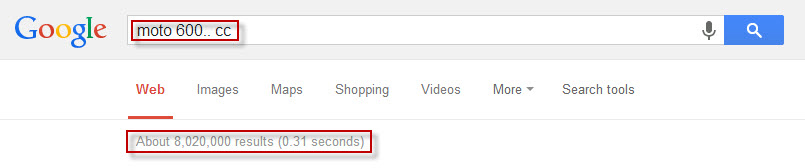
Another example: If your passion is motorcycles and you want to search for 600 CC and higher models, you would get the most accurate results by typing “moto 600.. cc “. If you use the string “600 cc bikes” without the two dots, you would only get pages relating to 600 CC motorcycles.

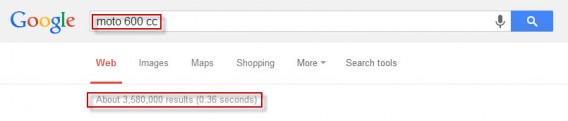
Range con puntiniRange senza puntini

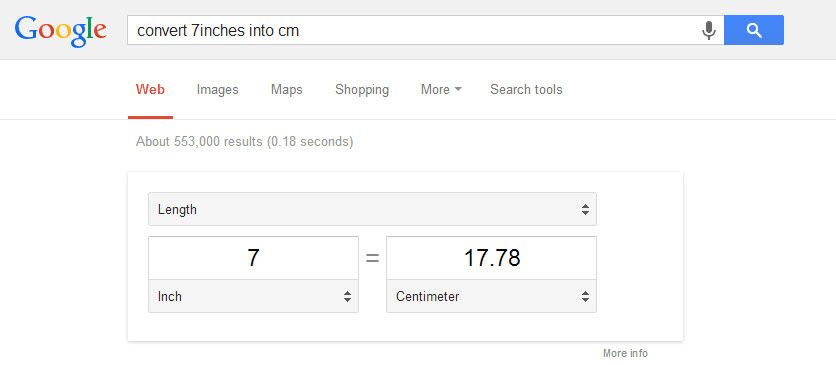
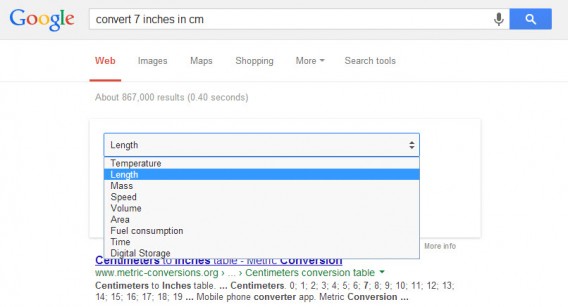
3) The one click converter: This is a great universal converter from Google. Write the conversion you want directly into the search field (for example “convert 7 inches to centimeters” to show the result) or simply chose “inches to cm”.

Clicking on the dropdown menu will let you select different values (speed, weight or volume, for example), and for each of them, different units of measure (such as inches, miles and even nautical miles).
4) Watch region-restricted YouTube videos: Not all content is available all over the world and is sometimes restricted to certain geographical regions or countries.

This can be really frustrating, but there is a way round it! For example, if the URL of the video you can’t view is:

youtube.com/watch?v={VIDEO ID}

write it in the address bar like this:

youtube.com/v/{VIDEO ID}

The video will stream without problems and in full screen.

5) Edit videos directly in YouTube: Since May 2013, a video editing suite was added to YouTube, something that some people still may not know about. It offers some really interesting tools, including a slow motion option! Of course, the video you’re editing must belong to you and be licensed under the Creative Commons.

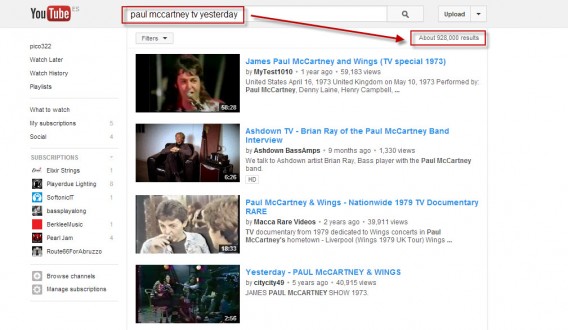
6) Narrowing your search: Trying to find exactly the video you’re looking for isn’t always easy in YouTube. Some search strings give so many results that they put a strain on even the most accommodating browser, and even then, it isn’t always exactly what you’re looking for. To make your life easier, however, there is ‘allintitle’. This function shows you only the results that have all the words of the string in the title of the video. For example, if you want to see Paul McCartney playing on a TV show yesterday, write “allintitle: paul mccartney tv yesterday,” and the videos that pop up are much more likely to be what you were actually searching for.
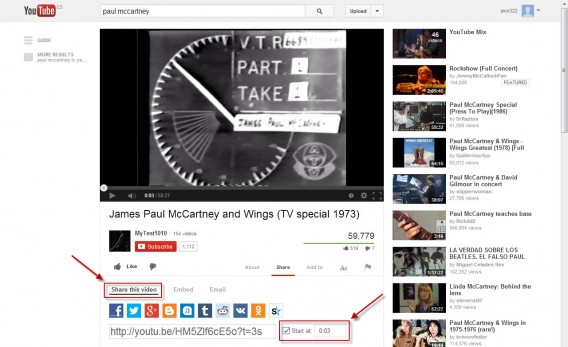
7) Share a video from a specific point: When you share a video with a friend or on a social network, more often than not you want to show just a part of the video, not the entire thing. To make sure that the video starts automatically from the point you want, click on ‘Share this video’, check the ‘Start at’ box, and enter the exact minute and second from which you want the video to start.
8) Watch full-length movies for free (and legally): YouTube also offers, in addition to video classics, channels through which you can see many full-length movies. There is a free section featuring some classics which are no longer protected by copyright.

Gmail

9) Protect yourself from spam: Urooj Kazi from JustUfollow.com explains a very interesting trick for decreasing the amount of spam in your inbox.

This is how a typical gmail address looks – xyz@gmail.com. You can add just about anything after the xyz separated by a + sign and emails sent to that address will still be delivered to your mailbox. This is because, Gmail tends to ignore all characters after the + sign. So, xyz+justunfollow@gmail.com, xyz+nothing@gmail.com, xyz+kittens@gmail.com are all the same email address.

Why would you need this trick? If you are like me, you subscribe to a lot of interesting blogs, news feeds etc. And as with most things in life, these email lists tend to get compromised and before you know it the very website you trusted is sending you spam. So, let’s imagine a hypothetical situation: you are following Google’s blog updates and you signed up with this email xyz+googleblog@gmail.com. Now if you receive spam in your email inbox and the “to” address is “xyz+googleblog@gmail.com”, you know which list has been compromised and you can immediately unsubscribe.

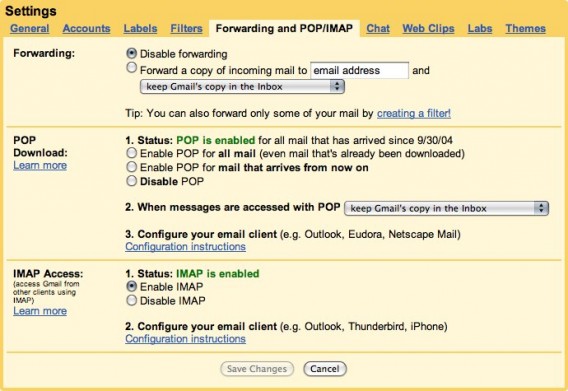
10) Get mail from other accounts in Gmail: Most of us have lots of email addresses with lots of different providers. If you manage your email through webmail, checking all your accounts can be time consuming and complicated. With Gmail, however, thanks to the Mail Fetcher, you can, with a simple setting, download mail from all of your accounts into Gmail so that you have them all in one place. To do this, follow the official instructions provided by Google.
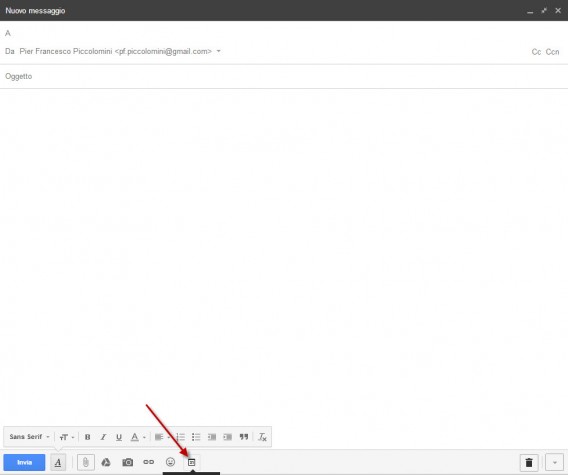
11) Send an invitation: Gmail offers a very convenient tool for organizing meetings (working or not) with other people. If you want to create an event and invite people to participate, create a message from webmail to Gmail and click on ‘Enter invitation.

Enter the name of the people you want to invite in the ‘To’ field. Fill in the fields that are relevant and send the message. Participants will receive an email like this:
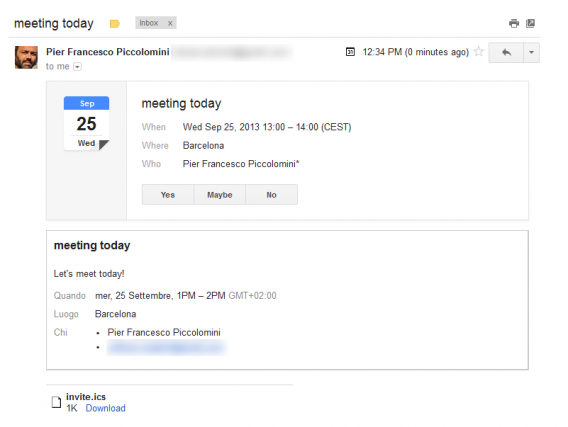
If they agree to participate in the meeting, the invitation will automatically turn into a commitment in their Google Calendar!

Maps

12) The ‘See All’ option: When you view an area with Google Maps, you’re also shown some points of commercial interest. Well, there’s a way to view all available places of interest, not just a small selection: just zoom in on the area that you want to see, and in the search field, enter an asterisk (“*”) – this will show you all the registered POIs.

You can also create maps using the Maps Engine, a new service with which you can create and share custom maps. The service is easy to use, and the ‘Take a tour’ option walks you step-by-step through the creation of a new map.

You can, among other things, group points of interest in layers and also display data on the map, a feature that is great for business users.

And finally…

In its fifteen-year history, Google has had dozens of “little surprises.” To close this article, we’ll mention three sneaky little functions of Google.

13) Tilt Typing: Type “Tilt” in the search field and the results are displayed on a screen tilted a few degrees to the right.
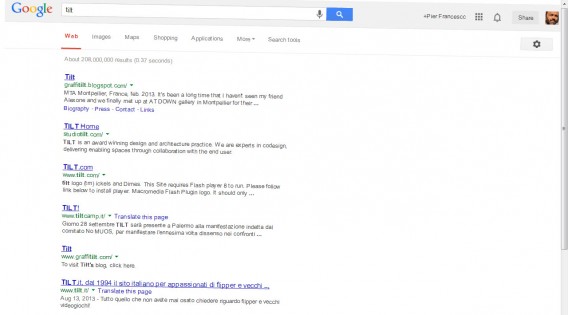
14) Binary: When you search with Big G, you’re shown the number of results matching the entered string. So far, nothing exciting here. But if you search for the word “binary”, this is shown in binary code!

15) Anagram: If you search for “anagram”, Google will show you appropriate search results, but for fun, it also offers an anagram of the word “anagram”! The suggestion will be tailored to the language you searched in.

Among the many tips and tricks for Google, we selected the 15 that seem most useful but might be less well known. There are, of course, lots of others.

Tell us your favorite Google tricks in the comments below!
How to: create LINE Snap Movies

Love Vine and Instagram Video style clips, but want them right in your chat app? The newest update for LINE on iOS (3.9.0) introduces Snap Movie, which allows you to create short videos, add background music, and send it to your contacts. While this feature is only on iOS at the moment, it will be released later for Android and other platforms. I’ll show you how to access and use Snap Movie, which will let you share your creations with all your friends.

Starting a Snap Movie

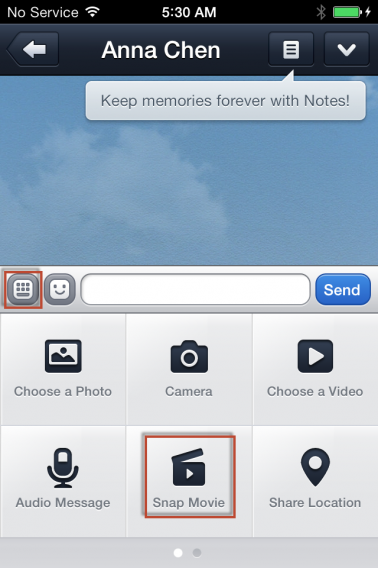
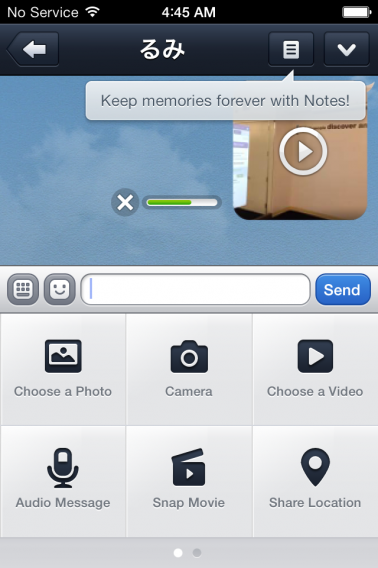
Snap Movies can be created in the chat menu. Tap the plus icon at the bottom, which will bring up a list of attachment options, and select “Snap Movie”.

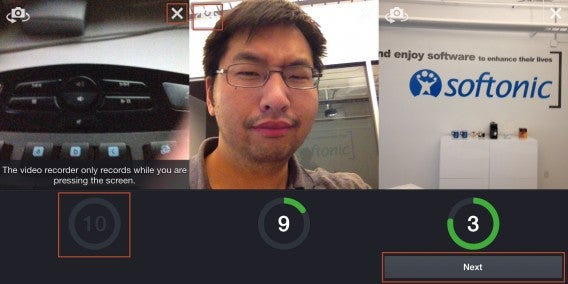
Snap Movies can be up to ten seconds long. Tapping the screen will record a single second, or you can long press to record all ten seconds. If you don’t like what’s been recorded, you can cancel the video by tapping the “X” at the top right.

By default, Snap Movie uses the device’s back camera, but you can hit the camera flip icon on the upper left to switch to the front camera. If your video is less than 10 seconds, hit the “Next” button to move to the next step. Full length clips will automatically complete and move on.

Music and Preview

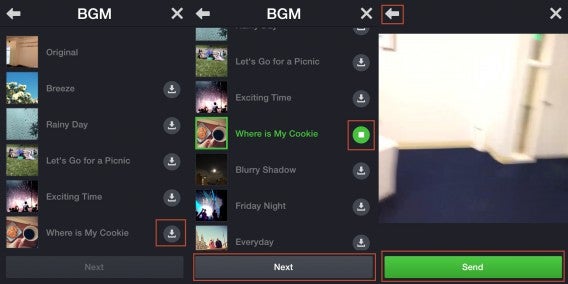
You’ll be taken to the BGM menu where you can choose to use the original audio, or add a background track. You will first need to download the song by tapping the corresponding button on the right. This should be fairly quick, though it does depend on the speed of your data connection. Take a listen to the audio and once you’ve found a track you like, hit “Next”.

You’ll be able to preview the full creation of your Snap Movie along with the music. If want to go back and change something, hit the back button in the upper left. If you like what’s been produced, hit “Send”.

The video will be sent to your friend, and will also be saved onto your device. This means you can send your Snap Movie to others by using the normal “Choose a Video” option. You can also watch, move, or upload the video file via other apps on your iOS device.

Being able to make short self-created movies and send them to your LINE contacts is fun and convenient. However, Snap Movie lacks the more sophisticated features of Vine and Instagram Video. LINE Snap Movies can’t be as easily edited, lacks filters, and doesn’t allow direct sharing to social networks.

For a comparison of more flexible video apps, you might want to check out Vine vs. Instagram Video and also how import and share your own videos on Instagram. If you need a refresher on other LINE features, check out how to register LINE on devices and add in your various contacts.

The Softonic Minute: YouTube, VLC, WhatsApp and FIFA 14

YouTube changes the way you can make and see comments, VLC gets a much-needed update for Windows and Mac with its newest version Rincewind, WhatsApp will soon be updated for iOS 7, and FIFA 14 releases updates to fix bugs less than a week after its debut. Check out this week’s hottest software news on the Softonic Minute!

Default player

<!–
By use of this code snippet, I agree to the Brightcove Publisher T and C
found at https://accounts.brightcove.com/en/terms-and-conditions/.
–>

<!–
This script tag will cause the Brightcove Players defined above it to be created as soon
as the line is read by the browser. If you wish to have the player instantiated only after
the rest of the HTML is processed and the page load is complete, remove the line.
–>
brightcove.createExperiences();

YouTube’s had enough of trolls. The video streaming site wants to reduce aggressive comments and will now use Google+ profiles as identifiers for posting comments. By integrating Google’s social network, you can now filter comments relevant to you.

VLC is updated. The new version, codenamed Rincewind, brings Windows error resolutions and, more importantly, an improved interface for Mac. The video shown here is the trailer for Train Simulator 2014, which you can now download on Softonic.

WhatsApp tailored for iOS 7. WhatsApp leaked some images  letting us see the new interface for Apple’s new operating system. There are few new features beyond design, which most applications are adapting. Among them is Instagram, which was also updated.

FIFA 14 gets a bumpy start. The highly anticipated football game from EA Sports came out this week for PC and consoles. Surprisingly, the game requires updates from the  very beginning. This patch release fixes bugs that fans saw in the demo. For example, the headers on goal won’t be as effective, unfortunately.

Check out all of our past Softonic minutes here!