What can I do with my tablet: train your brain

In this installment of What can I do with my tablet?, we’ll see how you can train your mind with games, keeping your brain active while also having fun.

A tablet can be useful for lots of things, from serious stuff like working and reading, to more idle pursuits such as watching movies or listening to music. Let¡s face it though– one of the most common uses of any Android device is playing games.

There are lots of titles you can download to your tablet, enough to spend entire days trying them out. You might, however, want to take advantage of those moments of downtime to train your brain while having fun, with the right games of course. Let’s see what the best brain training games are for Android tablets.

*Not sure if your tablet is Android? Read our article where we explain how to recognize the operating system on your tablet.

Pure mental training

Fit Brains Trainer

A sound mind in a sound body, as the saying goes, is all well and good, but if the brain is an organ, then it too needs daily exercise. This is the premise of Fit Brains Trainer, an app that keeps track of your progress and your brain training, just like any other fitness app. It includes lots of very challenging games, each one dedicated to training a particular skill.

Coach memory! Brain trainer

Coach memory! Brain trainer offers you several games to keep your brain in shape in different areas, each one with its own specific games. You can train your memory, attention, speed, ability to solve problems, as well as your flexibility, by playing entertaining games that are also really challenging.

Puzzle games and brain teasers

Pudding Monsters

From the same authors as the legendary Cut the Rope, Pudding Monsters is a game involving cute pudding monsters that need to be stuck together without losing any pieces on the street. The game requires you to solve increasingly difficult problems as you progress, but the satisfaction you get will increase too.

World of Goo

The World of Goo is populated by strange gelatinous beings. Here, rather than simply merging them, you have to build structures to rescue the Goo. To do so, you have to use the same beings that you’re trying to save. The methods you can use vary from level to level, and as the game progresses, the Goo will gain different physical properties.

Quell Reflect+

To be compelling, a game doesn’t necessarily have to have elaborate graphics and complex mechanics; Quell Reflect+ is proof of this. In a world of geometric mazes, you have to drag a droplet of rain through the level and collect the pearls along the way in the fewest possible moves. Sounds easy? Get ready to baffle your brain.

Puzzles and Logic

Threes!

Combining multiples of three isn’t as simple as it might seem. Threes! is similar to the viral game 2048, where you have to move tiles, combine numbers and achieve the highest score possible. Being mechanically simple, it’s really easy to just jump into a game. In theory, you’re just looking for the highest possible multiple of three.

QuizDuello

In the same vein as games like Trivial Pursuit, QuizDuello is a quiz which poses general knowledge questions. In this version, you play against another person online in the best of six rounds, each of which has three questions. It’s useful for remembering facts, dates, and concepts learned in school, but above all, it’s useful for training your mental reflexes.

Sudoku

We couldn’t leave out the classic Japanese numbers game, Sudoku. This version has a whopping 500 different puzzles and five levels of difficulty. The app also keeps track of the time it takes to solve each table, and is suitable for beginners as well, thanks to a helpful feature that provides assistance in case you get stuck.

Train your mind while you relax

If you’re using your tablet, you can play these games, all of them genuinely entertaining, to train your brain. From specific apps specifically for that purpose, to puzzles and brain teasers, installing and using these games will give you a mind gym at your fingertips.

In the next installment, we’ll take a look at the apps that we can use to talk to and get in touch with people, both near and far.

Read our Android Tablet Series: What can I do with my tablet? to find out all the cool things you can do with your tablet.

Secret should let us choose location settings

This week we looked into location tracking in two different app categories: Suzie looked at activity trackers and Chris turned his attention to anonymous confessions. All four of the apps we looked at ask for your location data, but the rewards you receive for this valuable data vary. Activity trackers like Moves and Human really need your location to work properly. Like Suzie, I’m a fan of Moves and I’m very relaxed about letting it store data about my location. It’s interesting and in theory helps me get in shape.

Anonymous confession apps like Secret and Whisper have a more tenuous need for your location data. Whisper uses your location to connect you with other users. Secret gathers location data too. But as Chris points out, it needs to explain more clearly why it wants this information.

The question about all these apps is whether it’s really safe to share your personal location data with them. As Stuart Dredge pointed out a few weeks ago, there’s no really good reason to trust brand-new startups in this regard. It might be that they’re really successful and hackers start to target their app, he says, or “…they’re not successful but they have clever technology, [so] they might get bought by Google, or Facebook, or Yahoo. And if they simply shut down, how much do you know about what data they’re storing and how they’ll dispose of it”.

In the post-Snowden world, where more of us are conscious of the choices we make when sharing our information, app developers should empower us and let us choose what we want to share with them. Of the four apps we looked at this week, Moves, Human and Whisper all let users turn location services off. Secret doesn’t and I can’t think of a good enough reason for that. A more thoughtful software company would offer that option.

Read our articles on activity tracking in mobile apps:

Fitness apps and location tracking: risk or reward?

I use Moves daily. The iOS and Android app that tracks your movements by foot, bike, and private or public transport has been a staple on my iPhone ever since I downloaded it roughly a year ago. Browsing through my daily stats the other day, I realized something glaringly obvious. Moves has been openly tracking my every move for the past year.

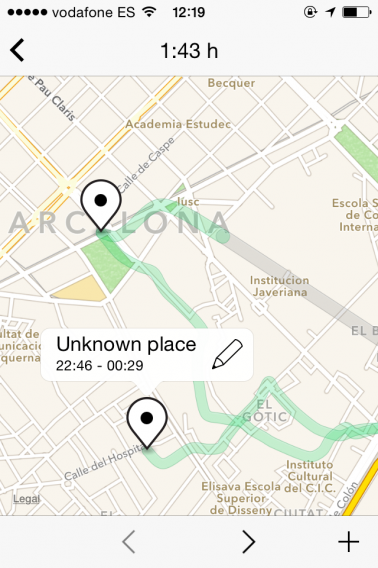
Moves tracks my every moveThe green shows walking, while the grey is public transport.
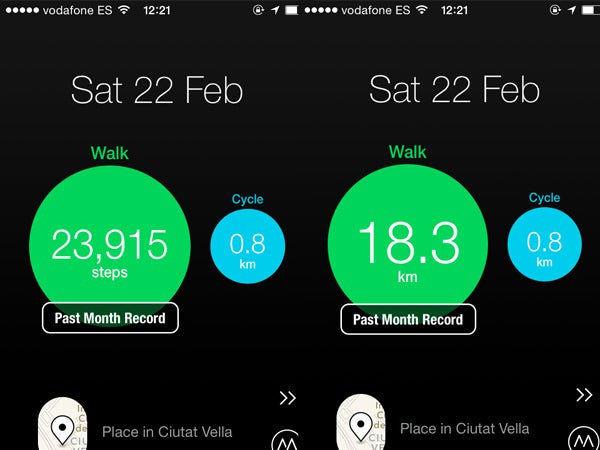
As wearables and fitness apps become more of an everyday reality and less of a fad, location tracking and routing are a natural addition. Coincidentally, last year’s uproar over NSA spying has been over tracking online and mobile activities. Location and fitness apps, on the other hand, knowingly track your activities, specifically, the activities you’re doing offline.

At this point, its safe to assume that no data is immune to potential spying, which led me to question whether or not physical tracking is something to be concerned about. Do any potential risks of apps that track offline activities outweigh the benefits of using them? I decided to take a closer look at Moves to get a better idea.

Tracking my every move

As far as fitness apps and wearables go, Moves takes a more casual approach to keeping track of physical activity as a self-professed activity tracker. From the convenience of your pocket, it uses your smartphone to do the tracking, calculating how far you travel every day, calories burned, and mapping out your entire travel history. Here is where things get a little bit tricky.

Moves calculates steps, distance and calories

Tapping on the green bubble gives you info about steps, distance, or calories.

The travel routes I take every day are mapped out and saved within the app. From the route I take to work, to the time I spend at the office, to the bar I grab drinks at, to the moment I arrive home – Moves knows it all. It gives me the option of labeling frequented places, although even without a label, it wouldn’t be hard to look at the past week of travel history to see that I go to and from the same places (work and home) at roughly the same time every day.

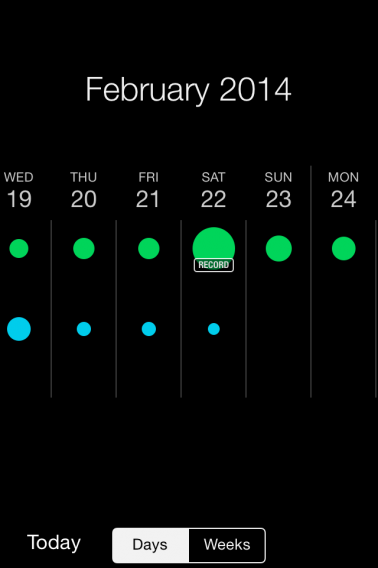
Moves stores all my historical dataClicking on the day will show you a summary, where you can see a map of the day’s travel history.
Because the app contains historical data, it has to be housed somewhere. The next questions are: where is this data being stored, and how is it being managed?

Privacy policy and data-sharing

After taking a look at it’s privacy policy, I spoke with Moves CEO Sampo Karjalainen to get further clarification on how the app’s data is being used.

Moves’ privacy policy states that the app’s data is uploaded between your cell phone and its servers, which store your private data, via a secure connection. It tracks individual user data by assigning an ID number to your phone, or by email address, if you choose to register with one.

It encrypts the communication channels transmitting the data, and makes clear that it won’t share your data with third-parties without your consent. Despite taking reasonable measures to ensure’s your data’s security, nothing is guaranteed.

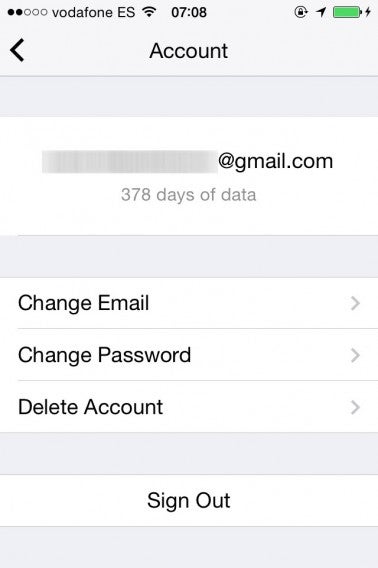
My email address is linked to my Moves data

My email address is linked to my Moves account

According to Karjalainen, when it comes to data usage, they only use it improve the way the app works: “We’ve developed our own algorithms so that the app can accurately track movements, and we use the collected data and activities to help improve these algorithms to be able to provide a more accurate service.”

Karjalainen says that they’re well aware of the sensitivity of the data being collected by Moves, and take “every reasonable precautionary measure” to ensure that it remains secure.

Another activity tracking app, Human, takes privacy just as seriously. Speaking with CEO Renato Valdés Olmos, he told me that they try to maintain a very ethical privacy policy and are aware of the sensitivity of the data they’re managing.

Taking things one step further, Human puts users in the driver’s seat. “We think that users should be in control of their data, so we anonymize all data in the back end. There’s no way to connect data with individual users unless they request the information themselves, ” says Olmos.

Similar to Moves, Human’s use of location data stems back to improvements to the app itself.

Less dangerous than tracking online activity

As of now, it seems as if people, myself included, are less concerned with the tracking of their offline activities than they are of their online ones. Why? It makes sense if you consider the fact that people have a lot more personal information about themselves online than what can be discerned from their geographic location, at least in theory. Karjalainen agrees. “I think there are more risks involved in using a service like Gmail, where you actually have more private and personal information available.”

Consider Moves: the only information you have to provide them with are your location, and if you choose, your email address. You’re not sharing any demographic information, banking details, or private messages.

Still, there are risks involved in sharing any type of personal information using online channels if you consider the fact that virtually any of our online or mobile activities have the potential to be tracked.

Why should apps like Moves be excluded from this type of spying? Chances are, they wouldn’t be. In fact, geo-location is exactly the type of information that government agencies would probably be interested in.

As Olmos notes, however, your data is only as safe as the company who’s managing it. Apps like Moves and Human take privacy seriously, and as a result, give users less to worry about.

In the end, what it seems to come down to is an active choice to share information. As Karjalainen notes, “it’s a personal choice for people to use these apps,” and you can’t be tracked with Moves if you don’t use it. If someone is really concerned about being tracked, it’s simple enough to close Moves, or not use it in the first place, for the app’s tracking service to stop. In reality though, the NSA doesn’t need an app like Moves to find out where you are.

Reward outweighs risk

I like being able to see where I’ve been and how much I’ve walked, especially when travelling. What I see as a more realistic danger than being tracked by a government agency is someone stealing my smartphone and tracking my location, but it seems as if the people at Moves are more than willing to help with this type of situation– Karjalainen noted one instance when they worked with a crime victim and the authorities to help solve a case, although unsuccessfully.

In short, the benefits of using Moves far outweigh any security concerns I might have.

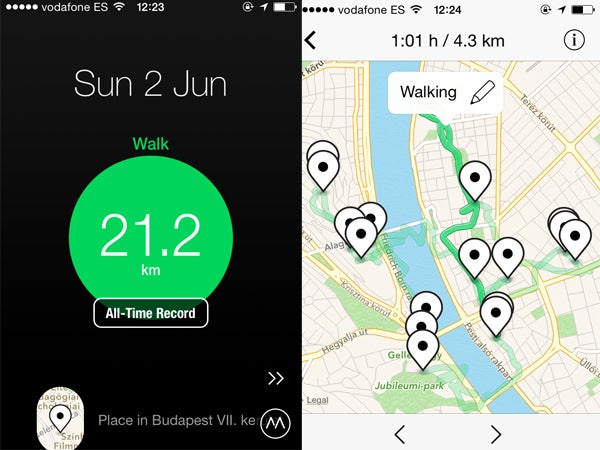
Moves in Budapest

My all-time record is walking 21.2km in Budapest

Looking at Moves, Human, and other fitness apps, it seems like tracking and routing offer real value to users, greater than the cost of sharing this information. Karjalainen himself says that he’s okay with sharing this information because he sees more value in the service than there are risks involved in using it. As he notes, “these tracking functions are native to iOS and Android devices; Moves just takes advantage of this function to make it useful and accessible to people.”

Still, as some of these fitness apps become integrated with more personal information, it doesn’t hurt to exercise the online virtue of common sense. As these apps, and their related hardware, continue to saturate the market, it’ll be interesting to see if any further privacy concerns arise.

Related articles:

Secret and Whisper know your location, even if your friends don’t

Apps like Whisper and Secret claim to keep you anonymous when you post, but they raise new concerns. Are you really anonymous? Is it really impossible for someone to know that it’s you? What data is collected by the app, and could it ever be made public? With more and more users thinking about privacy, developers are releasing apps that “promise” anonymity. You can say what’s on your mind without anyone knowing exactly who you are. But how safe are they? You should find out before you start using them.

Secret feed

Location Permissions

Android apps display all required permissions before installation. You have to accept them before the app installs and none can be disabled. iOS apps are a little different in that only the most important permissions are requested when the app first opens. The most common are access to your location, camera, and other accounts.

I’m always most concerned with the use of location data. People’s lives generally include a lot of of repetition. Whether it’s going to work, going to school, or going out with friends, an obvious pattern can be discerned from location data. If someone was able to hack one of these developers, they could find the collected data. This data could expose millions of users. Regardless of the content that was posted, finding out the patterns of users could have negative results.

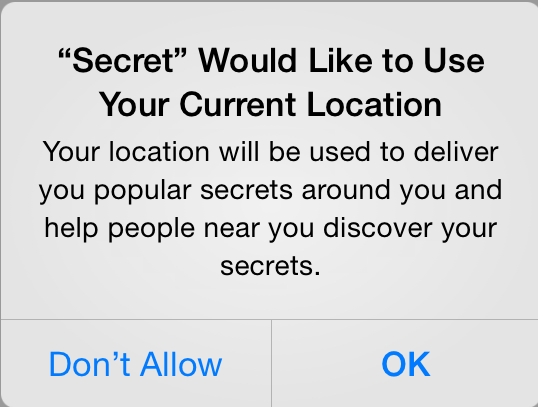
Secret location permission

The dismissed lawsuit against Apple for tracking users by keeping a cache of of data pulled from Wi-Fi and cell towers is one example of the use of this information. Google also uses location data across its apps. Google Now (built into Search) pulls data from other Google services to load information. Apple and Google have to be more transparent about location usage because people use these services on a lot of devices.

Most people enjoy the ability to get instant directions, and iOS and Android need permission to access your location to help you. Other third party apps also want to access that information, but a lot of times it’s not really necessary. It’s really about the data that can be pulled from the user.

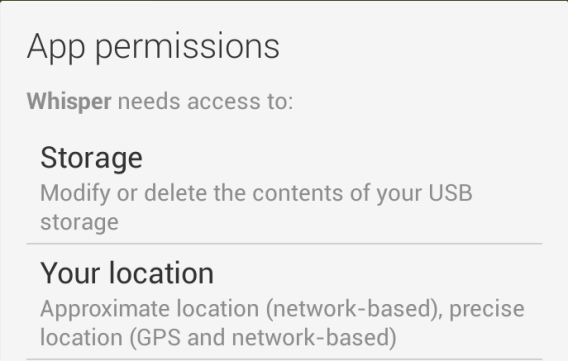
Whisper and Secret use geolocation. Whisper requires both approximate and precise location. According to Whisper, it uses “location services as options for our users. Users are not required to use their location but if they are interested in connecting with other users in their area they can do so.”

It is possible to not show your location when posting a Whisper, but the option is at the bottom of all the possible locations. The app also lets you disable location services but this kind of option is pretty difficult to find for many users. On the plus side, Whisper doesn’t use location to import photos because “image searches are done by Bing.com. There are no image location related searches.”

Whisper’s response to the use of location is positive, but the dual location permissions are still a bit confusing.

Secret is more vague because it doesn’t explicitly state why it wants to know your location. But the fact that it needs a phone number to register means that they have your area code in its system. So even though Secret can use your location information when you post, it requires you to submit your telephone number. The question is: why?

Looking at Secret’s privacy page about location information:

“We may collect information about the location of your device each time you access or use one of our mobile applications or otherwise consent to the collection of this information. For more details, please see “Your Choices” below.”

Unfortunately, looking through the “Your Choices” section, there isn’t anything that directly mentions location data. There is a section about cookies, but the link to “delete or disable flash cookies” takes you to the Adobe Flash Player documentation page.

Unlike Whisper, Secret doesn’t give you any options to disable location in the app and its instructions to disable cookies are complicated enough that they’ll be useless for most people. Since Secret is a new company, it needs to gather as much information as possible about its users. And while many apps collect information for usage and bug fixes, the primary function of Secret is being anonymous. That’s not really true if the company is collecting this information.

Nothing will be anonymous

The ability to communicate anonymously has a cost. While on the surface, you may think everything you do in these apps is private, these apps collect your data and can gain access to other accounts stored on a device.

The promise of anonymity is compelling, but like all interactions there is always a definite give-and-take between what you share and what is taken from you. It’s ultimately your choice if you use these apps, but you should be aware that everything you do online leaves some sort of trail.

Related articles:

DayZ’s Dean Hall announces what’s coming in 2014

Admitting that DayZ has a long way to go before it’s even a good game, let alone a great one, Dean Hall took to the stage at EGXRezzed to present for the first time anywhere his plans for the game in 2014 and its impressive sales so far.

DayZ is a zombie survival game, currently in its alpha testing phase. It started life as a mod for war simulator Arma 2.

The next update for DayZ will arrive in 2 weeks at best, or the end of April. Hall admitted that road-mappping and delays had almost become synonymous with the game, but hopes that realistic goals for this year will improve matters. The update will introduce crossbows and bows and arrows, and the arrows will stay in their targets, allowing you to retrieve them if you want.

Fireplaces are also on the way. They will allow you to cook, and can be upgraded into permanent ovens where ‘you can bake bread’. Hall joked that he could stop his presentation after such a major announcement!

For the rest of the year, lots of features are on the way. Throwable items, rag-doll physics and weather stood out for me. You’ll be able to throw any item you can pick up, and they will have ‘realistic physics’ that depends on what they are made of. Rag-doll physics means that all players will look better when they fall, and it will also allow you to drag bodies around, and should result in better looking injuries.

Weather, like snow and wind, will affect your player. You’ll feel the cold, and wind will affect your aim. Hall said how they illustrate wind direction while keeping the experience ‘immersive’ is still to be decided.

DayZ’s artifical intelligence is also being improved. This is good news, as currently zombies sometimes try to attack through walls. This will be fixed with improved path-finding for all AI beings in the game, including animals.

Six new animals are planned for 2014, but Hall didn’t reveal what they will be. One point is to allow players to go hunting to improve their chances of survival (or get killed by aggressive predators). As well as hostile and passive animals, there will be companion animals too.

Other features coming to DayZ before its planned ‘finished’ release in Q1 2015 are barricading, vehicles, modding support, Steam achievements, and persistent horticulture. He said that a challenge for his team was to balance realism with fun in DayZ. Some people might find a hyper realistic apocalyptic game fun, but Hall thinks that such a game would be too hard and draining for most players. Nevertheless, DayZ has to be believable – the survival and immersion elements of the game are essential for him.

Dean Hall also announced the game’s download and sales figures. The original mod, which can be downloaded for free has over 2 million downloads, whereas the standalone version which is being developed by Hall and his team has already sold 1.7 million copies.

Stay tuned for more news from EGX Rezzed 2014.

RELATED STORIES

Softonic Editors: how do you listen to music on the move?

We already know that the Softonic editors don’t wind up the gramophone after a hard day in the office, so how do they listen to their music? Especially when you’re out and about, it’s hard to strike the balance between quality, variety and ease.

Niamh Lynch, editor: I have pretty mainstream tastes, so a premium subscription to Spotify does me fine. I listen on my iPhone, which is broken, so right now I can only access my offline playlists. I’ve also got a few random albums and mixes downloaded elsewhere available via the iOS Music app, and I listen to them in times of dire necessity, although they’re mainly children’s music and Christmas carols, which isn’t necessarily what you want on a Monday morning.

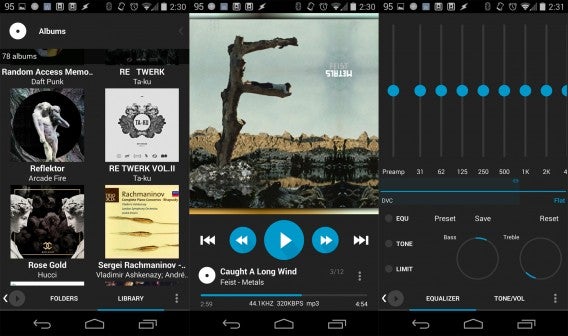
Lewis Leong, editor: I listen to music on my Android phone using an app called Poweramp. I prefer this app to Google Music because it’s highly customizable and plays FLAC files. Streaming apps like Spotify don’t sound very good, so I prefer to listen to my own music collection. Poweramp includes an easy-to-use equalizer and tone controls to compensate for crappy headphones. There are a ton of themes for Poweramp so you can make it look how you want. It also includes more advanced features like lyrics, ratings, tags, and gesture controls. If you want an audio player that can do it all, give Poweramp a try.

Chris Park, editor: Since I mainly listen to Korean music, I have to buy music through online stores. Streaming music services don’t include the music I like, so I purchase albums digitally and upload them to Google Play Music. This allows me to listen to music on my Nexus 5, Nexus 7, and desktop all synced together. The 20,000 song limit is one of the best features, because I still haven’t run out of space.

Lewis thinks Poweramp is a powerful, but underrated, music app

Suzie Blaszkiewicz, junior editor: My headphone jack is broken, and that’s why I don’t listen to music on my iPhone 4. On top of that, my 16GB phone has almost no free space for music because of all the apps I have installed. If I’m feeling a little obnoxious and want to listen to music using my iPhone’s loud speakers, I usually stream through SoundCloud over Spotify because I don’t have the premium version (pointless if I can’t use headphones), so it’s plagued with commercials and no freedom. I use my trusty 8GB iPod nano during my commute to work and my morning runs.

Jon Riggall, news editor: I use iTunes synced with my Mac. Since I DJ, I buy MP3s, and iTunes is a great way to organize them. I also use the Soundcloud and Mixcloud apps as there is lots of music shared on their I like to use. Recently I’ve been buying more and more music from Bandcamp, and the iOS app is great, with all your purchases available to stream, suggested artists and an excellent weekly radio show ‘BC Weekly’.

James Thornton, editor: For me, you can’t beat Spotify in terms of the amount of features and the catalog of music it has. In my opinion it’s well worth upgrading to premium to enjoy all music wherever you want without ads. Offline listening is a huge bonus for me, as is the Radio feature within the app as it’s the only way I get to discover new (and old) music given that I don’t listen to FM music radio these days.

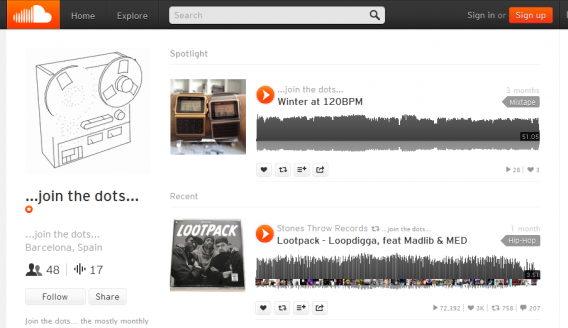
If you make your own music, SoundCloud can be a great option

Matt Mullarkey-Toner, editor: I listen to all my music on iTunes. I have a pretty big music collection and iTunes makes it easy to access gigabyte upon gigabyte of it. Streaming services like Spotify or Pandora are pretty cool and I listen to them on my PC, but I find that they to use up too much data on my mobile.

Tom Clarke, editor-in-chief: Until recently, I used an iPod Classic to listen to music on the go. But as my iPod gets older and more decrepit, I’ve switched to my phone and I’m quite pleased with the results. I use Spotify quite a lot. I’ve got a premium account and I find the audio quality just about acceptable over 3G (after all, I grew up with cassettes). A big problem with Spotify is that there are a lot of artists and labels that aren’t included in its catalog and I need my Drag City. I also use TuneIn Radio to listen to BBC radio stations, but more for news coverage than music.

Listening to the editors talking about their choices for music on the go, it shows an interesting reflection of what seems to be the status quo about streaming music: it’s good, but it’s not quite good enough if you’re picky about your tunes. Spotify fills the role, but people in the know think the catalog is limited, the quality’s off, and there are questions around how fair it is to artists. For resident audiophiles Jon, Chris, Lewis and Tom, it’s just not good enough.

The Softonic Minute: Twitter, Goat Simulator, Office and Minecraft

Twitter wants to be more visual, Goat Simulator gets crazy, Microsoft releases Office for iPad, and Minecraft backs out of Oculus Rift plans. Check out this week’s hottest software news in The Softonic Minute.

Default player


brightcove.createExperiences();

Twitter wants you to share more photos

The social network now lets you post up to four photos in one tweet, as well as tag up to ten friends, without using any of your 140 characters. The update is now available on iOS and will be coming soon to Android.

Watch the Goat Simulator launch trailer

Goat Simulator creators have released a new trailer ahead of its April 1st launch. The trailer uses slow motion reverse footage, parodying the technique used for the reveal trailer of zombie survival game Dead Island. Watch the Goat Simluatlor trailer here.

Office for iPad is free to view, pay to use

Microsoft officially released office for iPad at a press conference this week. Word, Excel, and PowerPoint are available on the platform with almost almost full functionality. Office for iPad is paid to use, but Office for iPhone, on the other hand, is now free.

Minecraft for Oculus Rift Cancelled

The popular game of infinite worlds won’t be available on the virtual reality headset. According to Minecraft creator Markus Persson, he was “creeped out” by Facebook’s recent purchase of Oculus Rift.

Make sure to check out all of our past Softonic Minutes.

New Watch Dogs trailer welcomes players to Chicago

The newest Watch Dogs trailer takes us on a tour of Chicago, the city where the game takes place. Game developers Ubisoft have taken an interesting approach – on one hand, the sandbox game promises a gritty, realistic representation of the Windy City, while on the other, it situates the game in a no-so-distant possible future, where the city we know is monitored by a sophisticated network of computers, smartphones, cameras and more…

Default player

<!–
By use of this code snippet, I agree to the Brightcove Publisher T and C
found at https://accounts.brightcove.com/en/terms-and-conditions/.
–>

<!–
This script tag will cause the Brightcove Players defined above it to be created as soon
as the line is read by the browser. If you wish to have the player instantiated only after
the rest of the HTML is processed and the page load is complete, remove the line.
–>
brightcove.createExperiences();

The game’s protagonist, Aiden Pierce, is an expert hacker who is more than capable of converting the city of Chicago into his own personal playground. He can listen in on telephone conversations, connect to CCTV streams, change up the city’s traffic systems and, from what we can see, so can his fellow citizens.

The video also promises some serious realism. The trailer showcases the game’s dynamic daylight and night cycles, as well as changing weather conditions. Meanwhile, Ubisoft seems to have made numerous changes to the game’s background and the behavior of its citizens, to the extent that each will have their own personality and interests, making the game much more varied and exciting as a result.

Check out our preview of Watch Dogs.

Pets and 3D glasses dominate Macworld 6 About to Break competition

Macworld Expo kicked off today at the Moscone Center in San Francisco. Hundreds of software developers descended on the expo hall to show off their apps. At the end of the day, SF New Tech hosted the “6 About to Break” awards, which were judged by a panel of experts from VentureBeat, Macworld, and Cult of Mac.

Here are the six companies that were selected for the competition.

  • AppPresser: a plugin framework that lets developers create Android or iOS apps using WordPress.
  • Everypost: an app that allows you to quickly update all your social networks at once.
  • Glyph: a wearable, personal home theater device that features a unique flip-down headband that functions as a screen.
  • MotionPortrait: a tool to create 3D avatars out of a 2D image.
  • Petcube: a camera in a box that allows you to monitor and interact with your pet while you’re away.
  • ReKognition: a cloud-based open platform that allows developers to incorporate visual photo recognition into their apps.

All were promising but only one company could win. Actually, that’s false as Petcube and Glyph tied for first.

Macworld Petcube Glyph tie

Petcube charmed the audience with its tiny box with a camera, speaker, and laser pointer. The device lets you monitor your pet while you’re at work. You can also “play” with your pet with a controllable laser pointer.

Petcube iOS screen

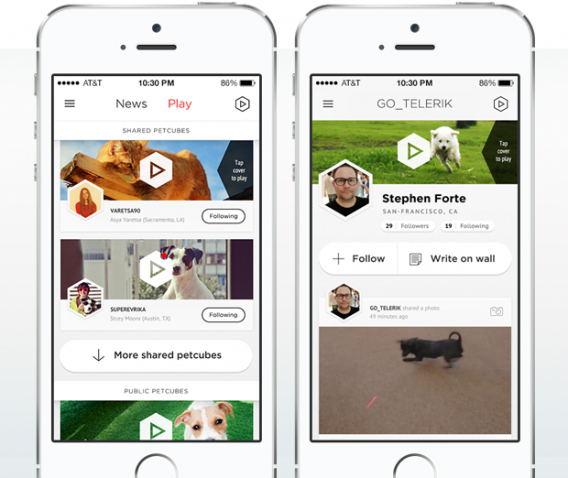
Everything is controlled using Petcube’s iOS app, which also functions as a social network for pet lovers. Think of Instagram with nothing but pictures of cats and dogs.. The company is currently working on an Android version as well.

Petcube is installing a bunch of its devices in Bay Area animal shelters to help pets get adopted.

The Avegant Glyph on the other hand is an interesting headphone/display that promises a home theater experience while on the go. Instead of using a LCD screen to display images, the Glyph uses two million “micromirrors” that reflect light to create a picture. Ed Tang, CEO of Avegant, promises a more natural viewing experience that doesn’t fatigue your eyes.

Macworld Avegant CEO Ed Tang

Tang also promised the headset would work with existing apps and devices to create a seamless experience. Avegant also hopes developers will create content specifically made for the Glyph by providing them with a development kit.

The judges were impressed but skeptical. “I want to call bullshit on this. We’ve seen a lot of devices in the past that did the same thing but they never worked,” said Andy Grignon, founder of Quake Labs.

“Come by our booth and try them out for yourself,” replied Tang smiling.

Macworld Avegant Glyph

When all the votes were counted, Petcube and Avegant tied for first, each getting 27% of the vote. 6 About to Break is supposed to show off the most innovative apps and devices that are positioned to disrupt the tech industry.

What we’ve learned is that you can look forward to more 3D headsets like the Glyph. Facebook’s purchase of virtual reality goggle maker Oculus VR is proof enough that this space will grow. And what Petcube teaches us is that the internet loves cats.

RELATED STORIES

Office for iPad announced that’s free to view, pay to use

Microsoft officially announced Office for iPad. CEO Satya Nadella had a short introduction in the press conference today talking about a new focus of Microsoft.

Dubbing it “Ubiquitous Computing,” Nadella stressed that the cloud is a main pillar for the company. His short monologue contained phrases like “Mobile First Cloud First World” and “do more across all devices.” But the main point was the reveal of Word, Excel, and Powerpoint for iPad.

These apps aren’t ports from the iPhone, but native apps that take advantage of the device.

Office for iPad will have a freemium model. Breaking it down, the apps are free to download for everyone as a viewer and reader. If you want to create or edit documents, Office for iPad requires a Office 365 subscription.

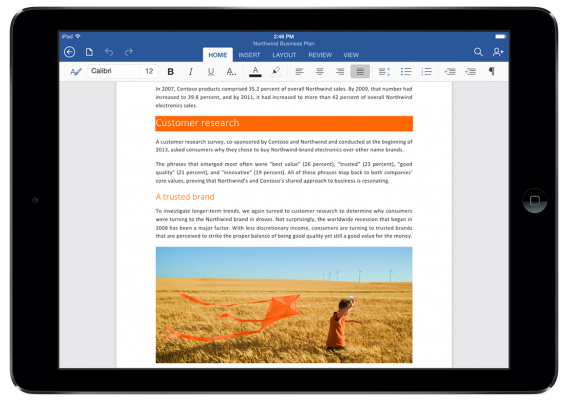
word for ipad

Since documents are stored in OneDrive, you will be able to have the latest version on any device and shared editing is supported.

Julia White demoed each suite while highlighting certain features.

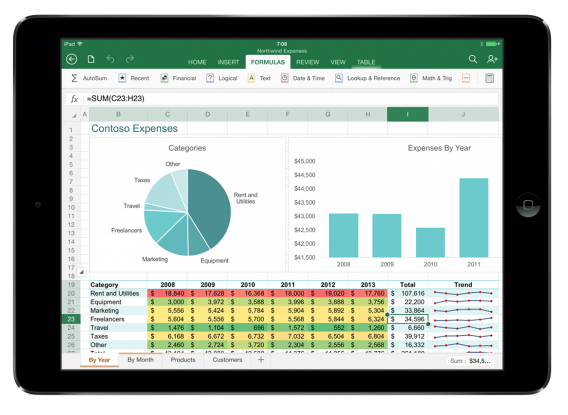
excel for ipad

Word allows for threaded comments and the ability to accept or reject edits. Excel can insert charts and update equations and Powerpoint has a touch-based laser pointer and annotation tool for presentations.

White also said that new content will be added to the app and that this touch-based Office app will be available in the Windows Store and other platforms.

Download Microsoft Word for iPad

Download Microsoft Excel for iPad

Download Microsoft Powerpoint for iPad

RELATED STORIES