Choosing the best PC game of the year for our Best apps of 2014 series wasn’t easy. The year has seen many great games hit computer screens; Titanfall was the first major title to be released this year, rounded out by games like FIFA 15 and The Crew, just in time for the holiday season.
With our panel of app experts, we narrowed down the choice to 5 finalists, and ultimately, one winner. Gameplay, graphics, story, controls, replayability, and entertainment value were all considered, and with these criteria in mind, one game came out on top: Dark Souls II. Have a sneak peak in the video below to see the rest of the finalists, and read on to see what put them on the list.
Default player
brightcove.createExperiences();
Dark Souls II
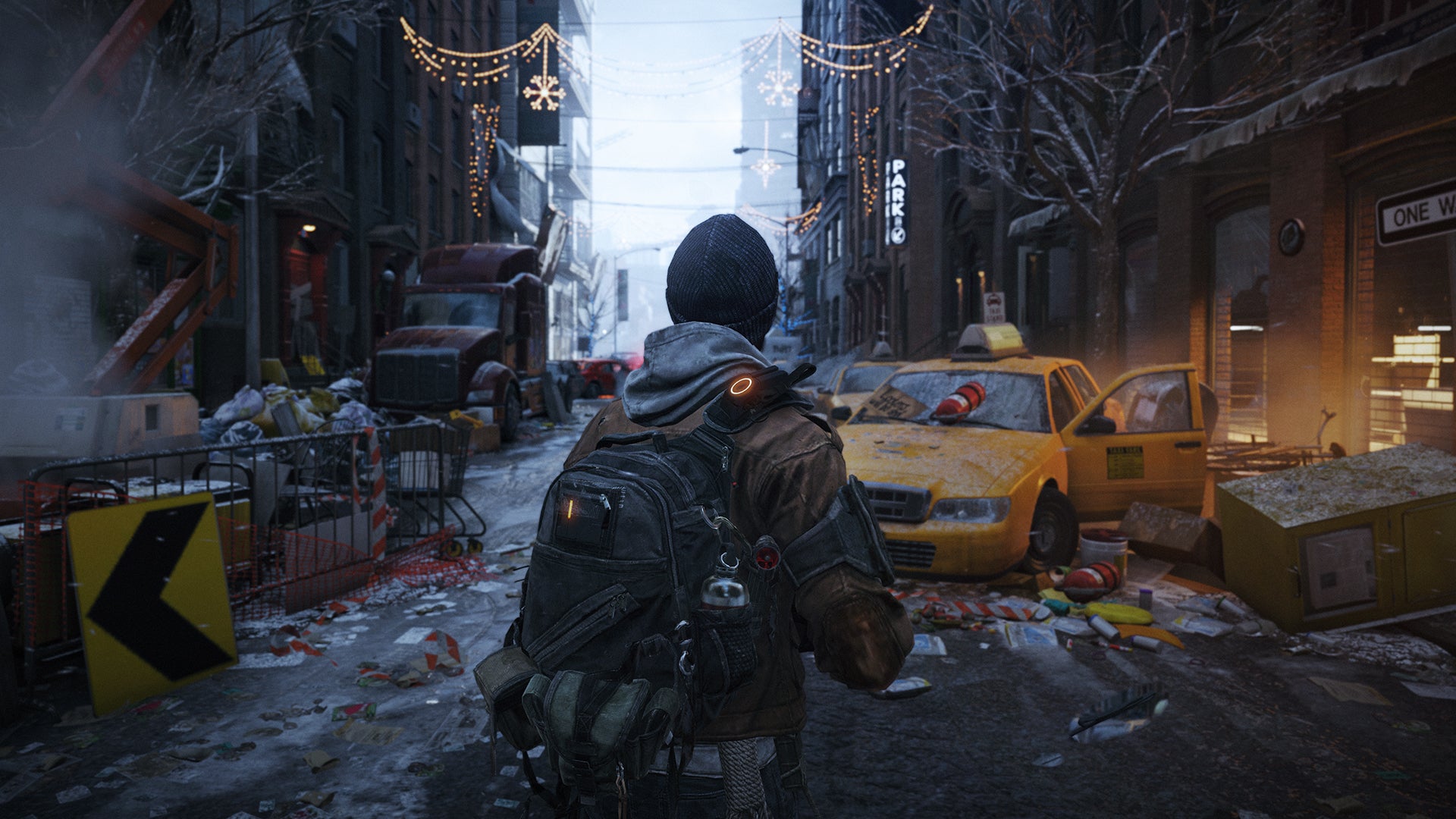
After a heated discussion, this title from Namco Bandai won over our editors, not only in terms of gameplay, and controls, but also for its replay value.
Dark Souls II is more accessible than its predecessor, and while it can still be both difficult and frustrating, this is exactly what makes it so satisfying. The combat system, along with an open world which you can fully explore, help make the game as good as it is, and with a lot of DLC, you’ll almost never get bored.
Alien Isolation was at the top of our list thanks to its story and graphics. The title from SEGA is undoubtedly the first high quality game from the Alien franchise, taking full advantage of the most recent movies in the series.
In terms of originality, gameplay in Alien Isolation takes the cake; the game is a combination of survival horror and FPS, keeping you in a constant state of tension. In a year in which women have claimed their rightful place in the video game industry, it can’t go without mentioning the strong female lead of in the game, definitely earning Alien Isolation some bonus points.
If you thought local multiplayer mode was relegated to the 90’s, think again. This year, TowerFall Ascenion has proven that it’s back in full swing.
Fast, frenetic, and elegant gameplay, lots of content, fighting arenas, and bonuses make for a lot of old school entertainment. The game brings back that ‘not gone but forgotten’ multiplayer feeling from old school console and PC games, but with a modern twist. The nostalgia alone is enough to put it on our list.
A great game doesn’t need to have an open world that you can explore freely. Sometimes, it only takes one environment, several small aircrafts, and one level of difficulty. Welcome, Luftrausers.
On one hand, Luftrausers is a very old-school game; on the other, it has a very similar dynamic to other popular games (think Flappy Bird) that make you feel like they could go on forever, but in fact, end quite abruptly.
The end goal of continuously striving to beat your previous score is what makes the game so addictive. But in no way does that make the game monotonous, because after each game, you gain experience and can modify your plane to improve it, further preparing yourself for battle.
Sequels can be very hit and miss, especially when you think about recent issues with games like Assassin’s Creed Unity, which was plagued with bugs. With Far Cry 4, however, it seems as if Ubisoft has gone big.
Despite the series having been around for almost 10 years now, Far Cry 4 once again makes you feel like you’re exploring a whole new world. Overall, the gameplay is quite diverse, with lots of content available. More importantly, the co-op mode gives for a much more exciting experience, extending far beyond the traditional campaign mode.
Will next year’s batch of games bring the same level of quality as this year’s bunch? With titles like The Witcher 3 and Batman Arkham Knight getting big hype and set to hit the market in Q1, you can almost bet on it.
As part of our best apps of 2014 series, we asked our expert app reviewers here at Softonic to help us determine the best health and fitness apps of 2014. As one of 8 different categories, our editors narrowed down the choices to 5 before voting on the best app of the year.
With wearables hitting the scene in a big way this year, 2014 was the year of activity trackers and fitness apps. Not surprisingly, major platforms like Google and Apple created their own ecosystems for monitoring health and fitness, while others got huge updates to compete with the growing trend. This year, it looks like physical activity came out on top, and RunKeeper took the top spot as our best health and fitness app of 2014. Keep reading to see the runners up.
Default player
brightcove.createExperiences();
RunKeeper
Although RunKeeper wasn’t new this year, it got a ton of new features and improvements without losing sight of its core function: tracking your run. As one of the original fitness apps, RunKeeper this year reinvented itself, incorporating a modern new interface and some excellent free training programs. The app is available for Android and iOS, and as a web app.
What makes it stand out compared to other similar apps is its integration with fitness trackers like Fitbit, Jawbone, and Garmin, as well as other fitness apps like Sleep Cycle, MyFitnessPal and Zombie Run.
Launched this year with iOS 8, Apple Health has every right to be on this list: it’s one of the first fully integrated apps completely dedicated to managing your health. While most apps focus primarily on collecting data about physical activity, Apple Health collects data about all aspects of your health, including your vitals (blood pressure, heart rate), body measurements, and any nutritional information you track. One of its best features is Medical ID, which give medical info that could be useful in an emergency (and is accessible through the lock screen).
The app integrates with both iOS and Apple Watch apps, as well as iCloud synchronization to let you access your data in OS X.
Apple Health is available for iOS 8 and up as a pre-installed app.
Google Fit
Like rival health app Apple Health, Google Fit is a data collection center that acts as a hub for health and fitness apps, especially useful with Android Wear. Unlike Apple Health, however, you have to download Google Fit from the Play store.
Focusing more on sports and fitness than health, Google Fit collects and syncs data from other activity tracking apps without you having to manually input anything. Steps, miles, and calories burned are all calculated within the app, which automatically detects whether you’re walking, running or biking.
Google Fit can also function as your own personal trainer, setting goals and pushing you to reach them.
A trend this past year was the ‘Seven-Minute Workout’, a condensed daily workout for people that don’t have much time. This, is exactly what the Carrot app does. Taking a more lighthearted approach to losing weight, Carrot offers to “transform your flabby carcass into a Grade A specimen of the human race”.
The app’s hilarious approach and innovative training model, designed for those who want to get maximum results with minimal effort, makes it one of the best health and fitness apps of the year.
Before Apple Health, there was Argus. The app, again, is a data collection center that stores a ton of different health data including steps, sleep patterns, or how much water you’ve had throughout the day, to name a few. What stands out most about Argus is its elegant style, collecting all the information you need on one screen without being too cluttered or confusing.
Although some data needs to be inserted manually or synchronized with other apps, you have the advantage of seeing how many calories you’ve consumed, how active you’ve been, and how many hours you’ve slept throughout the night, all on the app’s home screen.
The best health and fitness apps of 2014 give a clear indication of this year’s trend: more complete apps that feature data collection centers for physical activity, giving an overall picture of your health.
What lies ahead for 2015? Taking this year’s trends into consideration, and with the rise in popularity of wearables, you can expect to see a lot more health and fitness apps on a micro level, with wearable integration.
Check out the rest of our categories and the best apps of the year in our Best apps of 2014 series.
Last but not least… 8fit. We encourage you to read some of their amazing reviews!
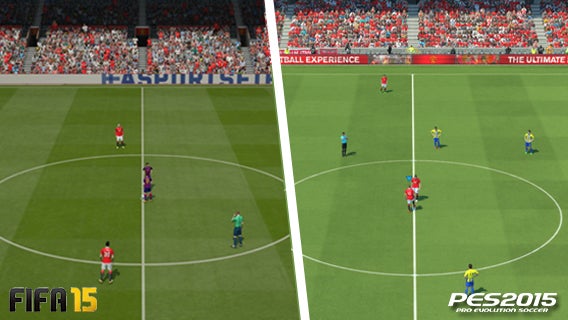
Soccer fanatics, semi-professional players, virtual coaches and video game fans get together every year to passionately discuss the same dilemma: FIFA or PES?
The discussion is more lively than ever here at Softonic. Editors Alessandro and Daniel have spent hours playing FIFA 15 and PES 2015, and after some spectacular goals, goal line clearances, and a lot of mistakes, they’ve picked sides in the battle: Alessandro prefers EA’s FIFA 15, while Daniel’s leaning more towards Konami’s PES 2015.
For both games, Daniel and Alessandro analyzed the most important factors: gameplay, graphics, tactics, licenses, andfeelingon thepitch. Keeping an open mind, they simulated a soccer game between the two soccer heavyweights to determine the best soccer sim of the year.
Gameplay
Default player
brightcove.createExperiences();
Animations
Daniel – PES 2015: I was really impressed with the animations of PES this year. Even the demo lets you appreciate Konami’s hard work. In the games we played, there were several high quality moves; a high pass made by Hamsik with the outside right foot found Higuain alone in front of the net, allowing him to finish off with a half volley bicycle kick, and it looked great.
As I got to see at E3, PES 2015 let me enjoy more freedom of movement: the classic problem of running on the spot is now a thing of the past. Not only that, players can now maneuver better with less space, being able to lose defenders with feints that are much closer to what’s possible in reality. The difference is huge when compared with FIFA, where players can execute moves with feints and tricks that are completely unrealistic.
The return of the PES ID– where individual players have their own style and animation– and its extension to more players makes PES 2015 even more realistic. In the old PES, you could recognize Roberto Carlos’ style of gameplay, but now it’s even better. Ronaldo, for example, is identifiable from each frame and motion, almost as if you’re in front of the TV watching a Champions League game.
Even the one-on-ones with the goalkeeper seem much more realistic. In FIFA 15, it’s almost impossible to score with a lob, and it’s one of the most common shots in these situations! In PES 2015, on the other hand, everything seems more natural, which we saw on several occasions.
Speaking of goalkeepers: they’re more realistic too. The goalies of PES 2015 have improved significantly, especially when they’re outside the box, anticipating shots from strikers much more intelligently. Then you have then animations that you see in the stadium, like when players’ momentum takes them off the field, in danger of falling over the ad hoardings.
Alessandro – FIFA 15: Yes, it is true, PES 2015 offers gameplay improvements, movement, and an impressive looking new graphics engine (the FOX engine), but despite a general improvement in the animations, it seems like Konami still has some work to do on its sometimes slow and cumbersome animations.
In FIFA 15, animations have improved too, and while PES is catching up, it’s not up to FIFA’s standards yet. In FIFA 15, players also react emotionally to gameplay. Players will look angry if things go wrong, just like in real life!
You mention PES ID, but we saw how well players move in FIFA. The fast dribbling of Messi, the physical power of Cristiano Ronaldo in one-on-ones, or the ball stopping stop control typical of Aguero are just a few examples where you can really feel the individual player you are controlling.
In terms of goalies, I only partly agree with Daniel. I found the PES goalkeepers less realistic, alternating between extreme calm and stillness, and exaggerated movement. In FIFA 15, however, the goalkeepers are more responsive and have 50 new animations, created by digitizing the movements of Howard, Everton’s goalkeeper. The result is extraordinary: they seem instinctive, coming out of the box fluidly, punching away shots, touching the ball with fingertips, and much more. Seeing is believing.
Conclusion: FIFA wins. 1-0.
Physics
Daniel – PES 2015: The physics of the ball in PES 2015 is significantly improved compared to previous years. In past games, it felt like kicking around a bowling ball: players seemed to kick the ball heavily as they ran across the field.
Now, however, the ball behaves in a much more natural way, especially in precision shots, where you can see much more realistic effects. Even in the contact between the players, you can almost feel the sweat on the opponent while taking on physical battles during the game.
I know it’s far from perfect, but I’m convinced that the small defects that are attributable to the features and demos will be fixed in the final version. If we’re talking strictly about physical improvements, the steps taken by PES 2015 are huge, while FIFA has changed almost nothing compared to last year.
Alessandro – FIFA 15: I don’t agree. Personally, after making huge claims, I was expecting PES 2015 to have more realistic physics. The ‘bowling ball’ effect remains for me, although it does seem a bit less pronounced. The ball is still ‘heavy’, some trajectories don’t seem believable, and throws-ins don’t feel right. This is the complete opposite to FIFA, where the physics of the ball almost verges on perfection: the trajectories of shots and crosses are clean and natural, and the deviations and rebounds are very convincing.
True, player contact has improved in PES (and it took time), but players falling after a foul looks a little fake. FIFA is clearly ahead in this regard; here, physical power and timing are crucial for winning a tackle, and if the opponent escapes, you can grab his shirt to stop him.
Conclusion: FIFA scores again. 2-0.
Artificial intelligence and style of play
Alessandro – FIFA 15: FIFA 15’s AI is much improved. Your can give players personalized orders and ask for specific movements on the field. For example, you can ask the attacker to pressure the opposing defense in possession of the ball, or ask the left wing defender for offensive support, to name a few. Players follow directions in an intelligent way, allowing for more experienced plays and strategies to shape the team according to the philosophy of the game.
The AI is also brilliant when talking about opponents. Your rivals are now able to interpret your style of play and adapt their strategy to changes in the game . If you’re wining 1-0 just a few minutes from the final whistle, expect pressure from your opponent (taking the chance to play on a break), or vice versa; you can surge forward to the bitter end to if your opponent is ahead in the last minutes of the game.
Finally, I can’t say anything without mentioning the corners. You can now choose between 4 predefined strategies on corner kicks: directing the ball towards the first or second post, on the edge of the area, or into a mass of players in front of the box. It’s great for increasing the unpredictability of corner kicks.
Daniel – PES 2015: Even though the teams in PES 2015 won’t be wearing official shirts, you’ll still be able to recognize them by the way they play. The re-creation of the way that each team plays is good enough to make it hard to distinguish between reality and fiction. Real Madrid plays with speed in counter-attacks, Barcelona makes a lot of short passes, while Atletico Madrid is defense-minded.
The AI of individual players, in your team and your opponents, are really amazing. While you’re attacking, your teammates move up the field and take the wings to open up space in case you want to make a pass. This also makes the game more fun, so much so that you feel like you’re playing with other “soccer smart” people on your team. Compare this with FIFA, where you often feel abandoned and alone on the field.
In this demo, I saw opponents do things that FIFA players have never been able to appreciate. Individual players react very well to situations in which you have to act instinctively, like when a defender is clearing the ball and must sweep it away immediately, when the attacker sees an unguarded net and pulls away, or when a goalkeeper comes out of his box to anticipate an attacker.
In addition, even in PES, there are tactical options for corners, but you can also take a player and strategically place him where you want him to be able to better take advantage of a corner.
Conclusion: PES scores. 2-1.
Graphics
Default player
brightcove.createExperiences();
Player realism and the field
Alessandro – FIFA 15: The next-gen graphics engine in FIFA 15 looks incredible. The field degrades during the game, while the uniforms of the players get covered in dirt and grass during the matches and move in a natural way.
This isn’t the case with PES: when you score a goal, for example, the ball hitting the net seems really unnatural. In short, PES seems like a step back, not being 100% aesthetically pleasing.
On the other hand, the two simulators seem equal when it comes to each players’ physical resemblance to the real thing. Features, expressions, scars, hair cuts, beards: every detail is reproduced with meticulous detail in both FIFA and PES. I must admit, however, that on the ground level, the Konami game is really impressive .
Daniel – PES 2015: Player resemblance in PES 2015 is amazing; all of the most famous players are perfectly recognizable and their every feature is faithfully reproduced, as Alessandro noted, even down to the haircuts.
I think that from the point of view players in Pro Evolution Soccer, it’s a cut above those in FIFA 15. During replays especially, you can appreciate the attention to detail, such as the eyeline of the players, which follows the movements of the ball and the action.
Conclusion: No one scores. Still 2-1.
Stadium atmosphere
Daniel – PES 2015: Pro Evolution Soccer has always been a step ahead in terms of setting and atmosphere, and this continues to improve year after year. In PES 2015, your living room seems to turn into a stadium every time you start a game.
In the stands, the fans are enthusiastic, and each time the action moves closer to one of the goals, the audience’s excitement grows, just like in reality. In addition, the cheers change from team to team, showcasing which team is playing in their home stadium. Even the banners on the sideline give the impression of watching a real game.
Alessandro – FIFA 15: Daniel hit the mark. Pro Evolution Soccer has always enjoyed a certain advantage in terms of atmosphere. This year, however, I think that FIFA has caught up. For me, both simulators now let you believe you are at the stadium.
EA has fixed a lot of details off the field: on the sidelines, you’ll see LED ads, ball boys ready to give back the ball, cameraman, coaches, and lots more. Above all though, you’ll see a graphically well-defined and participatory audience.
Why FIFA? Because the crowd in the stands is more dynamic and alive, while in PES, fans often move overly mechanically. I agree on the absolute domination of Pro Evolution Soccer with regard to the banners in the stands, but did you notice that while changing teams, some of the slogans are repeated?
Conclusion: Stalemate again. 2-1.
Celebrations and Replays
Daniel – PES 2015: The details in PES player celebrations are amazing. After scoring a goal, Vidal runs towards the curve mimicking a heart with his hands– exactly like he does in real life! Even when I played with Bayern at E3, Ribery approached the camera, grabbed it, and shook it with both hands while screaming into it. These kinds of details in PES are just amazing.
Even the replays are a highlight of the series. The auto replays may not be as spectacular, but the freedom to manually move the camera during replays allows you to watch the goals from every angle and zoom the camera in on every player’s face.
Alessandro – FIFA 15: A goal should be celebrated. Always. EA knows this, and it’s introduced new ways to celebrate, digitizing real celebrations from real soccer games. Unlike Konami’s game, where the type of celebration is decided automatically, FIFA lets you choose (with a special combination of buttons) how you want to celebrate a goal you’ve just scored. You can choose between tens of celebrations!
After the goal, you can’t miss the replay to relive your best moments. Even here, FIFA 15 has caught up when compared to PES. The replay system has been revisited in the EA game, with results that are more realistic: the replays have been cut much more like they are on TV, and the movements and angles of the camera make you feel as if you were reviewing the highlights of the match in front of the TV.
Tactics and strategies
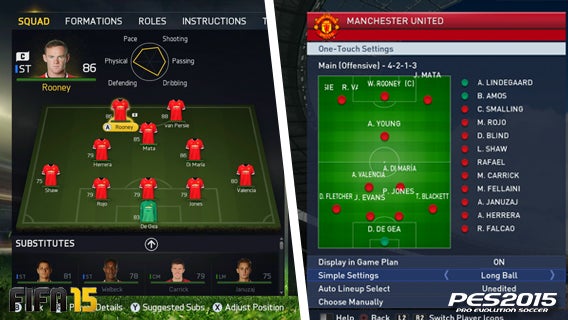
Alessandro – FIFA 15: The tactics and strategy system in PES has always been better than that of FIFA, especially in recent years. But now, EA has finally caught up.
The renewed tactics menu makes it easier to customize your formation. It’s also possible to give custom instructions to each player. You can get your center forwards to run in behind defenders or to press the opposing team whenever they’re not in possession of the ball. You can give freedom of movement to the superstar player, get the wingers to help out in defense, or have the center backs push up and play as strikers if you’re in the last minutes of the game and you desperately need a goal. The new system allows you to do all this and much more.
Yes. PES has added the ability to use different styles of play based on the context of the game: early in the match, with or without possession of the ball. However, in this aspect of the game, not much has changed. Then again, why should you change a winning formula?
Daniel – PES 2015: Exactly. You don’t change a winning formula. You make specific adjustments to resolve minor problems or to make improvements. The tactics and strategy system in PES has always been fantastic, and while you can criticize the aesthetics of the interface, you certainly can’t say anything bad about the practicality of all the tools it provides.
Changing the behavior of the team based on the situation of the game increases the simulation aspect of PES 2015, once again confirming that Konami is dedicated to providing a complete range of soccer dynamics on a virtual field.
FIFA 15 has undergone some major changes and more importantly, many features and tactics that were absent before have now been added.
I do have some doubts as to how much impact all of these aspects and tactics will actually have on the game though. Between the two, I think I’d rather stick with the winning formula, namely the tactics and strategies of PES.
Conclusion: FIFA comes out strong with a counterattack by PES. 2-2.
Team licenses, stadiums and competitions
Daniel – PES 2015:The chaaaampioooons! Hearing the song of the most important European competition gave me goosebumps, as did the view of the starry banner laid out in the middle of the pitch by the UEFA ball boys. In short, being able to play in the Champions League in PES 2015 is a unique experience, as it is for the Europa League, European Super Cup and the Copa Libertadores.
FIFA 15 doesn’t offer official competitions, so you’re forced to play the standard championship or made up tournaments, but I think Konami could make a bit more effort to obtain licenses, at least for all the major teams, stadiums, and European competitions. Nevertheless, the fact that I can see my team play in the Champions league (in the game at least) is truly amazing!
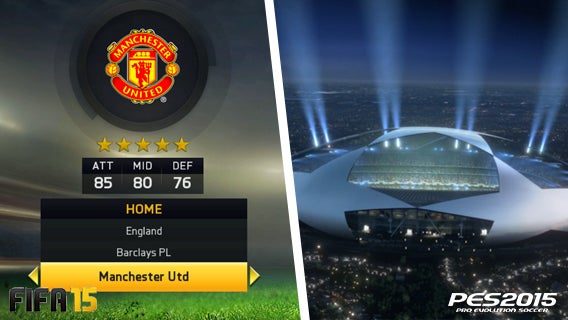
Alessandro – FIFA 15: The work done by EA is impressive. There are over 25 championships, all licensed. You also have the complete Premier League, along with all the stadiums from the first division. In short, there is something for everyone.
The range of licenses offered by PES is notoriously worse: only leagues from Argentina, Spain, France and the Netherlands are fully licensed, while leagues from Brazil, the United Kingdom, Italy and Portugal have only partial licenses. Having the rights to the Champions League, Europa League, European Super Cup and the Copa Libertadores doesn’t compensate for the clear difference.
Conclusion: FIFA retakes the lead: 3-2.
Feeling of the game
Alessandro – FIFA 15: FIFA has been substantially improved in terms of gameplay, animations and responsive controls. What’s more, it really gives you the impression of a stadium atmosphere. Playing is fun and, and above all, the game is particularly entertaining. On top of that, the multiplayer mode, skill games, and endless game modes will keep you glued to the screen. The goalkeepers, on the other hand, aren’t exactly impeccable, and at times it’s a bit too easy to score a solo goal using fast or highly skilled players.
For its part, PES 2015 gave me a nice surprise. The generation gap has given new life to the simulator by Konami. The gameplay has been significantly improved, as has the responsiveness of the controls and the physics of the ball. It does, however, still need a little something extra to be on par with FIFA. Nevertheless, the jump in quality is obvious, particularly regarding the specific movements of the players and the control touches, which are truly exceptional. I still prefer FIFA, but I must admit that PES has regained much of the charm it had lost in recent years.
Daniel – PES 2015: The game by Konami manages to reproduce the atmosphere of great soccer, along with events such as the Champions League. What’s more, the sensation of playing has been refined to perfection. Although the graphics in FIFA 15 are still a little better than PES 2015, where contact between players and movement on the pitch could still be improved, as far as the “feeling” of soccer goes, Konami takes the prize this year.
PES 2015 is a true simulator. The transitions, the movement of players, the team play, the AI of opposing teams, and its reproduction of different playing styles give you the experience of real soccer simulation.
I was a little disappointed with FIFA 15. Although it has been improved, the game by EA seems more arcade than it was a year ago, not only because of the many things you’re able to do with the ball, but also because it seems like you have slightly less control over the players. Of course, everyone will have their own opinions, but this is the impression that I have this year!
Conclusion: PES changes formation forces FIFA to defend. 3-3.
The final whistle goes as one an intense game comes to an end
In our first test with the demo versions, PES 2015 fell short of FIFA 15 by one goal. The fact that EA was ahead at the end of the first half was mainly due to a slight delay in the preparation of Konami’s game, with the full version having been released on November 13.
Now that it’s back, PES 2015 has regained the upper hand with a game that’s much more convincing than it has been in recent years. Although FIFA 15 has introduced many new features and still has fantastic physics along with great animations, Konami has managed to catch up in many aspects, successfully replicating the feeling of a soccer game in a way that it’s never done before.
Ultimately, the preference remains a matter of taste. However, if you are a fan of virtual soccer, the choice this year is certainly more difficult than ever.
Incredibly simple, minimalistic, and with only single-function, the latest app trends is towards apps that do one really basic thing. Yo! was a hit because of its extremely simple communication style, literally only pushing the word ‘Yo!’ to other users. Surprisingly, it’s not alone. Similar single-function apps have been appearing in app stores, including La-la, Emojli, and Yo. The big questions is, why? What’s so good about an app that can only do one thing?
I decided to take a closer look at the reason behind the popularity of these apps by asking the developers themselves about their appeal. More than just single-tasks apps, it looks like there may be more than one valid reason to start using these so-called single-function apps.
What do these apps do?
The common thread of every single-function apps is a hyper-simplification of something that seems to go against the evolution of technology (and common sense). No one buys a smart-phone to simply send a ‘Yo!’ or a goofy emoticon to friends. It seems almost counter-intuitive if you consider the enhanced level of communication that smartphones are supposed to bring.
The single-function or ‘one-task’ app changes slightly from one app to another, but when you consider it, they’re not all that different. They all serve as a way to facilitate communication between users. What changes, however, is the method.
As already mentioned, for example, Yo lets you send only one message to your contacts: ‘Yo!’. With La-la, on the other hand, you can chat with friend, but only through music.
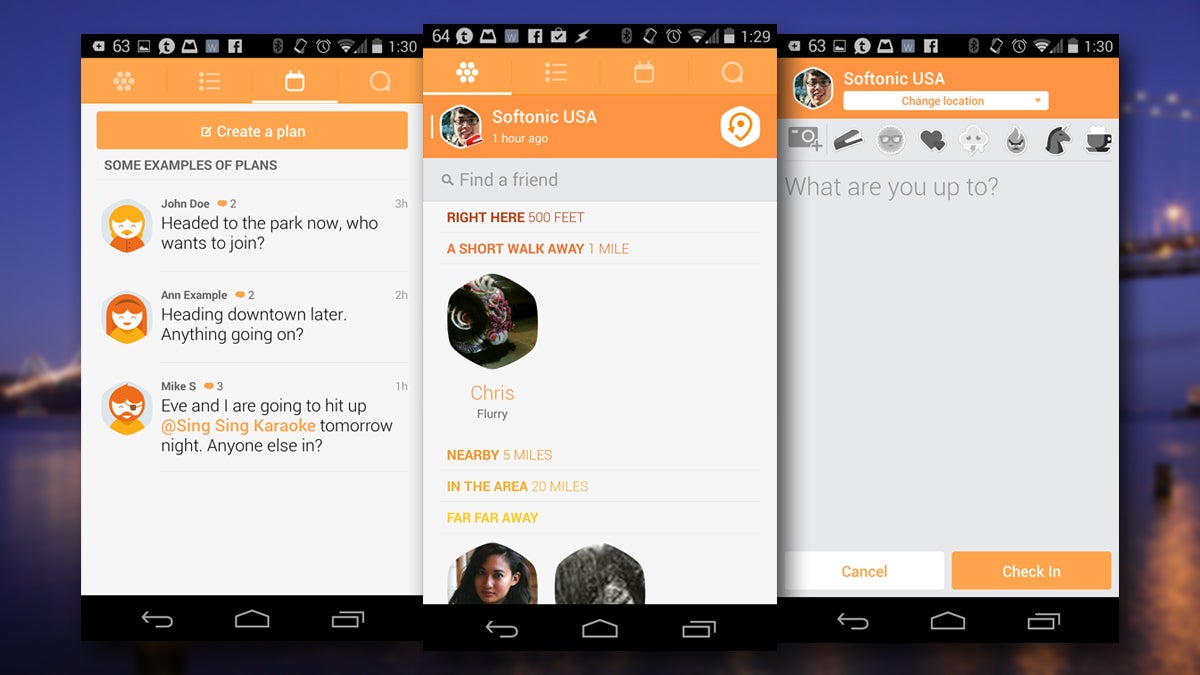
La-la app screenshot
Another app is Lo, which you can use to send your location to friends. In the vein of simplicity, a friend asks for your location, and you answer with your position. That’s it. Very similar is 1MinLate, which lets other people track your movements on a map for half an hour. It’’s like telling your friends, “I’m on my way.”
With Emojli, you communicate with smileys. Even user names are emojis.
And then there’s This. It’s a social network where you can share only one link per day.
Push for Pizza, which is slightly different, lets you order delivery pizza with a couple of taps on your smartphone’s screen.
The simplicity of these apps’ functions is matched only by the simplicity of their interface. With big buttons and bright colors, they’re a reference to the bi-dimensional flat design we first saw with Windows 8, then iOS 7 , and finally with the new Material Design in Android.
Real apps for real needs
But how do these developers go about designing these kinds of apps? What need drives these apparently useless apps? They’re all legitimate questions that you might have asked yourself, which I in turn, asked it’s developers.
Suprisingly, apps like Yo and Lo where created from real needs. Or Arbel, Yo’s developer, got a request form his boss to make an app so that he could send notifications to his personal assistant. “After dismissing him at first because I thought it was not worth my time, I thought about it and remembered I have a friend who I communicate with in the same way– by texting each other content-less messages. Like, for example, ‘Yo’”.
Lo, on the other hand, was developed by 4 people living in a 2 bedroom apartment. “One day while we were discussing our remote working strategy and how we typically communicate, someone asked the question ‘What’s the most common message we send each other?’ We all thought about it, and the obvious answer was ‘Where are you?’” said Evan Bullington, Base Forty’s co-founder, the company behind Lo.
The smartphone on the left requests the localization, on the right one the notification appears
Jason Hadjioannou’s idea to develop La-La, on the other hand, came from a daily event: “I was about to send my girlfriend a text message one morning and just thought it’d be cool if I sent her a short audible song snippet instead of writing it. I’m not really a chatty text messenger and normally run out of things to write, but a song snippet would say everything I needed without sounding boring. I made an early version of the app and sent her the 17 second chorus of ‘Hello’ by Lionel Richie”.
Other apps, like Emojli, were created as more of a fun idea. Matt Gray and Tom Scott, the app’s developers, told Softonic that the idea came from Yo and the new emojis. “The two of us had the idea at about the same time — we weren’t sold on it until we realized that usernames should be emoji too. At that point, we burst out laughing and realized we had to build it”.
Why should you choose a single-function app?
While they may be fun, you might be asking yourself why you should choose a single-function app instead of a more robust one that does all of these things. If you think about it, you can easily say ‘Yo’, send your location, an emoticon, or a song via iMessage or WhatsApp. Is it really necessary to have different single-function apps?
Well, behind all these apps there is one common motto: keep-it-simple. As Or Arbel puts it, “Why complicate things when they can be simple?” Bullington agrees, saying that the advantage of these apps comes from their simplicity “The value of apps like Yo is that users can go in and perform the task they want to perform without distraction or friction. It’s just get in, and get out”. Gray agrees: “I downloaded Yo! It didn’t stop me using anything else, but it was an amusing brief addition to the apps I already use”.
Why complicate things when they can be simple?
But it’s not just that. These apps have immediacy on their side. They respond to daily concrete needs. If I want to do one simple thing, and there’s an app that lets me do just that, then why should I go through a more complex one?
Hadjioannou poses a comparison with social networks: “We don’t all want all the features of a complex social network, but certain elements can appeal to different people. With single-function apps, users can pick and choose a social media outlet that fits who they are and how they wish to express themselves”.
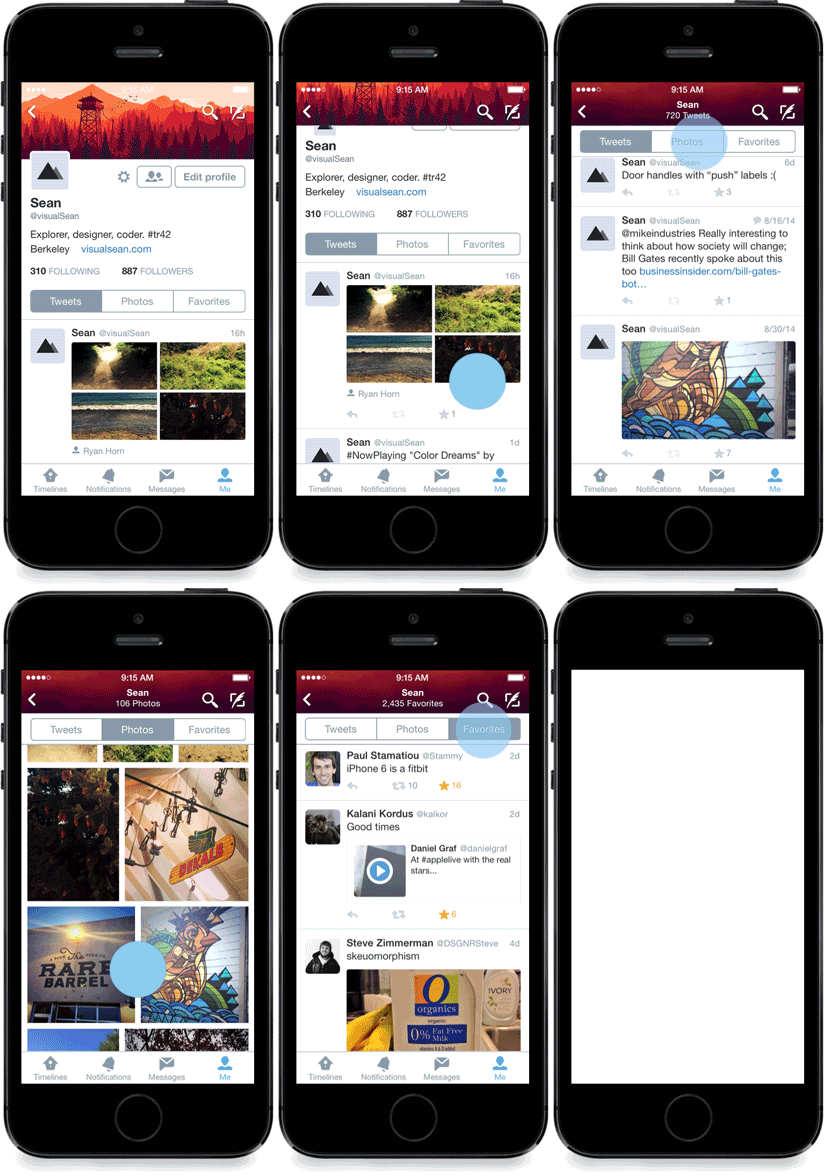
Bullington goes further, saying that “the user advantage of using Lo is all in the request-respond format and the 1-tap user flow. […] The world is responding to a new phenomenon– technology as a time-waster. We’re realizing that we spend too much time attached to feature-packed apps. With a push-heavy app like Lo, you can perform actions without gluing yourself to complicated app interfaces”.
The world is responding to a new phenomenon– technology as a time-waster.
Moreover, these apps stimulate creativity by giving you new challenges, as Grey points out. “The added constraints of only being able to use emojis in our app gives you a challenge and a prompt to be creative”.
What else can you use them for?
If I hear a song on the radio that me and my girlfriend always listen to, for example, and I want to tell her, sending her part of the song could be worth much more than telling her about it. Asking a friend you’re meeting up with where he or she is is much simpler with Lo, and the same goes for trying to get someone’s attention with Yo! or by sending them an ‘I’m happy’ Emojli. These are the primary intended functions of these apps.
But single-function apps can actually have alternative uses too. Apart from communicating with friends and family, they allow users to “get notifications about things they either can’t get anywhere else, or have to download a whole app just to get,” says Arbel.
Yo app screenshot
On Yo’s website, you can subscribe to many different feeds that notify you with a Yo each time something happens. Earthquake Yo warns you if there is an earthquake larger than 6.0 magnitude,while RedalertIsrael warns Israelis of rocket strikes in Israel. You can also use Yo! to check if you’re drinking enough water throughout the day with Yowater, or meet happy people with HappyYo.
We believe smart people from around the world will keep create amazing use cases with Yo.
Aside from these serious uses, Yo’s own offices have a vending machine that employees can Yo! to get a soda. They even have a toaster that you can Yo! to turn on, notifying you with a Yo when toast is ready.
La-La, on the other hand, can even get you free drinks during a concert. “A band declared on stage one night that anyone who sent them a La-La message with the lyrics “Buy Me A Drink” would get one on the house”, Hadjioannou told us.
Single-function better than multi-function?
Installing and uninstalling apps on your smartphone is so quick and simple that it’s almost effortless. Storage space keeps getting bigger and bigger, and the ‘there’s an app for that’ mentality isn’t far from the truth these days. If single-function apps really fill the gap of some need, could these apps be the standard in the future? Think of apps as big as Facebook, which has moved it’s Messenger function to a standalone apps, or Foursquare, which separated it’s glaringly different functions into two separate apps: Foursquare and Swarm.
These apps’ developers all agree on the fact that the ‘keep it simple’ philosophy works, and that there is a trend towards more simple and immediate apps, although this isn’t necessarily coming at the expense of more complex apps.
It’ll be interesting to see how they’ll integrate with wearables, where screens are smaller and the possibility to do more than one thing with an app is limited. “If I want to know how far away my brother is, but I know he’s biking over, I know I won’t get a text response while he’s riding. If he just has to tap a button on his watch or say a command to share his location, it’s safer and easier, and that’s a real value added”, says Bullington. As a matter of fact, Yo is already available for Google Glass and will soon be available on other wearable. Arbel’s idea is to make it available on all devices.
Single-function apps could be ideal for wearables
The key concept of these apps, and what their success on wearables depends on, is linked to the immediacy of push notifications. “Yo brought us the notion that apps can exist primarily within the context of push notifications, and with Lo, we’re trying to further that idea by making push notifications complete simple actions. It’s very easy to see push notifications becoming the primary hub of these one-function apps, simply because of how easy and instantaneous they are to use,” Lo’s co-founder Darshan Desai told Softonic.
It’s very easy to see push notifications becoming the primary hub of these one-function apps.
Even further, during a time where people are increasingly concerned about privacy, these apps give the advantage of being less invasive compared to more complex ones. Not only do they request (and require) fewer permissions, “they don’t hold much personal data”, Hadjioannou says.
Simplicity and minimalism could mean success
Yo can activate real things in the real world, and Lo’s developers “want to see these ideas improve the world, so that’s what we’re working towards”.
Basically, the success of these apps will depend mostly on how they’ll improve our relationship with technology, expanding its use in some cases, adapting to devices in others.
Hadjioannou has the impression that he “can digest and understand a single-task app’s full service a lot more easily and without much of a learning curve”. If hyper-semplification means accessibility and immediacy, then why shouldn’t this be a standard for apps?
Bullington forecasts that simple apps will converge with more complex ones, and it won’t take long before we’ll discover if the future will develop in this direction, or multi-function and single-task apps will continue to coexist. Only time will tell, but if Facebook and Foursqaure, Yo, La-La, and Emojli are any indication, it looks like that’s where we’re headed.
Whether you’re playing Skyrim or Titanfall, or if you’re waiting for the release of GTA V for PC, you’ll want to make the most of your computer’s power. First though, you need to prepare it for the beating it’ll get from playing these resource heavy games.
Luckily, you don’t need to be a programming genius to do it. You only need a few programs that, almost automatically, will do all the dirty work for you. From updating drivers to stopping other computer activity while you play, check out these 7 apps that’ll help improve the performance of your PC when gaming.
The gamer’s control center
Game Assistant
Game Assistant is the control tower for your video games. It’s interface collects the games installed on your computer so that you can access them quicker. The IObit program also frees up RAM and controls the temperature of your CPU, GPU and motherboard, to avoid the risk of overheating and possibly even damaging the hardware.
Devoted to maximize the performance of your PC while you play, Razer Game Booster closes all the programs you don’t need while you’re playing so that you use all resources on the videogame.
In addition, it includes a game launcher, a tool for downloading drivers and defragmenting the hard disk, a service for saving games in the cloud, and a built-in feature to make videos and take screenshots.
Ge Force Experience is an essential tool for gamers with a Nvidia graphics card. While the main function of the program is to update the drivers for your video card, it also includes a very useful function to get the best performance from your PC for every game installed. In addition, it shows the computer’s configuration and has an integrated tool for screencasting your game.
If you have an AMD video card, the best program for you is AMD Gaming Evolved Client. Similar to GeForce Experience, it helps you keep the drivers updated and optimize your games based on your hardware configuration. In addition, it lets you connect with other players in-game.
This little program is ideal to get rid of all those useless programs pre-installed by the manufacturer of your computer, both to delete the ones you don’t want or the ones you don’t use. No installation is required, and it helps you make your PC faster and more powerful, especially while you play.
There are many utilities to defragment your hard disk, starting from the one offered by Windows, to the ones included in Razor Game Booster. A disk that’s in order improves the performance of your computer, which is why you should opt for one of the best and fastest, such as Auslogics Disk Defrag.
Game Assistant and Razor Game Booster include tools to screencast your game. But if you don’t want to install them or if you prefer to use independent software, try Fraps. It allows you to take screenshots, record video, and shows the graphics performance of your computer in real time.
Every experienced gamer should have at least three or four of these programs installed on their computer, and if you’ve already played games with high requirements, you probably already have one installed.
All (or almost all) of them, however, can make your computer much more efficient or improve performance when you’re about to start playing, or if you’ve been sitting in front of the screen for six hours. And, if you don’t have a latest generation PC, they can help to at least partially compensate for the limitations of your hardware.
If you want to stream your games live, then check out one of our App of the Week entries, Twitch.
Google Maps on Android lets you save and use maps offline, especially helpful when traveling abroad without access to a mobile network. With offline maps, you can create custom maps to help you get directions anywhere in the world.
With the update to version 8.0, the steps have been simplified even more on smartphones and tablets.
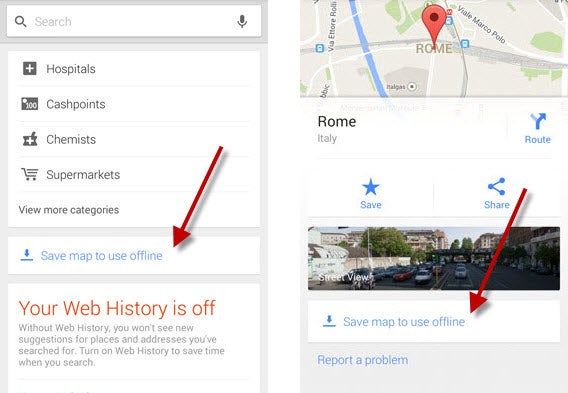
1. Find the map you want to save
Open Google Maps and search for the location you need. You can do this in two ways.
First method: type the location name in the search bar and then tap on the name of the place that comes up.
Search for the name of the place you want to access offline. Then, tap on the bottom bar with the name (second image),
Second method: Manually move the map to the location you’re interested in, and then tap on the search bar at the top to open the menu that’ll let you save the map.
2. Save the map
When the menu opens, scroll down until you find the option to Save map to use offline.
Look for the option to save the map offline.
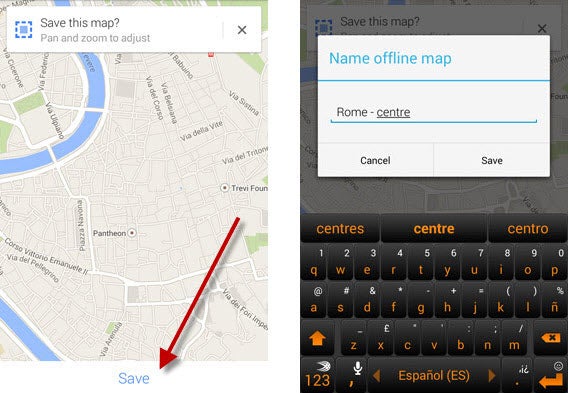
Enlarge the map or zoom out with the index finger and thumb on the screen to choose the map size.
Once you’ve defined the area, click on the Save button. After that, you’ll have to name the map and hit Save.
Resize and name the map
3. View maps offline, and manage them
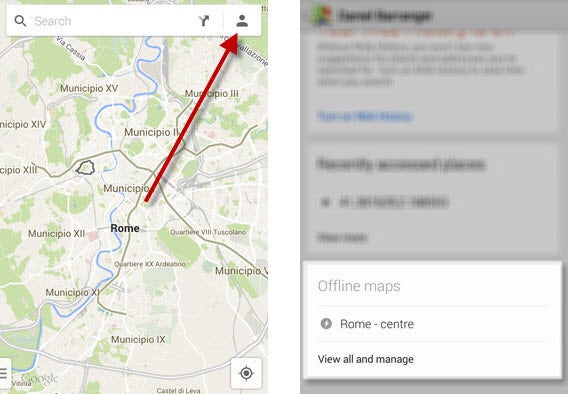
To access the map offline, open Maps and tap on the shape of the person in the top right corner. Once the menu opens, you can scroll through to find your map.
Access the saved map
Tapping on View and manage gives you access to a page where you can rename, delete, and update the maps you have saved.
Manage offline maps
Beware of maps that expire
Offline maps can be very useful, but beware: a saved map only lasts thirty days before it’s automatically deleted. If you’re planning a trip, save the map just before leaving or remember to update it.
Chrome, Firefox, Internet Explorer, and Opera: which one is themost powerful browser? As the window to your online world, your browser is probably one of the most important programs you have on your computer. For this reason, we decided to put the top four to the test to see how they stack up against each other.
Unsurprisingly, not all browsers are created equally. Some have more experience, like Internet Explorer, others are open source, like Firefox, some are sponsored, like Google Chrome, while some are shy, like Opera. To properly compare these browsers, we did an objective test in a controlled environment.
We used a computer with Windows 7 (which is why we excluded Safari from the list), and established criteria to define the winners: speed, memory usage, and web performance (speed and efficiency). Here, the tests are strictly based on objective rather than subjective criteria, because at the end of the day, personal taste always comes into play when choosing your browser.
For a full explanation of exactly how we carried out our tests, check out the complete methodology we used for the browser comparison.
To make it even easier, consider each browser like a car: each one serves the same purpose, but some are more suitable than others depending on what you need it for. You wouldn’t use a Range Rover to drive around a race track, just like you wouldn’t use a Lamborghini for off-roading.
With this analogy in mind, let’s see how the browsers stack up in each category and figure out which browser is best for you.
Speed: ready, steady, go!
Every time you start your browser, does it open a new window, or does it open the tabs you had open last time?
We wanted to be as close to reality as possible when it comes to browser usage, so in the speed tests, we considered both cases: we opened each browser with a single tab, and then with 11 tabs at the same time.
On top of that, we also split the test into two separate trials: cold start-up and warm start-up. For the first, we opened the browser as Windows’ first program. We then closed it, and opened it again for the second round.
In this video, you can see the test carried out by opening the browser for a second time (warm star-up) with 11 tabs.
Default player
<!–
By use of this code snippet, I agree to the Brightcove Publisher T and C
found at https://accounts.brightcove.com/en/terms-and-conditions/.
–>
<!–
This script tag will cause the Brightcove Players defined above it to be created as soon
as the line is read by the browser. If you wish to have the player instantiated only after
the rest of the HTML is processed and the page load is complete, remove the line.
–>
brightcove.createExperiences();
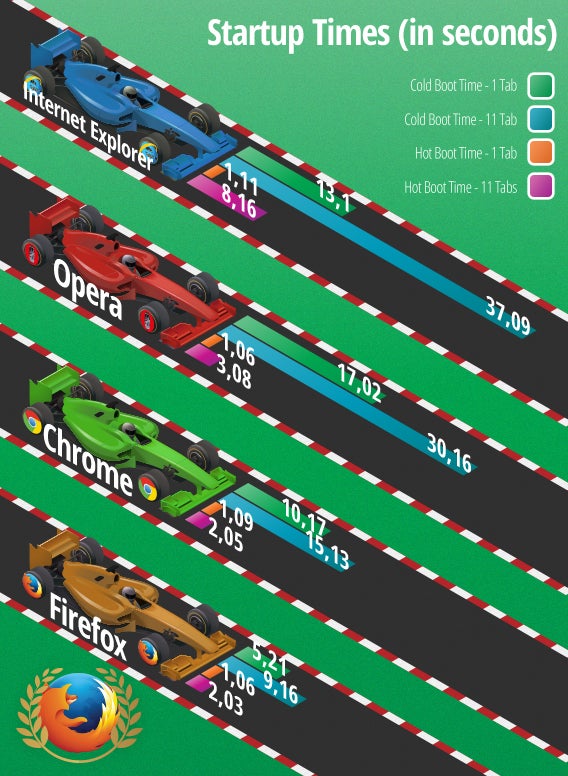
The results speak for themselves: Firefox is the fastest browser.
If you’re most concerned with how quickly your browser can open, Mozilla’s browser is a safe bet. The difference with its competitors is significant: opening a single tab in cold start-up is almost twice as fast as the runner-up, and 4 times faster than the last place browser when opening 11 tabs in warm start-up.
The silver medal goes to Chrome, while Internet Explorer and Opera struggle behind the other two. What’s interesting is that although Opera is based on Chromium, the same open source browser that Chrome is based on, it was significantly slower than Google’s browser.
Given the results, we can’t go without mentioning that Firefox uses a really great trick that gives it an advantage over its competitors when opening multiple tabs at the same time: while Chrome, Internet Explorer, and Opera load all tabs at once, Firefox focuses only on the first one, leaving the rest in the background to load only when you need them.
The advantage is considerable: not only does it reduce unnecessary energy usage, it only concentrates on opening the tab you need immediately, making it faster and giving it an edge over the others.
Firefox beats its competitors by a head and takes the lead thanks to a lighter and more streamlined structure.
Memory usage
How much RAM memory does each browser use? In other words, does the browser slow down your PC? This is what we took into account in the memory test.
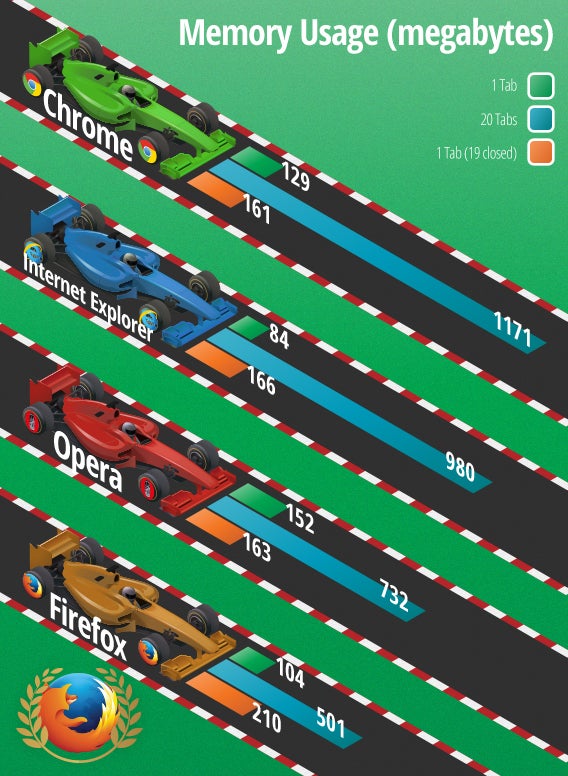
We analyzed the consumption of resources in several situations: with a tab open, with 20 tabs open, and with only one tab left after closing the other 19 that were open. For this test, we used Chrome’s memory tool.
Although it didn’t win by as much of a landslide as in the previous tests, Firefox clearly came out on top, using the least memory.
Going into detail, you can see that Internet Explorer uses less RAM with only one tab open. On the other hand, Firefox is best if you have many tabs open. Chrome was able to free the most memory after closing many tabs, although the difference with Opera is very small.
Why is Firefox the best for RAM usage? Not only did it finish first in our tests, but given the fact that you generally browse with more than one tab open, Firefox’s victory over other browsers is actually quite overwhelming.
To summarize, Internet Explorer is like a car that optimizes fuel consumption at the start, while Chrome and Opera save resources in the long run. Firefox, on the other hand, optimizes fuel consumption when you need it most thanks to a system that allows it to focus on only the open tab.
Mozilla’s browser has the lowest consumption and the best megabyte per second performance.
Web performance and speed
Which browser opens pages the fastest, and which opens websites with the highest quality?
To establish the efficiency and speed of each browser, we used comparison sites, websites which measure the performance of a browser through specific tests carried out in real time, directly from your computer.
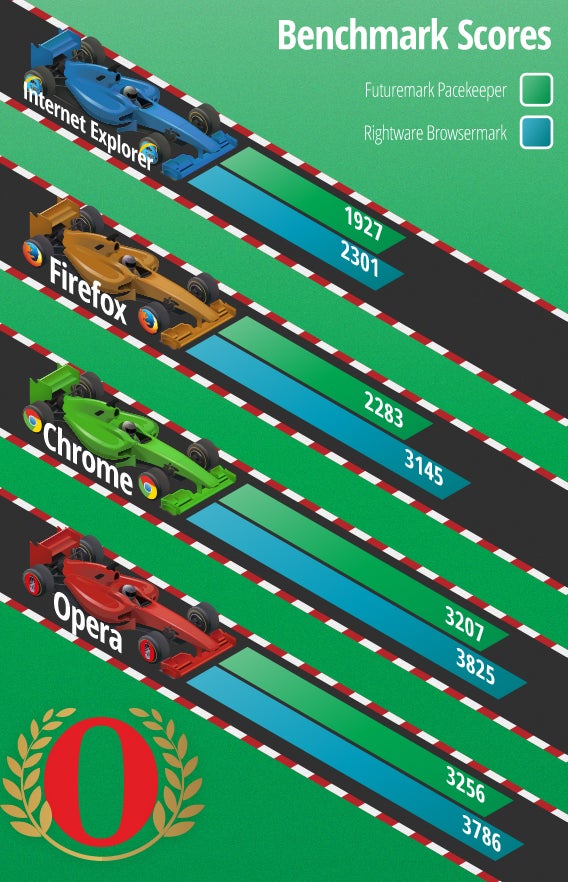
Specifically, we used Peacekeeper, which focuses on speed and JavaScript performance, and Browsermark, which analyzes several factors related to the performance of the browser. These sites have their own scale, independent from one another.
Default player
<!–
By use of this code snippet, I agree to the Brightcove Publisher T and C
found at https://accounts.brightcove.com/en/terms-and-conditions/.
–>
<!–
This script tag will cause the Brightcove Players defined above it to be created as soon
as the line is read by the browser. If you wish to have the player instantiated only after
the rest of the HTML is processed and the page load is complete, remove the line.
–>
brightcove.createExperiences();
Default player
<!–
By use of this code snippet, I agree to the Brightcove Publisher T and C
found at https://accounts.brightcove.com/en/terms-and-conditions/.
–>
<!–
This script tag will cause the Brightcove Players defined above it to be created as soon
as the line is read by the browser. If you wish to have the player instantiated only after
the rest of the HTML is processed and the page load is complete, remove the line.
–>
brightcove.createExperiences();
For both sites, Chromium-based browsers Chrome and Opera proved to have the best web performance.
With Peacekeeper, Opera was the best, beating Chrome, while with Browsermark, it was the other way around: Google’s browser came in first, immediately followed by Opera.
In both tests, Firefox and Internet Explorer are far behind the Chromium-based browsers. The browsers developed by Mozilla and Microsoft placed third and fourth respectively in both tests.
Chrome and Opera have the bodywork that hides a very powerful engine, giving them a performance and browsing speed far superior to its competitors.
Final result
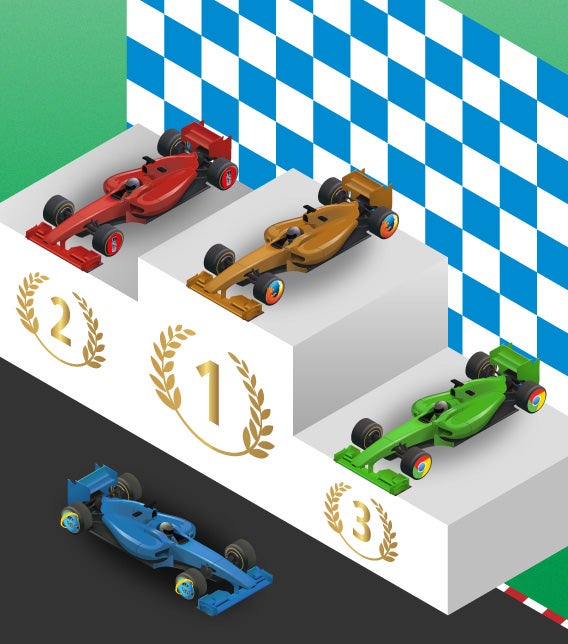
So, what is the best browser? According to the results of our comparison, the best browser is Firefox, winning two out of three rounds, as you can see in the ranking below.
In the end, however, your choice of browser will depend on your needs, on the websites you visit, and on how you use it: the best browser is the one that works for you. In fact, there are also many other factors, such as aesthetics, available extensions, integration with other services, and usability, that you can consider. For this reason, we only went through the most basic and necessary criteria to help guide your choice.
Default player
<!–
By use of this code snippet, I agree to the Brightcove Publisher T and C
found at https://accounts.brightcove.com/en/terms-and-conditions/.
–>
<!–
This script tag will cause the Brightcove Players defined above it to be created as soon
as the line is read by the browser. If you wish to have the player instantiated only after
the rest of the HTML is processed and the page load is complete, remove the line.
–>
brightcove.createExperiences();
Firefox is the best browser if you have a last generation computer. It’s fast and uses fewer resources, which guarantees good performance on any PC. It’s like a high-level subcompact: low fuel consumption, and quick. In addition, it’s an open source software that can be customized with many extensions, a smart and reliable choice.
Chrome is a good option if you have a powerful computer. Google’s browser (along with Opera) has the best performance and speed online, according to the results provided by the comparison sites. You can think of it as an all-terrain vehicle: big and with a powerful engine, but also heavy and not very agile.
With similar features to Chrome, Opera is the browser for those who have a powerful computer but want to be independent from Google. In fact, the Norwegian browser has a longer start-up time but uses less memory than Chrome, and has nearly identical performance online. It’s like choosing a car with an engine manufactured by a famous company but sold to another.
On the other hand, Internet Explorer is recommended for those who are faithful to Microsoft. Lagging behind in the start-up speed test and in online performance, it could be better on Windows 8. Internet Explorer is like a locally manufactured engine that fails to succeed abroad.
It’s not over yet!
In the coming months, we’ll run tests on the new versions of each browser to see if the updates improve their performance. In November, we expect to have Firefox 36, Chrome 38, Opera 25 and (maybe) Internet Explorer 12, so stay tuned for the next race.
Every year, people ask the same question: PES or FIFA? After playing this year’s magnificent title from EA, I was also able to preview Konami’s PES 2015 at E3.
In recent years, the world’s been waiting for PES to once again reach a competitive level on par with FIFA. This year, Konami promised to revolutionize the game after the disappointment of PES 2014, when, due to the changes in the new Fox graphics engine, they weren’t even able to introduce rain or snow.
The president of the European division of Pro Evolution Soccer, Shinji Hirano, said to MCV in February that “2014 was a year of transition for the franchise, but we know what went wrong, and we’re working on it. The next version will be totally different, so expect great things.”
At E3 in Los Angeles, I was able to try out PES 2015 to see if his statement was correct. Walking into the Konami room, I played two games from the new title, set to be released in September. So, how does it compare to previous versions, and more importantly, to FIFA?
Freedom of movement and accuracy
There were two teams in the demo: Juventus and Bayern. Unable to stray my loyalties from my own soccer team from Turin, I challenged a Konami PR guy playing Bayern. It took a few runs and crosses before I was able to get a first impressions of the game, but it became clear during the second half and the second game.
From the beginning, and mindful of the old Pro Evolution Soccer, I immediately noticed greater freedom of movement with fewer rigid movements and less pre-defined, straight line running. To summarize, the classic PES problems of running trajectories, which already seemed to be partially solved in the 2014 version, seem to have finally disappeared.
The players appeared looser, and their movements more natural, keeping with the quality of the players. During a particularly crazy moment in the Juventus half of the field, for example, I ran a one-two between Kroos and Robben to put the Dutch footballer on his own, right in the penalty area.
Juventus’ Pogba
I dropped back slightly, and typical of a player who prefers to kick with his left foot instead of his right, Robben hit the ball with his outstep. The curve of the pass found Ribery who, just a few steps away from the goalkeeper, hammered the goal home.
The response to commands was accurate and timely, although I didn’t experiment with any crazy tricks with the ball. In this regard, expect major improvements over the previous year’s offering.
My first impression of PES 2015 is more room for the unpredictability that’s typical of football, a feeling that I got after just a few bounces of the ball, which appeared much less predetermined (although they sometimes took somewhat exaggerated trajectories).
Atmosphere, celebrations and replays
If there’s one aspect in which Pro Evolution Soccer has always managed to outpace FIFA, it’s the ability to reproduce the atmosphere of the game on your home screen, whether on PC or console.
In PES 2015, that feeling has improved even more. The team’s entry onto the field and the cheers from the bleachers immediately convey the feeling of the beautiful game, mainly due to better definition of the audience in the stands, and not only during cut-scenes, but during play too.
What impressed me most, however, was the celebration scenes. After putting the ball in the back of the net, Ribery ran towards the camera situated on the sideline, grabbed it with both hands, and started to shout into it directly, just like any soccer player basking in the glory of a goal would.
Even the stadium cameras show crazy detail
The details of the player’s face were faithfully reproduced in a very realistic way as well, a sign that the Fox engine is finally as good as it’s supposed to be. Even the replays in PES 2015 were convincing, with many shots from different angles.
On the right track
The PR guy that I challenged told me that PES 2015 is much more precise and defined than the previous edition, and although I didn’t see the menu that lets you change weather in the demo, he assured me that in the final version, we’ll see rain and snow.
There are still some aspects that need flushing out, like the way the ball bounces, as well as the problem of some trajectories being rather unnatural, although it’s important to point out that the fluidity of the movements of the ball on the field have definitely improved. Likewise, the “bowling ball” effect seems to have disappeared too.
The AI for teammates could also be improved. At times, it felt like I was left completely alone against opponents, since there doesn’t seem to be any space to include them. In this respect, FIFA is definitely ahead.
Juventus’ Llorente
The PES 2015 I’ve seen and played, however, is not the final game, and it could change considerably before its release, even if it is already at a very advanced stage of development.
Although some aspects could be improved, Konami appears to be on the right track with its new soccer game, thanks to a greater fluidity of gameplay, command response, and the power of the Fox graphics engine.
Faced with few improvements from the gameplay perspective (in comparison with FIFA 15), it’s on a more level playing field with FIFA, even if it’s not quite at the same standard yet.
To really determine who will win between PES 2015 and FIFA 15, all we can do is wait for the release of both games at the end of September.
There’s a fine balance between aesthetic beauty and spectacular action, and Batman Arkham Knight hits it right on the head. This time a true superhero, the Dark Knight returns in this, the star game of E3 2014.
When I entered the demo room the lights were off, and the screening began. While I was thinking about looking for popcorn, the PlayStation symbol appeared on the screen, and I realized that what we were actually witnessing wasn’t a trailer, but a live demo.
Batman Arkham Night is dramatic and theatrical, but the changes between cut and action scenes is completely fluid. It seems to be designed to make the transition as smooth and unnoticeable as possible, and the quality difference between cut scenes and the action itself is barely, if at all, noticeable.
Gameplay is similarly polished. Fights are energetic and entertaining, there are objects that you can use spread around the game and, of course, there’s the Batmobile, without which Batman would be unable to save Gotham City…for the umpteenth time.
A superhero in all his dark splendor
In the live demo at E3, where we also got a chance to play, Rocksteady decided to show level 2 of Batman Arkham Night where Scarecrow appears for the first time. In it, the bad guy had taken possession of Ace Chemicals, a factory where he had taken 5 hostages and was in the process of making a bomb.
Once Batman made it to the factory, he easily made it to the top of the building with the claw and the Batscanner boomerang, which was able to analyze the building to see where the hostages were being kept.
I swooped down, dropping into the ventilation shafts where I was able to move undetected. The first surprise came when I used the new Fear Take Down move, which sends your enemies to the floor with the first shot when you enter into a scene. You do this with R + rotating the camera.
Fighting in Batman Arkham Night strikes a good balance between attack, defense, and counterattack. In the fight I took part in, there were various combos and a spectacular finish that ended in my enemies’ heads getting fried in the electric control station or getting squashed by a giant chandelier.
A puzzle-solver and an armed vehicle: Batman’s essential helper
If KITT and Micheal Knight are best friends, then Batman and the Batmobile are inseparable in Arkham Knight. We’ve heard rumors about the central role of the Batmobile, and after playing for a while, I can definitely confirm our suspicions.
The Batmobile is a tank, and a fireball, as well as a vehicle, and an independent robot. In the level we played, it used Fire Power to ruin whole walls, but also to jump up and land on enemies and, in Battle Mode, to burn things down in a cloak of flames.
The Batmobile’s central role is in solving puzzles and thus allowing us to progress in the game. The vehicle can operate remotely and, in some cases, bump off armed enemies blocking our path or even operate non-functioning elevators to get to other parts of the factory.
Welcome, new generation
In the demo we played, I completed the 2nd level of the game and that, plus exploring a little and some accidental deaths, took around 45 minutes. The game designers who where there explained that the game would have a game area about 5 times larger than Arkham City, and as a whole the game would take longer to complete than its predecessor.
The designers also added that the game we saw is clearly still in alpha version, but they’ve put a lot of effort into finishing. They also pointed out that their aim was to get the most from the power of the next-gen platforms, including the next gen PCs that we played on.
Pre-release version or not, Batman Arkham Night is an impressive game, even just from the point of view of the graphics. The detailed rendering of Batman, the pouring rain and the cinematic cut scenes are all amazing.
If we were waiting to play the new Batman before E3, now that we’ve had a taste, the anticipation is even worse. We’re desperate to get our hands on Batman Arkham Night which is, without a doubt, a truly impressive game.
Assassin’s Creed is back. Will the game innovate and recapture lost and fading fans? From what I saw at E3, it could succeed and..then some.
We saw the main news around the game at Ubisoft’s Conference, which we would then see firsthand at E3: as well as the long-awaited solo mode, there will be a co-op game with up to 4 players.
Assassin’s Creed Unity introduces an important new feature that doesn’t significantly change the saga or the gameplay we’re used to, but integrates into the game, enriching and giving life to the franchise that seemed to have lost its charm and vital energy since AC Black Flag.
The perfect setting for an assassin
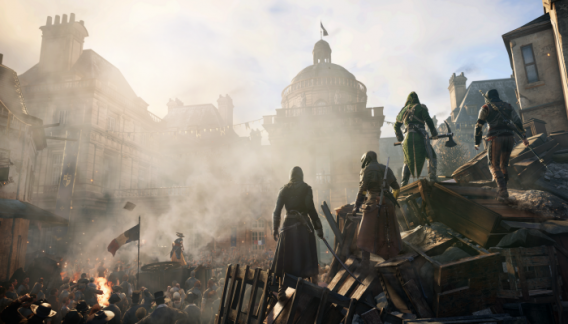
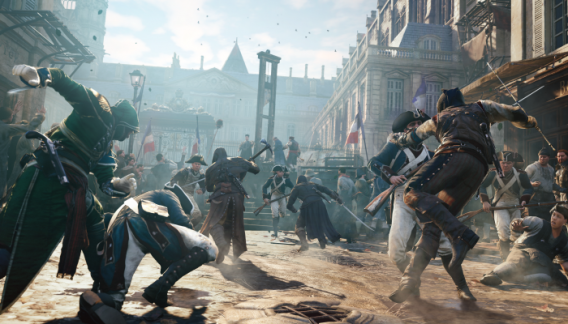
Assassin’s Creed is back, and this time it’s in a perfect setting, long awaited by fans: the French Revolution and the reign of terror. In Unity, we’ll start to see the power of next-gen with impressive graphics, film sequences and spectacular environments, populated by NPCS that interact with each other as real people.
In the mission that I saw, before killing our mark, we witnessed an execution by guillotine from the roof of a building in a square packed with people. After that, Arno falls on top of his victim, the assassination sequence perfectly imitating the brutality of the time.
In addition to the classic street life and watching passers-by from above, Assassin’s Creed Unity explores the interior and the private life of the city for the first time. In the virtual Paris of the game, you can explore one in every four houses and inside you’ll find hidden characters, quests and treasures.
Unlike previous chapters, in which we had to wait until the next scene is loaded whenever we walked indoors, in Assassin’s Creed Unity, entry into a building is smooth. In addition to houses, we can go down in the catacombs and the city’s sewerage system.
A return to murderous agility and renewed fighting
In the first chapters of the saga, I was impressed by the agility of Altair and Ezio when moving from one roof to another and climbing the walls of the buildings, but in the last releases, progress had stopped.
Assassin’s Creed Unity proposes new movements, especially with regard to climbing along the walls, with Controlled Descent. Now Arno manages to exit elegantly, clinging to the walls and projections without following a predetermined path.
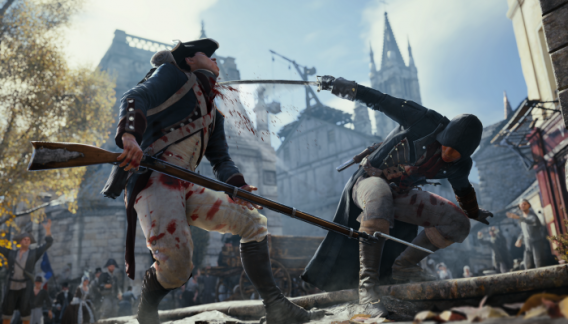
Even the fighting in Assassin’s Creed Unity seems renewed compared to the fighting seen in earlier chapters, even though they look similar at first glance. The main feature concerns the counterattack, which won’t be as lethal as it often used to be.
Killing in fighting isn’t as immediate, and as a result, the fight will be based more on the player’s timing and pressing the right button at the right time. In the live demo that I saw, the fight seemed to be very different, even though it seemed more fluid and with better animations. We’ll really have to wait until a gameplay demo to see how much the gameplay has innovated.
In the single player mission of Assassin’s Creed Unity shown at E3, I noticed how the stealth component of the game seemed rediscovered, with a brand new stealth system that lets you go unnoticed and seek cover behind objects more easily. From this point of view, is more the sense of being an assassin that skulking in the shadows.
To the delight of fans of AC, I also saw a kind of in-game map, thanks to which we can see goals and points of interest without having to pause and open the map. When you are high enough (for example on a roof of a building) and you are using Low Profile, these points will automatically appear on the screen.
Assassin’s Creed Unity adds a mini RPG component to the game, thanks to which we can strengthen Arno gradually as we progress. In the demo we saw, for example, Eagle Vision lasted just a second or so, but over time we can build the duration up.
Coop Multiplayer: the real gem of Assassin’s Creed Unity
The most eagerly awaited and substantial change to the Assassin’s Creed saga is the online cooperative multiplayer, which involves all the game campaigns. In Unity, we can call friends to intervene in missions, with a max of 4 players simultaneously.
In the demo, we saw the people’s assault on the Palace of the Marquis, the objective of the murderers’ mission. In the four screens, each character moved independently but had tools like the countdown timer to coordinate with others for synchronized action.
French Revolution or a murder revolution?
As seen at E3, it seems that Ubisoft has made enough changes to Assassin’s Creed Unity to give continuity to a series that has appeared stranded over the last 2 installments. It’s managed to do this, however, without upsetting the soul of the game.
Fans of Assassin’s Creed will have in their hands a title that brings back the heart of the game, even at this early stage. The question is whether Unity will win back those who abandoned the saga because they found it too repetitive. The power of next-gen and the co-op mode, as well as the protagonist’s new moves seem sufficient evidence to at least give it a try, but we’ll have to wait until GamesCom to try the game first hand and let you know for sure!
If you’re a fan of the series, watch a gameplay video of Assassin’s Creed Unity.
 Dark Souls II
 RunKeeper
 Daniel – PES 2015: I was really impressed with the animations of PES this year. Even the demo lets you appreciate Konami’s hard work. In the games we played, there were several high quality moves; a high pass made by Hamsik with the outside right foot found Higuain alone in front of the net, allowing him to finish off with a half volley bicycle kick, and it looked great.


 Auslogics Disk Defrag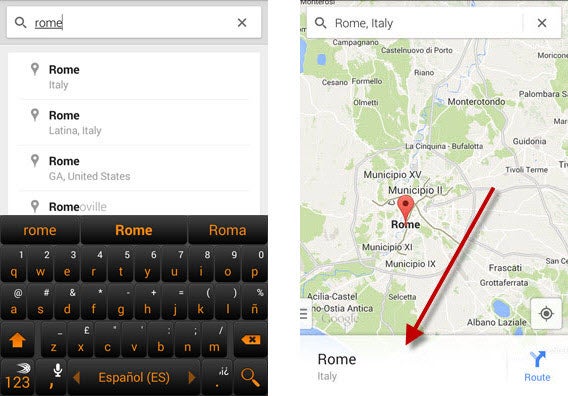


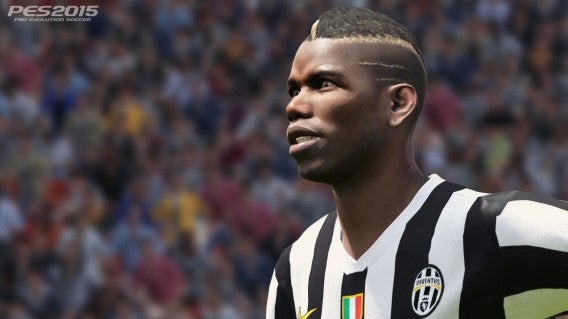 Juventus’ Pogba
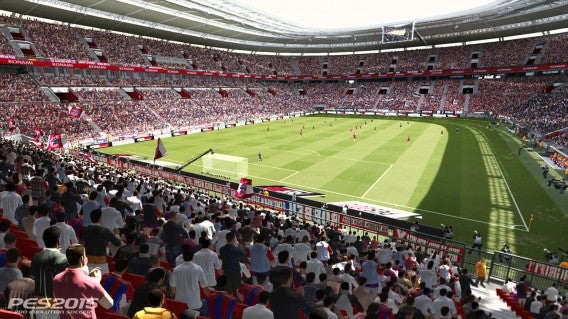
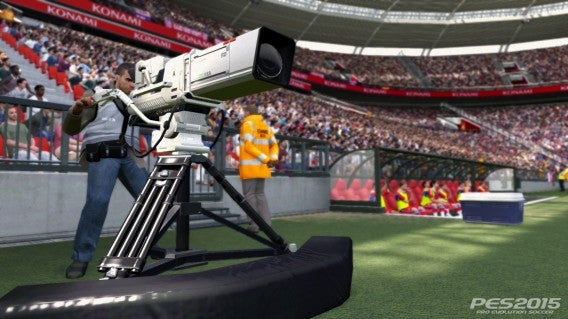 Even the stadium cameras show crazy detail
 Juventus’ Llorente