How to make video calls with Skype from Outlook.com

Skype is available for Outlook.com worldwide. From now on any Outlook.com user, after installing a plugin, can make video calls from the website without having to open Skype. In the following article, we’ll show you how easy it is.

After Microsoft bought Skype in 2011, Redmond have been working hard to achieve the full integration of their services: replacing Messenger with Skype was just the beginning. Now, thanks to this new feature, it’s easier to call your Microsoft contacts via Skype.

First things first: have you integrated your Microsoft account with your Skype account?

If, when Microsoft announced that they were “shutting down” Messenger, you followed the steps to integrate your account with Skype, then you don’t need to do anything. But if you haven’t done it yet, you should do it now: that way you’ll have access to your Skype contacts to send instant messages, and make free calls and video chats from Outlook.com.

To integrate the accounts, all you have to do is log on to Skype with your Microsoft (@ hotmail, @ outlook, @ msn …) account. You have more information in this article.

Install the Skype plugin

To make video calls from Outlook.com with Skype you need to install a web plugin. The easiest way to do this is:

1. Look for the contact you want to call in Outlook.com. Check that the contact is available in either Messenger or Skype.

Outlook.com Skype calls

2. Click on the camera icon (for a video chat) or the phone icon (for a call without video).
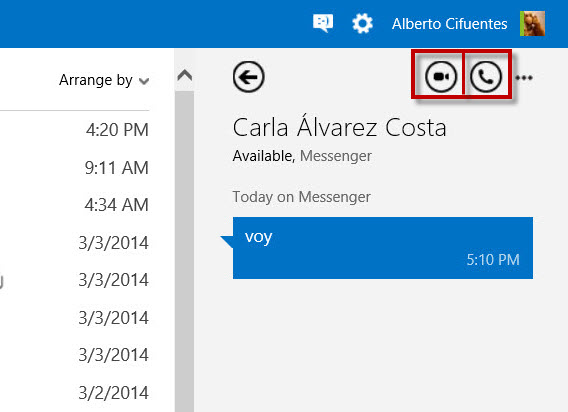
Outlook.com Skype calls

3. You’ll get a popup window that asks you to install the Skype web plugin.
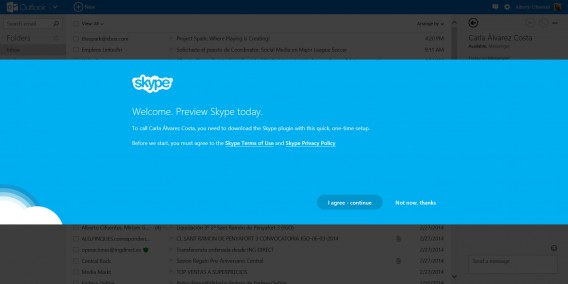
Skype plugin

4. Follow the instructions on the screen to install the plugin.
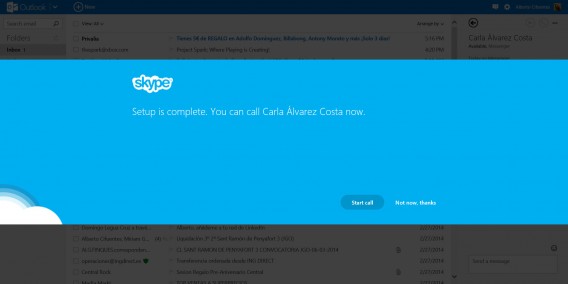
Skype plugin

Start calling!

Once the plugin is installed, you can start calling straight from Outlook.com.

Don’t forget that you can’t make a video call without a microphone and speakers. And if you want your conversation partner to see you, you’ll also need a webcam.

Although Microsoft says the quality of the call is HD, it will depend on the quality of the internet connection and the devices both participants are using.

Skype in Outlook.com

Wrapping up: A great invention

Being able to make video calls from Outlook.com is fantastic, and it shows Microsoft’s commitment to promoting integration between different services and providing access to them from anywhere.

If you access Microsoft Outlook.com with your account, not only will you have access to your email, you’ll also be able to make Skype calls directly from the browser, access Office Online and all your files stored on OneDrive. For me, it’s brilliant.

Have you tried calling from Outlook.com? What do you think?
AVG launches Zen, a security app for managing all your devices

AVG has announced the launch of its new Zen, a tool to manage the protection, performance, and privacy of all your PC and Android devices from one place. Zen allows you to add any of your and your family’s devices, so you can monitor their security remotely.

AVG Zen was first revealed at the Mobile World Congress in February. It gives you a centralized hub where you can see the security status of your various devices, and works with all of AVG’s main products: AVG Internet Security, AVG PC TuneUp, AVG PrivacyFix, AVG Antivirus for Android, AVG Cleaner for Android, AVG PrivacyFix for Android and AVG Zen Admin for Android apps.

AVG isn’t the only company who sees centralized device management as the future for security apps. We saw Remo MORE at the Mobile World Congress, which lets you optimize performance, manage files and more remotely too.

We spoke to AVG’s security evangelist Tony Anscombe in February, who said the company tried to create something that was very easy to use and understand. He said it would give parents the knowledge and power to manage their family’s security and privacy settings. The interface is very simple, and clearly shows you the status of each of your connected devices, while making it easy to change the settings on any of them.

RELATED STORIES

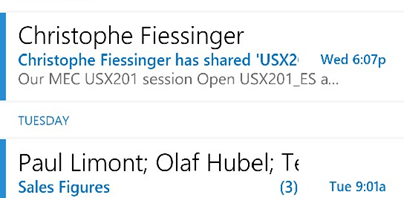
Microsoft wants to help clean your email with a new Outlook Web App tool

Today, Microsoft announced a new “decluttering” tool for its Outlook Web App. The utility will analyze your email inbox and remove unimportant emails.

The technology behind this tool is called the “Office Graph.” It will scan to see who you communicate with the most and whose emails you constantly ignore. Each user’s behaviors are different so Office Graph will tailor the experience to each individual user.

The Outlook Web App is already available on iPhone and iPad but has yet to come to Android. That’ll change some time this year, promises Microsoft.

OWA for Android coming soon

“Email is becoming more collaborative, more efficient, easier to manage and, yes, more social. Look for these new features to begin rolling out to Office 365 customers later this year,” writes senior product marketing manager Steve Chew.

Outlook Web App for Android will require a yearly subscription to Office 365, which isn’t surprising. Last week, Microsoft finally released Office for iPad which also requires a yearly subscription to Office 365.

Source: Office Blogs

RELATED STORIES