Windows Phone 8.1 innovates with Cortana voice assistant, Internet Explorer 11

Microsoft revealed the latest version of its Windows Phone operating system at its annual BUILD developer conference. Windows Phone 8.1 is a major jump for the operating system.

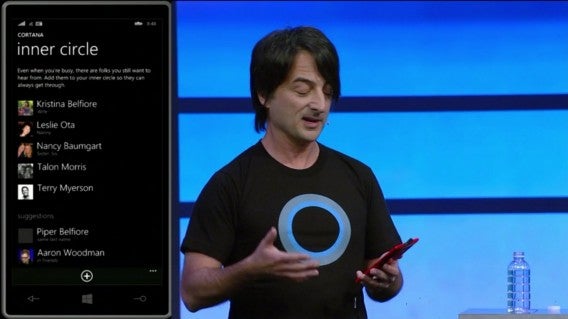
The biggest reveal is Microsoft’s voice assistant called Cortana. It promises to interact with users by offering answers, understanding natural speech, and anticipating your needs. It takes features from both Google Now and Siri. You can see a pattern emerging of Microsoft taking the best of its competitors.

Cortana inner circle

Internet Explorer 11 debuts for Windows Phone 8.1, finally catching up to modern browsers like Firefox and Chrome. There’s WebGL support, an improved YouTube experience, HTML5 video, and more. There’s also a new reading mode, similar to Safari’s Reading List.

The list of minor improvements in Windows Phone 8.1 is extensive. You can now create shortcuts to settings, install apps on external SD cards, and support for Bluetooth 4.0 low energy. Gamers can save their progress to the cloud using OneDrive. There’s also a podcast app, support for slow motion video, and the ability to select a default SMS app. The list goes on.

With Windows Phone 8.1, Microsoft is giving what users demanded. Microsoft is still fighting to remain the third most popular operating system after Android and iOS. To overtake them, Microsoft will have to do more than just match their features.

Users can expect to see the update “in the next few months,” according to Microsoft.

RELATED STORIES

Microsoft Office for iPad: the highs and lows

Microsoft Office for iPad should transform the Apple tablet into a powerful working tool. But for full functionality you’ll need a subscription to Office 365, so not all users will find the tablet version of Office such a revelation.

Office for iPad: free vs. Office 365 subscription

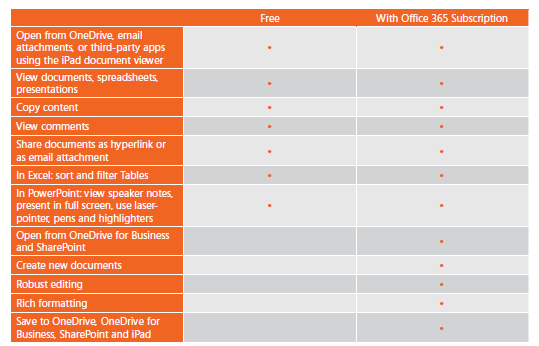
Office for iPad currently consists of three free apps: Word for iOS, Excel for iOS and PowerPoint for iOS. The name of the free version, however, is rather deceptive. You don’t really get more than a file viewer. To edit and create documents, a valid Office 365 subscription is required.
Office subscription options

Office for iPad feature comparison: Free vs. Office 365 subscription

Free features

All apps can open your documents from OneDrive and can store them there too. In Word for iOS, you can add comments while you’re working with colleagues on the same text.
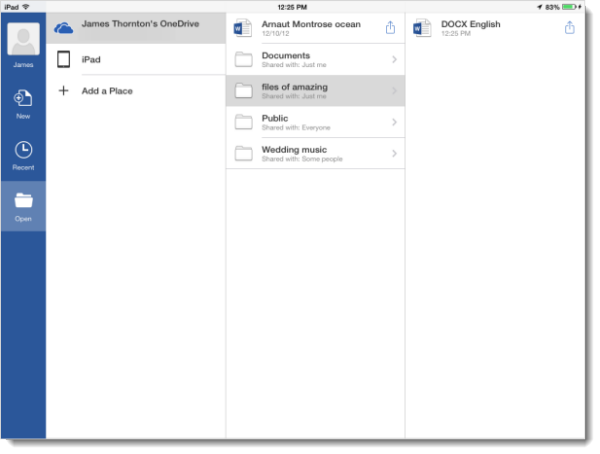
Word for iPad with OneDriveIn Excel for iOS, you can search, filter and sort tables.

Excel options

PowerPoint for iOS is suitable for presentations and shows material in either full screen or with notes. During the presentation, interesting points can be highlighted with tools such as a virtual laser pointer and marker pens.
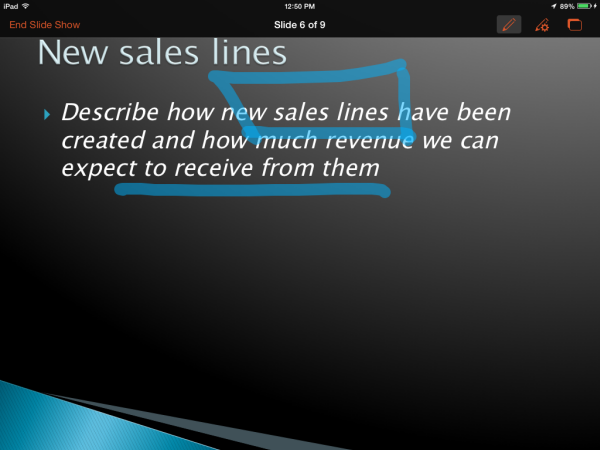
Emphasize relevant points

As simple free viewers, the Office for iOS apps should form part of your basic iPad setup. Even if the apps can’t really offer much else, when it comes to viewing Office documents correctly in Word, Excel and PowerPoint on your iPad, there’s really no way around it.

What’s annoying is that although they’re just simple viewers they are relatively large apps. PowerPoint take up 215 MB, Excel requires 233 MB, while Word takes up a gigantic 259 MB. If you’re only using the free version without an Office 365 subscription, the other features are simply blocked.

Office 365 subscription features

With an existing Office 365 subscription you can use the full version of Office for iPad. This  $9.99 per month or $99.99 per year is for the most basic version of Office 365 Home Premium.

The Office for iOS interface is very similar to Office Online from the Windows version. On the iPad, you can also use the individual apps in the Ribbon toolbar.
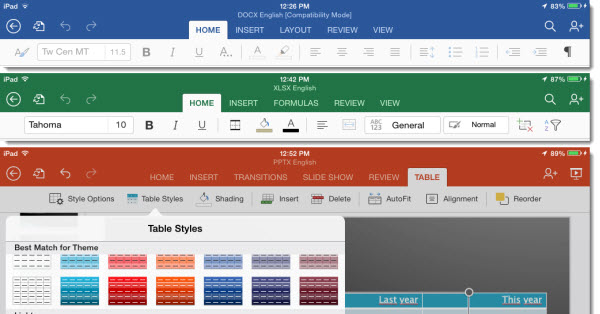
Office for iPad ribbon toolbar

Word for iOS

Word for iPad offers almost all the features you already know from Word: document templates, fonts and advanced layout features. With the help of the split keyboard, you’ve got enough space on a small tablet to design completely new documents and revise existing material.
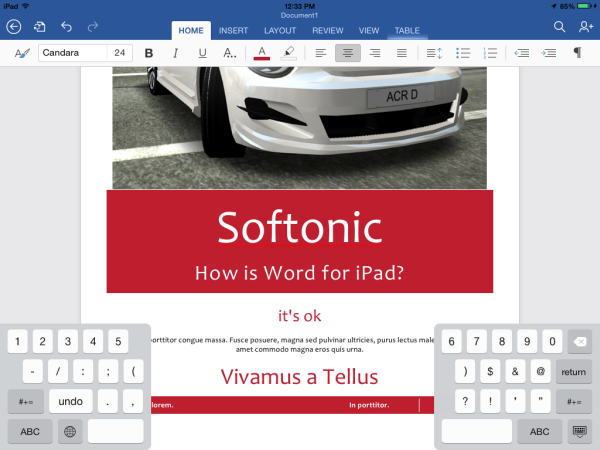
Office for iPad -  Word editing

Formatting of text works well and quickly; you’ll achieve good results with it. When embedding elements such as images, however, you must compromise a bit. The orientation to center, left or right, can’t be altered after you place the images. On the other hand, size, rotation, and text flow can be easily adapted.
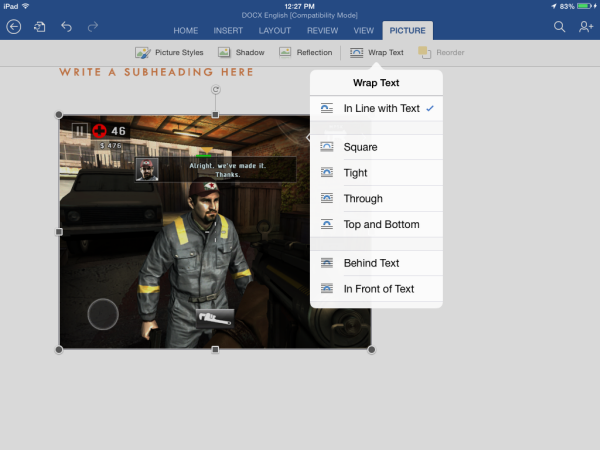
Word for iPad - text alignment

Normal editing of documents in Word for iOS also works easily. Shared documents can be edited simultaneously with others in real time.

Excel for iOS

In Excel for iPad, Microsoft has splashed out and offers a comprehensive and well-thought out app. The touch controls work surprisingly well. You can easily select cells, columns and rows, and also create or change complex formulas with ease.

Difficulties arise with a rather limited display size, but Microsoft can’t do anything about this. Bear in mind that large tables won’t show up so well on iPad. In order to use the space intelligently, Excel for the iPad is optimized for landscape mode. From here you can access almost all the functions you know from Windows via the menu bar.
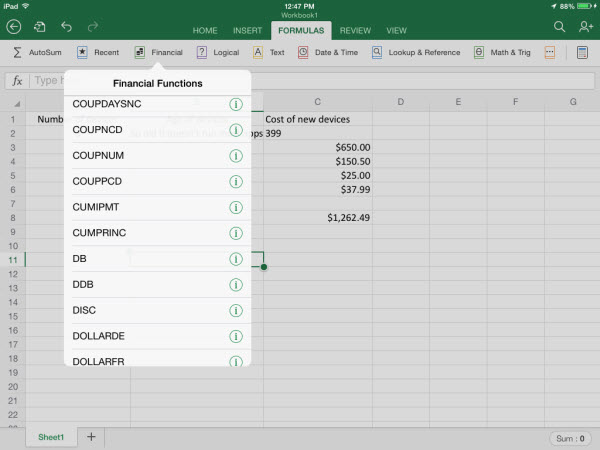
Excel for iPad - the usual suspects

PowerPoint for iOS

PowerPoint for iPad is also a fully-fledged app. As on the desktop, you can make appealing presentations from scratch. Adding slides with images and tables can be easily managed too.
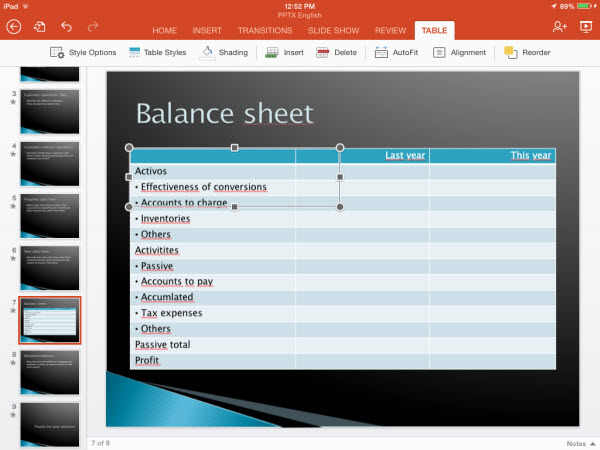
PowerPoint for iOS - editing mode

If you’ve got a complex presentation in mind, however, you should resort to the Windows app. On the iPad, it’s missing too many features in comparison with the (now very sophisticated) Windows version. The real benefit of PowerPoint for iOS, however, lies elsewhere. The app is perfect for adding the finishing touches to semi-prepared presentations, then presenting them directly from the iPad.

Conclusion: Office for iPad brings new life to everyday business

Office for iPad is aimed at business customers and is perfect for this market. For those who still don’t use an Office 365 subscription, Office for iPad won’t provide sufficient motivation. As a home user, Office for iOS is only really essential for viewing Office documents. If you’re looking to reproduce Office documents exactly as you’re used to seeing them, you’d be better off with the traditional desktop apps.

PowerPoint, however, is an exception to the rule. This excellent presentation app is sure to reign supreme in the office life of many companies, even without an Office 365 subscription. Running through a finished presentation straight from your iPad is convenient as well as making a great impression.

Related articles

Office Online: Microsoft offers free Office version for the browser

What’s new in Microsoft Office 2013

Free Alternatives to Microsoft Office

Downloads

Download Microsoft Word for iOS

Download Microsoft Excel for iOS

Download Microsoft PowerPoint for iOS

Microsoft OneDrive for iPhone and iPad

Download Microsoft Office Mobile for Android

Download Microsoft Office Mobile for iPhone

Adobe updates Premiere Pro and After Effects with timesaving features

Adobe revealed its upcoming updates to its video programs today. Adobe Premiere Pro CC and After Effects CC are both getting timesaving features and tighter integration.

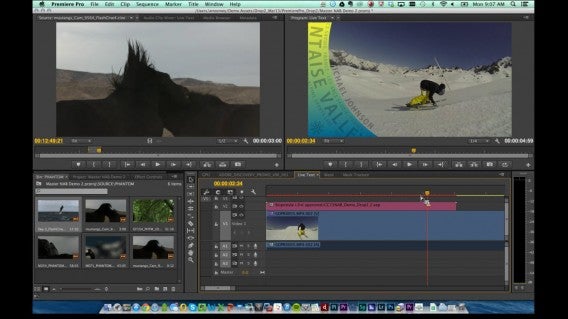
Premiere Pro CC now supports auto-saving to Creative Cloud so you’ll always have backups of your projects. New Live Text Templates allows videographers to change text within Premiere Pro without the need to jump into After Effects.

Adobe Premiere Pro CC Master Clips

To save time, Adobe added Master Clip effects into Premiere, which applies changes to any video project that uses that clip.

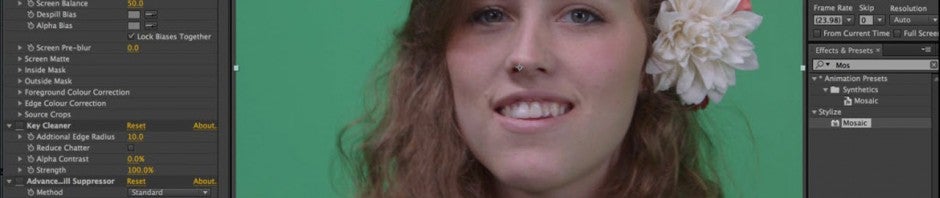
Premiere also makes tracking objects simple, handy for blurring out someone’s face in the video.

For After Effects CC, Adobe has integrated Typekit so users can choose from a huge library of fonts.

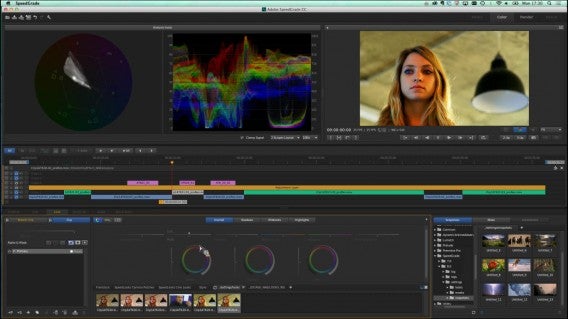
Adobe Speed Grade

Adobe is also making its video editing suite compatible with 4K video resolutions for those UltraHD TVs that we saw at CES 2014. Support for higher frame rates (50-120 fps) will be added so your video plays smoothly.

Adobe expects to ship the updated Premiere Pro CC and After Effects CC “in the next couple of months, along with other major updates to Creative Cloud.”

BBM joins the sticker craze, gets group photo sharing

BlackBerry updated its BBM chat apps with stickers, group photo sharing, and a larger attachment limit. While the app still lags behind competitors like WhatsApp and LINE, these new features should keep dedicated BBM users happy.

Stickers are making their debut in BBM. Packs of cute animals or your favorite WWE wrestlers are available to download. Packs are either free or $1.99. That could change in the future as BlackBerry experiments with pricing.

Default player


brightcove.createExperiences();

Apps like Viber, LINE, and Kakaotalk all feature stickers and charge $2-3 dollars for stickers. Stickers are fun way for people to convey emotion, better than text or emojis. BlackBerry promises to update BBM with new sticker packs on a regular basis.

BBM also updated with group photo sharing and larger attachment limits. You can now attach files up to 16MB, 10MB more than the previous limit.

Download BBM for: Android | iOS

Source: BlackBerry

RELATED STORIES

The Wolf Among Us Episode 3 trailer shows spoiler-filled action

If you haven’t caught up with the first two episodes of The Wolf Among Us, don’t watch this trailer! The trailer picks up immediately after the big reveal in Episode Two titled “Smoke and Mirrors.”

Default player


brightcove.createExperiences();

Without spoiling the game, the trailer shows Bigby and Snow on the hunt for someone they thought they could trust. The rest of the trailer is cryptic, showing an encounter with Dum and Dee Tweedle and Bigby getting violent with Jack.

Episode 3 “A Crooked Mile” doesn’t have a release date yet. We expect its release sometime in April if Telltale’s monthly release schedule is on track.

Be sure to check out our review for The Wolf Among Us.

Source: Xbox (YouTube)

RELATED STORIES

Upcoming Android camera update focuses on portrait shots and new interface

Google’s camera app for Android is mediocre at best but that may change soon. Engadget reports that Google is working on an update for the camera app that will provide new features and a better experience.

One of the upcoming features is background-blurring for portrait shots. This simulates a shallow depth of field of professional photographs. Shallow depth of field helps to focus a viewer’s eye on a subject in focus instead of details in the background.

The viewfinder for the Android camera app is also being fixed. Currently, the camera app for Android does not show a one-to-one representation of what you’re looking at to what you’re photographing. The update provides an uncropped view so you know exactly how your photo will look after taking the shot.

Google will also open up the camera app to developers. This mean the app can support third-party filters and effects.

As with Google’s other first-party apps, the camera can be updated independently from Android. This means you won’t have to wait for the latest version of Android to get the updated camera. Still, you have to be running Android 4.4 or higher to see the new features.

There’s no word about when we can expect the update to roll out.

Source: Engadget

RELATED STORIES

How to win at 2048: the game’s creator reveals his secrets

2048 is an online puzzle game with a simple concept that’s nevertheless extremely addictive. The goal is to move the numbered boxes on a grid in order to achieve the score of 2048 by adding numbers of the same value.

Are you addicted to 2048? We are too! So in order to regain a little bit of serenity in our lives, we asked Gabriele Cirulli, the creator of the game, for some help. The young Italian developer kindly shared his preferred techniques with us so we could put an end to our frustration and wreak havoc on the screen!

The technique I found […] is to only move the boxes in three directions, while keeping the highest number in a corner. This technique means you’ll get chain reactions that then make it easy to achieve a high number.

Let’s see together how quickly we can put the teachings of the master into practice to make the most of the odds.

Don’t go in all directions

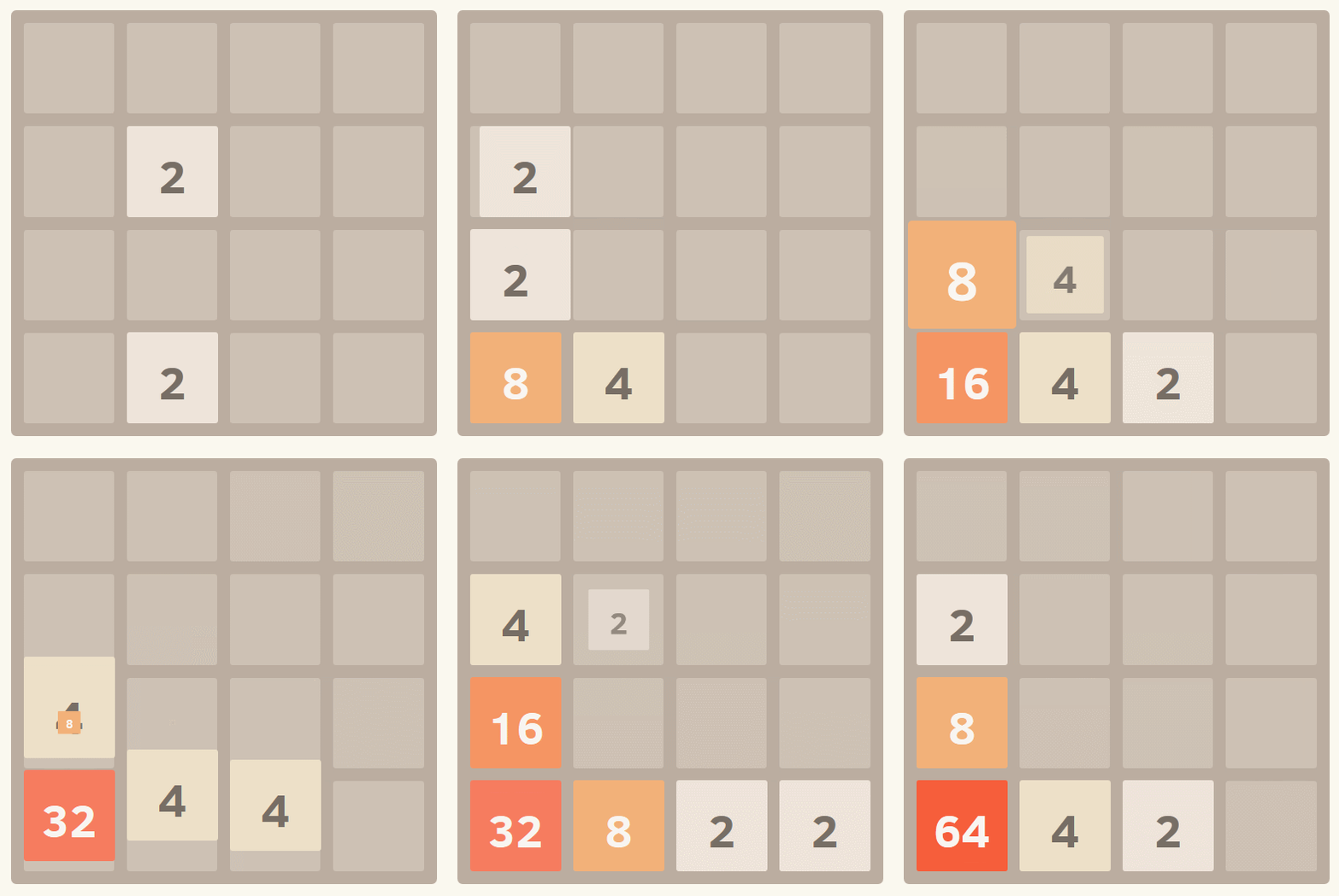
2048 Solution Tips Corner Test

Choose a corner of the grid and make all your moves in this direction…

Choose three directions and only use these three to move your boxes. Choose a corner of the grid and make all your moves in that direction first. By following this technique, you’ll avoid being blocked by finding yourself short of moves.

In the example above, I chose the lower left corner. Using only the Down, Up and Left arrow keys, I could quickly combine my boxes to get to 64. Try to avoid deviating from this rule as much as possible.

[Update 03/24/2014]

Our colleague, Ernesto, from Softonic Brazil, told us that he has managed to reach 2048 by following the 2 steps mentioned above – he just wanted to share that with you. He says it’s a great way to win without burning out!

Always keep sight of the highest number

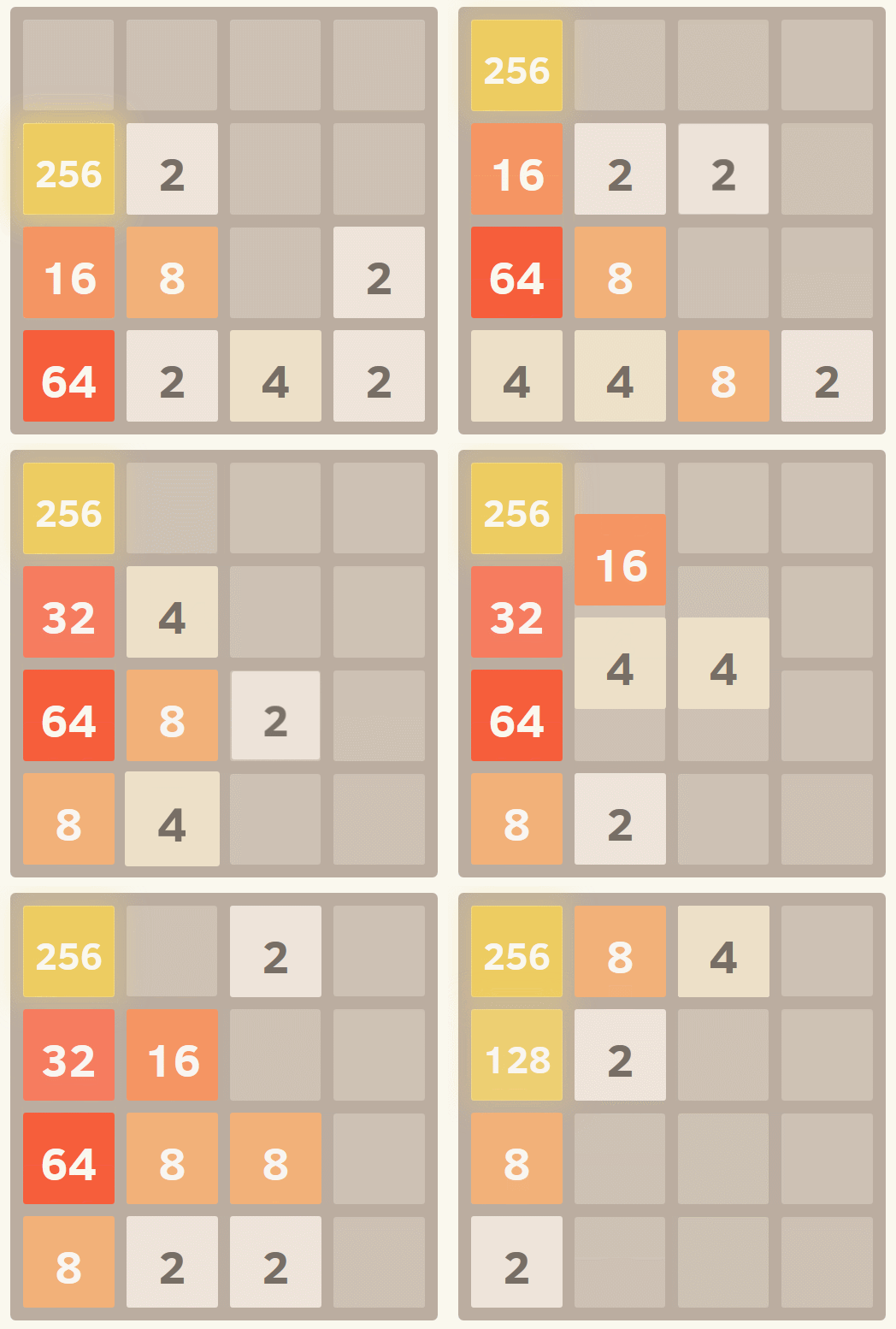
2048 Solution Tips Chain reaction TestChain reactions let you quickly get to 2048…

By always keeping your highest box in the corner (the one you chose at the beginning of the game), you can quickly create chain reactions, bringing you closer to 2048 points. Here, I’m keeping my 256 box in the upper left corner so I can clear the grid with a chain reaction.

So here you go: the two strategic pillars of 2048!, straight from the creator himself. It’s now up to you to put these teachings into practice and become part of the elite group of the 1% of players who reach 2048!

Farm Heroes Saga: 6 tips to level up

Save your moves, get free power-ups, and accumulate points. All this and more with our tips for Farm Heroes Saga!

Farm Heroes Saga (available on Android, iOS and on Facebook) is one of the latest hits from King, creators of Candy Crush Saga. You play the two games in exactly the same way (you must collect items of the same type) but the strategies to succeed are different.

After hours and hours of play, successes and failures, I’ve compiled a sure-fire strategy for getting through the levels, losing fewer lives and, ultimately, having more free time to play Farm Heroes Saga!

The importance of combos

The essence of Farm Heroes Saga is very simple: meet the plant-gathering objectives indicated. You must always stay within the number of moves given, so the more pieces you delete in a single play, the better.

Making rows with more than 3 items works well not only to fill that particular plant, but also gives you other benefits. So, keep in mind that:

– A row of 4 adds a point to all the items you have around you and eliminates those of the same type

– A row of 5 means all items of the same type on the board are automatically removed

Don’t rush! Instead, focus on finding combinations of 4 or 5 and you’ll reap the benefits!

Similarly, unless you keep within very few moves, feel free to create rows of 4 or 5 elements even if they’re made up of a plant that you don’t actually need for that level. For example, perhaps in one level you need to collect strawberries and apples…but at one point you can form a row with 5 drops of water…do it! By removing all drops on the screen, it’s highly likely that several more rows will be formed and your count will go up having wasted only one single movement.

Don’t waste your beans

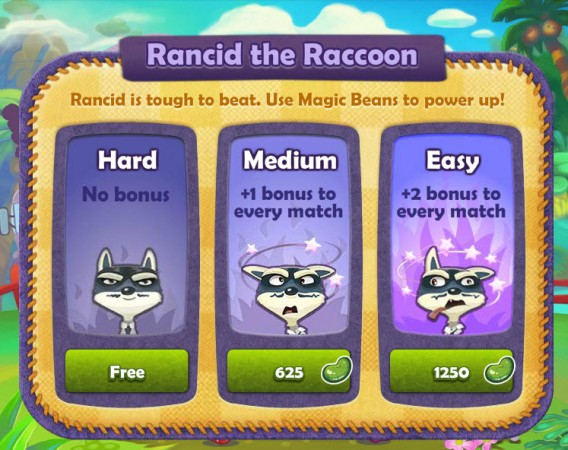
Green beans are achieved throughout the levels, and the more you get, the better. They allow you to do two things: make the levels with Rancid the Raccoon easier or buy some boosters.

Rancid’s levels aren’t hard compared to some normal levels, so don’t buy help with the beans. It’s better to accumulate Magic Beans to buy the shovel booster (for now, there’s not other way of buying boosters), which will be very useful, as you’ll soon realize.

Use your boosters wisely

Unlike other games from King, in Farm Heroes Saga you’ll always get boosters for free – once you’ve used a booster you just have to wait for it to recharge (24 hours) and you can reuse it.

Even though you’re not going to run out of boosters, though, doesn’t mean you should waste them. Use your head!

My recommendation is that you wait to use a booster at the end of a level (when you’ve got only 4 or 5 movements left) and that you try not to use more than one per level.

I’ll give you some tips for using each:

  • Shovel: Use it to unlock a locked section (e.g. frozen) that prevents you from making rows. Remember you can buy more with beans
  • Tractor: Use it to eliminate a row with many plants of the type you need, especially if you only have a few moves left
  • +1: Use it if you only have a few moves but many harvests of all types to get
  • Dog: Use it when you’re missing many elements of a particular type and there are many on the level
  • Egg: Opt for this one when there are lots of eggs on the screen but they are scattered and you can’t make combinations with them

Pay a visit to Farm Club

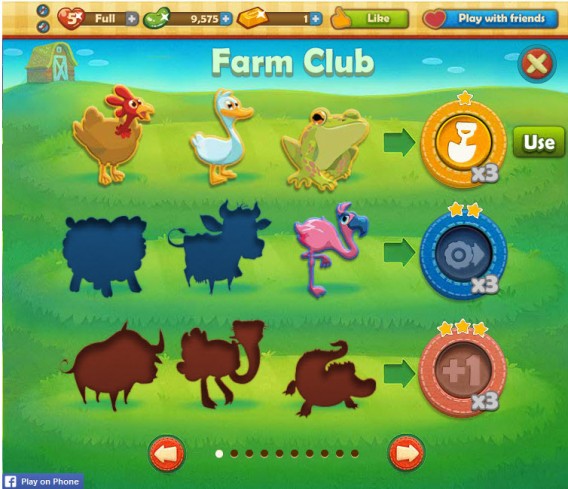
Farm Club is a feature that lists the animals that you’ve unlocked. If you unlock the three indicated in each one you can exchange them for different boosters.

Farm Club

From time to time make sure you check the possible combinations of animals and click on any of them: it’ll direct you to levels to get more animals.

Change the boosters that give you the animals when it suits you and remember not to waste them, as I explained in the previous step.

Combine your animals carefully

What you should know about the special boxes

In Farm Heroes Saga it’s not all conventional boxes, there are several types of boxes with special characteristics. Here’s a key to better understand them and get more out of them:

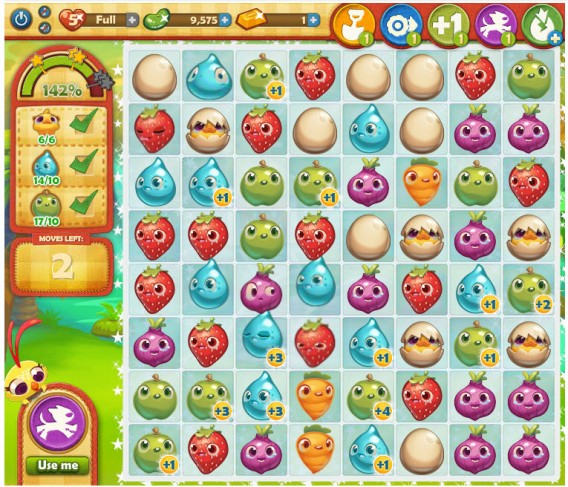
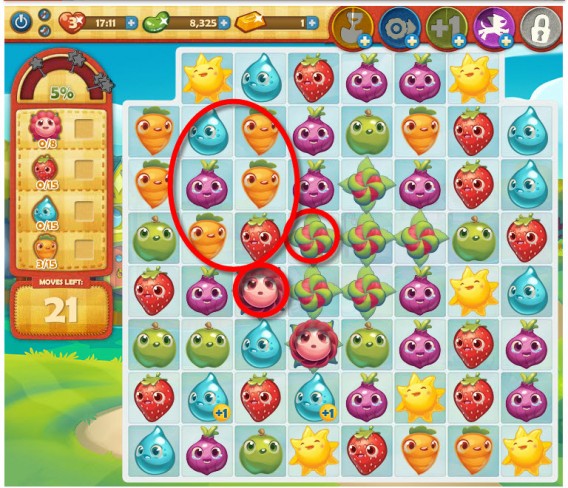
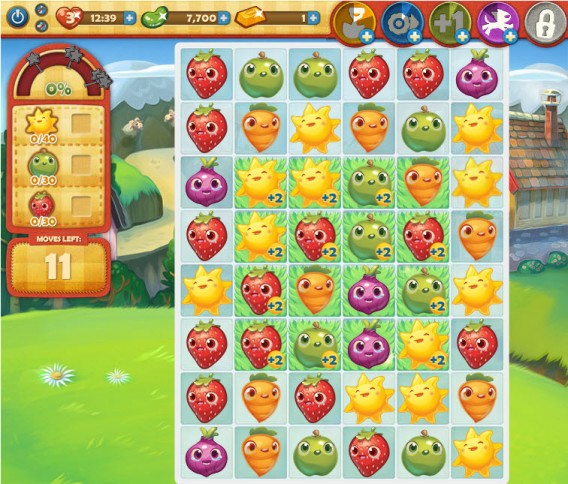
  • Boxes with flowers: to free these you must collect fruit in the adjacent squares. Try to make combinations that match with more than one flower, so less moves are required to free them. For example, in the image below: the carrot combination will affect two flowers at the same time.

Flower boxes

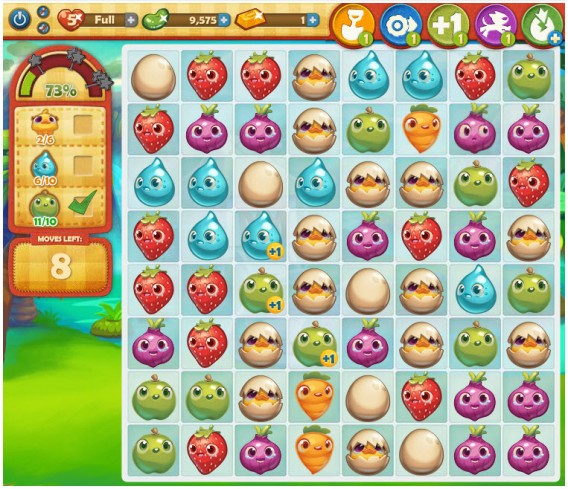
  • Eggs and chicks: Three eggs together form a broken shell, and three broken shells equals a baby chick. Note that, unlike other items, collecting more than three pieces of eggs together will generate no special effect.

Eggs and chicks

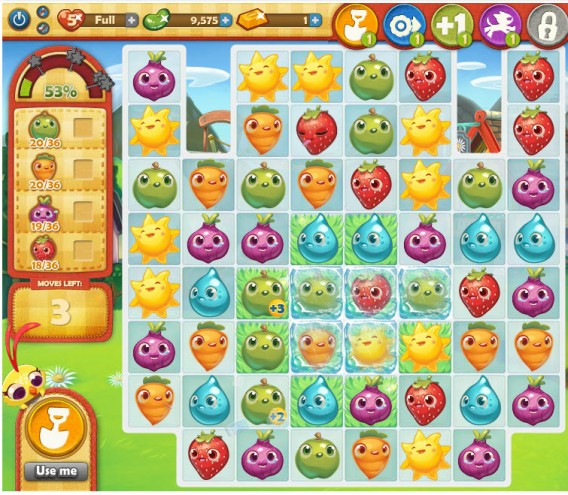
  • Frost zones: frozen sections can’t be moved and can only be eliminated if you combine identical normal elements. Keep this in mind when advancing and make use of the shovel on these pieces to move forward.

Frozen ground

  • Grassy areas: when you put pieces together in an area of ​​grass, each will give you more points than normal. Therefore, when you’re in levels with greenery, target your efforts on that point to get more points with a single move.

Grassy areas

Enjoy Hero Mode

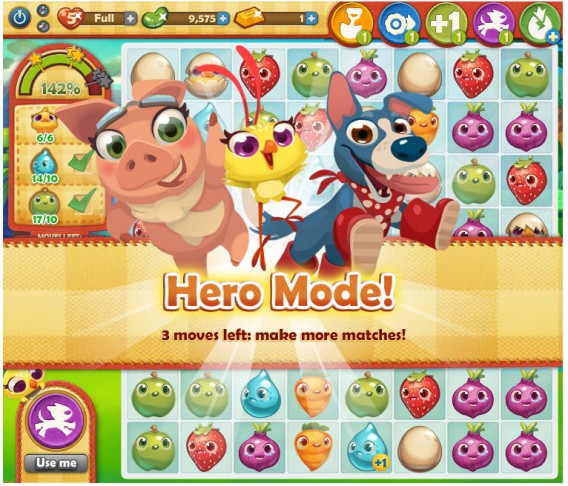
If you followed the tips above you’ll probably have leftover moves on some level; take advantage of them to get high scores.

Hero Mode allows you to use the remaining moves as you like, without having to worry about objectives. Also, each move you make causes points to be accumulated in crops.

More points means moving up in the rankings among (or ahead of!) your friends and getting more beans. Not bad, huh?

Hero Mode

Follow these tips…or do whatever you want!

These tricks are just some of the strategies that you discover by playing Farm Heroes Saga. As we always say, everyone has their own techniques that work for them. We’d love you to share techniques you’ve discovered.

Goat Simulator 2014 is as crazy as it sounds

Goat Simulator 2014 is exactly what the title suggests: a simulation of a goat’s life. Of course, this isn’t just your normal, every day billy goat: he can withstand more of a beating than usual. In what started as a joke, Goat Simulator has officially been released as the latest, and quite possible the strangest, simulator game for PC.

In Goat Simulator, you walk freely around the open world and destroy pretty much everything in your path, and what’s even better, is that you get points for it.

It was originally written for a small game jam before the joke suddenly turned into reality. By popular demand, Coffee Stain Studios went on to create the full game, including all the bugs– despite expected and very reasonable graphics, it’s not polished. The bugs, however, are what make the game so much fun to play. Your head regularly gets stuck and disappears through a wall if you stand too close to it, and walking up ladders looks absolutely hilarious.

Goat Simulator 2014

Enjoy a hilarious walk up a crane

You get numerous missions in the form of backflips, accumulating points by destroying things around you or by reaching certain heights. This is nice, but the real fun lies in the freedom to walk around and discover the secrets that the developers have hidden in the game. They range from small references (missing a penalty gets you a Like Baggio score), to huge hidden areas– you can even take your goat into outer space. If you’re a bit tired of being a goat, you can also sit back and enjoy a game of Flappy Goat in one of the houses.

Play Flappy Goat in Goat Simulator

A reference to the popular Flappy Bird game.

Goat Simulator is clearly a game that doesn’t take itself too seriously, which makes it really fun to play, with nice music that’s both cheerful and crazy. Compared to the recently released and extremely funny South Park: The Stick of Truth, Goat Simulator is a lot more silly and lighthearted.

Whether it’ll be as popular as other simulators like Euro Truck Simulator 2 remains to be seen, but at the very least, it’ll give you a few hours of entertaining gameplay. So far, it’s definitely the strangest game of 2014.

Original article written by Rutger Uittenbogaard published on Softonic NL.

Related articles:

Gang Beasts: the game everyone wanted to play at Rezzed 2014

At this year’s Rezzed games event in Birmingham UK, while there were a ton of great games, it was Gang Beasts that most people were talking about on the show floor. It’s a four player fighting game, and the great thing is you can play the early alpha version free on Mac or Windows.

Gang Beasts sees four different colored jello-like figures punching and grabbing each other until only one survives. The action takes place in a variety of dangerous locations, like on top of moving trucks, on a window cleaner’s platform or riding a Ferris wheel. The fun comes from the unwieldy movement of the fighters, who move as if they are made from jello. You can jump, punch and grab, and it’s grabbing especially that causes a lot of amusement, as you can find yourself being pulled around by other players holding any part of your body.

The difficult movement reminded me of QWOP, the ridiculous flash based running game. The fun comes from how awkward each player is, and the twists and turns that happen during a game. It’s local multiplayer (you all play on the same PC, not online), which also helps the enjoyment. Even losing is fun.

The game has been ‘greenlit’ for release on Steam in the future, but for now you can download an alpha build for Windows and Mac. Get the current build here. Gang Beasts has already had almost 100,000 downloads, which is impressive for an indie game and the buzz is still growing. Get a few friends around your monitor and try it out.

The Rezzed show has a history of finding indie games that go on to great things – Hotline Miami first gained popularity after being shown there in 2012.

RELATED STORIES

http://news.en.softonic.com/b/hotline-miami