How Bomberbot is teaching kids to code

For those who didn’t grow up in the internet age, a line of code might seem like a string of random characters hastily put together with virtually no logic or pattern. On the contrary, code is the basis of every programming language that’s used to create the webpages, apps, and games we use on a daily basis. Not surprisingly, it’s becoming increasingly important to know how to read and create this code.

Like learning any language, it’s better to start young, and games like Bomberbot are taking advantage of the sponge-like brains of children to teach the basics of coding from an early age.

Bomberbot

Bomberbot is an online game targeting children aged 8 to 12, teaching programming by helping them recognize the patterns and sequence structures involved in writing a line of code.

Playing as a robot, your task is to get through each level, collecting stars or destroying rubies by creating a sequence starting with directional arrows, brackets, and a hammer. As you advance, you’ll have more obstacles in your way and get more tools to be able to make your way around more complex levels.
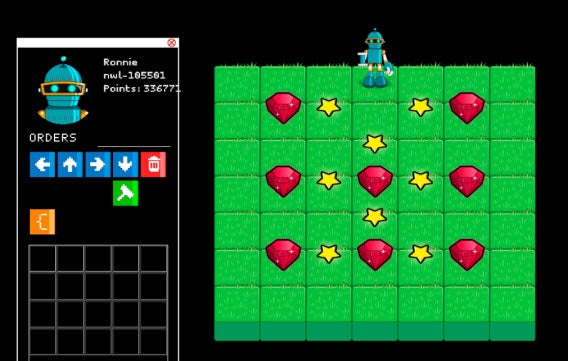
Bomberbot

A panel on the left gives you the tools you need to make it through a level. By clicking on a command, you can create a sequence for the robot to follow. Within the brackets, you can create shorter sequences that the robot will repeat a specified number of times.
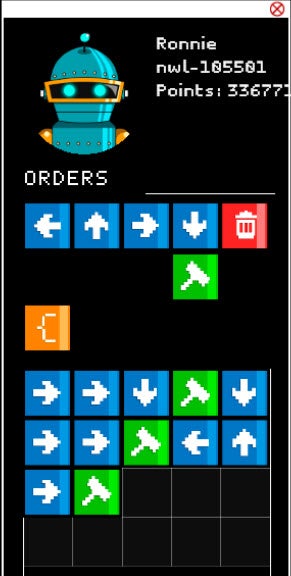
Bomberbot orders

At first glance, it might be hard to understand how such a simple game can teach kids to code, especially because there actually isn’t much code in the game.

According to Bomberbot CEO Cristian Bello, however, “it’s not necessary to see lines of code, you just need to start developing the logic to see how these things work.” This, of course, is the foundation to properly learning any language.

Consider written language. There are hundreds of different languages that use different syntax and structure, but they’re generally made up of word strings that form sentences, separated into paragraphs, and broken up by punctuation.

Computing language can be thought of in the same way. There are thousands of programming languages that use different forms and structures, but they generally follow the same recognizable patterns for creating sequences that can be understood by a computer. Ever heard the names Ruby, Python, or Java? They’re all programming languages that use code in different ways to create sequences that tell a computer what to do.

The idea behind teaching the patterns and structures involved in creating code is to allow children to develop the logic to recognize these patterns. In the early stages, this is actually more beneficial than learning one specific programming language: it’s creating the ability to learn multiple languages while reducing the risk of a programming language becoming obsolete in the eternally proximate “future” of tech.

The game isn’t completely code-less though, and it’s not all about passive play either. Bomberbot emphasizes the ability to create something, including building your own levels, a practical result of programming which demonstrates the output of something that can look pretty abstract. If you go into the Create a level option, you can actually see the code behind the level you’ve created by hitting the Toggle Editor button. Here, you can even play around with the code itself.
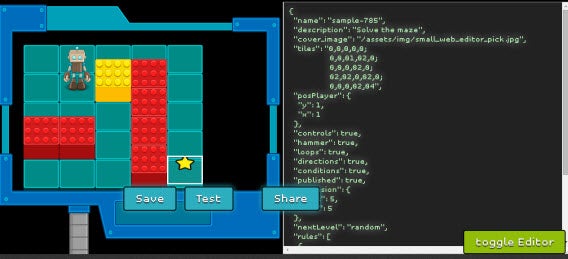
Bomberbot CreateALevel

With funding from Amsterdam-based Rockstart, the Bomberbot team opened its beta in April and is now working closely with over 3,000 users to make sure that it can provide a game that’s both useful and fun for kids.

“One of the biggest challenges has been trying to explain to people that you can learn from a game,” says Bello, highlighting how much research has gone into making something that actually helps kids learn something.

Coincidentally, the “teaching” aspect has already caught on in probably the most logical place: schools.

Teaching coding in schools

Computer classes have advanced far past simple word processing and typing skills, and many schools have started introducing coding into their curriculum. In the US, 10% of elementary schools have already started to teach coding, while starting this September in all UK schools, it will be mandatory to teach children to code from the age of 6.

Bomberbot has already gotten in on the action with Bomberbot Schools, a version of the game specifically for the classroom that makes lesson planning that much easier for teachers, who themselves need to learn the basics to be able to teach their students. The program will roll out this month in some schools in Amsterdam, where the company is based.
Bomberbot schools

Bello has said that he learned coding at 14, having taught himself. “I taught myself to code online, but it was very difficult,” says Bello. It’s problems like this that Bomberbot wants to avoid in the future. “It’s better that you start earlier– the earlier the better.”

Of course, Bomberbot isn’t the first or only game out there that has tried to teach kids how to code, but it’s introduction in schools certainly gives it a leg-up and demonstrates the value of this method to teach coding.

Next on the agenda for Bomberbot? Releasing an Android and iOS app later this year.

If you want to teach yourself how to code, check out part 1 in our 3 part Learning to program series.

How to use old Windows programs on Windows 8

When switching from Windows XP or Vista to Windows 8, some old programs don’t work anymore. This is especially painful for expensive specialized software. There are, however, ways around it.

This problem seems to affect software developed for Window XP more than others, as WinXP is very different from Windows 8. In many cases, you’ll be able to install programs in Windows 8, but you’ll get an error message when you try to launch it.

Windows compatibility mode

If you rely on legacy software, you have two options: the compatibility mode in Windows 7 and Windows 8, or a virtual machine.  Compatibility mode is fairly easy, but using a virtual machine is a bit more complicated. Check out both options below if you want to use older programs on a newer OS.

Execute programs with Windows Compatibility Mode

With Windows Compatibility Mode, you can modify the program to make it think it’s using an older version of Windows and provides some specific functions.

1. Open Properties

With the right mouse button, click on the program icon and then click Properties.

Windows properties

2. Enable the compatibility mode

Go to the Compatibility tab and enable the compatibility mode box.

Windows compatibility mode

3. Select the desired compatibility mode

You can select the OS you used to run the software on. If it still doesn’t work, you can try Vista or Windows 7 instead of Windows XP. Accept the setting with OK and close the window.

Windows compatibility mode os version

Your old software should also work on Windows 8. If the compatibility mode doesn’t help, you can try Windows XP mode as an alternative solution.

Alternative: The free XP mode as a virtual machine

I found issues moving to Windows 7 with old programs no longer working. I tried XP Mode, which is Windows XP functioning through a virtual machine, and it seemed to work quite well. This means that Windows simulates a complete computer, along with hard drive, CPU, memory, graphics card, and other hardware. There isn’t an XP mode for Windows 8, but there are way around it using programs like VMLite.  Check out the tutorials below if you want to run XP Mode on Windows 7 or 8.

XP mode

Related Articles

The best messaging app for Android – Sam’s choice

What’s the best app to send and receive text messages with Android? To save you some time, I’ve reviewed the most popular apps in this category to help you make the right choice. If, like me, you aren’t satisfied with the SMS client installed by default on your Android, I have the perfect app for you.

I’ve used Hangouts as my main SMS app for a long time. Going off of only good experiences with Google, I trusted the Mountain View giant to handle my text messages too. Unfortunately, whereas Google’s app is great for organizing video chats with friends, Hangouts doesn’t really hold up when it comes to SMS and MMS. The app jumbles your Hangout and SMS conversations without giving you the choice to separate the two, something I find extremely irritating.

Fortunately, some quick research led me to Contacts+, a true Swiss Army knife for everything related to communication on Android.

The best app

Contacts+

Messages +The first thing you’ll notice in Contacts+ is that it’s not a simple instant messaging client. The app not only includes a great address book, it also has a fancy dialer, and both have quickly replaced the default ones from Google on my Android phone.

For SMS and MMS, Contacts+ is even better. The app displays conversations in a chat format–nothing revolutionary– but Contacts+ goes a little bit further because of its perfect compatibility with social networks. In a chat window, you simply have to drag the screen to the right to access your contact’s Facebook, Twitter or Linkedin profile. Even better, with a tap, you can even switch from Contacts+ to Whatsapp or Hangouts and continue your conversation on another platform.

Messages +

Contacts+ displays your conversations as a chat

Contacts+ also caught my attention because of its ‘info bubbles‘, small windows that are superimposed on your screen when you receive a message while using another app. You don’t even have to switch to the app to read or reply to a message, a function that’s quickly become indispensable.

The best, though, is that Contacts+ lets you send free messages to other contacts using the same app, similar to Whatsapp. While it came out on top for me though, Contacts+ wasn’t the only cool app I found.

Download Contacts+

Rising stars

There are a few others messaging apps that stand out for either their design, or their innovative features. Here are some potential competitors to keep an eye on.

Hello SMS

hello smsHello SMS is an elegant SMS Manager that stands out for its sleek design and clever tab system. The app’s continuously improving with things like a new night theme, a perfect integration of emojis, and the option to share images faster and cheaper than via MMS.

Download Hello SMS

EvolveSMS

EvolveSMSEvolve SMS differs from other SMS managers thanks to its powerful personalization features. With backgrounds, text size, notifications, and customizable fonts, this app will satisfy anyone who prefers using apps with a unique look. Unlike other popular messaging clients, Evolve SMS is easy to use thanks to clear and legible menus.
Download EvolveSMS

Hangouts

HangoutsI said earlier that Hangouts doesn’t match Contacts+ when it comes to managing SMS and MMS, but the situation could soon change. According to early leaks, the next version of Android could indeed include a new version of the app that’s easier to use, making it the SMS client I know it has the potential to be.
Download Hangouts

Now, all you have to do is download Contacts+, install it, and enjoy the best SMS app currently available for Android, at least in my opinion. If you don’t agree, try one of the alternatives.

If you want to know how to deactivate Hangouts for Android in 15 seconds, we’ll show you how in this video.

Follow me on Twitter: @SamSoftonic

Flappy Birds (Family) is back, but only on Amazon Appstore

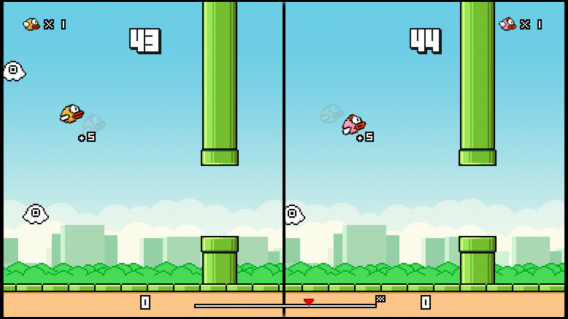
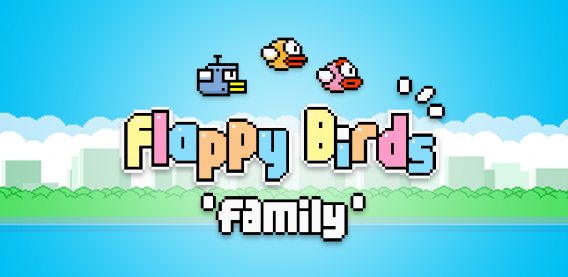
Like he said back in May, Dong Nguyen and Dotgears have re-released Flappy Bird. Now called Flappy Birds Family, the game includes a two player mode.

flappy birds family

Unfortunately, the only place to get the app is through the Amazon Appstore for Amazon Fire TV.

flappy birds family

Right now it’s unknown if or when it will be available through the App Store or Google Play.

Source: Polygon

Download

Flappy Birds Family on Amazon App Store

Related Stories

Flappy Bird to return in August with multiplayer

Flappy Bird developer’s next game features a guy jumping across buildings

Amazon Fire TV vs Roku: which one’s better for you?

Follow me on Twitter: @chrislikesrobot

Microsoft updates Office for iPad with export to PDF and other features

Office for iPad got a lot of downloads when it launched “four months ago,” but the retention of people using the different apps is unknown. Considering the necessity of an Office 365 subscription, a lot of people might not be able to use the editing features.

Microsoft has updated the suite of apps including Excel, PowerPoint, and Word with various updates, but the best new feature has to be export to PDF.

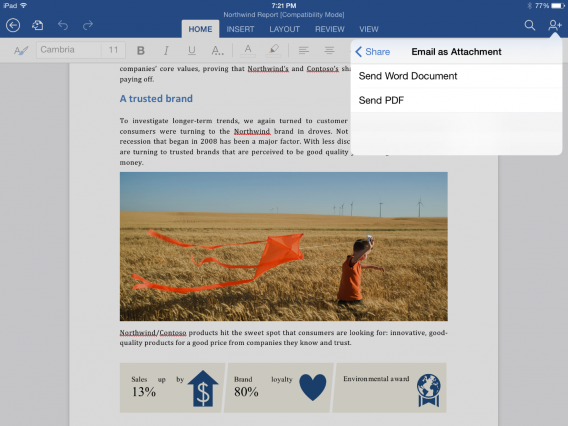
Export to PDF in Word for iPad

Export to PDF is available to everyone regardless of subscription and is found through the Share menu.

The individual app updates are:

Excel

  • PivotTables
  • New flick gesture for handling selected data
  • Added scaling and paper sizes for printing

PowerPoint

  • Presenter View to see notes and additional information
  • Add audio and video inside presentations, play natively in the app, insert video from Camera Roll

Included with the general updates like export to PDF is support for third-party fonts  and Crop and Reset options for images.

Source: Office Blog

Download

Excel for iPad

PowerPoint for iPad

Word for iPad

Related Stories

OneNote update for iOS and Mac adds file attachments

Shazam for Mac IDs songs and shows from the menu bar

Facebook Messenger for iOS now faster and supports full screen images and video

iOS 8 will include an iPhoto to Photos migration tool

Follow me on Twitter: @chrislikesrobot

Subject 13 teases puzzles in gameplay video

Even though I’m horrible at puzzle games, I do enjoy trying out different games in the genre. Subject 13 is currently at the tail of its Kickstarter campaign, but Microids have released a work-in-progress gameplay trailer for the various puzzles that will be included.

Default player


brightcove.createExperiences();

The story of Subject 13 puts you in the role of Franklin Fargo, a physics professor, who wakes up in an underground science facility with only a voice calling him Subject 13. Your job is to help Fargo escape this prison and find out why he was imprisoned there.

For more information: Subject 13 Kickstarter

Related Stories

App of the Week: Yet Another Cleaner

BitTorrent Bleep secure chat client stops snooping

Bolt is Instagram’s new Snapchat competitor

PlayStation Now PS4 open beta on July 31

Follow me on Twitter: @chrislikesrobot

Grand Theft Auto Online double RP Aug 1-3

If you’re still obsessed with Grand Theft Auto Online or haven’t played it in a while, Rockstar Games is offering double RP all weekend long.

From August 1 to August 3, any jobs or RP activity will give you double RP.

GTA Online Double RP

This is a good way to catch-up if you haven’t played the online part of Grand Theft Auto V recently. This is also the last opportunity to pick up the Independence Day Special content in the game, so at the very least you can get back into GTA Online to get the Liberator monster truck, Sovereign motorcycle, and clothes.

Related Stories

Grand Theft Auto V for PC will receive enhancements worth waiting for

FIFA 15 trailer shows improvements to agility

Sacred 3’s new screens before August 5th release

PlayStation Now PS4 open beta on July 31

EA Access is a subscription to EA games on Xbox One

Follow me on Twitter: @chrislikesrobot

Sacred 3’s new screens before August 5th release

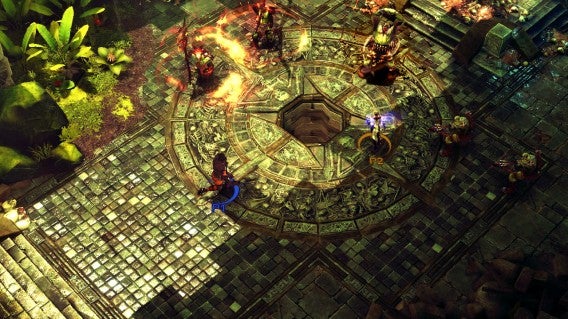
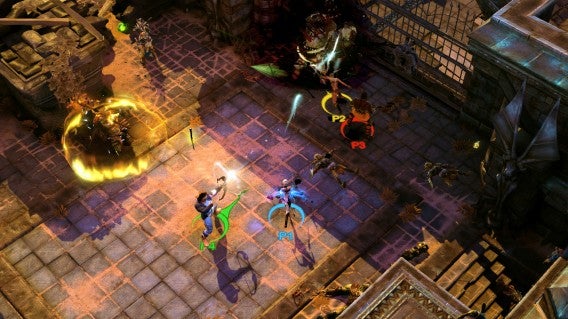
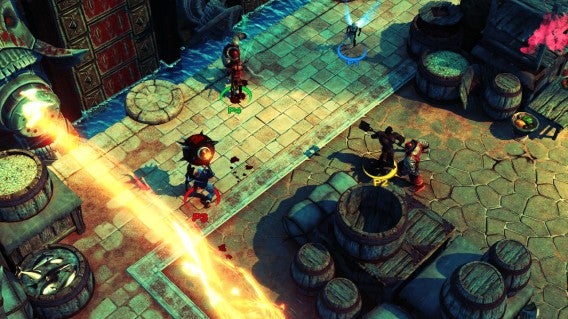
Sacred 3 will launch on August 5th, but before the game is available on Tuesday Deep Silver released five screens for the hack-and-slash game.

If you’re a fan of arcade hack-and-slash games, Sacred 3 will be a title to keep your eye on.

Sacred 3

Sacred 3

Sacred 3

Sacred 3

Sacred 3

Sacred 3 will be available on PC, PlayStation 3, and Xbox 360.

Related Stories

Call of Duty: Advanced Warfare trailer warns of PMC Atlas

FIFA 15 trailer shows improvements to agility

Homefront: The Revolution in development at Deep Silver Dambuster Studios

PlayStation Now PS4 open beta on July 31

EA Access is a subscription to EA games on Xbox One

Follow me on Twitter: @chrislikesrobot

How to use Windows XP Mode in Windows 8 using VMLite

There are no more updates for Windows XP. As a virtual machine and with the help of freeware like VMLite and the free XP mode, however, you can use XP as if it were installed on your PC.

The XP mode was once donated by Microsoft as a bonus for Windows 7 because some programs had compatibility issues with newer versions of Windows. In Windows 8, unfortunately, Microsoft wasn’t as generous: XP mode is nowhere to be found. Luckily, with VMLite, you can cheat a little bit and still run a virtual machine with XP on Windows 8.

1. Download Windows XP Mode from Microsoft (ca. 500 Megabyte)

The download is a self-extracting archive in .exe format with a patch for the Microsoft virtual machine. For now, only download the file– don’t run it yet.

2. Download VMLite and install XP Mode

The VMLite XP Mode is a free virtual environment similar to VMware or VirtualBox. With VMLite, you can run the XP mode from Microsoft without much effort on Vista or Windows 8.

3. Launch VMLite

4. Import XP mode

Click Machine in the top menu and then click New.

In the next window, select the second option and chose the previously downloaded file, ‘WindowsXPmode’.

VMLite XP Mode automatically unzips the package and prepares the device.

Before installing, you must still accept the license terms of agreement with Microsoft (although XP mode is free, you’re still using a different version of the operating system).

VMLite will now have installed the full XP OS as a virtual machine. Unlike a classic Windows installation, you need to set an administrator password. If you use XP mode with only one user, you probably won’t need the password again, but keep the password safe just in case.

In the next window, specify the amount of RAM you’d like to allocate to the virtual machine; 512MB is the minimum. Anything more than 2GB you probably won’t need, but the setting can always be adjusted later.

In the next window, you can enable Automatic Updates for Windows XP. The last update for Windows XP was released in the spring of 2014, so I recommend deactivating the option and manually installing all the updates when first launching VMLite.

The final step is the initialization of VMLite XP Mode’s virtual disk. After this, the installation is complete.

5. Start VMLite XP Mode

At the top of VMLite, you’ll now see the XP mode as a virtual machine. By clicking on the green arrow, you’ll be able to start running Windows XP.

You can run the Windows XP Mode either in full screen or in a window. VMLite will automatically adjust the screen.

6. Fast access in Hibernate and a desktop icon

If necessary, you can turn your virtual machine on and off without actually rebooting it. VMLite pauses the XP Mode and saves it to the hard drive, meaning you can use XP mode only if you really need it.

Related Articles

Subway Surfers: 7 tips to be number 1

Subway Surfers (available on Android, iOS and Windows Phone) is the classic infinite racing game: control a skateboarder while avoiding obstacles and collecting coins and items. Because it  has unlimited lives, you can play for hours without interruption, but that doesn’t mean you can’t try to master the game faster and get higher scores.

If you want to get higher scores to beat your friends in Subway Surfers, there are some strategies and tricks that can help you up your game.

Collect as many coins as you can

Although the score is what makes you beat your friends, it’s important that you pick up as many coins as possible. Instead of choosing the easy way, choose the one that will get you more money.

For example, if you go down the middle lane and move to the sides as fast as you can, you’ll get more coins.

Subway Surfers coins

Don’t forget to collect powerups

Yes, coins are important, but if you see that you’re approaching a powerup, take a detour and pick it up. It’ll give you amazing benefits like boots that make you run faster and jump higher, or a magnet you can use to attract all the coins in your path.

You might have to sacrifice a few coins, but you’ll see it was worth it as soon as you activate one of the powerups.

First thing’s first: buy boards

I don’t usually recommend spending coins, but in Subway Surfers, it’s absolutely essential if you want to progress.

There are many different ways to help yourself in the game, but above all, you have to invest your coins in hoverboards (the first option under Single Use). Why? The hoverboard gives you 30 seconds of immunity, meaning you won’t die if you hit an obstacle.

Always try to have a board in your inventory, and activate it as soon as you see the level starting to get complicated.

Invest in upgrades

Another thing you should spend coins on is upgrades. They help improve the powerups you find.

The return on investment is almost immediate: the longer you have a power activated, the easier it will be to collect coins.

Subway Surfers upgrades

Don’t spend your coins on single-use items

The only thing I don’t recommend spending your coins on is all other single-use items. They are quite expensive and their true value is not as good as that of the boards. In fact, the powerups you pick up are much more useful.

Subway Surfers singleuse

Save keys for sticky situations

The keys are the currency of the game. It’s quite hard to get them for free, so try not to spend them right away and save them for when you really need them.

Take this example: you get killed while you’re about to beat your friend’s high score. In this case, you should trade in a key and keep playing a little longer to beat your friend. Don’t use more than one key per game though, because before you know it, you won’t have any left.

Subway Surfers keys

Keep an eye on daily missions and challenges

An easy way to get items and coins is to overcome challenges and missions. These can be accessed on the game’s main screen.

The missions are tests that invite you to perform actions in the game, like collect X number of coins or jump X number of times. The best thing is, these missions have no expiration date.

On the other hand, daily challenges expire every 24 hours, but are also easier to overcome than the missions. Try to play Subway Surfers at least once a day, because if you succeed in the daily challenge for 5 consecutive days, the prize you get is very interesting.

Subway Surfers Missions and challenges

Practice makes perfect

Consider these tips if you want to play for longer without dying, but remember that although these tricks are used to extend the life of your game, you’ll still need good touch skills, so start practicing to improve your reflexes.

If you want more casual game tips, check out some of the articles below:

Follow me on Twitter: @mariabaeta