Update to Plants vs. Zombies 2: Focus on the new features

Plants vs Zombies 2 gets a makeover with a major update that brings many (mostly welcome) improvements to the strategy game. Let’s review all of the new features introduced in the new version.

Winter makeover

What do you think of the plants’ winter look?

Perhaps the most visible part of the new update is the December paint job that comes with a new look for some of the most frequently used plants. On the festive menu, you’ll find some sublime earmuffs for the peashooters, a scarf for the nuts, or gift ribbons for the sunflowers!

Turbo mode

Plants vs Zombies 2

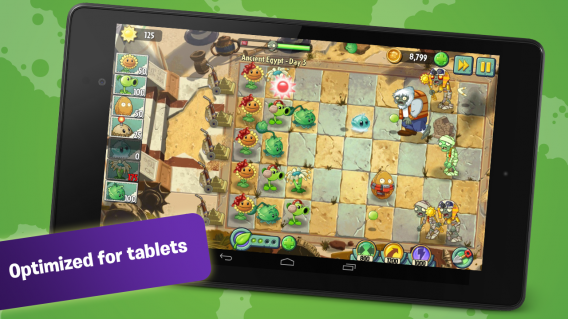
Turbo mode is now available alongside the pause button

The update also introduces us to turbo mode. This new feature is accessible via a button in the upper left corner of the screen and it allows you to accelerate the game speed to shorten the most boring phases. It’s a welcome development that will delight seasoned players.

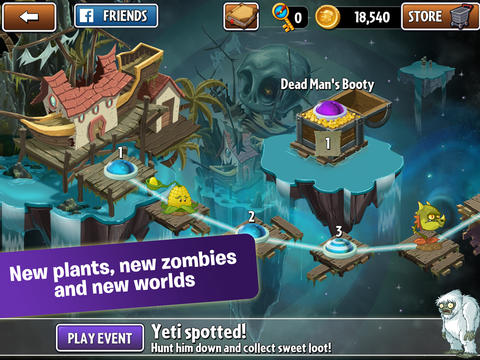
A re-invented playing map

Plants vs Zombies 2

The new playing map

If you believed what the first people to play the game said, then the playing map for Plants Vs. Zombies 2 was the main (and only) complaint that you could make about the game after its release. Many players have complained about the lack of clarity and the doors that block access to certain levels unless you have (or have bought) enough keys.

It seems that PopCap studios have listened to the grievances of their fans, since today’s update also fixes this aspect of Plants Vs. Zombies 2, abandoning the old map with its multiple branches, and adopting a new, much clearer linear system.

In fact, all of the levels are now placed one after the other for simplicity. There are no longer keys to collect: you just have to reach the end of successive levels to progress. A logical result, you no longer need to choose a path, per se, you just need to triumph in all the missions to reach the end of a world.

New enemies

Plants vs Zombies 2

Gargantuars in the heat of battle

A new category of zombies have appeared in the update to Plants Vs. Zombies 2: Gargantuars have actually benefited from all of this activity to make their comeback! Warning: these terrifying giants are very resistant and extremely dangerous. In fact, they will relentlessly trample over all types of plants and even send out a miniature zombie that you’ll have to eliminate quickly.

The inevitable Facebook integration

Invite your Facebook friends to win rewards!

For players who love to share, they will be delighted to learn that they can now connect to Facebook from Plants Vs. Zombies 2. They can invite their friends to play the game or send gifts to earn rewards in coins!

A new world

Plants vs Zombies 2

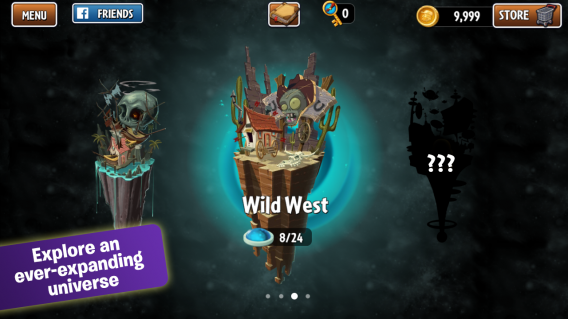
The mysterious new world to be played

This update to Plants vs. Zombies 2 gives us a glimpse of a new playable world, located immediately after the Wild West. This new world is called Far Future and although it’s not currently accessible, it will probably be unlocked with the next update. Who knows what nightmarish creatures from science fiction has inspired PopCap studios!

Although it was announced on the quiet, this winter update brings many welcome changes and refreshes to the hit PopCap Game just in time for Christmas! It’s a great opportunity to revisit the worlds infested with the living dead in Plants vs Zombies 2.

What do you think of the improvements that have been made in this update to Plants vs. Zombies 2?

Download Plants vs. Zombies 2 for Android

Download Plants vs. Zombies 2 for iOS

Google Maps: 7 tips for Android and iOS

Google Maps introduces more new features in each update, features that help it stand out. But more features can sometimes make the things confusing and can obscure some of Google Map’s more useful options.

That’s why the seven tips included in this article are ones that I can’t live without. By following these simple tips you’ll be able to use Google Maps more efficiently and will maximize its potential.

Warning: In iOS, you’ll need to sign into your Google account to store addresses and download offline maps. You just have to press the button marked with a silhouette in the top right corner of the screen in order to log in and access your Google account.

Google Maps

Locate yourself and see which direction you’re facing

Once you’re in Google Maps, tap the button at the bottom right of the screen to locate yourself. The map then centers itself around your position. The blue dot is you. Your direction is indicated with an arrow (or triangle, depending) of the same color.

Google Maps

To make sure that the map automatically turns in the right direction, just press the button again. The map will rotate to guide you with a compass view. It’s very handy for seeing where you are while walking around.

Warning: pressing the button a third time will cause the map to return to its original mode.

Find a good route

Google Maps allows you to quickly find routes for walking, driving, and public transport. There is a quick way to access this feature on Google Maps.

Click the arrow in the blue circle on the right-hand side of the screen. The app will open the page where you can select your preferred route.

Choose your travel type by pressing one of the buttons at the top and enter your destination into the text field below. Then select the route you wish to take to return to the main screen.

The red pin marks your destination, while the blue dot indicates your position.

Google Maps

Save maps for offline use

Google Maps lets you download offline maps to consult if you don’t have a data connection. Unfortunately, the feature is hidden.

Search for the area you want to save on your phone. Once you have the map on your screen, tap on the bar at the bottom of the screen and drag it up.

Tap on Save and select the area you wish to download using the zoom feature. Follow the instructions on the screen and give the mpa a name – it’s that simple!

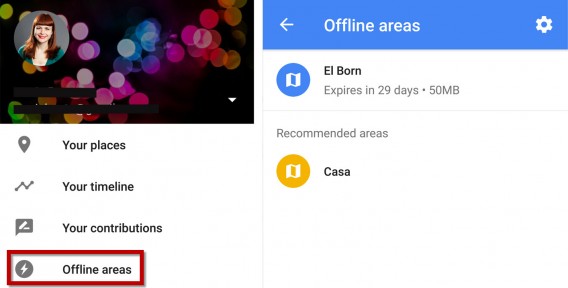
To open your saved maps on your device, you need to access the app options of Google Maps and select Offline areas. A list of your saved offline maps will appear, where you’ll also have the option to open or delete them.

Warning: some areas of the globe are not covered by this service. You can see the official list of available countries on the Google Help page.

Place markers and save your favorite places

Google Maps lets you add favorite places and store them for future reference. To save a place, simply leave your finger pressed on the place in question on your map. The app will then place a marker on the map.

To save the place, tap the bar at the bottom of the screen and drag it up. Then press Save. Google Maps will place a star on the map so that you can quickly and easily locate the place again.

Google Maps

If you want to save the place where you are currently, you can press the blue dot that shows your position to bring up a list of nearby places or hold your finger on it to place a marker. You then just have to drag up the bar on the bottom of the screen and press Save to record your find. You can also use the search engine in Google Maps to save places. Once your search is done, drag up the bar at the bottom of the screen, then press Save to save the place.

For a complete list of your favorite places on Android, go to the options menu by pressing the button at the bottom left of the screen. Then tap on your places.

On iOS, press the profile button marked with a silhouette in the top right corner of the screen.

Your stars are listed in the Saved places section.

To delete a saved place, simply press the Save button a second time.

Save your address to go faster

To save time in Google Maps, you are able to save your home and work address. You can then simply enter the words Home or Work in the app’s search field to find the corresponding addresses.

To perform this operation on your Android device, you just go to the options menu by pressing the button at the bottom left of the screen. Then click on your places.

On iOS, this is done in the Google Maps account screen. To access it just press the profile button marked with a silhouette at the top right of the screen.

Click on home and enter your address. You can then repeat this procedure for your work address.

Use Street View

To use Street View in the mobile version of Google Maps, you must first do a search of the location you wish to display.

Once you’re in the map, click on the bar at the bottom of the screen and drag it up. Then press the Street View window. This feature is very useful if you want to check out where you’re planning to go without leaving the couch.

Google maps

Change the perspective of the map

Swipe up with two fingers on the map to change the angle. This feature, coupled with the three dimensional building display can be very useful in urban areas. and often helps me find my way when I’m lost.

Google Maps

These seven tips should help you with Google Maps. With your smartphone in your hand, you’ll never get lost again.

Related Articles

Is Google Maps better than Apple Maps and Nokia HERE? We put them to the test in Barcelona

App of the Week: Maps.me

How to activate and deactivate roaming on your phone

Follow me on Twitter: @samsoftonic

Article originally published in French on Softonic FR.

The best entertainment apps of 2014

Probably one of the most essential functions you can use your smartphone or tablet for is entertainment. Naturally, with our Best apps of 2014 series and our jury of 11 editors, we decided to tackle the best entertainment app of the year.

From music, to movies, to games, smartphones and tablets have replaced radio, TV and computers to become the central hub of entertainment. In 2014, that trend grew even further: we saw the arrival of Beats Music and the expansion of Netflix into five new countries, while in Europe, Spotify will have paid back more royalties than iTunes by the end of 2014.

In 2014, not only where there a ton of new apps, there were also some massive updates to already existing ones. Our top pick of 2014? Spotify. Watch the video below to see why, and read on for the rest of our top 5 entertainment apps of the year.

Default player


brightcove.createExperiences();

Spotify

In 2014, Spotify introduced all new apps for iOS, Android, and Windows Phone. Along with its radical redesign, the music streaming app has integrated a new feature called My Music. This new option lets you better organize your playlists and save them in a gallery that’s both accessible and intuitive.

Download Spotify for Android | iOS |Mac | WindowsWindows Phone |Web

Djay 2

djay 2In May 2014, Djay surprised everyone by announcing a partnership with Spotify. With version 2.5 of the dj’ing app, users can now mix with the 20 million songs available on the music streaming service. To top it all off, 2014 also saw the arrival of the Android version of the app.

Download Djay 2 on AndroidiOS |Mac

Wakie

wakie

You couldn’t miss Wakie in 2014. The app, which is available for free on Windows Phone and Android, wakes you up by inviting other users to call you directly on your phone. In 2014, the app ventured out of its native Russia and made itself available to users in the USA, Canada, the UK, Singapore, and Hong Kong.

Download Wakie for AndroidWindows Phone

Duolingo

 Duolingo - Apprenez l'anglaisDuolingo, the easiet way to learn a language, needs no introduction. In 2014, the app added more ammo to its arsenal by launching Duolingo Test Center, a service that allows you to take online exams and receive a certificate confirming your language level.

Download Duolingo for AndroidiOSWeb

Shazam

shazamIn 2014, the music recognition app was updated, introducing the ability to play entire songs through an agreement with the audio streaming service Rdio. Shaazam also decided to make a major update to its interface this year; the new version puts more focus on television by giving you the option to search by TV show title.

Download Shazam for AndroidBlackBerryiOSMacWindows Phone | Windows

The year ahead

From music to language, there seems to be every indication of smartphones and tablets continuing to transform into entertainment hubs in 2015.

The names Viggle, Yidio, Pacemaker, and YouTube Music Key might not mean anything to you right now, but these entertainment apps, new in 2014, are the ones to watch in 2015.

Check out the rest of the best apps of the year in our Best apps of 2014 series.

Follow me on Twitter: @SamSoftonic

Far Cry 4: Welcome to Kryat

Far Cry 4 is the latest installment in Ubisoft’s action game series. After the excellent Far Cry 3 fans of the series have high expectations.

I have been following the Far Cry franchise closely ever since the first game. Having reinvented itself for Far Cry 3, the series found a second life by going back to its roots. Showing technical prowess, the first person shooter took us on an adventure to Southeast Asia in a chain of tropical islands under the control of an insane drug dealer.

Default player


brightcove.createExperiences();

This year the Ubisoft team takes us to the snowy mountains of the Himalayas. Here’s what I thought after playing two single player missions.

The initial bad trip

Far-Cry-4-Preview

One of the demons I had to fight in Shangri La

The first level I tried out took place in the mythical land of Shangri La. Between the bad trip and the initial journey, this level follows the hallucinatory delusions of Far Cry 3.

These episodes are triggered when the main character comes into contact with the thangkas, ritual paintings that allow you to relive the story of a legendary warrior from the game’s mythology. In this alternate universe, realistic landscapes have been decked out in shades of orange and blazing golden hues to give a beautiful visual effect.

Back on deadly lands

In this hallucinatory adventure, the hero must defend the sanctuary of Shangri La against horrible masked demons. Your only weapons are a ritual dagger, a bow with a limited amount of arrows, and your pet white tiger.

Far Cry 4 Preview

My feline companion in action

By pressing a button, I could make the tiger attack enemies as I shot them with volleys of arrows.

The gameplay was enjoyable, original and refreshing and it left me with a very strong impression. With frantic action, disorientating graphics, innovative mechanics, complex structured levels, Far Cry 4 will blow you away!

The title by Ubisoft continues the radical momentum started by Far Cry 3 and the Blood Dragon expansion shaking things up in the world of first person shooters.

Intoxication is decimating

The second level I played took me to the high peaks of Kyrat. After the first few seconds of playing the game, I came to realize that the enemy soldiers were not the only threat. The environment is also a character.

The level began with a breathtaking jump in a wingsuit, a special suit that allows you to glide over long distances.

Far Cry 4

The chasm that I flew across in the Wingsuit.

After several unsuccessful attempts, I finally managed to get pass this obstacle. I found myself in a camp occupied by enemy soldiers.

The purpose of the mission was simple. Just like in Far Cry 3, I had to eliminate all forces and liberate the camp. Only this time, I had to cope with the harsh environment of Kyrat as well.

Climate and altitude play a part in the gameplay. For example, the game’s hero suffers from a lack of oxygen when in high altitude areas. A variable that must be taken into account before attacking. And the Kyrat wildlife throws in another obstacle.

Far Cry 4

Wild animals won’t always be on your side

I haven’t even mentioned the enemy soldiers now have new movement abilities similar to you. Opponents can jump across chasms and even climb to attack you.

A game for adults

Far Cry 4 takes players seriously which is nice. The two levels that I visited during my demo introduced me to the game’s mechanics. Ubisoft wants to shake the status quo that dominates the genre (thinking back to the gameplay in several levels of Far Cry 3) to create an element of surprise.

Much like Bioshock Infinite before it, Far Cry 4 raises the bar. It invites you on a real adventure and will most likely be a new masterpiece in the world of Ubisoft escapism.

Far Cry 4 will be released on PC, PlayStation 4, PlayStation 3, Xbox 360 and Xbox One on November 18, 2014.

Related Articles

Call of Duty: Advanced Warfare: a slight upgrade

Hands on with Evolve’s Big Alpha

Dragon Age Inquisition (Preview): The Legend Reborn?

Follow me on Twitter: @SamSoftonic

Dragon Age Inquisition (Preview): The Legend Reborn?

Dragon Age: Inquisition is the latest installment in the trilogy of heroic fantasy role-playing games from Bioware. But how will this latest installment fair in the turbulent series?

People had only good things to say about Dragon Age: Origins, the first chapter in the series. Its well developed story line was filled with choices that had a real impact on the game, and it was backed up by invigorating tactical combat.

Dragon Age II, on the other hand, was a flop that left behind a trail of skepticism that has overshadowed the third installment of this RPG epic since its development began.

Getting a hands on with Dragon Age: Inquisition, the newest addition to the series, I had the opportunity to play through a single mission that involved some awesome looking battles. Will this new edition be able to reignite interest in the series? Let’s take a look at what the latest installment has in store.

Default player


brightcove.createExperiences();

Great finesse

One thing I always liked about the Dragon Age series is its clever mix of third person action game and tactical RPG. Thankfully, this blend is back in Dragon Age: Inquisition, but this time, the recipe has been spiced up with a pinch of subtle new additions.

The battles in Dragon Age: Inquisition are particularly entertaining, and I really enjoyed analyzing the battlefield before sending my companions into battle.

Dragon Age Inquisition

When going into tactical view, Dragon Age: Inquisition allows you to freeze time so that you and your companions can plan your attacks in advance.

By pressing a button, the camera elevates and is placed above the battlefield. A cursor allows you to give orders to your teammates. Whether you’re defending a specific position or focusing an attack on a particularly devious enemy, your allies will obey your every command.

Carnage for all

Battles in Dragon Age: Inquisition are tactical and favor those players who make the best use of their environment and the abilities of their companions.

Dragon Age: Inquisition allows you to change character in real time and vary the fun by alternating between different types of attacks, spells, and fighting techniques.

Dragon Age Inquisition

During my test session, I was able to take control of a mage, an assassin and a warrior, with all three having diametrically different attacks.The mage could unleash elements upon his enemies, the assassin had the ability to become invisible and kill targets by stabbing them, while the warrior’s strength and prowess were in his melee attacks.

Too easy?

Within seconds of playing Dragon Age: Inquisition, I was able to develop basic strategies, making one character launch multiple ranged attacks with a throwing weapon while getting another to attract the attention of the more dangerous enemies.

The problem I encountered with this was that due to the pace of play, I didn’t have time to plan my actions. The tactical mode tries to compensate for this by allowing you to accelerate time so that you can adapt your strategy to the evolving conflict, but I would have preferred to plan out a series of attacks and let my soldiers execute the plan.

Another complaint of this preview build was that, although it was possible to modify the spells and techniques used by the characters, it was impossible to alter their tactical predispositions. This meant that characters were either committed to attack or defense, and I was unable to change their behavior to suit my style of play.

Dragon Age Inquisition

Not that this mattered much, because the enemies I encountered during my test session didn’t give me a lot of trouble. Frankly, I would have been perfectly capable of getting through the mission playing in real time – though, to be fair, the demo was set to easy.

Fortunately, the developers have promised to bring back Nightmare mode, a game mode with increased difficulty, especially designed for players who are looking for more of a challenge.

Beautiful freedom

I have to admit, I was charmed by the graphics and ambient sounds as I passed through the level. At one stage, I had to walk to a desolate ruined castle in the pouring rain through a vast and lush marsh.

Dragon Age Inquisition

Unfortunately, the level I was visiting reminded me of a wide corridor. Although I had a bit of freedom to wander around, there was no time to explore, and everything seemed a bit restrained. It’s a big difference from the vast, open worlds promised by the games’ developers.

An eye for detail

Without reaching the visual prowess of The Witcher 3, Dragon Age is still a very beautiful game with decorative displays and well detailed character models.

Dragon Age Inquisition

The characters stand out for their originality, distancing themselves from heroic-fantasy cliches, an effort that deserves praise.

A sleeping dragon?

While I enjoyed my time with the preview build, I fear that Dragon Age: Inquisition is attempting to attract an overly large audience at the expense of loyal tactical RPG fans. I just hope that the game hasn’t watered down its core too much in order to provide a more accessible experience.

Dragon Age Inquisition

Dragon Age: Inquisition is coming to PC, PlayStation 4, Xbox One, PlayStation 3, and Xbox 360 on November 18, 2014. In the meantime, check out another RPG to look out for, The Witcher 3, in this exciting 35-minute video.

Related articles:

Hands on with Evolve’s Big Alpha

Surviving The Hunting Part 1 and Part 2

How to play Minecraft for free

Original article written in French for Softonic FR.

Follow me on Twitter: @SamSoftonic

Call of Duty: Advanced Warfare multiplayer preview

Call of Duty fans will tell you, the interest in the series is its multiplayer mode. Sledgehammer Games also talked about how the single player campaign for Call of Duty: Advanced Warfare will be dramatically different from previous games.

But COD: Advanced Warfare can’t ignore the millions of multiplayer fans who want something new, but familiar. What are the big changes in multiplayer?

Default player


brightcove.createExperiences();

Increased customization possibilities

Call-of-duty-advanced-warfare

The first major new feature of Call of Duty: Advanced Warfare’s multiplayer is the lobby. The lengthy drawn-out menus aren’t included anymore. It’s also possible to modify your equipment, Perks, and the appearance of your character easily between matches.

This new system lets impatient players to try out new weapons in a shooting range. Female avatars are back in Call of Duty: Advanced Warfare too.

A new class creation system

Default player


brightcove.createExperiences();

The perk selection system has evolved. The Pick 10 system introduced in Call of Duty Black Ops 2 has been abandoned for the new Pick 13 system.

These additional spaces will allow each player to customize scorestreaks as well as the exoskeleton’s special abilities such as the retractable shield or optical camouflage.

Advanced Gameplay

Call of Duty Advanced Warfare

Slegdehammer Games adapted soldiers’ futuristic equipment to traditional controls of the series. The resulting gameplay is not only intuitive and accessible, but also brings important changes.

The side dash, temporary shield, and the new jump boost mechanic, pressing the jump button twice activates a double jump, are some of the new additions. Call of Duty: Advanced Warfare’s arsenal of weapons leans towards science fiction while at the same time maintaining conventional firearms for those old school players.

A complete facelift

Call-of-Duty-Advanced-Warfare
The maps that I played put a lot of emphasis on verticality. The maps are a little bit larger and offer multiple paths. By using the jetpack you can take the high ground and quickly gain perfect positions for sniping. Without reaching the frenzy of Titanfall, the matches in Call of Duty: Advanced Warfare are more intense.

Six Million Dollar multiplayer?

Call of Duty Advanced Warfare
New weapons and perks improve the game without changing it too much. Multiplayer matches are nerve-racking and the new maps encourage you to take advantage of your soldiers’ new movement capabilities.

Call of Duty: Advanced Warfare is far from reinventing the wheel and it’s reasonable to question whether the changes will appeal to fans in the long term when compared with other new revolutionary titles such as Evolve or Titanfall.

Either way, the new installment is still conventional enough not to lose long time fans of the series.

Related Articles

E3 2014: The future soldier in Call of Duty: Advanced Warfare

Play the next game from Paper Please developer Lucas Pope

Assassin’s Creed Rogue will come to PC early 2015

Originally published in French on Softonic FR.

Follow me on Twitter: @SamSoftonic

35 apps perfect for the iPhone 6 and iPhone 6 Plus

With bigger screens, higher quality cameras, more powerful processors, increased Wi-Fi capabilities, and Touch ID, Apple’s iPhone 6 and iPhone 6 Plus have created a new standard for smartphones. Here are 35 essential apps for the iPhone 6 and iPhone 6 Plus to help you take full advantage of your new larger than life Apple device.

Protection

1Password

1PasswordNo more codes, logins, or forgotten passwords. 1Password is for when your memory fails us. It lets you to keep all of your passwords close at hand in a secure virtual safe. What’s more, future versions of 1Password will be compatible with Touch ID, the fingerprint sensor for iPhone.

Download 1Password

Writing

SwiftKey

SwiftKeySwiftkey is an alternative keyboard which stands out for its customizable themes, personalized predictive text, and integrated emoticons. Among several other interesting features, Swiftkey offers multi-language support, allowing up to three languages at once.

Download SwiftKey

Fleksy

FleksyAccording to its developers, Fleksy is the world’s fastest keyboard. On Android, Fleksy incorporates many clever features that will most likely be present in the iOS 8 version: 600 emoticons, refined themes and support for multiple alphabets.

Download Fleksy

PopKey

popkey PopKey is a keyboard that allows users to communicate through GIFs. Ultimately, the app will even let you use your own animated images. PopKey isn’t available yet, but you’re able to register on the developer’s website so that you’ll be alerted as soon as it’s launched.

Download PopKey

Taking photos

VSCO Cam

VSCO CamVSCO Cam is defined as the new standard of photography on smartphones. This quality app lets you to transform your photos using sharp filters inspired by the most legendary, real life lenses. An ideal app for putting iPhone 6’s new camera to the test.

Download VSCO Cam

Instagram

InstagramNo need to introduce Instagram, the popular photo app with vintage filters. This photo app allows you to apply filters to your photos and videos, then share them on social networks.

Download Instagram

Frontback

FrontBackFrontback invites you to create original photo montages by taking pictures with the front and back camera of your smartphone simultaneously. An app that will definitely benefit from the new cameras on iPhone 6 and iPhone 6 Plus.

Download Frontback

CamMe

CamMeCAMME is is a photo app that will delight those who love taking selfies. To take a picture with this app, you just have to open your hand and make a fist. It’s perfect for creating high quality self-portraits using the back camera of your iPhone 6.

Download CamMe

Making videos

Vine
vineVine is a free application that allows you to make short 6 second videos. These films can then be shared on social networks. A great app to test the new camera on iPhone 6 and iPhone 6 Plus.

Download Vine

Replay

replayWith Replay, you can capture your most cherished moments by creating beautiful montages from your photos and videos. This easy to use app is perfect for enhancing pictures taken with your smartphone.

Download Replay

Hyperlapse

 HyperlapseBrought to you by Instagram, Hyperlapse can stabilize videos taken with your iPhone and allows you to turn them into time-lapse movies. Together with the new optical stabilization system present in iPhone 6 and iPhone 6 Plus, Hyperlapse allows you to make great quality videos.

Download Hyperlapse

Drawing

Tayasui Sketches

Tayasui SketchesAccording to the creator of Tayasui Sketches, “good tools make good artists.” Do you have any artistic talent? Perfect. Why not take advantage of your phone’s large screen with this app that incorporates accurate and easy-to-use drawing tools.

Download Tayasui Sketches

Work

Wunderlist

wunderlistWunderlist is a free task manager that stands out with ease of use and a well-designed interface. This simple, powerful app is easily one of the best task managers available on iOS 8.

Download Wunderlist

Cal

CalCal is the perfect alternative to the default iOS 8 calender. As well as being compatible with Google Calendar and Microsoft Exchange, Cal presents your schedule in a clear, elegant, and uncluttered interface that will look great on your new smartphone’s screen .

Download Cal

Microsoft Office Mobile

officeMicrosoft Office Mobile is designed as a complement to Office 365. By subscribing to Microsoft Office, you can take full advantage of the iPhone 6 Plus’s large screen to view and edit Word, Excel and PowerPoint documents.

Download Microsoft Office Mobile

Evernote

evernoteWith Evernote, you can record everything and anything that comes to mind, regardless of what they are: texts, photographs, sound recordings, drawings, videos, contacts, and lists.

Download Evernote

Exercise

Nike+ Running

nike-runningThe iPhone 6 and iPhone 6 Plus are equipped with processors and new sensors that have been specifically designed to monitor your physical activity. Nike + Running is able to test your limits using your new smartphone.

Download Nike+ Running

Watching videos

VLC
vlc-for-iosVLC for iOS is a video player that lets you watch videos on the large screen of your iPhone 6. This app compensates for the limitations of iOS 8 by supporting a wide range of video and audio formats.

Download VLC

Pluto.tv

pluto.tvPluto.tv is the future of television on your iPhone 6. This app provides over 100 premium channels for all you TV addicts out there. You’ll be able to find the most popular online videos, various music channels, and even channels dedicated to animals!

Download Pluto.tv

5by

5by

With 5BY, you’ll always have an interesting video to watch on your iPhone. This app scours online videos every day to bring you a customized selection tailored to your preferences.

Download 5by

Youtube

youtubeOn iOS, YouTube lets you to view the entire library of videos available from your smartphone. Just what you need to enjoy the high-speed data connections and the large screen of the iPhone 6 and iPhone 6 Plus.

Download YouTube

Vimeo

vimeoNo need to beat around the bush. Vimeo is a video site that displays the best playback quality. Incidentally, this is also the best way to watch free stunning high definition videos on your iPhone 6 or iPhone 6 Plus.

Download Vimeo

Communication

Snapchat

SnapchatSince its last update, Snapchat is equipped with text and video chat features which are seemingly quite pleasant. With just one click, you can start a video chat with others using the app at the same time. Otherwise, the app still excels when it comes to photos, videos, and self-destructing messages.

Download Snapchat

Hangouts

HangoutsHangouts specializes in group video chats. Within moments you can create a video conference with up to 10 participants: perfect for talking with several friends at once or saying hello to family members living across the globe.

Download Hangouts

Rounds

RoundsRounds is a video chat app that’s ahead of its time. In addition to free unlimited video calls, Rounds allows you to share activities with other users: games, videos, photos, drawings, or visiting web pages.

Download Rounds

Glide

GlideRather than organizing video conferences, Glide provides the ability to record video messages that other users can watch and then reply to whenever they want.

Download Glide

Gaming

Infinity Blade III

Infinity BladeInfinity Blade III is the latest installment in the trilogy of action games. Like its predecessors before it, Infinity Blade III stands out for its high-quality graphics and gameplay that’s adapted for mobile.

Download Infinity Blade III

Monument Valley

Monument ValleyMore than just a video game, Monument Valley is a work of art. However don’t be fooled by its Escheresque appearance. Monument Valley will get your brain working with puzzles that are more complex than they seem.

Download Monument Valley

Asphalt 8

asphalt-8With Asphalt 8, sporty driving and dizzying speeds are back on iOS. This time, you can get behind the wheel of up to 47 licensed vehicles, including Ferrari, Lamborghini, and Corvette.

Download Asphalt 8

Oceanhorn

oceanhornSet sail and embark on an epic adventure in this action adventure game reminiscent of Zelda. You wake up one morning and discover that your father is missing. What could have happened to him?

Download Oceanhorn

Reading

Flipboard

flipboardFlipboard pulls content from social networks and your favorite websites to combine all the things you love into one very smooth and well presented interface. Once installed, your iPhone 6 will quickly turn into a fully personalized digital magazine.

Download Flipboard

Feedly

FeedlyFeedly is a mix between an RSS reader and a digital magazine. This app allows you to discover interesting articles through a powerful search engine and a stylish, easy-to-use interface.

Download Feedly

Sharing

PushBullet

PushBulletThis small app is able to connect your iPhone with up to six other devices. PushBullet can share links and documents from one platform to another in just a few clicks. It’s a must-have!

Download PushBullet

Instashare

InstashareDo you not have a Mac that runs OS X Yosemite? Do you simply just want to send files from your iPhone 6? If so then Instashare is the app for you.

Download Instashare

Personal interest

Pinterest

pinterestPinterest is one the apps that will benefit most from the large screens on the iPhone 6 and iPhone 6 Plus. These new smartphones will make perfect frames for your pictures, personalized pages where you can pin your favorite things and share your interests.

Download Pinterest

With these 35 apps, you can push your new iPhone 6 or iPhone 6 Plus to its limit and really make the most of everything Apple’s newest piece of hardware has to offer.

More about iOS 8:

What’s changed in iOS 8?

7 questions Siri can (and can’t) answer in iOS 8

The best keyboards for iOS 8

Article translated from French via Softonic FR.

Follow me on Twitter: @Samsoftonic
How to update to iOS 8

iOS 8 has finally arrived. The latest update to Apple’s mobile OS doesn’t bring as many sweeping changes as iOS 7 did last year, but it does bring lots of new features and improvements including continuity, the new Health Kit, and for the first time, third party keyboards.

If you have one of the devices listed below, you’ll be able to update to Apple’s newest mobile operating system.

iOS 8 compatible devices

iOS 8 compatible devices

– iPhone 6 Plus

– iPhone 6

– iPhone 5s

– iPhone 5c

– iPhone 4S

– iPod Touch 5th Generation

– iPad Air

– iPad Mini with Retina Display

– iPad Mini

– iPad 4th Generation

– iPad 3rd Generation

– iPad 2

Devices like the original iPad, the iPhone 4, and older iPod Touches will not be compatible with iOS 8. If you need help identifying your device, try Apple’s support page.

If you’re unsure of how to install the update, here are some simple instructions to follow.

Update via Wi-Fi

Before you update, make sure you do a back-up of your device via iTunes or iCloud. Then you can start the update process.

  1. Go to Settings > General > Software Update. When the update is available, you will see the iOS 8 download.
  2. Tap on Download. After the update has finished downloading, your iOS device will automatically install iOS 8. It’s recommended that you plug in your device during the update process.

iOS 8 install

Downloading iOS 8 from an iOS device

Update via iTunes

If you don’t want to update via Wi-Fi connection, you can install the update through iTunes.

  1. Connect the iOS device to your computer through the USB cable.
  2. Start iTunes.
  3. Click the device button for the device in iTunes at the top right. Click on Check for Updates.
  4. If iOS 8 is available, a message will appear prompting a download. Click Download and Install.
  5. iTunes will create a backup of your iOS device and install the update.

iOS 8 itunes

Installing iOS 8 through iTunes

And that’s all it takes!

Beware though, if you try to install the update the first day of its release: you may experience slow download times because everyone will be trying to update at the same time.

Related Articles

The best keyboards for iOS 8

What you need to know about syncing photos in iCloud

iCloud gets more secure with two-factor authentication

Follow me on Twitter: @SamSoftonic

The best video chat app on Android– Sam’s Choice

What’s the best video chat app for Android? It’s something I’ve wondered in recent years. I myself am fortunate enough to have friends all over the world, and video chat is one of my favorite ways to communicate with them. As most people do, I started with Skype, probably the most popular video chat program.

When I was still using it though, the group video chat option wasn’t available on the free version (although that’s since changed). That’s when I went on my search for the perfect video chat app. After looking far and wide, I am pleased to present the Holy Grail of video conferencing on Android.

The best app

Hangouts

hangoutsIt’s time to face the facts: at the moment, Hangouts is better than Skype in terms of video chat. Of course, the Microsoft app now has free groups calls, but only users of the PC or iOS version can take advantage of this. Fortunately, Hangouts works perfectly on mobile platforms.

The app contains several easy-to-use features for videoconferencing, allowing you to easily get in touch with friends and relatives and invite up to ten people to a video call. You can even invite people when the call is in progress, just in case you forgot about someone.

Skype for iOS gets groups calls feature

Hangouts offers easy-to-use features.

Another huge advantage Hangouts has over its competition is its enormous base of potential users. Most people already have a Google account, so there’s no need for friends and relatives to subscribe to an additional service, not to mention that the app is available on most mobile platforms. What’s more, users of the PC app don’t even have to install any additional software; a simple browser will suffice. It’s quite simply unbeatable.

Download Hangouts

The rising stars

Hangouts is the frontrunner at the moment, but the Google app, fairly conventional in its Android version, could possibly be outdone by video chat software that’s more specifically designed for mobile platforms. The following video conferencing apps stand out due to their unique design and innovative concepts. Keep an eye on these promising alternatives.

Rounds

RoundsRounds is a video chat app that’s a bit ahead of its time. In addition to unlimited free video calls, Rounds offers many activities that you and your friends can enjoy together. You can play games, watch videos together, share photos and webpages, and even scribble on the screen. Indeed, Rounds has every intention of making your video calls more fun and entertaining. It’s a newcomer that’s taking off fast!
Download Rounds

Glide

RoundsOne of the main problems with audio calls in general is organizing a time thats convenient for all those involved. This is a problem that Glide intends to solve in the simplest possible way. Rather than getting everyone together at the same time, the app allows you to record video messages which other people can then watch and answer whenever its convenient for them. It’s an interesting concept in a refreshing new style. More to follow.

Download Glide

Snapchat

RoundsSince its last update, Snapchat has incorporated some very nice video chat and texting features. With just one click, you can start a video chat with other contacts who are using the app at the same time. In theory, the concept is great, but in reality, the signal quality is far lower than other current alternatives. At the moment, it seems like more of a gimmick than a game changer. Stay tuned.

Download Snapchat

Skype may have the user base, and even Viber’s gotten in on the game, but Hangouts is on its way to catching up, and in my opinion, offers better features than Skype. Try Google Hangouts, or one of the other alternatives, if you want to comfortably video chat on your Android device.

Follow me on Twitter: @SamSoftonic

Related Articles

The best messaging app for Android – Sam’s choice

The best web browser for Android – Sam’s choice

The best email app for Android – Sam’s choice

The best map app for Android – Sam’s Choice

The best music app for Android– Sam’s Choice

How to make video calls with Viber on Android and iOS

Viber, the popular VOIP calling service, now lets you make video calls on iOS and Android. I’ll take you through how to enable the feature on an Android device and start making the always important video calls with your friends.

Note: the process is exactly the same for the iOS version of Viber.

1. Download Viber

Download the latest version of Viber for Android or iOS.

2. Search for contacts

Type in the name of the contact you’re looking for and hit enter to search. Once you find their name, click on it. Viber Video Chat

3. Free call

You’ll see the option to either make a free call, or send a free text. Choose Free Call.

Viber Video Chat

4. Video call

Once the call has been connected, there’ll be an option on the screen to activate your camera. Press the Video Call button to start a video call.

Viber Video Chat

Take note, the person you’re calling will also have to activate their Video Call function in order for the video conference to work on both ends.

If you want to switch cameras from the front to back (or vice versa), simply click the button shown below.

Video Video Chat

As easy as that, you’ll be making Viber video calls in no time.

You can even connect with people using the Windows and Mac version of Viber, so get on your Android and iOS device and start making video some calls!

Related Articles:

9 surprising features in Google Hangouts

How to use Skype’s free group video call feature

The top 5 Skype voice changers

Follow me on Twitter: @SamSoftonic