5 Ways to Breathe New Life into Dying Light

While Dying Light’s popularity was undoubtedly buoyed by it being the only big budget titles released in January, that didn’t stop it being a fantastical entertaining mash up of parkour and zombie smashing action. But while the story and its quests are certainly entertaining, I found messing about in the world making my own fun the best part of the game. So, in case you haven’t discovered them already, here are my hints to getting the most out of Dying Light.

2ombies

The first tip, and the one that proves the foundation to nearly everything that follows, is playing the game co-op with a friend. Yes, I know, you have lots of acquaintances online, but Dying Light only really come into its own when you are getting down and dirty with a buddy. Get your headset on and within moments you will find yourself laughing out loud at the game’s idiosyncrasies -including the ability of smashing a zombie’s face straight through your partner’s field of view and hearing them cry out in fright.

Leap for it!

At this point the chances are you have no doubt already discovered the joys of diving from a great height onto dumpsters, bin bags, and car roofs. What is wonderful about this that it doesn’t matter how tall the building or tower you dive from you will survive – just so long as you hit the mark.
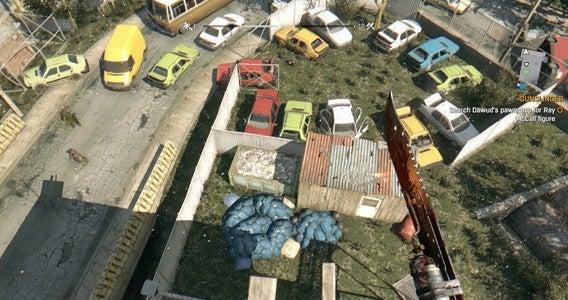
With friends there are two ways you can really capitalize on this high-flying mix of accuracy and terror. The first is a straight up race; set a single point on top of a car or dumpster next to a tower – the first person to get to the very top and jump down safely wins. The pressure of racing regularly had my friends and me messing up even simple jumps, resulting in us smashing unceremoniously into the sidewalk. Which brings me to the second method of enjoying this daredevil action… standing at the target of a friend’s leap and watching them miss.

Keep doing what you are doing… usually

One of the best things about Dying Light is that doing what you enjoy makes you better at it. There are three upgrade paths, and actions related to any of them grants experience in that area. So, the more you engage in the free-running the better you become, allowing you to move more fluidly around the world.

The one exception to this are the Survivor Skill points that you get from doing specific missions and quests. Thus – while you should just enjoy the open-world, zombie-slaying sandbox that is Dying Light – you really need to focus on getting this up to level twelve as fast as possible to unlock the grappling hook. With this new ability in your possession the whole game opens up, allowing you to rapidly ascend all of the games buildings with ease. It is just a shame that it is only for climbing buildings, so you can’t hook zombies towards you like Mortal Kombat’s Scorpion.

Challenges

Once you have another player in the game, Dying Light automatically gives you opportunities to take part in randomly generated challenges. You should always jump at these opportunities. Primarily this is because they offer good experience boosts, allowing you to level up faster and unlock those all-important high level abilities. What makes this even better is that the challenges are often comically broken, with some just having you run a few meters to the goal or kill a solitary zombie. Easy XP for one player, infuriating for the other.

Use it and lose it

In my opinion, Dying Light’s combat is one of its weaker elements. When you get bogged down by enemies, the game’s pace dramatically slows, robbing it of the fluid action that makes it so much fun. To help with this you have a huge range of weapons available to purchase or scavenge as you move through the game. All of these can be leveled up with different abilities and upgrades, but with each weapon having its own durability and a set number of repairs eventually you will lose them.

The thing is, whether you are going out of your way to find hidden EXPCalibur sword, or simply finding a legendary French wrench, there is no point being precious about using them. Use everything. Attach upgrades. Burn through your arsenal like its stats don’t matter because, ultimately, they don’t – you will always find a worthy replacement. Enjoy weapons as you get them because they make the game more fun at that moment. Simple.

And few extras

It doesn’t end there of course, there is plenty more undead entertainment to keep Dying Light shambling on. I loved smearing myself in zombie juice (the “Camouflage” perk) and joining a pack of zombies as they attacked my friend while chanting “one of us”, not technically part of the game but fun none the less. Plus there are dozens of secrets and videogame references littered throughout the world to you exploring and enjoying.

If you have any other tips for players to get the most out of Dying Light put them in the comments below.

Related Stories

Dying Light Review

Dying Light Gamescom Trailer Shows Co-op

Dead Island 2 Trailer is Full of Zombie Gore

Follow me on Twitter: @DoFuss

What to expect at GDC 2015

Every year, game developers flock to San Francisco for the annual Game Developers Conference to discuss how to innovate games and to show off their latest creations. GDC 2015 is next week and should give us a view into what we can expect to see this year and the years ahead.

Although most of the major game announcements are reserved for E3 and PAX, GDC shows us where the gaming industry is headed and what developers are excited about. This year, virtual reality is going to be a focal point of the entire industry. PC gaming is back with a vengeance and if we’re lucky, we’ll get to see what Valve has been up to.

Here’s what you can expect from GDC 2015.

Virtual reality in many forms.

Virtual reality has had a big presence over the past few GDC’s but this is the year when virtual reality really takes off. You can be sure we’ll see the latest version of the Oculus Rift with immersive games to show off the platform. We might also get a look at the final consumer-ready Oculus headset.

Oculus at GDC header

We got a preview of Sony’s Project Morpheus last year and the company should be back to show us its latest version. We haven’t heard many updates from Sony about its VR headset so it’ll be interesting to see what’s changed.

Samsung also has its own take on VR with its smartphone powered headset called the Gear VR. The device uses your Samsung Galaxy Note 4 as a screen to create immersive 3D content. Hopefully Samsung will allow the Gear VR to work with any smartphone, not just the Galaxy Note 4. Google proved this would be possible by handing out a pair of cardboard VR glasses to Google I/O attendees.

Microsoft HoloLens

Last but not least, Microsoft could bring HoloLens to GDC. The company announced its ambitious augmented reality goggles at a press conference last month. Microsoft’s take on VR is interesting as it overlays digital elements over real life objects. While the other headsets immersive you in an alternate reality, HoloLens builds upon your existing reality.

Improved graphics

Graphics are constantly improving across games but this year, we have several companies looking to wow us with new game engines. Valve is rumored to be showing off Source Engine 2, which will help developers easily create great looking games. The first Source Engine debuted more than 10 years ago but games built with it still look great. Source Engine 2 should wow us with stunning graphics for years to come.

Epic Games will be there showing off Unreal Engine 4, which has matured since its introduction last year. Unreal Engine 4 will be exciting as mobile games can be developed using the engine as well. Hopefully future games can look as stunning as the tech demo below.

PC gaming in the spotlight

steamos_livingroom

The console vs PC debate will never die but that’s a good thing. Competition between the platforms pushes developers to innovate games for each platform. This year, expect to see PC game take the spotlight again.

Microsoft will likely show off gaming in Windows 10. The company will also be showing off DirectX 12, a set of tools that game developers can use to build PC games. There were rumors that DirectX 12 would require all new graphics cards but that’s not the case. This is great news for PC gamers who update to Windows 10 as it’ll provide a free boost in graphics performance without requiring new hardware.

Windows 10 is also exciting because it’s the first Windows operating system to work between PCs, phones and tablets. Xbox head Phil Spencer announced Unity would support DirectX 12, allowing cross-platform play between Xbox and Windows 10. With DirectX 12, the barriers between console and PC may finally be broken down.

Don’t expect game releases

Metal Gear Solid V Phantom Pain

GDC has never been about game releases so don’t expect any major announcements. Bethesda already said it’s not attending the event so don’t expect any info about Fallout 4 just yet. The company may save the game’s announcement for E3 or PAX East. However, we may finally get release dates for both Metal Gear Solid V and Star Wars Battlefront. Don’t hold your breath though.

UPDATE: Valve will be bringing its own “previously-unannounced Steam VR hardware system” to GDC 2015, according to Polygon. The company will also bring a finalized version of its Steam Controller and will demo “new living room devices,” which could be more Steam Machines running SteamOS.

Related Stories

Activision reboots Sierra brand with Shiftlings puzzle platformer

Best free Android games

Best PlayStation Vita games

Follow me on Twitter: @lewisleong

Five Apps to Try This Weekend – February 20th 2015

Welcome back to Five Apps to Try This Weekend, Softonic’s weekly show that casts an eye over the last seven day’s digital downloads and gives you our experts’ top picks.

This week our line up contains not one, but two connectivity apps designed to further blur the every fuzzy divide between PC and mobile. The first of these is Pushbullet (Android | iPhone), which allows you to easily share data between devices. This is followed by Chrome Remote Desktop, a plugin that lets you access your home computer on the move.

Default player

<!–
By use of this code snippet, I agree to the Brightcove Publisher T and C
found at https://accounts.brightcove.com/en/terms-and-conditions/.
–>

<!–
This script tag will cause the Brightcove Players defined above it to be created as soon
as the line is read by the browser. If you wish to have the player instantiated only after
the rest of the HTML is processed and the page load is complete, remove the line.
–>
brightcove.createExperiences();

If you want a little more levity for your weekend, we also have two games to try. Both Harold and Evoland are titles that look simple at first glance, but quickly grow in complexity as you move through their increasingly challenging worlds.

Finally, we have a preview of Skype Translator. Still in development, this app now has the ability to translate English and Spanish audio on the fly. It is far from perfect, but does prove an exciting first step towards a Star Trek future. Watch the video for a chance to win one of three preview keys.

Let us know what you think of our recommendations in the comments below, and be sure to check back next Friday for another five apps.

Related Stories

App of the Week: Pushbullet

Five Apps to Try This Weekend – February 13th 2015

Best free Android games

App of the Week: Pushbullet

Softonic’s App of the Week highlights some of the coolest, most unique, and popular apps that have been released for Android, iOS, Windows, and Mac. This week we look at Pushbullet, the app that is breaking down barriers between PCs and mobile devices.

Though it has been out for a while now, Pushbullet is still topping the download charts thanks to its ability to remotely link phones, tablets, and computers.

Pushbullet offers numerous convenient functions that are designed to make your life just that little bit easier. These include easily sharing files between devices and pushing notifications from your phone to your PC. The most recent update even lets you respond to WhatsApp, Telegram, and other messaging apps that you receive on your Android phone from your PC.

When we first saw it we didn’t think we would need Pushbullet in our lives, but now that we’ve used it, we can’t live without it.

Default player


brightcove.createExperiences();

Download Pushbullet for iOS, Android, and Windows PC.

Up to $1 billion stolen in massive bank hack

Security firm Kaspersky Lab revealed a massive worldwide security breach across 100 banks and electronic payment systems around the world, including those in the United States. It is estimated that as much as $1 billion has been stolen using this security exploit, which first appeared in late 2013.

An ‘Ocean’s Eleven’ style hack

A multinational network of cyber criminals from Russia, Ukraine, China and other European countries are responsible for the breach, according to Kaspersky. What’s interesting is the sophistication and patience the hackers exhibited.

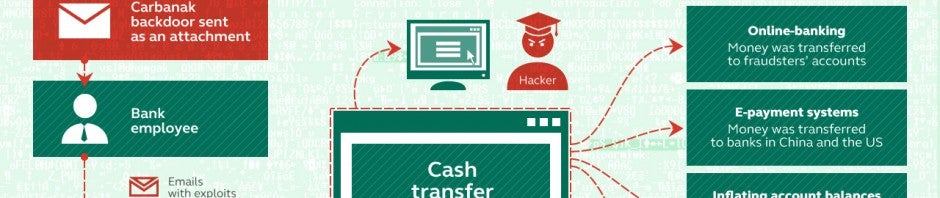
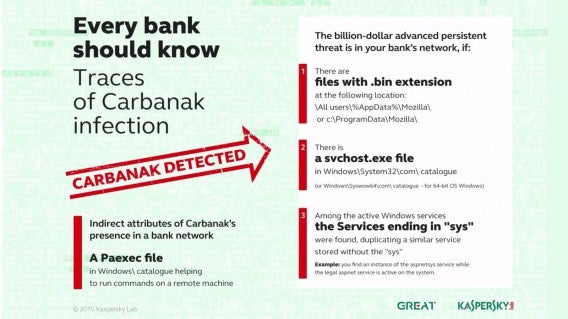
Each attack took an average of two to four months. Using spear phishing, a type of phishing email that targets specific organizations, hackers were able to install malware called Carbanak onto a bank employee’s computer.

Carbanak allowed hackers to monitor the behavior of bankers over months before stealing money. “This allowed the attackers to understand the protocols and daily operational tempo of their targets,” says Kaspersky in its report.

Another method the hackers used to stay under the radar was to limit the amount of money stolen to $10 million from each bank. Kaspersky speculates this limit was dictated by the fact that $10 million is the maximum amount budgeted by banks for fraud risk, hoping banks wouldn’t launch a full scale analysis of its systems. If spread out over 100 banks, the total amount stolen could top $1 billion. Out of the affected banks, 42% are located in Russia and only 10% are in the US.

Carbanak distribution

While most cyber thefts are more smash-and-grab, the methodical nature of this hack is “much more ‘Ocean’s Eleven’”, says managing director of Kaspersky North America Chris Doggett.

Hackers transferred money from banks to personal accounts and even attacked ATMs, scheduling machines to dispense money at specific locations and times where a member of the hacking group would be waiting.

An ongoing attack

How to detect Carbanak

No banks have come forward to acknowledge the hack as of yet. However, a representative from Bank of America responded saying it “was not impacted by Carbanak”. Other banks I’ve reached out to did not respond to my inquiries.

Kaspersky says the attack is still on-going and that it is working with law enforcement to track down the hackers. Security reporter Brian Krebs reported on this vulnerability back in December 2014, explaining how Russian and Ukrainian hackers managed to attack ATMs from inside banks.

The attacks began in December 2013 with peak infections occurring in June 2014. Kaspersky knew about the attack but didn’t release details until now because the investigation remains open. The company was asked by law enforcement not to divulge the information too early into the investigation.

Easy pickings

Although the $1 billion figure is shocking, the methods the thieves used to access banking systems are not. Techniques like spear phishing have been around for a long time. Spear phishing targets organizations with fake emails dressed up to look like legitimate correspondences to get bank employees to download infected attachments like Word documents.

Security money hack header - via 401(K) 2012 on FlickrPhoto credit: 401(K) 2012 via Flickr

Once an employee downloads or clicks on a malicious link, the Carbanak virus gets injected into the computer. Carbanak is what’s known as a RAT (remote access tool), which allows a hacker to see everything on a person’s computer, assume control and even log keystrokes.

After gaining access to one bank’s computers, the hackers then mounted additional spear phishing email attacks against other banks, sending the emails from legitimate bank addresses and impersonating employee behavior.

Banks failed to employ basic security practices

Computer security

Banks could have avoided being hacked if they took basic security measures. RATs are nothing new and neither are the phishing techniques that plague us today.

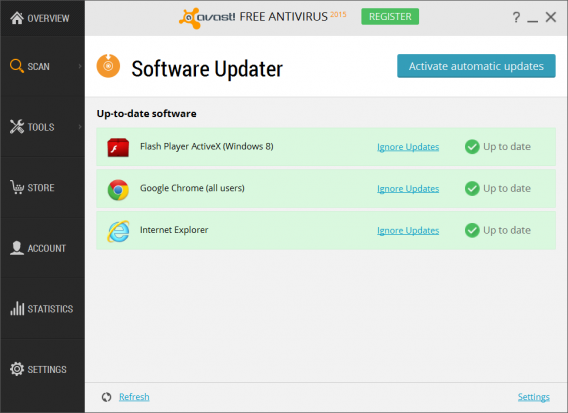
The Carbanak virus was distributed in infected Microsoft Office attachments. Having an updated version of Microsoft Office would have stopped the attack dead since these security vulnerabilities have already been patched.

Providing basic cyber security training for employees could have also led to the detection of spear-phishing emails that housed the infection.

On the whole, cyber security is not being taken seriously by many banking institutions. American Express, Capital One and Citibank all lack basic two-factor authentication, which goes a long way in protecting its customers’ accounts. Head over to https://twofactorauth.org/ to see which banks and services still don’t use two-factor. While banks are looking at increasing security for its customers, some forget to increase security for its own employees.

Out of your hands

I’ve preached basic security practices like using a password manager and enabling two-factor authentication but in this case, there’s not much you can do. The Carbanak attack is specifically targeting banks and not individual accounts, but you should still check your accounts often for suspicious behavior.

“Consumers should check both their online and paper statements on a regular basis for unusual activity. Additionally, consumers should be cautious when downloading attachments and opening links from both from people or institutions they do not know and do know. If an email claiming to be your banking institution seems suspicious, it could be a phishing scam and you should double check with your bank to make sure the email is really from them,” says Avast COO Ondrej Vlcek.

Avast 2015 software updaterAvast Free Antivirus 2015 checks for outdated software

To make sure you don’t fall prey to the same methods of attack as banks affected by Carbanak, make sure to keep your computer updated with the latest software and system updates. Windows users can check for updates in Windows Update and Mac users can check in the Mac App Store. If an email seems suspicious to you, visit your bank’s site directly or give them a call.

You can also use a service like Mint to monitor all of your financial accounts. Mint sends you notifications of any suspicious activity and lets you quickly glance at anything that might be off with your accounts. There are Mint mobile apps (Android | iOS) you can download to get notifications faster.

Unfortunately, corporate negligence for security is commonplace. Target’s breach last summer showed how slow the company ignored early warnings, resulting in 1 to 3 million stolen credit card numbers. Sony Pictures kept their passwords in an unencrypted plaintext file and didn’t encrypt its employees’ emails. Home Depot admitted its 2014 hack was attributed to the company’s policies of meeting security standards, rather than anticipating new threats.

All we can do is wait to hear which banks have been affected and how they’re going to patch their security holes.

Source: Kaspersky [PDF], 2

Related Stories

Anthem health insurance hacked. Here’s how to protect yourself.

Apple silently pushes critical security update to Mac users for the first time

Ignite – carriers could start installing apps on Android phones without your permission

Follow me on Twitter: @lewisleong

Five Apps to Try This Weekend – February 13th 2015

Five Apps to Try This Weekend is Softonic’s new weekly show where we gather recommendations from all of our app aficionados for things to keep your fingers busy from Friday to Monday.

With Valentine’s Day upon us, we are casting our gaze over Microsoft Outlook for mobile. It might seem like a tenuous connection, but I have it on good authority that communication is one of the keys to a successful relationship. Keeping things topical, in celebration of the NBA All-Star Weekend, we also have Angry Bird Seasons whose latest update has introduced a little B-Ball flavor to the popular franchise.

This week’s selection features two other games, the taptasticly addictive aa, and the physics-based construction title Besiege for PC. Finally, rounding off our first show we have the new web-based version of the popular magazine reader Flipboard.

Default player

<!–
By use of this code snippet, I agree to the Brightcove Publisher T and C
found at https://accounts.brightcove.com/en/terms-and-conditions/.
–>

<!–
This script tag will cause the Brightcove Players defined above it to be created as soon
as the line is read by the browser. If you wish to have the player instantiated only after
the rest of the HTML is processed and the page load is complete, remove the line.
–>
brightcove.createExperiences();

Be sure to let us know what you think of our recommendations in the comments below, and check back next week for another five to try.

Follow me on Twitter: @DoFuss
App of the Week: Microsoft Outlook for Mobile

Softonic’s App of the Week highlights some of the coolest, most unique, and popular apps that have been released for Android, iOS, Windows, and Mac. This week we are looking at Microsoft Outlook for mobile, a pocket-sized interpretation of the popular desktop email client.

The US software giant recently purchased the technically accomplished but ugly email app Acompli, and have rolled many of its more intelligent features into its new mobile Outlook. For our money the most interesting of these additions is the focused inbox that brings together mails from all of your regular contacts to help you better organize your busy life.

Add to this customizable gestural controls, the ability to sync multiple cloud storage services, plus a calendar that integrates with your contacts, and you have yourself one of the best mobile email clients we have tried. Check it out in action below.

Default player

<!–
By use of this code snippet, I agree to the Brightcove Publisher T and C
found at https://accounts.brightcove.com/en/terms-and-conditions/.
–>

<!–
This script tag will cause the Brightcove Players defined above it to be created as soon
as the line is read by the browser. If you wish to have the player instantiated only after
the rest of the HTML is processed and the page load is complete, remove the line.
–>
brightcove.createExperiences();

You can download Microsoft Outlook for iOS and Android now.

8 Breathtaking Photos From Places You’ve Never Heard Of

RONDA, SPAIN

Towering 120 meters over the Guadalevin River, the bridge houses a small chamber above the central arch which was allegedly used as a prison for the most nefarious criminals

NESGJA FISSURE, ICELAND

Created by an earthquake, the Nesgja Fissure envelopes its visitors in some of the clearest waters in the world, with spectacular views of the rock formations and the occasional arctic salmon.

SOCOTRA, YEMEN

Standing like umbrellas in the sand, these endemic trees produce distinctly red sap which were thought to be the blood from the ancient dragons.

MELISSANI CAVE, GREECE

The Greeks only realized that the Melissani cave was an ancient place of worship when a partial collapse in 1951 revealed an ancient clay figure depicting Pan Melissani hidden in a small crevice.

LAKE RESIA, ITALY

The only visible remnant of the city, Graun, is a bell tower that marks where the thriving town once stood.

ZHANGJIAJIE, CHINA

With sandstone pillars soaring more than 3.500 ft towards the sky, film director James Cameron was reportedly so amazed with this sight that he modelled the set of Avatar after it.

PLITVICE LAKES, CROATIA

The colors of the Plitvice lakes constantly change from green to blue to grey depending on the angle of sunlight.

CROOKED FOREST, POLAND

No one can really explain why these trees in Poland grew in such a bizarre shape. One popular theory suggests that WW2 Tanks heading into battle flattened the young tree saplings.

Images source: Getty Images

Got your breath back? Now discover 4 apps that will get you to these places!

– Trip Advisor for Android, iOS, Windows Phone or SymbianMillions of traveler reviews, photos and maps. Plan your perfect trip.

– Google’s Field TripYour guide to the cool, hidden, and unique things in the world around you.

World Travel Guide by Triposo – Free offline guide to destinations around the world.

– Google Earth for Android and iOS Fly around the planet with a swipe of your finger.

10 cool tricks for using Google Maps

Google Maps turned 10, so here are 10 cool tricks for using Google Maps that you might not know. And if you already are a master of Maps, share this article with your friends and family, so they will never get lost ever again (hopefully).

Most people know how to use the basic features of Google Maps: write an address or a place name, hit search, and the map will slide to the right place. If you want to see more information, you can click on the location; if you want to check out street view, you drag the little orange dude onto the map. Although useful, these are also pretty basic functions of Google Maps.

Surprisingly, many people don’t go beyond the basics, missing out on some of the most interesting features of Google Maps. The fact that Google hasn’t given them more visibility is probably because they aren’t essential, but they’re still pretty cool! Let’s take a look.

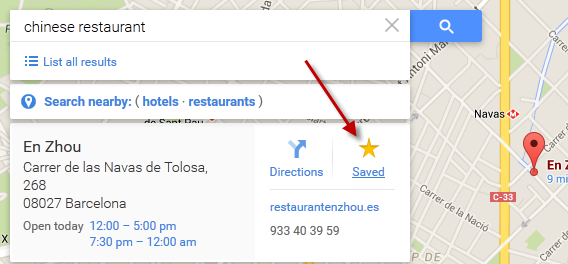
You can save your favorite places in the map to find them later

You took your time to scour the area for the ten nearest ATMs and the best Chinese restaurants. That’s great. If you want to remember them later, the wisest thing to do is to save them on your map. It’s like adding a tack to a corkboard. To save a place on the map, just press the star icon.

You can correct incorrect information on the map

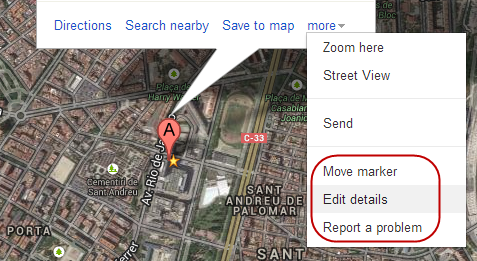
You’ve probably found an error or two in Google Maps: a store that’s on the wrong street, a street name that’s wrong, or maybe a place that’s closed down. Surprisingly, Google Maps will let you correct this information right on the map. When you’re on a location, tap the “more” link and select one of the editing options.

Google Maps edit

You can move the marker up to 200 meters to more accurately pinpoint the location, edit the details of the palce, or report a problem, including duplicates, closures or places that aren’t publicly accessible.

Zoom with one hand (on mobile)

When you’re on your phone, you can control Google Maps zoom with one hand. How? Just tap once and then slide up to zoom out, or down to zoom in.

Google Maps touch and slide

Touch and slide: that’s how the single-handed zoom works (source)

Tilt the map using two fingers (on mobile)

Another move on Google Maps for mobile that few know about? If you slide the map with two fingers, the map will lean forward or backward. This is a cool feature if you appreciate the satellite view.

Google Maps finger swipe

You can see the complete list of Google Maps moves for mobile or tablet on the Google support page.

Save maps to consult them offline

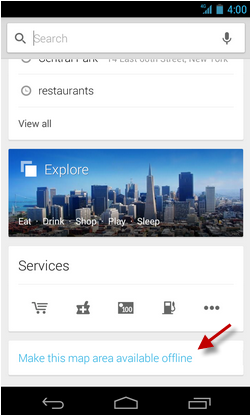
Google Maps lets you download sections of the map to your device, a great feature to use when travelling abroad, especially if you’re not in an WiFi zone ad don’t want to pay ridiculous amounts of money for an international data connection.

Google Maps offline

To download a section of a map to your phone, select an area, press Search, and once you’ve found it, select the “Make this map area available offline” option, or search “ok maps” to save the map.

Google Maps offline

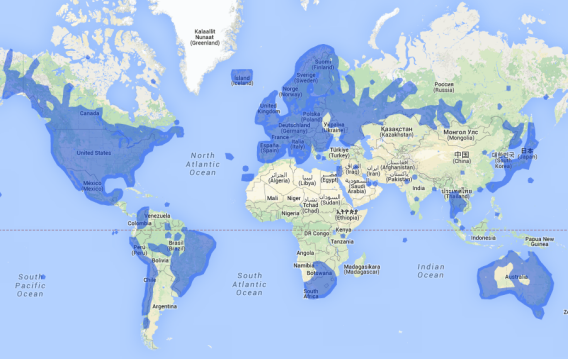
See where Street View is available

Google cars travel the world’s roads daily to take panoramic photos that make up Google Stree View.  But there are still many miles to go.

Google Maps street view

If you want to see where Street View is at this very second, and which parts of the world have been photographed, you can go to the official site, where you’ll find all the information.

Get alternative routes by dragging the markers

Google Maps doesn’t always offer the most logical route. To get a better route, or to force a route through the points you want, drag any points to indicate the way you want to go.

Google Maps alternate routes

Create routes with more than one stop

You can also add more than one stop on your route. Press the “+” button, select a place on the map and you’re done. To reorder the stops, simply drag the markers.

Create more than one stop

See all the recommendations for an area

If you’re all out of ideas but want to explore a particular area, zoom in on a section of the map and get Google’s suggestions on the map by entering a star (*) in the search bar.

Google Maps recommendations

Check your activity on Google Maps

Your Google Maps history is available by going to history.google.com, and then entering the section for Maps.

Google Maps history

Another option is to press the button on the mobile app, which is right next to the search box. One touch, and you’ll see a summary of all your activity.

Google Maps history

Google Maps: easy to use, but with an advanced layer

Like all of Google’s apps, Maps is notable for its simplicity, hiding most of its advanced features to avoid overloading the basic interface. Most of the tricks here only took a bit of curiosity to stumble across, but we’re sure there are plenty more still to be discovered.

Which are your favorite tricks for Google Maps?

[href^=”http://www.google.com/aclk?”] {display:none !important;}

[href^=”http://www.google.com/aclk?”] {display:none !important;}

Activision reboots Sierra brand with Shiftlings puzzle platformer

Sierra Entertainment is back with a new property. The defunct studio was resurrected by Activision in 2014, which acquired the developer back in 2008. Sierra developed popular games like Leisure Suit Larry and published iconic titles like Half-Life.

For a lot of gamers, Sierra brings back fond memories with its iconic logo. Now there’s a new, beautifully rendered high def version and I’ll admit, I felt shivers when I saw the new title animation before my demo for Sierra’s first new property, Shiftlings.

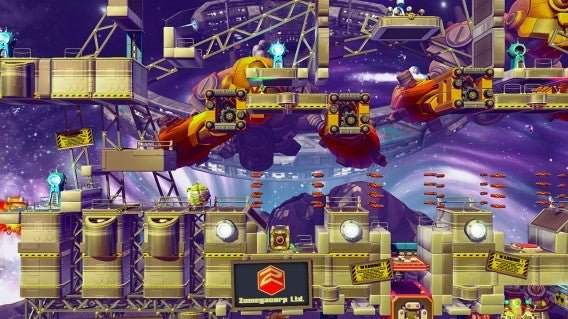
Shiftlings is a whimsical puzzle platformer developed by Rock Pocket Games. Shiftlings follows two silly looking aliens called Purple Plop and Green Goop on a reality TV show set in space that forces them to traverse hazardous levels performing menial tasks for entertainment. It’s entertaining for the audience because there are so many ways for Plop and Goop to die. And you will die in this game. Repeatedly.

Default player


brightcove.createExperiences();

The beginning levels start off easy enough, teaching you how to control two characters at once with one controller. The left joystick controls movement while the right buttons control jumping and switching characters/sizes. You’ll need to figure out how to get through each level by manipulating your characters’ sizes to work around obstacles. Your “fat” character will be heavier and can act as an anchor while the small one squeezes into tight spaces. Holding the top right bumper button will let you move both characters simultaneously.

Each level is beautiful detailed with tons of animations going on in the background. You’ll also hear the show host, Zookod Neutrino, narrate what you’re doing. He’ll give you hints if you get stuck, but in a hilariously condescending manner.

Shiftlings stuck

If you have a buddy, you two can play co-op (local or over the internet) where each of you assumes control over one of the two Shiftlings. While co-op usually makes games easier, it’s the opposite with Shiftlings. Both players can control when to switch from fat to small, making timing based challenges a test of friendship. While normal levels will allow some degree of planning, the frantic bonus levels will truly test your skill and patience.

Shiftlings will come with over 50 levels spread across five unique worlds. Each world has a theme, like dancing robots, and are beautifully animated. For a casual game, Shiftlings looks gorgeous on the PlayStation 4 and will release on multiple platforms. I asked Activision Associate Producer Andrew Petrie if there were plans to release more levels as DLC in the future. He said there are no plans at the moment but that they will wait to see how fans react.

Shiftlings zoomed out

Some fans may be disappointed that Sierra chose a casual puzzle platformer as its first original property to publish after its resurrection but Shiftlings is just the beginning. “Sierra will focus on games that offer unique experiences,” says Petrie. The studio will concentrate its efforts on finding independent games that may have been looked over. Shiftlings started life as a Steam Greenlight project before Sierra picked it up.

It’s a smart move as Activision already has huge AAA titles such as Call of Duty. Think of Sierra as the company’s skunkworks in charge of experimenting with games with less mainstream appeal. Sierra can be bolder with the games it publishes and develops. For dedicated fans, there will be a new King’s Quest game expected to launch in fall 2015 .

Shiftlings launches this spring on PC, PlayStation 4 and Xbox One for $15.

Source: Rock Pocket Games (Shiftlings)

Related Stories

Best PlayStation Vita games

App of the Week: Crossy Road

Play over 100 PS3 games for $20 a month with PlayStation Now

The best mobile games of 2014

Follow me on Twitter: @lewisleong