Android Wear vs Apple Watch

Google announced Android Wear in June 2014 with the LG G Watch and Samsung Gear Live as the first available Android smartwatches. Later that year, the Motorola 360 introduced the first Android Wear watch with a round bezel. Now there are six watches in both square and round styles with varying prices.

The Apple Watch opened pre-orders at midnight April 10 and will be released April 24, 2015. There are three versions in two different sizes, 38mm and 42mm. Now both platforms finally go head to head.
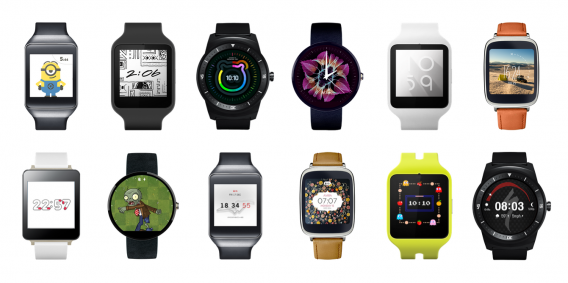
android wear faces

Android Wear offers six different watch styles from different manufacturers, but the operating system is locked down by Google so there isn’t a difference switching from one watch to another. Each watch is platform exclusive. Connecting Android Wear to an Android phone requires Bluetooth and the Android Wear app.

The Watch OS is a new Apple operating system that will easily connect with iOS because of Apple’s closed platform. This gives Apple Watch easy connectivity because there are fewer devices it needs to connect with.

But what are the differences between Android Wear and Watch OS?

Interface

Both smartwatch platforms use touch with small differences. Android Wear is a touch-based operating system where you manipulate cards by swiping in different directions to interact or dismiss information. Tapping the screen starts actions like voice replies for messaging or controlling music.

Android Wear also supports “Ok Google” voice commands to perform actions in compatible apps. Android Wear interacts with apps on your phone and there are only a limited number of locally installed Android Wear apps.
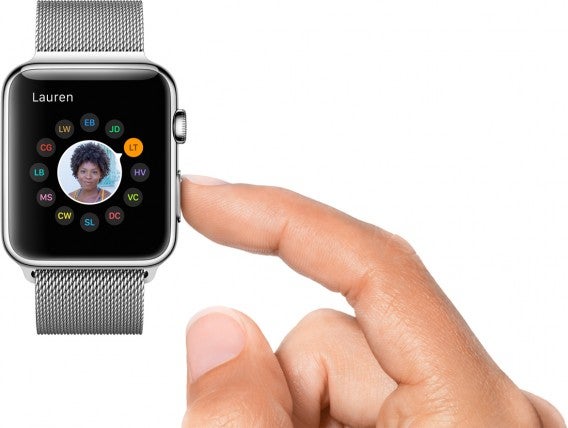
apple watch friends

Watch OS uses a combination of touch and physical controls. The Digital Crown on Apple Watch is used for scrolling and zooming. This is designed so your finger isn’t blocking the screen. Having the crown also helps traditional watch wearers feel at home. There’s also a side button used to access Friends or the people you contact frequently. You can send sketches drawn on the screen, send tap unique tap patterns, and your heartbeat

Touch controls are still used to interact with apps Instead of cards, Watch OS uses floating icons that you can swipe around. Apple’s Force Touch is a secondary input for additional controls. The combination of the crown and touch control could make navigation confusing for users.

Watch faces

The basic functionality of any smartwatch is to display the time. Both Android Wear and Apple Watch have this and both watches have a selection of different watch faces. Apple limits customization to the included watch faces without the option to install new ones unless they’re included in a Watch OS update.

Android Wear has stock watch faces, additional watch faces designed by manufacturers, and third party watch faces. If you don’t like the included watch faces, you can search Google Play and find a watch face that you like. Google requires that Android Watch faces meet specific guidelines so you’re getting an approved watch face.

Notifications

The common use of smartwatches is to show notifications. Regardless of what Google and Apple say about the additional features, notifications are the most common action. Both Android Wear and Apple Watch send notifications and give you the option to block notifications from specific apps.

Depending on how many apps are installed on your phone, you could be getting notifications from a bunch of useless apps. Android Wear is quick to tell you when a notification arrives and you can mute your phone when connected to Android Wear so your phone is silenced.
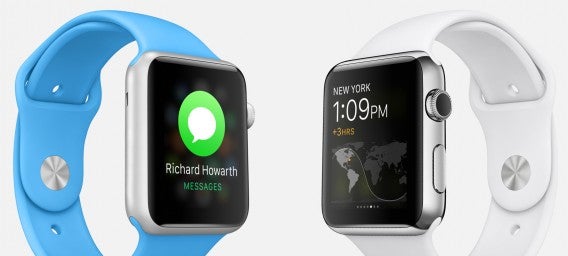
apple watch

In theory, Apple Watch should also have this function. If you’re connected to your Apple Watch, your phone shouldn’t vibrate or play a tone and only let you know through the watch. But those first few days, you should be prepared for a lot of irrelevant notifications.

Voice Control

Android Wear uses “Ok Google” to activate voice commands. You can give simple commands like calling someone, getting directions, and finding answers to simple questions with Google Search. One great feature is “Play Music,” which will start your default music player. You can even specify an artist, though the results can be hit or miss.

Voice is also used to reply to messages. There is a “Reply” button on compatible apps and after tapping it, you speak your message. Android Wear will register the message and send it back. It’s great if you’re driving and need to send a quick message.

Apple Watch uses Siri, activated by saying “Hey Siri.” You can record messages, get directions, or view your events for the day. There are more commands like finding out the time.

Voice control is still a hit or miss. When it works, it’s a nice feature. But in practice, it can actually add an extra step.

Fitness

Another “big” feature for smartwatches is recording health data. Unfortunately, no one has it perfect. Some Android Wear watches can track information like daily steps, heart rate, or calories; but this information isn’t always precise.

Compatible apps link with Google Fit (Google’s health app), but collecting data might require a third party product like a FitBit. Another problem is some watches lack sensors needed for more precise information. Another issue is that these apps still need connectivity with your phone, making exercise more annoying by requiring your phone.
Apple-Watch-buff-dude

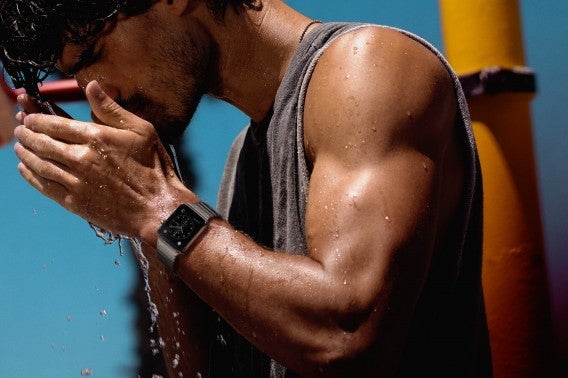
Apple Watch’s Health sensors monitor your heart rate and uses the accelerometer to measure movement, steps, and calories burned. When connected to your phone, Apple Watch can also use GPS for bigger workouts not tracked in steps like cycling.

But like Android Wear and Google Fit, Apple Watch and Health may only pull data from other apps into its database. And some apps require a connection to the iPhone for the data connection. This makes it difficult to go out to exercise and leave your phone at home.

Mobile payments

Both Android and Apple support NFC payments. On Android phones, you use Google Wallet to pay at participating stores. There’s no payment system built into any of the Android Wear smartwatches.
apple pay

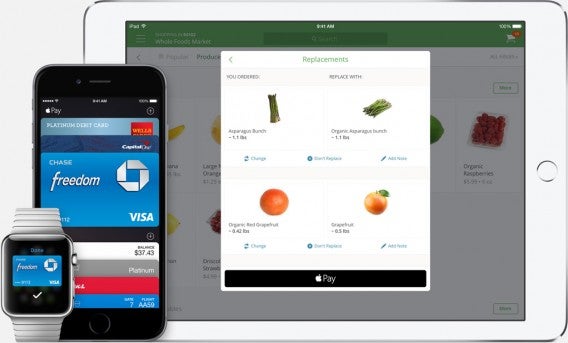
Apple is one step ahead. The iPhone 6 and iPhone 6 Plus support NFC for in-store purchases. The Apple Watch also has NFC and you don’t even need your iPhone to use it. One extra bonus is that you can use Apple Pay on the Apple Watch paired with a wider selection of iPhones including the iPhone 5, 5c, 5s, iPhone 6, and 6 Plus.

How about software?

Both Android Wear and Apple Watch have similar core features. The operating system is designed with two different perspectives. Android Wear is an extension of Google Now. It’s easy to jump from your phone to Android Wear if you use Google Now and its curated data.

Watch OS is designed as an extension of iOS. It contains a lot of similar features, like Siri, and uninstallable apps you rarely use. iOS users will be comfortable jumping into Watch OS because it has a similar design and interface. The difference is how you interact with the screen using the crown and touch controls.

But the key to each wearable is third party app support. Without apps, there’s no reason to buy a smartwatch. Most apps don’t need much updating to work with either platform.
It’s the smartwatch-specific functions that make the watch usable. Communication apps are prime examples of convenience. Replying with your voice is easier than pulling your phone out to type out a message.

Social networking apps provide quick glances on what’s happening. But most people don’t need their Twitter feed on a smartwatch. This is an area where developers haven’t figured out how to properly integrate social features. A majority of the time, it’s a notification or extension of features from the phone app.

Developers are thinking about smartwatch uses

BMW and Hyundai released apps to connect Android and iOS phones to its cars. These apps extend to smartwatches, giving you the ability to remotely start the car or lock the doors. As more cars implement this technology, smartwatches could replace the car key. The launch of Android Auto and CarPlay could see growth even faster.
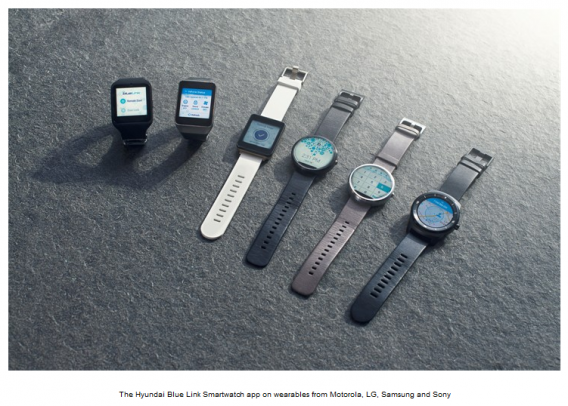
The connected home is also another area that companies are starting to move into. It’s not a new trend, but a trend that’s building more momentum. Philips Hue bulbs can be controlled through an app. Nest has an Android app that controls the temperature in your home. Honeywell Lyric is another thermostat controller compatible for Apple Watch. Lutron Caséta is another light control app that you can control through Apple Watch.

Another avenue is using the security built into devices to replace aging technology. SPG for Apple Watch is Starwood Hotels & Resorts’ replacement for the room key. You use Apple Watch to unlock your door.

Innovation shouldn’t be making new uses for the smartwatch, but how it can replace existing technology and make it better. The adoption of Android Wear and Apple Watch is based on an artificial need. It can’t replace your phone and acts as a bridge for information.

With Apple in the smartwatch arena, expect app development for smartwatches to increase. The company is great at pushing companies to adopt new technology much faster than Google. Since both major players are in the game, there will be more innovations and improvements.

That may be a positive and negative because like phones, you may need new hardware to take advantage of the newest features.

Related Articles

Apple Watch: everything you need to know

Everything you need to know about GTA V on PC

Best free apps for Samsung Galaxy S6

Follow me on Twitter: @chrislikesrobot

Is the Apple Watch right for you?

The Apple Watch is available for pre-order but should you get one? We’ve already covered reasons why you would want a smartwatch and why you don’t need one.. If you’re thinking of getting the Apple Watch, you want to know if it’ll truly be useful. To help you decide, these are the types of people that would benefit the most from getting the Apple Watch.

The Business Person

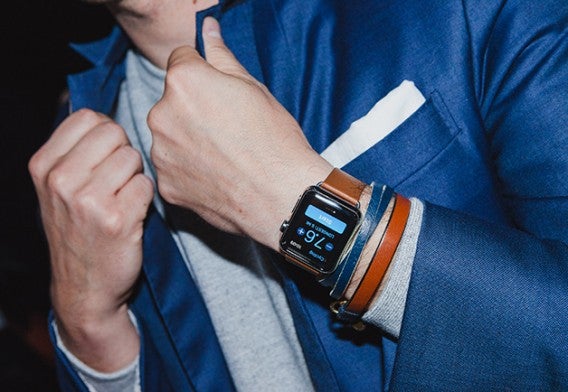
GQ  Apple Watch photo shootPhoto credit: GQ

For business people, time is money and the Apple Watch could save you time throughout your hectic day. The ability to receive and act on notifications from your wrist may be enough to convince some you of its worth. But the Apple Watch can do so much more with app developers flocking to the platform.

The Apple Watch can help you stay on top of the news, check your stocks, take care of your boarding passes, and much more. There’s the Salesforce Wave app, which helps you stay on top of your CRM. If you’re staying at a Starwood hotel or resort, you can use the SGP app to check in and unlock your room’s door. Calendar notifications, Maps navigation, and Passbook make the Apple Watch your personal assistant.

You can also stay on top of different time zones with different watch faces and the built-in World Clock app. Apple definitely thought about the timekeeping aspect of its smartwatch, offering a moonphase watch face that pay homage to haute horology.

Last but not least, you can use Apple Pay to pay for your business expenses without taking out your wallet at the store.

The Fitness Buff

Out of the box, the Apple Watch works great as a fitness tracker. The watch contains GPS to track your distance, a heart rate sensor, and an accelerometer for measuring your body movement to calculate calories burned.

The Activity app for the Apple Watch acts as a hub for all your fitness data. The interface shows concentric circles that shows your progress for your goals throughout the day. To make the fitness features appeal to more people, Apple integrated reminders to stand and move, something desk-dwellers like me, forget to do.

Apple also has its own Workout app, which helps encourage you throughout your workout. it tracks real-time stats like time, distance, calories burned, and speed for a lot of different activities like cycling and running. The Apple Watch is water resistant too so you don’t have to worry about sweating all over it. However, you’ll want to leave the watch on the sink when you shower.

These are just the features and apps Apple included with the watch but there are other fitness apps too. At launch, Strava has an app that lets you track your cycling and Lifesum has an app to track your food intake. Runtastic also has an app that can replace Apple’s own fitness apps.

The Tech Nerd

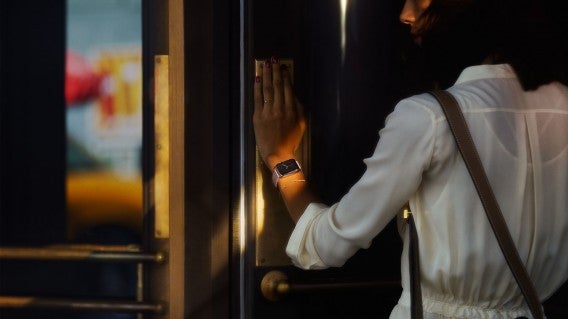
Apple Watch door

Although Apple worked hard on trying make the Apple Watch appeal to the masses, tech nerds are definitely one of the main demographics for any smartwatch. We’ve all dreamed of being like Dick Tracy, taking calls on our watch.

With more apps supporting the internet of things, you can be sure app developers will figure out innovative ways to use the Apple Watch. For example, Honeywell Lyric lets you control the lights and thermostat from your watch. On a hot day, you can set the AC to run half an hour before you return so you’re greeted to a cool home. You can create presets for controlling things in bulk for times when you’re on vacation.

You can even remotely control select cars using the Apple Watch. Apple partnered with BMW to create an app that lets users control their i3 or i8 cars from their wrists. The app also lets owners see the status of their vehicle and can even let you remotely control the door-locks. Like the Honeywell app, the BMW iRemote app can let you set the cabin temp before you hop in.

The Student

Apple-Watch-buff-dude

OK maybe students don’t really need the Apple Watch but it’s definitely a nice luxury to have. In addition to being a fitness tracker, students will find its subtle notifications useful for staying on top of their classes, social networks, and news. Having notifications on your wrist means you won’t have to blind fellow students in a dark lecture hall with your phone’s screen.

With the Evernote app, you can quickly jot down reminders and notes. Don’t worry, you don’t have to type on the Apple Watch’s tiny screen. Instead, you use voice dictation to create notes and reminders. The app also shows any content related to an upcoming meeting.

For students who don’t have a car, apps like Maps and Citymapper are great for getting you where you need to go. Citymapper shows you public transit around you and gives you the fastest route. The app is limited to specific cities but Maps works everywhere.

The Apple Watch will also help students keep track of their finances with the Mint app. You can track what you’re spending your money on, create budgets, and set savings goals.

The Social Peacock

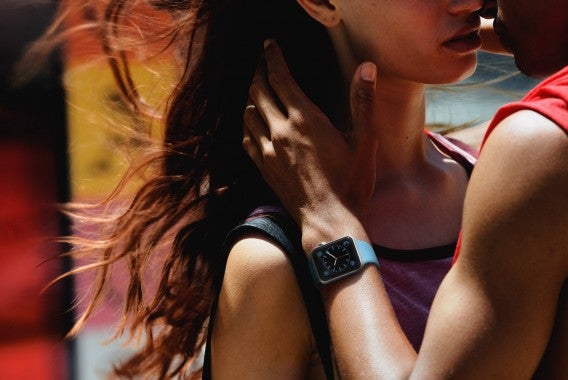
Apple Watch couple

Social Peacocks won’t need any apps at all to get utility out of the Apple Watch. While the base Apple Watch Sport model starts at a reasonable $350, you can show off to your friends by getting the $10,000 solid gold Apple Watch Edition version.

While most people won’t give your $10,000 Rolex GMT Master II another look, everyone knows about the Apple Watch. On top of that, everyone knows the gold Apple Watch costs $10,000, giving you instant recognition for your wealth.

And when your Apple Watch becomes obsolete in a year, you can upgrade to another solid gold Apple Watch 2 for another $10,000.

For more about the Apple Watch, check out our Apple Watch hub for everything you need to know.

Related Stories

Best apps for the Apple Watch (so far)

Apple Watch: everything you need to know

11 reasons you will be wearing a smartwatch this year

5 reasons I won’t get a smartwatch… yet

Follow me on Twitter: @lewisleong

Rockstar Editor: Making movies is easy

Even though there are many ways to capture game video, an in-game editor can offer more options for custom videos. Grand Theft Auto V includes a PC-exclusive video editor called Rockstar Editor. It lets you record gameplay clips while playing and can help you edit the captured footage to create movies.

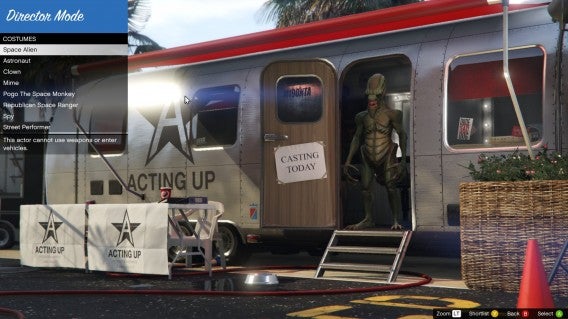
Rockstar Editor also includes Director Mode, allowing you to customize options to record and create unique videos within the GTA V engine. You still use Rockstar Editor to edit these clips, but now you are no longer limited to editing footage captured during story mode gameplay.

Clips for days

When you record in Grand Theft Auto V, the game collects clips. The game doesn’t record long, unedited video making it much easier to edit. The action is centered around the character you’re using, but the entire area is recorded so NPCs and traffic can be used in your films.

Rockstar Editor

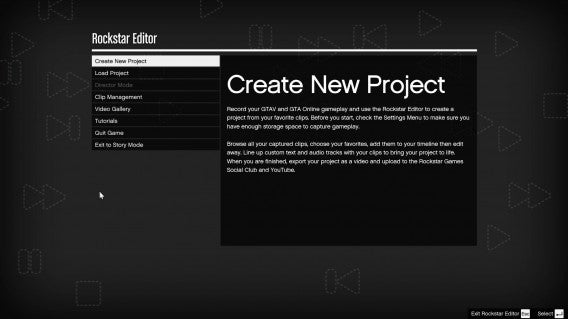
Depending on how long you record, you’re going to have a lot of small clips you have to browse through to find the exact section. When you enter the Rockstar Editor menu, you have the choice to “Create New Project” or “Load Project.” If you’re planning on starting Director Mode, you have to be in story mode to access this option.

After you start a project, you have to add a clip using the “Add Clip.” This lets you import recorded videos from the game. You choose the clips you want to use and arrange them in a rough timeline. When you want to start editing a clip, you press Enter to begin editing.

Default player


brightcove.createExperiences();

A lot of editing options

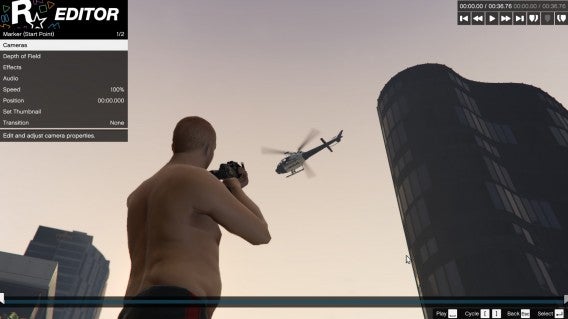
After Rockstar Editor loads the selected clip, here are options for manipulating the camera, adding depth of field, effects, audio, and speed. You’ll spend a lot of time in the camera menu to change the camera, focus on different subjects, and moving the camera to get the perfect shot. You can even add camera shakes to add more impact.

I created a couple of short videos using the “Free Camera.” This lets you move the camera around the area. You can’t move the camera anywhere you want though; you are limited to a small area but it was never a problem to get a good angle. If you’re worried about cuts between scenes, you can set a “Blend” option to make cuts more seamless. It’s really up to you as the editor on what style you’re going for.

Rockstar Editor

Under “Effects” you can add different filters and adjust the intensity, contrast, saturation, and brightness. The variety of filters is impressive but customizing the levels can take some time. In the “Audio” section, you can adjust the levels of the sound effects, music, or dialog.

Rockstar Editor also lets you play with the speed of the clip to add slow motion or speed up the action. Once you’re done editing a specific section, you place a marker which separates that specific edit from the rest of the clip. Then you repeat with a new section. You don’t have to use an entire clip and can adjust the clip length by using the sliders in the time bar.

You repeat the process until you’ve finalized your entire video and then add music. Rockstar Editor lets you use some of the music from radio stations in the game but you can also add more thematic scores, though those options are more limited. Text can be added if you want and they act as an overlays on the video. It’s great for creating title sequences.

After you’ve completed the entire project, you can either save it to use later or export it. Exports are the complete video files are shown in Rockstar Social Club. YouTube uploads are the only other option. There’s no way to get local files of your Rockstar Editor videos.

Director Mode

Director Mode is accessed through story mode. The purpose of Director Mode is to give you control of the game to create your own short movies. When you start Director Mode you choose a character to film. As you play the single player campaign, you unlock more characters to use. But if you jump right into Director Mode, you’ll see a wide cast of NPC characters already unlocked.

Rockstar Editor

Once you choose a character, you’re dropped into the map. From there you can bring up options and control things like time of day or weather. You also have access to some cheats like invincibility, explosive bullets, super jump, and wanted level. It’s a good set of options to let you stage your scene. You can reload options in-game, but any time you reset, you have to restart your video recording.

You record clips the same way, but now you can really work on getting a specific shot without worrying about the police coming after you when you create a massive explosion. Director Mode is the first step in creating your movies and Rockstar Editor is how you edit your story.

Expect impressive machinima

Rockstar Editor is a great tool on its own, but the creation tools in Director Mode gives Grand Theft Auto V a whole new set of features. It helps to have some knowledge of video editing before you go into Rockstar Editor, but there are tutorials available in the menu.

You should save often because during my time editing, the game froze and crashed on me after a lot of edits. If you’ve ever wanted to try making a digital short movie, it’s possible with Rockstar Editor. Rockstar Games released a very compelling filmmaking tool with an excellent game engine. The rest is up to your imagination.

Related Articles

Everything you need to know about GTA V on PC

Why video games are good for kids (and you too!)

Killing Floor 2 is bloody and wonderful

Follow me on Twitter: @chrislikesrobot
It’s good to talk: top tools for business communication

We all have to work (well, most of us), and we all have to communicate with our colleagues (not always a good thing). But today’s office environment is a very different beast compared to that of even ten years ago. With flexible, home-based working on the rise, as well as the need to better communicate with colleagues across the globe, we need tools to be able to productively work together.

We often use a number of fragmented (and not entirely secure or business-friendly platforms) to fulfill these different needs. But a plethora of corporate communication tools have been developed that aim to boost efficiency, improve the way we (virtually) talk to each other, and make life easier. Here are a few that we think will help improve your workplace communication.

Slack

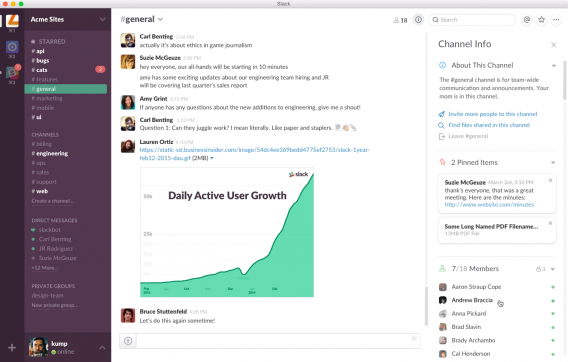
Slack is a platform for team communication, which pulls all internal conversations and communication into one, searchable place. This gives you a view into conversations between your co-workers, as well as immediate access to bugs, customer service tickets, and document sharing.

According to a Slack spokesperson: “Everyone needs to have visibility into what everyone else is working on to make things more efficient. Teams transition to Slack from a highly fragmented collection of tools they’ve cobbled together to build their own communication fabric: email, IM, Skype, SMS/iMessage, enterprise social tools, intranets, project management software, etc. Pulling all of those disjointed conversations into a single, organized, and searchable view radically increases transparency across teams. This ambient awareness means there’s less of a need for time-consuming stand up meetings, status reports, etc.

“Slack’s channel format allows you to quickly go from asynchronous to synchronous communication. When it matters, the real-time response cannot be undervalued, but Slack’s highly customizable notifications allow you to jump in and out when you’re needed. The centralized and searchable archive of messages is something that’s available not just to people on the team today, but the ones who start next week or next month or next year. Onboarding (new employee integration) ramp up times are dramatically reduced.”

Glip

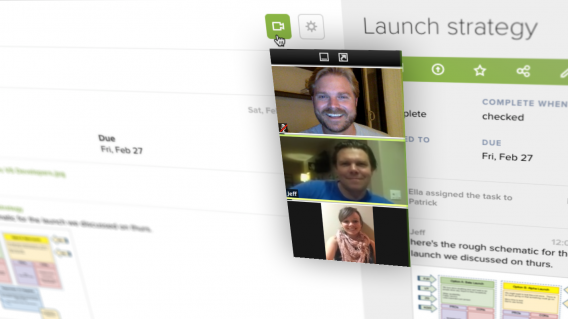
Glip is a business messaging platform with built-in productivity tools. It starts with real-time chat from your desktop, tablet or mobile phone, and builds business tools such as shared calendars, distributed task and project management, video conferencing, and file sharing, into this stream.

Peter Pezaris, founder and CEO at Glip, explains the benefits: “By embedding the productivity tools in the stream, you’ll not only get things done more quickly and efficiently, because it’s so easy to transition from conversation to creation, you’ll start tracking all of the tasks that are probably slipping through the cracks today. We like to say that Glip is so easy, you’ll actually use it. In addition, because things like tasks, meetings and files are native first-class objects in Glip, powerful interactions become not only possible but effortless. Attach an agenda to a meeting invite; associate a set of tasks to an image to request changes; or @mention a person, a team, a file, a task or any other object to create associations between units of work.”

The company also recently launched Glip 2, which Pezaris says come with speed, stability and usability improvements, along with some often-requested features such as recurring tasks, project templates, advanced keyboard shortcuts, and an all-new task management application.

Flowdock

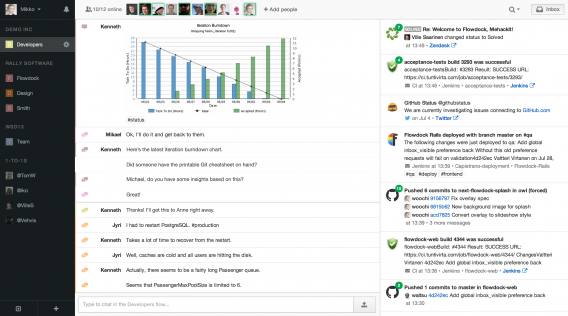
Flowdock is a chat tool for teams, which integrates with productivity apps to not only bring visibility into discussions, but work activity as well. Some of the unique features that this program offers include:

  • A team inbox. When a team integrates their tools with Flowdock, activity from their tools is combined to form a team inbox. The team inbox becomes a window into the team’s work, allowing them to react to work activity in real time.
  • Threaded chat. By being able to reply directly to a message, teams can have multiple conversations going on at once without confusion.
  • Tagging. Combined with search, Flowdock’s tagging capabilities help teams not forget anything.

HipChat

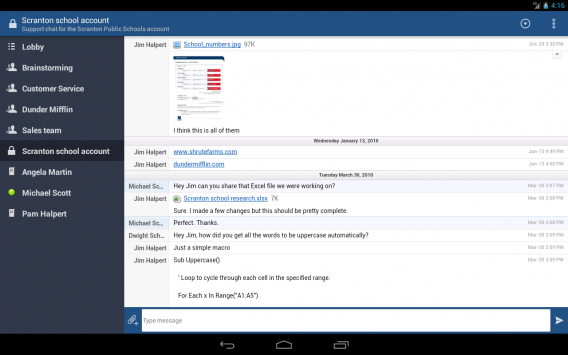
While HipChat may be primarily billed as a group chat application (for Windows, Mac, Android, iOS, and Linux), it’s much more than just that. For free (yes, at no cost), you get group chat and file sharing for an unlimited amount of users. For a monthly fee, you can also share your screens and make video calls , plus it integrates with a slew of other productivity tools such as JIRA (both are owned by parent company Atlassian), Google Hangouts, MailChimp, Twitter, and WordPress.

Yammer

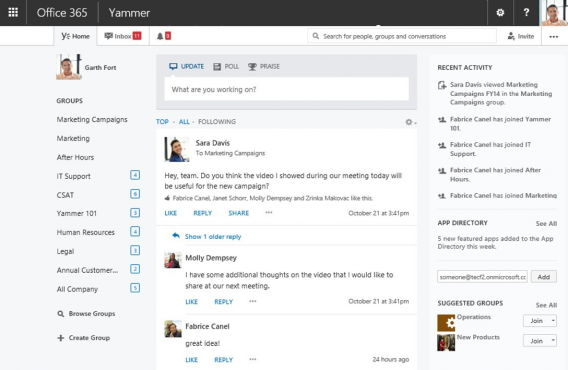
Yammer is Microsoft’s Facebook-style social network for businesses (which it bought rather than built itself). It’s user interface is inspired by Mark Zuckerberg’s social network, with a “news feed” with updates from your colleagues taking center stage, surrounded by information on your groups, recent activity, and a pop up chat window. It also offers cloud-based document storage and allows you to find colleagues that have the skills you need for a certain project through the search menu, thus aiding collaboration.

Facebook at Work

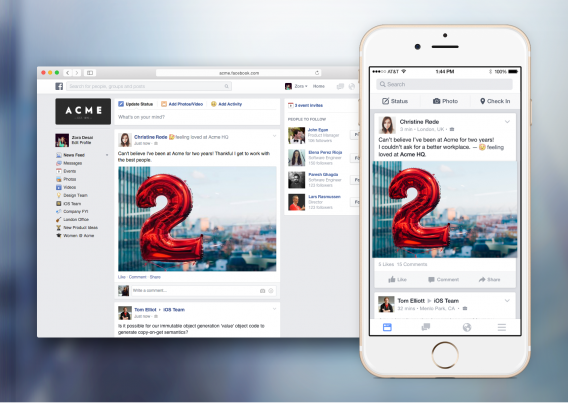
It’s hard to evaluate exactly how successful or good Facebook at Work will be as it’s currently only in beta and available to a limited amount of companies. Much like the consumer-focused main app, Facebook at Work has a news feed, the ability to send messages (to individuals and groups), groups, and events. You can set up a separate profile for the work option, meaning you don’t need to mix your personal and professional lives, and all the information you see will be specific to your company and what your colleagues are sharing (re work).

Which communication tools do you use in your organization? Let us know in the comments below.

Related Articles

Best free office suite

What’s new in Office 2016 for Windows

Facebook at Work: should the social network quit while it’s ahead?

Follow me on Twitter: @karenmccandless

Is Tidal worth it?

Tidal may be late to the streaming music game but it’s got a lot of hype surrounding it thanks to Jay-Z and his army of musicians. The service is making waves because it promises to help musicians control and distribute their music. For more about what Tidal is and why it’s important, check out my break down here.

But none of this matters if the service isn’t any good. Is Tidal worth switching to, or is Spotify too big of a beast to take down? First, let’s take a look at what Tidal offers.

Exclusive content

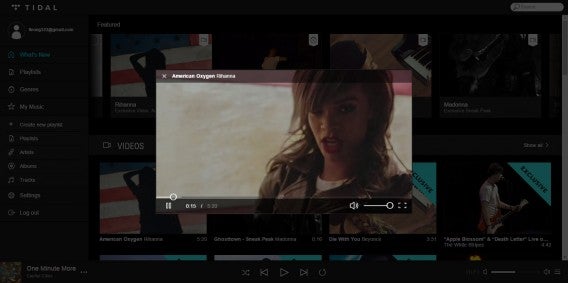
Tidal exclusive Rihanna

One of Tidal’s biggest selling points is its exclusive content. Rihanna released her music video for “American Oxygen” exclusively on Tidal last week. In addition to music videos, Tidal hopes to offer highly curated playlists and interviews.

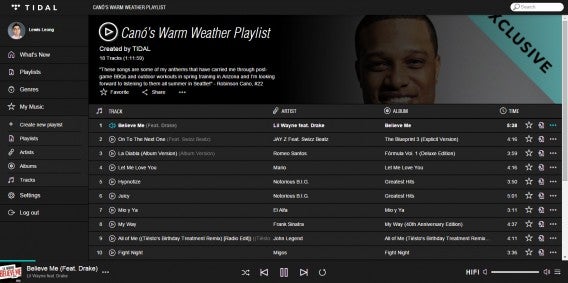
The exclusive playlists I listened to were good and came from Tidal’s staff as well as celebrities like deadmau5, Robinson Cano, The Hives, Jack White, Jay-Z, and many more. Exclusive playlists are a nice touch as it lets artists highlight their influences but they’re limited to mostly mainstream artists.

Tidal exclusive playlist Robinson Cano

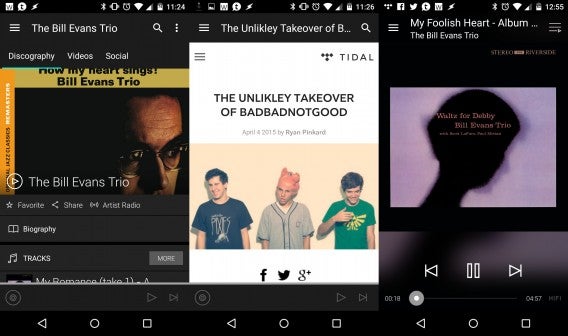
I also stumbled upon some exclusive interviews like the one with BADBADNOTGOOD but its hard to find written content on the Tidal service after they’re removed from the featured carousel. There’s a separate website, read.tidal.com, where you can read all the written content from Tidal’s nameless editors. I wish there was a dedicated section in the app for written content.

Music library

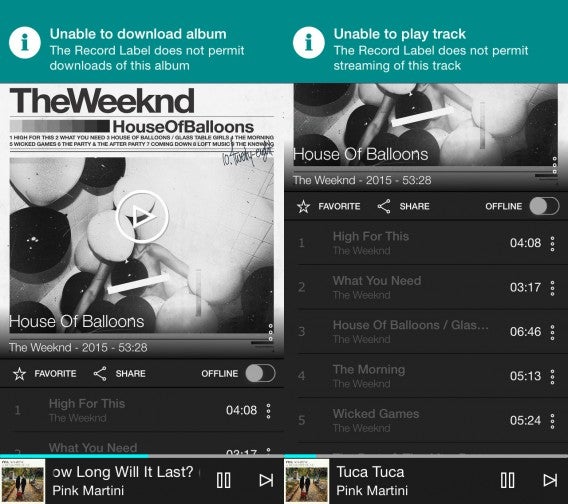
The Weeknd on Tidal

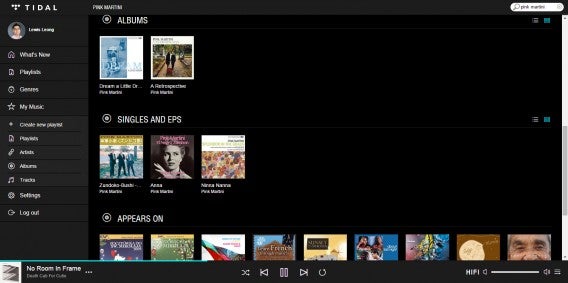
One thing was clear after using Tidal for a week: its music library isn’t as good as Spotify’s. Searching through the Tidal’s catalog revealed many gaps. For example, I looked up The Weeknd and was surprised to find that some of his albums couldn’t be streamed or downloaded because of his label. Radiohead’s King of Limbs album is missing too, but is available on Spotify. I was also disappointed that most of Pink Martini’s albums were not available on Tidal.

And that’s really the story of Tidal’s music offerings. Searching for specific albums, I was repeatedly disappointed at what was missing from its catalog. I compromised and listened to something else and fell into a rhythm of bitter acceptance. As Jay-Z and other Tidal investors wage war against other streaming services, this problem will only get worse for everyone.

Tidal music library

Spotify also has a lot of missing content due to licensing issues. Taylor Swift famously removed her discography from the service because of low revenue. Radiohead’s In Rainbows is missing from both Spotify and Tidal.

If you listen to mostly mainstream artists, Tidal’s library is actually quite good. For classical music lovers, Tidal’s library leaves a lot to be desired in terms of availability and organization. There’s a ton of classical content but it’s hard to find the specific album you’re looking for amongst the many compilation albums.

I compromised and listened to something else and fell into a rhythm of bitter acceptance.

But when you’re paying the same price for Spotify, which has the bigger library, it really doesn’t make sense to jump to Tidal. It’s even worse when you factor in the $19.99 per month high definition plan for a such a limited library.

Music discovery

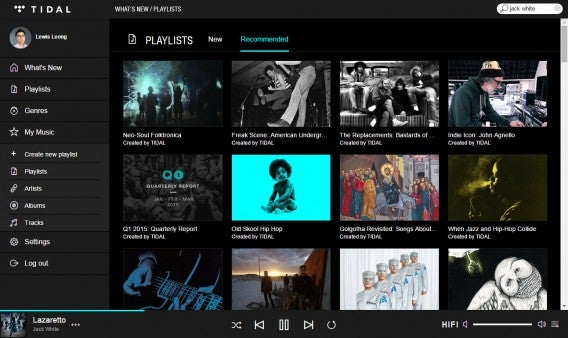
Tidal recommended playlists

What really makes a music streaming service valuable is music discovery. Tidal helps users discover new music through its featured content at the top of the app and website. There are also curated playlists and a hidden radio feature. The playlists are good for looking at what musicians are listening to but it’s not really customized for you. Songza offers better curated playlists based on mood.

Tidal’s radio feature can be accessed by playing a track and starting a radio station. I wish Tidal had a radio section in its app instead of hiding the feature in a hidden menu. And of course, you can browse music by genre.

Tidal is a solitary listening experience.

You can favorite different artists, albums, and tracks to help Tidal figure out what to recommend to you. I found the service’s recommendations quite good, showing me artists that I haven’t heard of before.

The biggest problem with Tidal’s music discovery is that it doesn’t have any social community. Spotify allows you to share and curate playlists with your Facebook friends. Collaborative playlists are a great way for friends to share music but Tidal is a solitary listening experience.

Sound quality

Tidal mobile audiophile set up

NERD ALERT. Here’s the equipment I used to evaluate sound quality.

Headphones: Sennheiser HD 600, AKG K550, Grado RS2i

Speakers: Paradigm 3se

DACs: Fiio E18 Kunlun, Schiit Audio Modi

Amps: Fiio E18, WooAudio WA3 with upgraded tubes

For most people, Spotify sounds pretty good, allowing for up to 320kbps Ogg Vorbis for streaming and offline listening. For double the price ($19.99), is Tidal’s high def subscription worth it? It depends on factors like your audio setup and if you know what to listen for. If you’re listening to music using the earbuds that came with your phone or a pair of Bluetooth headphones, you won’t notice a difference.

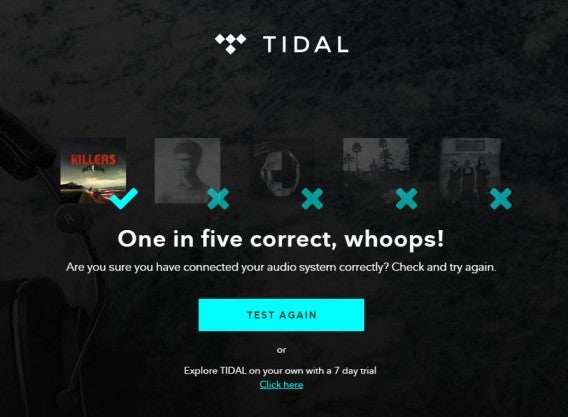
Tidal test failure

Tidal provides a flawed five track test to see if you can distinguish between 320kbps AAC and 1411kbps FLAC tracks. I failed and aced the test multiple times, even though I have a very good audio setup. A better test to take is Philips’ Golden Ears Challenge, which does a much better job at explaining what to listen for.

Instead of trying to see if you can hear a difference with Tidal’s Hi-Fi streaming, I recommend signing up for the 30 day try and see if you miss the sound after going back to compressed audio. The change is stark when your ears have been spoiled for a while.

If you’re listening to music using the earbuds that came with your phone or a pair of Bluetooth headphones, you won’t notice a difference.

If you’re a discerning listener, you will hear a difference with Tidal’s Hi-Fi streaming and downloads. Listening to 320kbps lossy audio is like looking through a hazy window. Listening to 1411kbps FLAC is like looking a window after cleaning it with Windex. Everything is a little bit clearer and effortless.

But in exchange for good sound, you give up a lot of space. I downloaded eight albums from Tidal onto my Moto X, which took up 3.16GB. There’s also the question of if you can hear a difference using a mobile phone instead of listening through the browser on your home hi-fi setup.

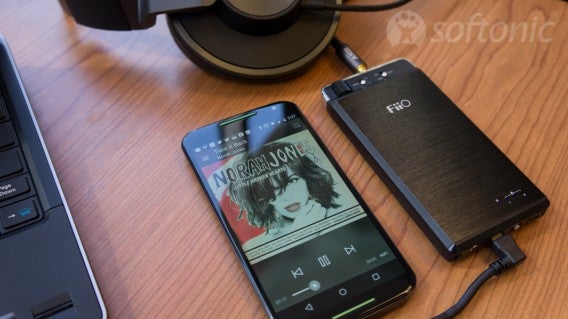
To test this, I hooked up my Moto X to my Fiio E18 DAC/amp to see if the quality made a difference. I took the train using this setup and it sounded great. I noticed blacker backgrounds as well as extended treble and bass compared to playing music directly out of the phone’s headphone jack. If you’re a crazy audiophile like me, you will appreciate Tidal’s sound.

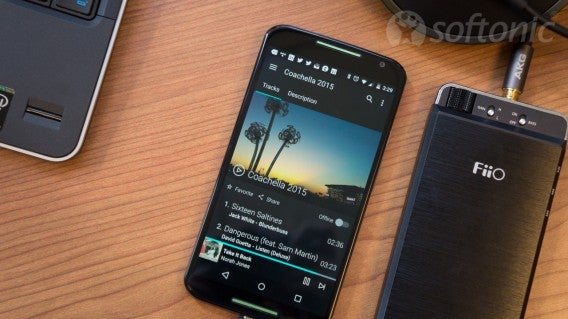
Tidal Moto X AKG K550 Fiio E18

Of course, file formats and high bitrate can only do so much. If an album is poorly mastered, it’s going to sound bad even in high-res. While you can always purchase higher resolution music, you can’t purchase a better master so that’s out of your control.

For $20 per month, I would have loved to see Tidal offer 24-bit audio as well. But technical limitations with 24-bit audio may degrade the user experience. With Hi-Fi streaming, Tidal already exhibits lag when initializing a track. Once a stream gets going, there’s no lag but scrubbing through a track makes streaming pause for several seconds as it caches. Downloading tracks for offline listening also takes a long time but its sound quality is worth the wait.

Even though Tidal’s Hi-Fi streaming sounds great, its limited library and cost makes the service a tough sell. Music collectors are better off purchasing used CDs or collecting vinyl. With physical formats, you get the sound quality and nostalgia of thumbing through artwork and lyrics, something no music streaming service can replicate.

App support

Tidal mobile apps

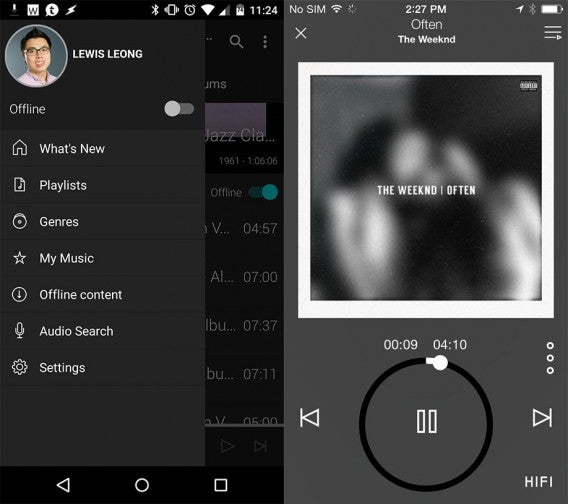
Tidal is available on Android, iOS, and the web. Its mobile apps are very similar to one another so you can pick up listening on different devices without much trouble. The home page of the app is where you’ll find What’s New, featuring exclusive content. The side menu reveals sections for your playlists, browsing by genre, your favorited music, and the offline mode. There’s a toggle for Offline, which lets you quickly access the albums and tracks you downloaded onto your phone.

Tidal locks you into only listening to its library and not your own.

I found Tidal’s browser support to be lacking. For Hi-Fi streaming, you need to use Chrome; Firefox users are limited to standard def streaming. To double check that you’re streaming in Hi-Fi, there’s a “HIFI” logo next to the volume controls that turns white when its active and gray when it’s off.

I would like to see Tidal come out with dedicated desktop applications for Windows and Mac, something Spotify offers. This allows for offline listening and integration with your local music library. While Spotify’s local music integration is a mess, it’s nice to have an option to fill out a the holes in the music catalog. Tidal locks you into only listening to its library and not your own.

A tough sell right now

Tidal for Android combined

After spending a week with Tidal, I found the service to be a tough sell. Google Play Music and Spotify both offer superior services in terms of music availability and user experience.

Tidal’s potential is there, but it’s not ready for prime time. If the service can get more music in its library and build out its music discovery features, it could be a force to be reckoned with. For now, Tidal is attracting users with its small selection of exclusive content and celebrity hype. To keep growing, Tidal will have to offer more than flash.

Tidal isn’t trying to sell you music but a lifestyle.

Right now, Tidal isn’t trying to sell you music but a lifestyle. It wants you to be a trendsetter who listens to the latest music exclusives. It wants you to be the discerning audiophile who wants high def streaming for their Hi-Fi set up.

I have no doubt Tidal will get better but its lackluster music library, curated content, and sound quality aren’t worth the money. For the same money, Spotify’s library and features are just better than Tidal’s. Or if you’re an audiophile like me, you’re better off digging for albums at your local used record store.

Related Stories

What is Tidal?

Best free Android music players

Apple Watch: everything you need to know

Best free apps for Samsung Galaxy S6

Follow me on Twitter: @lewisleong

Follow me on Last.fm: @lusciouslewis

Five Apps to Try This Weekend – April 3rd 2015 (kind of)

Hi and welcome to back to Softonic’s Five Apps to Try This Weekend for April 3rd. Yes, April 3rd. There is a small chance that we made a little mistake and had this prepared before our short vacation and then forgot to post it. Anyway, we actually had something a little different prepared for the hiatus, moving our focus from the newest and freshest apps to look at five fantastic and safe games to keep your kids busy.

This week, we have games that encourage imagination. Minecraft (iOSAndroid) is unquestionably top of class here, so we have dutifully included it in all of its open-world, discovery, and creation glory. But it is not alone, with Playworld Super Heroes (iOS) is also on hand to encourage your kids to build and design their own superheroes with whom to save the world.

If you want something a little more sedate to calm you little ones down, then we recommend either the charming The Snowman and the Snowdog (iOS | Android | Windows Phone), or the colorful Sago Mini Ocean Swimmer (iOS | Android | Windows Phone). Finally, if you want something more focused on learning then there is the captivating Metamorphabet (iOS), a wonderful tool to teach the alphabet and build vocabulary.

Sorry again for the confusion with this video, and we will be resuming our usual schedule this Friday (that’s the 17th of April). If you don’t want to miss an episode, be sure to subscribe.

Related Stories

Best mobile games that are safe for kids

Five Apps to Try This Weekend – March 27th 2015

Five Apps to Try This Weekend – March 20th 2015

Follow me on Twitter: @DoFuss

App of the Week: Office 2016 for Windows

We previously chose Office 2016 for Mac as our App of the Week for its dramatic redesign and this week, we have the Windows version. Office 2016 for Windows is out for you to test before its official release at the end of this year.

Default player


brightcove.createExperiences();

So what’s new with Office 2016 for Windows? Well, Clippy is back, but not in the way you think. The new feature is called Tell Me, which helps you figure out how to do things and actually does it for you. Clippy was annoying but Tell Me is now actually useful.

The ribbon interface has been tweaked. The functions most people use are now less hidden and streamlined.

Collaboration has also been completely overhauled to battle the extremely useful Google Docs. Offline use helps you maintain your workflow when you have a spotty connection.

For an in-depth look  at what’s changed in Office  2016  for Windows, check out our breakdown here.

Are these features enough to make the upgrade worth it? We’ll have the final verdict when we test out the official release later this year. But for now, give Office 2016 a try and let us know what you think.

Download the Office 2016 Preview for Windows

Related Stories

Microsoft continues cross-platform, device push

What’s new in Office 2016 for Windows

App of the Week: Office 2016 for Mac

Follow me on Twitter: @lewisleong

Why video games are good for kids (and you too!)

Should your kids even be playing video games? Video games are often blamed for violence in the real world, which might seem logical at first, but data suggests there is actually an inverse relationship between violent video games and violence in society. Lots of research actually suggests games are a very positive form of play, and can help in the development of children, even producing positive effects that other forms of play don’t.

So let’s look behind the scary headlines, and see how video games can be good for your kids.

Video games can train our brains

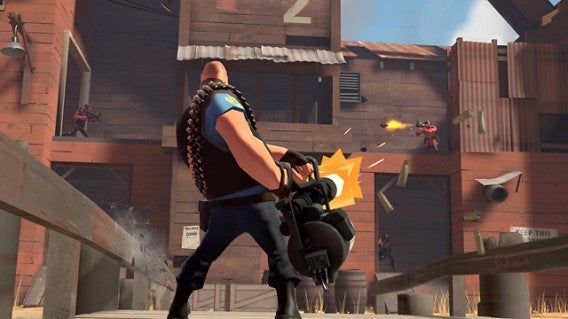
Video games have been shown to improve certain aspects of your ability to think. ‘Shooters’, which are usually played from a first person perspective, give players improved spatial skills. It also appears that regular players of shooters are better at allocating their mental resources regarding pattern-recognition. The nature of shooters – 3D spaces, unpredictability and the necessity of quick accuracy – encourages gamers to learn to quickly filter out unnecessary information from what they are seeing, so as to better respond to what’s relevant (someone shooting you!).

Team Fortress 2

Strategy games and role-playing games have also been shown to improve problem solving skills. There haven’t been studies into all types of games, but research has yet to show any of these benefits for racing and fighting games, which is a shame, as I grew up loving racing games.

However, all video games seem to encourage creativity. There is strong connection between playing games and creativity. And although studies have not yet shown if their relationship exists simply because creative people are more likely to play games, my own experience and intuition makes me feel that creative people are no more attracted to games than anyone else.

What is certainly true is that some of the skills and abilities that are encouraged in video games are useful and positive in the real world too.

Game Over. Continue?

In terms of motivation, games do something surprising. Death and failure are common occurrences in video games, and this experience trains players in that old refrain “if at first you don’t succeed, try, try again.”

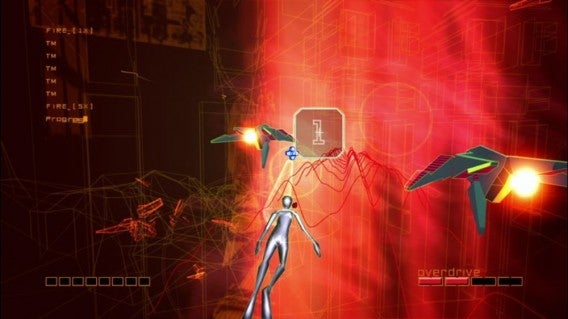
Game Over - Ikaruga

Where you might expect death or failure to demotivate players, it actually provokes higher motivation and desire to win. This optimistic attitude in the face of challenges is really useful both in education and life in general.

Games provoke joy and relaxation.. is that a bad thing?

Emotionally, things are quite simple. We’ve all heard stories of addicted kids going crazy when mum or dad decides to restrict access to a game (or delete their character in World of Warcraft), but most of the time, for most people that is not the case. We choose to play games for relaxation, escapism and because they make us happy. Playing a game can give you a feeling of gratification when you win, or that nice feeling of being ‘in the zone’ – where you are so involved in the action of a game you are almost unaware of yourself.

REZ HD

There is also evidence that the game designer’s habit of introducing one set of rules in a game, then continually altering them or replacing them altogether also has a positive effect. Games frequently introduce a set of rules, only to change them once players have gained the skills to beat that part. The two Portal games are excellent examples of 3D puzzle games that constantly tweak the rules of play to keep you learning outside your comfort zone.

Instead of feeling frustrated and angry at the rule change, players enthusiastically adapt to the new environment to beat the game. Teaching kids to approach change and difference with enthusiasm instead of fear and frustration has to be a good thing.

Killing in a video game might make you a better person!

Gaming is now a majority activity for young people – the old stereotype of the ‘nerd locked in his room’ has to be thrown out, as it’s simply not true any more, and not just because girls play games too. With most kids playing games, excluding a child from this will make them more socially awkward, and rob them of a ‘common language’ that they can use with their peers.

Games today are also often much more social by design. Online games like World of Warcraft connect millions of people and promote cooperative behavior (at least sometimes).

Some games encourage sociability and cooperation. Again we return to violent shooters, which are often vilified as everything that’s wrong with games (violence!). Violent games that are cooperative have been shown to provoke more cooperative and helpful behavior in players in the real world. So someone playing a team game online is likely to learn cooperative behavior amongst all the chaos and violence on screen, and will use that learning outside games. These benefits are not seen in solo competitive play, so don’t play too much deathmatch mode, where it’s everyone for themselves.

Call of Duty Advanced Warfare multiplayer

Another study suggests that ‘committing immoral behaviors in a video game’ can actually encourage better moral awareness in the real world. It sounds counter-intuitive, but ‘doing bad things’ in games produce genuine feelings of guilt in players with empathy, and this leads to greater moral sensitivity.

Grand Theft Auto has been regularly criticized for all the bad things you can do in it, from soliciting prostitutes to killing innocent civilians. But actual research suggests that players, when given the option, might not take it, and if they do, the feeling of guilt it produces will encourage them not to copy the behavior in real life.

…This might not be true of everyone though, as this video of older people playing GTA V shows!

Media scapegoating of video games

The media has often jumped on violent video games as a scapegoat for terrible tragedies like the Columbine massacre. Violent video games aren’t alone in being blamed for violence – it has happened with movies, TV and pop music, but video games as a cause of violence sounds more convincing. After all, in Mortal Kombat, the player is ‘virtually’ murdering his/her opponent, and in GTA V it’s the player who can mow down a sidewalk of pedestrians.

And yet a 2014 study showed that since 1996, the incredible growth of violent video games has actually accompanied a dramatic drop in youth violence. Now, this doesn’t suggest that violent video games caused the drop, but it certainly does show that they are not causing more violence.

It’s not all good news

A small percentage of young people do show signs of addiction to video games, and they highlight how time spent on video games should be controlled. In the US, as much as 8% of young people who play video games show signs of pathological addiction. While kids (and adults) can learn from video games, they need to learn other things in other places too. Games should be a part of our cultural mix, but not necessarily at the center of it.

As I said in my previous article, parents should not ignore age ratings for games – we should treat them like we do all culture, and control kids access to themes that are too mature.

Games can be good for kids

We’ve seen that there are many ways in which games can be beneficial for children, from improved mental and social skills to greater motivation in the face of challenges. There are certainly dangers, but they are nothing that a little parental knowledge, monitoring, and guidance can’t fix.

Media worries about violent video games and real violence are simply not backed up by facts, and as one of the Elderly Gamers points out, they are probably a good way to get tension and aggression out of your system, rather than encouraging criminality.

So let your kids play games and play with them too!

Sources and further reading:

The Benefits of Playing Video Games, Radboud University Nijmegen

Violent Video games can increase a player’s moral awareness, Venture beat

Elders Play Grand Theft Auto

Video game literacy, Wired

Being Bad in a video game can make us more morally sensitive, University at Buffalo

Just a Game? Unjustified Virtual Violence Produces Guilt in Empathetic Players, Media Psychology

Does Media Violence Predict Societal Violence? It Depends on What You Look at
and When, Journal of Communication

Related Articles

Best mobile games that are safe for kids

Should my kids be playing this? Parents’ guide to games in 2015

8 apps you don’t want to explain to your parents

Follow me on Twitter: @jonathanriggall

Everything you need to know about GTA V on PC

GTA V is finally out on PC on April 14th, around 18 months after the game’s original release on Playstation 3 and Xbox 360. Our original estimates of a six to eight month wait were a little off!

Over the last two years we’ve written a lot about GTA V, and to mark the release of the PC version, here’s a collection of the best and most useful articles about the game. We never doubted Rockstar would deliver eventually, though some people were skeptical!

This PC version of Rockstar’s GTA V promises to be the best looking of the lot – if your PC specs are high enough, this is going to be a beautiful looking game. The improvements between the last generation and current generation console versions were huge, and really made the state of San Andreas shine. With a possible 60FPS at 1080p, longer draw distances, more wildlife, heavier traffic and improved lighting effects, GTA V for PC will be the definitive version.

Watch the 60 frames per second PC trailer for GTA V:

Default player


brightcove.createExperiences();

Check below for the minimum and recommended PC specifications.

Here’s our original review. While there are plenty of technical improvements with the PC version, the basic story, gameplay and atmosphere remains the same. I was really impressed back in 2013, and even more so with the next gen version released a year later.

GTA V hints and tips:

Ten tips to complete missions

How to make cash quickly and easily

How to change characters

GTA Online hints and tips:

How to make cash quickly in GTA V Online

5 things you need to know about GTA Online

5 tips to level up quickly in GTA Online

GTA V features:

Rockstar Editor: Making movies is easy

The evolution of GTA

Watch the first first mission of GTA V

New first person mode makes GTA V more controversial

And hey, parents, don’t be fooled into thinking GTA V is ‘just a game’, it is absolutely not for kids. Find out more here.

Minimum PC specifications:

OS: Windows 8.1 64 Bit, Windows 8 64 Bit, Windows 7 64 Bit Service Pack 1, Windows Vista 64 Bit Service Pack 2* (*NVIDIA video card recommended if running Vista OS)

Processor: Intel Core 2 Quad CPU Q6600 @ 2.40GHz (4 CPUs) / AMD Phenom 9850 Quad-Core Processor (4 CPUs) @ 2.5GHz

Memory: 4 GB RAM

Graphics: NVIDIA 9800 GT 1GB / AMD HD 4870 1GB (DX 10, 10.1, 11)

Hard Drive: 65 GB available space

Sound Card: 100% DirectX 10 compatible

Recommended PC specifications:

OS: Windows 8.1 64 Bit, Windows 8 64 Bit, Windows 7 64 Bit Service Pack 1

Processor: Intel Core i5 3470 @ 3.2GHz (4 CPUs) / AMD X8 FX-8350 @ 4GHz (8 CPUs)

Memory: 8 GB RAM

Graphics: NVIDIA GTX 660 2GB / AMD HD 7870 2GB

Hard Drive: 65 GB available space Sound Card: 100% DirectX 10 compatible

Facebook Messenger gets its own web client

There is now a dedicated website for Facebook Messenger, meaning you can use it from any browser without opening Facebook itself.

The social network has just launched the web version of Messenger, which is available for English speaking users now, with other languages rolling out over the next few weeks.

Facebook span out Messenger from its mobile apps last year, and this new web interface looks just the same, although there are some missing functions at the moment. The company says there are no current plans to stop messenger also working on the Facebook.com site, but that could change.

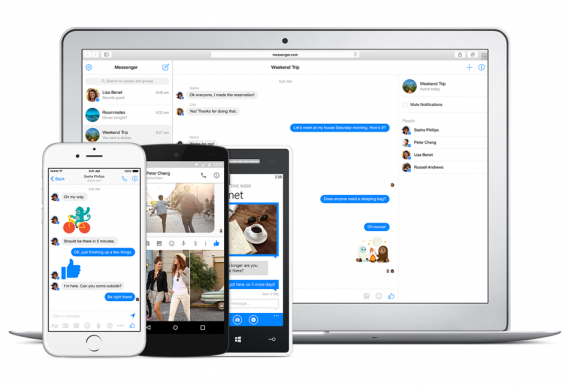
Messenger on the web looks just like the mobile apps. You can pick up your current conversations from it, or start new ones. Your sticker collection is included, and you can install new packs too. Clicking the Photo button lets you upload images from your device, but doesn’t currently allow you to use your webcam or device camera to take a picture. You also cannot make calls via the web version, or record audio messages.

Curiously, whatever device you log on from, you will sometimes see a message encouraging your to ‘Keep the conversation going from your phone’ and a link to install the mobile Messenger apps. Facebook previously had a Windows desktop app for Messenger, but that was discontinued in 2014.

The company’s reason for the new site is so new features can be built into messenger more easily. Messenger is a big focus for Facebook at the moment, with lots of new features being added. Some users already have Payments, which allows you to send and receive money via Messenger, and last month’s F8 conference saw the launch of Messenger apps.

Regardless of why this exists, the Messenger web client is a neat way to chat from your browser without the added distraction of the rest of Facebook.

Visit the Messenger web client
Download Facebook Messenger for Android, iOS and Windows Phone

Source: Re/code

Related Articles

Facebook Messenger now supports apps. Here’s why it matters.

Best Facebook Messenger apps

Internet Explorer is dying: a history of the world’s most hated browser

Follow me on Twitter: @jonathanriggall