WhatsApp for iOS gets free voice calling feature

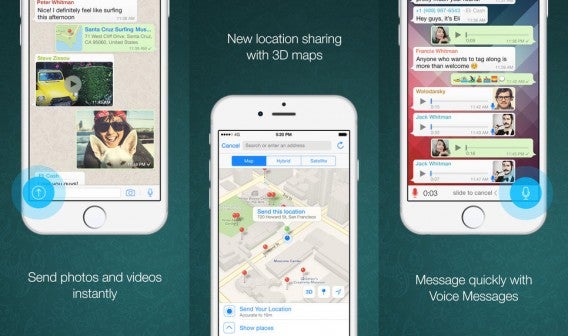
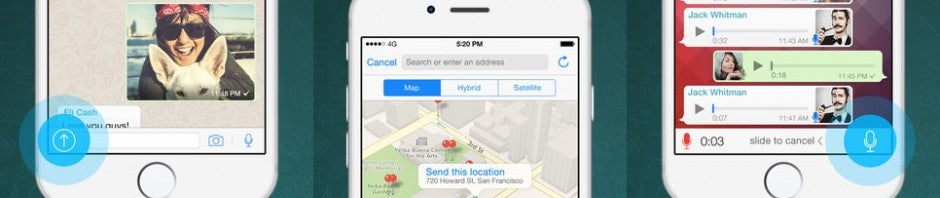
A few weeks ago, Android WhatsApp users gained the ability to make calls within the app. Today, iOS users will start receiving an update to enable free calling. The update also includes a new sharing extension for sending photos, videos, and links directly to WhatsApp.

The calling feature is not tied to a specific version of WhatsApp so you may not see the feature, even if you’re running the latest version of the app. WhatsApp will flip the switch to enable calling for a small set of users at a time, as a way to test the integrity of the service.

WhatsApp gained popularity by being a free text messaging replacement and with the new free calling feature, you might not even need a fancy mobile plan any more. Calls placed using WhatsApp only lets you talk to other WhatsApp users, but with 800 million monthly active users, that’s a lot of potential people you can call for free.

WhatsApp for iPhone combined

Not only is this good news for people who want to save on their cell phone bill but for those who have poor reception at home or at the office. Since WhatsApp calling is handled using the internet, all you need a good connection to make calls.

If you’re not a WhatsApp user, you can also make free voice calls using Google Hangouts. Google’s solution is even better as you can call any number within the US for free. If you have to make an overseas call, you put money in your Google Hangouts account to make international calls.

With free calling, WhatsApp is more useful than ever. Users can even chat with friends on a computer using WhatsApp’s web app. Check out my guide on how to use WhatsApp inside a web browser.

Download WhatsApp: Android | iOS

Related Stories

Android Wear vs Apple Watch

Is the Apple Watch right for you?

Is Tidal worth it?

How to conserve the Apple Watch battery

Diary of a fat man – Noom Coach (no more excuses)

Follow me on Twitter: @lewisleong

Meet our new app: Softonic Turbo Booster

At Softonic, we’re focused on helping you discover and enjoy apps for your phone or tablet. As part of this, we’re very proud to introduce a new app we’ve designed and built to improve the performance and speed of your Android device: Turbo Booster. After all, you can’t have much fun with any apps if your phone is running slowly!

If you’ve been using your Android phone or tablet for a while, you might notice that its performance may have dropped off. Maybe it’s slow to load apps or carry out tasks, or maybe you are short on device storage. This is where Turbo Booster comes in.

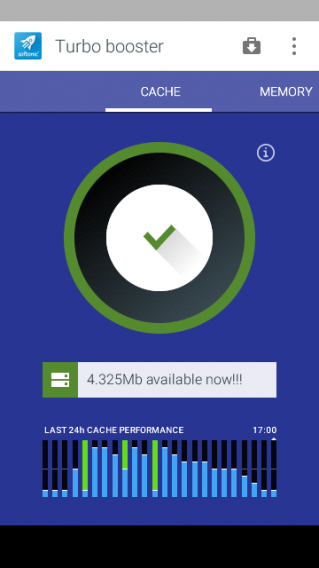
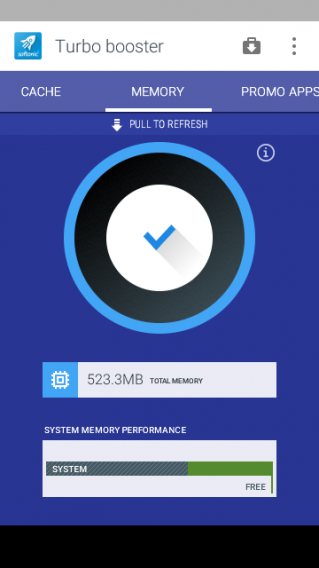
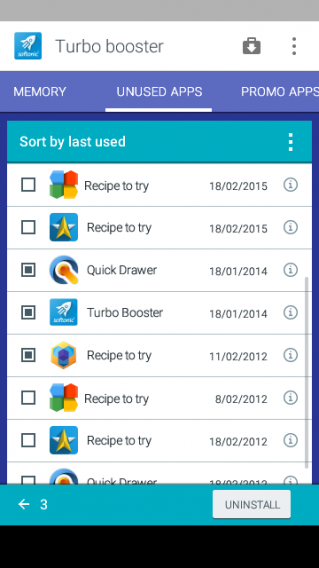
Turbo Booster has three main functions: deleting unnecessary files so you have more storage space on your device, boosting RAM by stopping tasks that are running in the background, and helping you get rid of the applications you don’t use anymore.

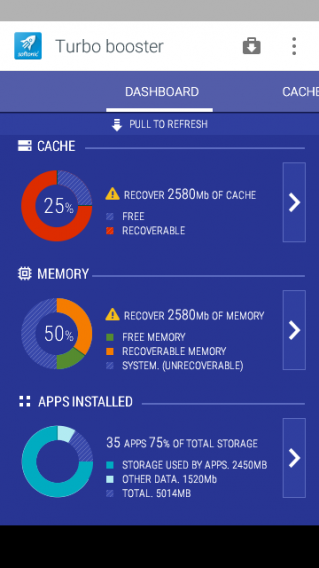
In the latest version, we’ve added a central dashboard where you can easily monitor the overall performance of your device:

We’ve made the user interface clean and simple to help you get started quickly. With clear headings for each feature, you can easily swipe between the different options. From there, it’s just a single click to clean files and boost RAM, while the app provides you with useful statistics on these improvements.

Turbo Booster also analyzes your apps and organizes them in order of usage so you can see at a glance if there are any that you would like to uninstall.

We really hope you enjoy using the app, but if you do have any feedback, let us know in the comments below!

You can download Turbo Booster now.

Watch the reveal trailer for Star Wars Battlefront

The Star Wars Battlefront reveal trailer dropped today, after years of anticipation. EA first revealed Battlefront at the E3 2013 game conference. There was a teaser trailer but it didn’t show much of the game. Today’s reveal trailer shows a lot more.

Default player


brightcove.createExperiences();

The graphics shown with the game engine are spectacular. Obviously the game won’t look as good as the trailer since it was just made using the in-game engine, but it should still be graphically impressive. We get to see a battle in the forest, an AT-AT, and enough explosions to make Michael Bay proud.

It was also revealed to IGN that Star Wars Battlefront will not feature a single player story campaign. The game was designed as a multiplayer game first and foremost but there will be co-op. The co-op missions will deviate from the multiplayer campaign and are designed to be replayed to achieve higher scores.

Star Wars Battlefront will be released November 17th, 2015, coinciding with the release of the movie, Star Wars: The Force Awakens. If you preorder Star Wars Battlefront, you will have early access to the Battle of Jakku DLC on December 1. This mission bridges Star Wars: Return of the Jedi to The Force Awakens.

With so much Star Wars news this week, I think Matthew McConaughey’s reaction speaks for all of us.

Related Stories

Game of Thrones is back! How does the game stack up to the show?

Five Apps to Try This Weekend – April 17th 2015

App of the Week: Grand Theft Auto V

Project CARS: PC specs announced with more game details

Rockstar Editor: Making movies is easy

Why video games are good for kids (and you too!)

Follow me on Twitter: @lewisleong

Game of Thrones is back! How does the game stack up to the show?

Game of Thrones returned last week for Season 5. But before you start the new season, you should play Telltale Games’ Game of Thrones.

Not to be confused with RPG, Game of Thrones – The Game, Game of Thrones – A Telltale Games Series is a point-and-click adventure game. It takes place in the same Game of Thrones universe as the TV show but offers a completely unique storyline.

Actors from the HBO show are faithfully recreated in-game and provide great voice acting. You’ll get to see Lena Hadley as Cersei Lannister, Peter Dinklage as Tyrion Lannister, Natalie Dormer as Margaery Tyrell, Kit Harington as Jon Snow, and more (I won’t spoil the surprise).

Default player


brightcove.createExperiences();

Game of Thrones – A Telltale Games Series follows the story of House Forrester, a northern house aligned with the Starks until the events of the Red Wedding. If you haven’t watched the show, you’ll want to watch up to the end of season 4 to understand what’s going on in the game (and to avoid spoilers).

But is the game as good as the show? In short, yes and possibly even better. You’re playing a passive role watching the show but with the game, every choice you make affects the outcome of the story. I’ve played other Telltale games like The Walking Dead and The Wolf Among Us but neither of those games made me agonize over my decisions as much as Game of Thrones.

The game works well because of its TV roots. We’ve sat through four seasons with these characters and feel deeply connected to each one. Love or hate, we want to see how our heroes get their revenge or see how their enemies die. By intertwining characters from the show and game, we’re immediately invested in the new characters.

Even though you’re playing as characters from House Forrester, a relatively unknown family in the A Song of Ice and Fire books, you are still invested in the characters. Telltale Games did a great job establishing the characters in House Forrester in a short period of time.

Point-and-click adventure games succeed or fail by their stories. With the help of George R. R. Martin’s personal assistant, Ty Corey Franck, Telltale crafted a unique storyline while maintaining everything that makes the show great. The Game of Thrones show and books are known for shocking viewers with plot twists and sudden deaths and the game is no different. You’ll be shouting, laughing, and crying throughout each episode.

Some players may lament the lack of combat and more interactivity, but it’s not a completely passive experience. I like the puzzle solving and dialog in the game. You’re not going to be sitting back and watching extended cutscenes. You’ll have to be alert and analyze what each character is saying to make good choices. I accidentally missed a few dialog choices while trying to text someone on my phone so don’t be like me.

Game of Thrones Tyrion Lanister

While the Game of Thrones game can’t stand on its own as a story or game, it is the perfect compliment to the TV show. If you love the show, you’ll love the game. We’re only three episodes into the six episode “season” of the Game of Thrones game but I’m already worried about what’s going to happen next.

I really, really hope I made the right choices.

Click here for my full review of Game of Thrones – A Telltale Games Series.

Related Stories

Five Apps to Try This Weekend – April 17th 2015

App of the Week: Grand Theft Auto V

Project CARS: PC specs announced with more game details

Rockstar Editor: Making movies is easy

Why video games are good for kids (and you too!)

Follow me on Twitter: @lewisleong

Five Apps to Try This Weekend – April 17th 2015

Welcome back to Five Apps to Try this Weekend, our (usually) weekly show that gives you ideas on how to keep yourself busy between Friday and Monday.

This week we kick off with Wattpad, the ebook reader for iOS and Android. Yes, it’s not exactly new, but it has just received an update and with International Book Day just around the corner, it seemed appropriate.

If you’re not especially booky and prefer a bit of sport, then we also have MLB.com’s At Bat – the iOS and Android app that provides your portal to MLB.tv. Filled with stats and news from your favorite teams, and a premium service that lets you stream all of the 2015 season, this one is a must for fans.

Three games round up our selection this week. The brutal Mortal Kombat X on PC has you once again trying to defend Earthrealm from encroaching evil in the most viscous ways possible. And if you don’t have a PC that can run it on, then there are always the mobile version.

Next is TellTale Games’ Game of Thrones… game… in honor of the new season of the fantastic fantasy series which out now on almost everything. Also, if you want to be sure you never miss an episode of show then we also recommend grabbing the HBO (iOS | Android) GO app.

Finally is the Behemoth, GTA V. The multi-award winning GTA V, which has now finally made its way to PC. While the single player remains basically the same as its original console release, this new version features improved graphics and the Rockstar Editor which lets you create stunning movies your in-game escapades.

That’s it for this week, remember to subscribe, and we will see you in 7 days.

Related Stories

Five Apps to Try This Weekend – April 3rd 2015 (kind of)

Five Apps to Try This Weekend – March 27th 2015

Five Apps to Try This Weekend – March 20th 2015

Follow me on Twitter: @DoFuss

Diary of a fat man – Noom Coach (no more excuses)

A few things have happened since I last checked in with my fat man diary, none of which have been good for my quest to downscale my vital statistics. First there was a vacation that had an unfortunate effect on my waistline. This was followed by a health-check that had me slightly taken aback at my nurse’s openness regarding my blood pressure, width, and most notably weight.

All this created a renewed focus in me. So, it’s back to the gym and being careful about what I eat. Information and data that I have been carefully entering into my latest app, Noom Coach – Weight Loss (iOS | Android).

Registering myself

And it is going well (though after the gym yesterday I can’t bend my arms). Much like my previous diet app, MyPlate (iOS), Noom offers an intuitive interface that remembers past data entries for easy access. In addition to this, it also recalls the amount or measure of earlier inputs – letting them be reentered with a simple swipe. This is hugely useful for me, as my general weekly diet does not alter much unless I am out and about.

This results in data entry that is a pleasure rather than a chore. Previous apps had me pouring over pages of data, and going one or two menus deep to enter a dish from the day before. With Noom, three or four swipes saw me finished with the list, intelligently updating as I added elements. I could even make this process more efficient using the “Create Dish” option, with a single gesture entering a whole meal.

Food!

Exercise was similarly easy to enter (if not to perform) – though a little more hidden away. Exercise-like activity in Noom is cunningly hidden under the “do more” option, which has the advantage of not rubbing your face in your inactivity if you are too busy to exercise in any particular stretch of your life. For me this is fantastic, as it relives unavoidable guilt that can lead me to unhealthy eating cycles.

Once you find the list of training choices you just have to find your activity. These are well organized with more common choices at the top, before becoming alphabetical. Once selected you can edit your activity level, duration, and calories burned. Calculating all this the first time is not exactly intuitive, but it is easy to pick-up and subsequent visits become lightning fast.

Working out

My only issue with Noom, and this is quite personal, is its insistence on regular weigh-ins. Personally I find this a dangerous request, as at my current size I am happier just to feel better in myself, and measuring each kilogram feels like it could give way to an unnecessary fixation – one which may be even more pronounced in people closer to their ideal weight.

I really like Noom, and in fact my next diary will focus on it again. Due to recent circumstances, I feel I didn’t give it enough time, and rather than moving on I want to dig further into its features. It’s great, but I will reserve complete judgment until next week.

Related Stories

Diary of a fat man – Fitivity (sometimes walls get in the way)

Diary of a fat man – MyPlate (sometimes life gets in the way)

Diary of a fat man – Daily Yoga

Follow me on Twitter: @DoFuss

How to conserve the Apple Watch battery

Excited to get your Apple Watch? You’ll be able to see if the smartwatch lives up to the hype soon. But like your iPhone, you’ll keep an eye on the battery to make sure it doesn’t die in the middle of the day. I mean, how awesome is the Apple Watch if it only tells the time?

According to Apple’s tests with a “preproduction Apple Watch and software paired with an iPhone using preproduction software” in March 2015, Apple Watch (38mm) will get:

Up to 18 hours of standard use: tested by checking time 90 times, 90 notifications, 45 minutes of app use, and a 30 minute workout

Up to 3 hours of talk time

Up to 6.5 hours of audio playback

Up to 6.5 hours of workouts

Up to 48 hours of time checking: based off five time checks per hour

Up to 72 hours on Power Reserve

All the tests were performed on the 38mm Apple Watch but the 42mm Apple Watch “should” have a longer battery life.

Apple Watch’s Power Reserve mode turns off all iPhone connectivity and only displays the time. It’s a Hail Mary to keep the watch alive until you can charge it again. You can manually activate Power Reserve from Battery Glance (which shows battery percentage) or from the Settings app.

But there other simple ways to improve the battery life of the Apple Watch. Macworld has some good tips about keeping your Apple Watch alive.

Turn brightness down

Apple Watch finger digital crown

It’s awesome to show off the screen with the highest brightness, but it comes at a cost. The higher the brightness, the quicker your battery drains. Find a brightness setting that works for you. You can test Apple Watch at the highest brightness and see how long it lasts. Then adjust brightness to a lower setting and compare your results. It’s a general test, but you will notice a difference.

Turn off notifications for apps

Apple Watch Twitter

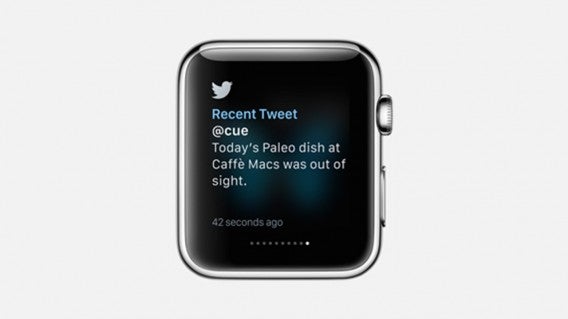
Apps that send notifications to your iPhone will also send it to Apple Watch. Dismissing notifications on your iPhone is easy, but getting a wrist vibration for each notification can get annoying. The vibration from Apple Watch uses the battery along with displaying the notification. Go through your apps list and disable notifications from apps you don’t need. Now your Apple Watch will notify you of your most important notifications.

Don’t take Apple Watch calls

While talking through Apple Watch might seem cool, you will look really weird. Apple Watch is also only rated for three hours of talk time. Three hours may seem like a lot, but transferring call data over Bluetooth to your iPhone requires battery power. Answer calls on your phone instead.

Don’t use it to play music all the time

You can locally store up to 2GB (out of 8GB) of music on Apple Watch. This is more than enough room for workout music, but don’t expect to load all your favorite tracks. Locally stored music is great for exercising if you pair Apple Watch with Bluetooth headphones or earbuds. Both audio playback and workouts (“workout session active and heart rate sensor on”) is rated for 6.5 hours and this is more than enough time to exercise. But combine that with other daily use and you’re draining your battery at a faster rate. Also be aware that some exercise apps require a data connection and you’ll have to bring your phone with you anyway.

Simplify the colors

apple watch greyscale reduce motion

Apple Watch’s Retina display makes it easy to read the small screen. But pushing a lot of pixels requires power. If you really want to increase battery life, turn on grayscale. This is designed for colorblind people, but the display won’t have to show a ton of colors. You can also reduce motion to limit animations. Less work for the CPU should lead to better battery life.

These are some quick tips to save Apple Watch battery life. There will be Watch OS updates that should address any battery issues with the first generation Apple Watch. Or if you’re really paranoid, there are already third party watch bands with built-in battery packs to extend the life of your Apple Watch.

Related Articles

Is the Apple Watch right for you?

Android Wear vs Apple Watch

Apple Watch: everything you need to know

Follow me on Twitter: @chrislikesrobot

App of the Week: Grand Theft Auto V

Softonic’s App of the Week highlights some of the coolest, most unique, and popular apps that have been released for Android, iOS, Windows, and Mac. This week, our patience finally has been rewarded as the hugely anticipated Grand Theft Auto V arrives on PC.

It has been a long journey. A wait of two years followed Rockstar’s first announcement of the game before its PS3 and Xbox 360 launch in 2013, and then another 20 months had to pass before its final PC incarnation.

The bottom line is that most people interested in GTA V will already have played it, so what does the PC version add to this open-world, crime-fiction epic? Well, quite a lot it turns out.

Default player


brightcove.createExperiences();

Visual improvements are a given of course, with the high resolution graphics seen in the PS4 and Xbox One versions, further improved upon, allowing resolutions up to a staggering 4K running at 60fps (providing you have the PC to run it). Other carry overs from the recent console release include the first-person camera view and improved online options, such as the fantastic Heist mode that lets you pull off dramatic bank jobs with your friends.

There are features completely unique to the PC version too. The most important of these is the Rockstar Editor, which lets you create your own movies from the in-game action. With the ability to edit all of the footage recorded around your character, change camera angles, depth of field, focus, and the type of camera you use – this tool lets you create beautiful videos to upload and share. There is also a Director mode that enables you to manipulate your character and environment to ensure you have complete creative freedom.

This version of GTA V also includes two new radio stations, FM Lab and Radio Self – the latter of which lets you add your own mp3 so you can listen to your favorite music as you cruise the city of Los Santos.

Finally we have the definitive version of GTA V, letting you relive this fantastic game again in the best way possible – download it for PC now.

Related Stories

Rockstar Editor: Making movies is easy

Grand Theft Auto V Review

App of the Week: Battlefield Hardline

Follow me on Twitter: @DoFuss

What to expect in Windows 10

Microsoft’s decision to jump from Windows 8 to Windows 10 is part of its master plan to make users forget the problems of the former and embrace the latter. The company is approaching its desktop operating system in a different way this time around, with new ways for users to access it, a change in support, and a host of new features and options. Here are some of the major changes you’ll see in the next version of Windows, which will be released this summer in 190 countries.

Free (for a while)

For the first time, Microsoft will offer Windows 10 as a free upgrade for users running on Windows 7 and up. There is also speculation that this will extend to those who currently have a pirated copy of these versions installed. This offer will only run for the first year after Windows 10’s release. The offer doesn’t extend to people running Windows RT tablets or business users.

Extended support

The company will also offer support for the operating system for as long as you have the device, ending the current policy of only offering support for a set period of time, while any updates will be provided automatically.

Consistent experience across all devices

Windows 10 will mark a lot of firsts for Microsoft, another one being that the mobile operating system will be built from the same core code as the desktop version (this also extends to Windows on Xbox). This means that developers can build apps and deploy them across all devices and the experience will be the same no matter what form factor you are using. The aim is for Microsoft is to finally get a foothold in the mobile market, especially after its Nokia acquisition. You can currently download the Windows 10 Technical Preview for phones, although not all devices are supported.

A new Windows Store

Not only is Microsoft streamlining its operating systems, it’s also streamlining the Windows Store experience. Instead of having to go to different places to buy your apps depending on the device you are using, there will now be one central store where you can download and update all your apps. Microsoft has also added a movies and video page into this so you can rent or buy these directly from the app.

A better browsing experience

Project Spartan will replace Internet Explorer in Windows 10 and promises to bring simplicity, speed, personalization, and collaboration enhancements. While Internet Explorer once ruled the roost, it has long been losing ground to Chrome and Firefox so Microsoft will be hoping that by completing overhauling the browsing experience it will be able to regain market share.

The Start Menu (returns)

The lack of a Start Menu was a particular gripe for users switching to Windows 8, which Microsoft sort-of addressed in Windows 8.1. This time round, the company has listened to its users and is reinstating it in a fully customizable form that draws inspiration from both Windows XP/7 and Windows 8. Within the Start Menu, there is both a list view as well as an area of Live Tiles, which can be resized according to importance. The menu can also be expanded to accommodate more Live Tiles.

Cortana

Microsoft’s Siri-style virtual assistant is coming to Windows 10. Currently it’s only available in EN-US language preview versions, but it will work through either text or voice input to provide easier and quicker access to a whole range of options, such as searching the internet (or Googling as anyone who doesn’t work at Microsoft might say), finding files, getting weather reports, telling jokes, calling/texting a contact (when using a phone), or telling a joke.

Virtual desktops

A useful new feature in terms of productivity and a good way to keep your apps and programs grouped according to what you use them for, Windows 10 will allow you to create different desktops at the click of a button. Switching between them is easy, while you can also see an overview of the desktops and what you have running on each.

New identification methods

A new feature called Windows Hello will introduce biometric means of authentication across your devices. This means you will be able to unlock your screen using a fingerprint, a scan of your iris, or facial recognition. The idea is to improve security by making your login more unique and personalized (rather than just a PIN or pattern to unlock your screen or device).

Windows 10 for small devices

With the internet of things becoming the buzzword of the moment, Microsoft is taking advantage of this trend by offering Windows 10 on an even broader range of devices. This time, it’s the turn of small-footprint devices, which may be short on space, but contain a vast amount of processing power. Microsoft will offer a cut down version of Windows 10 for these devices, which includes things like ATMs.

Download the Windows 10 Technical Preview now.

Related Articles

Microsoft continues cross-platform, device push

Project Spartan: the start of a new era of web browsing?

Microsoft will fight Windows 10 piracy by giving it away this summer

Follow me on Twitter: @karenmccandless
Project CARS: PC specs announced with more game details

Project CARS is looking to be 2015’s biggest racing game on PC, following its May release on PS4 and XBox One. Developer Slightly Mad Studios has now revealed the minimum and recommended PC specs for the game, which you can read below.

In an FAQ published on its website, the developer gives more information about this upcoming racing sim. Here are the most important points:

– There may be early access or a demo available via Steam.

– Project CARS features road cars, karts, track day cars, supercars, Le Mans Protoypes, GTs, and ‘modern open wheel’ cars (like Formula 1).

– It will have the largest collection of locations “of any recent racing game”, including circuits and point-to-point tracks.

– Online multiplayer races on 64-bit PCs will feature up to 32 racers, double that of the console versions. There is no local split screen option.

Default player


brightcove.createExperiences();

Slightly Mad Studios has a good track record of making racing games, being responsible for Need for Speed Shift and its sequel. That said, Project CARS promises a more realistic driving experience than their previous work, putting it alongside console exclusives Forza and Gran Turismo. It looks like it will be as deep and complex as you want it to be, while still being accessible for people who just want to race.

Minimum specifications

Processor – 2.66 GHz Intel Core 2 Quad Q8400, 3.0 GHz AMD Phenom II X4 940

Graphics Card – nVidia GTX 260, ATI Radeon HD 5770

Memory – 4Gb RAM, 1Gb VRAM

Recommended Specifications

Processor – 3.5 GHz Intel Core i7 3700, 4.0 GHz AMD FX-8350

Graphics Card – nVidia GT600 series, AMD Radeon HD7000 series

Memory – 8Gb RAM, 2Gb VRAM

Source: Project CARS

Related Articles

Why video games are good for kids (and you too!)

Should my kids be playing this? Parents’ guide to games in 2015

Everything you need to know about GTA V on PC

Follow me on Twitter: @jonathanriggall