Gamescom, YouTube, and Windows 10 news: Softonic Roundup

Last week was pretty full, so there is lots to cover in this week’s Roundup. And from Gamescom to Windows 10, we look at it all.

We kick off with YouTube’s new video player and counter. The first of these you have probably already noticed, as the video streaming service’s slick new player is a clear change. Source: Google System

Less obvious is the new counter, which no longer stalls at 301 if your new video is getting a lot of views. This is because of a change in the way views are tracked – find out more in the video. Source: ReelSEO

Next up is our weekly check in with Windows 10, which kicks off with Cortana. Microsoft’s personal assistant just released on Android in private beta, signaling its upcoming full release on the platform before finally hitting iOS later this year. Source: The Verge

In other Windows 10 news, it seems to be going well for the new operating system with some reports claiming it has been downloaded on over 25 million machines. Source: Neowin

It doesn’t stop there, with the Start Menu having won a design award. This is especially great news for Windows 8.1 RT users as – while they may not get Windows 10 for free – they will get the menu in their next update. Source: The Verge

Microsoft has just released Windows Bridge, the program that allows developers to easily port apps from iOS to Windows 10. With any luck, this will hugely bolster the number of apps available on the Windows Store. Source: Engadget

Finally this week, Gamescom – which also seems to feature a lot from Microsoft. The biggest news from the show for PC gamers is that Microsoft is going to introduce more Cross-Play features, allowing Xbox One and Windows 10 games to share save games, DLC, and in-game purchases between devices – as well as enabling them to compete against each other in multiplayer. Source: Kotaku

Other big PC game news from the show includes new expansions packs for both The Sims 4 and World of Warcraft. Source: PC Gamer

We will be back next week with more news, see you then.

Related Stories

What’s new, and what’s missing, from the Minecraft Windows 10 Edition Beta – App of the Week

Everything you need to know about Windows 10

Minecraft Windows 10 Edition, Musical.ly, Prune, and Outfit7’s latest game – Five Apps to Try

Follow me on Twitter: @DoFuss

Minecraft Windows 10 Edition, Musical.ly, Prune, and Outfit7’s latest game – Five Apps to Try

If you have no plans for this weekend, and are wondering what to do with yourself, then we may have the answer, five apps to keep you entertained through until Monday… or maybe even longer if you really like them.

First this week we have Musical.ly (iOS|Android), and app for every aspiring pop-idol – because it teaches you to lip-sync. All you have to do is pick out a section of a song you like, and Musical.ly will play the tune back for you to mime along to. It even records the results for you to share with your friends over social media.

Get more followers and likes in Musical.ly!

If you are planning on just relaxing this weekend, then we have Prune (iOS), a tranquil organic puzzle game that has you nurturing a plant towards sunlight. Though it may help you achieve a state of Zen it isn’t simple, with all kinds of obstacle between your seed and its goal.

For those of you who prefer something a bit more frantic we have Mars Pop Bubble Shooter (iOS|Android|Windows Phone). Yes, it’s another match-three bubble game, but it’s a good one as developer Outfit7 (famous for the Talking Tom series) have filled it with their own particular brand of charm.

Microsoft Translator (iOS|Android) is a must for all holiday goers. Microsoft’s translation tool will let you talk to people in 50 languages, and thanks to a Smart Watch companion app you can do it all without ever taking your phone from your pocket. Now you have no excuse for not asking a stranger to rub sunscreen on your back.

Finally this week we have the Minecraft Windows 10 Edition Beta (Windows 10 devices). This new version of Minecraft borrows heavily from the Pocket Edition of the game, but it will expand as developer Mojang continues to develop it based on player feedback. In real terms that means that it’s good, and it’s only going to get better.

Related Stories

What’s new, and what’s missing, from the Minecraft Windows 10 Edition Beta – App of the Week

Everything you need to know about Windows 10

Five Nights at Freddy’s 4, SOMA Messenger, Adventure Time Puzzle Quest, and Angry Birds 2 – Five Apps to Try This Weekend

Follow me on Twitter: @DoFuss

What’s new, and what’s missing, from the Minecraft Windows 10 Edition Beta – App of the Week

Alongside the release of Windows 10 last week Microsoft also slipped out another title – a tiny little game called Minecraft Windows 10 Edition Beta.

It is easy to summarize Minecraft as a creative open-world sandbox, but that ignores the beauty of this constantly evolving experience. It is a game that fuels the imagination of players, both young and old, in ways that never cease to amaze.

And the Windows 10 version of Minecraft is no different. While it may not be a great leap forward in terms of what is on offer, this new version the game is designed specifically to take advantage of the new operating system’s cross-platform compatibility. This means whether you are playing on PC, tablet, or a hybrid device, you can enjoy the same gaming experience – with controls that slip effortlessly between keyboard and touch on the fly.

As the Beta moniker suggests, Minecraft Windows 10 Edition is still in development. Improvements will be made based on feedback from the players, so the earlier you get in the faster it will evolve. To make this even more appealing, players who already own the game on PC will be able to download it from the Windows 10 Store for free!

Related Stories

Windows 10 review

Minecraft Windows 10 Edition Beta review

App of the Week: LEGO Jurassic World

Follow me on Twitter: @DoFuss

Making Cortana and Google get along

If you’ve jumped on Windows 10 bandwagon, you’re probably enjoying bossing around Cortana. “Hey Cortana, make an appointment for me. Hey Cortana, send an email. Hey Cortana, write this article” (that last one didn’t work). The problem is that, whenever you need to find something, Cortana insists on using Bing. But, if you would prefer her to use Google, this article is for you (spoiler, “Hey Cortana, use Google” doesn’t work either).

Windows 10 has been notably more aggressive promoting Microsoft services. The operations system pushes you to use a Microsoft account, uploads your files to OneDrive, and defaults to the Microsoft Edge browser (much to Mozilla’s annoyance). So, of course, Cortana likes Bing – and is seamlessly integrated with it – but you can convince her to use Google with a little persuasion.

Goodbye, Bing! Hello, Google!

This trick requires an extension for Chrome, so (for the moment) it seems that you will be needing to use Google’s browser for it to work.

First, you need Google Chrome to be your default browser. If you haven’t done this yet, you can go to this article to see how. It is an easy process, although it proves a little more hidden away than in previous versions of Windows.

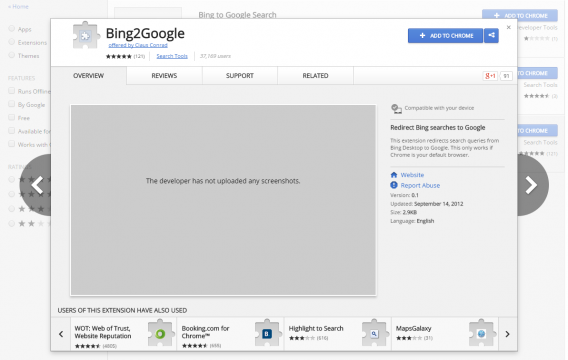
Now, the extension you need for this to work is called Bing2Google and it can be found in the Chrome Extensions Store. As the name suggests, all Bing2Google does is redirect all searches you make in Bing to Google.

Download Bing2Google, and ensure it is turned on in the extensions menu.

Bing2Google

Once Bing2Google is up and running, asking Cortana anything that requires her to search the Internet will have her open Chrome. Then, when she tries to search Bing she gets redirected to Google! All of which means that your results will be Googly.

It would be nice if Cortana could search Google without using this work around. But, while Microsoft are aggressively promoting their products and making in a struggle to set up Windows 10 exactly how you want it, it is good to know there are workarounds.

See more of our Windows 10 coverage.

Firefox, Gamescom, Windows 10, and Here Maps, all in the Softonic Roundup

In this week’s Softonic Roundup we check in on the release of Windows 10, see how Nokia could be helping Mercedes, BMW, and Audi develop self-driving cars, and get excited as the doors open at Gamescom in Cologne.

No real news yet, but Thursday will see Gamescom begin in Cologne. Europe’s biggest videogame convention has been constantly growing  and with hundreds of games, big studios, indie developers, and 335,000 fans attending last year alone, you know it’s going to get busy. Expect lots of game news from the show next week. Source: Gamescom and IGN

Last week saw Nokia selling Here Maps to Mercedes, BMW and Audi for 3,000 million dollars before it planned merger with Alcatel-Lucent. Why did these automotive giants want this software? Well, people seem to think it’s to help them develop self-driving cars, which need the high-fidelity geo-location data Here Maps provides. Source: The Next Web

Next, Windows 10. Yup, even though it’s now out, the news keeps coming. The launch was successful, but not perfect. Reports from Microsoft has 14 million downloads in the first day, with some unofficial figures reaching 67 million by day three. Not everyone has been able to get it yet however, with many still waiting for it to become available for them to download – and they could be waiting a while according to Microsoft. Source: Neowin, Windows Blog

There could be away around this delay, check out this post to try and force Windows 10 to start downloading.

Finally, Mozilla also has something to say about Windows 10, with complaints about the operating systems new method to change default programs. Where previous versions of the OS would swap over on request, the new process has become notably more protracted – a change Mozilla CEO, Chris Beard feels is an aggressive move against freedom of choice. Source: TechCrunch

That’s it for this week, we will be back next week when you can expect plenty of news from Gamescom.

Related Stories

Windows 10 upgrade, Angry Birds 2, Five Nights at Freddy’s 4, Twitter, and YouTube – News Roundup

Everything you need to know about Windows 10

How to set or restore your default browser in Windows 10

Follow me on Twitter: @DoFuss

How to set or restore your default browser in Windows 10

When you upgrade to Windows 10, you may find that your default browser has been changed to Microsoft Edge. There’s nothing wrong with Edge, and we’re certainly happy to see the back of Internet Explorer, but no one likes a computer overriding our choices. That’s a bit ‘I’m sorry, Dave. I’m afraid I can’t do that’.

Luckily Windows 10 isn’t really HAL 9000, as far as we know, and you can actually set or restore your default browser of choice. Here’s how:

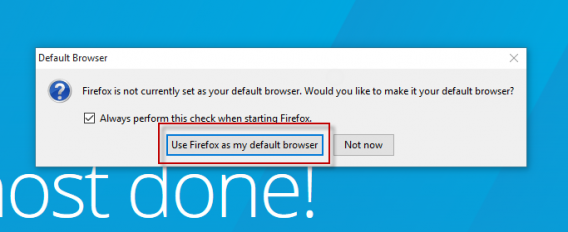
1: Open your favorite browser. We’re going with Firefox. When you open Firefox for the first time, it will ask you if you wish to make it your default browser. However, in Windows 10, this dialogue is not the end of the story. To get started, click ‘Use Firefox as my default browser.’

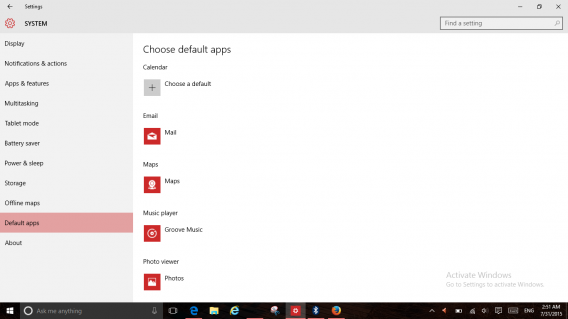
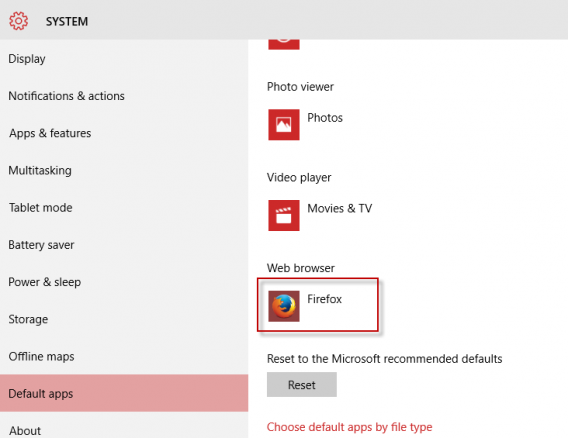
2: Windows 10 will now open the default apps setting screen. You need to scroll down this list until you get to Web Browser.

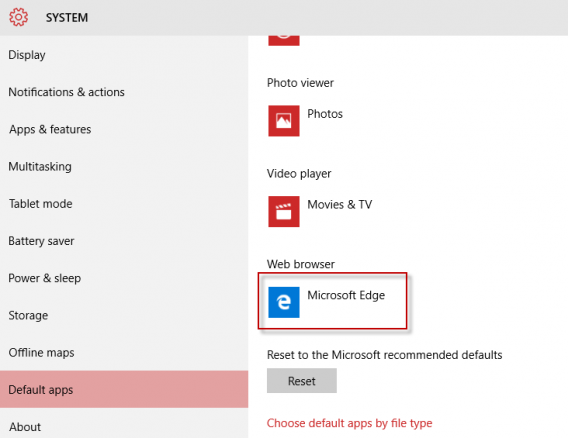
3: Click the Microsoft Edge icon.

4: A new screen will appear with all your installed browsers. Choose the one you want.

5: Your default browser is now set, and you will see it displayed as below.

There are many reasons to love Windows 10, as it’s a big improvement over 8. But adding extra steps for choosing default apps is not one of them. Any additional clicks required to perform a task make it less likely people will bother, so it’s hard not to see this as Microsoft sneakily trying to get people to stick with Edge as their browser.

Check out our full Windows 10 coverage.