Three games that prove 2016 is going to be best year yet for videogames

The first quarter of the year is meant to be nice and quiet. A time that allows gamers a chance to reflect on the previous year and catch-up with the inevitable glut of Holiday releases. NOT THIS YEAR!

There has been an of avalanche of amazing titles. And I honestly believe that – if this keeps up – 2016 is going to be butting heads with 1996, 1998, and 2007 for the title of “Best year for games ever”. Don’t believe me? Here are three of amazing games that have already take me by surprise this year.

Lost in Harmony (Android|iOS)

Lost in Harmony game came out of nowhere and completely captivated me in January.

It is a game that packs in so much style and variety that it is hard to define exactly what kind of game it is. There are elements of the endless-runner genre, as you speed towards the screen dodging and leaping over obstacles such as bombs, bears, and bikes. Other parts feel like a strange art project with the visual design managing to create the look of a pop-up collage built from a collection of different magazines.

But perhaps most magically thing is the music. Drawing on a range of classical tracks, Lost in Harmony arranges familiar pieces in beautiful ways. As you play, you slowly realize that you are dodging obstacles – and tapping the various orbs that appear on screen – to a beat you were yet to consciously hear.

If you missed this game I recommend downloading it today.

lost in harmony

The Witness (Windows)

Announced in 2009, I had been waiting for The Witness for a long time. However, at some point in the seven year wait, a certain amount of doubt had entered my mind. Could this first-person puzzler really live up to the expectation set by developer Jonathan Blow’s previous game, Braid? Turns out it could, and then some.

Walking around a beautiful serene island you must solve the games many grid based puzzles. Each challenge is simple, in theory, you just guide a line to the exit. But there are dozens of unspoken rules for the islands conundrums, and you must discover them all if you hope to solve the final riddle. Here is where The Witness excels, as it teaches you the rules through simple feedback and environmental clues. Through this method, it slowly layers one rule on top of another, until you are a solving hugely complex problems without ever having anything explicitly explained.

The result of this is that you wander the open-world of The Witness island feeling constantly amazed at your own genius.

the witness

Firewatch (Windows|Mac)

The final game on our list is Firewatch. But – while I am certain that this game belongs here – I can’t help but feel let down by my experiences with it.

You play as Henry, a firewatcher in a Wyoming national park during the summer of 1989. Your only job is to keep an eye out for fires in the sun-baked woodland from your tower. But the isolation of the forest puts you unexpectedly on edge as a series of strange events start to unravel around you.

Your only connection with humanity is a two-way radio to Delilah – a firewatcher in another tower. A brilliant script with wonderful voice acting and direction, makes this the highlight of the game. The relationship you build is actually believable. In fact it’s so convincing that I regularly found myself worried about my answers in case I upset her.

While I found the end of Firewatch a bit deflating, its successes in creating a realistic relationship and building tension make it unique.

firewatch

And that list is only of 2016 games that caught me by surprise. Let us not forget the other amazing games from the first two months of the year: Unravel, XCOM 2, Rise of the Tomb Raider, Homeworld: Deserts of Kharak, Layers of Fear, Street Fighter V, and probably a few others I am forgetting. Yes, it is going to be an outstanding year for games.

Next week I am going to be at the Mobile World Congress. I will try and get a Click-Swipe-Play up but, if I don’t manage it, keep an eye on Softonic for gaming news from the event.

See you next time!

Related Stories

2016’s most anticipated games

Three Kickstarter games that delivered

Gaming’s three most realistic relationships

On the road again – American Truck Simulator review

Follow me on Twitter: @DoFuss

Android 6.0 Marshmallow released on Samsung Galaxy S6 and Edge

As of this week, the Samsung Galaxy S6 and S6 Edge have started to update with the latest version of Android: 6.0 Marshmallow. This update has already reached South Korea, therefore it has to be a question of hours until it reaches elsewhere.

If you have a Galaxy S6 or S6 Edge and haven’t receievd the update – relax, these things never go as fast as you would like them to, and can sometimes take up to a couple of days depending on your country or operator.

Android 6.0 Marshmallow brings plenty of brand new features which you’re going to love, so just hold out!

In addition to the S6 and S6 Edge, Samsung has also announced that Marshmellow will eventually reach other mobile models. The Korean company has confirmed that they will soon release a report with confirmed dates, so stay tuned for more info!

Source: Sam Mobile

Capture Every Moment: Transform VLC Player into a Screen Capture App

Capturing a screen and saving it as a file can be tedious without special software. But using VLC Player, you can do it quickly, easily, and conveniently without installing and using another app. This is useful for capturing gameplay videos to share with your friends or on social media, creating a how-to tutorial or guide, and for showing your tech guru what’s going wrong with your computer so he or she can help out and fix your problem.

The Steps to Use VLC Player as a Screen Capture App

Hotkeys have to be turned on to do this. On Windows, press Shift + S or press Control + Alt + S. On a Mac, press Command + Alt + S. Alternately, you can use the Video menu on the Mac. To use the Video menu, select Video at the top of the screen, and then choose Snapshot. Select where you want the screenshots to save to by clicking Tools and then selecting Preferences. The Video option is on the left of the screen. On the Video Snapshots option at the bottom of the screen, set the destination you wish to save your screenshots to. If you haven’t installed VLC Player yet, now is the time.

Capture

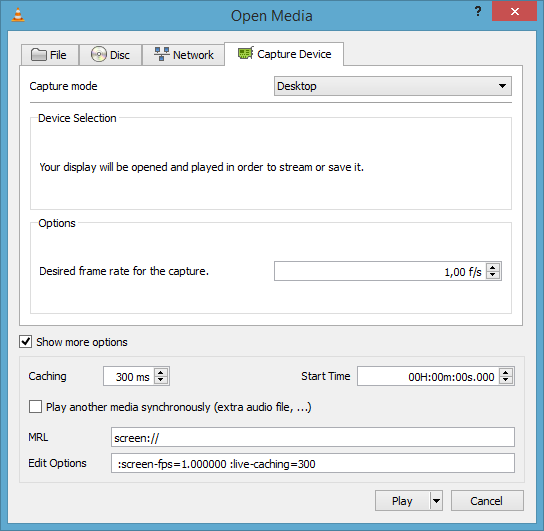
Open VLC Player and choose Media. From there, select Streaming. Click on the Capture Device tab and choose Desktop as the Capture mode (if you like, you can change FPS, or frames per second, at this time as well.) Then, click Next. At this point, make sure the source chosen is your screen. In case that dialog box is empty, enter it yourself by typing ‘screen://’. Now, select where you wish to save the file to. Confirm that File is selected within the drop-down menu, and then click the Add button (which is located on the right of the screen).

If you wish, at this time you can change the file type for your screenshot, such as MP4 or a different file type. Use the drop-down menu to make your selection. Finally, click Stream. VLC Player will be capturing your screen now.

Once you have captured your screen, you can send it to whomever you wish, just as you would send any other media file. Upload it to social media, share it on your blog, email it, or even deliver it via text message.

Sources: wikiHow

Live From Wherever You Are: How to Stream Using VLC Player

You can create your own videos to post to social media or develop podcasts with no additional expensive and hard-to-use software. Live streaming is a standard feature with VLC Player, and this feature can save you megabucks over most of the streaming software you’ll find online. Here’s how and why you can and should use VLC to stream live videos:

How to Live Stream Using VLC Player

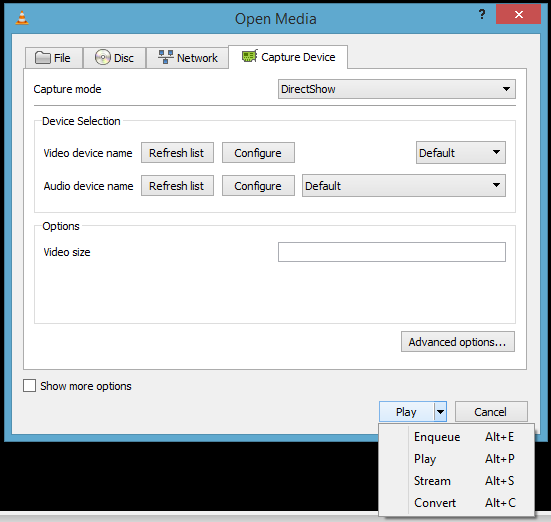
To begin broadcasting a live video stream in VLC, open the program and choose the Media option. When the Open Media dialog box displays, choose the media you wish to stream from the Files tab. You can choose more than one option. You can also stream to DVD or CD from the Disc tab or capture video from a particular device using the Capture Device tab. After you’ve chosen where to stream your video, simply click Stream.

Stream

The Stream Output window will pop up. The first panel simply shows what media sources you chose. From here, select Next. From the Destination Setup panel, determine a destination for your stream, such as HTTP to find available connections. Or, you can choose UDP to broadcast to a particular IP address or even a range of IP addresses.

Once you have chosen your destination, click on Add. You can also opt to activate the Display Locally by checking the box. This will allow you to see and hear the video streamed on your computer to make sure it’s playing properly. Now you can customize your settings. Either use the default path or choose your preferred HTTP destination. The transcoding settings can also be adjusted to your liking, such as lowering the quality to save on bandwidth.

Continue by clicking Next. It will then take you to the Option Setup panel. Unless you’re familiar with the Advanced Options, you will probably want to leave those as they are. Now it’s time to begin your live stream by simply clicking the Stream button. It may be necessary to adjust your firewall settings to allow VLC Player to connect, and you might have to forward ports on your router as well.

Stream Your Own Podcasts

Podcasts are ideal for connecting with any niche audience, especially if you are a contractor or small business owner. The benefit of podcasts over other online video streaming options, such as pre-recorded webinars, is that podcasts provide live information and interaction. Podcasts are also perfect for video blogging, instructional videos, promotional videos, business training, and many other purposes.

Broadcast Your Own Videos on Social Media

Social media streaming is also great for video blogging and for live streaming special events like trade shows, conventions, conferences, and behind-the-scenes material. Social media live streaming can also be a way to build brand recognition or become a viral Internet sensation, meaning your business could find itself reaching worldwide audiences and gaining thousands of new customers with the click of a mouse.

When it comes to streaming, you have to check out these 5 Apps to Get the Most Out of Chromecast!

Sources: How-to Geek

Related Stories

More Than Just a Video Player: 5 Expert Hacks for VLC Player

Capture Every Moment: Transform VLC Player into a Screen Capture App

What can we expect from a world of 5G?

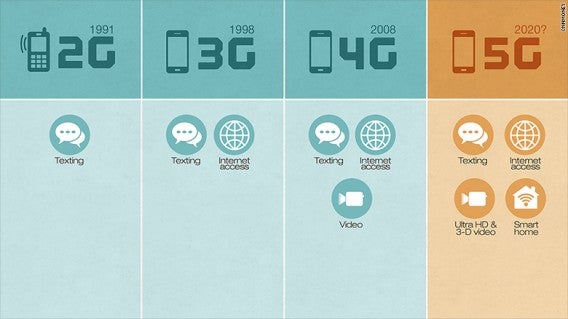
Although we are only in the midst of the 4G boom, the technology industry is already talking about its next big thing – 5G – something we can hope to enjoy in just four years. But how exactly will 5G affect our lives?

Nokia is due to divulge more detailed information surrounding the future of 5G at the Mobile World Congress in Barcelona later this month, however they have already dropped a few hints about what we can expect from this technology and the kind of things it will enable us to do:

Navigate 1000 times faster than 4G

Yes, you read correctly. A 5G connection can reach speeds of around 30GB per second (1000 times more than your average 4G connection. This will give us infinite possibilities to video and chat in various ways straight from our smartphones.

Video multi-casting

Thanks to video platforms such as YouTube or on-demand television, we can enjoy various content in real time on our mobile devices. But what if we could see any music or sports event better than those who are actually present at the event?  The high speed of 5G will allow us to enjoy uninterrupted live video in 4K (HD of the highest quality) and with a multi-camera system that will allow us to change camera angles so that you are guaranteed the best views every time.

Self-driving cars

They have already performed the first tests of cars that drive themselves, but the current connection situation means that it’s not quite feasible to detect the potential dangers in real time. 5G would break that barrier and make the cars 100% connected meaning that this idea would no longer be a thing of just science fiction movies.

Advanced robots

Just like the self-driving cars, 5G allows interaction in real time with robots that will be able to perform multiple tasks, from highly complex medical operations to the more mundane tasks such as domestic services.

Virtual Reality

Virtual Reality is now available to everyone thanks to Google Cardboard (here we show you the best apps to make the most from Google Cardboard). Until now, virtual reality has been something you mainly have to enjoy alone, but with 5G connection however, VR will be available so that numerous people can enjoy it collectively.

Is there anything that excites you the most about this potential technology? Please let us know in the coments!

Source: CNN Money


Google saves a baby’s life in the most incredible way

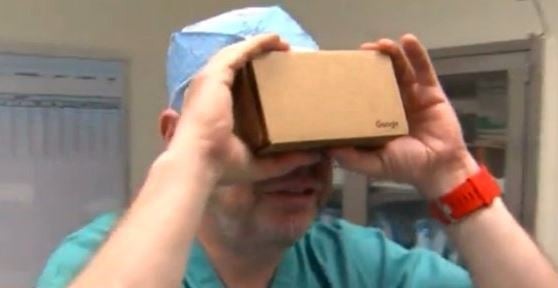
Doctors were recently able to save a baby’s life, all thanks to Google Cardboard – the must-have virtual reality accessory by Google. The doctors, based in Miami used the device in order to visualize a 3D plan of the young girl’s heart in order to perform the life-threatening operation.

The baby girl was born in August without a kidney and almost half a heart – a condition that was practically unheard of in the medical world. Cardiology specialist Redmon Burke ordered a 3D plan of the heart, however the hospital printers were not working at that time. The team of doctors then came up with a way they could use the $20 Google accessory.

They downloaded the app “Sketchfab“, which allowed them to download images of the patient’s heart to their mobile device. They were then able to view the organ from every angle possible, making it easier to perform the operation with presision and of course, success!

“To see this little cardboard box and a phone, and to think this is what saved our daughter’s life” said the baby’s Mother.

Source: Huffington Post

Spice Up Social Media: How Video Can Get You More Likes

If you are trying to get lots of social likes and shares, the ticket to success can be great videos. Videos not only increase the number of people who stop to see what you’ve posted, but they also up the chances that viewers will take the time to click and watch. The visual nature of videos captures the attention of social media users, and videos often force users to stop and pay attention among all of the text posts that are out there competing for their views, likes, shares, and follows. Here are several examples of compelling videos that cause social media viewers to stop, watch, and listen to your messages:

Videos for Showing People How to Do Things

When you need to convey a complex series of steps for how to get something done, a video is truly more powerful than thousands of words. In fact, people who would never stop to read a manual or how-to guide will readily watch a video. Everything from how to play a guitar to how to change the oil in a ’57 Chevy can be taught via video. VLC Media Player is ideal for capturing these types of videos and streaming them to your social media account as well as your blog, website, and other media outlets.

Videos Work Well to Put the Spotlight on a Special Event

Trade shows, conferences, conventions, and other special events are incredibly popular, but the number of interested people far surpasses the number of people who can actually attend. Some can’t afford it, others can’t get off work, and still more are too far away from the event to get there. Live streaming video from popular events like Comic-Con, CONEXPO, DragonCon, DexCon, ComicCon, GenCon, and the Annual Comic and Pop Culture Convention can be tremendously powerful in landing you follows, likes, and shares. VLC allows you to live stream without expensive equipment or complicated software.

Videos to Unveil New Products

Seeing is believing and nothing makes this more true than showcasing new products via video. Video can show what’s different, new, and unique about your new product, especially when the features of the product are difficult to describe. This technique isn’t just for the big brands, either. Even small companies and startups can benefit from releasing and sharing videos of their latest innovations.

Videos to Highlight Your Particular Talents or Skills

Are you particularly gifted in a certain skill? If so, showcase this talent with a video! People will be able to see how awesome you are, and this could help you to land more business as well as social follows and shares. People love to see talented people at work, whether you’re detailing a classic hotrod, painting an extraordinary work of art, or playing the best darn game of Call of Duty ever. Showcase your talents and skills with a video and post it to social media. In no time, you could become an Internet sensation as well as a business success story.

Want to watch media in another language? Find out how to how to add subtitles in VLC Media Player!

Sources:

Social Media Examiner

Reelseo

Warning! This error could damage your iPhone forever

“The iPhone could not be restored. An unknown error occurred (53).” This message is currently bringing fear to iPhone 6 users around the world, but why?

Well, because after you’ve received it, your iPhone could be deemed useless.

Error 53 can occur when updating your iPhone 6 with the latest version of the iOS 9 operating system. If it does occur, the system will no longer be able to apply the update and will then restrict the Home button and Touch ID from working.

It seems to be that this error is most common on devices which have had their Home button replaced in somewhere other than an official Apple store. According to Apple, this is a correspondence error between the parts of the phone that produce “a security measure to protect the device from a potentially fraudulent Touch ID sensor.”

What should I do if I receive “Error 53”?

Have you fallen victim to this error? If so, this is what Apple (official source) has recommended:

1) Download to latest version of iTunes.

2) Force restart you iPhone (by holding down the power and home buttons together).

3) Try to restore the iPhone again.

If this does not solve the problem, contact Apple Technical Support or visit an authorized dealer to change the Home button.

It’s a dark day for Videogamers: Sonic’s bringing out a movie

Back in 2014, rumors of a new movie started circulating around the gaming world, that was to star one of the most famous video game characters of all time. Now, it’s been confirmed: Sonic the Hedgehog will be hitting our cinema screens (if it makes it that far) in his very own film that combines real life with animation. The movie is expected to be released in 2018, and brought to us by Sony Pictures.

If I’m not mistaken, this will not be the first film we’ve seen starring the blue rodent.  Sonic also had an animated film many years ago (which actually, was more like two longer cartoon episodes).

But this? This is much worse. Also with real actors. What were they thinking?

You might be wondering to yourselves about why I’m being so negative about the whole idea. Well (since you asked), maybe some of you won’t remember the following movie where they created a real-life movie out of gaming heroes:

Can’t see the video? Click here.

The thing you hate most about Facebook is about to get worse

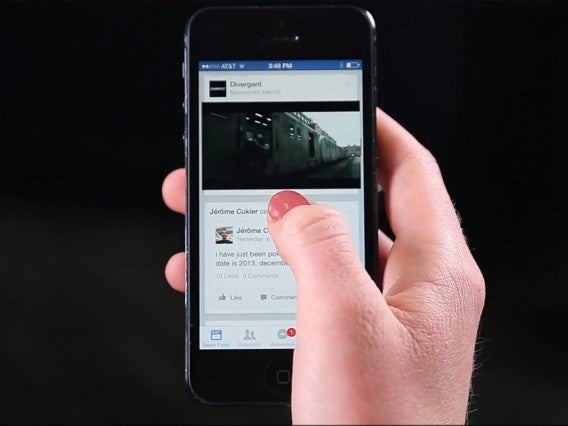
Around half a billion people invest 100 million hours watching videos on Facebook every day according to a spokesperson. Naturally, Facebook has sought a way to get some economic benefit out of this figure, but how? Well, more advertising of course!

In fact, Facebook has spent months looking for a way to make money from their videos and it’s even reported that some users have already encountered full-size ads with sound when trying to watch a video.

It is understood that Facebook also plans to create a separate section devoted purely to videos. If that’s the case, it could mean war between the social media giant and our dearly beloved YouTube. Obviously this section would also be filled with ads, just like, well, YouTube.


It’s important to understand that this increase of videos on Facebook is by no means an accident. Facebook has made changes so that now you see a lot more videos instead of the usual various images or links. The company has also added new features such as live transmission to encourage you to upload more videos.

Let’s see how the future holds out!

Source: Business Insider