Good news: eighth Harry Potter announced

This week, Harry Potter fans around the globe received some fantastic news: the release of what will be the eighth  book in the Harry Potter saga. The book (named “Harry Potter and the Cursed Child”) will be released on July 31st this year, which just so happens to be Harry’s birthday (but you already knew that, right?).

Unlike J K Rowling’s other work, this book comes in the form of a play script, from the hit play in London’s West End, which she co-wrote with Jack Thorne and John Tiffany. Obviously, not everyone can attend the play to get the full story, hence the release of it in book form.

Obviously,  it won’t be the same as her previous stories, but at least the story will continue and we’ll get a clearer idea into the life of one of the world’s most famous wizard.

Source: Pottermore

Windows 10 now crystal clear with how updates improve your system

One of the many problems that Windows 10 has had, is that every time you update the system, it doesn’t clearly indicate what exactly has been improved. This creates a certain distrust for the user, which let’s be honest, is not good for any brand.

Luckily, this has all changed, and now every time you receive an update, Windows goes into great detail of the  that have been made, and how your system has been improved.

The changelog (the list of improvements) for Windows 10 is now available on the Microsoft Support page. From now on, after each update, Windows 10 will explain exactly what’s going on.

Below you will see the most recent list of improvements (logged on February 9th, 2016)

-Fixed issues with authentication, update installation, and operating system installation.

-Fixed issue with Microsoft Edge browser caching visited URLs while using InPrivate browsing.

-Fixed issue that didn’t allow simultaneous install of apps from the Windows Store and updates from Windows Update.

-Fixed issue that delayed the availability of songs added to the Groove Music app in Windows 10 Mobile.

-Improved security in the Windows kernel.

-Fixed security issues that could allow remote code execution when malware is run on a target system.

-Fixed security issues in Microsoft Edge and Internet Explorer 11 that could allow code from a malicious website to be installed and run on a device.

-Fixed additional issues with the Windows UX, Windows 10 Mobile, Internet Explorer 11, Microsoft Edge, and taskbar.

-Fixed additional security issues with .NET Framework, Windows Journal, Active Directory Federation Services, NPS Radius Server, kernel-mode drivers, and WebDAV.

Do you use Windows 10? Do you like or prefer other versions of Windows? Let us know!

Gaming’s three most realistic relationships

Valentine’s Day is almost here! But while this is a special day for couples, love is more about putting up with your partner’s frustrating idiosyncrasies than it is one-off romantic gestures.

With only a few hours to build a relationship this is something games often struggle to do. A handful do manage to pull it off though, so here are my three favorite gaming couples.

The Darkness II (Windows|Mac)

Let’s kick things off with a first-person shooter, if only because it is perhaps the least romantic genre available. The Darkness games actually do a job setting up poignant romantic moments between the hero Jackie Estacado and his longtime girlfriend Jenny Romano. Much of this is revealed through exposition, explaining how the two fell for each other during their time together in an orphanage.

It’s a sad tale for the two though, with Jenny being killed in the first game due to Jackie’s Mob ties. That doesn’t stop her staring as a recurring character though, as she continues to haunt Jackie long after death providing his drive through the games.

It isn’t this posthumous connection that really drives their love home though, it is a quiet moment in their apartment while she is still alive. Sat on the sofa watching TV, you can stay for nearly half an hour watching a movie with Jenny asleep on your shoulder – just enjoying her being there. It’s calm, uneventful, and feels real in a lovely way.

Enslaved: Odyssey to the West (Windows)

There is love at first site, connections that grow over time, and romances that develop from hate-filled co-dependence. Not a great Valentine’s Day card, but exactly what happens in Enslaved: Odyssey to the West.

Escaping a band of slavers, the heroic Trip has to make her way hundreds of miles back across a post-apocalyptic America. In such a hostile world, she feels her only chance of making it is to enlist the help of Monkey. However, having seen this rebellious wastelander in action she realizes he isn’t one to help willingly, so she uses a slaver-headband to control him. Now, if she dies or he leaves her alone for too long, his head pops. Ah, young love.

But their relationship grows, and a weird co-dependence and romance develops with each of them bringing their own unique skills. Monkey even reveals that, after years alone in the wild, the headband has become a good excuse for him to stay near the only person he has ever cared about.

Passage (Windows|Mac|iOS)

Passage is an interactive metaphor for relationships and life. This tiny free game has you walking down a narrow path, making your way forward through life. You can explore up and down through different parts of the world, finding rewards.

But along the way you can meet a partner, and this completely changes how you play. Moving as a unit you can no longer fit through the game’s small paths, frequently forcing you to double back. But, on the plus side, you can find greater rewards.

Yes, it’s low-res even by Commodore 64 standards – but in Passage starting a relationship forces you into a real trade-off. So, as in life, if you want the benefits of a partner you must be prepared to put up with inconveniences.

Okay, a lot of older games there, but if you want a more contemporary real-world romance then try Firewatch (Windows|Mac). It only game out yesterday, and it’s about as depressing as everything else on this list…

I’ll be back next week with another three games, I’ll see you then.

Related Stories

Three Lara Croft games to play before Rise of the Tomb Raider

2016’s most anticipated games

Three Kickstarter games that delivered

Bear witness to this incredible game – The Witness review

On the road again – American Truck Simulator review

Follow me on Twitter: @DoFuss

YouTube Red: a glimpse at the first series and movies available on the new paid service

YouTube Red, the paid subscription version of YouTube was launched today in the United States. Besides other privileges, YouTube Red will offer exclusive programs, series and movies for its paying customers.

For now, YouTube Red is only available in the U.S., but it is expected to reach other countries very soon – we’ll be sure to keep you updated!

Could this service be good enough to compete with the likes of Netflix and its gigantic catalog of entertainment? Let’s take a look at what’s on offer so far:

Scare PedDiePie (series)

YouTube experiences popular games in real life.

Don’t see the video? Click here.

Lazer Team (movie)

Comedy that follows the advetures of a group of friend who have an alien experience.

Don’t see the video? Click here.

Dance Camp (movie)

A film about summer camp for ballerinas.

Don’t see the video? Click here.

A Trip to Unicorn Island (documentary)

Documentary that follows the life of YouTuber Lilly Singh.

Don’t see the video? Click here.

The Twitter you knew is dead. Here’s another change you’re not going to like

It’s time to forget the Twitter you once knew and loved. That Twitter has apparently died forever, all thanks to the recent changes implemented by the social media giant. Until now, Twitter has always listed tweets in chronological order – makes sense doesn’t it? Well, that’s changed. Now it feeds you the tweets that it thinks matters to you the most, regardless of whether they are new or not. Later, if you decide to continue scrolling down, you’ll see the normal feed with the most recent tweets.

This is what Twitter had to say about this new feature: “You follow hundreds of people on Twitter, maybe thousands, and when you open Twitter, it can feel like you’ve missed some of their most important tweets. Today, we’re sharing a new timeline feature that helps you catch up on the best tweets from people you follow.”

In other words, Twitter wants to be more like Facebook.

The good news? You can turn it off if you don’t like the new option. In addition, Twitter also promises to gather users’ opinions on the changes over the next couple of weeks.

There is also a rumor that the company plans to get rid of the 140 character restriction, which would give the user the opportunity to write much more.

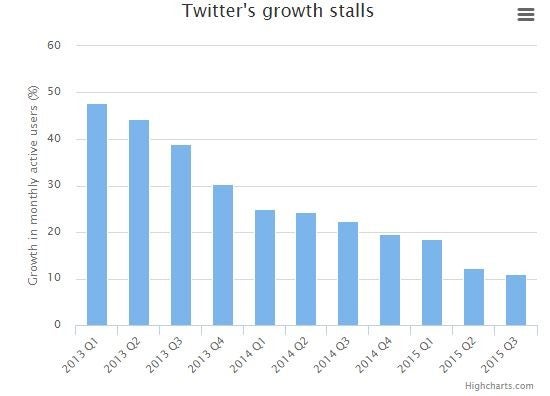
So, just why exactly is Twitter introducing all these changes right now? Well, maybe if you take a look at the graph below you’ll get a better idea of the kind of trouble they are currently in.

What Twitter is failing to realize is that nobody is liking these new changes. They don’t make any sense. If I want to use Facebook, I can use Facebook. Twitter’s objective is completely different. And they’re currently annihialating it.

Source: The Telegraph

Is Microsoft about to get rid of its most iconic program ever?

Paint is the classic Windows program that has been helping us doodle since the beginning of time (1985 to be precise). Although Paint has given us 31 years of good moments, it seems all that could disappear very soon. Can you imagine a life (or a PC) without Paint?

Although Microsoft hasn’t confirmed that the idea is on the cards, there are many clues that indicate that Paint will soon be history. A user recently stumbled upon a new project by Microsoft on Paint’s help page called “Plumbago”, which appears to be a hybrid between Paint and OneNote. According to the filtered data, this new replacement program would be designed to work better on touch screens and would be compatible with a stylus and other peripheral equipment.

Apparently Microsoft realized the leak, and promptly erased the information from the help site. Could this indicate that they are hiding something before an official announcement?

Whether Paint is about to disappear or not, we need to start making make the most out of our special moments with Paint, before we lose it forever.

Gmail’s new security feature you should be aware of

As of yesterday, any mail that arrives to your Gmail account that is not compatible with the TSL encryption will appear a padlock icon next to it. If you click on the icon, you’ll get a message warning you that it may not be a good idea to respond to the email with confidential information.

Gmail will also alert you of the users it can’t verify.

These methods are intended to protect you from harmful emails. If Gmail doesn’t recognize the sender as an authentic and verified sender, it will also replace the profile picture with a question mark.  This is to say that if you receive an email supposedly from your bank; if the padlock icon appears in the top right corner, and you have the question mark as the profile image, it would best to not trust the source and delete the email immediately.

Source: The Verge

Warning! New trojan targets Skype users

Watch out people! Your Skype account may be at risk. Researchers from Palo Alto Networks have recently discovered a new, advanced trojan that targets Skype users. It has been nicknamed the T9000.

The aim of T9000 is to gain information about its victims by stealing their encrypted data and taking photos of the users’ applications. This is a much more advanced and effective version of the previous Trojan, dubbed T5000.

The rise of Skype as a tool for work and business might have motivated the creation of T9000, which also has the ability to record audio conversations. In theory, it’s logical to assume that the T9000 is aiming to steal information from companies. It shouldn’t attack “normal” people, but in any case, please be careful!

Source: ITProPortal

How to add multiple accounts on Instagram and manage them

Instagram for iOS and Android now allows its users to manage up to five different accounts without having to close the application. Although this feature is a little bit hidden, we’re going to tell you exactly how you do it.

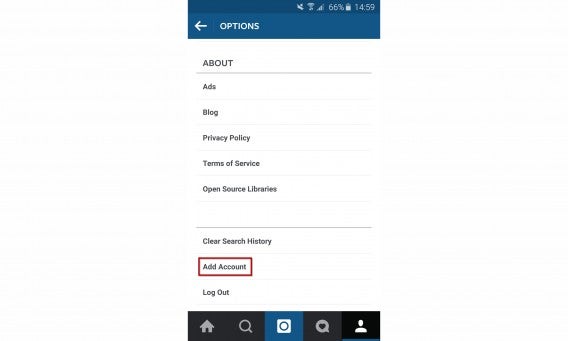
1. Go to the options on your profile

View your profile by clicking the little man, then click the three dots in the top-right hand side.

2. Go to “Add Account”

Under all of the options you’ll see the “Add Account” option. Click it!

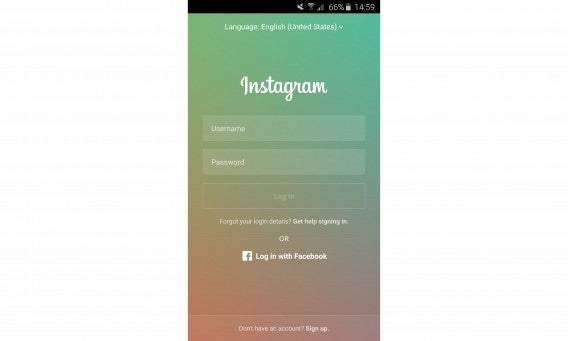
3. Start a session with your other account

You’ll see the following screen. Login with the details of your other account (providing you have other accounts). You can also add any Facebook accounts you have affiliated with any of your Instagram. You can repeat this step up to five times.

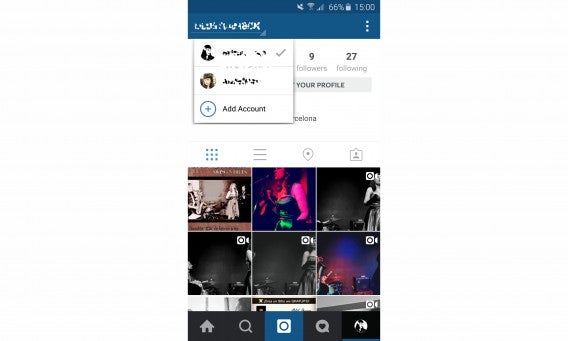
4. Change which account you wish to use whenever you want

By now you will have noticed that the button on your profile has changed to the thumbnail of the account you are currently logged into. Want to switch accounts? Easy- simple view your profile as explained earlier, and click your username on the top-left of the screen. You’ll see how easy it to to navigate to each account!

5. If you get tired of one of your accounts – get rid of it

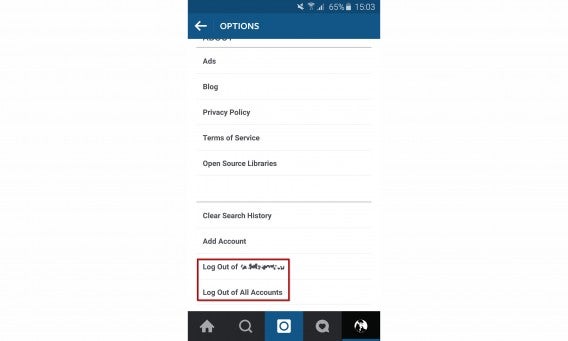
Have you found that you’re not using one of your accounts? No problem, it can easily be removed. To remove one of the accounts from the group you are currently managing, simply go back to the options menu where you’ll have the option to deactivate it. Note that this doesn’t delete the account, but simply removes it from your current Instagram session.

Now you’re Instagramming like a pro!

If you liked this tutorial, maybe you’ll like our complete Instagram tutorial too!

Get 2GB free Google Drive space TODAY!

A free account on Google Drive offers you 15GB of space. How do you feel about adding an extra 2GB absolutely free?

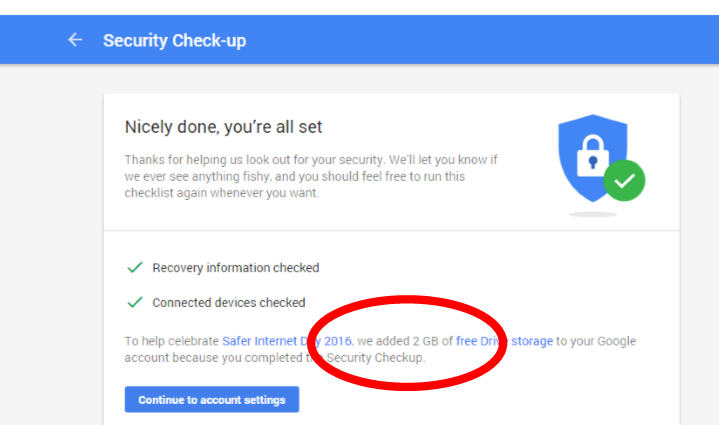
For today only, Google is giving you the opportunity to earn an extra 2GB of drive space just by completing a quick security check that takes no longer than one minute.

This gift is an incentive in celebration for the Safer Internet Day 2016, which aims to promote the best use of web services. All you need to do is click on this link which will run a quick security check on Google (checking your phone number, etc) and you will instantly be gifted with the extra space.

By doing this, you’re not only boosting your Google Drive memory, but you’ve also improved the security on your Google account. It’s a  situation!