
Productivity tips for lazy people

These productivity tips will help you get more work done when you need to do it.

productivity plan

Getting things done can be such a chore. It is not just the finishing of jobs that is hard neither. Starting them can be bad enough too. Whatever the reason or distraction that is standing in the way of the work that needs doing does not matter. The only thing that counts is that it is there, and the work is not getting done.

Fortunately, however, there are a number of coping techniques and tips that you can utilize to break through these difficult times when distraction reigns supreme. You are not lazy, you just like to occupy your mind with other pursuits when there is work to be done. Well, these tips are here for you to help you regain control of your consciousness and start getting stuff done. These are the top productivity hacks to help you improve productivity in your daily life.

Tips for productivity

These tips aren’t necessarily related to apps or software, they’re simply good practices to have at hand any time you feel distracted or struggle to start a task. The truth is we do a lot of jobs on our computers these days, and they bring with them a whole new world of electronic distractions such as social media and online procrastination. These tips are here to help you fight them.

The 2-minute rule

2 min rule

The two-minute rule is a simple yet brilliant way to increase productivity. It offers a way to instantly deal with the small tasks that end up in your in-tray and forces you into taking action on similar tasks that would eat up a larger amount of time. The two-minute rule states that:

If a job can be done in under two minutes, you should just do it there and then.

If a job is clearly going to take longer than two minutes, then you should start it right there and then.

This rule is brilliant because it instantly activates your brain to the task at hand. It declutters your to-do list by making sure none of those little tasks clog it up when they’re so easy to complete. On top of that, the rule also ensures that those bigger tasks are already underway when you move not the next item. It is always easier to come back to a task you’ve already started than it is to start a new one.

Chew gum

OK, this one sounds a little strange. Let’s all be honest though; you’re not looking for productivity tips here that are going to take a lot of effort. Really, you’re after the easiest tips that will have the biggest results. Well, that’s what we have here. Scientific studies have found that chewing gum can make you more productive. Amazingly, chewing gum can make you work 10% faster, can stop you feeling sleepy, and can even make you more charismatic. Start chewing gum now!

Break lists

This is a cool little tip that will make so much sense once you read through it. It is imperative that we take breaks during the day if we’re to work as effectively as we can. In fact, be should be taking 15-20-minute breaks roughly every 90 minutes. Shutting down one program on your computer and opening another one, say Twitter or Facebook, for example, is not going to have the regenerative effect a proper break will. This is why you should create break lists; write down all the short pleasurable activities you can think of that help make you feel better. Now, this could be something like “check Twitter” but only add activities to your list that help you feel like you’ve had a break. Mine would be something like read from a book or magazine, take a walk, make a coffee, call a friend, etc.

Microsoft To-Do Download
8

The Pomodoro method

Image via: Flickr

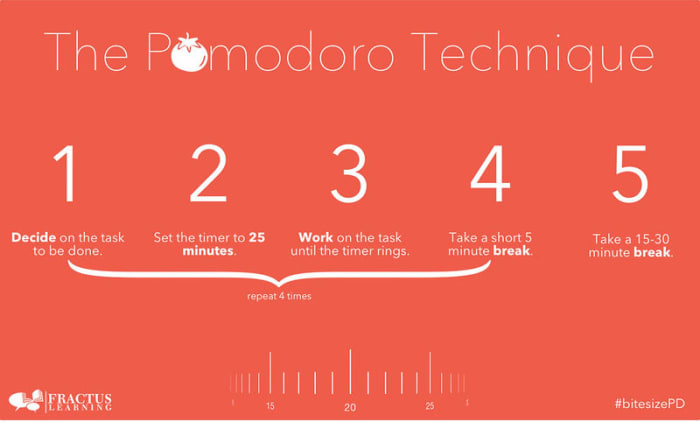
If you really want to take your breaks to the next level, you should look into the Pomodoro technique. Pomodoro works off the idea that your brain can only remain truly active for around 25 minutes. You set a timer for 25 minutes and then every time it rings you take a short five-minute break. This could be when you go make a coffee or check your phone. Then, when you’ve done this work-break cycle four times, you take a longer 15-30-minute break and then start the process all over again. This way you get to go through all the different items on your break list while training your brain to focus for shorter periods.

Pomodoro Timer Donwload
8

Don’t break the chain

We’re not talking about a Fleetwood Mac song here; we’re actually talking about a Seinfeld hack. Yep, Jerry Seinfeld actually shared one of the productivity tips he used to help him develop as a comic by trying to write better jokes every day. To do the same you need to get yourself a huge calendar poster that covers an entire year. Then every day you work on the task you want to work on you get to put a giant red x in the square for that day. Pretty soon, you’ll have a chain of red x’s and you’ll be a hell of a lot more motivated to work on your task because you won’t want to break the chain!

Do the hardest thing first

The final tip of the day is about what you should work on first. It is no secret that the most productive time of day is first thing in the morning just after we wake up. This means that it is first thing in the morning when we begin working that we should tackle our hardest tasks. This way you will take care of the most challenging and pressing issues when you’re at your best, but it also helps build momentum for the rest of the day. Once that first big task is out the way, everything else will feel smaller and less daunting.

The coolest Google Chrome extensions

googleGoogle Chrome is the leader of the browser market for many reasons, and one of them is inarguably the number of extensions it offers. As anyone familiar with the wonders of Google’s program will know, the Chrome Web Store is outstanding when it comes to extensions. The only drawback is that there are too many to choose from!

So today, Softonic is going to save you lots of time. Here’s our list of the coolest Chrome extensions.

Google Chrome Descargar
7

1. Classic Games

The name says it all, doesn’t it? Our first pick is Classic Games, which offers exactly that: classic video games. It contains a wide range of historic, retro arcade games. For example, you can play the legendary Pac-Man, Tetris, Street Fighter 2, Quake, King of Fighters, Mahjong, and much more on Chrome. Enjoy them all for free, just a few clicks away on your browser. That said, this extension can sometimes crash, so be patient.

2. Vikings War of Clans

Vikings have captured our collective imaginations in a big way. Just as the Romans were all the rage 15 years ago, bringing us endless movies and series, now, thanks to the show Vikings, they’re the “stars” of many products. Vikings: War of Clans is a fun game of strategy for your Google Chrome browser. The best thing: a whopping 40,000+ players have installed it on their toolbar, which says a lot.

3. Death Racing

Classic arcade games, a Vikings game… and now, how about some driving? Like Nicolas Cage in Gone in Sixty Seconds (what a movie!), with Death Racing, you can enjoy crazy car chases from your Google Chrome browser. The developers have created a simple, straightforward game inspired by films like The Fast and the Furious. The best thing about this game is that it’s incredibly addictive, so you’ll get hooked in a matter of seconds. But be careful not to play it at work, because it’s pretty scandalous and not at all quiet.

4. Coloring pages

Here’s another extension whose name leaves little room for doubt. “Coloring pages” is exactly that: an extensive collection of black-and-white pages you have to bring to life with color. The illustrations are typical of children’s coloring books, so as you can imagine, this extension is targeted towards that crowd. It includes basic painting and erasing tools, so just add the extension to keep your little rascals busy. Just make sure they don’t visit any other sites in the meantime!

5. 2048

You’re probably familiar with this game, but if not, be patient and calm: you might feel like taking a sledgehammer to your keyboard and mouse, and the point is to have fun, not to get frustrated! 2048, a video game by Italian developer Gabriele Cirulli, has had great success all over the world. The objective is simple: different numbers appear on the display, and you have to add them until the multiplied combination of the boxes equals 2048. It may seem easy, but it’s actually pretty hard. You’ll see it!

6. Word Search Puzzle

The name sounds a bit bizarre, but Word Search Puzzle is really just a version of the famous game of Alphabet Soup, and one you can play from a Google Chrome extension. How cool is that? The tool works pretty well, and you’ll get the hang of it after a few tries. All you have to do is find words as quickly as possible.

7. Google Arts and Culture

Next on our list is an application developed by Google itself, so it’s one of the best Chrome extensions out there. Known as Google Arts & Culture, this tool lets you tour the greatest works of art and culture that humanity has ever created. True masterpieces ranging from Van Gogh to Monet and other renowned artists. The point is, you have all the world’s art in the palm of your hand. Or better said, at the click of your mouse.

8. You DJ

Ever been fascinated by the world of DJs? If the answer is yes, You.dj is a fantastic tool to get your start on a turntable. Although there are dozens of websites to emulate DJs, this is the most famous one thanks to its extensive catalog of songs and excellent recreation of the turntable. We must say it’s a bit hard to use at first, but with a few hours’ practice, you’ll be fast (but to be perfect, you need a lot of experience).

9. Backgrounds Every Day

There are many apps that keep all of their promises, literally. And Backgrounds Every Day is one of them. This extension is a tool that will decorate your Google Chrome homepage with a new wallpaper every day. Feel like seeing cats one day? Well, it has them. What about a sports car driving through a stunning landscape? Well, that’s available too. All of these popular images are provided by this extension, which does exactly what it promises to do. And that’s pretty neat.

10. Netflix Party

It’s one of the apps we’ve mentioned the most at Softonic, and it’s still one of Google’s best: Netflix Party. How many times have you wanted to watch a movie or TV series with that special someone, but he or she is far away? Well, Netflix Party makes it possible for two people to watch a movie at the same time on their respective PCs. What it does is synchronize the video playback of both profiles and add a group chat so you can comment on everything, similar to a live stream. It may seem otherwise, but it’s one of those very useful extensions.

11. Improve YouTube

Now that we’re in the audiovisual world, we can’t overlook Improve YouTube. This Chrome extension does an incredible job of enhancing the characteristics of Google’s famous streaming platform. You can resize all the uploaded videos, hide distracting elements around the clips, find the best codecs to improve quality, modify the playback speed more than usual, activate the dark theme, subtitles always on, auto pause, etc. It’s an incredible Google Chrome extension.

12. Evernote Web Clipper

We’re not sure if this application is as fun as the others we’ve recommended, but it’s certainly not boring. Evernote Web Clipper can make all your electronic devices work in unison. Let us explain. Imagine you’re looking at a website and want to view it later on your iPhone or Android smartphone, but don’t feel like searching for it again on your phone. Well, with Evernote, you can just click on the extension and add the URL. It will appear on your mobile device as long as you’ve installed Evernote Web Clipper there too. All in real time. It’s that simple!

13. Fruits Slice

One of the most popular games at Google Play Store is also available for Google Chrome. Called Fruits Slice, it has an easy premise: fruit falls from the “sky,” and you have to slice it like a ninja or samurai. In fact, you’ll use swords, katanas and other famous cutting tools. The more fruit you slice, the higher your score. It’s a lot of fun, and it has been praised by players all over the world. Its reputation precedes it.

14. Lastpass

Like Evernote, we’re not sure if Lastpass is fun, but it’s certainly useful and will save you lots of time. After all, with this extension, all your passwords will be stored in a sort of vault. You might be wondering, is it secure? The answer is obviously yes. All your passwords appear as encrypted and it’s not possible to view them, so everything is saved. It’s one of the securest extensions in the catalog, with thousands of positive reviews. You won’t be disappointed.

15. Battle Tabs

Now we’ll jump back to very fun video games: Battle Tabs is inspired by the legendary game of Battleship. It takes the same approach. Each team takes turns, and there are fleets of ships on a grid that you have to sink. Every time it’s your turn, you have to mark a box to bomb. If you guess right, the ship is hit. When all the targets of the ship have been hit, it sinks.

16. Keepa

If you’re a frequent Amazon shopper, you’re going to love Keepa. This extension tracks all the website’s prices at every moment and notifies you when one increases, drops, stays the same, is discounted, etc. It’s capable of incredible things! We promise you’ll spend a lot of time exploring Amazon’s catalog of discounted products, to the point where it becomes fun. Also, you can program different tasks to keep track of a specific item.

17. Twitch Now

In the same league as YouTube, Twitch has become the biggest streaming platform around. In fact, its Google search ranking keeps climbing. How has it managed that? Well, by attracting the whole gaming community to its site, where there are tens of thousands of streams every day. And yes, there’s something for everyone. Precisely because of that, Twitch Now is the perfect extension, because it expands upon the platform to offer more exhaustive content. Because after all, one of the drawbacks of Twitch is that its search engine isn’t that great. This is how you can fix it.

18. Paint Editor

Imagine drawing on Softonic’s website. Imagine drawing over this text. Is that even possible?! With the Paint Editor extension, it is: you can virtually draw on any website. Obviously, the changes are not saved, but this extension gives free rein to your creativity. Enable it, grab your tools, and start drawing. It’s that simple! When you close the tab, mind you, it will all disappear.

19. Colorful Tic-Tac-Toe

Does Tic-tac-toe need any explanation? It might be one of the most legendary games that mankind has ever played. This is because you only need a piece of paper and a pen. One player draws “X”s and the other one “O”s. The first player to place three of their marks in a row is the winner. This extension comes with two different game modes and multiple levels of difficulty. Because if you’re tired of always winning, the only thing you can do is move up a level.

And those are our top 19 coolest Chrome extensions if you’re looking to have a good time. Which one is your favorite?