‘You opened my case.’ Those bone-chilling words uttered by the titular girl doll, Poppy Playtime, might be the beginning of a whole new story for the indie horror project. The producer of IT, Roy Lee, sees a film premiere in Poppy’s near future. He has said that he will produce the film and is looking for filmmakers willing to direct the planned project.
Anyone who has played, or watched a YouTube or Twitch playthrough by one of many video game gods, will know that Poppy Playtime has solidly cemented itself as a title from the same deranged and demented mentality that led to Five Nights at Freddy’s. This kind of game has become a genre within the broader horror genre and has taken the world by storm more times than can be counted.
Similar to FNAF, Poppy Playtime takes seemingly innocent childhood themes and turns them into your next nightmare. We can see from the highly-acclaimed The Conjuring expanded universe of horror movies that people love being scared. There is virtually no doubt that a movie matching the in-game history and lore of Poppy Playtime would be a massive success.
On the point of lore, the in-game mysteries and stories are reason enough for it to be turned into the next breakout scare-a-minute cinematic horror title. The game is jam-packed with secrets, mysteries that are far from being solved, and a list of potential big baddies for the next parts of the game that could change horror movies forever.
According to the latest reports, Studio71 is taking the lead on the production of the movie and has already let a few details about the coming title slip.
‘We’re thrilled to be partnered with such an incredible team in Mob Games and their breakout game, Poppy Playtime. Their vision for this game is a vivid tapestry that allows the space for feature films that don’t retread on the narrative’s gameplay. Fans of this franchise are in store for a new storyline that stands alone as its own terrifying and gripping saga.’
Going by this comment from Michael Shreiber of Studio71, we can clearly see that the game and the movie will be in the same universe, but not the exact same story. Like we said earlier, the possibilities for storylines and conflict within this game’s universe are endless, and we are so excited to see how this shapes out.
We’ll be sure to bring you more details as they get released. In other news, it seems we all baited our breath for an April 29th release of Chapter 2 of Poppy Playtime. Here’s hoping we see a release of the highly-anticipated second chapter soon, but while you wait, why not experience the Poppy Playtime horror on mobile?
E-commerce now reigns as the new normal, and small businesses and digital advertisers need simple, inexpensive creative solutions to help target niche audiences and market their products quickly. Adobe has stepped up to meet the burgeoning demand for a fast and easy-to-use design product in its largely template-based Creative Cloud Express, the graphic design software company’s revamped version of Adobe Spark.
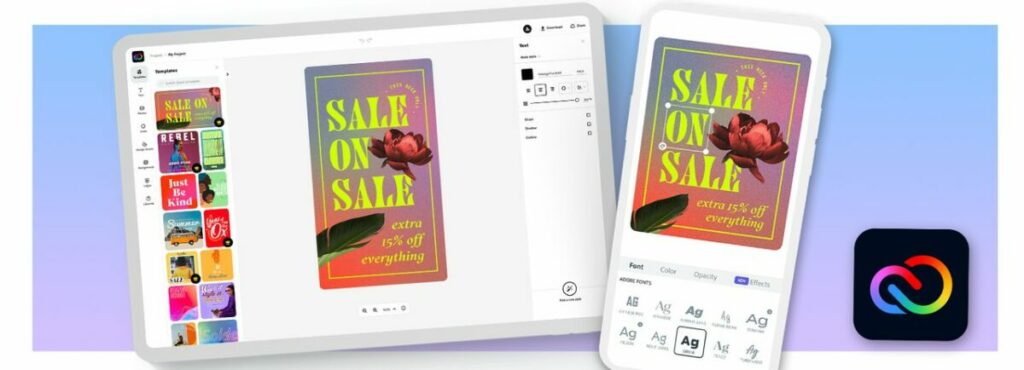
Initially released in December of 2021, Adobe Creative Cloud Express (also known as Adobe Express and CC Express) utilizes simple drag-and-drop technology within a unified task-based app that works with mobile devices and PCs. The software enables non-designers to swiftly generate polished, original multimedia content for their social sharing accounts. Digital marketers like Creative Cloud Express as an affordable solution for creating marketing materials like brand logos and web banners.
One of the latest additions to Adobe’s renowned assemblage of digital design apps, Creative Cloud Express is an inexpensive, user-friendly alternative to competitors like Canva, PicsArt, and the software company’s own Illustrator. While many claim Adobe Express is just a rebranded update to Spark, developers at Adobe have implemented several noteworthy changes.
Here are the features Adobe added to CC Express in April 2022:
Color palette creator: This feature generates palettes with suggested color combinations.
Font recommendations: Under More Fonts, there’s a tool for suggested font pairings.
Mobile video quick actions: These include quick actions for cropping, video speed, and more.
Generate QR Code quick action: This tool simplifies the process of creating QR codes through Adobe.
Convert to SVG quick action: This tool now supports SVG along with other file formats.
With these additions, Creative Cloud Express finds a comparatively wider audience than Spark and other content creation tools like Photoshop Express and Premiere Rush. The app is not, however, aimed at seasoned creative professionals who can render original design results with traditional tools like Illustrator. Instead, Adobe Express adopts several core features from multiple dedicated applications from Adobe and their AI tools to make the software more accessible and easier to use.
Adobe Express is made for fast design solutions
Adobe Express is an optimal design solution for students, online advertisers, and small business owners who routinely create anything from social media posts to promotional videos and self-branded logos. The software retains its simple interface by utilizing a template-first approach that is far more intuitive and simple to access than the individual creative apps discoverable in Adobe’s full Creative Suite.
Adobe’s extensive library of drag-and-drop templates and Sensei machine-learning technology translate to a well-streamlined user experience for beginners with little to no design experience. The general idea behind the app is that it is the perfect tool for people trying their hand at graphic design for the first time and small business owners who want to avoid the extra overhead of a professional design service. Moreover, the continuous access to Adobe’s updated Creative Cloud libraries and the suite’s collaborative and sharing features are among the app’s several top advantages.
How does Adobe Creative Express work?
Adobe developed Creative Cloud Express to be quick and easy to start using, even if it is your first time trying graphic design software. It is a web-based application, and all you need to launch the program is a desktop PC or mobile device and a stable internet connection. Before you get going, you must create an Adobe account to access the freemium edition or sign in to your existing profile. The app delivers itself via the Cloud, and you can access mobile versions of Adobe Express that replicate the web edition of the software.
While Adobe express is a template-based app, you can tailor it for your specific design needs. Some templates are laid out for Instagram stories, while others lend themselves best toward materials like YouTube thumbnails and advertising fliers. By clicking Show All, you can reveal the available categories. Housed within the specified categories is an impressive library of template options associated with the type of media you wish to create.
If you’re working with the free but limited version of Adobe Express, you will notice the Adobe premium template offerings mixed in with the free samples. The welcome filter allows you to separate the two products easily, however. As you grow more comfortable with the software, it’s easy to create your own templates from scratch and save them. But most users find that the advanced features in Creative Express tend to negate the general purpose of the app, which is to help speed the creative process along. If you do feel like indulging your creative senses, the app allows you to customize existing templates for a more original design.
Customizing your creations
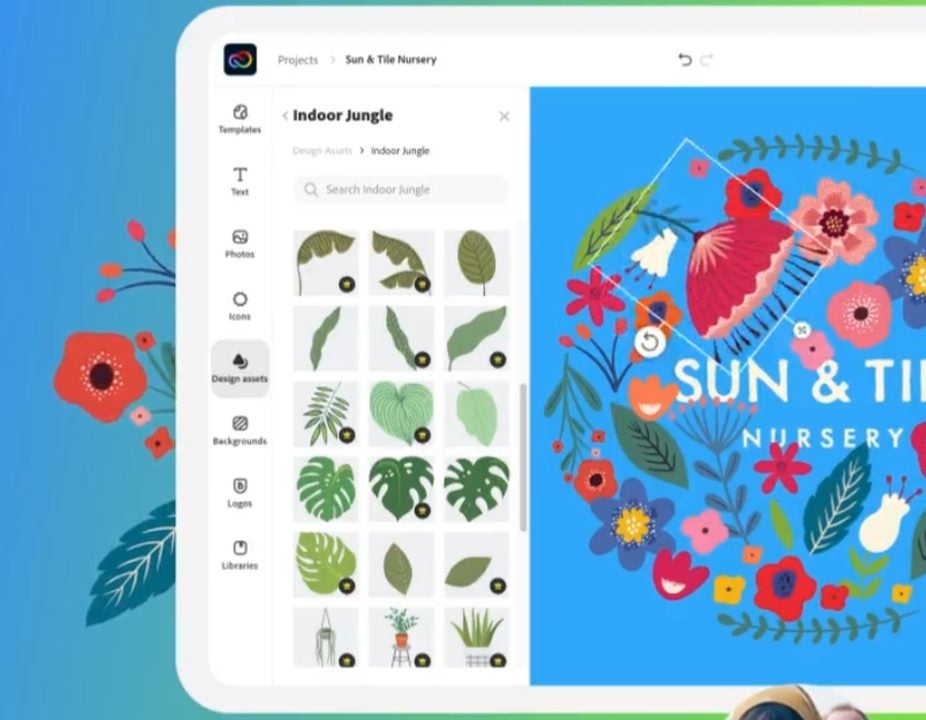
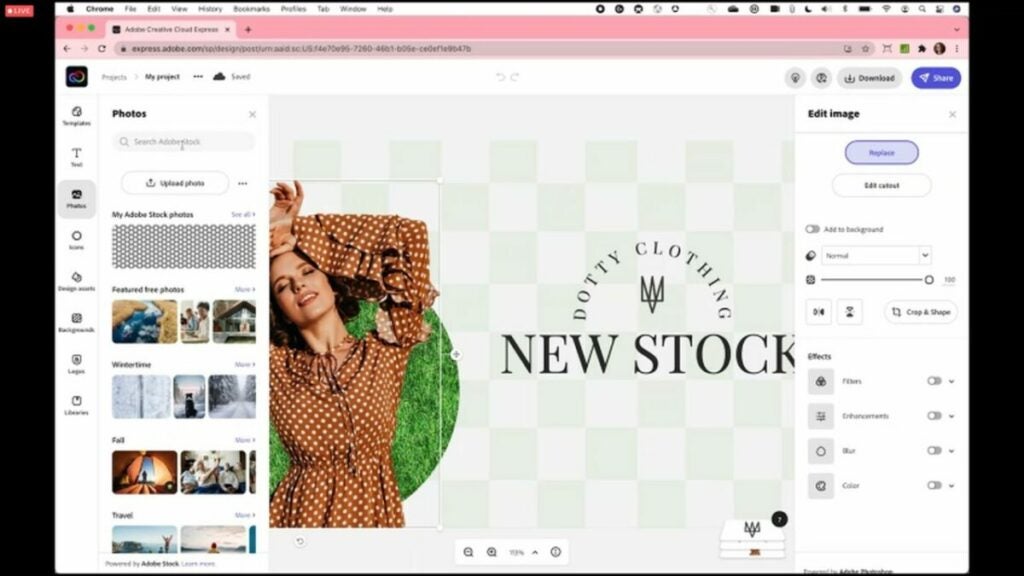
Once you’re in the app, you’ll find a well-organized editing space. Off to the left, there are a set of graphics that you can add to your design image. This section contains text tools, Adobe Stock images, a vast selection of black and white icons, backgrounds, and more features. Off to the right of your display are the pre-set color palettes, several layout options, and all the necessary tools to bring your design to life. The middle of the page gives an accurate preview of your work in progress.
After you select the object you are working on, the right side of your workspace displays an Edit Image sidebar. This advanced menu feature gives you the option to remove the background from your canvas automatically, an impressive function usually reserved for more heavyweight applications like Illustrator or Photoshop. Not unlike those two apps, you may have to work with it, and the success of the edit depends upon factors like high image contrast and the type of background you have.
Edit Image also lets you play with functions like image opacity, cropping and masking, and other rudimentary digital photo edits like background blur, color filters, and general image enhancements. When you click on a text field, a set of text editing tools automatically replaces your current sidebar display. While limited compared to the Adobe professional software design packages and apps, this toolset is sufficient for making sharp-looking edits quickly.
As with Photoshop, its more advanced counterpart, image editing in Adobe Express assembles your projects in layers. The process is ostensibly more simplified in the sense that you’re just arranging objects on top of each other. You can, however, track the sequences of edits in layers at the lower right of your canvas and rearrange them according to your desired results.
Is Creative Cloud Express just for beginners?
As you can see, Adobe’s Creative Cloud Express accomplishes a lot with a rather limited toolset. It’s not just forstudents and entry-level creatives interested in familiarizing themselves with basic design software. While the app is undeniably a great starting point for beginners, its powerful image and photo enhancement features allow you to pull off Illustrator and Photoshop-like projects in a fraction of the time.
The creative expediency of Adobe Express is a fantastic value-add for experienced design professionals who work with visual images in high volumes and need to deliver their messages quickly. Professional tools like Illustrator and Photoshop lend themselves well to virtually limitless invention, but most digital marketing agencies, for instance, simply don’t have the time or resources to build a unique vision with every post.
For those who don’t obsess over the deeper elements of their multimedia content, Creative Cloud Express offers a capable and effective set of editing tools and design templates. Some functions like undoing edits and object selection may not be as accessible and accurate as more robust creative applications from Adobe, but Adobe Express is undoubtedly the most affordable product for generating professional-looking multimedia content quickly and with minimal effort overall.
An excellent value for the money
Creative Cloud Express won’t replace professional design tools like Illustrator and Photoshop, but it’s a hugely accessible app for beginners and an outstanding tool for busy creative professionals who need to turn polished Web content around quickly. Enjoy Creative Cloud Express for Web Apps at no cost today. Looking for Adobe Express alternatives? Check out our guide to using Canva.
Pros
Practical and powerful image editing
Free version provides 2GB of storage
Affordable, professional-grade graphics
Template-based for faster workflows
Easy-to-use, comprehensive software
An affordable option for beginners
Powerful social media creation tool
Access to Adobe Stock Images and template library
Compatible with most major social sharing platforms