SHIFT UP has not had a bad year. With the commercial success of Stellar Blade, they have established themselves as one of the major studios in Korea. This confirms what was already known, given the success of their previous game: Goddess of Victory: Nikke. A mobile game that is tremendously popular among the Asian audience, and increasingly so among the Western audience, which seems to want to end the year on a high note. Or start the next one even higher. Many mythical anime girls are coming to the game because SHIFT UP has confirmed that Goddess of Victory: Nikke will have […]
SHIFT UP has not had a bad year. With the commercial success of Stellar Blade, they have established themselves as one of the major studios in Korea. This confirms what was already known, given the success of their previous game: Goddess of Victory: Nikke. A mobile game that is tremendously popular among the Asian audience, and increasingly among the Western audience, which seems to want to end the year on a high note. Or start the next one even higher.
Many Mythical Anime Girls Arrive in the Game
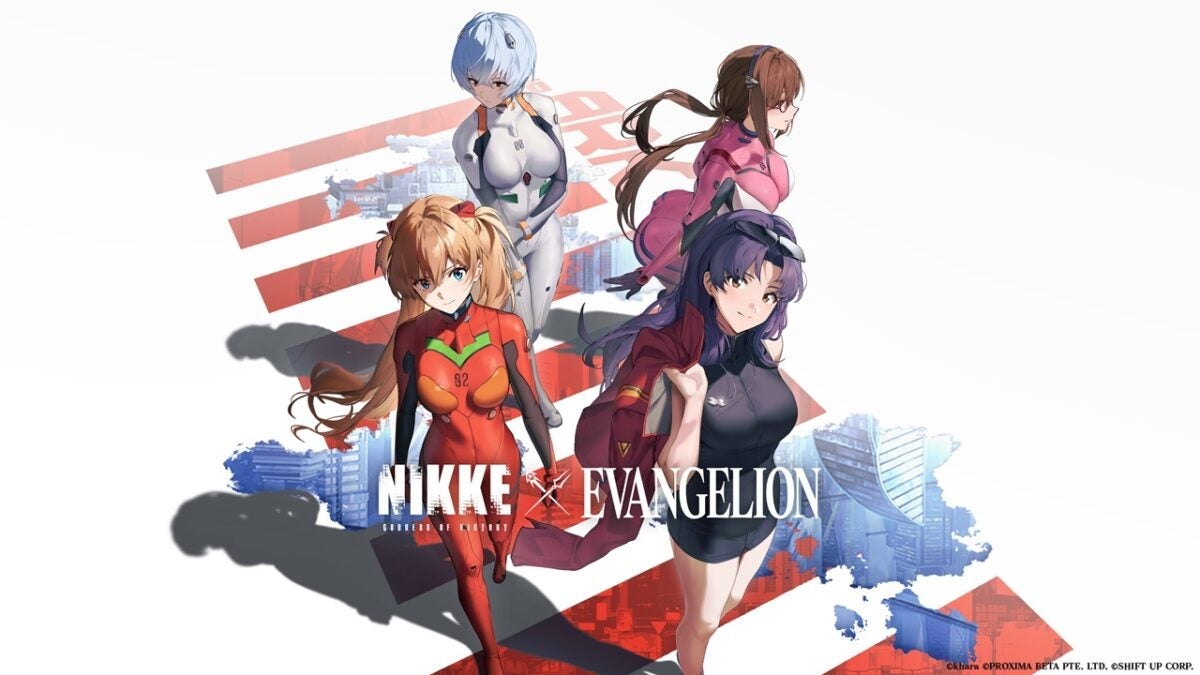
Because SHIFT UP has confirmed that Goddess of Victory: Nikke will have two high-profile collaborations next year. The first being with the popular cult anime Neon Genesis Evangelion and the other with its own game, Stellar Blade.
The first to arrive will be its collaboration with Evangelion. Scheduled for February and anticipated for weeks, it has been confirmed that Asuka, Rei, Mari, and Misato will become part of the game, along with a new SSR character and a character that will be offered for free to all those who participate in the event. This will include different outfits, a 3D event map, a minigame, and an immersive and collaborative story.
For its part, we will still have to wait a little for the collaboration of Stellar Blade. Although no concrete details have been given yet, neither in the content nor in the release date, it has been confirmed that it will contain the best of both worlds. Confirming that they will seek to give all the care that their two star franchises deserve.
In turn, since the 26th, SHIFT UP has been offering gifts to those who enter the game during these special dates. And on January 1st, they will introduce a new SSR character, Rapi: Red Hood. So, if you haven’t played Goddess of Victory: Nikke yet and all this catches your attention, it is available on the App Store on iOS and on Android on Google Play.
GODDESS OF VICTORY: NIKKE is a sci-fi RPG shooter where you lead a group of female warriors on a mission to rid the universe of evil. Engage in action-packed battles with a wide array of weapons to bring peace to the universe. Take cover from enemy attacks, eliminate robots, and face powerful bosses across post-apocalyptic landscapes. Each warrior possesses unique skills and weapons, allowing for strategic gameplay. Switch between characters during battles, with AI-controlled allies aiding in combat. Customize characters, weapons, and settings using the city map interface. The PC version offers keyboard and mouse controls, enabling precise targeting and seamless gameplay. Synchronize progress with the Android version for convenience.
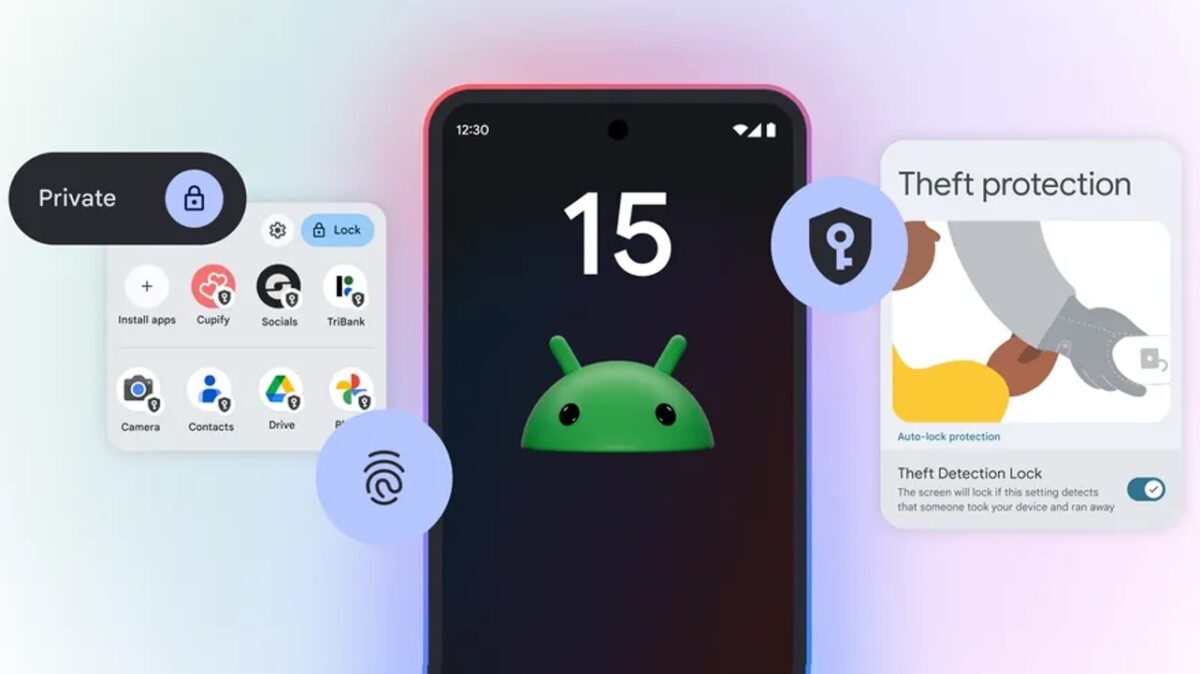
For those who don’t know, Google gives you quite a bit of authority over how and when it accesses your information associated with Android. And we say this because Apple has been boasting for years that they are the user-friendly company when it comes to privacy, but Google has improved a lot in this regard over the last 4 years. Ultimately, it all comes down to being informed about the possibilities and then determining what balance between privacy and functionality makes the most sense for you. And the responsibility falls directly on you, which means you have to make an effort […]
Ultimately, it all comes down to being informed about the possibilities and then determining what balance between privacy and functionality makes the most sense for you.
And the responsibility falls directly on you, which means you have to make an effort to understand your operating system and how you can get the most out of it without giving up all your privacy along the way.
By default, most of Google’s privacy options are turned off, as Google thrives on ads and the better it knows you, the better experience it can offer you as an individual user.
This is not necessarily bad, but it may not be what you want or are looking for. And navigating through the layers of settings, not only with Google itself but also with the various third-party services that interact with the phone, is often easier said than done. So let’s go with the best options when it comes to securing your phone and your Google account:
1. Uninstall all the apps you don’t use
This first step of privacy on Android is a no-brainer and something everyone should do periodically: review all the apps installed on your phone and delete the ones you haven’t used in the last two months.
Applications that you do not use not only consume resources on your device, but they can also leave doors open to confidential information that would be better closed.
So open the app drawer and examine all the icons you see. If you haven’t used an app in a while, press and hold its icon and select “Uninstall” or, if you don’t see that option, select “App info” and look for the “Uninstall” button.
2. Check the applications with access to your Google account
In addition to specific phone permissions, applications and services may request access to certain types of data from your Google account, such as your contacts, your Gmail messages, or even your Google Drive storage.
Once again, this access may be completely justified and not a cause for concern (and would only be present if you explicitly authorize it at some point), but once you are no longer actively using the associated application, you won’t want to leave that avenue open.
Luckily, it is especially easy to close, and another painless privacy measure that is worth doing periodically. You just have to open the Google account connections pageand review everything that appears on the list. For items you no longer use or do not recognize, click on their title and then on the “Remove all connections” option on the screen that appears next.
3. Ensure your lock screen does not display sensitive information
By default, Android is usually set to display all the content of your notifications on the lock screen, which means that if someone else picks up your phone, they could see sensitive information without even having to enter a PIN, pattern, or passcode.
To change this situation, open the Display section of your phone’s settings, select “Lock screen” and then “Privacy” and change the setting to “Show sensitive content only when unlocked” or “Do not show notifications at all,” whichever is more convenient for you.
4. Reset or delete the Android advertising ID
Many people don’t know it, but you can reset or delete something known as your “advertising ID” on Android.
That ID is a unique string of specific numbers from your phone that apps can use to identify you. They may not know your name or anything personal about you – unless you choose to share that information – but that advertising ID allows them to understand your interests and behaviors, and then use that data to show you ads that are supposedly more likely to appeal to you.
When you reset or delete that ID, all that data is lost, and the apps have no way to relate your behavior to any consistent identifier associated with you. Once again, that doesn’t mean you won’t see ads within apps or on the web. It just means that those ads won’t be programmatically selected based on your ongoing activities and what they suggest about your interests.
5. Review the permissions of your applications on Android
Let’s think about those apps that you actively use, because even those may have permissions that you once granted, but no longer need.
So open the Security and Privacy section of the system settings and tap “Permission Manager”. Depending on the software and device you are using, you may need to first tap a line that says “Privacy” or “Privacy Controls” before you see it.
Next, go through each type of permission on the list one by one, review the applications that have access to it, and consider whether the access of each application still seems necessary to you.
If you see something that seems questionable, tap the app’s name and change its setting to “Deny”. There is a possibility that the app may no longer be able to perform some of its functions as a result, but in the worst case, it will ask you to re-enable the permission at some future point and then you can reconsider it.
Starting from Android 12 in 2021 onwards, you can specify whether you want an app to have access to your exact location or just the approximate one, in case you’re very concerned about them knowing where you are at all times.
Bluesky, the decentralized social platform, has announced a new “Trending Topics” feature as a Christmas gift, currently available only in beta. This tool, similar to its rival Twitter, can be turned on or off in the “Content and Media” section within Settings. Currently, it only works in English, although more languages are planned to be included in the future. In the desktop version, Trending Topics appear in the right sidebar, while in the mobile app they are accessible from the search button. The feature also respects the words muted by users, so that it does not […]
Bluesky, the decentralized social platform, has announced a Christmas gift: a new “Trending Topics” feature, currently available only in beta. This tool, similar to its rival Twitter, can be turned on or off in the “Content and Media” section within Settings. Currently, it only works in English, although more languages are planned to be included in the future.
In the desktop version, the Trending Topics appear in the right sidebar, while in the mobile app they are accessible from the search button. The feature also respects the words muted by users, so they do not appear in this section unless desired.
Merry Christmas from us to you ??? We launched Trending Topics today, and you can find it by tapping the search icon on the bottom bar of the app or the right sidebar on desktop.
It seems that this year we have only talked about Donald Trump and Israel’s invasion of Gaza. And, according to Google’s Year in Review 2024, we have talked about this… but also about many more things. Google’s annual review of the most searched terms in 2024 reveals that the top global searches were mainly based on sporting events like the Copa América, the UEFA European Championship, and the Olympic Games. Additionally, people searched for Liam Payne, former member of One Direction who passed away in October, and the president-elect of the United States, Donald Trump. Because as it was […]
It seems that this year we have only talked about Donald Trump and Israel’s invasion of Gaza. And, according to Google’s Year in Review 2024, we have talked about this… but also about many more things.
Subscribe to the Softonic newsletter and get the latest in tech, gaming, entertainment and deals right in your inbox.
Google’s annual review of the most searched terms in 2024 reveals that the top global searches were primarily based on sporting events such as the Copa América, the UEFA European Championship, and the Olympic Games.
Additionally, people searched for Liam Payne, former member of One Direction who passed away in October, and the president-elect of the United States, Donald Trump. As expected, many of this year’s searches were related to the U.S. presidential elections.
A truly vibrant year that we will never forget
Some of the terms that stand out this year include “excessive heat,” obviously related to the extremely high temperatures in many places around the world this summer, “iPhone 16” which shows the ongoing interest in Apple’s flagship phone, and Imane Khelif, the Algerian boxer who was falsely accused of being a man during the 2024 Summer Olympics.
To remember the year, Google has shared a handy video, with an emotional overview of some of the people and events that topped this year’s trends. It’s worth watching the full video, above.
Highlights of 2024 included the year of Country music, with Beyoncé and Post Malone reviving a genre that had been declining for decades. Or the farewell of Rafa Nadal, one of the greatest athletes of all time, in his farewell year from tennis. Without a doubt, it’s worth a peek!
A team of engineers from Northwestern University has carried out the first demonstration of quantum teleportation through fiber optic cables that already carry Internet traffic. This breakthrough, published in the journal Optica, opens the door to combining quantum communication with existing fiber optic infrastructures, significantly simplifying future applications of quantum computing and advanced technologies. “Our work shows a path towards next-generation quantum and classical networks sharing a unified infrastructure,” commented Prem Kumar, the study leader. Quantum teleportation allows information to be shared in an ultra-fast and secure manner between users […]
A team of engineers from Northwestern University has conducted the first demonstration of quantum teleportation through fiber optic cables that already carry Internet traffic. This breakthrough, published in the journal Optica, paves the way for combining quantum communication with existing fiber optic infrastructures, significantly simplifying future applications of quantum computing and advanced technologies. “Our work shows a path towards next-generation quantum and classical networks sharing a unified infrastructure,” commented Prem Kumar, leader of the study.
Subscribe to the Softonic newsletter and get the latest in tech, gaming, entertainment and deals right in your inbox.
Quantum teleportation allows sharing information ultra-fast and securely between distant users, without the need to directly transmit the data. This phenomenon takes advantage of quantum entanglement, a technique that connects particles despite the distance between them. As Kumar explained, while classical communications use millions of light particles, quantum information employs individual photons. “Teleportation allows the exchange of information without it having to physically travel long distances,” detailed Jordan Thomas, co-author of the study.
Before this discovery, many doubted the viability of quantum teleportation in cables with classical traffic, given that the entangled photons would be lost among millions of light particles. However, Kumar’s team identified less congested wavelengths to place the photons, in addition to adding filters that reduce the noise generated by Internet traffic. “We placed our photons at a strategic point where the scattering mechanism is minimized,” explained Kumar.
Classic infrastructures can be leveraged
To test the method, the researchers used a 30-kilometer fiber optic cable with a photon at each end, simultaneously sent quantum information and high-speed traffic, and confirmed that the quantum information arrived intact at the destination after applying a quantum measurement protocol. “This work demonstrates the coexistence of quantum and classical communications in fiber optics,” highlighted Thomas.
The next steps include extending the experiments to greater distances and testing with cables installed underground. “If we choose the wavelengths well, it will not be necessary to build new infrastructures,” concluded Kumar, showing optimism. “Classical and quantum communications can coexist.”
Sí, GTA 6 aparece en la lista, como puedes imaginar.
The year 2025 is shaping up to be one of the most exciting in terms of video games in recent times. There are dozens and dozens of high-caliber titles planned for the upcoming year, so at Softonic, we have decided to make a list of those we most eagerly anticipate.
Here are the 10 most anticipated video games of 2025. Many do not have a final release date assigned, but they will be released during this new year.
1. Grand Theft Auto VI
With total and absolute difference, the most anticipated game of 2025: GTA 6. The day the Rockstar Games title hits the market, the rest of the dates will be empty in the face of the incredible earthquake it will cause. With only one trailer released so far, it hasn’t needed anything else to create all the possible anticipation. It’s GTA, after all.
Platform: PlayStation 5, Xbox Series X | S and PC (the latter not confirmed).
Date: 2025 (second half).
2. Assassin’s Creed Shadows
Although Assassin’s Creed Mirage was released in 2023, the next major game in the Assassin’s Creed saga after Valhalla is this Assassin’s Creed Shadows. Ubisoft has been working for almost half a decade on the long-awaited arrival of the franchise to feudal Japan, a setting that players have been demanding almost since its inception. With controversy surrounding it, time will tell if this has happened too late or just in time.
Platform: PlayStation 5, Xbox Series X | S, and PC.
Date: February 14, 2025.
3. Borderlands 4
The famous IP from Take-Two returns with a new iteration full of hype for the most die-hard fans. Hardly anything has been known about this new installment, which is why the secret remains well-guarded within the company’s walls. However, it is known that the more carefree action and many customization options will return. Borderlands 4 promises a lot.
Platform: PlayStation 5, Xbox Series X | S and PC.
Date: End of 2025.
4. Death Stranding 2: On The Beach
It has taken us almost six years to see the second part of Death Stranding, a more than prolonged time due to the team working on other projects, as well as different versions of the first Death Stranding. The proposal of this second game is exactly the same as its predecessor: it’s about connecting the world. How to do it is another matter.
Platform: PlayStation 5.
Date: 2025 (exact day not confirmed).
5. Ghost of Yotei
After surprising everyone with Ghost of Tsushima, Sucker Punch returns with Ghost of Yotei. The new samurai video game exclusive to PlayStation will take us to a new time frame (300 years later) and against new enemies. There is a lot of anticipation to get our hands on it.
Platform: PlayStation 5.
Date: 2025 (to be definitively confirmed).
6. Kingdom Come: Deliverance II
Its first installment surprised everyone with its great medieval recreation, which is why Kingdom Come: Deliverance II is eagerly awaited. Warhorse returns with an RPG where all the actions taken during the first part will have repercussions in this second one. Sounds amazing, doesn’t it?
Platform: PlayStation 5, Xbox Series X | S, and PC.
Date: February 4, 2025.
7. Monster Hunter Wilds
Along with Hollow Knight: Silksong, the most desired video game on Steam right now: Monster Hunter Wilds. Capcom’s franchise gathers millions of fans worldwide, to the point that its previous installment is the best-selling production in the history of the Japanese brand. It’s time to hunt more monsters while making friends along the way.
Platform: PlayStation 5, Xbox Series X | S, and PC.
Date: February 28.
8. Like a Dragon: Pirate Yakuza in Hawaii
There comes a point where each year we enjoy a new installment of Like a Dragon, but each game is better than the last. This time, it’s the turn of Like a Dragon: Pirate Yakuza in Hawaii, an installment where we will control the incredible Goro Majima while having a pirate aesthetic and naval battles. There is a lot of excitement.
Platform: PlayStation 4, PlayStation 5, Xbox One, Xbox Series X | S, and PC.
Date: February 21.
9. Doom: The Dark Ages
After Doom: Eternal, the people at ID Software return with Doom: The Dark Ages, a video game in the series that takes us to a dark fantasy setting. The franchise completely abandons the more futuristic aesthetic to take a leap back in time. The idea is to bring the most frenetic and intense action of all the installments.
Platform: PlayStation 5, Xbox Series X | S, and PC.
Date: 2025 (day not confirmed).
10. Nintendo Switch 2
Yes, this is not a video game, we know, but it is one of the most anticipated releases in the video game world: Nintendo Switch 2. It is known that the Japanese company must announce its console before March 31, meaning we are just weeks away from meeting its successor. Additionally, it should be noted that its commercialization would also be during 2025. We still need to know which games it will come with, but there is excitement.
Platform: Nintendo Switch 2.
Date: 2025
Up to here is this list with the most anticipated of 2025. Which one do you miss and which one do you choose from those mentioned?
Fartcoin is the ultimate memecoin with no utility whatsoever, and the incredible thing is that it has amazed the world by claiming a market capitalization of over 500 million dollars. This event is surprising, as the era of memecoins is long gone. Their heyday was in 2019 and 2020, but since the Bitcoin crash around that time, almost all of them have fallen into oblivion. For those who don’t know, Fartcoin has no intrinsic value. Instead, the memecoin derives all of its value from a vibrant community dedicated to sharing jokes and memes […]
Fartcoin is the memecoin par excellence with no utility whatsoever, and the incredible thing is that it has amazed the world by claiming a market capitalization of over 500 million dollars.
Subscribe to the Softonic newsletter and get the latest in tech, gaming, entertainment and deals right in your inbox.
This event is surprising, since the era of memecoins is long gone. Their peak was in 2019 and 2020, but since the fall of Bitcoin around that time, almost all of them have been forgotten.
For those who don’t know, Fartcoin has no intrinsic value. Instead, the memecoin derives its entire value from a vibrant community dedicated to sharing jokes and memes related to flatulence.
BREAKING: Fartcoin's market cap is now greater than 38% of all American publicly-traded companies. pic.twitter.com/obLQK8LNTe
The value of Fartcoin is so high that it could almost enter the SP 500
Even so, no one expected the memecoin to surpass 500 million dollars in market capitalization.
To provide context, let’s consider the fact that Fartcoin is now more valuable than an astonishing 38 percent of all publicly traded U.S. companies.
Of course, according to historical precedents, the memecoin season is still in its infancy. In previous cryptocurrency bull cycles, Bitcoin usually took the initial lead, followed by Ethereum’s Ether, and then memecoins began to record dizzying gains, crowning the peak mania phase of the cycle.
When the 6-month and below #Bitcoin Realized Cap HODL Waves bands surpass ~80%, it's a good indication the market is over-heated, and a major price peak is likely… ?
Currently, however, Bitcoin is still in its leadership phase, which gives credibility to the hypothesis that the market will likely see many iterations of Fartcoin before the current cycle ends.
Let’s consider the fact that many altcoins are still quite far from their all-time highs recorded in the previous bullish cycle.
Interestingly, BlackRock has provided another bullish boost to Bitcoin today by formally recommending a 1 to 2 percent portfolio allocation to spot Bitcoin ETFs.
Meanwhile, it is possible that Fartcoin will register additional gains. But do not expect those gains to last. With these cryptocurrencies, it is best to stay away… at least if you value not having high chances of going broke.
Managing our files efficiently is essential, especially in a world where every minute counts. On our Macs, we have a tool that completely transforms the way we interact with documents, images, videos, and more: Quick Look. With it, we can view and edit files without even opening them in the associated applications, a small resource that, once discovered, becomes indispensable. What is Quick Look and how does it work? Quick Look is a feature integrated into macOS that allows us to preview virtually any type of file in a matter of seconds. From PDF documents to images and videos, […]
Managing our files efficiently is essential, especially in a world where every minute counts. On our Macs, we have a tool that completely transforms the way we interact with documents, images, videos, and more: Quick Look. With it, we can view and edit files without even opening them in the associated applications, a small resource that, once discovered, becomes indispensable.
Quick Look is a built-in feature in macOS that allows us to preview almost any type of file in seconds. From PDF documents to images and videos, even compressed files. With just a tap, we can view the content of a file and decide what to do with it, all without leaving Finder or opening more applications.
Using Quick Look is extremely simple: we select a file in the Finder, the desktop, or even from an email, and press the space bar. Instantly, a window opens showing us the content of the file. If we need to view another file, we simply use the arrow keys to navigate between them —ideal for comparing documents or images—. Additionally, if we select multiple files, we can view them in a grid format, which is especially useful for photographs or graphic projects.
Quick Look is not only fast, but also adaptable. We can resize the window or even expand it to full screen, which gives us more space when working with files of greater detail. To exit the view, simply press the space bar again, and everything returns to normal.
How to Edit Files Directly from Quick Look
What makes Quick Look even more special is that it is not limited to previewing. We can perform basic edits directly from the same window, without needing to open any app. For example, when working with images or videos, Quick Look allows us to:
Rotate images and videos with a single click. If we need to rotate in the opposite direction, we hold down the Option key while clicking the button that Quick Look offers us.
Trim audio and video clips by selecting the part we want to keep. A pair of yellow handles allow us to adjust the start and end of the clip precisely, and we can preview the changes before saving them.
When it comes to documents, such as PDFs, the possibilities are not far behind. From Quick Look, we can add annotations, signatures, or even highlight the most important text. A way to review documents without the need to open heavy or complicated editors. When you stop viewing the document, the changes are simply saved.
And what if we want to share the file in question? From Quick Look, we have direct access to macOS sharing options, which includes sending files via email, AirDrop, or even uploading them to cloud services. All of this without leaving Finder.
Quick Look is not just a useful feature —like these four keyboard shortcuts for the Mac that we should know or the Finder’s quick actions—, it is a feature that transforms how we manage our files. It allows us to interact with them more swiftly, which translates into a much more fluid and efficient daily routine. When working with multiple documents, the time lost opening and closing applications quickly adds up. Thanks to Quick Look, we can optimize that time, reduce distractions, and focus on what really matters.
Studio Trigger has become synonymous with quality. And for good reason. These former Gainax members brought with them some of the biggest names in the industry and have proven it with some of the best animes of the last decade. The latest of them, Delicious in Dungeon. But to further solidify their dominance, they have decided to bring back Gainax’s last great anime. They have decided to bring back Panty & Stocking with Garterbelt. Panty & Stocking with Garterbelt returns with the original team at the helm with an excellent new trailer, New Panty & Stocking with […]
Studio Trigger has become synonymous with quality. And for good reason. These Gainax rebels brought with them some of the biggest names in the industry and have proven it with some of the best animes of the last decade. The latest of them, Tragones y Mazmorras. But to further solidify their dominance, they have decided to bring back the last great anime from Gainax. They have decided to bring back Panty & Stocking with Garterbelt.
Panty & Stocking with Garterbelt return with the original team at the helm
With an excellent new trailer, New Panty & Stocking with Garterbelt confirms some important details for us. Hiroyuki Imaishi returns as director, Atsushi Nishigori will do the character design, and everything seems as crazy and vibrant as it was back then. Although it remains to be seen how they will resolve the cliffhanger with which the original series ended, if they even address it at all.
Although it has a generic 2025 for its release, with the trailer having been released in December, it is expected that the series will premiere in the summer or fall seasons. So we will have to be patient, taking the opportunity to watch the original series of these two sisters, half-fallen angels, more obsessed with sinning and being excellently animated in an experimental way than doing whatever it is that angels do in the Bible.
Google has begun to expand the use of its Gemini artificial intelligence models to new countries like Vietnam and Thailand, according to Android Police. Among the new features in these regions are Gemini 1.5 with Deep Research and two experimental variants of Gemini 2.0: Flash Experimental and Experimental Advanced. These models promise to meet different needs, from everyday tasks to more complex work. The Deep Research function, exclusive to Gemini 1.5, allows users to conduct advanced research. Simply enter a topic, and the AI evaluates the content of dozens or even hundreds of web pages to generate a detailed report. […]
Google has begun to expand the use of its Gemini artificial intelligence models to new countries such as Vietnam and Thailand, according to Android Police. Among the new features in these regions are Gemini 1.5 with Deep Research and two experimental variants of Gemini 2.0: Flash Experimental and Experimental Advanced. These models promise to meet different needs, from everyday tasks to more complex work.
The Deep Research function, exclusive to Gemini 1.5, allows users to conduct advanced research. Simply enter a topic, and the AI evaluates the content of dozens or even hundreds of web pages to generate a detailed report. Users can adjust the research plan before the AI executes it, and once the process is completed, the results can be exported directly to Google Docs.
Regarding the new Gemini 2.0 models, Flash Experimental focuses on providing speed for daily tasks, while Experimental Advanced is designed to handle more complex tasks with greater precision.
For now, Deep Research is only available to Gemini Advanced subscribers in several regions, including the United States, and can only be used through the Gemini web application, excluding the mobile versions of iOS and Android.