Moon added to Google Earth

moonies.png

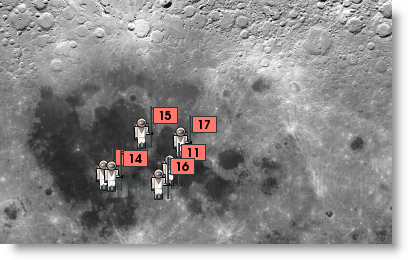
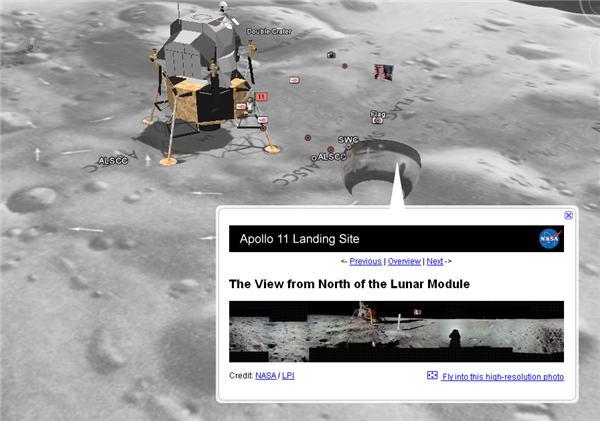
As we said earlier, Google are making a special announcement about the moon in Google Earth very shortly. However, if you open the application now, and hit the planet button, you’ll see the 3D moon is already available!

Turn off your layers, then zoom in and look around. All the Apollo missions are there – and sitting with the Apollo 11 mission is the Lunar Lander in 3D! As with all Google Earth in general, there’s tons of information dotted around for you to see, read and explore. Don’t wait for Google to announce it, go and have a look now!

See the Apollo landings on Earth!

mooning2.png

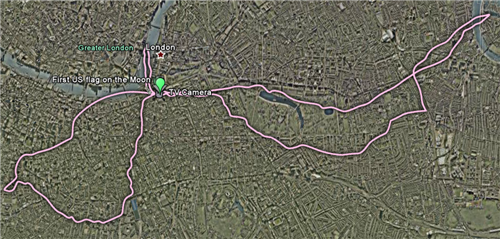
Looking at the moon landings on Earth might seem like a silly idea, but New Scientist have put together a collection of downloadable layers for Google Earth, which allow you to see how far the astronauts went on their moon explorations. They put the routes taken by the Apollo explorers, and add them to major cities. If you know any of the cities included – London, New York, Los Angeles, Boston and Sydney – these give you an excellent feel for the scale of their investigations, from the small first steps of Apollo 11, to the much larger distances covered in later missions with the Lunar Rover.

mooning.png

If moon landings on Earth are too earthy for you, check out Google’s 2D Moon here. Google are announcing “something special” at an event later today featuring none other than Buzz Aldrin. If they don’t announce Google Moon in 3D, I’ll eat my space suit.

In the unlikely event that the moon isn’t added to Google Earth, you can download NASA’s World Wind, which is free and features 3D models of Earth, the moon, Mars, Venus and Jupiter too.

Download the Google Earth moon landing layers here, and Google Earth here. If you have Google Earth installed, download the layers you want, and just open them with Google Earth. The moon landing images will then appear automatically.

Ask OnSoftware: Updating PortableApps

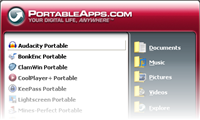
We have had a three part question from a user on Twitter (@softonic_en) about the PortableApps Suite. That’s a really useful collection of applications you can keep on a pen drive, and use on any PC you happen to be in front of.

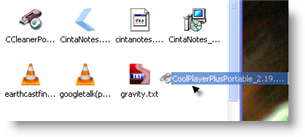
The first question asks how to update applications in PortableApps. To do this, first you have to download the new file. Then, open your USB drive, and drag the downloaded application into that window. If it’s a ZIP file, double click it to unzip it so you can run the installer. The next stage is just double clicking the application’s EXE file, and following the installation wizard. The old version will be removed, although your settings will be kept.

The second and third parts are related to updating the PortableApps suite itself: When you guys update the suite do you guys update the apps in the suite? What programs are taken out of the suite in 6.73 and will they be gone if I update from 6.72 to 6.73?

When PortableApps is open, click Help and choose update. This will take you to a download of the new version if you don’t have it. Then the process is the same as above – drag the downloaded EXE file into your USB file window, and double click it to update. This won’t change any of your applications, just the PortableApps interface, so you won’t lose any applications by updating at all. I must point out the version number for the PortableApps Suite is not as high as 6.73 yet! The current version is 1.5.2.

The PortableApps Suite comes highly recommended, as it’s a fantastic collection of genuinely useful free software, with a really user friendly interface.

Friday Timewaster: MoneySeize

MoneySeize is a great example of retro jumping and collecting. Your hero, of sorts, Sir Reginald MoneySeize II, Esq. needs to collect all the gold coins he can find, to fund construction of the tallest tower in the world! No princesses to rescue here. There are 50 stages, with 1010 coins to find. Stages range from super easy to almost impossibly difficult. It even comes with the disclaimer “this game is very difficult” – platformer professionals will love it. It really is great, though, and our rotund aristocratic hero can do everything an Italian plumber can – while wearing a top hat.

Microsoft to emulate Spotify?

According to the UK’s Telegraph, Microsoft is planning to launch a music streaming service similar to Spotify and Pandora. Like Spotify, they are planning ad supported streaming for free listening, with a premium model without ads. The Telegraph adds that this may help bolster the basically failed Zune player.

It’s difficult to know what to think about this, but I’m skeptical they can pull it off. While Windows 7 looks like a much better effort than Vista, Microsoft has an unfortunate habit of making applications with too much fat like Windows Media Player, and they are world beating experts at being shockingly uncool.

Spotify and Pandora’s main problem is getting global licensing rights, and perhaps Microsoft with all its clout could overcome that. But would the product be as effortlessly intuitive as Spotify? There just isn’t anything in Microsoft’s portfolio that suggests it isn’t going to be a big mess compared to what’s on the market already. What’s likely in my mind, is that we’ll see a Windows spin off of a streaming service designed for the Xbox 360. I just don’t think it will have the “I want one!” cool factor.

Whatever happens, there’s a lot to win in terms of music streaming, as some people think it’s a big part of the future of the music industry. I don’t think it’s necessary for Microsoft to be the biggest player in that service – having a near monopoly with operating systems is enough! Although maybe this is a way of finding new revenue if they are killed by Google…

Friday Timewaster: Swordless Ninja

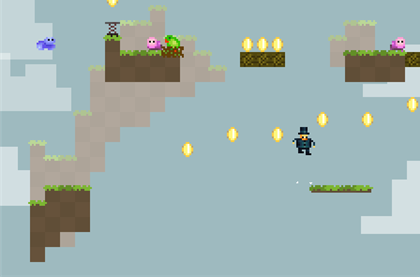
Swordless Ninja is a cute platform game, which is accessible but hard enough to require some effort to beat. You are the Swordless Ninja – and why are you swordless? Because you evil nemesis has stolen your sword and your girl, that’s why! A video game where you have to save a girl from the clutches of evil? It’s an interesting proposition.

The game has great, cheerful style and some amusing sound effects. The only irritations are the same that have plagued platform games forever (unfair falling, one hit and you’re dead etc). Otherwise, Swordless Ninja is a really enjoyable platformer. Requires Flash.

Today’s downloads for Windows, Mac and Mobile

Windows: Chains is a great little 5-level demo which will keep you stuck to your screen until you’ve beaten it. Using a mix of classic chain-building-to-clear gameplay with a fashionable real physics element, it’s superbly compelling. Mixed with cool, minimal graphics and hypnotic music – if you’re short of free time, don’t download it!

Get Backup logoMac: TimeMachine is usually the backup utility of choice for most Mac users but it doesn’t always cater to the needs of those that need something a bit more flexible. Get Backup attempts to plug this gap as a tool that’s suitable for both beginners and those with more professional backup needs. Everything from customized backups to automated backups is possible with Get Backup and it even allows you to compress them too.

Train your brain on your phoneSymbian: If you want to get the most out of your life then it’s important to keep your brain in good shape. There are lots of ways you can do this – including installing Smart Educational Games on your phone. Smart Educational Games consists of a series of four mini games that test different types of knowledge, including math, memory, logic and geography.

5 great Add-ons for new Firefox users

firefox3-51.pngWith the recent release of Firefox 3.5, there’s never been a better time for Internet Explorer users to give it a go. In case you think for a moment that browsing is much the same on Firefox – hold on a minute!

Aside from being faster, lighter and more stable, what makes Firefox really different is add-ons. You can easily customize Firefox to work how you want it to, and it’s not hard. Click an add-on download link, restart Firefox (it will remember all your open tabs), and you’re done. To get started, here’s 5 add-ons I think are really cool, and should convince you of Firefox’s all-round awesomeness!

1 – Juice. I include this as it’s flashy, great looking and can really change your browsing. Basically, if you read something you want more info about, just highlight it, and drag it into the Juice sidebar – it will search Google, Yahoo Bing or Twitter for answers. See a picture you like? Just click and drag it into juice and it’s saved. YouTube videos get a tab that you can drag into juice, so you can make a playlist, and also watch videos in the sidebar while you browse. It’s cool, have a go!

2 – DownThemAll! This basically allows you to download whatever is on a web page. You can choose what type of files you’re looking for, like MP3s or images, and’DownThemAll’ in one click. It can save you lots of time scrolling through long pages looking for files.

3 – Open IT Online. This neat add-on allows you to open most documents, spreadsheets and presentations using online applications. when downloading a Word file,  an extra option will appear under ‘Open With’, allowing you to see the document in your browser, saving you the hassle of waiting for another application to open. It’s unobtrusive, and makes document viewing hassle free.

4 – UrlbarExt is a bit nerdy, but I like it, and use it every day. It adds a bunch of tools to the address bar, like a tiny URL maker, an add address to clipboard button and much more.  It really makes use of a piece of browser space that was underused.

5 – The add-on I use most? TwitterFox. Everything I want from Twitter, without having to open up a page, it’s fantastic. You get a tiny icon at the bottom of Firefox, and clicking it activates a pop up display showing you your Twitter feed. It feels ideally suited to Twitter, and I can’t imagine a browser without it anymore.

So there you have it. If you load up an add-on you don’t like, it’s simple to deactivate it – just go to add-ons in the Tools menu, and you can deactivate or uninstall anything you like. No doubt everyone will have their own favorites, so you can go and check out the Firefox add-on site here.
Follow the Tour De France on Google Earth

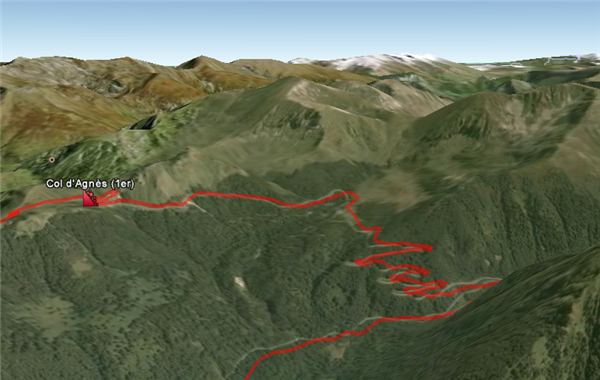
Google Earth has one of the liveliest user/contributor communities around, and there always seems to be people putting the program to new uses. This weekend sees the start of the Tour De France, and if you’d like an interactive map of the grueling route, try this Google Earth file.  Zoom in over a mountainous part, and use tilt to get a good idea of just how painful parts of the race will be! There’s an extended description of the route at creator Thomas Vergouwen’s blog.

All you need to do to view it is open Google Earth, and download the file. Select ‘open with Google Earth’, and you should see the red route with various flags and icons stuck over France. Check back at Thomas’ blog to see if there are real time updates available, so you can track progress on your Google Earth map. Check out this impressive YouTube video flypast of one of the mountain stage:

[youtube]http://www.youtube.com/watch?v=onyVutrfBzA[/youtube]

Friday Timewaster: Zodiac Reactor

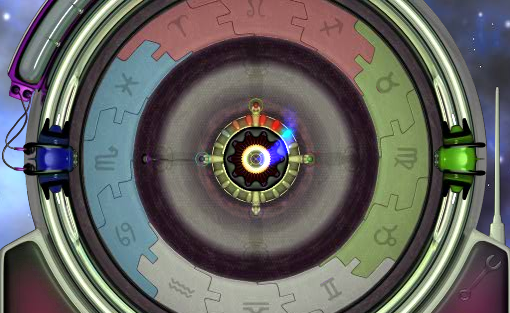
How are your reactions this friday? They’ll need to be razor sharp if you want to score highly on Zodiac Reactor. It’s a simple timing-reaction puzzle game, where you have to hit one of four keys at the right moment as a corresponding element approaches the Zodiac Reactor. It’s a simple idea, but if you panic for a split second and lose concentration, you are done for.  It takes a minute to grasp, but the introductory tutorial is great. Check it out!