Recently, an extensive demo of the highly anticipated game 007: First Light was presented, which transports players to a spy environment with mechanics reminiscent of the iconic Hitman series. This third-person shooter combines infiltration and social manipulation as central pillars of the gameplay, while also incorporating moments of chaotic action that stand out in the experience. A game that will delight fans of the secret agent. The demo began with Bond infiltrating a hotel, where exploration is key to discovering distraction opportunities and […]
Recently, a lengthy demo of the highly anticipated game 007: First Light was presented, which transports players to a spy environment with mechanics reminiscent of the iconic Hitman series. This third-person shooter combines infiltration and social manipulation as central pillars of the gameplay, while also incorporating moments of chaotic action that stand out in the experience.
A game that will delight fans of the secret agent
The demo began with Bond infiltrating a hotel, where exploration is key to discovering opportunities for distraction and deception, similar to Agent 47’s approach. Throughout the mission, it was noted that the narrative is linear, with a predefined path that culminates in intense shootouts and combat sequences. While some players may prefer stealth, there are those who are drawn to a more aggressive style that prioritizes direct action.
The combat features elements of both shooting and hand-to-hand combat, evoking comparisons to titles like Max Payne and Sifu. In the demo, Bond used SMGs and shotguns with abandon, throwing weapons to the ground after running out of ammunition and taking advantage of explosions to eliminate several enemies in one blow, which significantly enhances the visual experience of the game.
Some moments of the demo felt very orchestrated, like the car chase that follows a set script, which has generated divided opinions among fans. While some may enjoy the spectacle, there are those who prefer the spontaneity often found in more open games. Despite this, it is highlighted that Bond can employ social manipulation tools to access gala events, although the interest in hard-hitting action seems to resonate with many players.
These are all the solutions you’ll need to solve the most common Android problems
Google has some of the most popular apps in the world. The likes of Chrome and Gmail have billions of users but they’d be nothing without another crucial piece of Google software. Google’s mobile operating system, Android, has secured its place as the most dominant operating system of all time. There are literally billions of Android smartphones in use right now all around the world, which massively dwarfs the number of Apple iPhone users. Most of us are Android users and when most of use something there is a good chance that a lot of us will be experiencing problems when we do.
These common problems are what today’s article is about. We’re here today to help you fix some of the most common Android problems. Google can help you fix certain Android problems like fixing an installed Android app or how to fix Android problems connecting to a Wi-Fi network, but we’ve had to figure out the solutions for a lot of these problems ourselves. Don’t worry though, they all work. This is how to solve common Android problems.
The most common Android phone problems and solutions
Frozen Android mobile device
We’re going to start today’s guide with a classic problem that has affected all electronic devices and a classic solution that has worked throughout the ages. If your Android phone has crashed, frozen, or if your screen is unresponsive, the best thing you can do is reset it. Yep, our first solution is to turn your Android phone on and off again.
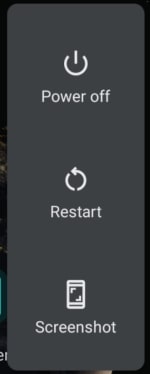
To hard reset your Android phone all you need to do is hold the power button down until you see the screen go blank and then see the Android loading screen appear again. You’ll need to wait about 20 seconds. This should reboot your Android device and have it working as normal again. If your device froze after you dropped it, however, you might have a bigger problem. Also, if the problem persists, one or more of your apps might not be working properly.
Android apps not working properly
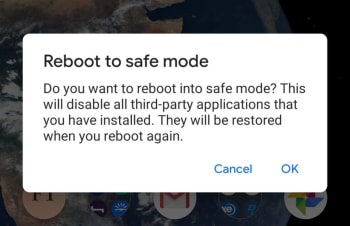
If your phone is stuck in a reboot cycle or is constantly crashing, freezing, or running slower than it normally should, you may have installed an app that is causing you problems. In order to test for this, you should restart your Android device in Safe Mode. Safe Mode will boot your Android phone with all your third-party apps disabled. This means you can check whether your phone works properly without them and then uninstall the problem apps, normally your new apps, and start again, if it doesn’t.
To reboot your Android device in Safe Mode, hold down your power button until the Android power menu appears. Then hold your finger down on the power off button until you see the Reboot in safe mode option. When you’ve done this, your phone will boot in airplane mode and you’ll see a little note in the bottom-left of your screen telling you your device is being run in Safe mode. Have a play around making calls etc. to see how your phone works with all third-party apps disabled.
Android phone needs resetting
If you still experience problems when running your device in Safe Mode you will need to perform a factory reset. You can do this by going to Settings, then Backup & Reset, and finally Factory Data Reset. Don’t do this, however, unless you’ve first tried finding the problem using Android Safe Mode.
Battery life problems
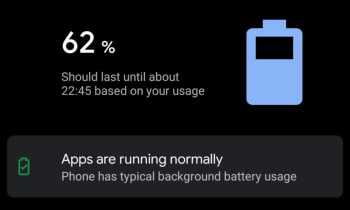
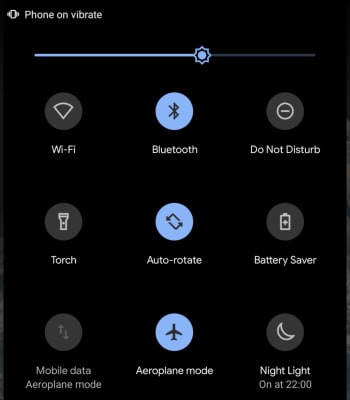
Battery drain issues affect almost every single smartphone user on the planet. It is just a fact of life that smartphone batteries aren’t big enough. There are, however, a few things Android users can do to alleviate battery problems. The first is Android’s Battery Saving mode, which you can find in the pull-down menu on your home screen. This will automatically limit many of your phone’s background settings that use up all your juice.
Another big drain on your phone’s battery life will be your screen brightness. If you’re trying to get your phone to last to the end of the day have your screen brightness set as low as possible. If you don’t need them, turn off Bluetooth and Wi-Fi too. The other big change you can make is to disable Location services.
The most common reason Android phones run slow is because they’re running out of storage space. If your phone allows it, you could use an SD card to boost your internal storage, but you can try two software fixes to your memory issues too. Normally, these issues will be caused by having too many apps installed on your phone or too many photos saved. You can solve the former problem by uninstalling all the apps you no longer use. Another good trick for clearing up space on your Android phone is downloading a cleaning app like Clean Master, which will hunt out stray files in your cache and wipe them from your phone’s memory.
You solve too many photos problem by installing Google Photos and using the auto backup feature. Google Photos knows when your phone is running low on space and will prompt you to backup your photos to the cloud and free up the local space on your device. You’ll then still be able to view your photos as normal whenever you have an active internet connection.
If your Android phone is running too hot, you could have either a software or hardware related issue. If the problem persists when using a certain app, try updating or reinstalling the app to the latest version to see if this helps solve the issue. If it doesn’t, try searching through the Google Play Store comments and reviews for the app to see if anybody else has reported a similar problem.
The problem could be related to Android itself, however. To check for this, Google your exact Android version with the phrase Overheating to see whether there is a history of a similar problem affecting other users. If nothing you find helps and your phone continues to overheat, you should think about taking your phone to a professional as there might be a hardware problem causing the overheating.
Can’t download Android apps
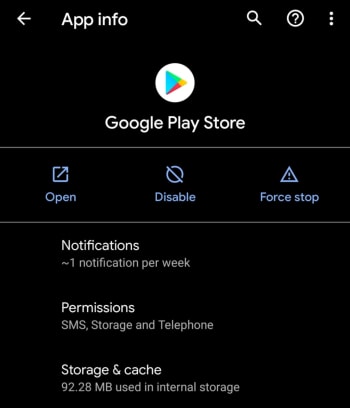
If you’re having problems downloading apps from the Google Play Store, there is a good chance the problem is that your Google Play Store app has a corrupt cache. To fix this problem go to the Google Play Store app settings menu by holding your finger down on the app and hitting the info button that appears. Then hit the Storage & cache option and tap Clear Cache.
Let’s have a look at some of the things you should look out for to make sure your phone hasn’t been hacked.
Have you ever wondered how to know if your phone is hacked? We are all aware of the many cyber threats surrounding us when we use the internet on our PCs. Think of all the measures we take to protect our computers from hackers, antivirus programs, VPNs, proxies, and more. But when it comes to our mobile devices, we aren’t always as careful.
With so much of our lives contained in our smartphones, these devices have become a crucial part of our daily lives. Think about that one time you forgot your phone at home, how utterly lost you felt without it. We store almost everything on our phones these days, important documents, bank details, health care, IDs, and more. If someone were to hack our phones, they’d have access to all of this information.
A lot of the time, you might not even know that you’re being hacked. This type of attack is much more subtle than a robbery. Once the hacker gets into your devices, they can easily access your apps, files and even use your data without you even knowing. This is why it is critical to know the signs of a hacked phone to protect yourself.
Can iPhone Get Hacked? or Is it Just a Matter of Android?
Although iPhones are usually better protected than Android devices, they can still be hacked. Unfortunately, as technology advances, so do hackers. Using a device that seems safe is no longer a surefire way to protect yourself from hackers. If they want to, hackers will find a way through the protective measures, which is why it is essential to stay one step ahead and not assume your safety just because of your device type.
Is my phone hacked? 8 ways to find out
There are quite a few things to look out for that could indicate your phone has been hacked. On their own, these could be simple issues that should be looked at individually. If you’re experiencing a few of them, however, then you should think about dealing with them as a whole.
1. Your device is a lot hotter than usual
If your mobile phone has been hacked, there will be lots of unauthorized programs running in the background behind your operating system. These could be things like adware, spyware, trojans, etc. all designed to make money for the hacker in different ways. These will be putting extra pressure on your device’s processor and memory. This will, in turn, cause the processor to heat up much more than normal. If your device is hotter than usual, try to find out why. If you can’t get to the bottom of it, something fishy might be going on.
2. Your battery doesn’t last as long as it should
The same that goes for extra heat will also go for extra power. Even if you’re not feeling the heat, you might still notice that your battery is running down much quicker than it used to. Again, this could be because of unknown programs always running in the background.
3. You seem to be using more data than you usually do
This follows on from the other two. Most malicious programs running in the background will connect to the internet to do whatever it is they’ve been programmed to do. This could something like be transferring your data to a third-party server or showing you ads that wouldn’t normally be there. If you’re not connected to Wi-Fi, this will use mobile data. Check your data usage.
Six app settings that are devouring your mobile data
4. Your call message records include calls you didn’t make and messages you didn’t send
If the malware infecting your phone has permission to make calls or send messages then this could end up costing you big. Some hackers will program the malware to call their own premium rate phone lines that can cost many dollars a minute to call. The same goes for SMS messages too. If you notice outgoing phone numbers you don’t know or phone calls you don’t remember, check with your network provider immediately.
5. You’re seeing a lot more pop-up ads than you’re used to
As we’ve just mentioned, one way for hackers to make money is through raising ad-based revenue. They do this by forcing their victims to view more ads than they normally would. If you’re noticing more ads than usual, your phone may have been infected with adware and most likely has been hacked.
6. Your phone has new apps that you didn’t install
Always pay attention to the apps you have on your phone. For one of many reasons, hackers could try to install false apps. If something is there and you don’t remember how it got there, it may have been installed remotely by a malicious third party.
How to detect fake apps in the Google Play Store in just 3 steps
As we’ve already mentioned, hackers will try to install their secret programs onto your device. These will try to do a number of things but will run in the background without you knowing about it. It stands to reason then that if your phone is running all sorts of extra little programs and protocols in the background, it won’t be able to perform its normal functions as efficiently.
8. Unusual Background Noises
Another telltale sign that your phone may be hacked is if you hear odd background noise. This can either be while you’re listening to the audio or even while making calls. If you hear strange background noises, you should immediately investigate further as it could mean that your phone has been hacked and someone is listening in on your conversations.
What to Do If Your Phone Has Been Hacked
If you’ve noticed any of the above signs and you suspect that your phone has been hacked, don’t panic. There are things you can do to get rid of the hacker and keep them from coming back.
Check Your Phone Bill
First, you should check your phone bill for any calls you didn’t make. Make sure to check for any unknown number dialed and the length of the calls. Make notes of anything unfamiliar to you. Also, don’t forget to check your messages as well. You should carefully check all your messages for any traces of messages sent to numbers you don’t know or containing texts you haven’t sent. Once you’ve gathered all this data, contact your service provider and discuss the matter with them. You may even get the chance to claim back your losses.
Change All Account Passwords
If you notice any unfamiliar activity on your device, immediately log out of all accounts and change the password. It is best to use a strong, randomly generated password consisting of letters, characters, and numbers when doing this. It is a good idea not to make up a password yourself if you suspect that you’ve been hacked. This is because the hacker potentially already knows you and might be able to guess the new passwords.
Uninstall Any Malicious/Suspicious Apps
Go through all of your apps and delete any ones that are unfamiliar or that you don’t use often. This may take some time, but it is a crucial step as the hacker might be using malicious apps to gather your data, or worse.
Install an Antivirus App
Make sure to install a good antivirus app. As soon as you’ve installed the antivirus, make sure to run a full scan and remove any threats picked up by the app. Also, if your app has ‘Real-Time Protection, ’ we recommend enabling it. This feature will assist in keeping you safe by flagging suspicious websites, links and phishing attacks in the future.
Worse Case Scenario – Restore Phone to Factory Settings
If you’ve done all the above steps and it still seems like your phone has been hacked, you might have to resort to a factory reset. This will return your phone to how it was when you first took it out of the box. Any apps that you’ve installed will be removed. Any messages, emails, and photos will also be removed. This is why the factory reset is the last option on our list. Make sure to backup anything you want to keep before restoring your phone to factory settings.
Know the Signs of a Hacked Phone
In this day and age, we have to stay one step ahead of hackers. With more and more of our lives taking place online and through our mobile devices, we cannot afford to have our data breached. One way to stay safe is to know the warning signs and act immediately if you suspect anything.
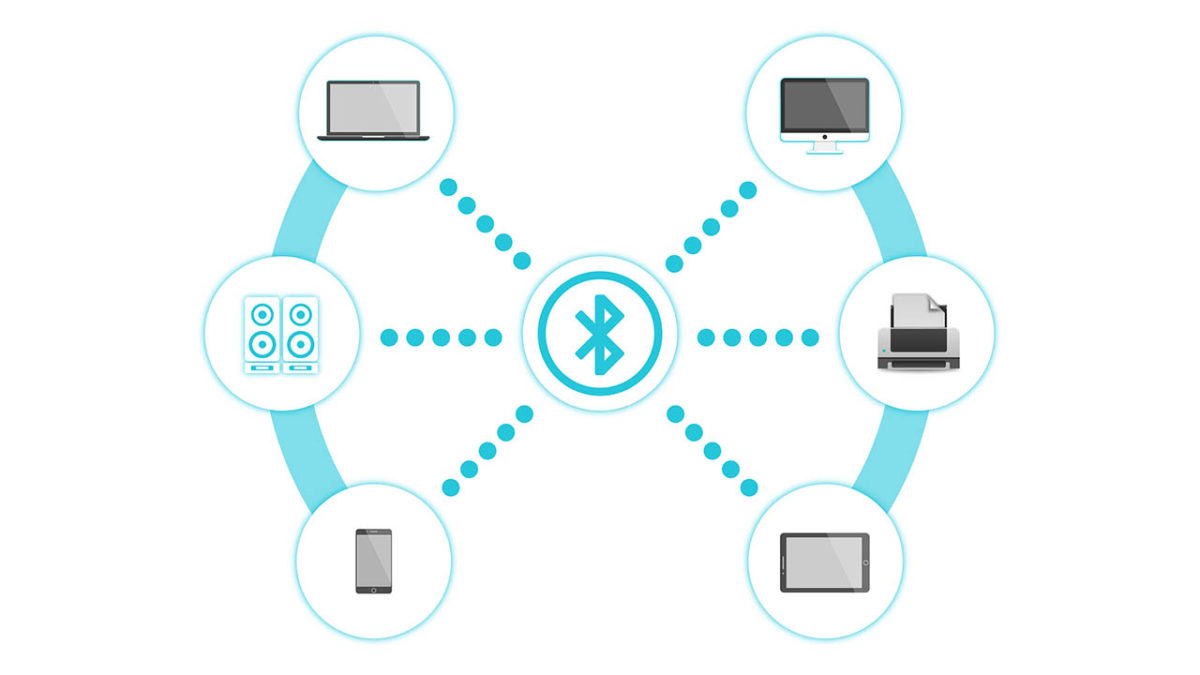
New Bluetooth bug can target Bluetooth devices from versions between 1.0 to 5.1
A disturbing new Bluetooth vulnerability has been discovered by researchers. It could see our wireless devices leaving us vulnerable to cyber-attack. The problem relates to Bluetooth’s authentication protocols and could see a potential attacker taking up a position between two Bluetooth devices and eavesdropping on all information shared across the connection.
Once the attacker comes to the correct encryption key, they then have ultimate access to all data being shared across the connection and could even add their own data to the connection. To give an example of what this could mean, I’m writing this report out on a keyboard and thinking about the last time I used my online banking!
The Bluetooth SIG Group had to release a security notice warning about the vulnerability
The other scary thing to note about a KNOB attack is that victims don’t even know they’ve been compromised. It isn’t the easiest exploit, however, which means there is hope. The post explaining the vulnerability says, “For an attack to be successful, an attacking device would need to be within wireless range of two vulnerable Bluetooth devices that were establishing a BR/EDR connection. If one of the devices did not have the vulnerability, then the attack would not be successful.”
Fortunately, there are Bluetooth devices out there that aren’t vulnerable to this attack and the attack will only work if the attacker is in close proximity to two vulnerable devices at the same time. This means that the level of effort required to pull this off means it is likely to be businesses that will be targeted rather than individuals. Don’t worry, nobody is going to be hacking into your headphones and telling everybody that you listen Justin Bieber, and not Led Zeppelin like you’ve been telling everybody.
The other good news is that the Bluetooth SIG Group that describes itself as, “a global community of over 34,000 companies serving to unify, harmonize and drive innovation in the vast range of connected devices all around us” has already upgraded the minimum security specification that goes out to Bluetooth manufacturers to seven bytes. This means that even if the KNOB attack can degrade the security credentials of a Bluetooth connection, it won’t be able to do so to the extent that a brute force attack will be possible.
AAAANNNNDDDD Breath. Phew, it took a lot to get through all of that without making a single knob joke. Best knob jokes in the comments please.
Researchers have discovered how to infect DSLR cameras with ransomware
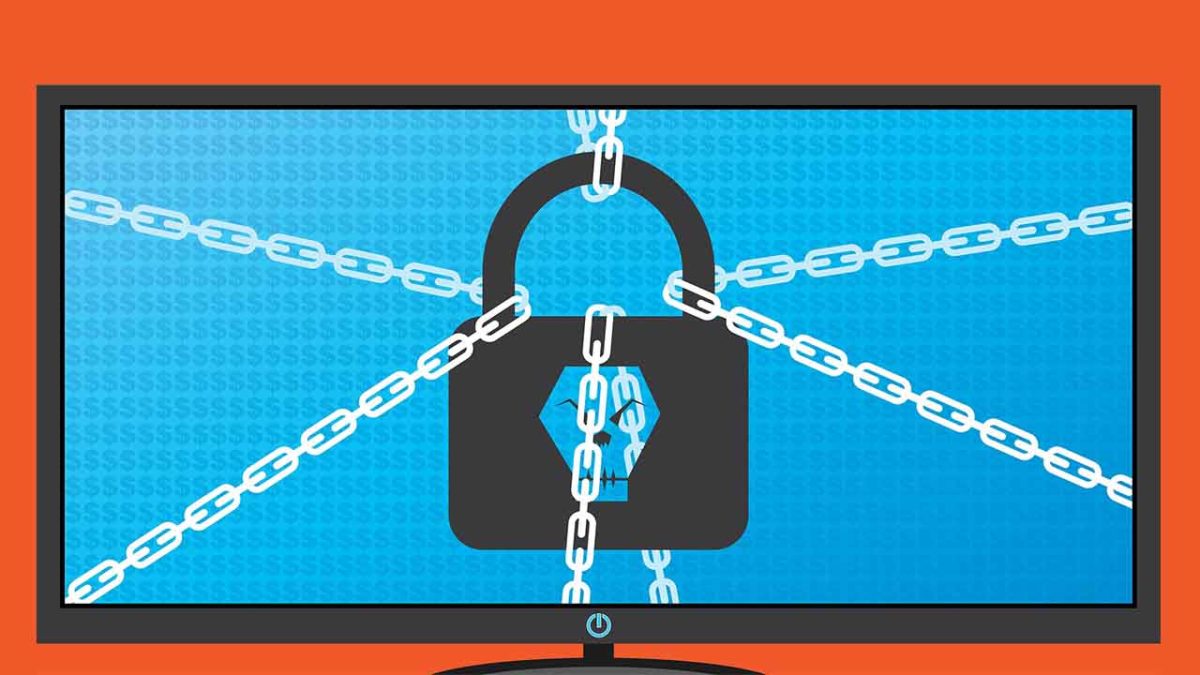
Ransomware is possibly the most terrifying of all the malware threats. Even without all the Hollywood style nightmares the name alone can induce, the ransomware reality is bad enough. Data gets hacked and then held hostage. You either pay up or you lose it forever, or if there is something embarrassing in there, it gets spread all over the internet.
Researchers have discovered how to infect DSLR cameras with ransomware
Security researchers at Check Point software have presented some rather interesting findings at the Def Con security conference in Las Vegas. Looking at the Canon EOS 80D, which has both USB and Wi-Fi connectivity they discovered that the camera, and others enjoying similar levels of connectivity, could be vulnerable to attack.
Eyal Itkin, a researcher at Check Point, recounts the vulnerability in a recent Check Point blog post, “Our research shows how an attacker in close proximity (WiFi), or an attacker who already hijacked our PC (USB), can also propagate to and infect our beloved cameras with malware.” He goes on to ask how you would feel, if attackers took control of both your computer and your camera, with all pictures being held until a ransom was paid.
The vulnerability relates to the Picture Transfer Protocol (PTP) found on the EOS 80D, which manages the transfer of digital files. Vulnerabilities found in the PTP make it possible for a malicious actor to infect the camera with ransomware. The PTP could then be used to infect accompanying computer systems whenever the infected camera is hooked using its USB or Wi-Fi connection.
Think about all the different types of staff members connected to local government institutions, hospitals, and schools that use cameras regularly and you’ll understand how explosive this development could be.
Speaking to ZDNet, a spokesperson for Canon said the company is working tirelessly to remove the vulnerability from the firmware it loads onto its cameras. The problem, however, is that PTPs are used by all camera vendors, meaning this isn’t just a Canon problem.
Sony is mostly known for their electronics, entertainment, and their weird mutual contract with Marvel regarding the rights to Spider-Man. We’ll be honest, we weren’t expecting a heatwave solution to come from them, but we got one, in the form of a wearable air condition chip. That’s right – this techwear slips right into your clothing and lets you cool yourself off on the fly. (It heats up during winter, too!)
The device is called the Reon Pocket and astonishingly has already succeeded in its crowd-funding campaign (probably thanks to this summer’s record temperatures). It’s a lightweight gadget about the size of a credit card and it slips right beneath the collar of your shirt.
From there it’s controlled via an app on your smartphone, and can reportedly lower body temperatures by 30 degrees. Even better, Sony alleges that the Reon Pocket will be sold for about $117, a price we’d be more than happy to pay if the thing works as well as they claim.
Slip the device right into the back of your shirt. Control it with an app.
If you’re already getting out your wallet, let us stop you real quick; it’s time for the bad news. To start, the device isn’t available just yet, and likely won’t drop until 2020.
Sony also plans to first launch the product in Japan, so unless you’re planning to get one imported (or you happen to live in Japan!) you’ll have to wait even longer.
Fight back against climate change by switching your search engine
There are also some questions regarding battery life (the Reon Pocket is estimated to last just under two hours), so there are still some kinks to work out before we give the device our recommendation.
Still, the thought of walking outside and being able to adjust how hot it feels on the fly sounds awfully enticing. These days it’s a borderline super power.
For those of us braving the heat every day, 2020 is still a long ways off, but we’ll be keeping tabs on the Reon Pocket so that you don’t have to! Stay cool and stick with Softonic!
Since 2014, spam calls have risen considerably, and the inevitable truth is it’s only going to get worse. Of all the nuisance call complaints in 2017, 62 percent were about robocalls.
Think about that: Millions of people suffering unwanted interruptions to their lives from … a machine. It’s all a bit too “Terminator 2” for our liking. Unless you find some way to block the calls completely, the robocaller will harass you forever (or until you disconnect your phone).
So what can you do? Get suited up like Sarah Connor and track the machine down for immediate termination? That’s perhaps taking it too far, and besides, there’s a much simpler solution: Install a spam call blocker on your mobile phone. Basically, if you get a call, protect yourself. If you want to get rid of unwanted robocalls, check out our list:
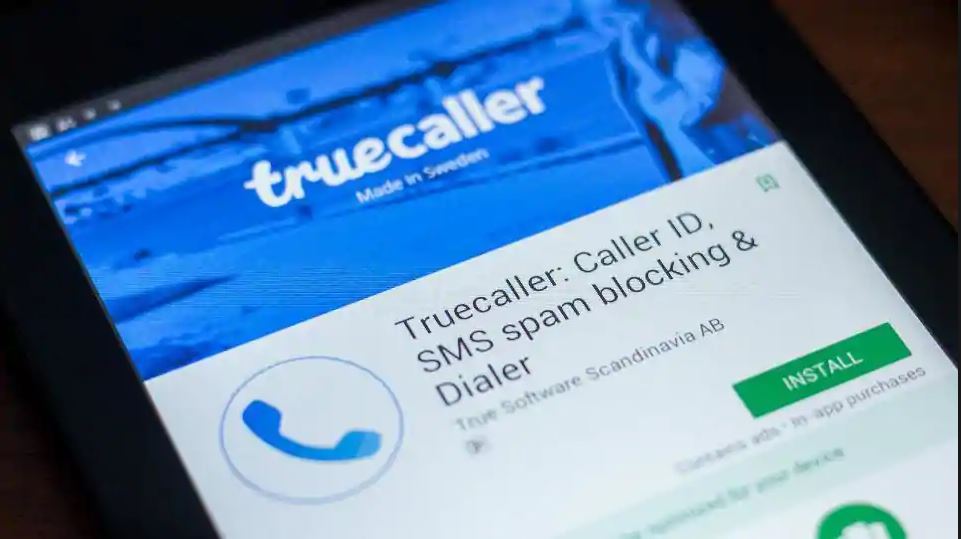
With more than 100 million daily users, TrueCaller is one of the most popular call blocker apps around. Promising to help you track and block spam, identify who’s calling you, and even tell you the best time to call your friends, TrueCaller is a powerful tool against the march of robo-spam. It’ll even block spam text messages, too.
Truecaller can identify fraud and robocalls before you even answer
TrueCaller’s strength lies in its community. Every time a member identifies spam numbers, it’s added to a list which is then used to block unwanted calls not just for that user, but all users. That means the occasional call might get through, but once identified it should, in theory, be blocked forever. That means no more pesky telemarketing calls.
Since TrueCaller crowdsources contacts from its users, there’s been some controversy over privacy. The reverse look-up means you can find names from numbers (but not vice versa), even if they’re not in your address book. Sharing your friends’ contact info without them agreeing to it isn’t really fair, but the good news is you can opt out of this and still use the app.
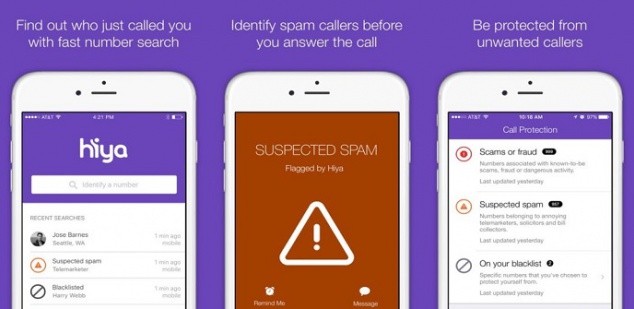
Hiya claims to have the “world’s most advanced phone spam protection engine”. While we can’t prove that’s true, the app does have a slew of 5-star reviews on the app store.
Hiya provides context needed to confidently take or make calls.
Like other blockers, Hiya uses a spam database of over 1.5 billionphone numbers that it draws from to identify the source of incoming calls. It then filters unwanted calls, and you can create your own by adding numbers from your own contact list or call history. Basically, it automatically blocks calls. The free version identifies spammers, robots, and scams in real-time, and there’s a reverse-lookup feature so you can find out if you’re in the sights of some nefarious telemarketer.
To get their “premium caller ID” you need to pay extra, and again it means adding your contact list so you and others can “share” contacts and identify people not in your phone book. If you’d rather not share your contact list, you can ask Hiya to remove it.
RoboKiller answers spam calls and makes telemarketers’ lives miserable.
Oh, the sweet, sweet taste of revenge…
For just $2.99 per month, you can give the spammers a taste of their own medicine. RoboKiller doesn’t just block calls, it answers them for you.
Answer Bots (prerecorded voice snippets designed to simulate conversation) take your spam call and analyze voice patterns so even if your spammer is using a spoofed local number or an unknown number, they’re still caught. And the results are hilarious.
From drunken wasters to grumpy old men,Answer Bots make spammers’ lives hell while gathering the information RoboKiller needs to block even more nuisance calls. There’s even a RoboRadio where you can enjoy listening to the Answer Bots taking revenge.
Aside from the unbridled joy of vengeance, you’ll also get text blocking, and customizable block lists.
But occasionally, we face a problem we can’t solve with a quick download. We’re about to show you something that will blow your mind. Buckle up, friends. This is the Dunking Buddy:
Dunking your cookie in milk is a time-honored tradition riddled with problems.
Dunk the cookie too quickly and you don’t get maximum milk saturation.
Dunk the cookie too long and it could break apart and sink to the bottom of your glass.
If you want the whole cookie dunked, you’re going to get your fingers covered in milk.
Sometimes that milk is too cold and it hurts your precious fingers to try to withstand the freezing temperatures for maximum dunkage!
That’s where the Dunking Buddy comes in. This ingenious gadget uses magnets to create a tiny elevator on either side of your cup. Insert your cookie, slide down the handle on the outside of the cup and your cookie begins its luxurious milk bath. When you’ve achieved maximum saturation, raise the cookie and enjoy.
Instagram-powered vending machine gives free food for selfies
Just the little cookie elevator itself will cost you $6.95. They’ll throw in a color-changing cup for another $3. If you want to go nuts, you can get 12 of the cup-and-elevator combos for $82.50. So, yeah, kind of expensive for a couple of magnets and plastic, but if you’re a cookie-dunking fiend, this could be a real game-changer.
We do need to mention that the Dunking Buddy appears to max out with an Oreo-sized cookie. Anything beyond that and the cookie will be too big for the little tray. It’s also not dishwasher safe.
Need to schedule a meeting? Calendly could be the perfect tool.
You’ve got a busy schedule. Making ends meet is hard enough without having to log your conversations, add meetings to your to-do list, or spend time meticulously setting up virtual conference rooms.
Calendly takes care of all the tedious micromanagement of your work life so that you can spend your time preparing the important stuff. Think of it as your own personal secretary, helping you plan your itinerary and schedule meetings without the back-and-forth of countless emails.
Time management is something we all struggle with, and it only gets harder the higher you are in the company ladder. Chief Marketing Officers have a tendency not to last more than a few years in their position, with the average tenure being just 44 months. Many CMOs stumble early in their new role solely because there are so many threads to keep track of. Calendly is a secret tool in your back pocket that partitions your daily work effectively and uniquely for you. Take a peek at the strategy:
"The average tenure for a CMO is just 44 months. Shocking? Considering that the median is just 31 months, it appears that many CMOs stumble early in their new assignment." Here's a guide for new CMOs to find their footing:https://t.co/pntHRColKB
Calendly works by seamlessly integrating itself with your digital schedules such as Google, Outlook, Office 365, or iCloud. It flags any double-bookings, and works with your selected calendars to automatically check availability to help you professionally connect with clients, contacts, and prospects. You can allow invitees to schedule individual slots (or multiple team members at once) to take the burden off your own shoulders, and create and manage all kinds of meetings, no matter how large a team you’re working with. If you like to host webinar events, Calendly is simply a must-have. For a more in-depth walkthrough of all Calendly’s specific features, check the full rundown on their website here.
The best thing about Calendly is that it offers complete customization no matter what kind of business you’re working in, or what kind of relationship you have with your co-workers. You can elect to have Calendly send confirmation and reminder emails to your team so that you don’t have to do it in person (this is super helpful in improving no-show rates), and customize your alerts to account for a comfortable buffer time before the meeting officially starts. You can even use Calendly to cap the number of meetings allowed per day. It keeps track so you don’t have to.
10 Tips for Massively Increasing Your Productivity From a CEO With ADHD https://t.co/3a4GQA7irg
You can sign up in seconds right here. You don’t even need to give it your credit card information. Calendly has over 2 million monthly users, and requires virtually no setup. Give it a whirl right now and watch your productivity reach new levels! Never get double booked again, automate appointment scheduling, and choose to share links via your email or website to fully integrate yourself in a work environment that you set.
Let us know in the comments below if Calendly was able to help you, and enjoy easier, faster, and painless scheduling!
Can Apple overthrow Netflix, Visa, and the digital news ecosystem?
Today was “Show Time” at the Steve Jobs Theater in Cupertino, and the company proudly announced four new innovations they’re bringing to the public – some won’t be here until Fall 2019, others you can get right now. Take a look:
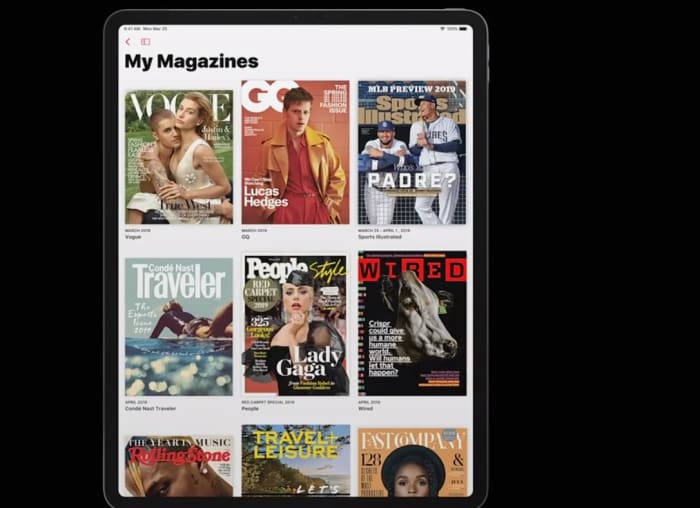
Tim Cook announced at today’s keynote that Apple News has become the leading news app on mobile devices, with over 5 billion articles read per month. Now the company is aiming to widen the news net by adding a subscription service that also includes popular magazines and digital media. Cook praised “the power of journalism and the impact it can have on our lives,” and the new Apple News+ service adds big names like Time, Vogue, People, National Geographic, Popular Science, Billboard, The New Yorker, Sports Illustrated, and Fortune.
You can now access your favorite magazines on your phone
The service covers “over 300 magazines across all sorts of topics,” said Apple’s Vice President of Applications, Roger Rosner, “all in a single package. Once you’re in the tab, all you have to is tap on a cover and you’ll be brought to the table of contents. Some articles may even have moving images like in Harry Potter, or animated headers or cross-outs, and there will also be a section specifically tailored to your preferences and previous viewings.
See your recommended articles and publishers all in one place
Subscribing to this many magazines would take over $8,000 a year, but through Apple, it’s all available to you for a monthly fee of $9.99. The first month of the service is free, and it’s available in the U.S. and Canada right now. Apple News+ will reach Australia and the UK later on this year.
Apple Card
Apple cuts out the middle man, offering their own new credit card
Cook said Apple Pay is the “simplest, most secure, and private way to pay.” The service has seen a great response since its launch. According to Cook, it will soon pass 10 billion transactions in over 40 countries. To take its success to the next level, Jennifer Bailey, the VP of Apple Pay, announced that Apple has “completely rethought the credit card [to encourage] a healthier financial life.”
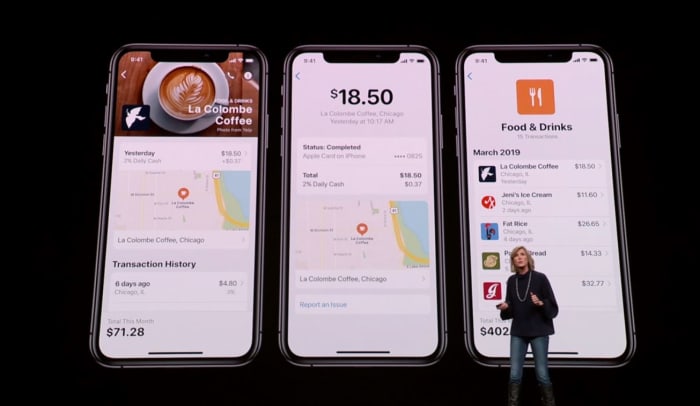
Track and manage your spending easier than with Apple Pay’s new update.
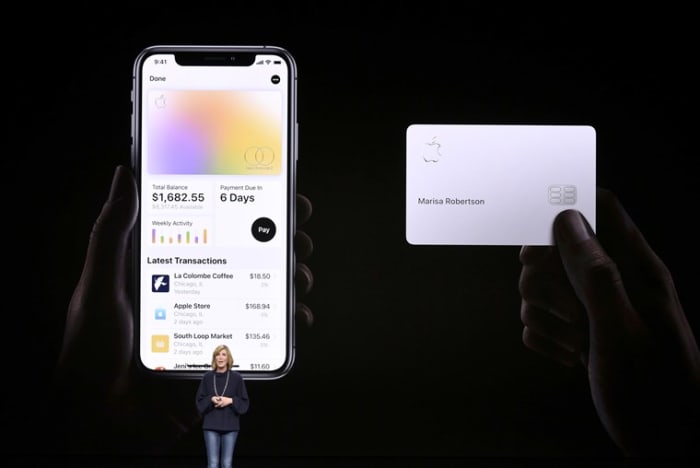
This innovation comes in the form of the Apple Card, a new credit card that’s the result of Apple’s new partnership with Goldman Sachs and MasterCard. The new card comes with a unique number stored in a security chip, and can only be verified through touch or face ID any time you use it to make a purchase. The card also focuses on user privacy, and Apple guarantees they have no way to track what you bought with the card, how much you paid, or when the transaction was done. The Apple Card doesn’t even have any numbers or cvc; all that information is in the wallet app.
The new Apple card is sleek, safe, and secure.
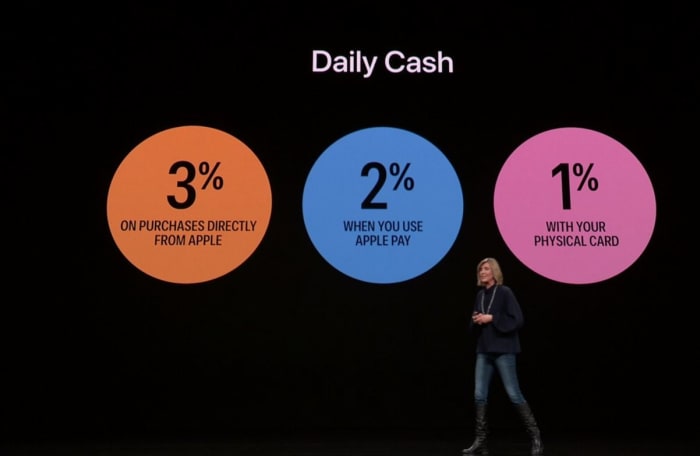
The Apple Card was made to help users avoid high interest rates and to help keep better tabs on payments. The new Daily Cash feature also allows users to receive 2% daily cash any time you use Apple Pay, 1% any time you use the Apple Card, and 3% any time you purchase directly from Apple.
Enjoy immediate cashback with every purchase you make with Apple Card
The amount of Daily Cash you can receive is unlimited, and the Apple Card will be located in the wallet app starting this summer.
Apple Card: Designed for iPhone. Sign up on iPhone, begin using it immediately anywhere Apple Pay is accepted. Uses machine learning to provide easily recognizable transactions. Shows spending trending. Daily Cash gives you cash back, every day you spend. Added to Apple Cash.
The upcoming Apple Arcade service offers over 100 unique games to subscribers.
Apple’s App Store is now visited by half a billion people each week, and the most popular category is games. According to Tim Cook, iOS is now the largest gaming platform in the world, and over a billion people have downloaded games from the app store: a collection of over 300,000 games, both free and paid.
Apple is directly collaborating with game creators to bring this collection to subscribers.
Apple Arcade aims to shine the spotlight on the paid games, which are often overlooked and overshadowed by the more enticingly-priced free games. These are “games that redefine games, both curated and backed by Apple” says the company, and Apple Arcade will offer over 100 games when you subscribe – games that are not available anywhere else, and new titles will be added frequently. Even better news is that all the games can be played on or offline, and will never have ads, additional purchases, or track or mine any of your user data.
Apple is proud to have teamed up with these companies and more to make Arcade possible
Apple Arcade will be available in over 150 countries around the world this Fall, though Apple did not yet specify pricing.
Apple TV+
Apple TV+ is an upcoming subscription that adds both unique and simplified content to your home.
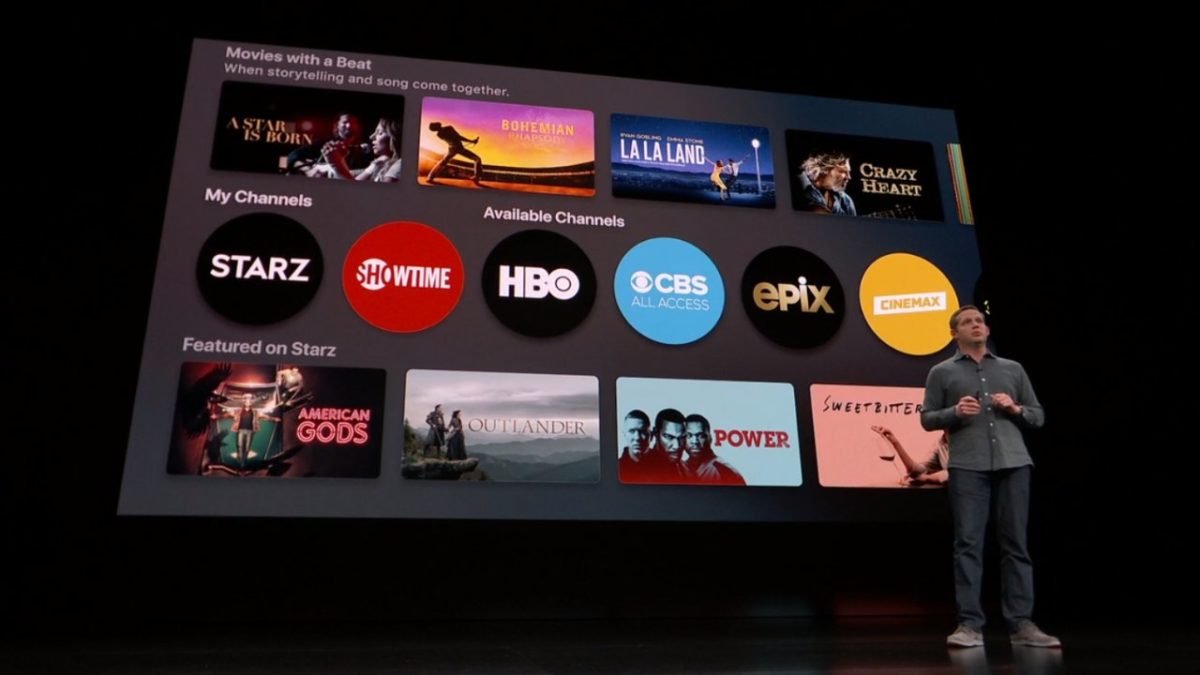
Lastly, Tim Cook introduced a new paid subscription service to Apple TV: Apple TV+. Like Netflix, this lets users “pay for only the channels they want – all in one app with the password you already have.” It enables you to “watch everything on-demand and add-free, online or offline” with a subscription that also allows for family sharing.
Apple’s tv streaming platform is about to become much more user-friendly and accessible
Apple TV+ has redesigned the app so that it’s both easier to use, and also offers exclusive content that’s both recommended to you and that’s completely fresh and new. It’s got movies, sports, news, network tv, HBO, Showtime, and even a kids mode that makes Apple TV+ “a safe place to explore together.”
A number of guest celebrities greeted the audience at today’s event, including Oprah Winfrey, who’s bringing a new book club to Apple. And Steven Spielberg is partnering with Apple to revive the “Amazing Stories” series he produced in the mid-80s.
Steven Spielberg made a surprise appearance, championing Apple TV+ and introducing his new show.
The ad-free subscription service will be available across 100 countries starting this fall, with “commitment to quality story-telling” that can be watched on all devices both on and offline. This also includes series such as “Little Voice,” “The Morning Show,” “Sea,” “Little America,” and the Sesame Street spinoff “Helpsters” for kids.
Apple TV+ will also feature “Helpsters” among other programs for children.
We’ll also get the general software update that will bring Apple TV to all devices this May. For the first time, this software will also be usable on Mac (but that will be later this year). Apple has also partnered with leading Smart TV partners in hopes of integrating Apple TV and Apple TV+ with this growing market as well. Again, no prices were given yet, though a family plan was mentioned.
Apple teams up with big names in Smart TVs with Apple TV+
This announcement marks an exciting new series of innovations from Apple, with the general theme of a safer, more private experience between the company and user, while simultaneously attempting to bolster the community’s internal networking and the sharing of culture to a medium that’s (as Winfrey put it) “in a billion pockets.”
Will you be subscribing to any of these new products? Let us know in the comments below which you’ve got your eye on, and stay tuned for more news as it’s made available.