Windows 10 was set to lose support in 2025, but Microsoft backtracked: today the first extended security patch arrives

Microsoft ended the main support for Windows 10 last month, marking the beginning of a new phase for the world’s most used operating system. The company has released the first Extended Security Update (KB5068781), which will focus exclusively on fixing security issues and will not add new features, as had been the case in the past. Windows 10 still has a lot of life ahead With the release of this update, Microsoft has made it clear that any future support for Windows 10 will be limited to addressing specific bugs. Specifically, the update KB5068781 […]

Microsoft ended the main support for Windows 10 last month, marking the beginning of a new phase for the world’s most widely used operating system.

The company has released the first Extended Security Update (KB5068781), which will focus exclusively on addressing security issues and will not add new features, as has been the case in the past.

Windows 10 has a lot of life left ahead

With the release of this update, Microsoft has made it clear that any future support for Windows 10 will be limited to addressing specific bugs. Specifically, the update KB5068781 resolves an issue related to an erroneous message about the Extended Security Updates (ESU) program, offering nothing more than minor quality adjustments.

This approach reaffirms the company’s policy to consolidate its transition to Windows 11, suggesting that those who continue to use Windows 10 will have to comply with this new standard of minimum updates.

Microsoft’s change of strategy could generate some discontent among users who, for various reasons, prefer not to upgrade to Windows 11. The company has expressed its preference to redirect users to its latest operating system, which implies an implicit pressure to abandon the older version.

Although it is evident that Microsoft has a strong interest in achieving broader use of Windows 11, the decision to maintain support, albeit limited, for Windows 10 could be seen as a lifeline for those who still depend on this system.

The KB5068781 update is available for Windows 10 Enterprise LTSC 2021 and for the 22H2 version of Windows 10. This security-focused approach, therefore, defines what users can expect in the coming months: an update cycle in which problem fixing will be the norm, sidelining innovations and new features, at least in the Windows 10 ecosystem.

Windows wants you to leave Windows 10 before its end comes

Microsoft is preparing for the imminent end of support for Windows 10, set for October 14, 2025. This critical date has begun to motivate the company to seek more creative ways to persuade users to upgrade to Windows 11. Unlike previous attempts that included intrusive ads, such as full-screen pop-ups, the current strategy focuses on offering attractive options, such as the Copilot+ PCs. Microsoft is ramping up its push for Windows 11 with the new Copilot+ PCs. The Copilot+ PCs are devices that meet the rigorous system requirements of Windows […]

Microsoft is preparing for the imminent end of support for Windows 10, scheduled for October 14, 2025.

This critical date has begun to motivate the company to seek more creative ways to persuade users to upgrade to Windows 11.

Unlike previous attempts that included intrusive ads, such as full-screen pop-ups, the current strategy focuses on offering attractive options, such as Copilot+ PCs.

Microsoft intensifies its bet on Windows 11 with the new Copilot+ PCs

The Copilot+ PCs are devices that meet the rigorous system requirements of Windows 11 and stand out for integrating artificial intelligence-based features, such as Windows Recall and improvements in search. These devices aim to optimize the user experience and facilitate the transition to the new operating system.

Microsoft has indicated that, despite Windows 10 continuing to dominate the market with a share of 54.2%, Windows 11 has achieved notable growth, reaching a market share of 42.69%.

During the fourth quarter of last year, up to 15% of premium laptops in the United States were Copilot+ PCs, and this figure is expected to increase in the coming years. Microsoft seems to be focused on turning this figure into a larger proportion of future sales, suggesting that the adoption of these PCs could be key to the overall adoption of Windows 11.

The company has decided to adopt a less invasive approach to encourage updates, evidenced by the corresponding improvement in user experience and the sensitive approach towards privacy and security.

Users who still rely on the Microsoft ecosystem but own older devices may increasingly be led to consider purchasing a Copilot+ PC as the end of support date for Windows 10 approaches.

Microsoft will add pop-up messages to Windows 10 to encourage you to create an online account

Microsoft has made a decision that is likely to be annoying for Windows 10 users, as those who do not have an official Microsoft account active on their PC will receive pop-up messages insisting that they create an account to link their PC and Microsoft services to a specific person.

This is a striking move at this point, considering that Windows 10 has just over a year and a half of free support left. However, it seems that Microsoft wants to continue insisting on this service for a niche of users that, to this day, is still much larger than the one that exists in Windows 11.

Windows 11 Download

Annoying pop-up messages

As PCGamer explains, Microsoft has taken the most aggressive and invasive approach possible to continue convincing Windows 10 users to create a Microsoft account. Considering that this window will appear if you don’t have your account linked, an option that many users choose is to disable this type of notifications through the settings in the security and privacy section.

This will not be harmful to Windows 11 users for one reason: in order to use Windows 11, you must have a previously linked account, so this step is already fulfilled by all users who have Windows 11 on their computer. It is not the same in the case of Windows 10, where this requirement is optional, and there are still many users who use this system without creating or linking a Microsoft account to their PC.

Windows 10 continues to be ahead of its successor

This decision, which will be quite unpopular for the numerous Windows 10 users, is partly due to the fact that Windows 11 users are still a minority compared to its predecessor system, as Windows 10 still has more than twice as many users today. It is partly a failure on Microsoft’s part, whose requirements to make the leap were too demanding for many users, either due to lack of hardware capacity or because they failed to convince users of the advantages of Windows 11 over its previous version.

And, despite the fact that virtue lies in freedom, this freedom has an expiration date: October 2025, the month in which, after more than a decade, the free support for Windows 10 will officially come to an end. At that moment, Windows 10 will no longer receive security updates, so its mere use will pose a great risk for users. Likewise, Microsoft encourages those who want to stay on this version to pay a fee to continue updating their PC until October 2027.

Therefore, by the end of next year, it will be seen whether users opt for the exodus to Windows 11 or other systems, or if they comply and pay to continue receiving security patches.

Windows 11 Download

Windows 10 will stop receiving support in its 21H2 version very soon

Windows 10 is gradually shutting down, and the end of version 21H2 of this operating system is closer than ever. In fact, there are less than 3 months left for support for this version 21H2 to end, as these updates will unilaterally end on June 11, 2024. Thus, Windows 10 will close another stage towards its final closure (for free) in October 2025.

As it is evident, the 21H2 version of Windows 10 is not the most recent of this operating system, so those who have delayed this update should not have, in most cases, any problem to receive the 22H2 version, which is the latest that Windows 10 has received and will receive.

Windows 11 Download

Windows 10 continues to fade away

More than 2 years have passed since Windows 10 passed the Olympic torch to Windows 11, although its flames have remained strong inside due to the enormous support it continues to receive today. However, despite this, Microsoft continues with its plans, and that is why on June 11th the penultimate version of Windows 10, 21H2, will no longer have active support from the company.

Alternatives to Windows 10

The end of Windows 10, for better or for worse, is getting closer and that is something that concerns the majority of Internet users worldwide, since Windows 10 is still the most used operating system, doubling the number of users compared to Windows 11, despite the fact that this version is more modern and has more features. Therefore, sooner or later, Windows 10 users will be forced to make a decision: what to do with their operating system.

One option is more than evident: stick with the Windows 10 system (in its 22H2 version, of course) until its free support expires in October 2025 and then subscribe to the paid security updates that will be available until 2028. Another option is to update the necessary software or hardware to have Windows 11, or, if you don’t want this system or pay for updates, switch to Linux open-source software.

Windows 11 Download

Microsoft releases the new app to optimize the performance of Windows 11 and 10

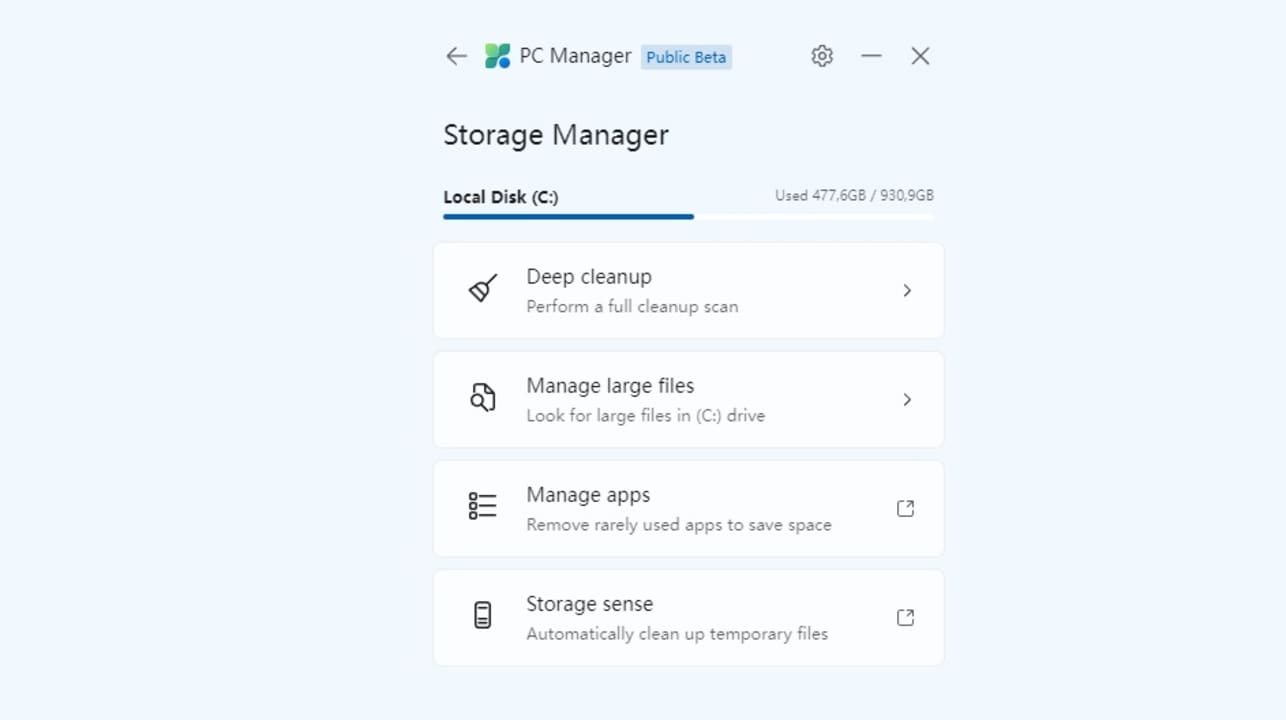
Microsoft, with the aim of providing users with a more efficient system, has already launched its application designed to optimize the performance of Windows 11 and Windows 10 systems. This app, available for free download, will easily and simply clean files and improve the performance of the computer in question.

Thanks to this, after many years of waiting, it will not be necessary to download third-party programs or applications to optimize or clean the PC from junk in its storage. In fact, it has a very simple interface to use and allows you to perform actions without any difficulty

Windows 11 Download

Instant Optimization

This tool, named PC Manager, will allow users to optimize their systems so they can save resources, increase free storage space, clean the cache memory, and perform many other cleaning tasks that help accelerate PC performance.

This is a very useful tool, especially for long-term use, as we often may not be aware of the amount of “junk” we generate within our computer. Thus, tools like PC Manager take care of performing the necessary cleaning to ensure the computer’s performance is as optimal as possible.

Key year for Microsoft

2024 is a very different year for Microsoft, and it can be seen in the plans and roadmap it is taking in this regard. There are many uncertainties surrounding Windows 11, in fact, with rumors pointing to Windows 12, and other voices indicating that this year will continue with Windows 11 as the protagonist, but with a major update for the second half of this 2024.

In fact, this can also be seen in one of its most well-known divisions, Xbox, which is going through the most turbulent moment in its more than 20-year history. There is still much to be known, and Microsoft has yet to provide more details about the future of the company, but all rumors also point to a radical change in its business model, prioritizing the exclusive value of its system to enhance its catalog of Third Party games.

Windows 11 Download