How to make a GIF in Photoshop

A GIF is an image file, similar to files like a JPEG, PNG, or BMP. They are essentially highly compressed image files. GIF stands for ‘Graphics Interchange Format’. GIFs are firstly graphics, which makes them visual by nature.

When you want to create them, you need the best image-editing software for top results. Here’s how to make a GIF in Photoshop.

40% off
BLACK FRIDAY

From: All Adobe Creative Cloud Apps

How to make a GIF in Photoshop

  1. Load your images into Photoshop

    How to make a gif in photoshop

    Collect a group of images that have a connection you can convert into a flow that you can animate. In File > Scripts > Load Files Into Stack, you can open a range of images simultaneously so that you don’t have to drag them into your document one by one.

    Then select the Browse option and find each file you want to place in the document. Press OK, and Photoshop will create a layer for every image you want to include.

  2. Open the Timeline Window

    How to make a gif in photoshop

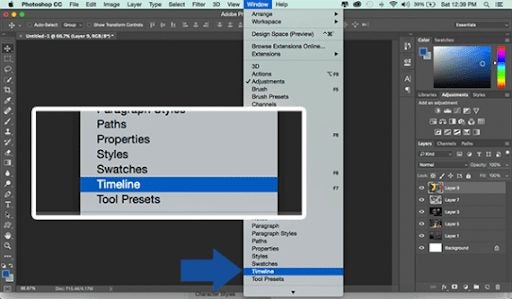
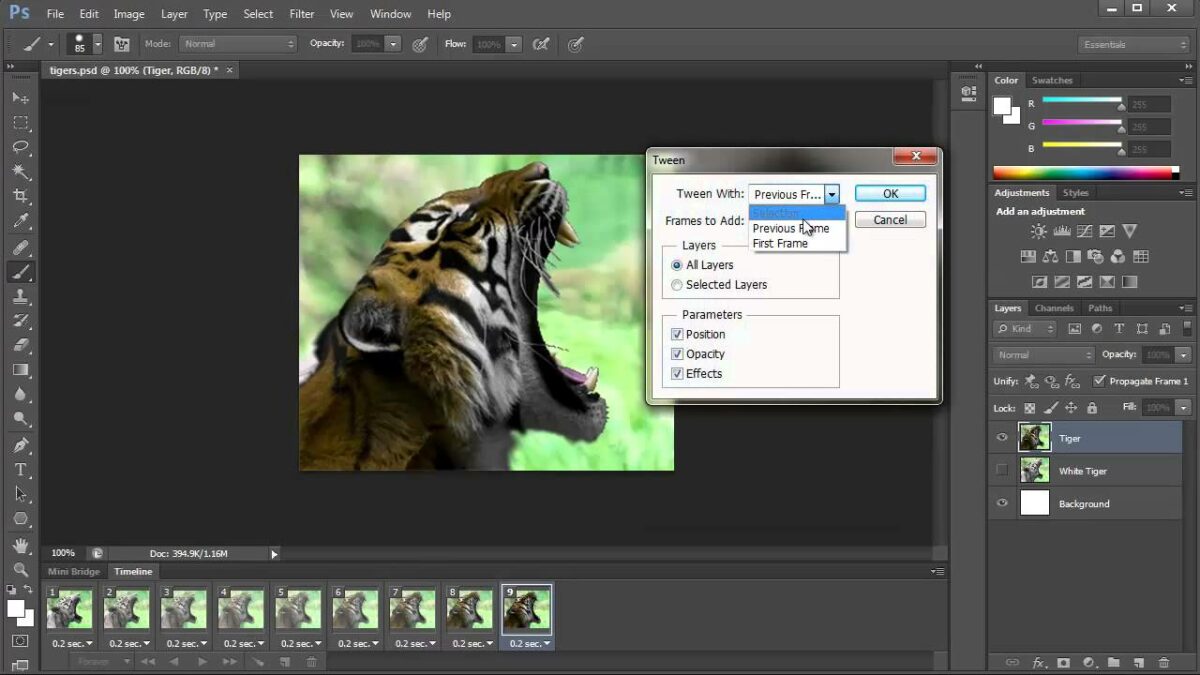
    Before you can animate your GIF, you’re going to have to create Keyframes. Open the Timeline window. Navigate to Window > Timeline and get started. Via Timeline Frames (keyframes), you can apply frame-by-frame edits to our images and create animated effects through layers.

    The Timeline window lets you adjust layers, move elements, apply filters, rotate text, and set the length of time for which frames will appear. Once you’ve chosen the Timeline option, the animation window will show at the bottom of your screen.

  3. Create Frame Animation

    How to make a gif in photoshop

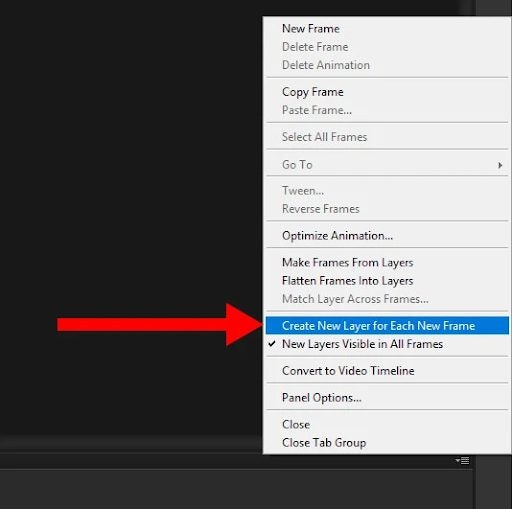
    Click on the button, Create Frame Animation, in the Timeline. This will change the Timeline mode to a style for working frame-by-frame. You can apply your animation edits in these frames. You’ll have to make sure each frame has its own layer so that you can edit a frame without affecting any of the others.

    To split your images into layers, choose Select > All Layers and then locate the Timeline menu icon at the top right of the window. Then choose Create New Layer For Each New Frame.

  4. Make frames from layers

    How to make a gif in photoshop

    Making Frames From Layers will turn each of your layers into a frame in your Timeline.
    This means that you’ll be able to edit elements in each frame in your Timeline separately without interfering with any of the others. The more complex you want to make your animations, the more frames you’ll need to be able to set up good transitions between the different frames.

  5. Set durations of your frames

    How to make a gif in photoshop

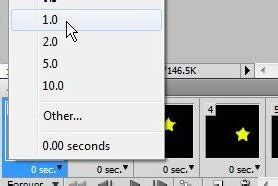
    The next step is to decide how long each of your frames will play for. If you don’t, your animation might work. First, choose the frame you want to edit. Click the arrow and select the time you want the frame to run from the dropdown menu that appears. The default for each frame duration is 0 seconds. You can change it to, say, 0.2 or 0.5 seconds to start with and change it to a different time later.

  6. Looping options

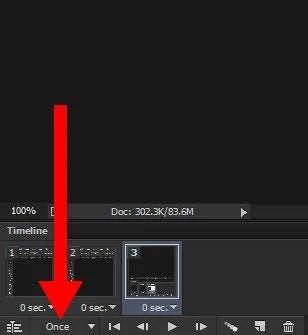
    If you want your image to repeat more than once, you’ll have to set up looping options. Below the Timeline, select the Once option, which will open a dropdown menu. You’ll be able to choose from preset options or set up your own. Choose whatever suits you. The most common choice is Forever since most animated GIFs are designed to play repeatedly as long as they stay open.

  7. Preview and export

    To make sure your GIF looks and plays the way you want it to, you can preview it by simply pressing the Play button on the Timeline.

    If you’re happy, you can save your GIF in Photoshop. You can’t use the usual Save command. You’ll have to go to File > Export > Save for Web (Legacy) instead. Name your file and save it as a Photoshop (PSD). You might want to edit it later. You can now export your GIF to whoever you like and await the reaction.

Why GIFs are so popular

GIFs are used on blogs, instant messaging applications, and social media, often conveying humor and a wide range of emotions. They are used extensively for animated memes. Use is so widespread that the word GIF was named the Oxford Dictionary word of the year in 2012. A GIF search engine called GIPHY has 500 million users, more than Pinterest and Twitter. They send out over seven billion GIFs every day!

Guides to Photoshop

Here are some sites to visit that have excellent guides to learn about Photoshop.

Conclusion

There’s a reason GIFs are so popular. You can use them to good advantage in your work or just have fun communicating with friends and associates on social media. The creative possibilities are limitless. Follow our step-by-step guide to create your GIFs quickly and easily.

20 Great Things You Can Do With Adobe Creative Cloud

Adobe Creative Cloud (CC) is a dream come true for any graphic designer. This powerful suite includes more than 20 programs built for photo and video editing as well as creating digital illustrations. Among them, you’ll find popular and award-winning tools such as Photoshop, Illustrator, and Lightroom. With this amazing collection of software, it’s clear why Creative Cloud is the first choice of professional developers and designers around the world.

With Black Friday around the corner, why don’t you take this chance to get a subscription to Creative Cloud? If you’re still unsure about it, keep reading because today we’ll share with you 20 great things that you can do with Adobe CC.

40% off all Creative Cloud apps Subscribe now
9
Offer available from November 15th until December 2nd, 2021

Change facial expressions from any photo

Adobe Photoshop CC lets you scan the facial features of any picture and easily enhance them with its Face-Aware Liquify tool. You’ll also be able to change the expression of your model just by moving a few sliders, making it very easy to get the perfect portrait.

Face-Aware Liquify tool

Fix blurry pictures

There are few things as frustrating as taking a great photo and then realizing it’s blurry. Thanks to the Shake Reduction tool from Photoshop you’ll be able to sharpen your picture in just a few clicks.

Shake Reduction tool

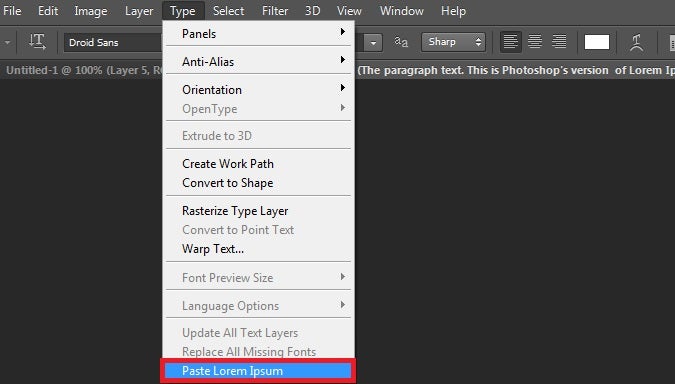
Add dummy text

When testing the layout of text content in a picture, one will typically turn to the well-known Lorem Ipsum placeholder text. Adobe Photoshop CC will save you precious minutes thanks to its tool to automatically add this dummy text into your projects.

Paste Lorem Ipsum tool

Edit your pictures from your mobile

Android and iOS users are able to easily import and edit any picture stored in the cloud with the help of their smartphone thanks to the Adobe Photoshop Fix app.

Photoshop Fix

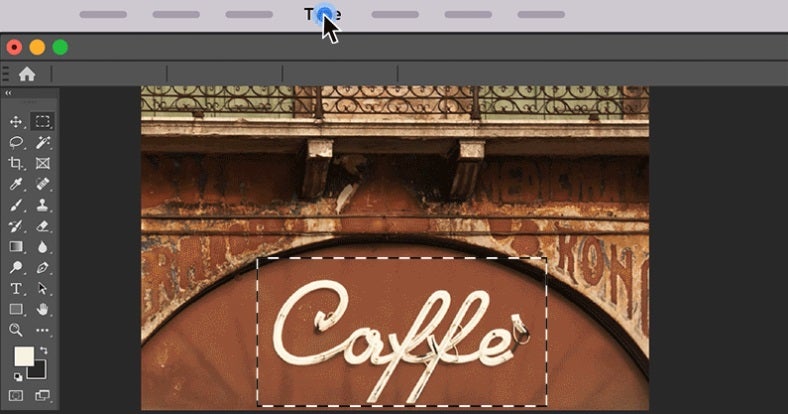
Identify any font from a photo

Photoshop can help you identify any font you find in a picture thanks to its Match Font tool. After uploading the photo, let the software do its magic and compare the mystery font with the ones installed on your computer as well as the Adobe Fonts catalog.

Match Font tool

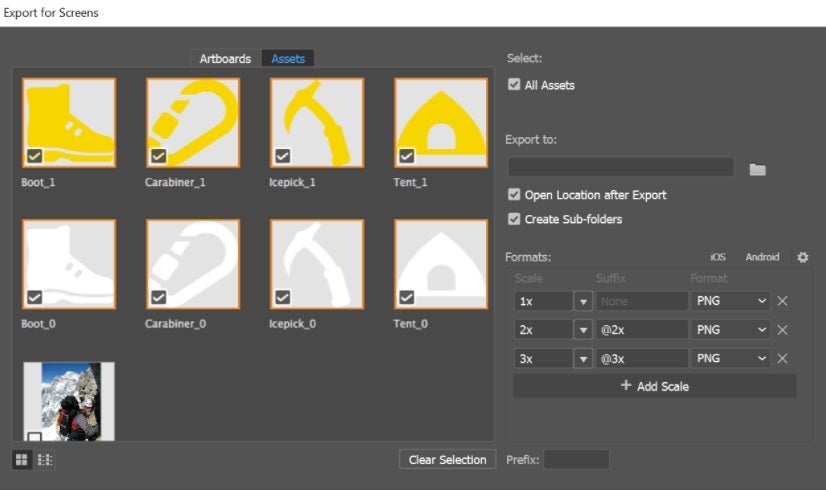
Export and share your assets

If you’re a graphic designer, you’re probably losing a lot of precious time exporting files to share with your clients. Adobe Illustrator CC can help you increase your productivity thanks to its helpful tool to export all your assets in seconds.

Export your assets Illustrator

Make perfect shapes

Being able to draw symmetrical shapes is vital for any designer, though it’s not always an easy task. Adobe Illustrator includes a useful tool that will turn any poorly hand-drawn shape into perfect geometric vector art.

Vector art Illustrator

Design your own fonts

Thanks to Illustrator, you’ll be able to quickly design and create fonts that will give identity to your brand or project. Starting from a sketch, just follow Adobe’s step-by-step process and surprise everyone with your personalized fonts.

Font design in Illustrator

Add color and edit your strokes

The Live Paint tool in Illustrator will let you draw and paint like you would on a canvas and then turn every single stroke into a vector. This way you’ll be able to freely turn your ideas into color and then easily edit them with just a few clicks.

Live Paint tool in Illustrator

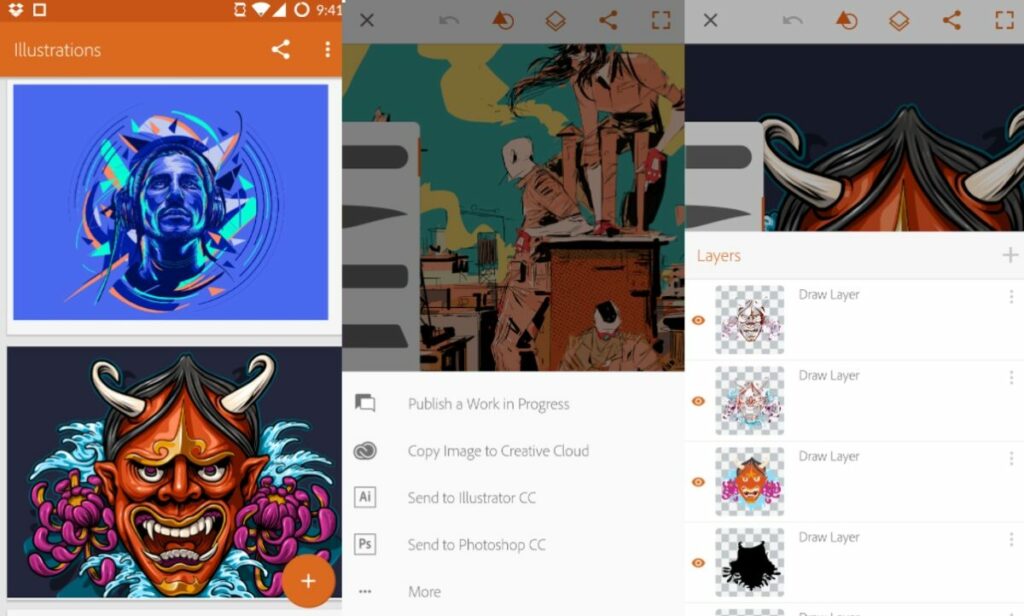
Draw and design from your mobile

With Adobe Illustrator Draw (Android/iOS) you’ll be able to draw, design, and send your projects to Photoshop and Illustrator right from the screen of your smartphone or tablet.

Adobe Illustrator Draw

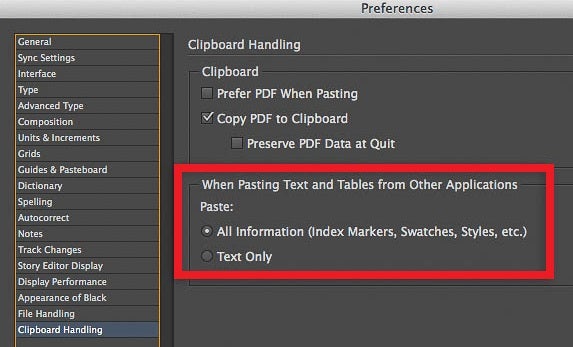
Keep your text’s original formatting

When you copy and paste some text from Word to any Adobe app, it will typically lose its formatting. Using InDesign there’s a workaround to this setback thanks to its option to keep the formatting of all your documents.

Keep formatting Indesign

Create HDR panoramas

Do you want to surprise everyone with a picture of a breathtaking landscape? Adobe Lightroom includes a tool that will let you merge a large number of photos into a single one, creating amazing HDR panoramas.

HDR Panorama

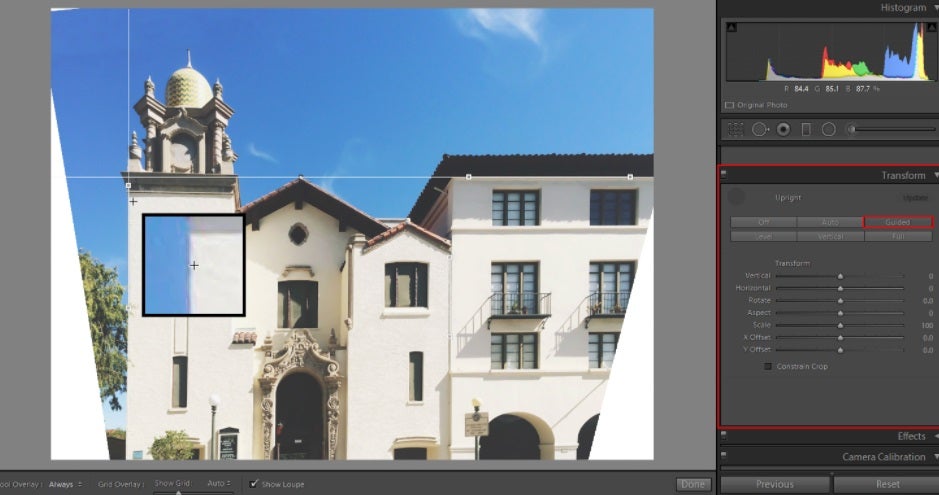
Correct the alignment of your pictures

Thanks to Lightroom’s Upright Guided feature you’ll be able to correct the perspective of any picture in just a few seconds.

Upright Guided

Create a responsive web design

As a web designer, you already know how important it is that your site is responsive. Sometimes this is easier said than done, but don’t worry. Dreamweaver can help you create attractive and responsive websites in record time.

Adobe Dreamweaver

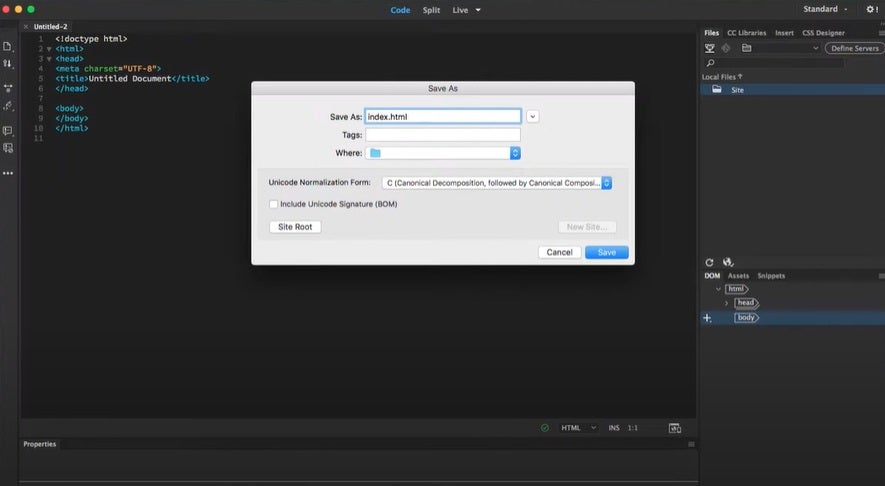
Edit CSS in a visual editor

Dreamweaver includes a CSS Designer Panel that will let you add and edit your site’s CSS as well as see all the changes in real-time.

Dreamweaver Designer Panel

Design and integrate animations

With Adobe Animate you can design and create interactive animations for videogames, tv shows, and websites. You can also make dynamic avatars and doodles, as well as breath life into all of your infographics.

Adobe Animate

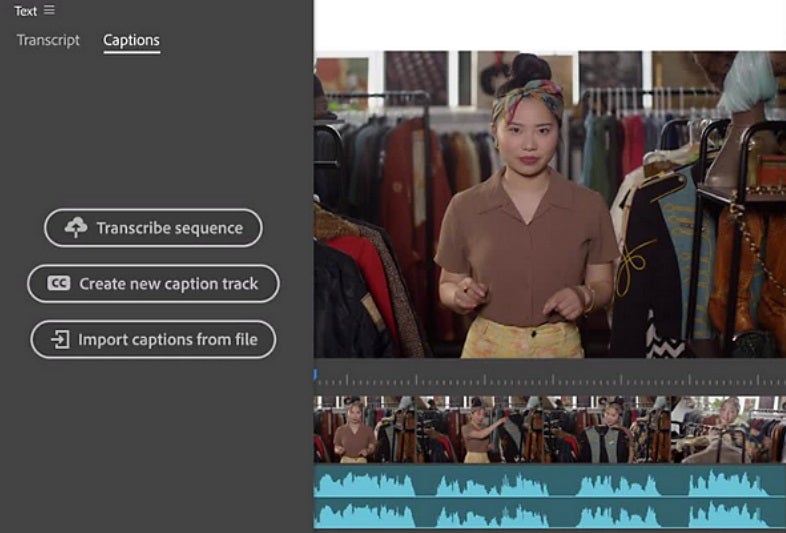
Auto-generate captions

Need subtitles for your videos? Adobe Premiere Pro can auto-generate captions for all your videos with its improved transcription and caption tools.

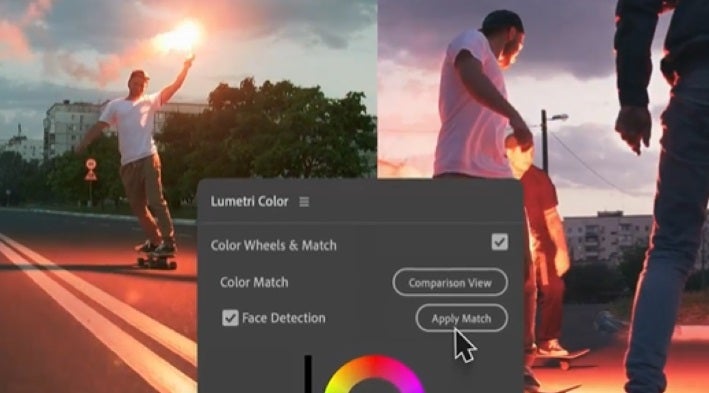
Color matching made easy

Thanks to Adobe Sensei’s AI and the Lumetri Color panel, you’ll be able to easily adjust and edit the color of your videos with Adobe Premiere Pro.

Lumetri Control panel

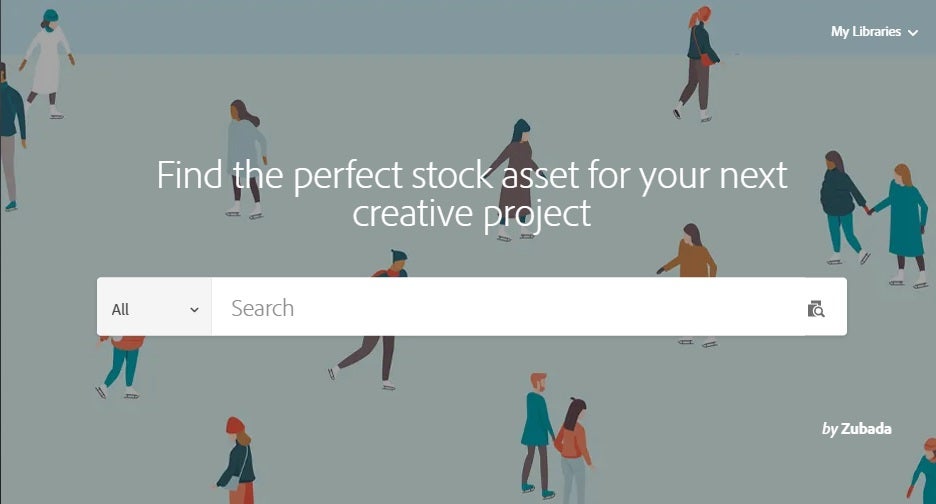
Find perfect images for all your projects

Download stock images and photos, videos, audio footage, royalty-free templates, and vector illustrations suitable for any project with the help of Adobe Stock’s catalog.

Adobe Stock in English

Easily sync with all Adobe apps

Thanks to the cloud, you’ll be able to seamlessly create, edit and synchronize all your projects with the entire Adobe CC suite.

Man with computer

Unleash your creative power

Adobe Creative Cloud is a powerful suite that will help you create anything you can imagine, always with professional results. What are you waiting for?

BLACK FRIDAY OFFER: 40% off all Creative Cloud apps Subscribe now
9
Offer available from November 15th until December 2nd, 2021

Top 5 of Adobe Creative Cloud apps

When it comes to Adobe Creative Cloud, there are plenty of apps integrated with it that you can use. You can use them for videos, photo editing, web, UX, design, and so much more! There’s a massive community that you can join to learn how to become an impressive creator.

Adobe is known for bringing the latest and greatest in digital artwork technology. Their Creative Cloud suite is no exception, bringing together some of the best Adobe desktop apps in one big cloud that syncs seamlessly across your devices.

Here are the top five Adobe Creative Cloud desktop apps (please note that Adobe Acrobat is not mentioned here because it is a part of the Adobe Document Cloud suite).

Photoshop

Adobe Photoshop is the industry standard for digital graphics and image editing and is, by far, the most popular Adobe Creative Cloud desktop app. With capabilities that extend beyond images to include web and graphics design, it’s no wonder that it’s been the go-to software for generations of artists and designers.

It’s worth noting that Photoshop is a raster-based program; it does not export vector files. That said, it can be used to create vector files. Plus, it has a “create vector mask” feature that you can use to vectorize raster images. In both cases, you can save the work as EPS files, which you can then open up in…

Illustrator

The vector-based counterpart to raster-based Photoshop, Adobe Illustrator still reigns supreme as a versatile tool to create any kind of 2D graphics from print material to infographics for the web. With amazing native features such as symbols, image trace, the ability to open and work with AI files, and even converting text into curves — as well as features that Photoshop does not have, like layer comps and an artboard tool — Illustrator is a powerhouse for creators of all levels. It also offers the best third-party support. Just check out their plug-in page to see what we’re talking about.

InDesign

Adobe’s go-to for social media content is now InDesign. It’s the ideal tool for social media content creators. With its easy-to-use drag and drop interface, exporting assets for social media has never been easier. Also, with built-in features like creating animated GIFs and QR codes, you can create engaging and interactive content that will stand out from the rest. InDesign is perfect for creating digital or print publications, presentations, and even simple flyers and posters as well.

Dreamweaver

One of the oldest Adobe desktop apps, Dreamweaver has been a mainstay in web design and development for over two decades. While it may be somewhat complicated to get started with, if you’re looking for a powerful WYSIWYG editor with incredible control and customization options, it’s the way to go. The latest release of Dreamweaver takes it even further with modern code editing tools that aren’t too different from a desktop text editor, plus some very helpful new features for coding.

Even if you’re not a web developer but you want to learn how to build websites, you can use Dreamweaver to see your code side by side with your design work.

Portfolio

Now that you’ve used Photoshop, InDesign, Dreamweaver, and Illustrator to create beautiful work, where are you going to organize and store it all? With Adobe Portfolio, of course! Built into the Adobe Creative Cloud, Portfolio is a quick and easy way to create a portfolio website that will house your best work, with the option to share it on social media. Portfolio is an all-in-one solution for showcasing designs, writing, videos, and more. You can even connect it to your Behance account to get extra exposure.

Check out the Creative Cloud All Apps plan

With the top five Adobe Creative Cloud desktop apps, you have everything you could ever need to be a creative genius. Whether you’re looking for an industry-standard image editor, a top-of-the-line web development tool, or a no-fuss way to share your best work with others, Adobe Creative Cloud has you covered.

These are just five of the apps offered in Adobe’s Creative Cloud suite. If you want even more designing capabilities, look at the Creative Cloud All Apps plan, which provides licensing for all 20-plus Creative Cloud apps.

Disney Plus Day: Premieres and Offers

Walt Disney is going out of its way to make sure you celebrate Disney Plus Day with them on November 12, 2021. To entice new members to subscribe to its elite membership deals, it’s lowering the premium for one month. There’s also a host of new premiere movies and shows coming to the streaming platform.

Stick with us as we explain what Disney Plus Day is and what you can expect! There’ll be a special presentation by the Walt Disney company. While it’s mentioned which shows we can expect, there aren’t official release dates for all of them as yet.

What is Disney Plus Day? 

It’s the first time in history that we’re celebrating Disney Plus Day. In essence, it’s the second anniversary of the popular streaming service that’s brought us movies and shows from collections like Star Wars and Marvel, to name a few. 

Here are some words from the CEO of Walt Disney, Bob Chapek:

“The inaugural Disney+ Day will be a grand-scale celebration of our subscribers across the entire company. This day of appreciation brings to life our mission to entertain, inform, and inspire fans and families around the globe through the power of unparalleled storytelling, and will become an annual tentpole event to be amplified across our global businesses.”

Disney Plus Day offer

Well, the usual subscriptions go for about $7.99/mo in the United States. If you want to take part in the celebration, you’ll have one month of paying $1.99 in the US! As you can see, it’s a massive reduction in rates so you can get a taste of what the streaming service is all about.

Subscribe for only $1.99

From: Disney+ Day

$1,99 $7,99

The offer is only valid from November 8th to November 14th, 2021, so you’ll need to act quickly if you don’t want to miss out! As soon as the month expires, you’ll revert to the standard prices unless you choose to cancel your membership by then.

If you remain a member, you’ll be treated to all the latest shows from iconic brands. Some popular names include Disney, Pixar, Marvel, Star Wars, National Geographic, and Star. 

Disney Plus Day Premiers: What to expect?

Together with that statement, Walt Disney released an official list of shows you can expect to appear in the new few weeks. You’ll even see the Simpsons hosting a short to celebrate Disney Plus Day with us. Here’s what you can look forward to.

Shang-Chi and The Legend of The Ten Rings

The long-awaited Marvel movie is now available on Dinsey+. The story revolves around a valet in San Fransisco who uncovers new powers and must face his past if he wants to save everyone. Those who are members of the streaming service can watch this show at no additional cost.

Shang-Chi and The Legend of The Ten Rings

Jungle Cruise

If you’re looking for a family adventure based on one of Disneyland’s rides, check out this movie with Dwayne Johnson and Emily Blunt. There’s a touch of the supernatural while they have to face wild animals and reptiles in this fantasy action tale. 

Jungle Cruise

Home Sweet Home Alone

You may remember the Home Alone movies that always played around Christmas and the New Year celebrations. Well, Max Mercer is the new protagonist in this reimagining of the original tale. When his family head to Japan without him, he needs to defend himself and his home against trespassers. Imagine more hilarity and chaos in this version.

Home Sweet Home Alone

Olaf Presents

Remember that adorable snowman Olaf from the Frozen movies? Well, he wants to present some short stories of a few favorite tales where he takes center stage. You may recognize the Lion King, Aladdin, and The Little Mermaid, but with a fresh spin.

Olaf Presents

Ciao Alberto

If you saw the hit animated show called Luca, you’ll want to see this short sequel called Ciao Alberto. It features many of the same characters, with Alberto Scorfano trying to impress his mentor. Of course, he faces some challenges along the way that makes his mission difficult to achieve.

Ciao Alberto

Dopesick

Michael Keaton fans will enjoy this new series that’s based on the book “Dopesick: Dealers, Doctors and the Drug Company that Addicted America.” It will appear on international markets, but you can enjoy it on Disney Plus as part of the menu. Eight episodes are expected for now.

Dopesick

The World According to Jeff Goldblum Season 2

If you’ve seen the first season of one of Disney’s originals, “The World According To Jeff Goldblum”, you’ll be happy to know that Season 2 will soon be available. He’s sure to take us on more entertaining journeys as he meets with influencers and random people on various topics.

The World According to Jeff Goldblum Season 2

A few special features

As if the above entertainment isn’t enough, there are a few other small features expected. We’ll see the legacy of Boba Fett, the renowned bounty hunter from the Star Wars series. You can also expect to see some shorts from the Marvel Cinematic Universe, telling us what’s planned for fans. The other announced features include “Frozen Fever,” Oscar-winning shorts “Feast” and ”Paperman,” and Oscar-nominated Mickey Mouse short, “Get A Horse!

 Walt Disney is going out of its way to make sure you celebrate Disney Plus Day with them. To entice new members to subscribe to its elite membership deals, it’s lowering the premium for one month. There’s also a host of new premiere movies and shows coming to the streaming platform.  Stick with us as we explain what Disney Plus Day is, when it begins, and what you can expect! When is Disney Plus Day? The official date for Disney Plus Day is November 12, 2021, and there’ll be a special presentation by the Walt Disney company. While it’s mentioned which shows we can expect, there aren’t official release dates for all of them as yet. What is Disney Plus Day?  It’s the first time in history that we’re celebrating Disney Plus Day. In essence, it’s the second anniversary of the popular streaming service that’s brought us movies and shows from collections like Star Wars and Marvel, to name a few.   Here are some words from the CEO of Walt Disney, Bob Chapek:  “The inaugural Disney+ Day will be a grand-scale celebration of our subscribers across the entire company. This day of appreciation brings to life our mission to entertain, inform, and inspire fans and families around the globe through the power of unparalleled storytelling, and will become an annual tentpole event to be amplified across our global businesses.” Disney Plus Day Premiers: What to expect? Together with that statement, Walt Disney released an official list of shows you can expect to appear in the new few weeks. You’ll even see the Simpsons hosting a short to celebrate Disney Plus Day with us. Here’s what you can look forward to:  The streaming premiere of Marvel Studios’ “Shang-Chi and The Legend of The Ten Rings”  The beloved Disney family-friendly adventure film “Jungle Cruise,” available to all subscribers The new Disney+ Original movie “Home Sweet Home Alone,” a reimagining of the popular holiday franchise An all-new original series of shorts from Walt Disney Animation Studios called “Olaf Presents,” which sees Frozen’s beloved snowman retelling several classic Disney tales as only he can  The domestic Disney+ streaming debut of fan favorite shorts from Walt Disney Animation Studios including “Frozen Fever,” Oscar®-winning shorts “Feast” and ''Paperman,” Oscar-nominated Mickey Mouse short, “Get A Horse!” and more An animated short film “Ciao Alberto” from Pixar, featuring characters from this summer’s animated hit breakout film “Luca”  A new short from The Simpsons that pays tribute to Disney+’s marquee brands The first five episodes from season 2 of “The World According to Jeff Goldblum” from National Geographic A special celebrating the origins and legacy of Star Wars’ legendary bounty hunter, Boba Fett A special celebrating the Marvel Cinematic Universe on Disney+ with an exciting look towards the future “Dopesick,” an original series starring Michael Keaton, which will be released in international markets as part of the Star general entertainment content offering Disney Plus Day offer So, what is the Disney Plus Day offer? Well, the usual subscriptions go for about $7.99/mo in the United States and 8.99€ in Spain. If you want to take part in the celebration, you’ll have one month of paying $1.99 in the US and 1.99€ in Spain! As you can see, it’s a massive reduction in rates so you can get a taste of what the streaming service is all about.  As soon as the month expires, you’ll revert to the standard prices unless you choose to cancel your membership by then. The offer is only valid from November 8th to November 14th, 2021, so you’ll need to act quickly if you don’t want to miss out!  If you remain a member, you’ll be treated to all the latest shows from iconic brands. Some popular names include Disney, Pixar, Marvel, Star Wars, National Geographic, and Star.  Disney Plus tips and tricks! Before you leave we have some Disney Plus guides you’ll want to take a look at to make the most use of this offer above:  10 incredible series you can watch now on Disney+ Top 10 National Geographic documentaries you can watch on Disney+ Top 10 animated Disney movies The Best Content on Disney+ in 2020 Long-Lost Disney Classics Available Now on Disney+ How to watch Black Widow, Marvel’s latest movie on Disney+  Join in the streaming fun! Now that you know what Disney Plus Day is all about, why not join us in the celebrations? We’re looking forward to seeing as many of the shows available, specifically in the Marvel and Star Wars universes. It’s going to be an incredible ride!

Join in the streaming fun!

Now that you know what Disney Plus Day is all about, why not join us in the celebrations? We’re looking forward to seeing as many of the shows available, specifically in the Marvel and Star Wars universes. It’s going to be an incredible ride!

Subscribe for only $1.99 GET THE OFFER
9
Disney+ Day

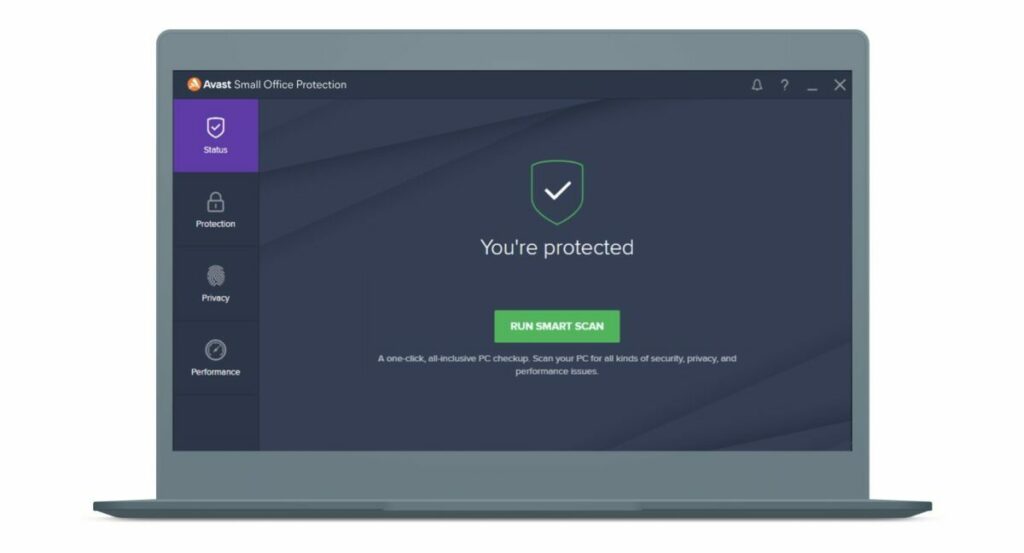
Avast Small Office Protection: Keeping Your Business Safe

Small businesses are increasingly attacked as hackers look for easy targets and quick scores. Many smaller offices or new start-ups have to pinch every penny, and cybersecurity often falls by the wayside. Unfortunately, that leaves them open to malware, ransomware, phishing, and other digital attacks. To address this growing trend, Avast presents Small Office Protection, a robust and affordable security solution designed specifically for small businesses.

This next-gen, lightweight solution is ideal for start-ups, entrepreneurs, remote workers, and home offices. Let’s look at what makes Avast Small Office Protection such a useful, robust tool for a small business owner.

-30%
Until end of October. -20% as of November 1st, 2021

From: Avast Small Office Protection

$97.99 $139.99

Made For Small Businesses

Avast Small Office Protection is designed to be affordable but powerful, perfect for small businesses and at-home offices. You can protect up to 10 devices without needing extensive technical knowledge or expensive add-ons. It’s a one-stop, real-time security solution for start-ups, entrepreneurs, home offices, and small companies.

The system includes various features, like:

  • Ransomware Shield.
  • Remote Access Shield.
  • Next-Gen Antivirus.
  • Web Shield.
  • Email Shield.
  • File Shield.
  • Wi-Fi Inspector.
  • Real-Site Phishing Checker and Net.
  • Advanced Firewall.
  • Sensitive Data Protection.
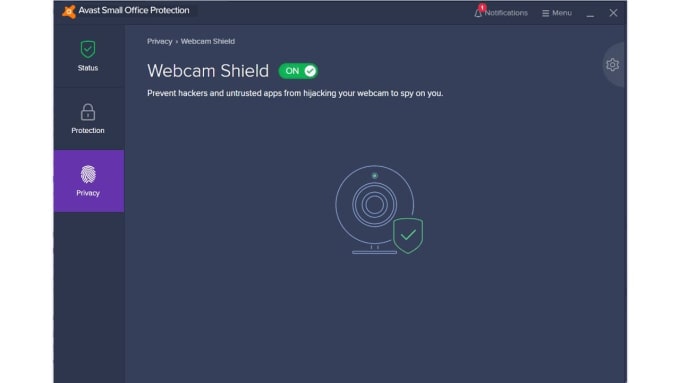
  • Webcam Shield.
  • Data Shredded.
  • Software Updated.
Avast Small Office Protection

The Benefits of Avast Small Office Protection

There are many benefits to having Avast Small Office Protection, but we will highlight the top advantages below.

Protection From Various Cyber Threats

Avast Small Office Protection can protect your business from various cybersecurity threats, including:

  • Hackers.
  • Ransomware.
  • Malware.
  • Digital extortion.
  • Data leaks.

The statistics indicate that hackers prefer to target vulnerable small businesses, with around 46% of companies being targeted by ransomware or other cyber threats. With Avast Small Office Protection, you can rest assured that your data, clients, and employees will be safe. The system also creates automated backups so that you can restore your data at any time.

Easy To Use And Install

If you’re not an IT guru, don’t worry! Avast Small Office Protection is designed to be easy to use, regardless of your skills or experience. The software guides you through the quick installation, and once it’s up and running, that’s it. There’s no need for additional configuration or management to stay protected. The software was designed to protect your devices automatically while allowing you to focus on running your business.

Multi-OS Support

Many individuals are now working from home, exposing small businesses to several security threats. According to the statistics, remote workers have resulted in data breaches in over 20% of companies, with many using their personal devices. Consequently, it’s nearly impossible to control which devices your employees will use. Luckily, Avast Small Office Protection works on a multitude of devices and operating systems, including:

  • Windows devices and desktops.
  • macOS laptops and iOS mobile devices.
  • Android devices.

Excellent Performance

Avast Small Office Protection is an extremely lightweight solution. Consequently, it has a very small impact on day-to-day operations, ensuring that your performance isn’t affected.

Increased Wi-Fi Privacy

Public wi-fi networks have always posed a security risk to our personal devices. However, now that many people are working remotely, the risk of exposure due to an unsecured network is significantly higher than before.

Avast Small Office Protection keeps all data protected, particularly when you’re using a public network to access the internet. It protects banking information and passwords and can even prevent unauthorized data downloads.

Top Solution for your Business

Small businesses are considered vulnerable and are frequently targeted by hackers and cybercriminals. It’s critical to have a robust security solution to protect your data and clients, and Avast Small Office Protection is the ideal software to achieve that goal. Not only is it affordable, but it’s also extremely powerful. For small business owners and entrepreneurs, Small Office Protection is an absolute must.

-30%
Until end of October. -20% as of November 1st, 2021

From: Avast Small Office Protection

$97.99 $139.99

How to buy Windows 10 – Tips to get your original license at a low cost

Windows 10 is one of the most popular Microsoft OSs ever. Not only functional and lightweight, but Windows 10 has also been praised for its modern features and UI, its integration with Xbox Games service, and, most importantly all the small fixes and remedies to Windows 8.1 interface and Windows 7 security issues. Read also How to Buy Microsoft Office – Get Your Genuine License For A Cheap Price!

If you’re going to get a new PC, maybe you need to buy Windows 10 – perhaps you’re going to kiss your old Win 8 installation goodbye… whatever the case, keep on reading and you’ll discover how to get the best deals for Windows 10 and buy your brand new license without breaking the bank, and the law altogether!

Can you buy Windows 10 for cheap?

One of the first things you may have noticed in your journey to get your Windows 10 license, is probably the fact that you can actually buy it directly from Microsoft online. Despite how convenient it is to buy products without leaving your desk or sofa, one thing is sure: Windows 10 doesn’t come cheap on the Microsoft Store. This can be an issue, especially if you’re a student on a budget or a freelance with limited business.

So, can you buy Windows 10 for cheap? Absolutely! We’ve written this article to help you navigate the overwhelming mass of deals, opportunities, discounts, and other offers online, to get your Windows 10 at the best price, without breaking your wallet or the law. Yes, because, as with everything related to the magical world of the Internet, caution must be used when it comes to buying a digital license for any software you need. Remember: when a deal is too good to be true, it most likely is. One of the best solutions we tested and chose is Mr Key Shop, one of the best websites where you can buy Operating Systems Windows 10 and other original software at the best price, we’ll talk about its services and pluses later.

Where should you go for the best Windows 10 deals?

Searching across the web, you may encounter a certain number of offerings, from private vendors/merchants on eBay or Amazon to a plethora of websites promising the best prices for Windows 10 or whatever piece of software you’re looking for. And, while it’s obvious that the Microsoft Store is not your only legit source of digital licenses, you must understand how to discern the righteous, legit deals from other questionable ones.

On one hand, you must know that you actually buy Windows 10 at a low price, thanks to the ESD licensing model. ESD licenses are digital licenses that companies purchase in bulk to get a volume discount on the overall price. This way, they can pay a lesser unit price, activate all the required seats, and then sell the exceeding licenses to recover some budget.

Such a practice has been deemed as a legit process in many jurisdictions across the world, including Europe, where the European Court of Justice ruled that ESD licenses can be legally resold. This is why you’ll find a lot of third parties selling Microsoft Windows 10 and Office licenses for cheaper prices than Microsoft MSRP. 

On the other, though, not all resellers are playing fair. There is the so-called grey market, where the boundaries between legit transactions and illegal ones are quite fuzzy. Here you may incur stolen product keys, or licenses bought in bulk by using stolen, forged, or cloned credit cards. Cybercriminals thrive in such a market, but you as a user may get exposed as scams, frauds, as well as see both your money and your new license are gone forever. Yes, because Microsoft may void any suspect key at any time.

Fortunately, there are some legit companies as well. And they all share some traits: secure payments, money-back warranty, fully-fledged Customer Service in your language with no extra fees, a good track record of review and feedback on external sources, like TrustPilot.

Among the best third-party resellers we tried in time, one we really liked is Mr Key Shop. Based in the UK, Mr Key Shop is a professional online store offering Microsoft Windows, Microsoft Office, and Antivirus licenses. You may find a vast selection of options, from Windows 7, 8, and you can buy Windows 10, to Microsoft Office Suite 2010, 2013, 2016, 2019, very soon, Windows 11 Operating System and Microsoft Office 2019 Suite. They also offer top security Antivirus brands like Avast, McAfee, Kaspersky, ESET, and Norton, both for computers and mobile phones/tablets. But the best things are their competitive pricing, instant delivery after purchase, and professional, free-of-charge Customer Service. It is important to know that the upgrade to Windows 11 will be free of charge for those who have a genuine Windows 10 license installed.

They also provide their customers with everything they need to download, install and activate Windows 10 and the other products on sale, from a complete and clear set of instructions, an official download link to the ISO files, and, of course, a 100% genuine product key. We recommend you to go check their catalog frequently since Mr Key Shop offers discounts and deals throughout the year.

Yes, but why buy Windows 10 in 2021?

There are plenty of good reasons to buy Windows 10: first of all this is one of the best OSs ever. It slowly grew in the hearts of users, and, most importantly, it will be supported until 2025 – four full years of use.

Secondly, a genuine Windows 10 will grant you the free upgrade to Windows 11, once it will be out in October 2021. And this could also be an excellent strategy if you wish to upgrade to Windows 11 since you can buy now a cheap Windows 10 license, and then go for the upgrade.

You can also upgrade to Windows 10 from Win 7 or Win 8.1 if for any reason you’re not eligible for the old, free upgrade. The upgrade license is even cheaper, and you will need Win 10 anyway, if you want to ditch your old Win 8.1 installation in favor of the latest Microsoft OS, to the extent that you meet all the system required, TPM included.

But let’s say you just built a brand new PC, this is the best moment for you to buy a discounted Windows 10 license, and then go for Windows 11 upgrade with no extra costs!

Takeaway – Go for the best Windows 10 deals, stay for Windows 11!

Wherever the store you want to invest in is, do check some basic requirements: secure payments (i.e. PayPal), money-back warranty, clear and transparent Terms & Conditions, good Customer Service, and, most importantly, feedback and reviews on external websites like TrustPilot.

No matter which version you need, if you have to buy Windows 10 Professional or choose a discounted Windows 10 Home license, be extra careful about the asking price. A deal that is too good to be true, it most likely is. Mr Key Shop meets all the aforementioned requirements, and if you decide to go on and buy from there, rest assured you’ll have a very pleasant experience.

That said, Windows 10 is still an excellent OS you can buy, not only for the Windows 11 free upgrade but also for the modern look, fast performance, and all those sweet optimizations for touch screens and multi-device user experiences. We’re sure that Windows 10 will be loved and remembered forever, and we suspect that 2025 won’t be its final year, as many users may want to stick with it for longer.

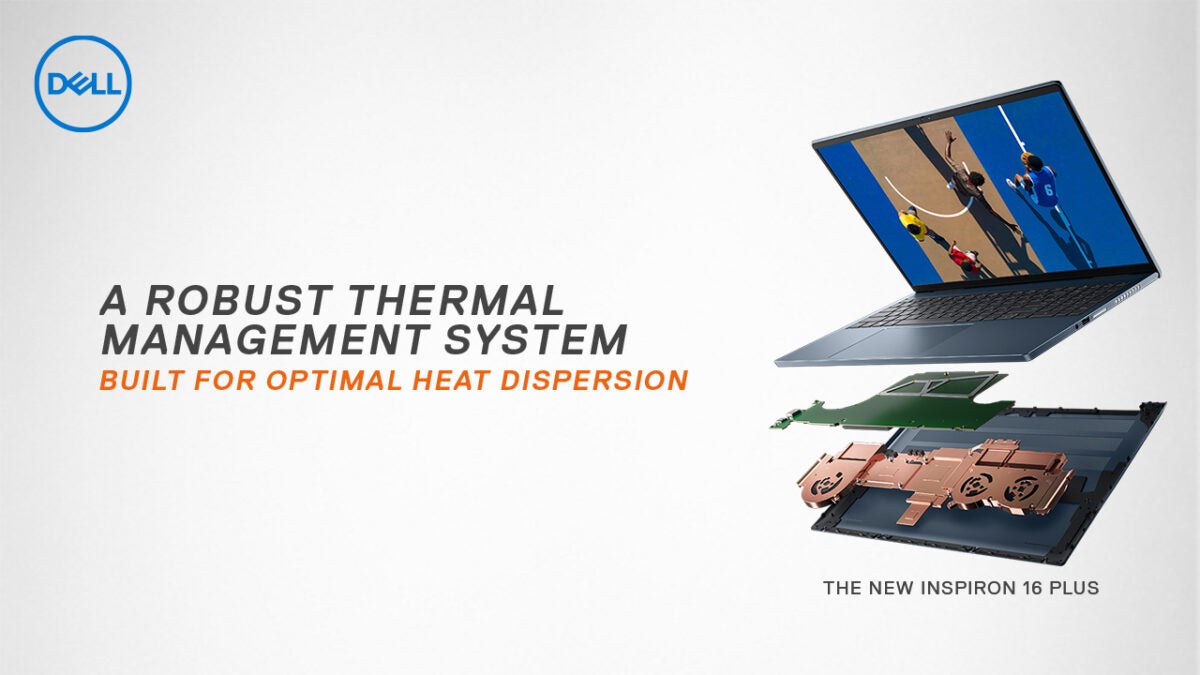
Dell Inspiron 16 Plus: Premium Value for the Best Performance

Sitting between the Dell XPS premium range and the mainstream Inspiron models is the Dell Inspiron 16 Plus – a high-quality, robust laptop with excellent features. With a massive array of features, ranging from the 11th Gen Intel® Core and built-in graphics to the sustainable design, it’s hard to believe that this laptop is part of Dell’s more affordable Inspiron range.

Watch, Create, and Play in High Resolution

The Inspiron 16 Plus is a giant leap forward for Dell, primarily due to the 16:10, 16-inch screen. It’s one of the first affordable premium laptops with this size screen, but it gets better. The laptop comes with native 3K resolution and supports 100% sRGB and 81% AdobeRGB color ranges. It’s capable of supporting games, creative software, and movies in incredible detail and vivid colors.

The laptop has a built-in NVIDIA® GeForce RTX™ 3050 graphics card with 4GB GDDR6 memory, enhancing your visual experience. Don’t worry about the visuals straining your eyes. The Inspiron 16 Plus comes with a ComfortView Plus display that lowers the amount of blue light emission and reduces the impact of long periods of use on the eyes.

Other Technical Specs

  • Processor: 11th Gen Intel® Core i7 (4.6 GHz, 8-core).
  • Operating System (OS): Windows 10 Home 64-bit.
  • Video Card: NVIDIA® GeForce RTX™ 3050 4GB GDDR6.
  • Display: 3K 16-inch Display (3,072px x 1920px).
  • Display Brightness: 300 nits.
  • Memory: 16GB RAM, 3200MHz DDR4.
  • Storage: 512GB Solid State Drive (Optional Upgrade to 1TB).
  • Camera: 720p, 30FPS HD camera with built-in dual-array microphones.
  • Ports: 2 x USB 3.2 Gen 1 ports, 1 x Thunderbolt™ 4 port, Universal Audio Jack, HDMI port, power adapter port.
  • Average Battery Life (In-Use): 11-13 hours.

Other Features: Connected, Cooler, Optimal Performance

With a high-performance 11th Gen Intel® Core™ and the NVIDIA® GeForce graphics card, the Inspiron makes good use of its three fans and five heat pipes to keep the laptop cool and working well. The GPU is also backed by free NVIDIA Studio drivers, optimized to make the most of applications like Adobe’s design range.

Connectivity is also a breeze. The laptop comes with two standard USB ports at Gen 1 speeds and includes a Thunderbolt™ 4 port, an excellent addition to a device at this price range. It also includes an Intel Wi-Fi 6 module, so you can stay connected easily wherever wi-fi is available.

Finally, Dell adds a nice touch to the 720p HD camera by including a privacy shutter, preventing curious eyes from turning the lens on you.

Sustainable Design, Real-World Capabilities

Aside from its excellent features and hardware, the Inspiron 16 Plus is designed with sustainability and real-world functionality in mind. All the painted parts are coated with eco-friendly VOC waterborne paint, while the packaging is made from recycled materials. To ensure that the laptop also works in almost all situations, Dell tested:

  • Its ability to deal with harsh, short-term heat up to 65°C.
  • The quality of the hinges after 20,000 uses.
  • The longevity of the keyboard after 10 million keystrokes.
  • How the battery holds up after 30 removals and reinstallations.

In short, Dell went above and beyond to ensure that the Inspiron 16 Plus is durable, sustainable, and perfect for everyday use.

The Bottom Line

Although the Inspiron 16 Plus isn’t entirely on the same level as Dell’s premium XPS line, it’s as close as you can get while still on the budget. While there are some notable differences, the Inspiron 16 Plus feels and works like a premium laptop at a mid-range price. The 16-inch display, Intel i7, real-world capabilities, long battery life, and built-in GeForce graphics make this device ideally suited as a mobile entertainment system or as a tool for creators on the go.

How to Buy Microsoft Office – Get Your Genuine License For A Cheap Price!

If you need to buy Microsoft Office for your PC or Mac at home or at work, you’ll probably have already taken a look on the Web. As you may have seen, there are plenty of options out there. But how to discern the best deals for Microsoft Office, how to be sure to get the best, cheap price for Office? Keep reading to see how you can buy your next Microsoft Office License without breaking the bank!

Can You Buy Microsoft Office spending less?

The first and foremost result you may have incurred is probably the Microsoft Store: you can buy your digital Microsoft Office License without having to physically go to a retail store, with all the convenience of buying from home and immediately receive your order. The pain point, though, is that you’ll have to shell hundreds of bucks for your new Microsoft Office installation and the problem is that you have to decide between a single payment solution or a subscription to be paid every month.

Moving further on your searching – if you have done it before reading this – you may have seen dozens of “best offers for Microsoft Office”, “cheap Microsoft Office prices”, and other offerings scattered throughout your search result page. And this should answer the above question: yes, you can buy Microsoft Office spending less than the bloated price asked on the official Microsoft Office. But how?

If you are looking for the best Microsoft Office deals, ESD licenses are the answer.

Many third-party companies offer the so-called ESD Licenses, namely digital licenses that many companies buy in bulk to get volume discounts. When they activate all the required seats, organizations may want to sell the exceeding licenses to get some money back.

The good thing is that ESD licenses come way cheaper than other sources, and the best thing is that such a practice is 100% legal, as deemed by the European Court of Justice, among the others.

ESD licenses can be traded, and here comes a multitude of third parties buying and reselling these licenses for profit, asking a lower price than your average MSRP.

However, you must be advised: when a bargain is too good to be true, it probably is not.

The ‘best’ deals for Microsoft Office are not always the best option for you

This might sound counter-intuitive, but the truth is: you must be extremely cautious when it comes to buying Microsoft Office for cheap.

As you may have noticed, there are plenty of third parties and merchants on Amazon or eBay, selling dirt-cheap licenses for anything – from Antiviruses to Windows OS, and obviously Microsoft Office.

Three bucks for Microsoft Office 2016? Why not? – You may think. Well… think again! These prices are pure sci-fi, and if you see one of these deals around, you should first take a look at feedbacks and reviews online. Yes, because, you may have incurred the so-called grey market.

In short, this is a place where things get fuzzy in terms of lawfulness, and you may risk getting a stolen product key, or a legit one purchased, however, using a forged/cloned/stolen credit card. Needless to say, you may get exposed to cyber-criminals, or simply lose your money, and your license, since it may be voided by Microsoft at any moment. A solution can be Mr Key Shop, one of the best websites where you can buy genuine Microsoft Office Suite at the best price. 

Looking for the best price for Microsoft Office? Check these tips out!

Piracy is not an option, of course, so what to do? We’ve got you covered, lucky you!

There is a lot of genuine, professional services you may want to go for. All these are characterized by some common traits: secure payments (i.e. PayPal), free Customer Service, money-back warranties, and, most importantly, a good track record of positive feedback and reviews online.

We tried some of these businesses, and we want to recommend one in particular: Mr Key Shop. This is a UK-based company specializing in Windows Operating System and Microsoft Office Suite licenses for PC or MAC, as well as Antiviruses subscriptions.

They’ve been around for enough time to prove their reliability and professionalism, and as you can see on TrustPilot, this is one of your go-to companies when it comes to seeking the best discounts for Microsoft Office.

The service is fast, prices are low, and you will get complete and noob-friendly instructions directly in your inbox immediately after your purchase, together with your brand new genuine product key and an official link to download your Microsoft Office ISO file with no hassle. 

Technical support is free and the products are all digital, so you avoid the pollution that comes with shipping goods, in fact Mr Key Shop is Eco-Friendly.
Now that you know how to buy Microsoft Office for cheap, what else should you know?

Microsoft Office is an umbrella term, encasing different editions that may suit different needs. Now that you know how to get the best price for Microsoft Office, you should also consider what version is the best choice for you.

The most complete stores, such as Mr Key Shop, offer plenty of options, and the most common are:

  • Microsoft Office 2019: this is the latest version of Microsoft Office to date, at least until Microsoft Office 2021 will be officially released. This is the most updated suite you can buy, with all the modern features you can expect from one of the best productivity suites ever, like cloud sync and more. Buy Microsoft Office 2019 if your OS is Windows 10 or 11, and you want to enjoy the latest features.
  • Microsoft Office 2016: one of the most popular versions around. It’s still used by a lot of users – both private and business – and for some good reasons: modern UI, excellent performance, modern features. Buy Microsoft Office 2016 if you want to spend less, and your PC is not exactly the newest.
  • Microsoft Office 2013: a beloved good-old version of Office, yet functional and performing nowadays! Buy Microsoft Office 2013 if you’re working under limited resources, but you want to enjoy a good performance/features balance.
  • Microsoft Office 2010: running Windows 7 or 8? Don’t want to upgrade to Windows 10 or 11? Stick on one of the most acclaimed versions ever! Buy Microsoft Office 2010 to enjoy a fully-fledged productivity suite with optimal performance on older systems.
  • Microsoft Office for Mac: as a Mac user you know the meaning of “it just works” very well. And if you don’t want to renounce all the convenience and efficiency, buy Microsoft Office for Mac and boost your productivity!

We recommend checking your system requirements carefully before you proceed with your order. The best stores like Mr Key Shop also give you clear and complete lists of specs to meet, so take a look at their product pages.

Takeaway

Wherever you choose to buy Microsoft Office, always take a look at reviews and feedback. Be sure about your system specs, and compare pricing lists. Sometimes, a bargain is way too good to be true, and it usually is – so always check for secure payments and explicit warranties.

And if you want to get even better deals, check Mr Key Shop’s catalog regularly to get the best discounts for Microsoft Office, and achieve better productivity!

IObit Uninstaller 11: Remove Stubborn Programs and Block Spam Pop-ups

IObit is a leading provider of innovative system utilities for Windows, Mac, and Android OS. Their software enhances operational performance and protects the devices of over 10 million active users globally, and IObit Uninstaller 11 is one of the newest releases from this widely trusted, award-winning industry leader.

IObit Uninstaller DOWNLOAD FOR FREE
9

What is IObit Uninstaller?

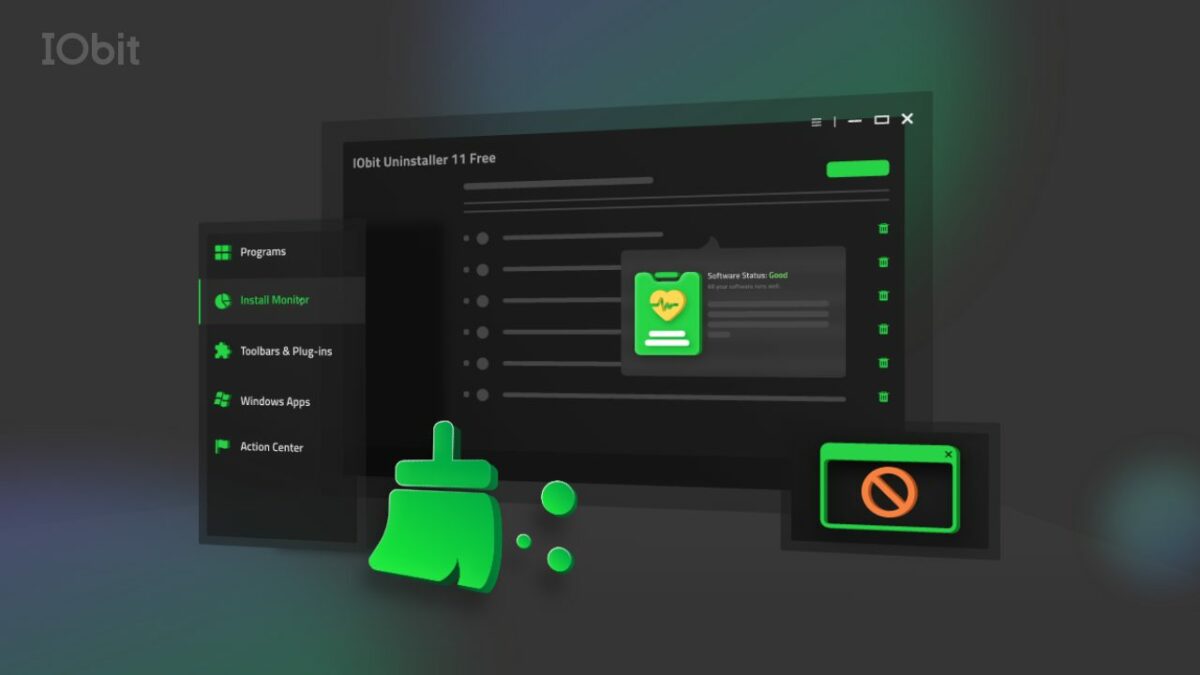
In short, IObit Uninstaller 11 is the perfect uninstallation tool, and this latest version includes several new features. It allows users to remove stubborn programs and bundleware while blocking malicious browser extensions and pop-ups, ensuring a healthy, secure PC and a smooth browsing experience.

Standard features include:

  • Bundleware Uninstaller
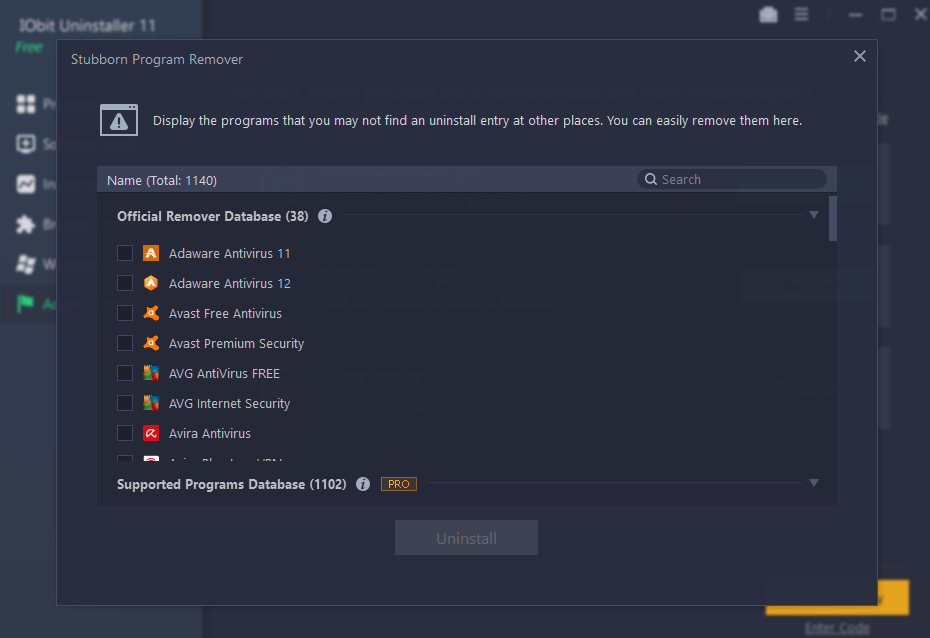
  • Stubborn Programs Remover
  • Force Uninstall+
  • Real-Time Install Monitor
  • Software Health

IObit Uninstaller was the first utility program to develop a bundleware detector and remover. Its advanced algorithms quickly detect when bundleware is installed, allowing you to remove it quickly and conveniently.

Force Uninstall+ is another robust component of the utility software. If you’ve ever struggled to remove a program due to missing registries or built-in errors, Force Uninstall+ is your answer. Not only does it remove these programs, but it also cleans up the related files and keeps your devices running smoothly.
The Real-Time Install Monitor routinely logs what happens during the installation process, making it easy to spot problems or unwanted piggybacking software. 

If you’re experiencing issues with disruptive pop-up notifications and malicious browser extensions, Software Health gives you all the tools you need to protect your digital experience. This robust feature works with all popular browsers, including Microsoft Edge, Chrome, Firefox, and Opera.

What’s New in IObit Uninstaller 11?

While IObit Uninstaller comes with several excellent features as a standard, this latest version has added several significant capabilities to increase its efficacy. Not only can you manage software permissions and block pop-up notifications, but you can also clean up setup files and remove malicious software and browser extensions.

Additional upgrades include an uninstall engine that eliminates residual files entirely by using advanced cleaning algorithms. An enhanced in-depth Install Monitor can log more items, including startups, created during the installation process. In addition, the Stubborn Program Remover database now supports removing over 1,000 troublesome programs, while Reinforced Force Uninstall+ can get rid of programs even when their uninstall registries are missing.

The database also received a notable upgrade. Now, at 50% larger, it supports updates for popular software like AnyDesk, Calibre, Discord, qBittorrent, and LibreOffice.

A few other upgrades include:

  • A better UI that comes with a light and dark skin for a more user-friendly experience.
  • Support for 37 languages.
  • Future-ready and fully supported by Windows 11.

These are just some of the excellent features that make IObit Uninstaller the first and last stop for any user who wants to clean and protect their devices. While it can work in conjunction with other removal programs, it’s always a good idea to run only one removal tool on your device at any time.

Do I Have to Update to Version 11?

While version 10 will still work, we highly recommend that existing users upgrade to the latest version. The new features, improved database, and enhanced algorithms make it worthwhile.

Conclusion

IObit Uninstaller 11 is a potent tool capable of removing unwanted and stubborn programs, blocking malware and malicious pop-ups, and protecting your precious devices. IObit has gone the extra mile to provide users with a highly capable utility with its latest features.

Best of all, IObit Uninstaller is free. While you can choose to upgrade to the PRO version for more advanced features, the free download is robust and includes several of its impressive capabilities.

GOM Mix Pro Video: Editing Made Easy

Video editing isn’t one of the easiest skills to learn, and most software platforms don’t make it any easier. Most editors use complex programs that are expensive and require intensive technical knowledge. With GOM Mix Pro, even a beginner can create beautiful, professional videos quickly and in various formats. Aspiring content creators can take advantage of the discounted Youtuber Pack for a 70% discount.

What is GOM Mix Pro?

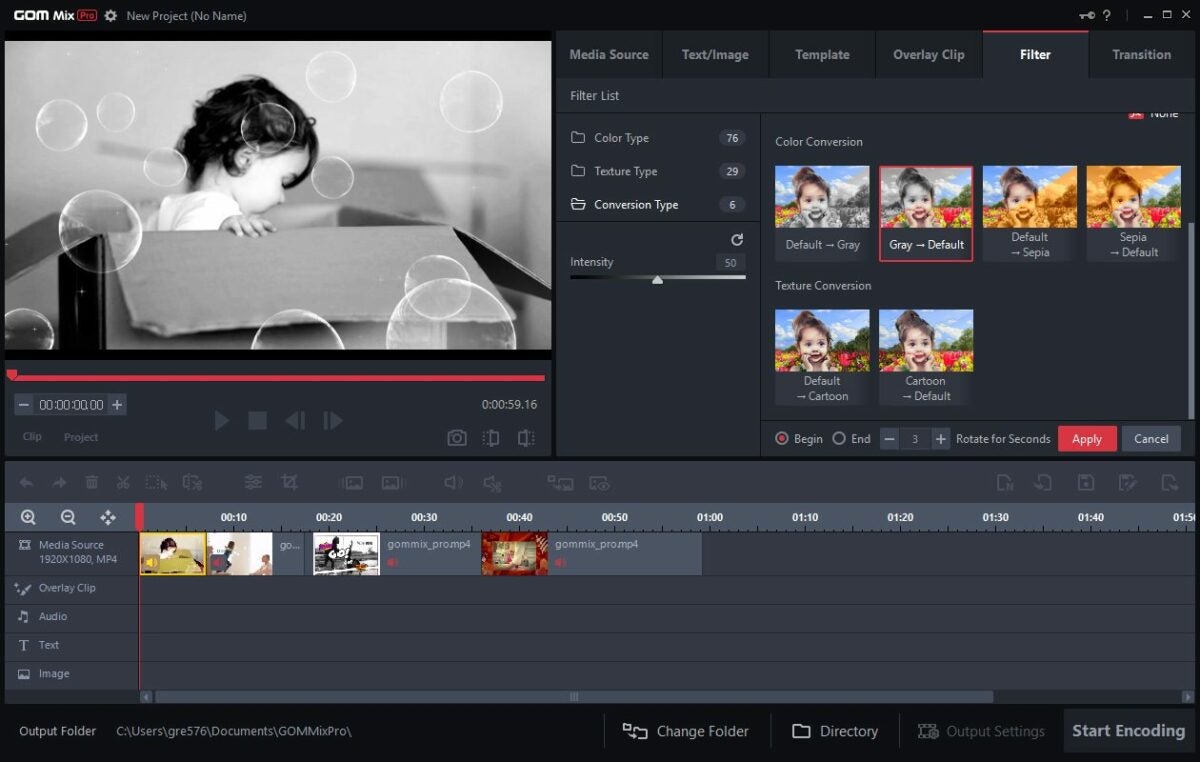
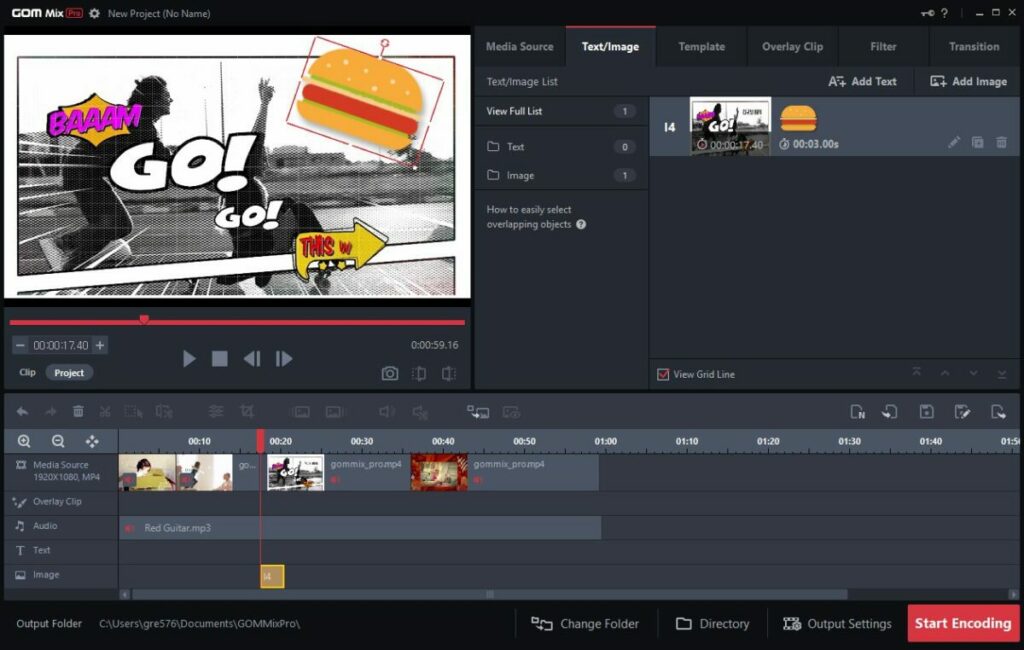
GOM Mix Pro is a video editor and player that allows you to create high-quality videos. You can use the editor to easily combine clips and files, add images or text, and enhance the video with effects.

The free version gives users access to several editing features, including effects, overlays, and filters. However, there is also a paid version that comes with several additional benefits.

User-Friendly Interface and Excellent Features

The software includes several excellent features in both the free and paid versions. Some of its key ones include:

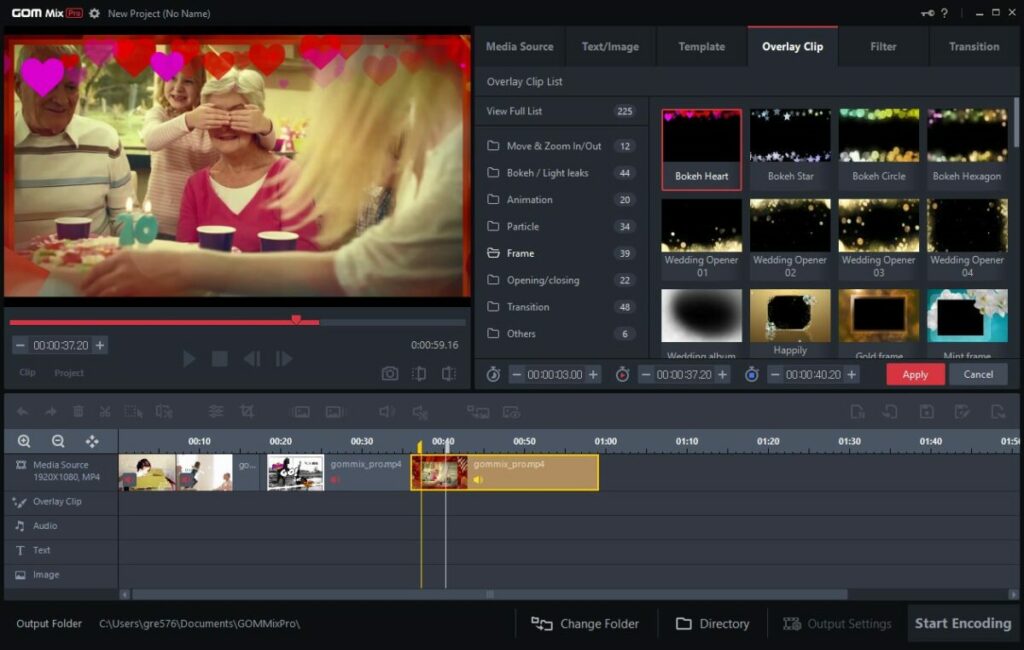
  • A wide variety of overlay clips.
  • Image transitions and frame effects.
  • Access to video editing sources.
  • Regular and continuous software updates.
  • Over 100 filters to enhance your videos.
  • Supports five audio formats and over 30 video formats.
  • Available in 10 different languages, including English, Spanish, Russian, Korean, Japanese, German, Turkish, Vietnamese, and Czech.

It also has many standard editing features, including trim, crop, split, text, and image formatting. The software also has six layouts: media source, audio, text, visual effects, and image.

Described as a video editor for all, it’s the highly user-friendly interface that makes this software perfect for beginners and experts. The video editing software allows anyone to create high-quality, professional videos using straightforward editing features and included effects.

Videos for Any Platform

To begin, simply drag and drop your files into the program and use any of the preset options to get started. Once you’re done, export your video to any of the available formats. 

Since it supports over 30 video formats, you’ll be able to create videos for almost any platform. Popular ones include:

  • Mpeg
  • Mp4
  • Avi
  • Mov
  • Mkv
  • Flv

If you’re an influencer or online creator, you can upload your videos directly to social media platforms such as Facebook and YouTube. You can also save your creations directly to Google Drive.

GOM Mix Pro Vs. Other Paid Products 

GOM Mix Pro’s paid software expands on the available features:

  • No limits on encoding time.
  • Watermark is removed from videos.
  • All content is made available.

Most similar video editing software cost between $20 per video to $100 per year or more. Some may require additional payments for filters, effects, or access to additional clips and features. GOM Mix Pro offers the same features as several top video editing software platforms, and throughout August there’s a special offer available.

Even at its original price, GOM Mix Pro is one of the best easy-to-use video editing software platforms available today. With its many excellent, professional features, GOM Mix Pro is a perfect option for any video editor and designer on a budget.

Aspiring content creators and YouTubers can get the YouTuber pack which is also available on discount. The package gives users access to GOM Mix Pro, GOM Cam, and GOM Player Plus. The complete bundle is everything you need to become a successful YouTuber.

Creative, Professional, and Affordable Editing

What really sets GOM Mix Pro apart from other video editing software is the combination of features, easy-to-use interface, and cost. It’s an affordable, winning combo and the YouTuber package makes GOM Mix Pro an absolute must-have for both professional and beginner video editors and content creators.