
While Gameloop is an excellent way to play Android games on your PC, you may experience some lag when playing high-end games like PUBG Mobile. You may be able to ignore it the first few times, but we find it completely frustrating, especially when we’re dying to get that legendary kill. There are a few ways you can fix lag in Gameloop, and we’re going to show you how.
How to Fix Lag in Gameloop
Some of the methods below entail making changes to your PC or laptop settings, while others deal with Gameloop itself. Ensure your running both at optimal performance if you want to avoid any lag. You might want to also check your internet connection speed.
Method 1: Apply the best PC performance settings
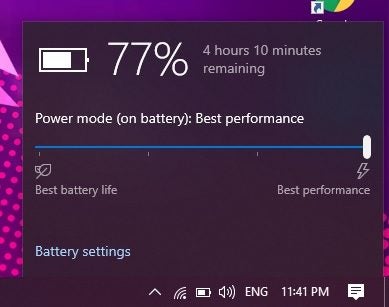
Some computers have a battery-saving mode, which drops some of the resources like CPU speed and memory. Select your battery in the Task Bar and check that it’s set at “Best Performance.” If you’re running NVidia GeForce on your PC, ensure that all settings are at their highest.
Method 2: Change Gameloop settings
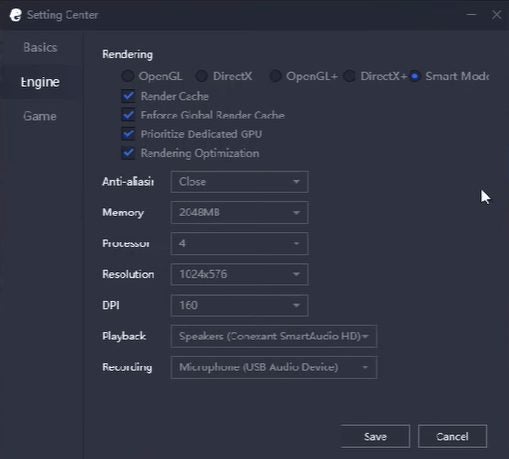
If the first method doesn’t work, it’s time to look at Gameloop. Head into the Setting Center, and ensure you have the following selected:
- Render Cache: Enabled
- Graphics Rendering: Smart Mode
- Global Render Cache: Enabled
- Close Anti-aliasing mode
- Rendering Optimization: Enabled
- Prioritize Dedicated GPU: Enabled (if possible)
- Memory: Half of available memory
- Processor: indicate which one you have
- Alter the resolution to default
- Dot Per Inch: 160
- Game Tab/Gaming Resolution: SD 720P
- Game Tab/Display: Smooth
Method 3: Alter game settings
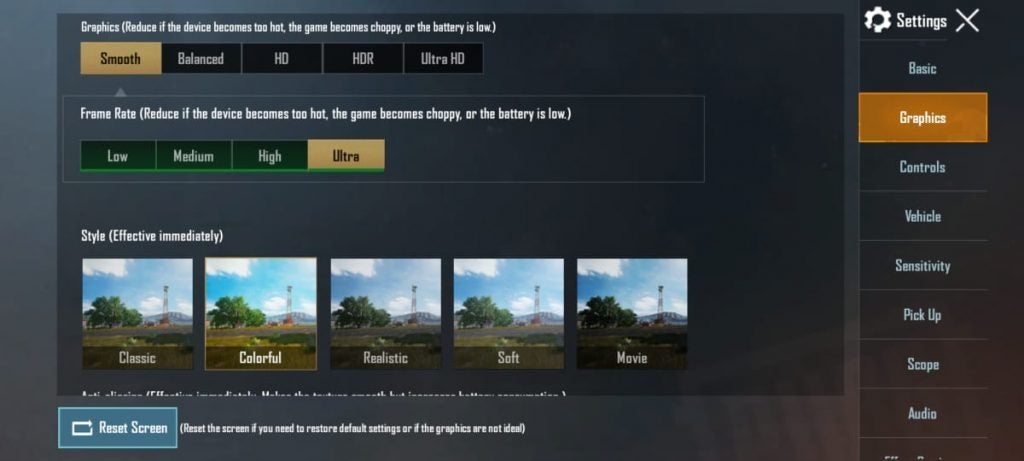
Finally, you’ll have to look at the game settings. Look at which options are available, and change some selections to a low performance if necessary. If your computer can handle it, set it higher.
Don’t let your finger lag on the trigger
Now that you know how to fix lag in Gameloop, you can go on the hunt and start killing in PUBG Mobile. Remember, it also depends on your ping rate and internet speed, so changing these settings might not help if that’s an issue.
