Microsoft announces that Edge will finally be useful for something: watching guides while you play
Edge is not the most beloved browser among users. Microsoft knows this. Even if Windows comes with it already installed, the first thing everyone does is download their trusted browser. Generally Chrome, the more daring ones choose Firefox, and those who understand choose Opera. But practically no one sticks with Edge, compared to the base of devices on which it is installed. And Microsoft wants to change that. Microsoft Edge wants to be your new favorite tool for gaming. Microsoft has announced Edge Game Assist. A feature that allows using Edge as part of the overlay of the Game Bar, allowing us […]
Edge is not the most beloved browser among users. Microsoft knows this. Even if Windows comes with it already installed, the first thing everyone does is download their trusted browser. Generally Chrome, the more daring ones choose Firefox, and those who understand choose Opera. But practically no one sticks with Edge, compared to the base of devices on which it is installed. And Microsoft wants to change that.
Microsoft Edge wants to be your new favorite tool for gaming
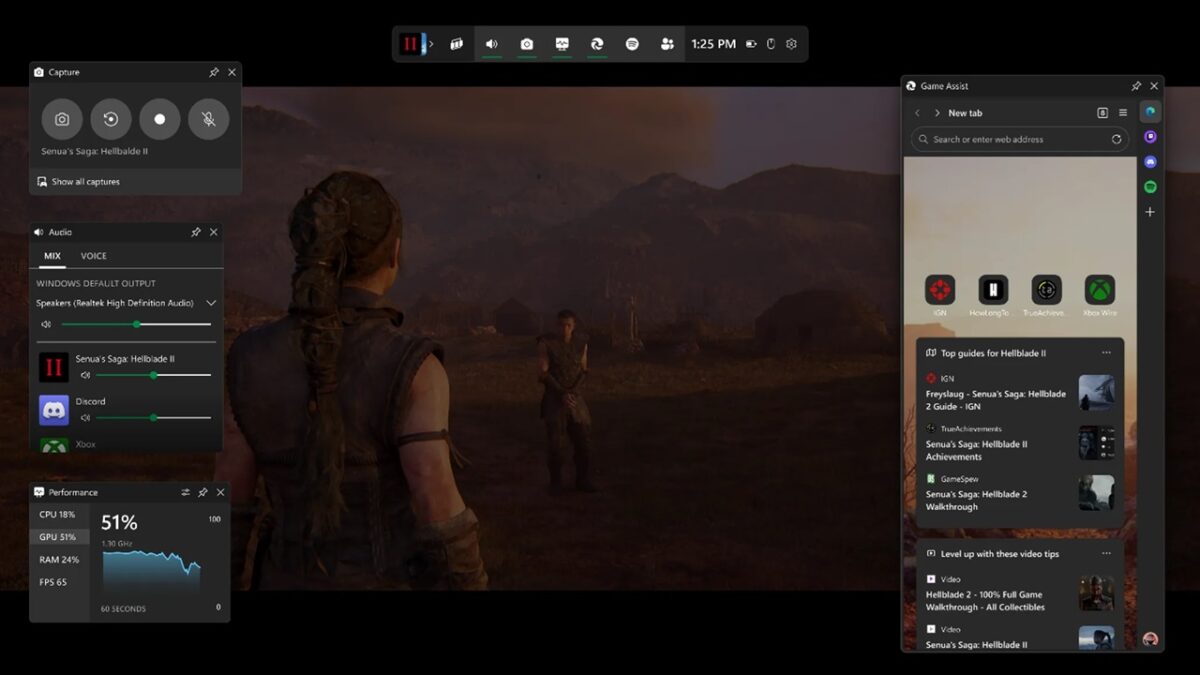
Microsoft has announced Edge Game Assist. A feature that allows using Edge as part of the Game Bar overlay, enabling us to use it within our video games. And what is it for? So that, within compatible video games, it suggests guides, tips, and tricks for each specific moment of the game we are in. Making our lives easier. And not needing to exit to the desktop to look it up in our usual browser.
By placing it at the top of the screen, we can ensure it is visible at all times. And while it may not be the most comfortable way to play, it does ensure that we always have the guide in view if we get stuck in a game. This is especially useful when it also allows us to do the same with gameplay videos from YouTube.
Game Assist shares browser data and cookies from the full version of Edge, aiming for players to make the permanent switch to using this browser. This is also why they have added services like Discord, Spotify, and Twitch integrated within it, so they can be used while gaming. Something that Opera GX already does, with greater control over the resources it uses. And also, with a greater market penetration. Although not installed on every Windows computer by default.
Game Assist, at launch, will be compatible with nine games. These games are Baldur’s Gate 3, Diablo IV, Fortnite, Hellblade II: Senua’s Saga, League of Legends, Minecraft, Overwatch 2, Roblox, and Valorant. And while we expect this list to grow over time, it seems Microsoft has something good in hand.
{
"de-DE": "Kulturjournalist und Schriftsteller mit einem besonderen Interesse für Audiovisuelles und alles, was gespielt werden kann. Ich bin nicht hier, um über meine Bücher zu sprechen, aber Sie können mich immer danach fragen, wenn Sie neugierig sind.",
"en-US": "Cultural journalist and writer with a special interest in audiovisuals and everything that can be played. I'm not here to talk about my books, but you can always ask me about them if you're curious.",
"es-ES": "Periodista cultural y escritor con especial interés en lo audiovisual y todo lo que se pueda jugar. No he venido a hablar de mis libros, pero siempre puedes preguntarme por ellos si tienes curiosidad.",
"fr-FR": "Journaliste culturel et écrivain avec un intérêt particulier pour l'audiovisuel et tout ce qui peut être joué. Je ne suis pas ici pour parler de mes livres, mais vous pouvez toujours me demander à leur sujet si vous êtes curieux.",
"it-IT": "Giornalista culturale e scrittore con un interesse speciale per l'audiovisivo e tutto ciò che può essere giocato. Non sono qui per parlare dei miei libri, ma puoi sempre chiedermi di loro se sei curioso.",
"ja-JP": "",
"nl-NL": "",
"pl-PL": "",
"pt-BR": "Jornalista cultural e escritor com um interesse especial em audiovisuais e tudo que pode ser jogado. Não estou aqui para falar sobre meus livros, mas você sempre pode me perguntar sobre eles se estiver curioso.",
"social": {
"email": "",
"facebook": "",
"twitter": "https://twitter.com/AlvaroMortem",
"linkedin": ""
}
}
View all posts by Álvaro Arbonés