Microsoft doesn’t understand why you keep using Google Chrome

Microsoft is working hard on Edge, but they still see users, every time they get a new PC or reconfigure it after a format, only using their browser to download Google Chrome and then abandoning Edge forever. That’s why, even though it may seem intrusive, Microsoft is asking users why they prefer to use Google Chrome and trying to remember its strengths.

Microsoft Edge was the natural successor to the failed Internet Explorer, a browser whose life was prolonged beyond what was warranted, with technology that became obsolete too soon. Edge has been with us since 2014, but the stigma from the years of Internet Explorer, coupled with Google’s browser comfortably settling into dominance, means that Microsoft Edge is not getting the desired traffic.

Google Chrome DOWNLOAD

Questions that activate if you download Chrome

If you proceed to download Google Chrome through Microsoft Edge, various banners and even a questionnaire may be activated, which you can voluntarily respond to. In these contents, Microsoft will insist that Edge is a browser of comparable quality to Google Chrome, built on the same technology. They will ask you what reason makes you continue choosing Google’s browser over Edge.

In fact, a system settings recommendation via Copilot might even be activated to improve Edge’s performance if it appears to be a problem. However, you can ignore all the messages that Edge sends you while you install Chrome or another browser, unless you are interested in giving Microsoft Edge a second chance. That is the ultimate goal of these messages that are currently programmed when a user turns to the competition.

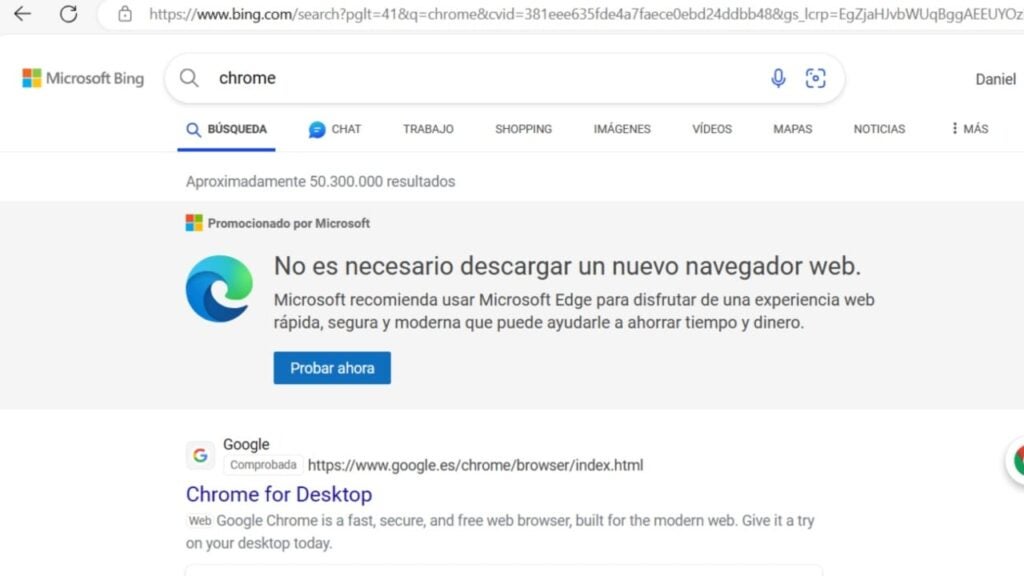
If you type Chrome in Edge’s Bing search, you will see a banner insisting on the value of Microsoft’s browser.

The dominance of Chrome that bothers Microsoft

Google Chrome has been the browser with the highest traffic on the internet for many years. Thanks to the popularity of Android devices, where Chrome is the default browser, and the good work done on PCs in previous years, this browser is ahead of all others, forcing its competitors to constantly innovate.

That’s why Edge, which already features Copilot, an AI assistant, wants you to give its features a chance, which are miles ahead of what Internet Explorer used to be. Meanwhile, other strong competitors like Mozilla Firefox have also worked diligently to make improvements for users in various areas.

Google Chrome DOWNLOAD

Why can’t big tech companies monetize artificial intelligence?

Despite the interest and fascination it produces in us, the industry faces a great challenge: how can this technology be made profitable?

No matter where you look or where you go, it’s impossible to escape the trend of artificial intelligence. Although this technology has coexisted with us for decades, new tools like ChatGPT have played a crucial role in popularizing AI among the general public.

Microsoft Edge DOWNLOAD

Despite the interest and fascination it generates in us, the industry faces a significant challenge: how can this technology be monetized?

To begin with, getting AI-powered generative models up and running has proven to be quite expensive. High energy consumption and the need for powerful servers make the cost of using this technology very steep. Because of this, companies like Google or Adobe are still experimenting with different strategies to develop and sell this technology.

Success doesn’t equate to profits

For instance, we have learned that Microsoft has incurred significant losses due to GitHub Copilot, one of the first generative AIs they launched in collaboration with OpenAI. This service assists programmers in developing, correcting, and translating code, making it extremely popular (in fact, more than 1.5 million people have already used it). However, its success doesn’t offset the high operational costs.

In the case of GitHub Copilot, users pay around $10 per month to use the assistant. Nevertheless, in the early months of 2023, Microsoft was losing an average of over $20 per user (some even as much as $80).

To prevent this, Adobe and other companies are limiting its use and charging users based on their usage. As expected, this is not well-received by the public.

According to Adam Selipsky, CEO of Amazon Web Services, “many customers […] are unhappy about the high price they have to pay to use some of these models.” As it is a relatively new technology, the public still needs to understand what kind of use they want to make of artificial intelligence and, above all, at what price. Unlike other types of software, generative models require more money and years of development to succeed.

For businesses, it’s just a matter of time before the production of generative models becomes more affordable, similar to what has happened with other technologies.

Microsoft Edge DOWNLOAD

Edge 1.18 is now available in beta phase

Microsoft is indeed on a roll with its updates. From the potential addition of artificial intelligence to Microsoft Paint to the almost complete overhaul of Skype, the company is striving to modernize all its applications. While it’s also retiring some of them, it’s now time to update Microsoft Edge, at least in part.

The beta version of Microsoft Edge 1.18 has arrived and brings some quite interesting innovations for both professional and casual users. According to the Microsoft development blog, the most exciting feature in this beta is intelligent search.

This feature retains the name “search on page,” but despite its slight resemblance to traditional search that can be found in any search engine, it has some peculiarities. When searching for a word or phrase on any page, Microsoft Edge will open a suggestions panel displaying synonyms and related searches to make the search less cumbersome, also serving as assistance in case the user has misspelled the word they intend to find. In this way, simply selecting the desired word will trigger a quick and precise search. However, it’s worth noting that Microsoft will retain the information from these searches and use it to further enhance this artificial intelligence-powered feature.

Microsoft has also taken the opportunity to update its policies

With the new features, Microsoft has also chosen to modify its policies, both for SmartScreen and Microsoft Edge update policies. According to the first one, it allows administrators to create a dictionary of domains exempt from SmartScreen warnings, while the second one enables administrators to control the download of updates.

These are just some of the most notable changes that Microsoft Edge has undergone in its beta for version 1.18, but there are several more quite interesting ones if you’re interested in giving this browser’s innovations a try.

Microsoft Edge will let you manage your passwords by creating different categories

Microsoft Edge Canary, the testing ground where developers try out different features, has been updated with a new and interesting feature related to the password manager within Edge. This update would refresh the system itself and add intriguing features such as categorizing each password.

This new functionality in Microsoft Edge Canary will allow you to have better control over the passwords you have stored in the system. When you accumulate passwords, being able to categorize them will enable you to be more productive in your daily life, whether it’s for work, daily routines, or leisure.

Microsoft Edge Canary DOWNLOAD

Improvements for password management

This new password manager, as seen in the latest version of Microsoft Edge Canary, shows you how, in addition to all the information related to a website, the username and password you use, you can add categories that will be especially useful for efficient management.

These categories offer a multitude of options: email, business, news, video games, finance, shopping, social networks, technology, sports, and much more. This can be particularly helpful for active internet users who, in addition to instantly managing dozens of passwords for different websites, can easily distinguish each one by assigning them to their respective category.

Edge Canary, Microsoft’s testing ground

It’s worth mentioning that Edge Canary is an application available to all types of users, and if you enjoy trying out features before they reach the general public, you’ll like this service. In Edge Canary, you’ll have access to interesting changes and can provide feedback that will help Microsoft refine its service, improve it before its release, or discard it if it doesn’t meet expectations.

Microsoft is not the only company doing this with its browser. In fact, its main competitor, Google, also has Chrome Canary, which serves a similar function, testing various beta-phase changes to provide a better service to users.

Microsoft Edge Canary DOWNLOAD

Experience the New: Microsoft Edge 116 Launches with Exciting Upgrades

Every day, there are more browsers in the market: Google Chrome, Opera, Mozilla Firefox, Brave Browser… But there’s one in particular that we’ve all grown fond of after so many years with it: Microsoft Internet Explorer. It stopped receiving support a while ago, but its spiritual successor, Microsoft Edge, has carried on its legacy with much smoother performance, aiming to stay one step ahead of its competition.

Microsoft Edge DOWNLOAD

This achievement hasn’t come about by chance. Like many other browsers, Microsoft Edge has to fight for its market share, and apart from providing fast and efficient service, it has been known for striving to include a few innovations in each of its major updates that progressively enhance the quality of life for its users and offer them a gradually more pleasant experience.

Edge for Business, the major novelty

To cater to the needs of the numerous professionals using its browser, Microsoft has included in its 116th edition (the latest stable version) an option that, in their own words, is a tool that allows organizations to maximize their productivity and security, and provides the ability to separate work from personal searches with an automatic switch between the personal and professional browser windows.” Among other things, it adds a small briefcase icon to identify the professional window and incorporates an identification system that will provide Edge for Business capabilities to anyone who logs in through their Azure account (currently known as Entra ID).

In addition to this, there’s a significant user experience enhancement: the Edge sidebar, which has always proven highly useful, can now be pinned to the Windows 10 desktop by simply clicking the “unpin” button. This way, the sidebar will be available at any time without the need to keep the browser open. Considering that this sidebar can be customized with the user’s desired utilities, it becomes an even more powerful tool.

Microsoft Edge DOWNLOAD

These are not the only novelties that Microsoft Edge brings, but they are certainly the most interesting ones and, undoubtedly, the ones we will appreciate the most in our daily lives.

Microsoft Edge’s Upcoming Addition: Handwriting Feature in the Works

Handwriting input can still align with technology. At the very least, that’s what Microsoft is planning, as it readies this functionality for all users through Edge, and it could become officially available at any moment. The reason: this feature is already being tested in the Canary version of Edge.

This feature would enable all devices compatible with handwriting input to soon have this function active in Microsoft Edge. With it already available in Edge Canary, it’s just a matter of time before this functionality reaches all users, following the necessary enhancements and fixes from this initial release.

Microsoft Edge DOWNLOAD

Handwritten Texts in Documents

In this way, Microsoft Edge would soon have this function available for any user with compatible devices. This was demonstrated by Twitter user Leopeva64, who uses the Canary version of Microsoft Edge. Not all tested functions always end up being implemented, but given the feasibility of this feature, it would be reasonable to expect that this one will be.

It’s always welcome to have support from companies to be able to transcribe digital text through our own handwriting. In fact, there are even phones that already have this kind of feature, such as the Samsung Galaxy S23 Ultra, which allows for handwritten text transcription through the S Pen – a feature that also existed in its previous models.

Microsoft Edge has been the successor to the legendary Internet Explorer.

The advancements of Microsoft Edge

Microsoft Edge is a system that aims to distance itself as much as possible from Internet Explorer, an iconic but not very popular browser in terms of usability, far behind the dominant Chrome and Firefox. There’s a fair consensus that Microsoft Edge is much superior to its older sibling, but there’s still work ahead to gain more market share.

That’s why Microsoft Edge and parallel systems are attempting to adapt to current trends, such as generative AIs. For instance, Bing’s chatbot turned out to be based on OpenAI’s GPT-4 model. Now, the addition of handwritten transcription would be another feature well-received by the community, although it remains to be seen if they will decide to implement it and, if so, when it would arrive.

Microsoft Edge DOWNLOAD

What the Brave browser can do for you

There are better options than Chrome… Learn more about how the Brave browser stacks up the competition.

Not all browsers are created equally, and at this day and age when you’re spending so much time online, you should be using the best browsing tool possible. So which is it? Chrome? Firefox? Edge? The truth is there’s no objective ‘best browser,’ but there are certainly strengths and weaknesses to each. And we’ve got some compelling reasons why Brave could be the best browser yet. We’ve compiled a list of pros and cons for each one. Let’s run through them.

Mozilla Firefox

Pros:

  • More privacy than Chrome
  • Can be as fast as Chrome
  • Less likely to mine for data

Cons:

  • Runs slower on pages with lots of images, pop-ups, and videos
  • Lags behind Chrome once you install plug-ins to block those pop-ups and vids
  • No built-in support for Flash

Google Chrome

Pros:

  • Recognizes all plug-ins
  • Fast
  • Tons of extensions

Cons:

  • Bloated and heavy
  • Taxing on your RAM
  • Lacks trustworthy privacy features

Microsoft Edge

Pros:

  • Lightweight and smoother than Chrome
  • Built-in Cortana is very convenient
  • Reading mode fights distractions and blocks ads

Cons:

  • Unavailable on Mac or any Windows OS less than 10
  • If you have Windows 10, Chrome is still a better option
  • Even Internet Explorer is more popular

Opera

Pros:

  • Turbo mode speeds up page loads dramatically
  • Free, built-in VPN
  • Integrated wallet and messenger services, including WhatsApp and Messenger

Cons:

  • Fewer extensions
  • No parental controls
  • Middle of the road option, lacking where other browsers excel

Safari

Pros:

  • Default browser for Apple, very convenient
  • Works in tandem with all software designed by Apple
  • Default pop-up blocking

Cons:

  • Safari is over 15 years old, and its age is beginning to show
  • Lacking in customization
  • Useless if you don’t use Apple products

Brave

Brave is a relative newcomer for iOS, Android, macOS, Windows, and Linux created by Brian Bondy and Brendan Eich, the inventor of JavaScript and the co-founder of Mozilla.

Brave automatically blocks any third party trackers, shutting down anything that might worsen your browsing experience. Without ads in the way, Brave is up to eight times faster than the mobile competition, and offers numerous extensions as well. Brave also helps you support your favorite publishers.

Softonic is proud to partner with Brave. When you download from us, we may earn a commission.