
Skip to content

Softonic English

Just another Softonic Sites site

Premiere Pro + Firefly: how to test three opening hooks for the same campaign video before final edit

The first seconds of a video are key to viewer retention. The thing is, if the beginning doesn’t grab viewers right away, people will scroll past it instantly. Luckily, with Adobe Premiere and Firefly you can quickly try out different versions and see which hook works best.

Below, we explain step by step how to create different openings with Adobe’s tools.

Adobe Premiere Pro
Adobe Premiere Pro Download

Use a good hook for your video

What we call a “hook” is nothing more than the start of any video, the first few seconds or minutes. If you want your videos to make an impact, a good hook is what will keep people watching.

There isn’t just one kind of hook: it can be a question, striking images, fast camera movements, etc. This also poses a problem, because no one can guarantee which hook works best. That’s why trying several options will help you decide (or help others decide).

One quick way is to split the video into two parts: one part is the beginning and the other is the rest of the video. In Premiere, you can do this with nested sequences.

A nested sequence is a group of clips that behave as if they were a single clip. To create one, do the following:

  • First, select all the clips in the timeline you want to group together (hold Shift while clicking them one by one).
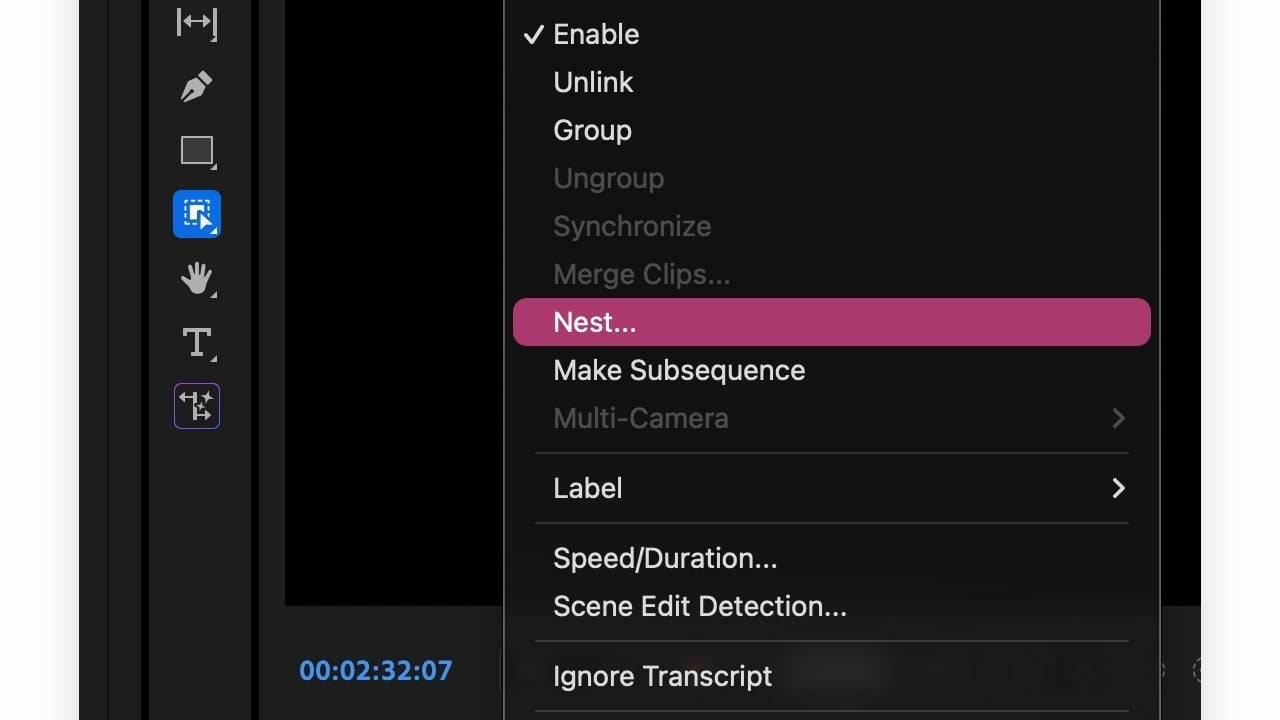
  • Right-click on any of the selected clips and choose Nest. A small window will open where you’ll have to give it a name.
  • In the timeline you’ll see a single clip in a different color replacing the ones you selected.

Use Firefly to create variations

Firefly is especially useful when it comes to creating visual assets, which will help you edit different versions without having to spend too much time.

Besides images, Firefly can also generate short clips from a written description. This can come in very handy for trying out different ideas or shots without having to shoot them yourself again.

Generating video clips in Firefly is very simple:

  • Go to the Adobe Firefly website from your browser. You can also use the official app available on iOS and Android.
  • If you’re using the browser, go to the text box at the top. In that box, click on Image and switch to Video.
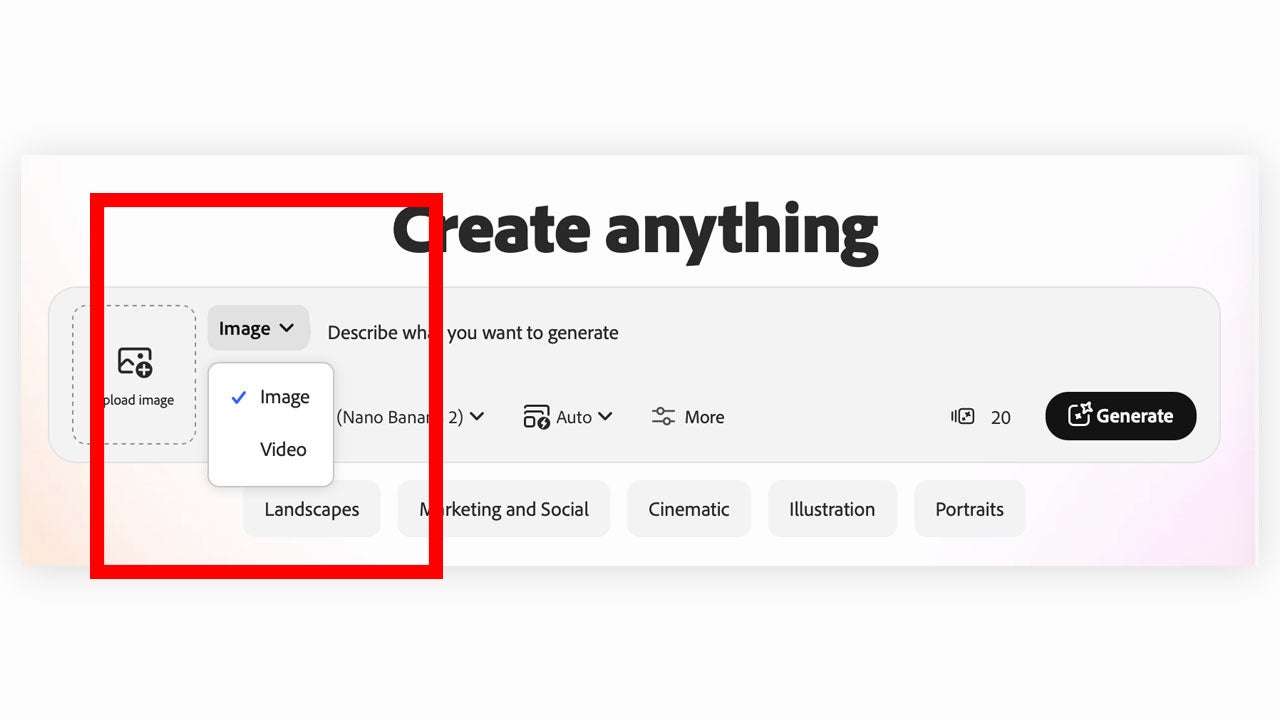
  • Right below you’ll also see a button to switch between different video generation models. Adobe’s is Firefly Video, but you can also choose from third-party models like Veo 3.1, Seedance 2.0, and many more. Besides clips, for different variations you can try adding subtitles, voice-overs, or animated graphics that help hold the viewer’s attention. If you can, get other people to watch your videos and give you their opinion on the different hooks.

Premiere’s most useful features

Premiere has many useful features to make your editing much easier. Some features that may be useful to you are:

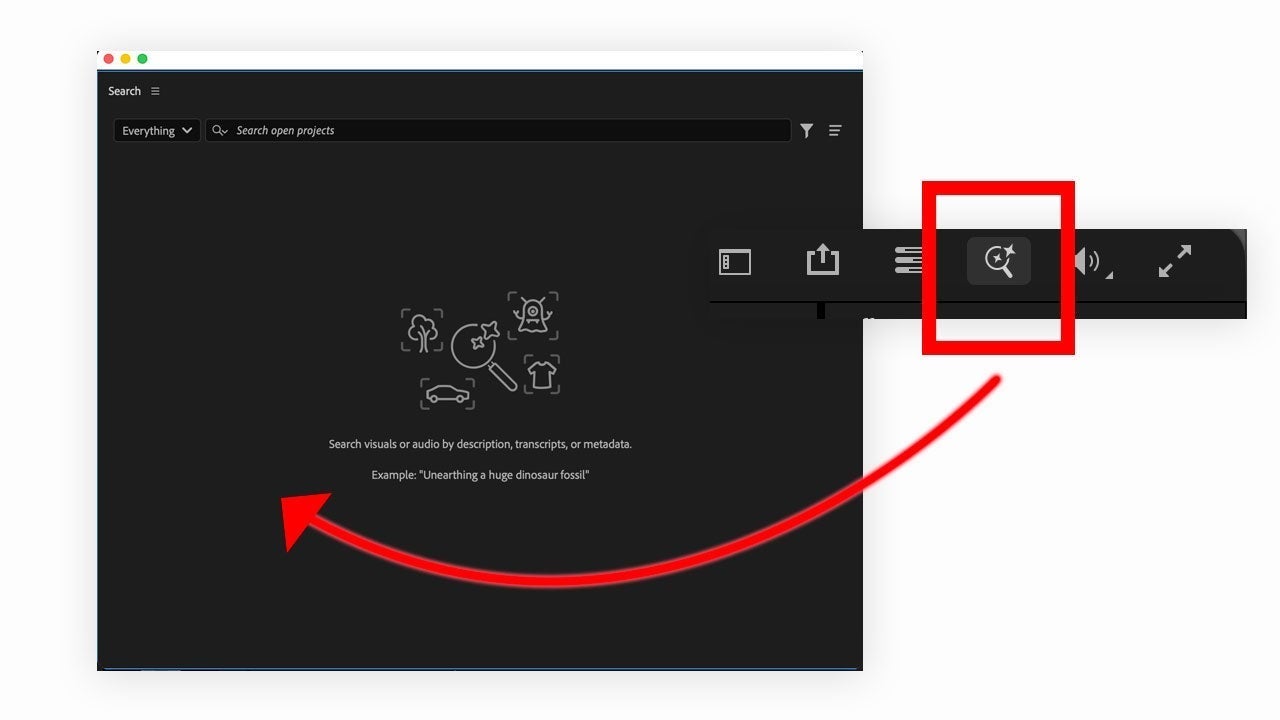
  • Smart search: Searching for assets becomes faster thanks to Media Intelligence. Import your clips and let Premiere analyze the content in the background. Then, open the Search panel by selecting the magnifying glass icon in the upper right corner. Premiere will show results for visual elements, audio, text, and metadata.
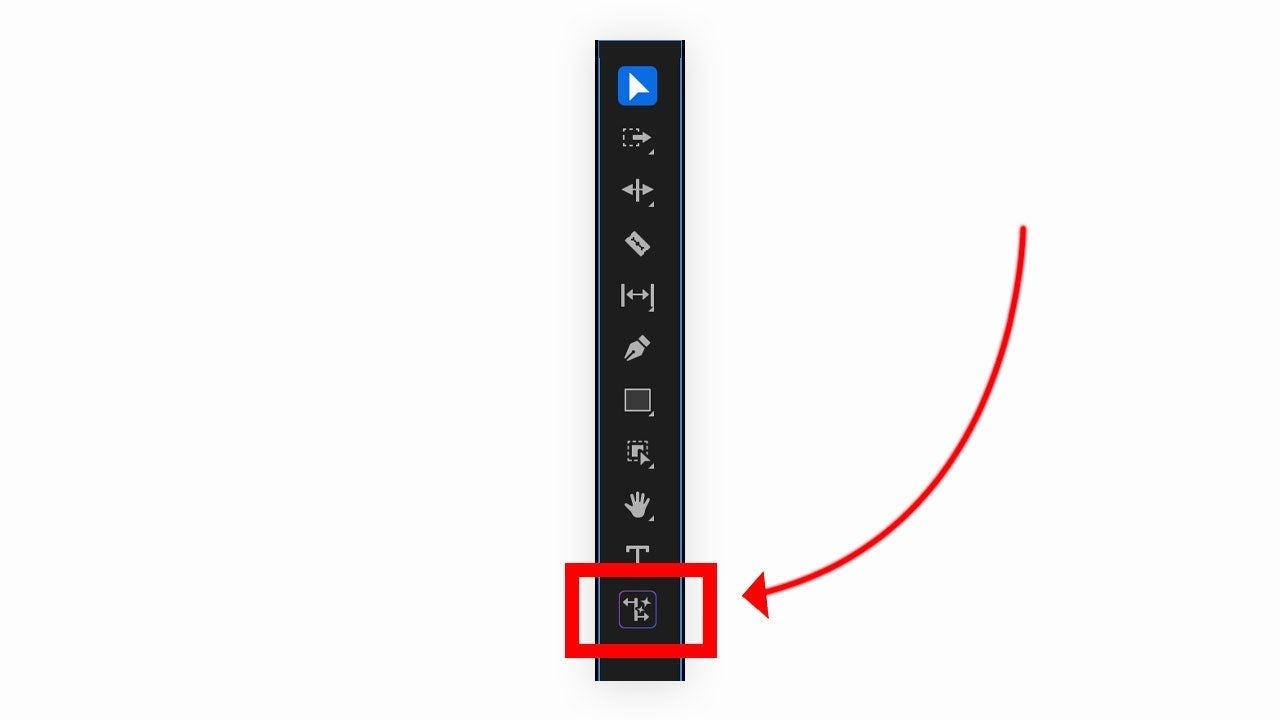
  • Generative Extend: Sometimes a shot can end up shorter than we’d like. Luckily, Premiere has added a new feature called Generative Extend that lets you extend clips a bit. In the timeline, click on the clip you want to lengthen and then select the Generative Extend tool. Finally, drag the edge of the clip to the desired length.
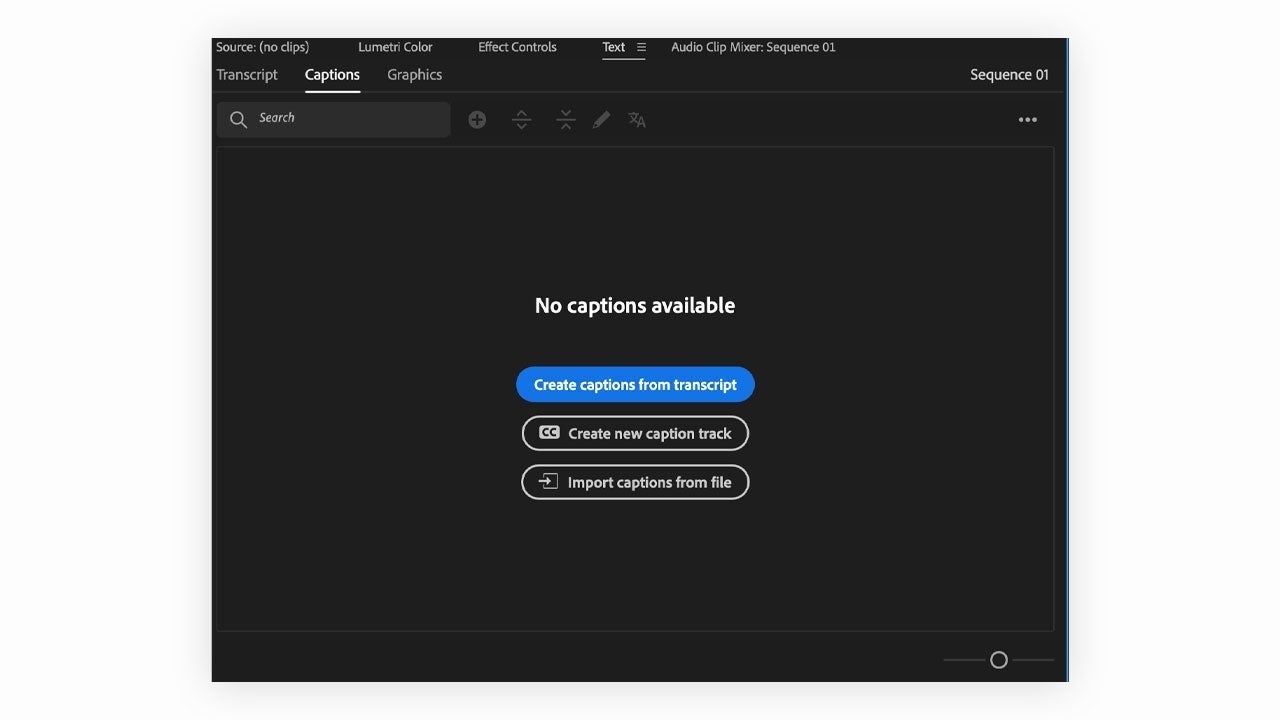
  • Add subtitles: Subtitles are a great addition for videos intended for social media. To generate subtitles automatically, open the Text panel (Window > Text) and click on Captions. Afterward, select Create captions from transcript. In the Create captions dialog box you’ll be able to choose the format and style of the subtitles, among other things.
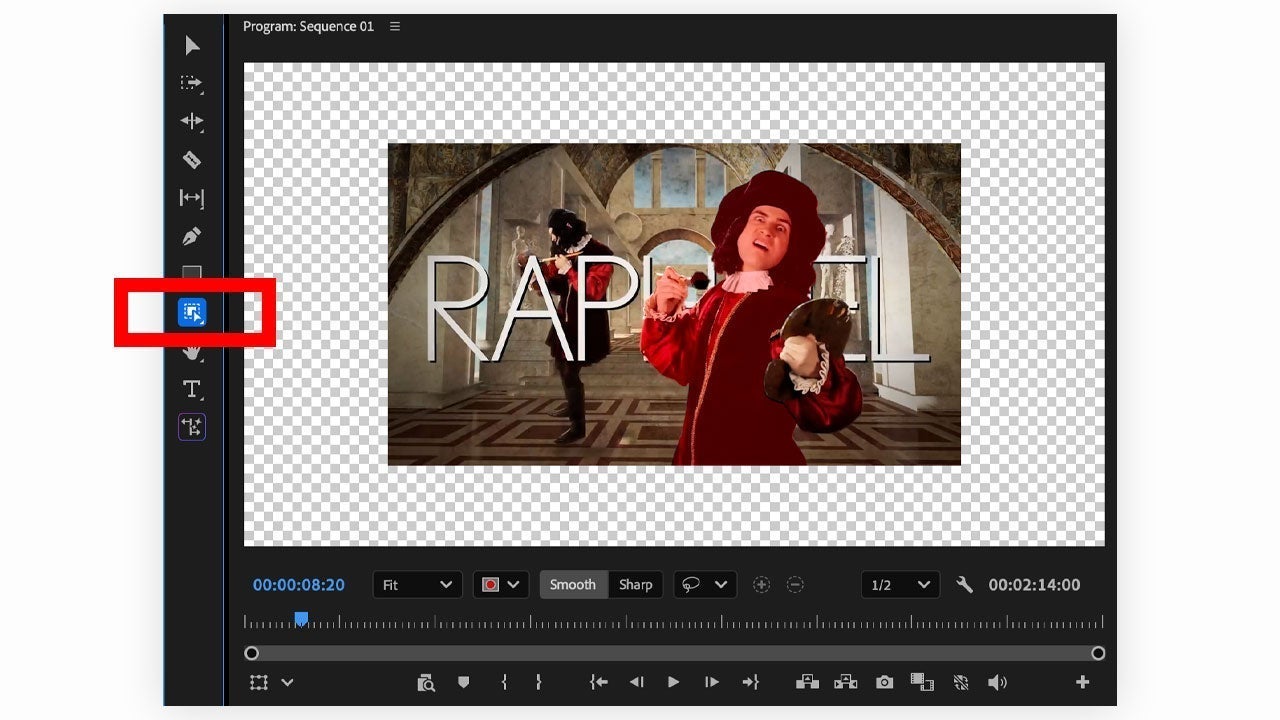
  • AI object masks: If you want to darken a background or replace it with another one, the mask tool will be very useful. Thanks to AI, Premiere can automatically identify objects and people in your clips. To use it, select Object Mask in the toolbar and move the mouse over the clip preview. Next, you’ll see objects and people automatically highlighted as you move the cursor.
Firefly and Premiere, a great creative combo

Using Firefly and Premiere is a great idea for creating more and better content without spending too much time on it. And if you want to improve your workflow even more, follow these steps:

  • First, put together the main body of the video: Before thinking about the opening, finish the rest of the video first, including the message, music, and everything else. Once you have the video finished, group it into a nested sequence.
  • Think of several different hooks: Use Firefly Boards to keep your references close at hand. Make an effort to come up with several distinct ideas that aren’t slight variations of the same one.
  • Gather the assets you need for those hooks: Use Firefly if necessary to create the visual material needed.
  • Ask others for feedback on your videos: If you can, have others watch and share their thoughts on your video and its different hooks. This can help you get an honest perspective on your work.

Adobe Firefly
Adobe Firefly Download

Author: María López

{ "de-DE": "Künstler aus Berufung und Technikliebhaber. Seit ich denken kann, habe ich gerne an allen möglichen Gadgets herumgebastelt.", "en-US": "Artist by vocation and technology lover. I have liked to tinker with all kinds of gadgets for as long as I can remember.", "es-ES": "Artista de vocación y amante de la tecnología. Me ha gustado cacharrear con todo tipo de gadgets desde que tengo uso de razón.", "fr-FR": "Artiste de vocation et amateur de technologie. J'aime bricoler avec toutes sortes de gadgets depuis que j'ai l'usage de la raison.", "it-IT": "", "ja-JP": "", "nl-NL": "", "pl-PL": "", "pt-BR": "", "social": { "email": "", "facebook": "", "twitter": "", "linkedin": "" } } View all posts by María López

Author María LópezPosted on September 28, 2026September 29, 2026Categories News

Post navigation

Previous Previous post: DeepMind’s WeatherNext Cyclones is now open source: earlier hurricane warnings
Next Next post: Apple releases iOS 27.0.1 alongside watchOS and macOS: these are the bugs it fixes

Recent Posts

  • Black Friday Deals That Are Too Good to Be True – Because They Are
  • Nvidia will continue cutting its graphics card production in 2027
  • Shop smart this Cyber Monday: how to get the best deals with peace of mind
  • WhatsApp is testing stickers with sound. We’ll even be able to create them ourselves, but is it a good idea?
  • How agencies use Adobe Firefly to get client buy-in before the first design round

Archives

  • November 2026
  • October 2026
  • September 2026
  • August 2026
  • July 2026
  • June 2026
  • May 2026
  • April 2026
  • March 2026
  • February 2026
  • January 2026
  • December 2025
  • November 2025
  • October 2025
  • September 2025
  • August 2025
  • July 2025
  • June 2025
  • May 2025
  • April 2025
  • March 2025
  • February 2025
  • January 2025
  • December 2024
  • November 2024
  • October 2024
  • September 2024
  • August 2024
  • July 2024
  • June 2024
  • May 2024
  • April 2024
  • March 2024
  • February 2024
  • January 2024
  • December 2023
  • November 2023
  • October 2023
  • September 2023
  • August 2023
  • July 2023
  • June 2023
  • May 2023
  • April 2023
  • March 2023
  • February 2023
  • January 2023
  • December 2022
  • November 2022
  • October 2022
  • September 2022
  • August 2022
  • July 2022
  • June 2022
  • May 2022
  • April 2022
  • March 2022
  • February 2022
  • January 2022
  • December 2021
  • November 2021
  • October 2021
  • September 2021
  • August 2021
  • July 2021
  • June 2021
  • May 2021
  • April 2021
  • March 2021
  • February 2021
  • January 2021
  • December 2020
  • November 2020
  • October 2020
  • September 2020
  • August 2020
  • July 2020
  • June 2020
  • May 2020
  • April 2020
  • March 2020
  • February 2020
  • January 2020
  • December 2019
  • November 2019
  • October 2019
  • September 2019
  • August 2019
  • July 2019
  • June 2019
  • May 2019
  • April 2019
  • March 2019
  • February 2019
  • January 2019
  • December 2018
  • November 2018
  • October 2018
  • September 2018
  • August 2018
  • July 2018
  • June 2018
  • May 2018
  • April 2018
  • March 2018
  • February 2018
  • January 2018
  • December 2017
  • November 2017
  • October 2017
  • September 2017
  • August 2017
  • July 2017
  • June 2017
  • May 2017
  • April 2017
  • March 2017
  • February 2017
  • January 2017
  • December 2016
  • November 2016
  • October 2016
  • September 2016
  • August 2016
  • July 2016
  • June 2016
  • May 2016
  • April 2016
  • March 2016
  • February 2016
  • January 2016
  • December 2015
  • November 2015
  • October 2015
  • September 2015
  • August 2015
  • July 2015
  • June 2015
  • May 2015
  • April 2015
  • March 2015
  • February 2015
  • January 2015
  • December 2014
  • November 2014
  • October 2014
  • September 2014
  • August 2014
  • July 2014
  • June 2014
  • May 2014
  • April 2014
  • March 2014
  • February 2014
  • January 2014
  • December 2013
  • November 2013
  • October 2013
  • September 2013
  • August 2013
  • July 2013
  • June 2013
  • May 2013
  • April 2013
  • March 2013
  • February 2013
  • January 2013
  • December 2012
  • November 2012
  • October 2012
  • September 2012
  • August 2012
  • July 2012
  • June 2012
  • May 2012
  • April 2012
  • March 2012
  • February 2012
  • January 2012
  • December 2011
  • November 2011
  • October 2011
  • September 2011
  • August 2011
  • July 2011
  • June 2011
  • May 2011
  • April 2011
  • March 2011
  • February 2011
  • January 2011
  • December 2010
  • November 2010
  • October 2010
  • September 2010
  • August 2010
  • July 2010
  • June 2010
  • May 2010
  • April 2010
  • March 2010
  • February 2010
  • January 2010
  • December 2009
  • November 2009
  • October 2009
  • September 2009
  • August 2009
  • July 2009
  • June 2009
  • May 2009
  • April 2009
  • March 2009
  • February 2009
  • January 2009
  • December 2008
  • November 2008
  • October 2008
  • September 2008
  • August 2008
  • July 2008
  • June 2008
  • May 2008
  • April 2008
  • March 2008
  • February 2008
  • January 2008
  • December 2007
  • November 2007
  • October 2007
  • September 2007
  • August 2007
  • July 2007
  • June 2007
  • May 2007
  • April 2007
  • March 2007
  • February 2007
  • January 2007
  • December 2006
  • November 2006
  • September 2006
  • August 2006
  • June 2006
  • May 2006
  • July 2001
  • January 2001
  • November 2000
  • September 2000
  • August 2000
  • July 2000
  • April 2000
  • March 2000

Categories

  • Affiliate post
  • Expert Review
  • Gaming
  • Guides
  • How to
  • Legacy how To
  • News
  • Noticias
  • Software>Security
  • Sponsored
  • Trucos y Consejos
  • Uncategorized
  • Windows software

Meta

  • Log in
  • Entries feed
  • Comments feed
  • WordPress.org
Softonic English Proudly powered by WordPress