Skip to content

Softonic English

Just another Softonic Sites site

Reduce tax season stress with Acrobat's AI-powered document tools

Carrying out an administrative process as complex as tax regularization can be quite overwhelming. One of the main causes is the document disorder: scattered invoices, lost receipts, lack of time to organize documents… Fortunately, Adobe Acrobat can help you solve all this chaos. With Adobe’s program, you can easily get organized without spending too much time and gain peace of mind, as you will see now. Why the tax season is overwhelming It doesn’t matter if you do your taxes yourself or prepare the documents for your manager, in both cases it is practically mandatory to maintain order (at […]

Carrying out such a complex administrative process as tax regularization can be quite overwhelming. One of the main causes is the document disorder: scattered invoices, lost receipts, lack of time to organize documents… Fortunately, Adobe Acrobat can help you solve all this chaos.

With Adobe’s program, you can easily get organized without investing too much time and gain peace of mind, just as you will see now.

Adobe Acrobat
Adobe Acrobat DOWNLOAD

Why the tax season is overwhelming

It doesn’t matter if you do your taxes yourself or prepare the documents for your accountant; in both cases it is practically mandatory to keep things organized (at least if you would rather not face surprises later). However, this can be difficult for many of us.

Documents come from too many places (banks, clients, administration, etc.), and there are all sorts. Scanned files, photos, or PDFs. This can lead anyone to lose any document in the blink of an eye. The good news for you is that Adobe Acrobat might be the solution you are looking for, even if you are the most disorganized person on Earth.

Centralize tax documents with Acrobat

The first step to calm is to centralize your documents. Here, Acrobat can act as the main space to store all your files. Adobe’s program can, among other things, scan documents and convert them into PDFs, save the PDFs that you receive by email, or convert images into more manageable files.

You could also structure everything into a single PDF if you need to. Instead of having many loose files, you can create a single PDF organized by sections, for example. It can include sections for income, expenses, and more. With this gesture, you can gain immediate access to what you need.

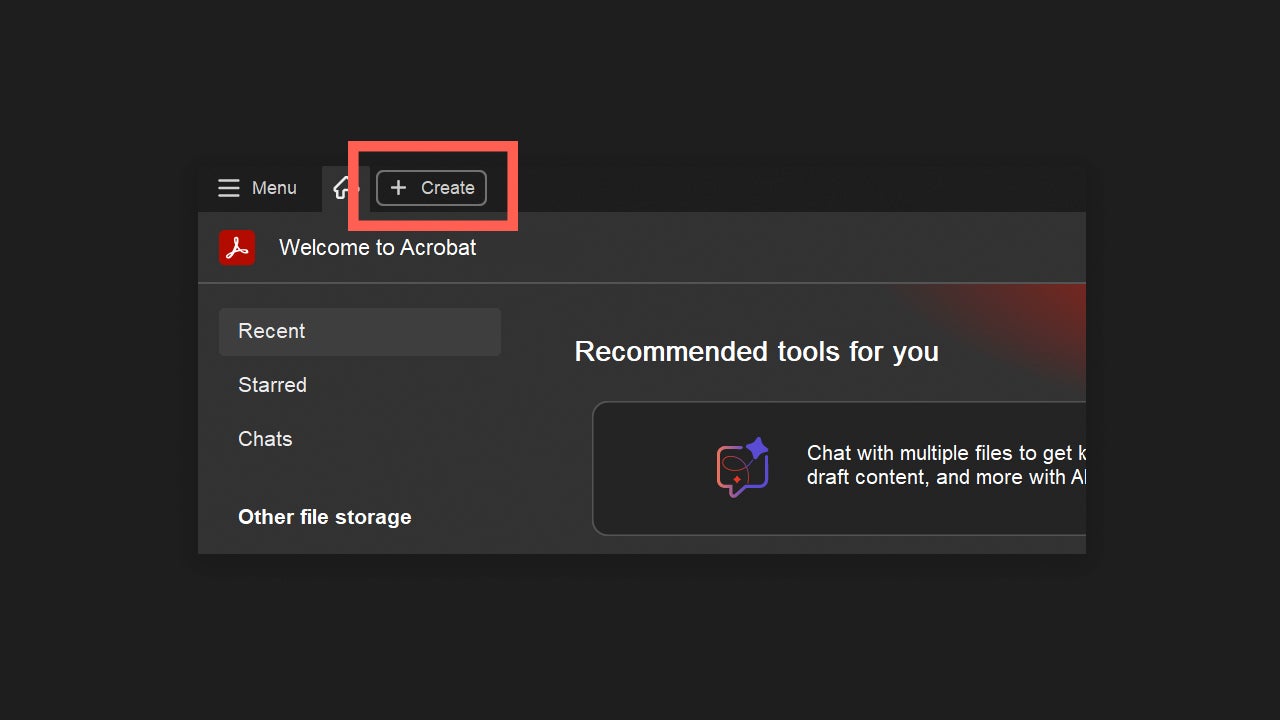
To merge several files into a PDF, open Adobe Acrobat, and in the top tabs, click on + Create.
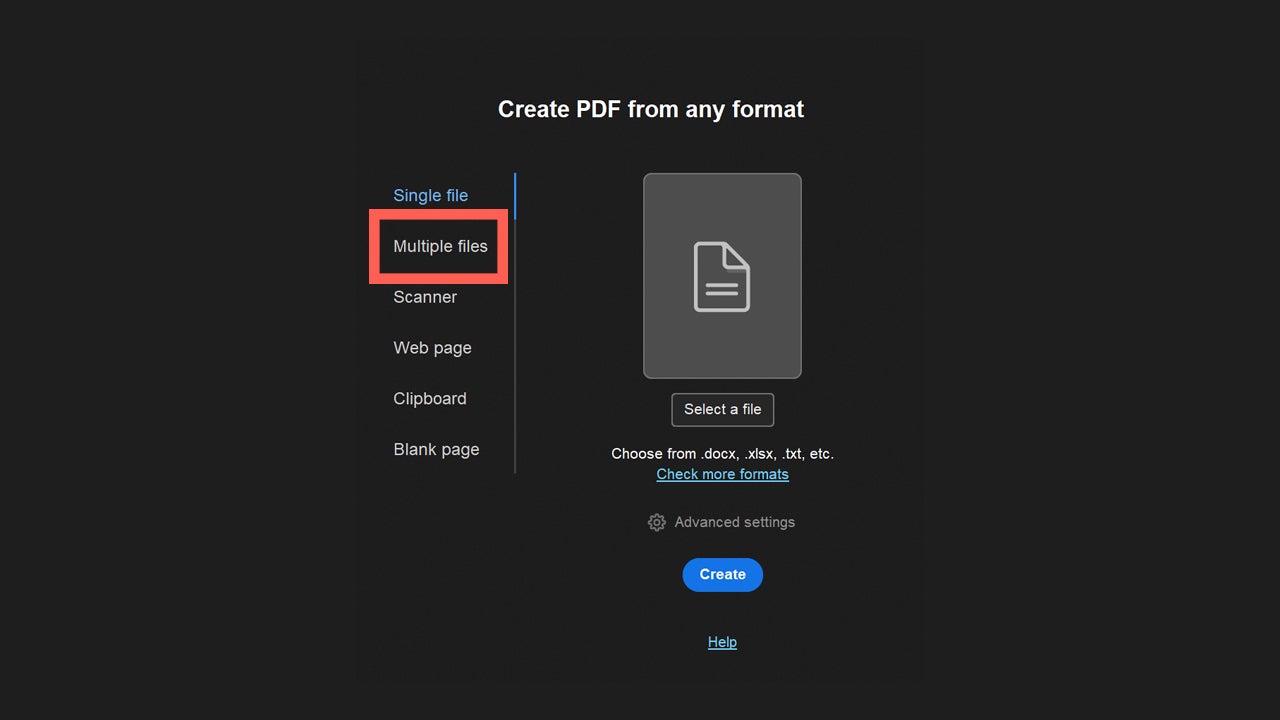
Then, select the option for multiple files. From here, you can choose between Combine files, Create multiple PDF files, or Create PDF portfolio. The first option, Combine files, is the one we will use, as it allows us to create a single PDF from several files. Finally, click on Next and then on Add Files. Select the documents you want and select Combine. Now your PDF is ready.
How the AI assistant reduces mental load

Keeping your accounts up to date is an activity that can be overwhelming for many of us. Checking that your invoices and receipts are correct is essential to ensure everything adds up and there are no errors in your taxes. Acrobat AI Assistant can help you verify this, if you know how.

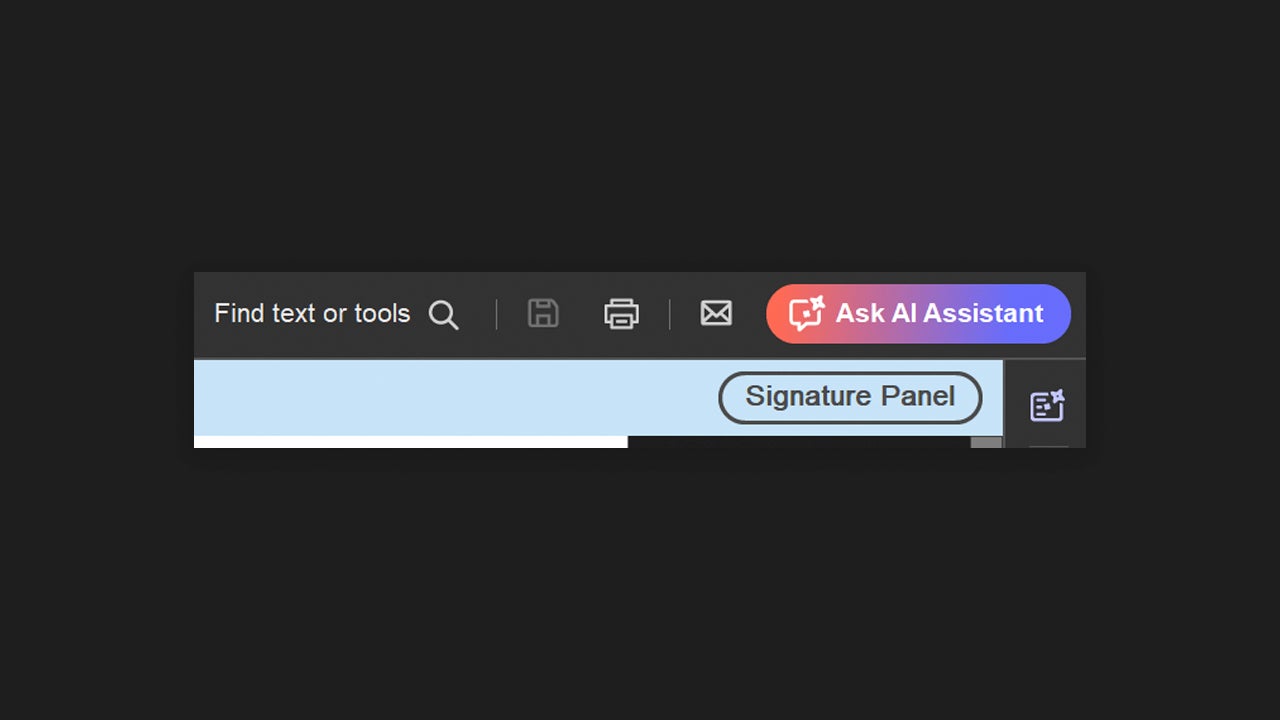
You can ask the Acrobat AI Assistant to summarize a document or to explain what it contains exactly. Very useful for lengthy contracts or receipts that use complex language, for example. To use it, open a document with Acrobat and select the Ask AI Assistant option (you will see it at the top right). Then, a chat will appear from where you can make your inquiries.
If you access it from the web platform, you just need to go to the Tools section and click on AI Assistant. Thereafter, you should upload the document you want to use with AI Assistant. Once you do that, you will see the AI Assistant chat on the right. From there, you can ask anything about the document. Within the chat itself, question suggestions related to the content of the file will be shown to give you ideas.

To enjoy the benefits of AI Assistant, you have several options. One of them is to subscribe to the Acrobat Studio plan, the only one that includes AI Assistant as standard. If you have another active plan, whether it’s Acrobat or Creative Cloud with all the apps, you will need to pay for an additional plan focused solely on AI Assistant. You can check the current rates through this link.

Security and trust during tax preparation

Tax documents contain much personal data that should not be circulating around carelessly. Acrobat has many security settings that can help you protect your documents.

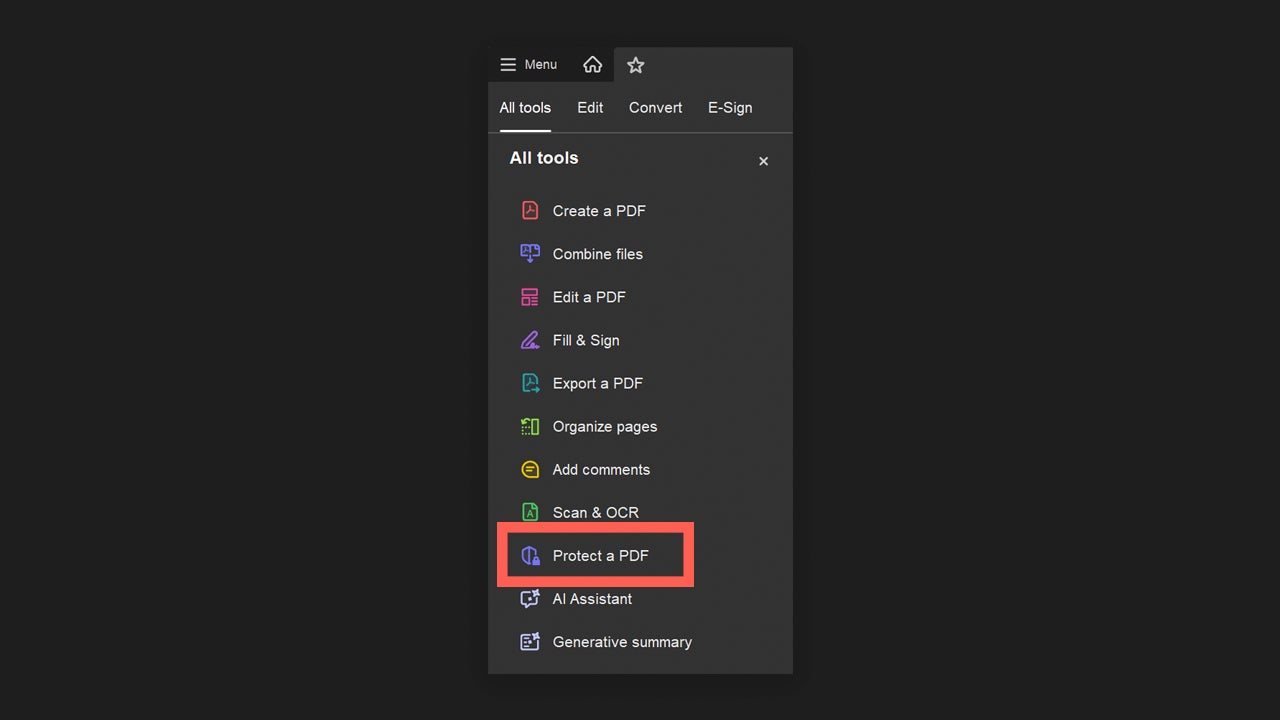
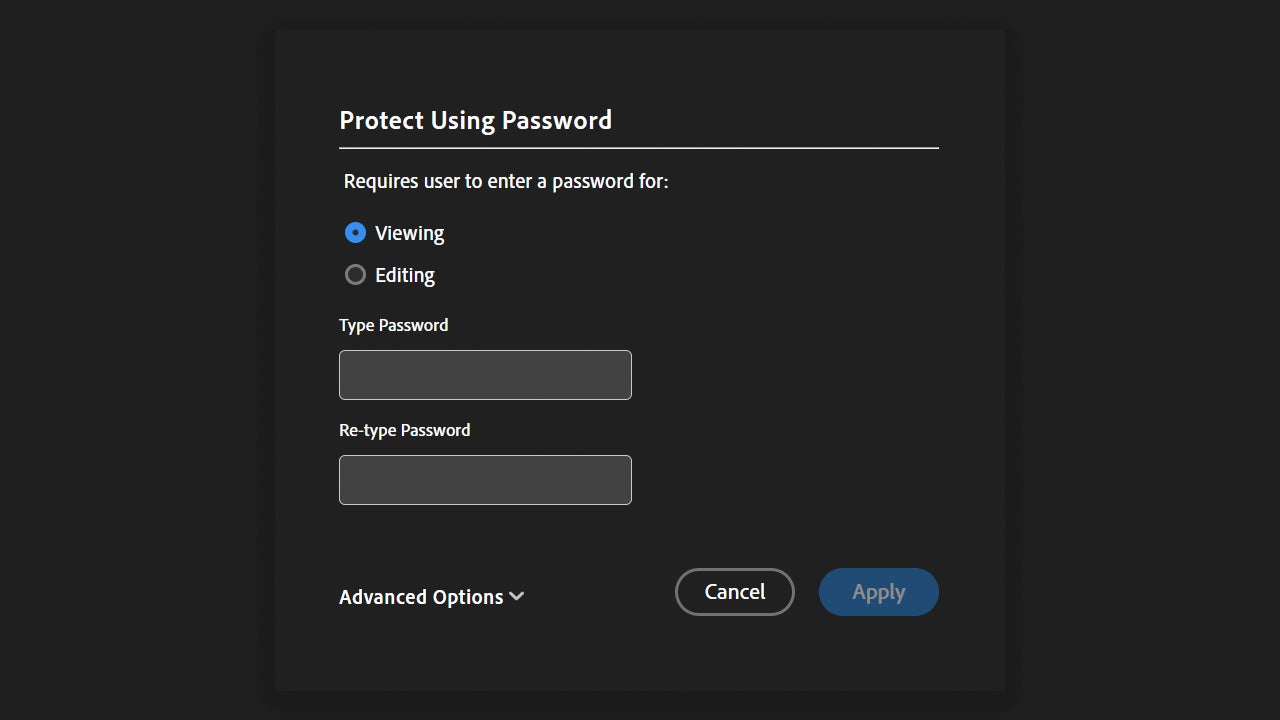
If you want to password-protect your documents, you can easily do it this way. Open the document you want to protect with Adobe Acrobat. On the left, you will see the All Tools section. From there, look for the Protect a PDF option and click on it.
Below you will see a list of options to choose from on how you would like to protect your document. There are various degrees of complexity, from the simplest, such as password protection, to encryption with a certificate. If you select the Protect with Password option, you will then need to enter the password that will protect the document and choose whether the password allows editing or just viewing the document.
From a stressful task to a clear process

When you combine centralization, review, and security, everything changes. You will save time searching for files, have fewer last-minute scares, and have more confidence when presenting your documents or sending them to your manager. The best part? You will gain in mental health, and you won’t have to worry about whether you’re missing something or not.

Who benefits the most?

Freelancers, self-employed, and small businesses are some of the professionals who can benefit the most from the advantages of Adobe Acrobat. However, anyone in charge of organizational tasks (whether at work or at home) will see how Adobe Acrobat can be quite useful to them.

Acrobat helps you stay organized without having to become an accountant. You gather everything in one place, and when you need any document, you know you won’t have to search everywhere.

Adobe Acrobat
Adobe Acrobat DOWNLOAD

Author: María López

{ "de-DE": "Künstler aus Berufung und Technikliebhaber. Seit ich denken kann, habe ich gerne an allen möglichen Gadgets herumgebastelt.", "en-US": "Artist by vocation and technology lover. I have liked to tinker with all kinds of gadgets for as long as I can remember.", "es-ES": "Artista de vocación y amante de la tecnología. Me ha gustado cacharrear con todo tipo de gadgets desde que tengo uso de razón.", "fr-FR": "Artiste de vocation et amateur de technologie. J'aime bricoler avec toutes sortes de gadgets depuis que j'ai l'usage de la raison.", "it-IT": "", "ja-JP": "", "nl-NL": "", "pl-PL": "", "pt-BR": "", "social": { "email": "", "facebook": "", "twitter": "", "linkedin": "" } } View all posts by María López

Author María LópezPosted on February 23, 2026February 23, 2026Categories NewsTags acrobat, Adobe

Post navigation

Previous Previous post: The second season of the live action One Piece already has a release date
Next Next post: The parents of Kimetsu no Yaiba are preparing a new movie that is a spin-off of a famous universe

Recent Posts

  • The KPop Demon Hunters are not the only ones: these are the 10 unique animated films that have won the Oscar that are not from Disney
  • Peter Jackson believes it is possible that he could make the only work of Tolkien that he has not been allowed to adapt
  • The director of Final Fantasy VII Remake is clear: young people do not connect with Final Fantasy
  • The worst nightmare of parents will have a movie. Its voice cast is absolutely incredible
  • The studio behind Lies of P sees AI as the future of its games and fans are not responding well

Archives

  • May 2026
  • April 2026
  • March 2026
  • February 2026
  • January 2026
  • December 2025
  • November 2025
  • October 2025
  • September 2025
  • August 2025
  • July 2025
  • June 2025
  • May 2025
  • April 2025
  • March 2025
  • February 2025
  • January 2025
  • December 2024
  • November 2024
  • October 2024
  • September 2024
  • August 2024
  • July 2024
  • June 2024
  • May 2024
  • April 2024
  • March 2024
  • February 2024
  • January 2024
  • December 2023
  • November 2023
  • October 2023
  • September 2023
  • August 2023
  • July 2023
  • June 2023
  • May 2023
  • April 2023
  • March 2023
  • February 2023
  • January 2023
  • December 2022
  • November 2022
  • October 2022
  • September 2022
  • August 2022
  • July 2022
  • June 2022
  • May 2022
  • April 2022
  • March 2022
  • February 2022
  • January 2022
  • December 2021
  • November 2021
  • October 2021
  • September 2021
  • August 2021
  • July 2021
  • June 2021
  • May 2021
  • April 2021
  • March 2021
  • February 2021
  • January 2021
  • December 2020
  • November 2020
  • October 2020
  • September 2020
  • August 2020
  • July 2020
  • June 2020
  • May 2020
  • April 2020
  • March 2020
  • February 2020
  • January 2020
  • December 2019
  • November 2019
  • October 2019
  • September 2019
  • August 2019
  • July 2019
  • June 2019
  • May 2019
  • April 2019
  • March 2019
  • February 2019
  • January 2019
  • December 2018
  • November 2018
  • October 2018
  • September 2018
  • August 2018
  • July 2018
  • June 2018
  • May 2018
  • April 2018
  • March 2018
  • February 2018
  • January 2018
  • December 2017
  • November 2017
  • October 2017
  • September 2017
  • August 2017
  • July 2017
  • June 2017
  • May 2017
  • April 2017
  • March 2017
  • February 2017
  • January 2017
  • December 2016
  • November 2016
  • October 2016
  • September 2016
  • August 2016
  • July 2016
  • June 2016
  • May 2016
  • April 2016
  • March 2016
  • February 2016
  • January 2016
  • December 2015
  • November 2015
  • October 2015
  • September 2015
  • August 2015
  • July 2015
  • June 2015
  • May 2015
  • April 2015
  • March 2015
  • February 2015
  • January 2015
  • December 2014
  • November 2014
  • October 2014
  • September 2014
  • August 2014
  • July 2014
  • June 2014
  • May 2014
  • April 2014
  • March 2014
  • February 2014
  • January 2014
  • December 2013
  • November 2013
  • October 2013
  • September 2013
  • August 2013
  • July 2013
  • June 2013
  • May 2013
  • April 2013
  • March 2013
  • February 2013
  • January 2013
  • December 2012
  • November 2012
  • October 2012
  • September 2012
  • August 2012
  • July 2012
  • June 2012
  • May 2012
  • April 2012
  • March 2012
  • February 2012
  • January 2012
  • December 2011
  • November 2011
  • October 2011
  • September 2011
  • August 2011
  • July 2011
  • June 2011
  • May 2011
  • April 2011
  • March 2011
  • February 2011
  • January 2011
  • December 2010
  • November 2010
  • October 2010
  • September 2010
  • August 2010
  • July 2010
  • June 2010
  • May 2010
  • April 2010
  • March 2010
  • February 2010
  • January 2010
  • December 2009
  • November 2009
  • October 2009
  • September 2009
  • August 2009
  • July 2009
  • June 2009
  • May 2009
  • April 2009
  • March 2009
  • February 2009
  • January 2009
  • December 2008
  • November 2008
  • October 2008
  • September 2008
  • August 2008
  • July 2008
  • June 2008
  • May 2008
  • April 2008
  • March 2008
  • February 2008
  • January 2008
  • December 2007
  • November 2007
  • October 2007
  • September 2007
  • August 2007
  • July 2007
  • June 2007
  • May 2007
  • April 2007
  • March 2007
  • February 2007
  • January 2007
  • December 2006
  • November 2006
  • September 2006
  • August 2006
  • June 2006
  • May 2006
  • July 2001
  • January 2001
  • November 2000
  • September 2000
  • August 2000
  • July 2000
  • April 2000
  • March 2000

Categories

  • Affiliate post
  • Expert Review
  • Gaming
  • Guides
  • How to
  • Legacy how To
  • News
  • Noticias
  • Software>Security
  • Sponsored
  • Trucos y Consejos
  • Uncategorized
  • Windows software

Meta

  • Log in
  • Entries feed
  • Comments feed
  • WordPress.org
Softonic English Proudly powered by WordPress