Skip to content

Softonic English

Just another Softonic Sites site

Rotate an object in Illustrator: generate multiple angles of the same object

One of the heaviest tasks for any illustrator or designer is creating multiple views of the same object. And in most cases, to achieve a good result, you will have to invest a lot of work time. With the arrival of the Turntable feature in Adobe Illustrator, that process changes significantly. This new tool allows you to generate multiple rotated views of a vector or raster object from a single illustration, reducing production time and maintaining a consistent appearance across all versions. What is Turntable? Simply put, the Turntable function uses technology […]

One of the heaviest tasks for any illustrator or designer is the creation of multiple views of the same object. And in most cases, to achieve a good result, you will have to invest a lot of work time. 

With the arrival of the Turntable feature in Adobe Illustrator, this process changes significantly. This new tool allows you to generate multiple rotated views of a vector or raster object from a single illustration, reducing production time and maintaining a consistent appearance across all versions.

Adobe Illustrator
Adobe Illustrator DOWNLOAD

What is Turntable?

Simply put, the Turntable function uses Adobe Firefly technology to automatically generate different angles of an object from a single view. It does not build a 3D model, but from the outside, it might look like it. The function interprets shapes and creates new editable perspectives that closely mimic the original illustration.

By using Turntable, you can explore different viewpoints without having to rebuild the drawing from scratch. It also represents a time saver if you need to work with different views of containers, characters, or other similar elements. 

How to use Turntable 

Using Turntable is quite simple. To get started, open your project in Adobe Illustrator and select the vector or raster object that interests you. 

From here, there are several ways to activate Turntable. If you select the object, a floating contextual menu will appear with various generative AI options, colors, and more. Click on the sparkles icon located all the way to the left and select the Turntable option. If you don’t see this floating menu, go to Window > Contextual Task Bar to make it appear. 
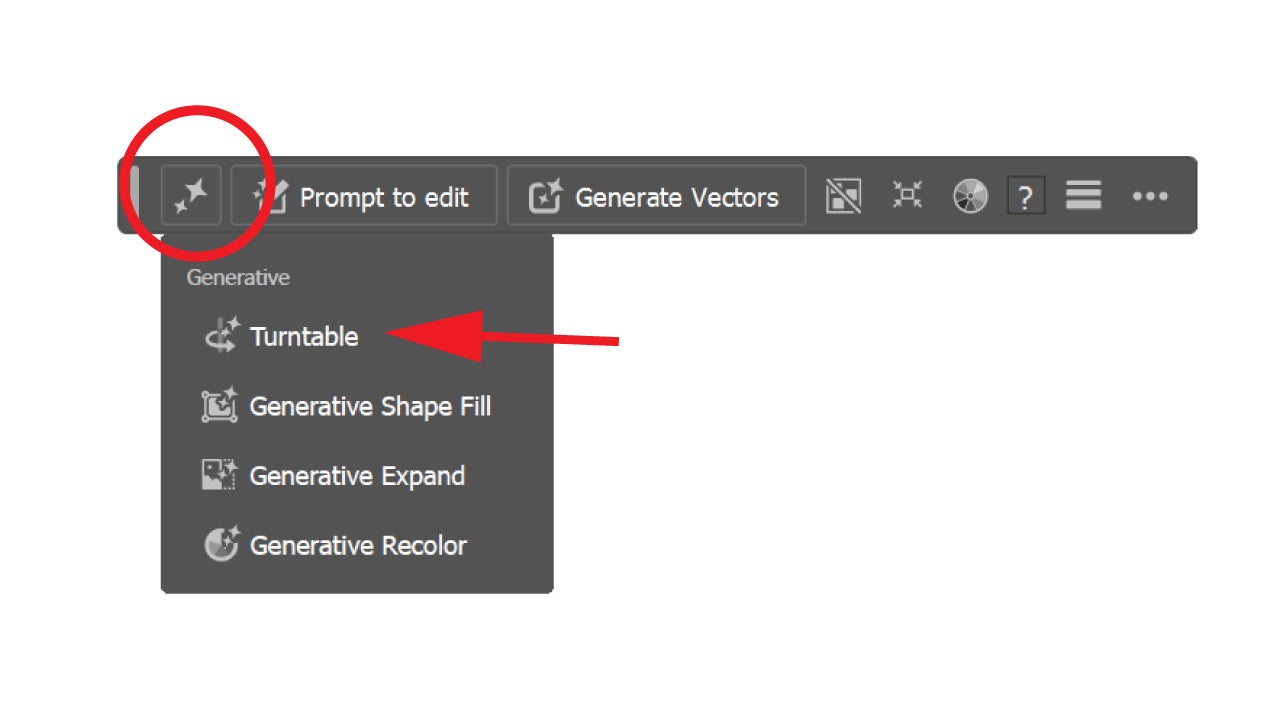
You can also activate the Turntable feature from the properties panel. You can access it by going to Window > Properties. When selecting Turntable, we will have to wait a few moments for Adobe Illustrator to generate the views. When it finishes, we will see a new floating menu below the drawing with a slider and arrows to change the views and rotate the object.

You have to keep in mind that, on some occasions, it won’t work very well. This happens when we deal with objects that are very abstract, as it is not able to generate views that are very reliable. Otherwise, you can be quite calm and be surprised by the results.

Combine with other Illustrator tools

Turntable by itself is a great feature, but it can be even more useful and surprising if we combine it with other generative AI functions within Adobe Illustrator.

One of the newest, Concept to Vector, allows you to convert a simple initial sketch into a vector illustration. If you are someone who usually captures conceptual ideas in notebooks and the like, Concept to Vector can help you vectorize your ideas without needing to invest much time.
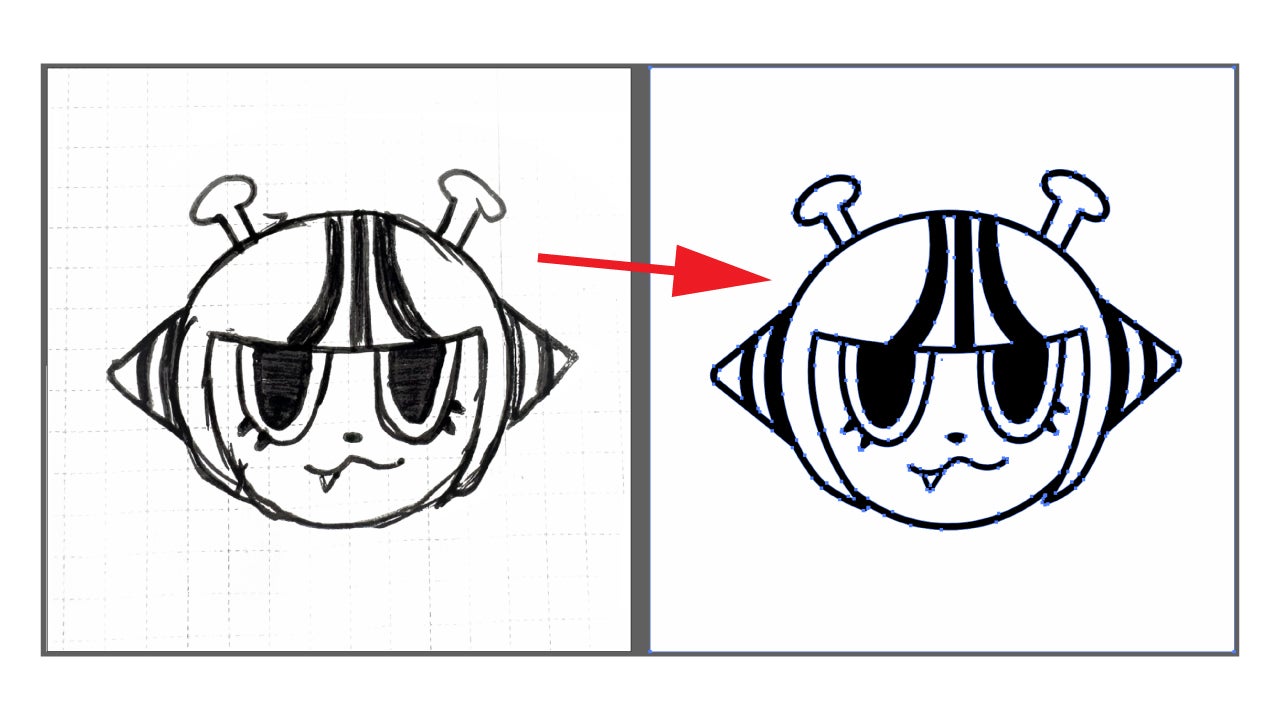
To use it, open the image in Illustrator and select it. Once done, the contextual menu we mentioned earlier will appear. There, click on the Concept to Vector option. You can also access it from Object > Generative > Concept to Vector.

Once the main piece is created, Turntable can automatically generate new perspectives of the same object.

Similarly, Generative Expand helps to expand your compositions and adapt them to different formats. From a vector drawing, you can generate multiple views with Turntable and then expand the scene to use it in banners, ads, or social media content.

To use Generative Expand, select the object and then click on Crop Image, an option you will see in the floating context menu. If you don’t see it clearly, look for its symbol, which is located on the right.
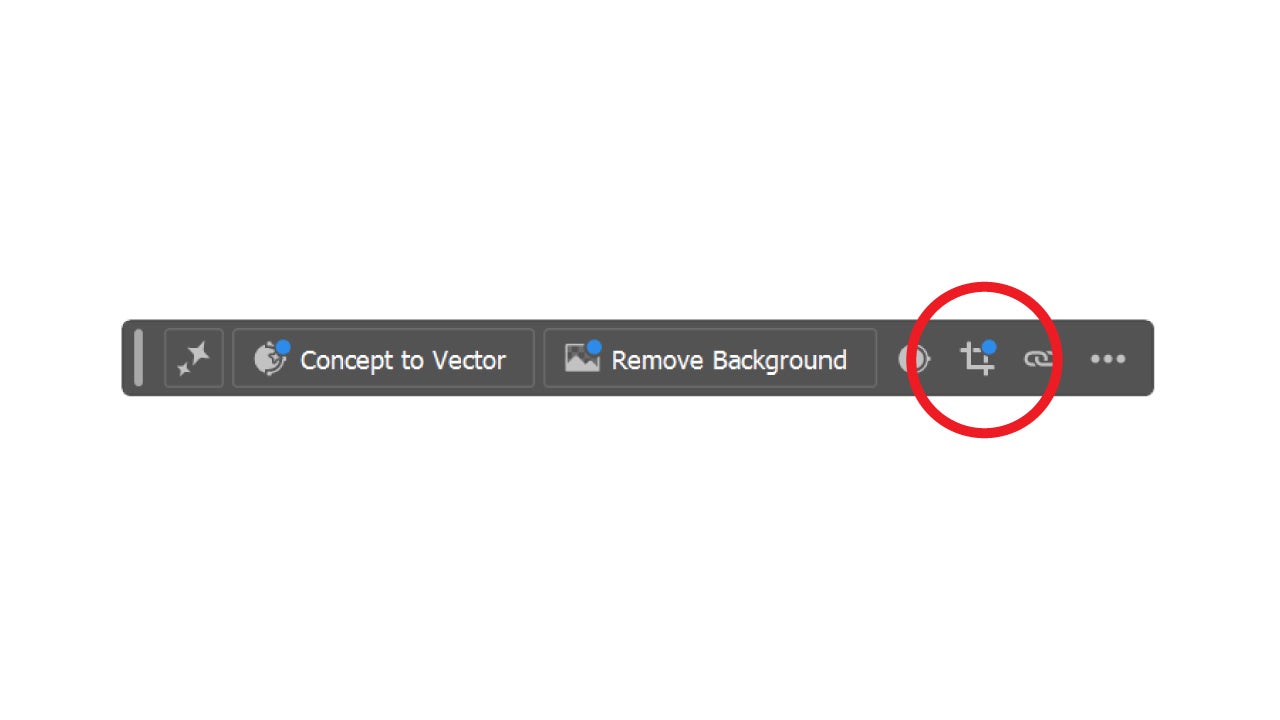
Drag the frame limits in the direction you want to increase the image area. You can use the shortcut Shift + Alt (Option on Mac) while dragging with the mouse to move the frame equally in all directions. You can also specify the exact measurements in the Properties panel if needed.

Select Generate in the contextual bar and you will see how an “expanded” copy of the original image is created. You will see three variations with different results in the Properties panel, keep the one you like the most or regenerate others if you don’t like these.

Current Limitations

Although it is a very powerful tool, Turntable is not meant to replace manual work or 3D modeling.

As we mentioned before, Adobe emphasizes that it works best with clearly recognizable objects and may provide less accurate results with abstract shapes, complex texts, or certain advanced effects of Adobe Illustrator. Other features, such as gradients, effects, or complex constructions, still have many limitations.

Adobe Illustrator
Adobe Illustrator DOWNLOAD

Author: María López

{ "de-DE": "Künstler aus Berufung und Technikliebhaber. Seit ich denken kann, habe ich gerne an allen möglichen Gadgets herumgebastelt.", "en-US": "Artist by vocation and technology lover. I have liked to tinker with all kinds of gadgets for as long as I can remember.", "es-ES": "Artista de vocación y amante de la tecnología. Me ha gustado cacharrear con todo tipo de gadgets desde que tengo uso de razón.", "fr-FR": "Artiste de vocation et amateur de technologie. J'aime bricoler avec toutes sortes de gadgets depuis que j'ai l'usage de la raison.", "it-IT": "", "ja-JP": "", "nl-NL": "", "pl-PL": "", "pt-BR": "", "social": { "email": "", "facebook": "", "twitter": "", "linkedin": "" } } View all posts by María López

Author María LópezPosted on June 23, 2026June 23, 2026Categories News

Post navigation

Previous Previous post: Grammarly AI Agents: What they are and how they help you write better
Next Next post: Google NotebookLM now offers editable flashcards: free on web and mobile

Recent Posts

  • Gran Turismo 7 is giving PS5 and PS4 players 2 free cars until August 31
  • The Whisper Man is already surging on Netflix despite poor reviews
  • Adrenaline Overdrive announced: retro FPS with John Wick action and Max Payne noir
  • Spider-Man: Brand New Day won’t bring back Tony Stark: Peter moves on
  • IT: Welcome to Derry premieres on HBO: a darker, bloodier Stranger Things

Archives

  • August 2026
  • July 2026
  • June 2026
  • May 2026
  • April 2026
  • March 2026
  • February 2026
  • January 2026
  • December 2025
  • November 2025
  • October 2025
  • September 2025
  • August 2025
  • July 2025
  • June 2025
  • May 2025
  • April 2025
  • March 2025
  • February 2025
  • January 2025
  • December 2024
  • November 2024
  • October 2024
  • September 2024
  • August 2024
  • July 2024
  • June 2024
  • May 2024
  • April 2024
  • March 2024
  • February 2024
  • January 2024
  • December 2023
  • November 2023
  • October 2023
  • September 2023
  • August 2023
  • July 2023
  • June 2023
  • May 2023
  • April 2023
  • March 2023
  • February 2023
  • January 2023
  • December 2022
  • November 2022
  • October 2022
  • September 2022
  • August 2022
  • July 2022
  • June 2022
  • May 2022
  • April 2022
  • March 2022
  • February 2022
  • January 2022
  • December 2021
  • November 2021
  • October 2021
  • September 2021
  • August 2021
  • July 2021
  • June 2021
  • May 2021
  • April 2021
  • March 2021
  • February 2021
  • January 2021
  • December 2020
  • November 2020
  • October 2020
  • September 2020
  • August 2020
  • July 2020
  • June 2020
  • May 2020
  • April 2020
  • March 2020
  • February 2020
  • January 2020
  • December 2019
  • November 2019
  • October 2019
  • September 2019
  • August 2019
  • July 2019
  • June 2019
  • May 2019
  • April 2019
  • March 2019
  • February 2019
  • January 2019
  • December 2018
  • November 2018
  • October 2018
  • September 2018
  • August 2018
  • July 2018
  • June 2018
  • May 2018
  • April 2018
  • March 2018
  • February 2018
  • January 2018
  • December 2017
  • November 2017
  • October 2017
  • September 2017
  • August 2017
  • July 2017
  • June 2017
  • May 2017
  • April 2017
  • March 2017
  • February 2017
  • January 2017
  • December 2016
  • November 2016
  • October 2016
  • September 2016
  • August 2016
  • July 2016
  • June 2016
  • May 2016
  • April 2016
  • March 2016
  • February 2016
  • January 2016
  • December 2015
  • November 2015
  • October 2015
  • September 2015
  • August 2015
  • July 2015
  • June 2015
  • May 2015
  • April 2015
  • March 2015
  • February 2015
  • January 2015
  • December 2014
  • November 2014
  • October 2014
  • September 2014
  • August 2014
  • July 2014
  • June 2014
  • May 2014
  • April 2014
  • March 2014
  • February 2014
  • January 2014
  • December 2013
  • November 2013
  • October 2013
  • September 2013
  • August 2013
  • July 2013
  • June 2013
  • May 2013
  • April 2013
  • March 2013
  • February 2013
  • January 2013
  • December 2012
  • November 2012
  • October 2012
  • September 2012
  • August 2012
  • July 2012
  • June 2012
  • May 2012
  • April 2012
  • March 2012
  • February 2012
  • January 2012
  • December 2011
  • November 2011
  • October 2011
  • September 2011
  • August 2011
  • July 2011
  • June 2011
  • May 2011
  • April 2011
  • March 2011
  • February 2011
  • January 2011
  • December 2010
  • November 2010
  • October 2010
  • September 2010
  • August 2010
  • July 2010
  • June 2010
  • May 2010
  • April 2010
  • March 2010
  • February 2010
  • January 2010
  • December 2009
  • November 2009
  • October 2009
  • September 2009
  • August 2009
  • July 2009
  • June 2009
  • May 2009
  • April 2009
  • March 2009
  • February 2009
  • January 2009
  • December 2008
  • November 2008
  • October 2008
  • September 2008
  • August 2008
  • July 2008
  • June 2008
  • May 2008
  • April 2008
  • March 2008
  • February 2008
  • January 2008
  • December 2007
  • November 2007
  • October 2007
  • September 2007
  • August 2007
  • July 2007
  • June 2007
  • May 2007
  • April 2007
  • March 2007
  • February 2007
  • January 2007
  • December 2006
  • November 2006
  • September 2006
  • August 2006
  • June 2006
  • May 2006
  • July 2001
  • January 2001
  • November 2000
  • September 2000
  • August 2000
  • July 2000
  • April 2000
  • March 2000

Categories

  • Affiliate post
  • Expert Review
  • Gaming
  • Guides
  • How to
  • Legacy how To
  • News
  • Noticias
  • Software>Security
  • Sponsored
  • Trucos y Consejos
  • Uncategorized
  • Windows software

Meta

  • Log in
  • Entries feed
  • Comments feed
  • WordPress.org
Softonic English Proudly powered by WordPress