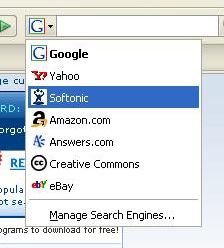
 One of the most outstanding features in Firefox is its built-in search engine from which you can conveniently search many websites, depending on how you configure it. Yes, there’s more to this search tool than just asking Google. Try clicking on the “G” logo beside the input field and you’ll see quite a complete search engine menu to choose from: Yahoo!, Amazon, Answers… Just select any of them and enter your keywords to search that site right away.
If this list is not enough, you can always add new search engines to it. Click on the logo again and select “Manage Search Engines” from the context menu. Firefox will display a window with all the search engines available in your browser, which you can arrange them in any order you like. Click on the “Get more search engines” option and you’ll be taken to the Mozilla Add-ons site to download new engines. Also, if you happen to visit a website that has developed its own search plug-in for Firefox, the search bar logo will blink and the new search engine will be then automatically added to the list.
But what if your favorite website is not featured in this search engine menu, nor on the Mozilla site? Well, we still have an ace up our sleeve and it’s called OpenSearchFox. This neat extension allows you to create custom search engines from virtually any website, just by right-clicking on its search field and selecting “Add OpenSearch plugin”. You’ll be able to have search engines just about for anything!