Support for Flock browser to be discontinued

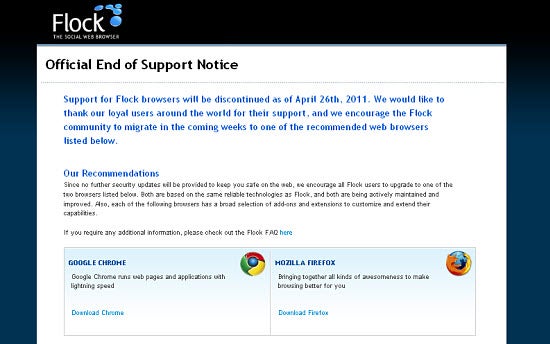
As of April 26, social browser Flock‘s developers will no longer be offering support to users. Based on Chrome, Flock’s browser interface integrated several different social networks including Facebook and Twitter to give its users the ultimate social browsing experience.

Flock’s creators advise current users to switch to other browsers and specifically recommend Mozilla Firefox and Google Chrome. Without regular security patch updates, a browser may be susceptible to newer viruses, malware and other internet threats that could potentially do harm to your PC.

For those seeking a similarly social browsing experience to Flock, RockMelt is another fantastic option that integrates Facebook, Twitter and your favorite blog feeds quite seamlessly. In fact, we’ve even pitted Flock and RockMelt head-to-head here at OnSoftware before, with RockMelt coming out on top in its current development stage. There’s no shortage of good browser alternatives!

Do you use Flock? If so, what browser are you planning on switching to and why? Let us know in the comments below.

First look at Flock 3.5 for Mac

The latest version of social networking browser Flock has just been released for Mac with some interesting changes. I took it for a test-drive to see how Flock 3.5 performs.

Flock is a web browser which was originally based on Firefox but has been best known for broad integration with a wide range of social networking sites. Flock 3.5 however sees it changed considerably under the hood. Gone is the Firefox base in favor of a Chromium one which is interesting considering the recently released RockMelt has also based itself on Chromium and aims to steal the social networking par excellence crown from Flock. However, Flock beats it in the social networking stakes offering integration with LinkedIn, Flickr, and YouTube compared to just RockMelt’s Facebook and Twitter.

Continue reading “First look at Flock 3.5 for Mac”

Social Browsers: Flock vs. RockMelt

Recently released, RockMelt is a Chrome-based browser heavily integrated with Facebook and Twitter, but it’s not the first to do that. Flock has been around for a while, and this year it moved from being Firefox to Chrome based too, cutting its extensive social features back to Facebook and Twitter.

Which one deserves your download? Find out below:
Features:

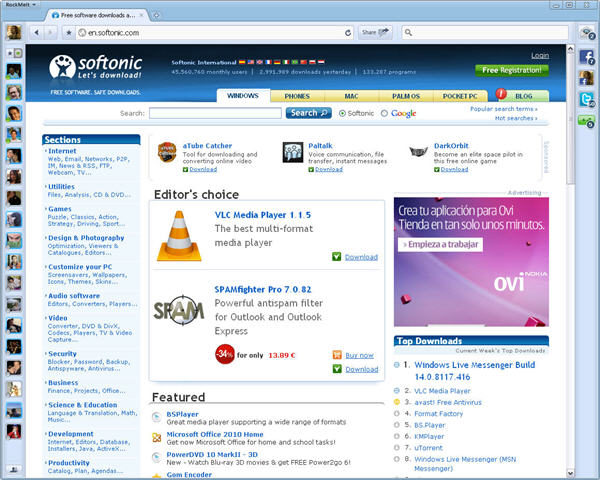
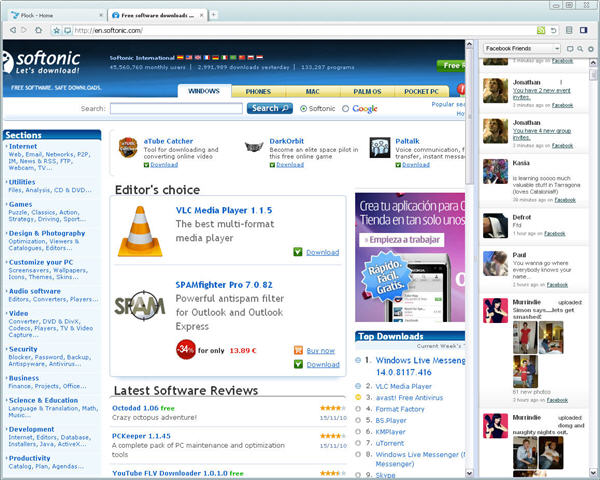
Both browsers are designed for use with Facebook and Twitter. With Flock, both are integrated into a single retractable sidebar, whereas RockMelt uses iPhone-like buttons with notifications and pop-out floating windows. RockMelt also integrates Facebook Chat, while both have share buttons next to the address bar for quick link sharing. Of course, personal taste will come into this, but I do think RockMelt separates the two services more clearly, while its notification system is also neater. Flock does allow you to add your YouTube account, but you can add any feeds to RockMelt.  Winner: RockMelt

Interface:

Chrome is the base of both of these, and that’s obvious in their overall style. However, RockMelt’s tabs and text look better, and the social features are much flashier and more convenient. With its easily retractable social bar, Flock can quickly give you the most browsing space, but RockMelt’s two sidebars are very slim. When you close the Flock sidebar, you won’t be interrupted by any updates, while RockMelt’s minimized buttons always tell you when something’s happening.If you want to use a social browser, staying up to date and connected is the point – so RockMelt makes more sense. If you really want some peace you can easily close all the social sidebars. Winner: RockMelt
Efficiency:

Despite its double sidebars and having Facebook Chat running, RockMelt used considerably less memory than Flock, often by up-to 25%. This is surprising, because Flock’s interface seems lighter and simpler and also has less features. Winner: RockMelt

Availability:

RockMelt is still in a limited beta. It’s not hard to get an invite, but you might wait a few hours or days depending on your luck. Flock is available now, but unlike RockMelt, the newest version isn’t available on Mac yet. Winner: Flock

Conclusions:

In its current development stage, RockMelt is by far the best social browser of the two even though it’s still a beta product. Flock feels less developed and isn’t different enough to a traditional browser to be a serious contender. The earlier Firefox version was a bit heavy, but it was full of features that really did make it unique. More work is needed on this Flock. RockMelt, feels light, fresh and different. It’s great for Facebook and Twitter addicts, although some users may find it a little distracting. You can apply for a beta here, or follow us on Twitter and we will give you an invite as we get more.
Free Browser Game: Flock Together

Flock Together is a casual browser game that tells the simple tale of a girl who accidentally lost her best sheep friend by tying it to a balloon. Of course she did!

Well, what’s done is done, and to save the sheep she must fly up to get it with the help of birds she can catch with ropes. You begin with three ropes, not enough, but you can sell the birds you catch – in a balloon emporium – to buy more ropes. Eventually, you’ll have enough ropes to tether sufficient birds to reach your sheep. Our little protagonist will then be free to play other dangerous and irresponsible games with her best sheep friend.

Flock Together won’t take you too long to complete and is a pleasant, relaxing experience while it lasts. Requires Flash.

[via jayisgames.com]

Flock embraces Twitter and Facebook

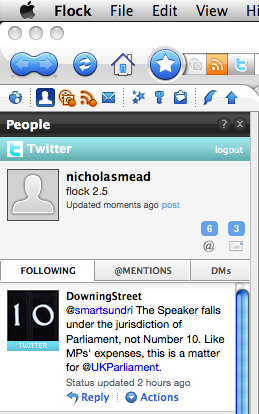
flocklogoIt’s been a while since we’ve heard anything from the developers at Flock but they’ve just announced the release of Flock 2.5 which, unsurprisingly for a browser with a heavy focus on social networking, showcases impressive enhanced integration with Twitter and Facebook.
Shawn Hardin of the Flock team says:

Flock 2.5 makes sharing and discovering content fast and easy. You just drag and drop URLs, photos, videos, text or other things you find on the web to a friend’s Twitter, Facebook, MySpace or other profile in Flock’s People Sidebar and it’s instantly shared. And now Flock comes with Twitter Search right in MyWorld, so you can keep up to date on all the topics you’re most interested in and save them in the best place possible, your Flock browser.

Flock screenshotThere’s no need to use a separate twitter client with Flock because you have one built into the left navigation bar – and pretty impressive it is too. Probably the stand-out features are the fact that you can simply drag and drop images into your tweets and you can define keywords for twitter searches that Flock will automatically monitor for you.

Meanwhile Facebook users have been catered for with a Facebook Chat client that goes with you wherever you go. So even if you’re surfing other websites, you can still chat to contacts in a Facebook Chat style client that sits at the bottom of the browser. Finally, another nice innovation is FlockCast which enables you to update several social networking features at once – perfect for social networking addicts who can’t be bothered visiting each site separately.

Although I’m increasingly impressed by each release of Flock, I still find the browser overwhelming in terms of the amount it tries to fit in. However, I guess this is inevitable for a browser that integrates so many social networking sites. However, as Twitter and Facebook grow, I wouldn’t be surprised to see it really take-off one day. Note that at the time of writing, version 2.5 is only available for download in US English language but presumably other languages will follow shortly.

A quick look at Flock 2

Flock logoSo Firefox 3 is now officially released but hang on, Firefox isn’t the only one that’s gone through a major overhaul recently. This week has also seen the beta release of Flock 2, a browser that I recommended to readers last year.

If Firefox ever does go down the wrong road or starts to decline, I’m certain that Flock will be one of the main contenders to take its place mainly because it’s based on the same engine but with a greater focus on social networking integration. Most of the improvements relate to security, performance and the interface basically taking in all the same enhancements to the Gecko engine that Firefox 3 now enjoys. In fact, many of the enhancements are identical to Firefox 3 such as the enhanced Add-Ons window which now shows the plugins you have installed in the browser and allows you to disable those that might be causing issues. Similarly, when you close the browser and have multiple tabs open, Firefox 3 and Flock 2 now both ask you if you want to save the current collection of tabs for next time.

Flock Feed refresh

One of the biggest individual improvements as far as I can see is that Flock’s Feed Reader is now much easier to update. In the old version, you’d have to wait hours for it to update itself but now you can just manually refresh it at your leisure. This includes individual feeds, a collection of feeds or all of your feeds. It also now tells you when you last updated each separate feed which is useful. Continue reading “A quick look at Flock 2”

Why I might be switching to Flock

I love FlockThis is a tough job because comparing a browser that’s at such an early stage of development to the polished product that is now Firefox is not an easy task.

I accept many of Cyril’s criticisms about the layout of Flock but let’s remember that these are still early days. More to the point however, I don’t believe that Flock is trying to compete with Firefox as a whole – I think it’s aiming at those that are immersed in social networking and Web 2.0. What I’d like to argue for is the promise behind Flock which I believe lies in its potential for these kind of activities – principally blogging, networking and sharing.

In particular, I can see that for so called ‘power bloggers’ out there, Flock offers a very interesting alternative. For those using WordPress, Flock makes life much easier by offering unparalleled integration with it. The quill icon in the toolbar takes you directly to the Flock blog editor which seamlessly integrates with WordPress. The blog editor includes quicktags and easily lets you add Technorati tags to your post – all in a WYSIWYG editor. A button to the right of this takes you to the blog ‘topbar’ where all your latest blog entries are listed and enables you to drag stuff that you are going to publish.

Another factor which impressed me is the integration with Flickr. Just enter a Flickr username and in the all important topbar, you’ll see their latest stream of photos. Drag one of the photos into the main browser window, and you’ll be taken straight to their main page.

For a blogger or photo fan, Flock promises to be a real treat when it’s finished and the various bugs are ironed out. Firefox’s secret was in taking antiquated old Netscape, and then simplifying and streamlining browsers. Times change quickly in the internet world however and now browsers are having to evolve to meet the demands of Web 2.0. Let’s at least give the Flock team some credit for trying to innovate – things never improve by settling for the status quo.

Why I won’t be switching to Flock

FlockFlock is edging toward its 1.0 release, but as of yet, I’m still not fully convinced by the “browser for social addicts”. Here’s why.

I still find that Flock takes a considerable time to load compared to any other browser, even good ol’ Internet Explorer. Although, the interface has been redesigned and the people at Flock have put some work into it, I still find it too cluttered and confusing. To me there are too many little icons in the Flock toolbar, and instead of having them even out the Navigation Toolbar icons, they sit right underneath. Also, having the media bar with its scrolling images and any side bar open, is just too much information on one screen.

The Web Clipboard is where you store all those clippings and images you’ve found on the net and want to use somewhere else, like on your blog. I’m still surprised that anything you save into it still opens up in a basic pop up window and not in a new tabbed window in the interface. And oddly enough, you can’t open more than one item from the Web Clipboard at once or move them around in the list.

In this new outing, Flock has added the “My World” page, a sort of personalized space where you get your own search bar, favorite feeds, sites and media. I don’t understand the need to add a search bar in there, as you already have one at the top of the browser. I also find the layout of the My World page cumbersome, and you can’t resize or move around elements, a la Netvibes. The “Available Services” section on the right side links to some of the biggest social networks, like del.icio.us or YouTube, but you can’t even add new ones, like Facebook or Twitter.

Don’t get me wrong, Flock is a great effort, and a different kind of browser. Still, I can’t adjust to the interface and don’t like how most of the social tools are integrated. Call me old fashioned but I prefer sticking to Firefox for my daily browsing.

Click here to read Nick’s retort to Cyril’s post, entitled ‘Why I might be switching to Flock’

Download of the Day: Flock 0.7.13.1 Beta

Flock iconOften defined as “the social web browser”, Flock offers you not only a fast, reliable web browser based on Mozilla, but also a bunch of tools especially designed for online networking and social interaction: a blog button to post anything on the fly, integration with del.icio.us, tags to organize bookmarks and easy RSS feeds aggregation. Definitely a new concept in web browsing!

Flock on!

songbird_commun.jpgWith all the curent debate about the browser wars and Firefox versus Internet Explorer, some of the smaller, more innovative browsers on the market have struggled somewhat to win the column inches they so clearly deserve. And no, I’m not talking about the ‘so Scandanavianally good it’s just boring’ Opera.

The two web browsers which have grabbed my attention come from the same root. Both Flock and Songbird are based on the Mozilla browser and are therefore cousins of the ever-more-popular Firefox. From there, however, the similarities end. Flock is based on the very futuristic concept of the ‘social browser’, or perhaps that should be ‘internet interactor’. The whole idea behind this smart all-rounder is that you use one program to do everything.

Continue reading “Flock on!”