Icy Tower 2 Temple Jump released for Android and iOS

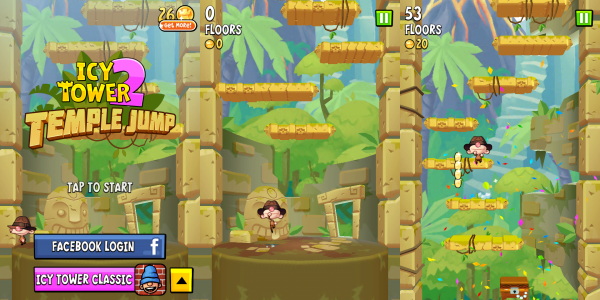
Free Lunch Design, creator of the massive Icy Tower has released a new game for iOS and Android, Icy Tower 2 Temple Jump. Essentially the same as Icy Tower 2, but with a temple theme, your challenge is to jump as far up an endless tower as you can, using either tilt or touch controls.

Icy Tower was released as a free game for Windows in 2001, and went on to be massively popular for many years. The sequel was released in 2012, and Icy Tower 2 Temple Jump is the first new version of that game.

Icy Tower 2 Temple Jump is free, but does contain optional in-app purchases to make progression easier. You can buy extra coins to buy power-ups that will let you jump higher and climb further up the Temple Tower.

Download Icy Tower 2 Temple Jump for iOS or Android.

First Screenshots of Icy Tower 2

One of the biggest freeware PC games of all time, Icy Tower is getting a sequel. Free Lunch developer Johan Peitz released the first tutorial screenshot of Icy Tower 2 this morning, and promised more to come over the weekend.

The game was quietly announced over the summer, and now we have four screenshots to check out in total, which you can see below.

According to Free Lunch Design, Icy Tower 2 is first being released on iOS soon, and will be brought to PC and Mac ‘if all goes well’ after that.

Continue reading “First Screenshots of Icy Tower 2”

Video: Make your own Icy Tower characters

Icy Tower provides a great way to waste time during a lunch break or a rainy day. While the gameplay never gets boring, you tend to get sick of the sight of Harold the Homeboy after around the 1,000th attempt at cracking the game. A while back I explained how to create your own Icy Tower character, but seeing as some of you still seem to be having trouble building your new hero I thought I’d do a quick screencast to walk you through the process.

insertvideo(“outtest15″,”1019″, null , null, true,”false”,url+”images/watermark_final.png”);

More cheats for Icy Tower

Improve your Icy Tower skillsMany people choose to spend their lunch hour taking a walk, reading the newspaper or lunching with friends. However, there are plenty of us who must stay chained to our desks at this time due to our chronic addiction to Icy Tower. I don’t know how many times I’ve tried to help Harold the Homeboy get to the top of the tower over the years, but I still can’t bear to tear myself away from the game. A while back I hit you with some tips and tricks on how to improve your score and now I’ve stumbled across some more great cheats that no serious ‘Tower-head’ should be without, courtesy of RAMMichael.

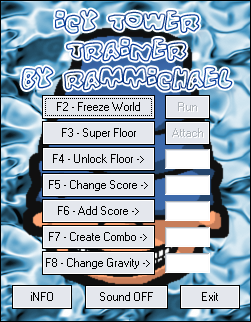
The site offers a bunch of downloadable add-ons that will inject a new lease of life into Harold, and improve your overall enjoyment of the game (if such a thing were possible). I must confess that I’m still not exactly world class at the game, so I found the Icy Tower Trainer a real godsend. This utility lets you do things like freeze the game, make all floor lengths the same, or unlock any start floor.

Those of you who are more proficient in scaling the tower might want to try and make things a little bit more challenging from the start. Icy Tower Floor Controller is a simple little editor that lets you change the size of the floors to make things a bit more interesting. Initial Speed Changer, on the other hand, will crank up the pace of the scrolling at predefined speed of your choice. Both of these tools add some welcome diversity to those boring early stages.

Lots of my Tower-playing pals have taken to posting videos of their stunning performances on YouTube. I’ve got pretty fed up with their gloating, so I installed the Icy Tower Replay Editor and Replay Info. The editor allows you to change the values in your saved replays to make it look as if you’ve done a lot better than you actually have. It takes a while to get the hang of programming these changes, but once you do you’ll probably spend more time pretending to do really well than you will actually playing the game!

Mastering combos in Icy Tower

Adepts of the little hoodster Harold the Homeboy know the strategic importance of combos in Icy Tower. If you want to make points and one day get your name on the high scores list, you need to know how to master your jumps. The player currently at the top of the list managed to pack in a whopping 1029 combo-jumps in a row!

What you need first is to gain speed, so that you can jump more than one floor at a time. As soon as you’ve managed that you’ll enter “combo mode” and the meter on the left of the screen will be activated. You’ll have to keep making jumps of two floors or higher to keep the meter from draining and ending “combo mode”. IcyTower.org has some good tips on how to make great combos by bouncing off walls or knowing the right time to jump. We also came up with a little list of hints and cheats for those of you that are struggling. The best way to learn though is by watching, so why not check out this little video of a few super combos:

[youtube]K7jCm0HU1EU[/youtube]

Top Icy Tower cheats and hints

Harold The HomeboyWe reckon that there’s no better way to waste an afternoon than with a game of Icy Tower. The addictive platformer starring the energetic little scamp, Harold The Homeboy is more enjoyable than just about any other past-time you care to mention as far as I’m concerned. However, if you’re struggling to make big scores in the game, it can be a little frustrating. Luckily, there are a number of things you can do to help you and Harold out. While insideTonic could never condone cheating, here are a few little hints we’ve picked up to help you out should you choose to read them:

  • Get some air – Making running jumps is a sure-fire way to hit big scores. Start running from one end of the block to the other and at the end press space bar. This makes Harold jump about five floors in a single jump but takes lots of practice.
  • Go up in the world – Create a copy of the game file “tower.cfg” into the game folder and rename the file to “debug.me” Press [Up] while playing the game and you will go up through the floors.
  • Do some training – There aren’t that many official ‘cheats’ for Icy Tower but the independently-built Icy Tower Trainer certainly helps you out a bit with three extra modes. Unfortunately the download is only in German but once installed you can just press F10 to activate ‘Fun Mode’ or F11 to switch on ‘Replay Mode’.
  • Seek professional help – Icy Tower junky Mizi Mace has put together a rather lovely set of eBooks that walk you through the game and give you further helpful advice on succeeding. You might also want to check out our own guide to pimping your Icy Tower character.

Create your own Icy Tower character

Harold the Homeboy has become something of a cult hero in gaming circles now following the success of Icy Tower. However, due to the addictive nature of the game you end up spending so much time with the little dude that it’s possible to become sick of the sight of him (especially if you want to be as good as the player in this video).

[youtube]lMqq07EZwDk[/youtube]

The good news is it’s possible to give Harold a makeover using the built-in templates files. Enter the “\icy tower\characters\template” folder in Windows Explorer and click on the paintbrush icon to open a sprite version of the character. Press Ctrl + E to open up the sprites for editing Use the editor to tweak the character’s design, ensuring that every part of every sprite is the same colour. Make sure you don’t go out of Harold’s green outline (though you can change the colour of this outline). Now save the image and play the game with the template character selected.