ALLPlayer – the ultimate media player for subtitles?

Imagine the scene. You’re just about to settle down to a film on your PC but because it’s in a foreign language, you need subtitles. You spend the next half and hour searching the internet for the right subtitle files only to find that everything you try either doesn’t work or is badly out of sync. In the end, you’re too tired and frustrated to bother watching it anymore so you go to bed and curse the subtitle world.

If this scenario is familiar to you then you should try ALLPlayer which has the best support for subtitles in any media player I’ve tried. ALLPlayer is a refreshing change as far as media players go because it not only automatically retrieves film subtitles based on the movie file’s title but it can even “speak” the subtitles back to you – albeit in voice that sounds rather like Robocop. ALLPlayer uses the excellent database at opensubtitles.org to match your file name with the appropriate subtitles meaning it does the searching for you.
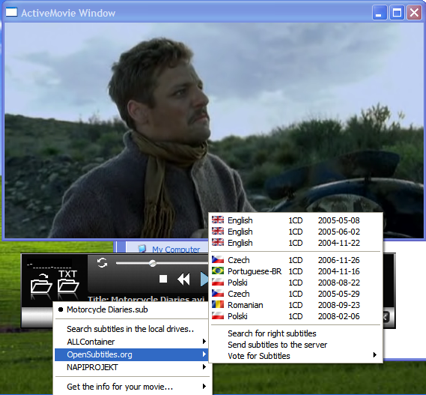
ALLPlayer Subtitles Access

OK, the results are not always perfect and sometimes it doesn’t find anything at all but it’s a darn sight more efficient than going on a wild goose chase for them yourself. It retrieves the subtitles in no more than a few seconds, downloads them to your film folder and you can activate them immediately.

ALLPlayer also handles subtitles differently from most average players. Using something called “IQ text” it can detect the length of a phrase of sentence and make sure that the subtitles are kept on screen long enough for you to read them. Unless you’ve only just started learning a language however, and can’t read very quickly, this soon becomes annoying as the subtitles appear to be out of sync all the time.

Although there are skins available through the LiveUpdate feature (which also supposedly updates the codecs for you although the database doesn’t always work), AllPlayer doesn’t feel quite as slick as something simpler like BSPlayer but this can be forgiven for the subtitle features. Some other more basic features yoo – such as full screen mode – are not as obvious as they should be either. Nevertheless, ALLPlayer is an excellent choice for all those that rely on using subtitles with their films.
Adobe Media Player: The killer app for Internet TV?

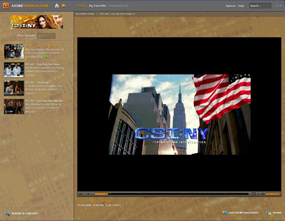
Adobe Media Player has made some impressive partnershipsMore and more people are turning to the Net to watch television these, with some commentators predicting that traditional TV will be dead within 10 years. Up to now though, the range of programs available through online TV services hasn’t been that great. By that I don’t mean there’s not a lot of shows – there are – it’s just that a huge percentage of these aren’t worth watching.

Things are changing quickly though, and the release of Adobe Media Player 1.1 today marks a big step in the evolution of online TV. Now out of Beta, the AIR-based software boasts a slick new interface that makes it easy to enjoy your favourite TV shows without having to switch on your television set. You can use the software to search for streaming and downloadable video content, get alerts when new episodes appear and even download these new episodes automatically.

Adobe Media Player still doesn’t have the sheer volume of content as the likes of Joost, Veoh TV, or Babelgum, but it’s certainly showing signs of carrying more ‘quality’ content. Adobe has partnered with the likes of Comedy Central, MTV, Nikelodeon and Showtime to deliver some truly great shows. It’s even teamed up with Sony Pictures to offer some movies on the site, such as Jerry Maguire and Men In Black.

Unfortunately, Adobe Media Player isn’t quite the finished article yet. Finding some of the best content still requires a bit of digging around, and even when you do it might be unavailable. If you live outside the US then prepare to be disappointed, because a large number of the shows are only available in America. Be warned also, that the RAM-hungry Media Player client has a huge appetite for memory. Hopefully, these issues will be rectified over time and, I’m sure if Adobe can keep making connections with the major content providers, Media Player will be able to play a large part in kicking the TV set into touch.

Adobe launch AMP media player

Adobe Media Player (AMP)Adobe yesterday announced the launch of their very own desktop internet TV application amid questions over whether the world really needs another media player. Adobe Media Player (AMP) has been built with Adobe Air – the company’s flagship Web 2.0 application. At the moment, a number of content providers are on board including CBS, MTV Networks, Universal Music Group and PBS. Users can also add content from any Flash video sites that support RSS feeds. The service is already being compared to Apple’s iTunes video service and Miro but unlike them, it offers users and broadcasters the chance to earn money from their footage via advertising. In their launch statement, Adobe said this commercial element is what differentiates AMP from the existing options because:

It provides exciting new ways for viewers to discover and interact with their favorite content, while offering revenue and brand-building opportunities for content publishers.

John Loiacono, senior vice president of Creative Solutions at Adobe added:

With Adobe Media Player, we’re bringing viewers and content owners closer together, with an experience that doesn’t constrain them by platform or proprietary software application. It’s a merger of TV Guide and DVR for Internet video content. Some great shows, like The Hills from MTV and CSI from CBS, are already available to view and more will be coming soon.

It’s also thought that depending on the success of the service, Adobe will introduce downloads of films and shows to own or rent later this year which would certainly heat things up between the way competitors such as iTunes and YouTube regard AMP. It’s clear that Adobe are trying to create a one-stop media player that will serve all needs ranging from simple video playback of DivX files to downloading and rental of movies. The worrying thing is the amount of advertising that may be necessary to keep AMP free. Launching an internet TV service supported by advertising is far from easy, as Joost has been finding, and AMP will have to prove that it can provide high quality and popular content that are not bogged down in ads if it is to succeed.

Pump up the volume in your media player

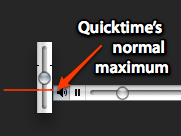
Quicktime overdriveWhen using either VLC or Quicktime, you have ways of increasing the volume more than what the normal slider bars in both applications let you. In Quicktime, as MacMerc.com suggest, just press the Shift key, while you’re adjusting the slider at the bottom left of the Quicktime interface. In VLC, if you’ve reached the maximum and still aren’t satisfied, just press Ctrl and the Up arrow. You’ll see a white volume bar appear on the right of your screen. Just like in Quicktime, this lets you reach a higher volume than usual. An other easy way of improving the sound is by choosing the right preset in the equalizer in VLC. If you’re watching a movie or TV show, I’ve found that either ‘classical’ or ‘live’ give you the best types of sounds.
Adobe announces new Media Player

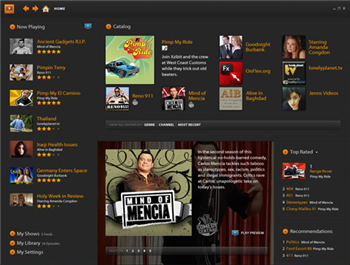
adobe-player-screen-1.pngIn a big day for web application press releases, Adobe have officially announced yet another new product. Adobe Media Player (AMP) will be a desktop media player for Windows and Mac users which will allow them to view, download and rate web-based Flash content. Developed using the previously-announced Apollo runtime, AMP is designed to compete with Windows Media Player (among others) in the battle for users’ desktops. So, today is the day that Microsoft has announced an incursion into Adobe territory while simultaneously, Adobe is moving to grab users from Microsoft.

While a downloadable version of Adobe Media Player has yet to surface, its features sound promising. According to Adobe:

Adobe Media Player enables higher quality Flash format playback, the ability to download and view videos offline, ways to discover interesting new shows, full screen playback, one-click viewer ratings, and a powerful Favorites feature that automatically downloads new episodes of favorite TV shows or video podcasts. The player is cross-platform, based on open standards – including RSS and SMIL…

Naturally, it remains to be seen whether Adobe can really make a success out of joining the desktop media player market which is arguably already overcrowded, especially with newcomers like Democracy and Joost. But with their web expertise and the golden standard of Flash behind them, Adobe might just be able to pull it off. Stay tuned for more.